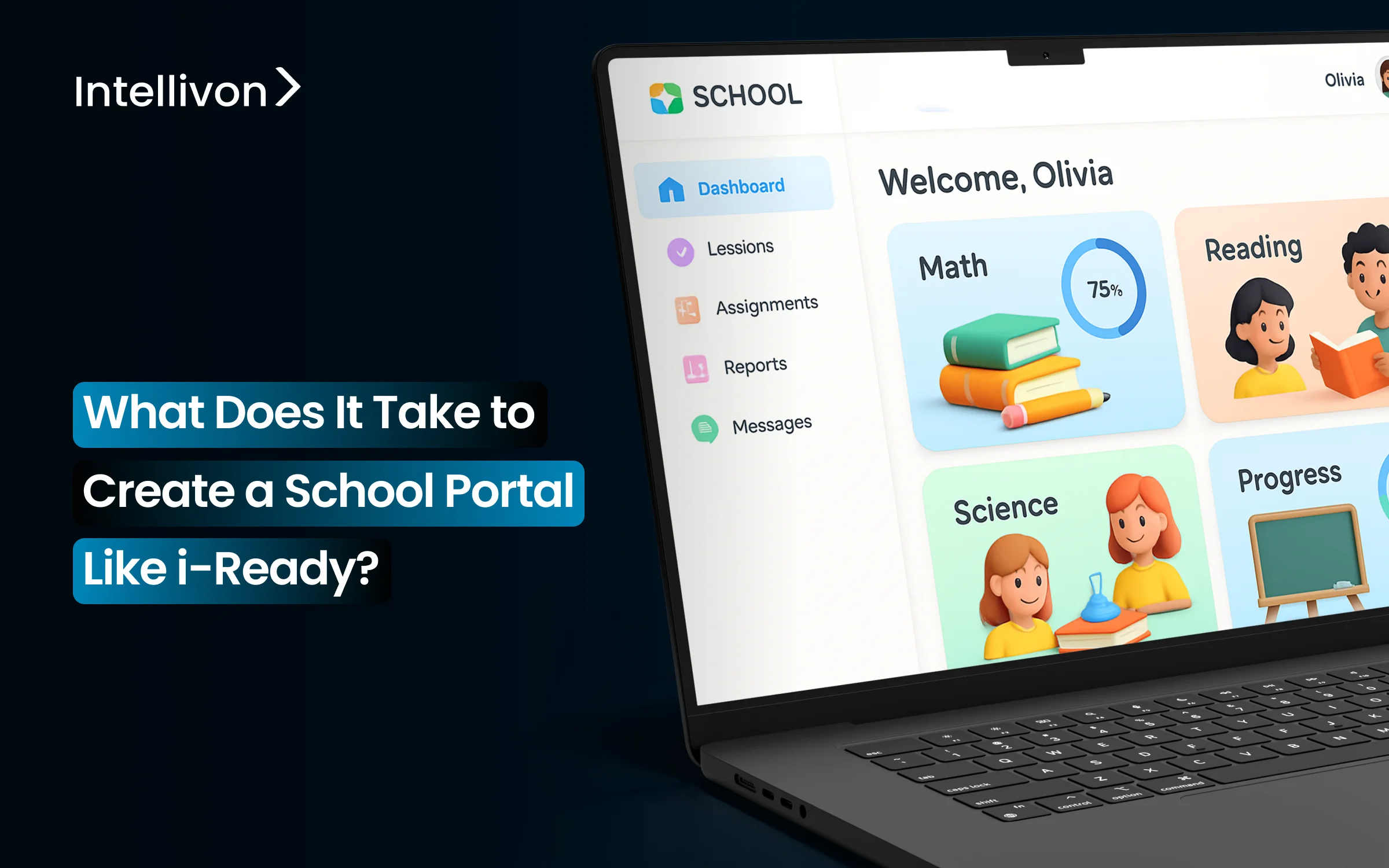
District educational institutions juggle between multiple systems for assessment, instruction, teacher workflow, and reporting. Each tool keeps its data in its own space, which isolates the information and makes it difficult to access. Teachers have to switch between platforms, and leaders cannot connect diagnostics to classroom outcomes. This hinders improvement efforts and reduces visibility into growth.
The i-Ready school portal became popular because it unified diagnostics, personalized learning, and district analytics in one location. Diagnostics lead to personalized instruction, student work provides timely insights, and district analytics clearly show risk and progress.
Intellivon creates learning platforms that follow the same unified model as i-Ready. Our work includes adaptive learning engines, multi-role dashboards, secure data infrastructure, and analytics that aid district-wide decision making. These systems help clients cut down on operational challenges and improve instructional effectiveness. In this blog, we discuss what it takes to create a school portal like i-Ready and how Intellivon builds these solutions from the ground up.

Key Takeaways of the Adaptive Learning Market
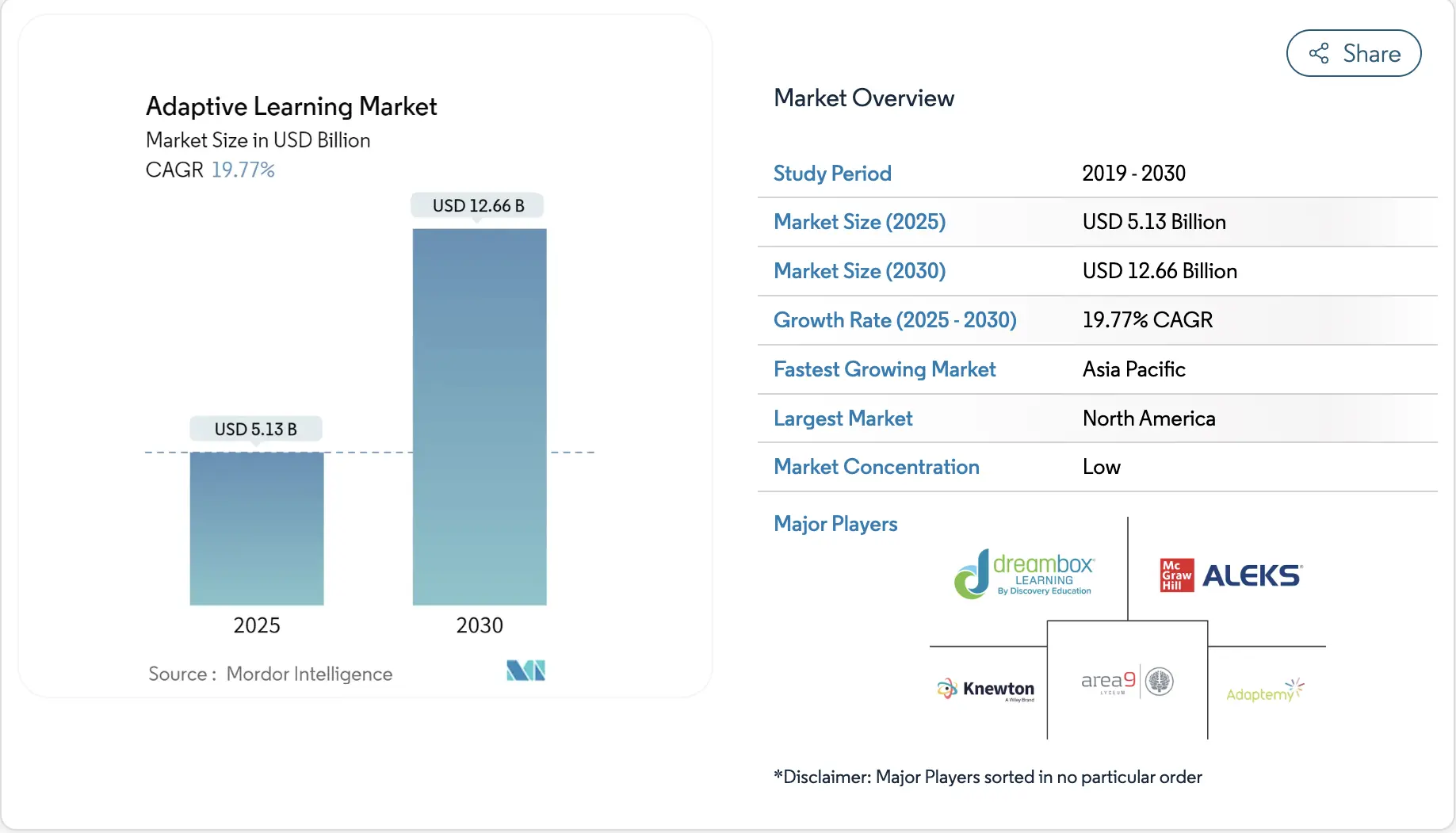
Mordor Intelligence values the adaptive learning sector at a little over USD 5.1 billion in 2025, and current projections show it growing to approximately USD 12.6 billion by 2030. This reflects a strong compound annual growth rate of about 19.7%, indicating sustained demand for personalized and data-driven instruction across the education ecosystem.
What’s Driving Adoption:
- Adaptive platforms deliver 40% better student performance than traditional methods. Efficacy data drives procurement decisions.
- Pandemic lockdowns accelerated district technology adoption by three to five years. Infrastructure is in place. Leaders now need measurable returns.
- AI can process student data and adjust content difficulty instantly. True adaptivity works at the district scale now.
- Corporate learning segments are growing at 20.7% through 2030. The market extends beyond K-12 into workforce training.
- Cloud deployment accounts for 71% of the market. No capital expenditure barriers remain.
- Federal and state funding prioritizes platforms that close achievement gaps with measurable proof.
- Teachers managing 25-30 students need automated grouping and intervention tools. Manual methods don’t scale.
61% of K-12 educators use adaptive learning systems weekly. These platforms are core infrastructure now. Districts that bought standard LMS tools are migrating to adaptive systems to justify continued spending. The competitive window is closing as leaders lock in adoption and content ecosystems.
What Is The i-Ready School Portal?
The i-Ready school portal is a unified learning system that brings diagnostics, personalized pathways, and multi-level analytics into one environment. Districts use it to replace the patchwork of tools that handle assessment, instruction, and reporting separately.
Students start with an adaptive diagnostic that identifies their current skill level. The platform then builds a learning path that changes in response to how each student performs.
Its adoption has increased because schools see measurable improvements in instructional accuracy and data usage. A large portion of K–8 students in the United States now rely on i-Ready for reading and math support.
Teachers use insights from the portal to plan targeted lessons and monitor growth during the year. District leaders rely on the portal to observe performance patterns across grade levels, track progress toward goals, and review subgroup trends without switching between multiple systems.
Features of the i-Ready School Portal
1. Adaptive Diagnostic Engine
The diagnostic adjusts to each student’s responses and identifies specific skills they have mastered or need to develop. It builds a clear baseline for instruction.
2. Personalized Instruction Paths
After the diagnostic, students receive pathways that adapt continuously. Lessons shift based on accuracy, pace, and error patterns, which supports steady progress.
3. Teacher and District Dashboards
Teachers review insights for grouping, planning, and intervention. District administrators track growth, equity trends, and school-level performance through consolidated dashboards.
The i-Ready portal succeeds because it connects assessment, instruction, and analytics in one coordinated system. Each user gains a clearer view of progress, and districts benefit from more reliable data and consistent instructional support
How the i-Ready School Portal Works Step-By-Step
The i-Ready school portal follows a closed-loop flow where adaptive diagnostics create personalized learning paths, teacher dashboards guide interventions, and district analytics track growth and equity across schools. Here is a step-by-step workflow of the same:
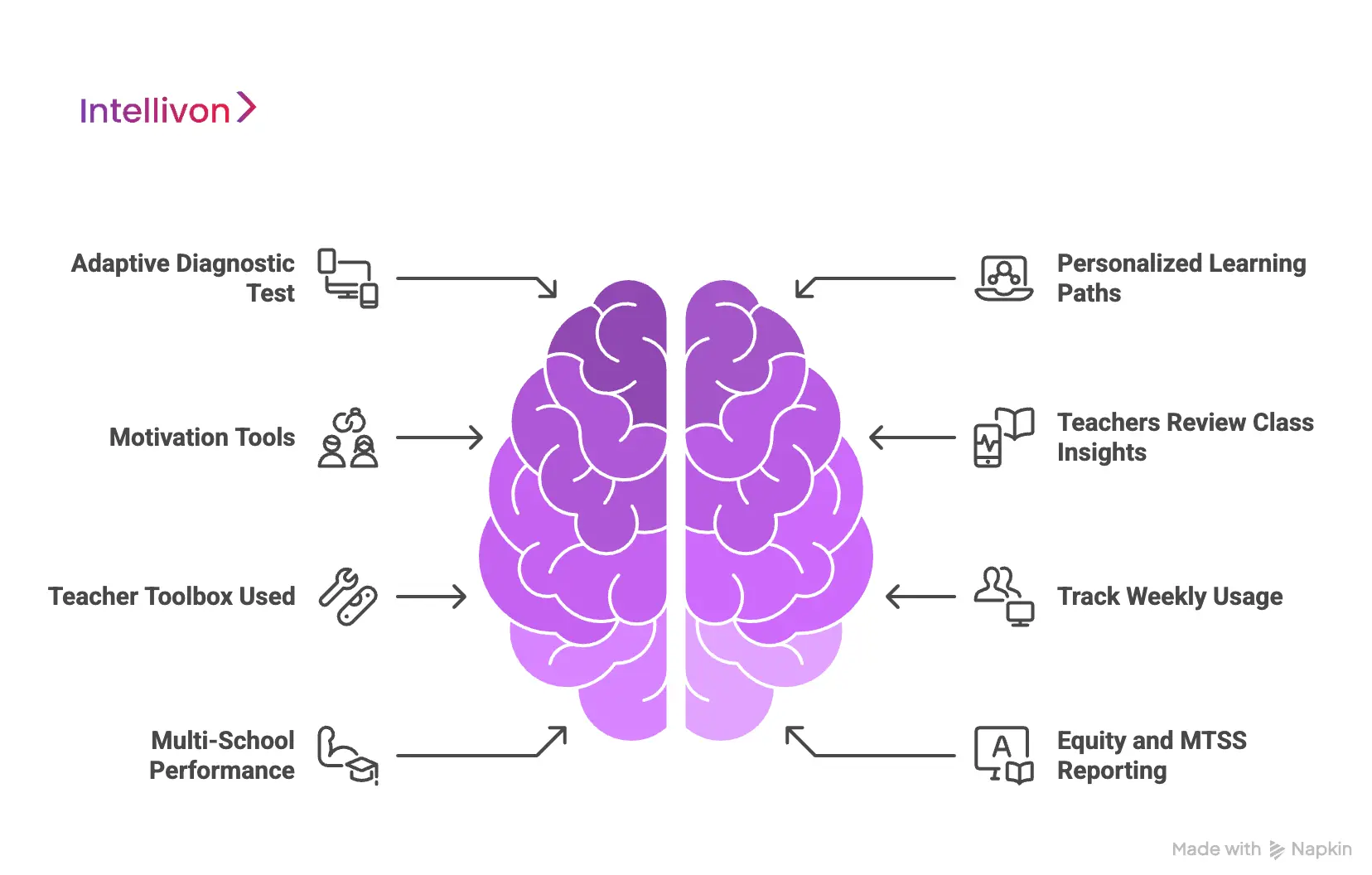
Step 1: Adaptive Diagnostic Test
Students start with an adaptive diagnostic that adjusts to each response. The system identifies the skills they have mastered and the areas they still need to learn. This creates a clear baseline that informs every part of the instruction cycle.
Step 2: Personalized Learning Paths
After the diagnostic, the platform generates a learning path for each student. Lessons adapt to accuracy, pace, and progress. If a student struggles with a concept, the system reinforces foundational skills. If the student moves quickly, it advances them to the next level.
Step 3: Motivation Tools
To help maintain steady usage, students see simple progress markers and goal indicators. These elements encourage regular participation and help teachers keep learning consistent throughout the week.
Step 4: Teachers Review Class Insights
Teachers access dashboards that highlight current performance. The system identifies students who need extra support and recommends small groups based on shared skill gaps. This removes guesswork and reduces planning time.
Step 5: Teacher Toolbox Used
Once groups are formed, teachers use the Teacher Toolbox. It provides ready-made lessons linked to specific skill needs. Teachers save time and deliver intervention with stronger alignment to student data.
Step 6: Track Weekly Usage
Teachers monitor lesson completion and time on task. These signals help them see when instruction is effective and when a different approach may be needed.
Step 7: Multi-School Performance
Leaders view performance across grades and schools. They can identify trends, spot areas that need support, and track progress toward district goals.
Step 8: Equity and MTSS Reporting
The portal highlights subgroup trends and equity gaps. Leaders use these insights to support MTSS decisions, allocate resources, and strengthen intervention programs.
The platform serves every role in the district, where students receive targeted instruction and teachers get clear guidance and time savings. Leaders see performance patterns across campuses, and this shared value drives strong usage and long-term renewals.
Business and Revenue Models of i-Ready
i-Ready uses a combination of flexible business models and predictable revenue structures that align with district purchasing cycles, implementation needs, and long-term instructional goals.
Below are the core models that shape how i-Ready operates in the market:
Business Models of i-Ready
Districts expect clarity, predictable implementation, and low friction when adopting instructional systems. i-Ready’s business models support specific operational needs, from classroom rollouts to districtwide oversight.
This structure also helps leadership teams justify continued investment because the platform supports instruction, reporting, and improvement planning in one place.
1. Per-Student Licensing Structure
This model allows districts to pay only for the students they serve. It scales easily across grades and helps budgeting teams plan with confidence. Districts can expand or reduce enrollment without renegotiating the entire contract.
2. Schoolwide and Districtwide Licensing
Larger systems often choose unlimited-building access to reduce administrative complexity. This eliminates uneven access across campuses and encourages consistent usage. It also supports efficient onboarding during the school year.
3. Tiered Product Bundles
Districts with different needs can select diagnostic-only packages or full instruction-plus-assessment bundles. This flexibility supports phased implementation and reduces early risk. Many districts begin with diagnostics and expand once results become visible.
4. Professional Learning and Support Packages
i-Ready offers structured training, coaching, and rollout support to improve fidelity. These services help districts standardize implementation across schools. They also raise overall usage, which strengthens student outcomes and renewal decisions.
Revenue Models of i-Ready
i-Ready’s revenue strategy aligns with multi-year funding cycles and district budgeting practices. The platform creates stable, recurring income while offering optional add-ons that support deeper instructional impact. These models complement each other and help districts sustain long-term usage.
1. Annual Subscription Revenue
Districts purchase yearly access to diagnostics, instruction, and reporting. This subscription structure fits common budget timelines and supports long-term planning. It also ensures predictable platform updates and support.
2. Curriculum and Content Sales
Many districts buy print and digital curriculum that aligns with the i-Ready program. This pairing helps teachers combine online instruction with consistent classroom materials. It also strengthens commitment to the wider instructional ecosystem.
3. Assessment and Item Bank Add-Ons
Districts can add supplemental assessments or expanded item banks to support local testing needs. These add-ons deepen platform usage and increase the value of the existing subscription. They also help leadership teams track progress more precisely.
4. State-Level and Enterprise Agreements
Some states procure i-Ready for hundreds of districts at once. These contracts provide long-term stability and broaden the platform’s reach. They also support consistent growth measurement across an entire state.
i-Ready’s business and revenue models succeed because they match district expectations around flexibility, predictability, and instructional value. The combination of scalable licensing, aligned curriculum, and long-term service partnerships creates strong retention and measurable impact. This foundation is a key reason the platform continues to lead the adaptive learning market.
How Adaptive Learning Systems Cut Weekly Lesson Planning to 6 Hours
Many teachers spend more time preparing instruction than delivering it. Recent studies show that only 49% of their workweek involves direct time with students. The rest goes into planning lessons, reviewing materials, analyzing data, and adjusting instruction for different learner needs.
Preparation alone can take 11 hours each week, while evaluation and feedback activities add another 6.5 hours. This workload limits instructional quality and places significant pressure on schools that expect consistent delivery across classrooms.
Adaptive learning systems help teachers cut preparation time from 11 hours to roughly 6 hours per week by automating insight generation, simplifying evaluation workflows, and recommending targeted instructional resources. Here is how:
1. Automated Insights Replace Manual Review
Teachers often spend evenings reviewing assessments, identifying patterns, and planning next steps. Adaptive platforms automate these tasks. They scan student work, evaluate mastery, and surface key insights within minutes.
Teachers receive clear summaries of what students understand and where they struggle. This cuts hours of analysis and helps them focus on planning meaningful instruction rather than sorting data.
2. Tailored Ready-to-Use Resources
Preparation takes time because teachers search for materials that fit each group’s level. Adaptive systems recommend resources based on performance and proficiency. These recommendations include small-group activities, guided practice, and targeted reinforcement.
The system brings the right materials to the surface without requiring lengthy searches. Teachers save time while keeping instruction aligned with student needs.
3. Streamlined Evaluation
The average teacher spends 6.5 hours each week reviewing student work and providing feedback. Adaptive systems simplify this by generating instant scoring and targeted comments. They identify misconceptions, track progress, and offer suggestions that fit each learner’s path.
Teachers can add personal notes where needed, but the heavy lifting is handled by the platform. This improves feedback quality while reducing the hours required to produce it.
4. Consistency Across Classrooms
Large districts struggle to maintain consistent instruction across schools. Adaptive systems help align lesson quality by grounding every decision in data. Teachers receive clear guidance on what students need next, which reduces guesswork.
The result is a more predictable learning experience across classrooms and a smoother workflow for teachers at every level.
5. Reduced Administrative Load
Educators often switch between multiple systems for assessments, planning, and progress tracking. Each transition consumes time and increases cognitive load. Adaptive platforms unify these workflows under a single interface.
Teachers plan lessons, review progress, and manage groups in one place. Integration cuts unnecessary steps and supports more efficient preparation.
Schools gain significant productivity when technology helps teachers reduce routine preparation and feedback tasks. Adaptive learning systems provide the insight, structure, and automation required to bring planning time closer to six hours per week.
Features to Build a Platform School Portal Like i-Ready
Building a solution to the standard of a system like i-Ready requires a multifaceted feature set. A district-level i-Ready-like system requires adaptive learning engines, teacher workflow automation, secure data architecture, and multi-role analytics that work together as one unified platform.
1. Student-Side Features: Adaptive Engagement
The student experience must be accessible, engaging, and highly personalized. This drives sustained usage and measurable skill acquisition.
- Adaptive Instructional Activities: Exercises automatically adjust difficulty based on real-time responses. This ensures students work within their Zone of Proximal Development (ZPD).
- Embedded Formative Assessment: Assessment events are seamlessly integrated into activities. This eliminates the need for frequent, separate testing windows.
- Progress Visualization: Students see clear, motivating dashboards to track their movement through skill pathways. This reinforces growth and encourages persistence.
- Universal Design for Learning (UDL): The system must include accessibility tools like text-to-speech and high-contrast modes.
2. Teacher-Side Features: Prescriptive Action
The platform must act as an instructional co-pilot. Its primary job is to reduce the teacher’s cognitive load and maximize intervention time.
- Prescriptive Action Dashboard: Teachers get a clear “Next-Step” interface showing students needing intervention. This prioritizes daily tasks efficiently.
- Dynamic Grouping Recommendations: The system automatically suggests flexible, skill-based intervention groups. Recommendations update daily based on student data.
- Offline Instructional Resources: One-click access generates digital or printable materials tied directly to the necessary skill deficit. These resources should include teacher talk-tracks and differentiation notes.
3. Admin-Side Features: System Oversight
District and school administrators require high-level, aggregate data. This information is necessary to manage resource allocation and drive system-wide accountability.
- Cohort Progress Analytics: Administrators can visualize the growth of specific groups, such as all 3rd graders or all ELL students. This allows comparison against established growth norms.
- Automated MTSS Tiering: Real-time visibility shows the percentage of students in Tier 1, Tier 2, and Tier 3. This is essential for compliance and proactive resource planning.
- Implementation Fidelity Monitoring: Dashboards track usage metrics, including average student minutes and adherence to intervention routines.
4. Instructional Design: Skill Alignment
The core value resides in the content structure and its adherence to learning science.
- Explicit Skill Graphs: A transparent, interconnected map links all measurable skills, from foundational phonology to complex comprehension.
- Multi-Modal Scaffolds: Built-in supports (visual, auditory) appear or disappear dynamically based on student performance. This ensures necessary support without over-scaffolding.
5. Interoperability & Compliance: Enterprise Readiness
For district procurement, compliance, and seamless integration are mandatory requirements.
- Rostering Standards: Support for open standards like OneRoster is critical. The system must synchronize class data automatically from the Student Information System (SIS).
- Single Sign-On (SSO): Integration via platforms like Clever or ClassLink ensures secure, one-click access for all users.
- Data Privacy Compliance: Strict adherence to FERPA and COPPA standards is non-negotiable. The platform requires robust security measures and strict role-based access controls.
Advanced Features Needed at District Scale
To compete at the enterprise level, the platform must include sophisticated engines and deep data governance.
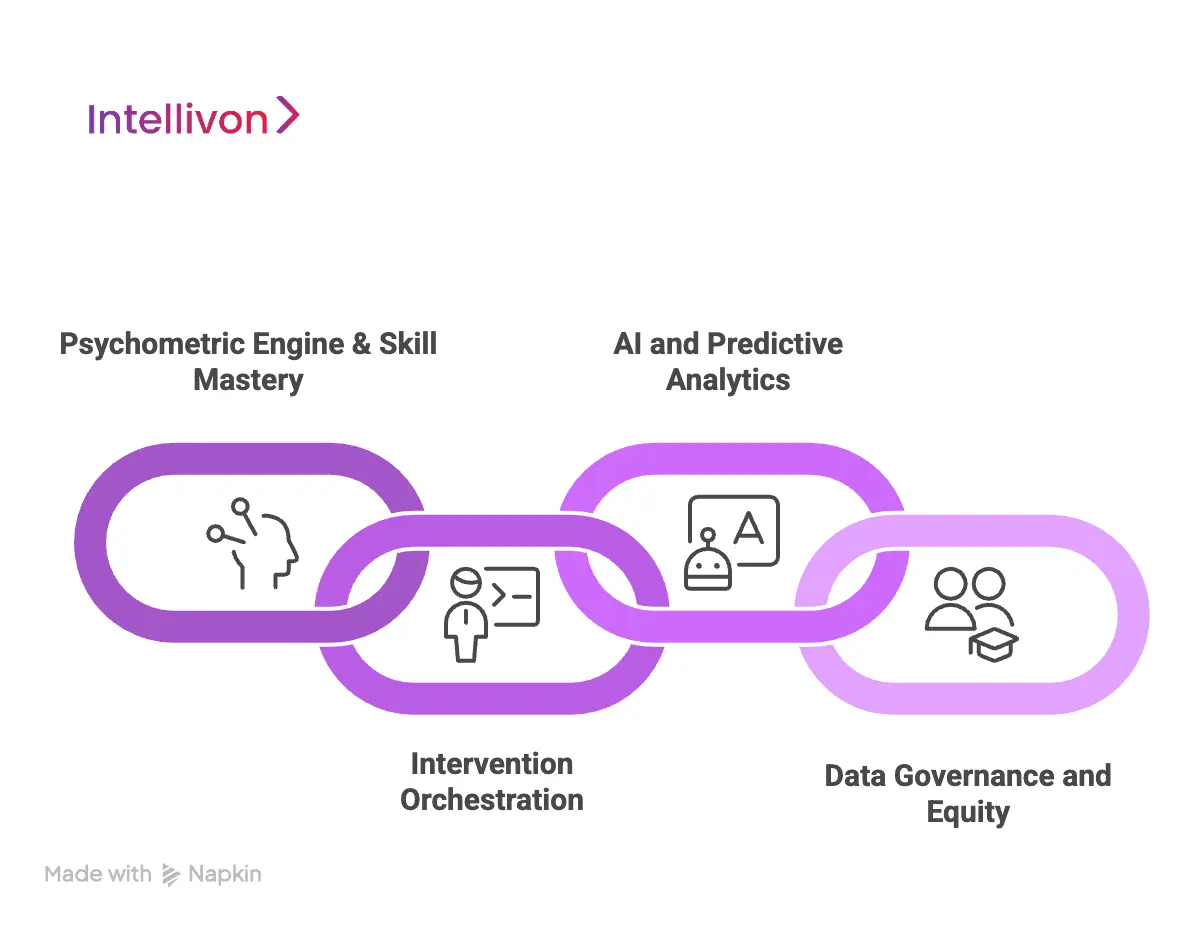
1. Psychometric Engine & Skill Mastery
The intellectual property lies in the precision of the learning engine.
- Skill-Graph Engine: This engine manages complex prerequisite relationships between skill nodes. It defines the personalized instructional sequence.
- Probabilistic Mastery Rules: The system must use Item Response Theory (IRT) or similar models to determine mastery. This moves beyond simple percentage scoring for more accurate measurement.
2. Intervention Orchestration
The system must actively manage the entire intervention lifecycle within the MTSS framework.
- Automated Referral Triggers: Define custom district rules that automatically trigger intervention referrals. This is based on specific usage or growth risk metrics.
- Intervention Documentation Log: A standardized module tracks all teacher-led interventions, duration, and student responses. This is vital for auditable MTSS documentation.
3. AI and Predictive Analytics
Machine Learning transforms reactive data into a proactive strategy.
- Early-Risk Prediction: AI models forecast a student’s risk of failing year-end benchmarks months in advance. This allows for proactive resource allocation.
- Teacher Co-Pilot Features: AI should analyze cohort skill gaps and autonomously suggest optimal small-group strategies. This acts as a high-leverage instructional coach.
4. Data Governance and Equity
Decision-makers need data to drive equitable outcomes.
- Equity Dashboards: Easy segmentation and comparison of growth rates across student subgroups are mandatory. This helps identify and address systemic gaps.
- Data Sovereignty Controls: The architecture must guarantee clear data ownership and secure storage, adhering to all vendor governance requirements.
A district-level system built to the standard of i-Ready relies on precise design and seamless coordination between instruction, assessment, and analytics. When these elements work together, districts gain a platform that delivers consistent growth, reliable data, and long-term instructional value.
Architecture of Building A School Portal Like i-Ready
A school portal like i-Ready requires a cloud-native, microservices architecture built for district-scale performance, strict data governance, adaptive AI engines, and seamless interoperability with SIS and SSO systems.
The following sections break the architecture into six connected layers. Together, they support accurate diagnostics, adaptive instruction, and reliable analytics for students, teachers, and district leaders.
1. Core Layer: Foundation and Security
This layer establishes the platform’s stability and protects sensitive information. It ensures each district operates in a secure, isolated environment. The strength of this layer determines how well the entire system handles growth, regulatory audits, and sudden usage spikes.
1. Multi-Tenant Isolation
Each district receives a logically isolated environment within the platform. This prevents data mixing and satisfies strict legal expectations from procurement teams. Isolation also improves reliability during peak usage, since performance issues in one tenant do not affect another.
2. Microservices Framework
The system breaks core functions into independent services. Rostering, reporting, content delivery, and assessments operate separately, which reduces complexity and avoids single points of failure. This structure also allows targeted scaling of services that face heavy load, such as adaptive assessment or real-time analytics.
3. Zero-Trust IAM and RBAC
Identity and Access Management verifies every user and every service call. Role-based permissions restrict access to the data required for each job. This model helps districts meet FERPA and COPPA requirements while protecting student information from unauthorized access.
2. Learning Layer: The Instructional Engine
This layer powers instruction and continuous measurement. It manages content delivery, adaptive learning logic, and the psychometrics required to place students accurately. The precision of this layer determines how well the platform supports daily classroom instruction.
1. Assessment and Psychometrics Engine
The engine uses calibrated Item Response Theory models to determine the right question for each student. This improves placement accuracy and ensures the diagnostic reflects real ability rather than simple score averages. Reliable calibration is key because instructional pathways depend on this measurement.
2. Adaptive Pathing and Skill Graph Manager
The Skill Graph maps every prerequisite and learning outcome. The system uses real-time mastery data to choose the correct next lesson. This prevents students from being pushed ahead without a foundation and keeps instruction aligned to their learning needs.
3. Global Content Delivery Network
A global CDN distributes media and lesson assets close to the end user. Students in rural districts or low-bandwidth environments still receive fast, stable content. This supports consistent engagement across diverse regions and device types.
3. AI/ML Layer: Predictive Intelligence
The AI layer elevates the platform from a reactive tool to a proactive instructional engine. It processes real-time events, builds mastery predictions, and signals risk earlier than traditional assessments.
1. Feature Store and Event Streams
Every click, response, and interaction flows through an event streaming system. The feature store organizes these signals so models can analyze patterns quickly. This infrastructure allows the platform to adjust instruction or flag risk within seconds.
2. Adaptive Mastery Models
Models such as Bayesian networks estimate the probability of skill mastery. This approach is more reliable than percentage scores because it considers difficulty, response patterns, and learning history. The system gains a more accurate picture of student progress.
3. Risk Prediction and Co-Pilot Models
AI predicts which students may fall behind long before benchmarks indicate issues. Teachers receive guidance on grouping, intervention timing, and recommended strategies. This shifts classroom planning from reactive to proactive.
4. Analytics Layer: Data Governance and Insight
Leaders rely on data that is trustworthy, timely, and easy to interpret. This layer transforms raw performance signals into operational dashboards for districtwide planning.
1. MTSS Dashboards and System Views
Dashboards summarize student movement across MTSS tiers and show growth projections by school. Leaders use these views to guide staffing, allocate coaching support, and monitor implementation. High-quality dashboards reduce guesswork and improve equity planning.
2. Longitudinal Data Warehouse
A secure data warehouse stores years of performance information. Districts can compare cohorts, evaluate program effectiveness, and analyze long-term trends. This helps leadership teams make informed instructional and funding decisions.
3. Equity and Subgroup Reporting
The system disaggregates achievement and growth by student subgroup. Leaders can spot performance gaps early and align resources to address them. These reports also support state accountability requirements and district-level equity goals.
5. Interops Layer: Seamless District Integration
District adoption depends on how easily the platform connects to existing systems. This layer ensures a smooth onboarding and reduces the workload on district IT teams.
1. OneRoster and ClassLink Connectors
Certified connectors automate roster creation, updates, and permissions. District teams avoid manual file imports and benefit from daily syncs. This improves accuracy and reduces onboarding time significantly.
2. SIS and LMS Sync Endpoints
The platform syncs with systems like PowerSchool and Canvas. This keeps class structures and enrollment data aligned without constant manual intervention. Teachers see accurate rosters, and administrators avoid duplicate work.
6. Infrastructure Layer: Cloud Resilience
The infrastructure layer ensures the platform stays healthy, even during districtwide testing periods or sudden traffic spikes.
1. Kubernetes-Based Orchestration
Kubernetes manages the deployment and scaling of microservices. It handles failover events, rolling updates, and container health checks. This keeps the system stable and responsive during heavy usage.
2. Multi-Region High Availability
Running workloads across multiple cloud regions protects the system from outages. Districts benefit from reliable uptime and strong disaster recovery options. This architecture supports enterprise-level service agreements.
A school portal that matches i-Ready’s reliability requires more than strong features. It depends on a layered architecture that connects assessment, instruction, analytics, and governance. When each layer works together, districts gain a platform that scales, adapts, and protects student data while supporting consistent instructional quality.
How Intellivon Builds an Enterprise-Grade Learning Portal Like i-Ready
Intellivon builds i-Ready-class learning platforms through a structured engineering blueprint that blends multi-tenant architecture, adaptive diagnostics, AI-driven personalization, and district-wide analytics designed for scale and compliance.
The steps below outline how we build platforms capable of serving thousands of classrooms with precision and reliability.
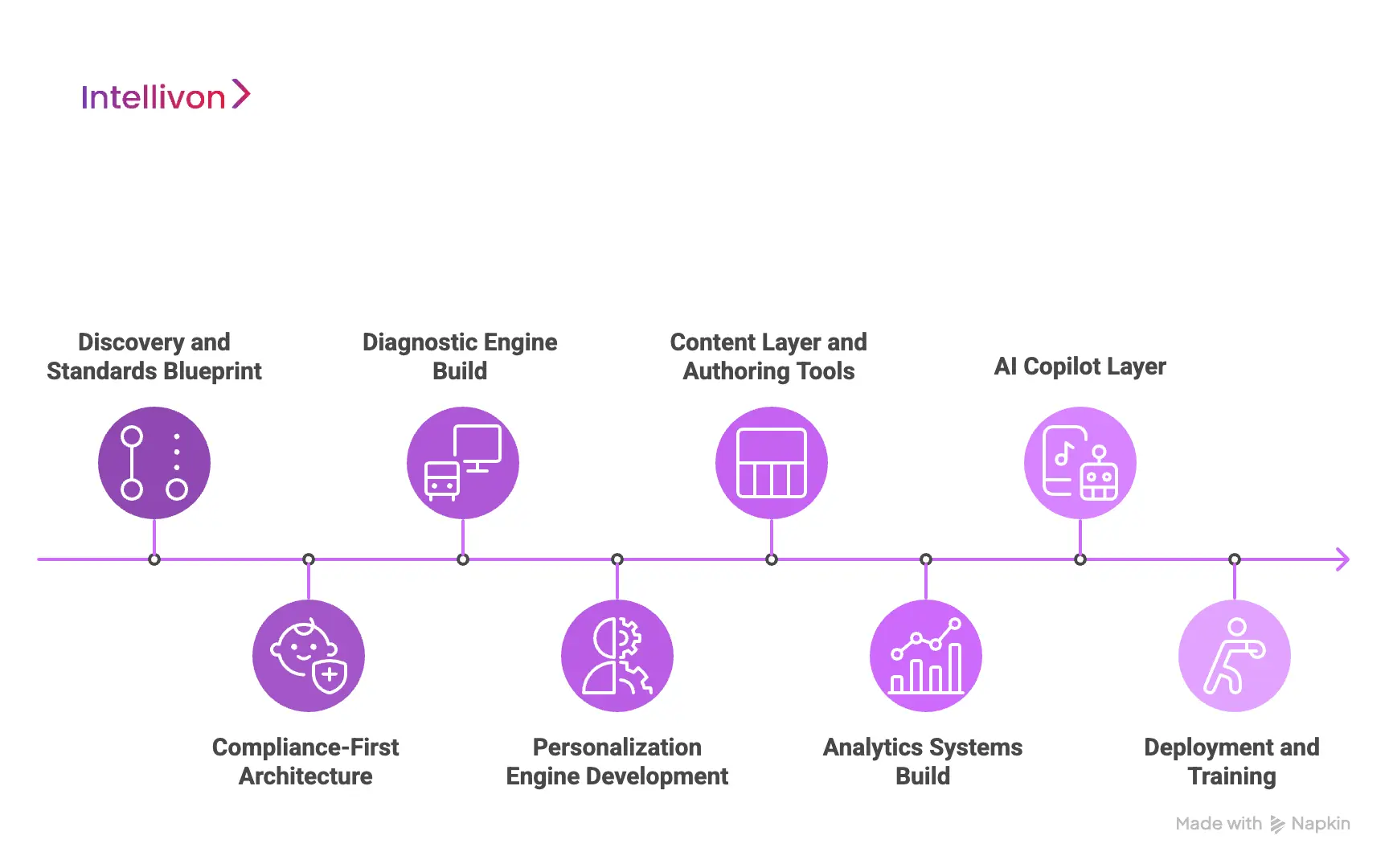
Step 1: Discovery and Standards Blueprint
Every engagement begins with a thorough discovery phase. We work with district leaders, curriculum teams, and instructional coaches to define goals, standards alignment, and compliance expectations.
This blueprint identifies required assessments, target use cases, and non-negotiable data rules. It becomes the foundation for architecture, content design, and AI models.
Step 2: Compliance-First Architecture
We design the platform to operate across many districts without risking data overlap. Each tenant runs in an isolated space supported by zero-trust controls.
The architecture meets FERPA, COPPA, and state-level privacy rules before any instructional logic is added. This helps districts trust the system from day one and simplifies procurement review.
Step 3: Diagnostic Engine Build
Our teams develop a calibrated item bank aligned to state and national standards. The diagnostic engine uses adaptive logic to determine student skill levels quickly and accurately.
We design each item to support computer-adaptive movement, which ensures students receive tasks that reflect their current ability. This step defines the accuracy of all downstream personalization.
Step 4: Personalization Engine Development
We build a skill graph that maps prerequisites and instructional sequences. The personalization engine uses this graph to generate tailored learning paths.
It adapts based on mastery, pace, and error patterns. This component ensures students receive instruction that meets their specific needs rather than generic grade-level content.
Step 5: Content Layer and Authoring Tools
The content layer organizes lessons, activities, and scaffolds into a structured library. We also create authoring tools so districts can add or adjust materials without depending on external vendors.
This supports long-term sustainability and aligns instruction with evolving standards or district priorities.
Step 6: Analytics Systems Build
Teachers receive actionable insights, not raw data. We design dashboards that highlight daily priorities, skill gaps, and grouping opportunities.
Administrators see multi-school trends, subgroup performance, and MTSS indicators through consolidated views. These insights support coaching, resource planning, and accountability reporting.
Step 7: AI Copilot Layer
The AI Copilot assists teachers with planning, intervention timing, and group creation. It reviews student patterns and recommends the next instructional steps.
The system also predicts risk and flags students who may require early support. This layer reduces teacher workload and increases instructional precision.
Step 8: Deployment and Training
We guide districts through onboarding, training, and implementation support. Adoption engineering ensures teachers understand the platform and use it consistently.
Our rollout plans include coaching sessions, usage reviews, and fidelity checks. This helps districts see measurable gains quickly and sustain them across the school year.
Intellivon accelerates development by using reusable frameworks for diagnostics, personalization, analytics, and compliance. These components shorten build timelines without compromising quality. Districts receive a platform that is reliable, adaptive, and ready for large-scale adoption.
Cost to Build a School Portal Like i-Ready
At Intellivon, the priority is to help education enterprises build adaptive, compliant, and district-ready learning platforms that scale reliably. Pricing aligns with the instructional scope, assessment depth, required integrations, and long-term district usage. Every investment aims to strengthen learning outcomes, improve teacher efficiency, and create a secure data environment trusted by administrators and parents.
When budgets are limited, we refine scope collaboratively without compromising FERPA, COPPA, or state-level compliance. We plan for long-term scalability, stable performance, and future AI enhancements. Each build balances cost efficiency with measurable instructional impact and predictable ROI.
Estimated Phase-Wise Cost Breakdown
| Phase | Description | Estimated Cost Range (USD) |
| Discovery & Standards Blueprint | Requirements, data rules, content alignment, MTSS needs, SIS/LMS expectations | $6,000 – $12,000 |
| Architecture & Multi-Tenant Design | Cloud-native setup, district isolation, role-based access, encryption | $8,000 – $15,000 |
| Diagnostic Engine & Item Bank | CAT model setup, IRT calibration, item authoring, metadata tagging | $6,000 – $12,000 |
| Personalization Engine & Skill Graph | Skill graph design, learning path logic, mastery rules | $12,000 – $25,000 |
| Content Layer & Authoring Tools | Lesson templates, scaffold library, authoring console | $10,000 – $20,000 |
| Teacher & Admin Dashboards | Insight models, grouping logic, MTSS visualizations, usage analytics | $10,000 – $20,000 |
| SIS/LMS + SSO Integrations | OneRoster, Clever, ClassLink, PowerSchool, Canvas syncing | $6,000 – $12,000 |
| Security & Compliance Engineering | FERPA/COPPA controls, multi-tenant IAM, logging, audits | $6,000 – $10,000 |
| Testing, QA & Educational Validation | Psychometric checks, usability tests, load testing | $6,000 – $10,000 |
| Pilot, Training & Adoption Support | School-level rollout, teacher training, feedback cycles | $6,000 – $10,000 |
Total Initial Investment Range: $50,000 – $150,000
Ongoing Maintenance & Optimization (Annual): 15–20% of initial build
Hidden Costs Districts Should Plan For
- Integration complexity: Different SIS/LMS systems may require custom mapping or middleware.
- Compliance workloads: District privacy audits, data agreements, and documentation require recurring effort.
- Data governance: Normalizing data structures across schools demands continuous oversight.
- Cloud consumption: Adaptive learning engines and real-time analytics need cost-managed infrastructure.
- Change management: Training teachers and administrators requires time and structured onboarding.
- Model recalibration: Adaptive engines and diagnostics need periodic updates to maintain accuracy.
Best Practices To Avoid Budget Overruns
- Start with a focused scope: Deploy in select grades or subjects, measure impact, then expand.
- Embed compliance early: Avoid expensive reengineering later in the development cycle.
- Use modular architecture: Reusability accelerates future enhancements and reduces cost per feature.
- Optimize cloud usage: Balance real-time and batch jobs to control compute costs.
- Maintain strong observability: Track latency, uptime, data sync health, and model behavior continuously.
- Iterate for longevity: Refine lessons, update analytics, and tune mastery models based on real usage.
Request a tailored proposal from Intellivon’s EdTech engineering team. We align your roadmap with instructional goals, compliance requirements, and budget boundaries to help you build a district-ready portal with measurable academic impacts.
Conclusion
Districts are moving toward unified learning ecosystems that deliver adaptive instruction, reliable diagnostics, and actionable insights. A platform built to the standard of i-Ready gives schools a measurable way to improve outcomes, streamline teacher workload, and strengthen visibility across classrooms. Leaders gain real confidence in their data, and students receive instruction that reflects their actual learning needs.
Intellivon helps enterprises build these systems with clarity, precision, and long-term scalability. Our frameworks reduce development risk, protect compliance, and accelerate time-to-value for districts. When you are ready to build an enterprise-grade learning portal, our team can guide the entire journey from blueprint to adoption.
Build an Enterprise-Grade Learning Portal With Intellivon
At Intellivon, we build adaptive learning platforms that combine psychometric accuracy, instructional intelligence, and district-scale reliability. Our systems unify diagnostics, personalized learning, teacher workflows, and multi-school analytics in a single ecosystem. Districts gain visibility, teachers save time, and students receive instruction that matches their skill needs.
Each platform is designed for large, compliance-heavy environments: secure, scalable, and engineered to deliver measurable academic impact from the first deployment cycle.
Why Partner With Intellivon?
- Compliance-First Architecture: Every platform aligns with FERPA, COPPA, GDPR-K, and state-level student data policies.
- Adaptive Intelligence Engine: Our diagnostic, mastery, and personalization models follow proven psychometric and learning science principles.
- Teacher Workflow Optimization: We design tools that reduce planning time, automate grouping, and surface actionable insights.
- Seamless SIS, LMS, and SSO Interoperability: We support OneRoster, Clever, ClassLink, PowerSchool, Skyward, Canvas, and Google/Microsoft identity systems.
- Enterprise-Scale Cloud Infrastructure: Multi-region resilience, zero-downtime updates, high availability, and elastic scaling ensure consistent performance during peak diagnostic periods and district testing windows.
- Continuous AI and Content Optimization: MLOps pipelines update mastery models, refine adaptive paths, and improve lesson recommendations.
- Zero-Trust Security Model: Strict identity controls, encrypted transport, tokenized identifiers, and continuous monitoring protect student data without compromising performance or usability.
- Designed for District Adoption: We build teacher-friendly interfaces, admin dashboards, and actionable reporting that help districts drive fidelity, consistency, and long-term usage across schools.
Book a strategy call with Intellivon to explore how a custom-built learning portal can strengthen district performance, improve instructional precision, and scale reliably across your entire school network.
FAQs
Q1. What core capabilities must an i-Ready–level learning portal have to support district-wide adoption?
A1. District-scale adoption depends on a platform that unifies diagnostics, adaptive instruction, teacher workflows, and multi-school analytics. The portal must deliver accurate skill placement, real-time personalization, and actionable insights that reduce teacher workload. Leaders also expect the system to support MTSS, equity reporting, and consistent implementation across all campuses. Without these capabilities, adoption weakens and instructional value declines.
Q2. How much does it typically cost to build and maintain a district-scale adaptive learning portal?
A2. A high-quality learning portal typically ranges between $50,000 and $150,000 for the initial build, depending on diagnostic depth, content complexity, and required integrations. Annual maintenance averages 15–20% of the build cost. Districts should also plan for cloud usage, compliance reviews, SIS/LMS integrations, and ongoing model recalibration. These investments ensure the platform remains accurate, secure, and aligned with district priorities.
Q3. How do adaptive diagnostics and personalization engines maintain accuracy across diverse student populations?
A3. Accuracy depends on calibrated item banks, strong psychometrics, and mastery models that consider difficulty, response patterns, and learning history. The system must support multilingual learners, varying skill levels, and diverse instructional contexts. Personalization engines use skill graphs and probabilistic models to ensure each student receives content that reflects their real readiness rather than their grade placement.
Q4. What integrations are required to roll out a learning platform across multiple schools without disrupting existing systems?
A4. District-ready portals must integrate with SIS systems like PowerSchool and Skyward, LMS platforms like Canvas and Schoology, and SSO providers such as Clever and ClassLink. Support for OneRoster ensures accurate and automated provisioning. These integrations reduce IT burden, prevent data inconsistencies, and create a seamless experience for students, teachers, and administrators.
Q5. How does a learning portal ensure compliance with FERPA, COPPA, and state privacy rules during real-time data processing?
A5. Compliance requires multi-tenant isolation, zero-trust access controls, encrypted data flows, and strict role-based permissions. The platform must maintain detailed audit logs, secure rostering, and controlled data retention policies. Real-time processing must follow the same protections, ensuring student information remains private while the system generates insights and adaptive recommendations.