Classrooms today rely on connection. The Seesaw educational platform has changed how teachers document learning, how families stay involved, and how schools measure progress on a large scale. What began as a portfolio tool has become the main source of engagement for thousands of districts, managing everything from daily check-ins to assessments based on standards. However, as schools transition from pilot programs to full deployment, expectations have changed.
Education leaders now want a reliable infrastructure, with secure family messaging, real-time visibility of learning, automated compliance reporting, and district-wide analytics that truly inform teaching.
At Intellivon, we create these platforms with a strong focus on reliability by merging careful testing, built-in compliance, and the kind of dependability that districts need. The aim is to help schools implement learning platforms that teachers want to use, families can trust, and administrators can manage confidently. This blog explains the specific infrastructure and features that make platforms like Seesaw effective in large school systems, and how we build them from the ground up.
Key Takeaways From the Student Engagement Platforms Market
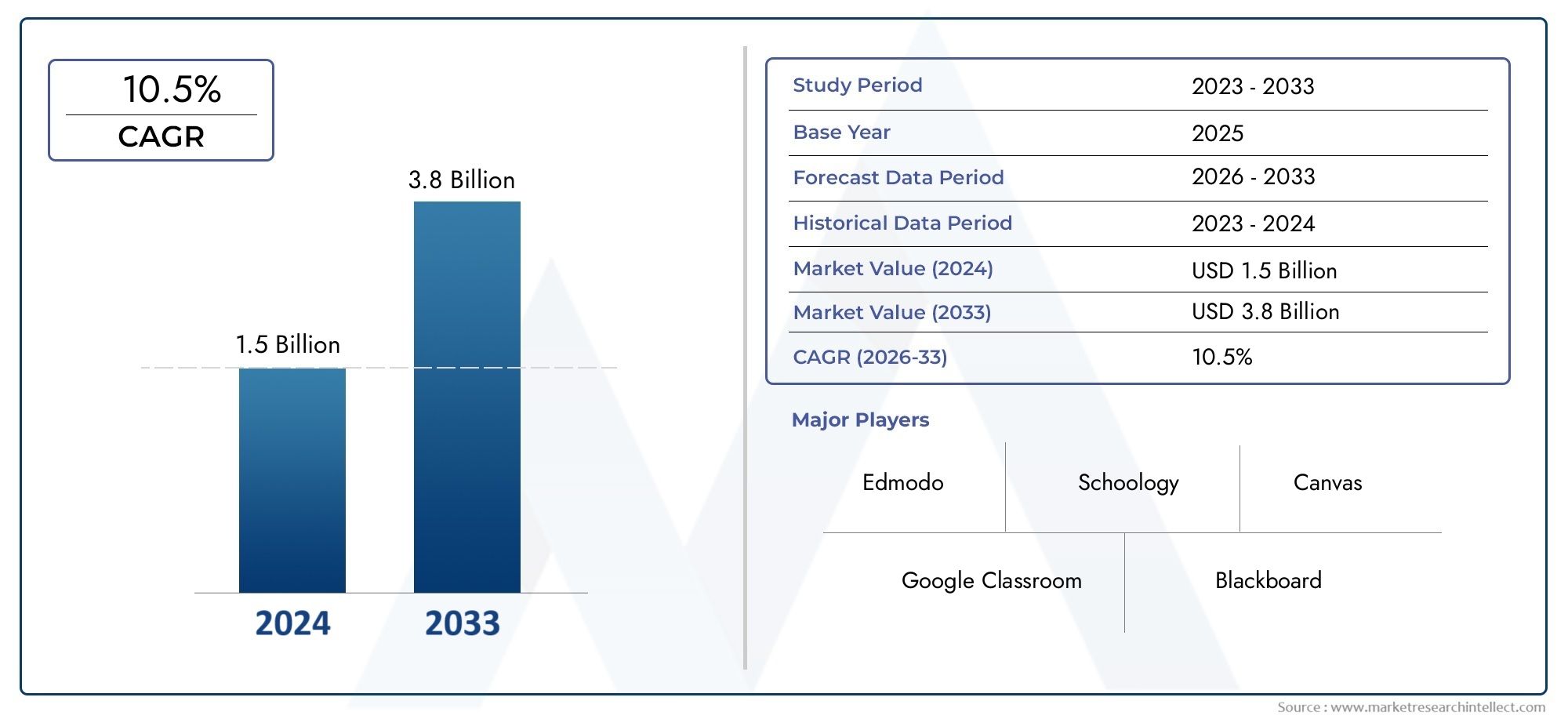
Student engagement platforms have rapidly shifted from optional classroom tools to core infrastructure across global school systems. Valued at USD 1.5 billion in 2024, the market is projected to reach USD 3.8 billion by 2033 at a 10.5% CAGR, driven by rising demand for personalized, interactive learning and real-time instructional feedback.
Market Snapshot & Growth Signals
- Another forecast places the 2025 market value at USD 5 billion, projecting a 15% CAGR through 2033.
- Growth is fueled by rapid device adoption, digital content consumption, and demand for tools that increase retention and participation.
- The broader digital education sector is expanding from USD 24–32 billion in 2025 to USD 80+ billion by 2030, growing at a 24–27% CAGR.
- Investment is accelerating as districts prioritize data-driven instruction, continuous engagement, and compliance-focused platforms.
- AI, analytics, and immersive technologies (VR/AR) are becoming standard expectations for modern learning ecosystems.
- Leadership teams increasingly evaluate platforms based on their ability to unify engagement, analytics, and safe family communication.
Seesaw’s Global Position
- Seesaw has surpassed 25 million users worldwide, with strong traction in elementary education.
- Its emphasis on interactive learning, family engagement, and student portfolios strengthens district-wide culture and academic visibility.
- Market growth for Seesaw is projected at 13.2% CAGR through 2032, led by North America and growing adoption across Europe and APAC.
These trends indicate sustained momentum for student engagement platforms, making them essential components of modern education ecosystems that prioritize accessibility, interactivity, and data-informed instruction.
What Is The Elementary Learning Platform Seesaw?
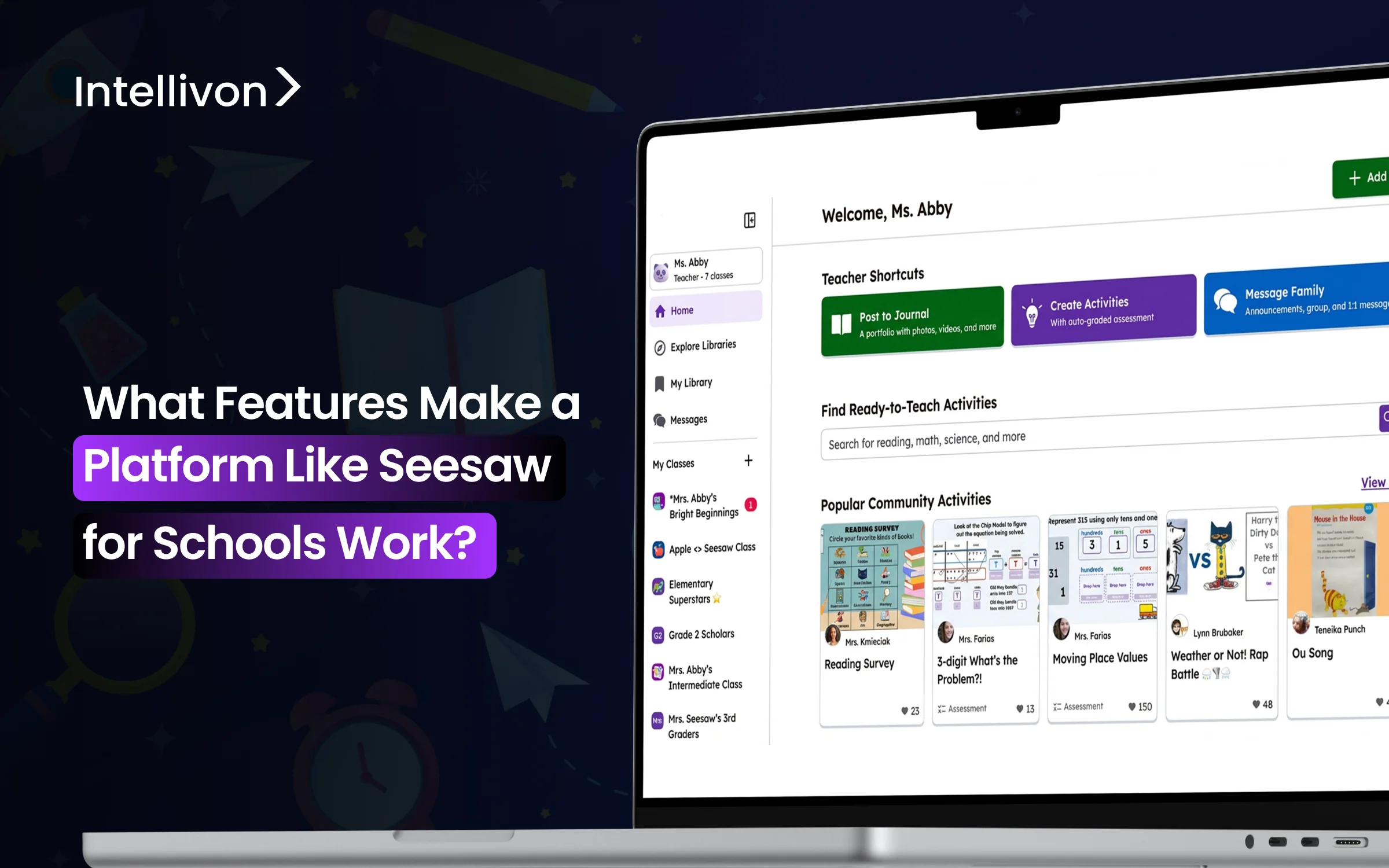
Seesaw is an elementary learning platform used by over 25 million users worldwide. It combines digital portfolios, classroom activities, and family communication in one system. It brings portfolios, classroom activities, feedback, and home connection into one continuous learning loop.
The platform works because it fits naturally into how young students learn and how teachers already manage instruction. Instead of acting as a traditional LMS, Seesaw functions as a live engagement layer. It captures daily learning in real time, connects it to families instantly, and gives leaders a clear view into classroom activity without disrupting teaching workflows.
How Does It Work?
Seesaw works by connecting SIS data, classroom activities, student portfolios, and family communication in one workflow that runs automatically in the background. Below is a clear view of how the platform functions in a real classroom setting.
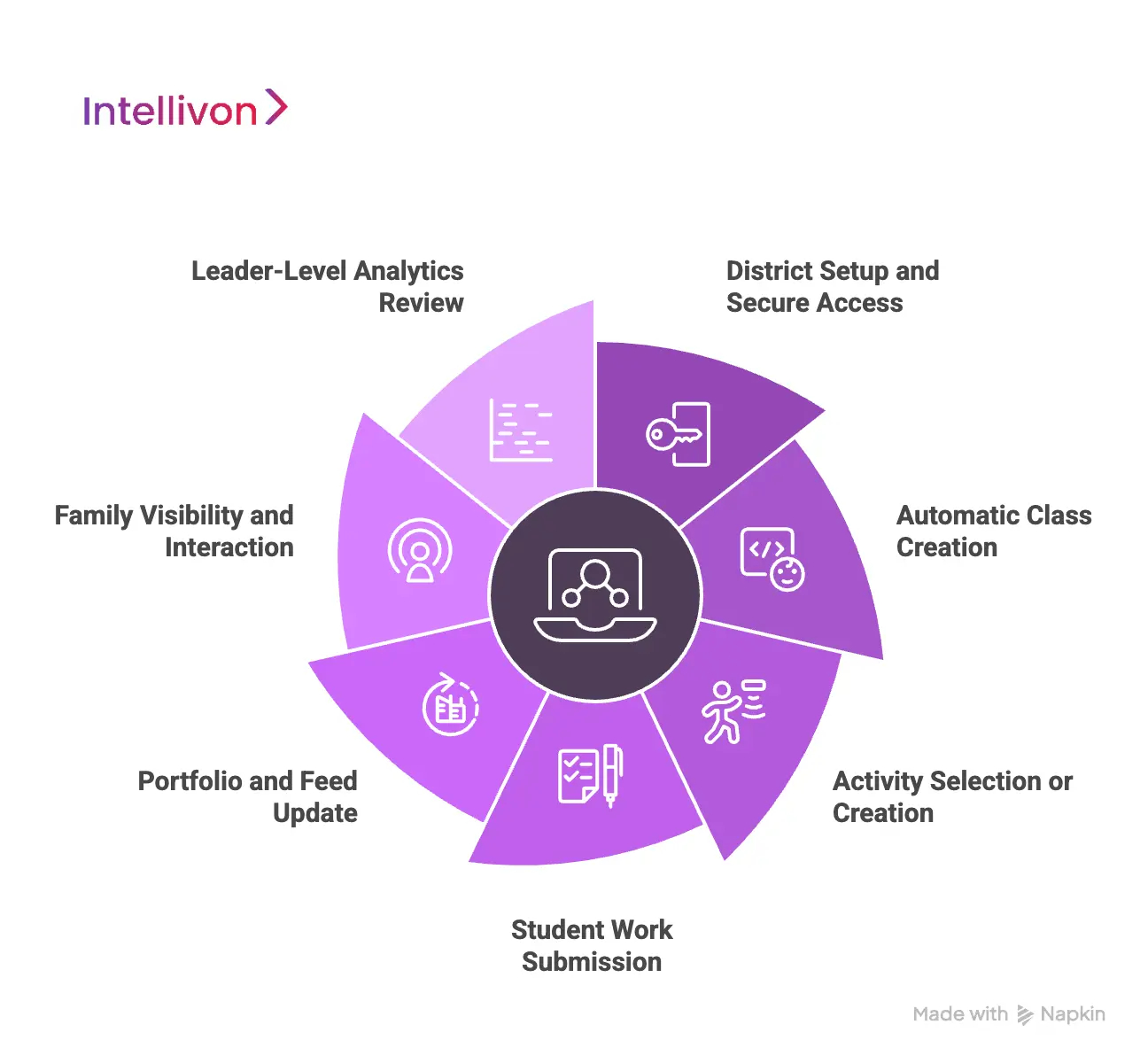
1. District Setup and Secure Access
Technology teams begin by linking Seesaw to the district’s SIS and identity provider. Rosters, courses, and staff assignments sync automatically. Teachers and students then sign in using district-approved SSO, which keeps authentication secure and reduces support issues. This setup creates a stable foundation before any classroom activity begins.
2. Automatic Class Creation
Once syncing is complete, teachers find their classes already organized with accurate student lists. They can adjust small groups, add co-teachers, or rename sections. Because classes are generated from SIS data, districts avoid errors and reduce manual work for staff.
3. Activity Selection or Creation
Teachers open their dashboard and select activities from Seesaw’s lesson library or design their own. They can add written or audio instructions, attach reference materials, and align activities with specific skills or standards. This step keeps lessons consistent across grade levels and reduces time spent planning.
4. Student Work Submission
Students complete the assigned task using tools suited to elementary learning. They record voice explanations, draw diagrams, take photos of worksheets, or type short responses. Each submission flows directly into the platform without needing email, apps, or external tools.
5. Portfolio and Feed Update
Every piece of work appears instantly in the student’s portfolio and in the class feed. Teachers review submissions, approve them, and add audio or written feedback. This streamlines formative assessment and builds a timeline of learning that grows throughout the year.
6. Family Visibility and Interaction
Families receive real-time notifications about new work or teacher updates. They can react, leave comments, or ask questions inside a safe communication space. This level of visibility increases participation, especially for busy families who rely on mobile devices for updates.
7. Leader-Level Analytics Review
School and district leaders access dashboards that show engagement, activity volume, and usage trends. They can track adoption across grade levels, identify classrooms that need support, and review instructional patterns that influence student progress.
Seesaw works because every step reinforces the next. It supports teachers, engages families, and gives leaders clarity without adding operational complexity.
Business and Revenue Models of Seesaw
Seesaw’s commercial success is tied closely to how schools actually adopt technology. The platform does not rely on aggressive top-down sales alone. Instead, it grows through classroom trust, district validation, and long-term institutional standardization.
This layered approach shapes both its business and revenue models across global education systems.
Business Models of Seesaw
Seesaw operates on multiple business models that work together to reduce entry friction, accelerate adoption, and lock in long-term district usage.
1. Freemium Classroom Adoption Model
Teachers can start using Seesaw at no cost. This encourages experimentation inside classrooms without procurement delays.
As usage spreads across grades, schools begin to formalize adoption through paid plans. This bottom-up approach builds demand before sales engagement even begins.
2. School and District Licensing Model
Once institutional adoption begins, Seesaw shifts to school- and district-level licenses. These plans bundle admin controls, compliance tools, rostering automation, and leader dashboards. The buying decision moves from individual teachers to centralized education leadership.
3. District Standardization Model
In many systems, Seesaw becomes the default engagement and portfolio layer across all elementary schools. At this stage, it shifts from a tool to an operational infrastructure. Portfolios, family communication, and feedback workflows become embedded into everyday instruction.
4. Ecosystem and Content Partnership Model
Seesaw expands value through partnerships with curriculum creators and educational publishers. Districts gain access to premium instructional content distributed through the same platform. This strengthens retention and increases the platform’s footprint inside instruction itself.
5. Professional Services Enablement Model
Large rollouts often require onboarding, teacher training, usage optimization, and change management. Seesaw supports these needs through paid professional services delivered directly or via partners. This accelerates district-wide success during early adoption.
Revenue Models of Seesaw
Seesaw’s revenue structure emphasizes predictability, enrollment alignment, and multi-year continuity rather than transactional billing.
1. Annual Subscription Licensing
Schools and districts pay yearly subscription fees based on student count, number of schools, and feature tier. This makes budgeting predictable and scales naturally as enrollment changes.
2. Tiered Feature Monetization
Revenue increases as districts unlock higher-tier features. These include advanced analytics, expanded family communication tools, deeper admin controls, and enhanced moderation and reporting capabilities.
3. Multi-Year Enterprise Contracts
Large districts frequently enter two- to five-year agreements. These contracts lock in pricing, ensure platform continuity, and position Seesaw as a long-term instructional partner rather than a short-term vendor.
4. Implementation and Training Revenue
Some districts invest separately in structured onboarding, administrator training, and adoption programs. These one-time or short-term service engagements add another revenue layer during large deployments.
5. Custom Integrations and Data Services
Districts with complex SIS, reporting, or identity needs often pay for custom integration work. This includes advanced data exports, compliance workflows, and state reporting alignment.
6. Curriculum and Premium Content Revenue
Revenue is also generated through access to partner curriculum libraries and premium instructional content hosted inside the Seesaw ecosystem. This allows districts to consolidate both platform and content spending.
Seesaw’s commercial model is built for long-term institutional alignment. It lowers barriers at the classroom level, then scales through district licensing, feature tiers, and multi-year contracts. For enterprise leaders, this structure delivers adoption flexibility, cost predictability, and durable platform continuity across academic cycles.
How Interactive Digital Platforms Drive 65% Higher Parent Participation
A 2025 industry analysis on digital parent–teacher partnership tools found that interactive digital portfolios increased parent participation by 65% compared with traditional newsletters and paper folders.
This shift reflects a bigger change in how families engage with learning. Static updates no longer meet expectations. Parents now respond to real-time visibility, multimedia evidence of progress, and two-way communication embedded directly into classroom workflows.
Platforms like Seesaw transformed parent engagement by moving it from passive consumption to active participation. Instead of receiving periodic summaries, families now interact with daily learning moments. This immediacy builds trust, accountability, and continuity between school and home.
1. Encourages Two-Way Academic Dialogue
Traditional newsletters push information outward. They rarely invite response.
Interactive platforms reverse this dynamic.
Parents can:
- View student work in real time
- Respond with comments or encouragement
- Message teachers directly within secure environments
This turns communication into a continuous academic dialogue, not an occasional broadcast.
2. Builds Emotional and Academic Investment
Photos, videos, voice notes, and annotated assignments create an emotional connection.
Instead of reading about progress, parents see and hear it. This visual proof increases:
- Trust in instruction
- Student motivation at home
- Consistency of academic reinforcement
The result is deeper family involvement in daily learning routines.
3. Remove Barriers to Participation
Modern platforms reduce participation friction through:
- Built-in translation
- Mobile-first design
- Simple, icon-driven interfaces
- Low-bandwidth optimization
Families no longer need technical confidence or laptops to stay involved. Accessibility directly translates into higher participation rates.
4. Real-Time Notifications Sustain Engagement
Instant alerts for:
- New assignments
- Teacher feedback
- Student achievements
- Missed work
These keep parents consistently connected. Unlike weekly updates, real-time signals maintain momentum and attention.
Why Enterprise Platforms Amplify This Impact at District Scale
At enterprise scale, consistency matters more than features.
District-wide engagement increases when platforms:
- Enforce uniform communication standards
- Centralize parent access across schools
- Maintain strict privacy and consent controls
- Integrate with SIS and identity systems
At Intellivon, we architect these engagement layers with compliance, accessibility, and scale built in from day one. The 65% increase in parent participation is driven by visibility, simplicity, and real-time connection. Interactive digital platforms convert families into active learning partners. At enterprise scale, this shift directly strengthens engagement, retention, and student outcomes.
Core Architecture That Makes Seesaw Work
Seesaw runs on a cloud-native, multi-tenant architecture with real-time data processing, secure access control, and deep SIS integration to support district-scale classroom engagement.
For enterprise education systems, architecture determines long-term success. It affects uptime during school hours, integration with legacy systems, compliance readiness, and total cost of ownership. Seesaw’s core architecture reflects the needs of large, distributed school networks rather than isolated classrooms.
1. Cloud-Native and Elastic Infrastructure
Seesaw operates on a cloud-native foundation that adjusts computing capacity in real time. Usage peaks predictably during school hours, especially in the morning and during submission windows. The infrastructure scales automatically in response to these patterns, so performance remains consistent for every classroom.
This elastic model prevents the slowdowns that often occur when traditional systems attempt to serve thousands of simultaneous users. It also allows Seesaw to deploy updates continuously without requiring local installations or scheduled maintenance windows.
2. Multi-Tenant Data Architecture
Seesaw uses a multi-tenant architecture in which many schools share the same core platform while their data remains logically separated. Each district operates within its own controlled data environment, even though the underlying infrastructure is shared.
This approach reduces operational cost while preserving privacy. It also allows districts to benefit from system-wide security enhancements and performance improvements without rebuilding their own environments.
3. High Availability and Fault Tolerance
Elementary platforms cannot afford downtime during instructional hours. Seesaw is built with high-availability design and automatic failover systems that keep classrooms operational when individual services fail.
Redundant components handle disruptions silently in the background. This ensures teachers can continue instruction without interruption and prevents loss of student work during transient infrastructure issues.
4. Role-Based Access Control
Access control forms the backbone of Seesaw’s security posture. Students access only their own activities and portfolios, teachers view only their assigned classrooms, and families see only their child’s work. At the same time, administrators receive role-specific visibility across schools.
This strict separation limits data exposure and supports internal governance policies. For districts, this reduces audit complexity and simplifies privacy enforcement.
5. SIS, Rostering, and Identity Integrations
Seesaw integrates directly with district SIS and identity systems to automate roster and account management. When students move classes or teachers change assignments, the platform updates automatically without manual intervention.
This integration layer eliminates one of the most common sources of data inconsistency in K–12 systems. It also lowers the administrative burden on IT teams who would otherwise manage spreadsheets and manual imports.
6. Real-Time Data Processing
Every student submission, teacher approval, and family interaction flows through real-time processing pipelines. Feedback appears immediately in student portfolios, and families receive notifications without delay. At the same time, teachers see activity as it happens.
This immediacy strengthens the instructional feedback loop. It also allows school leaders to observe engagement trends as they develop instead of relying on delayed reports.
7. Security, Encryption, and Audit Readiness
Seesaw encrypts data both in transit and at rest. System access is logged continuously to support audit requirements. Moderation and safety tools monitor activity to protect students and maintain platform integrity.
These security controls enable educators to operate within strict privacy frameworks. They also give districts defensible evidence when undergoing compliance reviews or third-party assessments.
8. API Layer and Platform Extensibility
Seesaw exposes secure APIs that allow districts to exchange data with external systems such as analytics platforms, data warehouses, and reporting tools. This prevents the platform from becoming a closed ecosystem.
Extensibility ensures Seesaw can operate as one layer within a larger digital learning architecture rather than a standalone silo.
Seesaw’s architecture succeeds because it balances scalability, security, and operational simplicity. It supports daily classroom activity while quietly handling identity, performance, and data flow in the background. For enterprise education systems, this invisible foundation is what turns a classroom tool into dependable infrastructure.
Classroom Engagement Features That Make Seesaw Work
Seesaw classroom engagement features include digital student portfolios, real-time family communication, automated teacher workflows, and student-centered interactive learning experiences.
Each feature reinforces visibility, participation, and continuity across the learning cycle.
1. Student Portfolios and Learning Journals
Student portfolios sit at the center of Seesaw’s classroom model. Every learning artifact is captured as it is created. Work is auto-tagged to students and activities, which keeps records organized without manual sorting. Teachers do not spend time curating evidence. The system does it continuously.
The platform supports multimedia-first learning. Students upload photos of written work, record voice explanations, submit short videos, and draw directly on screen. This allows young learners to show understanding in ways that go beyond text.
2. Two-Way Real-Time Family Communication
Family engagement in Seesaw is not limited to announcements. Communication flows in both directions. Teachers share classroom updates and student work as it happens. At the same time, families respond in the same secure environment.
Built-in translation removes a major barrier for multilingual communities. Parents engage in their preferred language without relying on external apps. This increases participation across diverse populations.
3. Teacher Workflow Automation
Seesaw removes much of the repetitive work that slows down elementary instruction. Teachers rely on smart assignment templates to launch activities quickly. They reuse and adapt lessons without rebuilding content from scratch. This saves planning time across the year.
Auto-grading features assist with objective tasks, while rubrics standardize evaluation for subjective work. Teachers apply consistent scoring with fewer clicks. Feedback shortcuts allow quick voice or text responses, which improves turnaround time for students.
These automation layers do not replace teacher judgment. They reduce administrative overhead so educators spend more time observing learning and less time managing tools.
4. Student-Centric Learning Experiences
Seesaw’s interaction model is designed for how young students actually express understanding. Voice and video responses allow early learners to explain their thinking without being limited by writing skills. This improves participation across varied ability levels.
Teachers assign differentiated tasks within the same classroom. Students receive work matched to readiness rather than a single uniform activity. Interactive worksheets further support hands-on learning through drawing, dragging, and annotation.
Offline access extends learning into low-bandwidth environments. Students can complete work without live connectivity and sync later when internet access returns. This supports equity across rural and infrastructure-constrained districts.
Seesaw’s engagement features work because they reflect real classroom behavior. For school leaders, this feature stack creates sustained participation rather than short-term adoption.
Compliance & Safety Features That Keep Seesaw Trusted
Seesaw enforces verified parental consent, minimal data collection, third-party vendor governance, and audit-ready access logging to meet strict student data privacy requirements. This is especially true in districts where legal exposure, parental scrutiny, and regulatory audits are constant realities.
Seesaw’s trust position comes from treating compliance as a system design principle rather than a policy layer added later. Its safety framework is embedded into daily workflows, access controls, and data handling practices across every classroom.
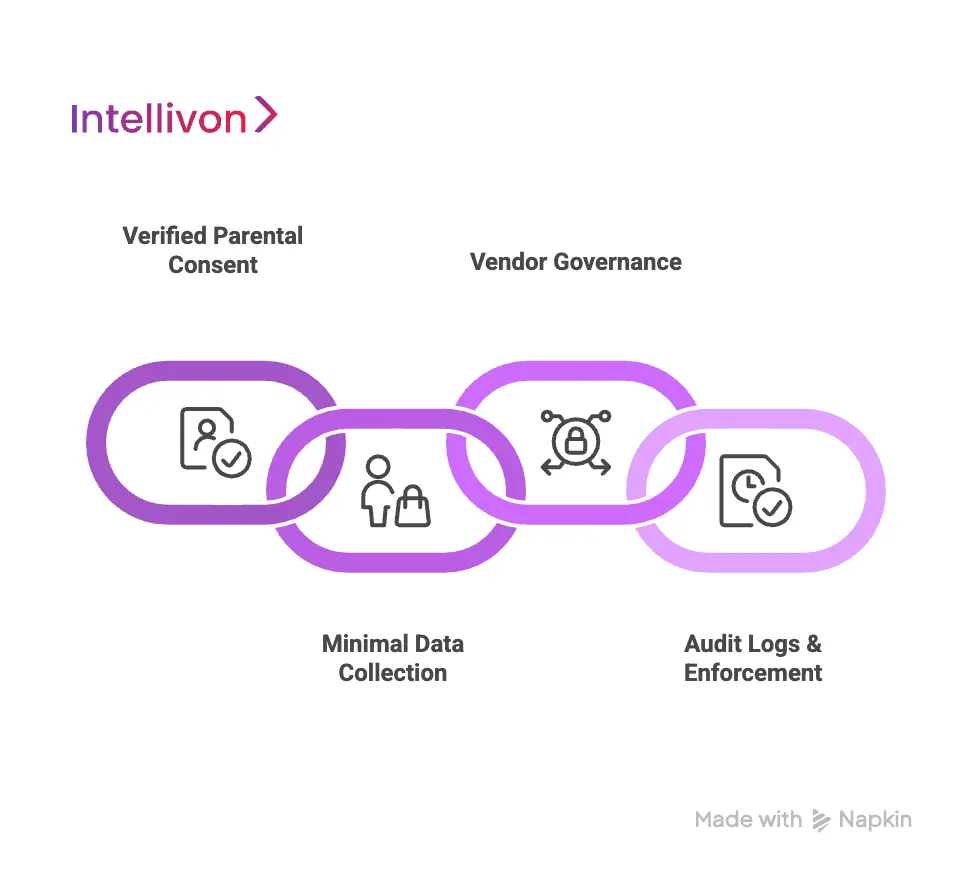
1. Verified Parental Consent Flows
Parental consent in Seesaw operates as a verified workflow that controls how and when a student account becomes active for family access. Schools initiate consent through secure invitations tied to official student records. Families authenticate their identity before gaining visibility into student work.
This verification layer protects against unauthorized access and prevents accidental exposure of student data to unverified users. For districts, it ensures that family engagement features remain aligned with consent laws and internal privacy policies from the first login onward.
2. Safe Defaults and Minimal Data Collection
Seesaw follows a principle of collecting only what is operationally necessary for instruction and communication. Student profiles remain lightweight. The platform avoids unnecessary personal identifiers that do not directly support learning workflows.
Default system settings prioritize safety over exposure. Content visibility is restricted by role. Public sharing is disabled by default. Teachers review and approve student work before it becomes visible to families.
3. Vendor Governance and SDK Controls
Enterprise districts rarely operate in single-vendor environments. Learning platforms often rely on integrated tools, content providers, and service layers. Seesaw manages this complexity through strict third-party governance and controlled SDK usage.
External tools must meet defined security and privacy standards before integration. Data access is scoped tightly to specific functions. Partners do not receive broad visibility into student records by default.
4. Audit Logs and Policy Enforcement
Every meaningful interaction inside Seesaw generates an access record. Logins, data views, approvals, and administrative actions are tracked with time-stamped audit trails. These records support internal investigations, compliance reporting, and external audits.
Policy enforcement operates continuously rather than through manual checks. Role permissions, communication limits, and data visibility rules apply automatically across the system. When staff roles change, access updates without delay.
Seesaw remains trusted in elementary education because safety is built into its operating model, not layered on as an afterthought. Verified consent, minimal data exposure, strict vendor governance, and continuous audit logging create a compliance posture that scales with district size.
AI Features Modern Platforms Like Seesaw Use
Student engagement platforms like Seesaw use AI for activity creation, personalized learning paths, real-time engagement analysis, and teacher workload reduction within secure, classroom-safe environments.
For enterprise buyers, the real question is not whether AI exists, but whether it operates within safe, auditable, and instruction-first boundaries. Modern student engagement systems now use AI to interpret behavior patterns, automate repetitive work, and surface insight at the right moment inside instructional workflows.
1. AI-Generated Assignments
AI now assists teachers at the lesson design stage. Instead of building every activity from a blank page, teachers generate structured prompts aligned with prior performance and grade-level standards. This reduces preparation time while preserving instructional intent.
For districts, this capability improves instructional consistency across schools. Teachers still control final content, but AI accelerates the creation process and reduces variability in base lesson design.
2. Adaptive Personalization
Modern platforms analyze how students interact with tasks, how often they revise work, and how quickly they respond to feedback. These engagement signals allow the system to suggest differentiated tasks based on observed learning behavior rather than static placement rules alone.
This adaptive layer helps teachers assign work that meets students at their actual readiness level. Over time, it also supports equitable instruction by identifying learners who need support before gaps become visible through grades.
3. Automatic Content Tagging
AI models now classify student submissions by subject, skill, and learning objective. Teachers no longer tag every artifact manually. The system organizes learning evidence as it is created.
This automation strengthens reporting, intervention planning, and longitudinal tracking. For district leaders, it creates consistent data structures across thousands of classrooms without relying on manual compliance.
4. Real-Time Engagement
AI continuously monitors patterns of activity, submission timing, and interaction frequency. It highlights classrooms or students where engagement begins to decline. Leaders gain early signals rather than waiting for attendance or assessment cycles.
These insights help schools intervene earlier. Coaches support teachers who need help. Counselors reach students before disengagement becomes chronic. This is where AI shifts from operational convenience to educational impact.
5. AI Assistants
AI also operates as an invisible assistant. It helps sort submissions, flag incomplete work, suggest feedback phrasing, and organize activity streams. Teachers spend less time navigating interfaces and more time observing learning.
For enterprise systems facing teacher burnout and staffing shortages, this workload reduction has strategic value. It protects instructional capacity without adding headcount.
In systems like Seesaw, intelligence supports personalization, accelerates workflows, and improves visibility without disrupting classroom trust. For enterprise leaders, AI now represents operational resilience as much as instructional innovation.
How Intellivon Builds Education Platforms Like Seesaw
Intellivon builds Seesaw-like student engagement platforms using a compliance-first, cloud-native, and analytics-driven eight-step enterprise development framework. Each phase is designed to reduce risk, accelerate adoption, and support district-wide scale from day one.
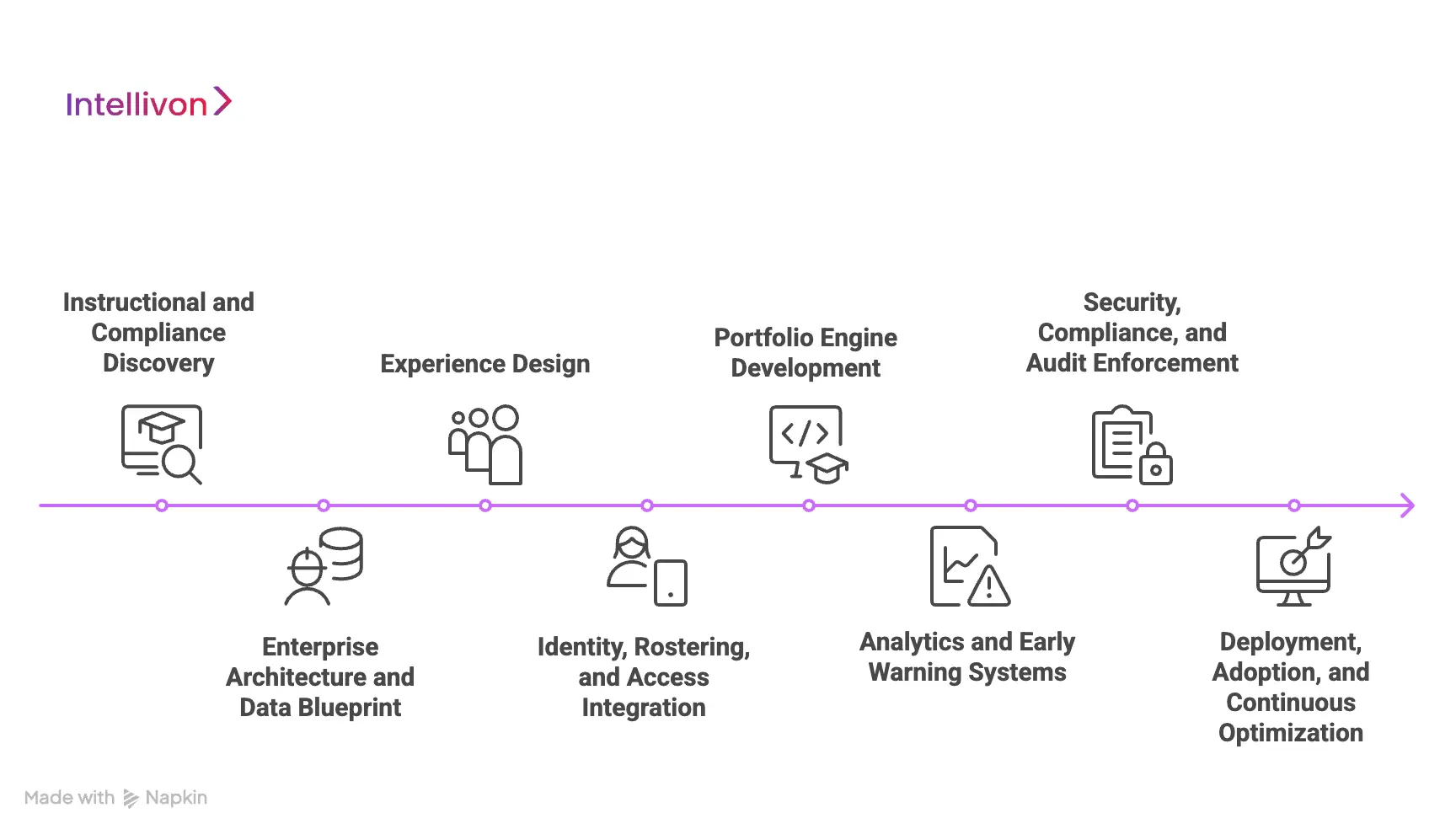
Step 1: Instructional and Compliance Discovery
Every platform begins with a discovery phase that aligns academic goals with regulatory constraints. We work with district leaders, curriculum teams, IT, and legal advisors to define what data will flow through the system, how it will be used, and where consent gates must exist.
This phase prevents downstream redesign. It ensures the platform supports real instructional models while remaining defensible under privacy and procurement scrutiny.
Step 2: Enterprise Architecture and Data Blueprint
We design the full system architecture before a single interface is finalized. This includes cloud infrastructure, data isolation models, identity layers, and integration paths with SIS and district systems.
This blueprint determines scalability, uptime, and long-term cost of operation. It is the foundation that allows the platform to grow from a pilot school to a multi-thousand-classroom deployment without re-architecting the core.
Step 3: Experience Design
User experience is mapped separately for each stakeholder group. Teacher workflows focus on speed and clarity, student workflows emphasize simplicity and expression, and the family access prioritizes visibility and trust.
By designing these journeys in parallel, we avoid the common failure point where one group’s experience improves at the cost of another’s adoption.
Step 4: Identity, Rostering, and Access Integration
We integrate the platform with district identity providers and SIS systems to automate user provisioning and class creation. Rosters sync continuously, and role changes update automatically.
This removes manual account management and eliminates one of the most common sources of data inconsistency and support burden in school platforms.
Step 5: Portfolio Engine Development
At this stage, we build the core classroom engine. This includes student portfolios, activity workflows, submission pipelines, feedback systems, and family visibility layers.
Every interaction is designed to generate structured learning evidence while remaining simple for daily classroom use. This balance is critical for long-term adoption.
Step 6: Analytics and Early Warning Systems
We then layer analytics on top of classroom activity. Skill tracking, engagement metrics, and multi-school dashboards are built directly into the platform.
At the district level, this transforms daily interaction data into operational insight that supports instruction, intervention, and leadership oversight.
Step 7: Security, Compliance, and Audit Enforcement
Security is enforced at every layer of the platform. Data is encrypted, access is role-governed, and consent and data visibility follow strict policy rules.
We also implement continuous audit logging so districts can demonstrate compliance during regulatory reviews and internal governance checks.
Step 8: Deployment, Adoption, and Continuous Optimization
Deployment includes pilot rollouts, staff onboarding, and adoption tuning. We monitor how teachers and families use the platform in real conditions, then refine workflows to improve participation and efficiency.
Post-launch, the system evolves through continuous optimization. Updates respond to instructional patterns, compliance changes, and district growth.
Platforms like Seesaw succeed because their foundations are engineered, not improvised. Intellivon applies enterprise-grade architecture, compliance-first design, and analytics-driven intelligence to every stage of development. The result is not just a classroom tool, but a district-ready engagement system built for long-term scale.
Cost To Build A Platform Like Seesaw For Schools
Building a Seesaw-style student engagement platform requires sustained investment across identity governance, secure data architecture, classroom workflows, family communication systems, and district-grade compliance. The actual cost varies based on scale, depth of integrations, regional regulations, and analytics maturity.
At Intellivon, we design cost models that align with regulatory mandates, SIS and LMS ecosystems, and long-term institutional strategy. Every platform roadmap balances instructional impact with financial responsibility. For districts and enterprises working under budget constraints, we phase development to preserve FERPA, COPPA, and state-level compliance without sacrificing safety or adoption.
Estimated Phase-Wise Cost Breakdown
| Phase | Description | Estimated Cost (USD) |
| Discovery & Compliance Blueprint | Requirements, data-flow mapping, FERPA/COPPA/GDPR-K alignment, admin policy design | 6,000 – 12,000 |
| Secure Architecture & Multi-Tenant Setup | Cloud-native design, PII isolation, encryption, IAM rules | 8,000 – 15,000 |
| Core Classroom & Assignment Module | Class creation, assignments, submissions, and grading workflows | 10,000 – 20,000 |
| Communication & Moderation Layer | AI/NLP filtering, message review tools, reporting workflows | 6,000 – 12,000 |
| Content & File Safety Engine | Sandbox uploads, malware scanning, safe link handling | 8,000 – 14,000 |
| Teacher & Admin Dashboards | Visibility tools, safety insights, and behavior monitoring | 10,000 – 20,000 |
| SIS/LMS & SSO Integrations | OneRoster, Clever, ClassLink, PowerSchool, Canvas, SAML/OAuth | 6,000 – 12,000 |
| Security & Compliance Engineering | Audit logs, breach detection, and least-privilege enforcement | 6,000 – 10,000 |
| Testing, QA & Security Validation | Pen-testing, privacy checks, scalability, and load testing | 6,000 – 10,000 |
| Pilot, Training & Rollout Support | District onboarding, educator training, workflow optimization | 6,000 – 10,000 |
Total Initial Investment Range: USD 60,000 – 175,000
Annual Maintenance & Optimization: 15–20% of initial build
Hidden Costs Organizations Should Plan For
- Integration Complexity: Different SIS and LMS systems require extensive mapping, testing, and workflow customization.
- Compliance Workloads: Ongoing privacy assessments, vendor agreements, incident response planning, and regulatory updates require continuous legal and engineering support.
- Data Governance & Normalization: Districts operate on fragmented data formats across schools and grade levels.
- Cloud Consumption Costs: Real-time submissions, AI moderation, file scanning, and analytics pipelines increase compute, storage, and bandwidth usage over time.
- Change Management & Training: Educator onboarding, refresher programs, and operational support must be budgeted as recurring costs, not one-time expenses.
- AI Model Maintenance: Content moderation, engagement analytics, and behavior detection models require periodic tuning as usage patterns and language models evolve.
Best Practices to Avoid Budget Overruns
- Start with a clearly defined scope anchored around core classroom and assignment workflows.
- Embed compliance rules during the first architecture phase rather than layering them later.
- Adopt a modular, microservices-based architecture to simplify upgrades and minimize long-term redevelopment expenses.
- Actively optimize cloud workloads by separating real-time functions from scheduled background processing.
- Maintain full observability across access patterns, system load, and data flows to prevent performance failures from becoming capital-intensive crises.
- Continuously iterate based on real classroom usage rather than assumptions.
Talk to our experts to get your phased cost roadmap and deployment strategy. Whether you are modernizing one school or scaling across an entire district, our teams help you launch with confidence and grow with clarity.
Conclusion
Platforms like Seesaw succeed because they solve real operational problems at the classroom and district scale. They connect instruction, families, data, and compliance into one continuous system. For enterprise education leaders, the value is not just engagement. It is visibility, governance, and long-term scalability built into daily workflows.
As digital learning becomes a permanent infrastructure, the question shifts from adoption to durability. At Intellivon, we build Seesaw-like platforms as growth enablers, not point tools. If you are planning your next district-wide learning system, we help you design it for scale, security, and sustained impact.
Build an Enterprise-Grade Classroom Learning Platform With Intellivon
At Intellivon, we develop enterprise-grade classroom learning platforms that combine compliance-first architecture, identity-led security, and district-scale reliability. Our systems unify instruction, engagement, analytics, and governance into one secure digital learning ecosystem.
Each platform is engineered for large institutional environments. It remains stable during peak usage, secure under regulatory scrutiny, and scalable across schools and regions. From encrypted data pipelines to moderated communication layers and role-based access controls, every component is designed to support safe, resilient digital instruction from the first deployment cycle.
Why Partner With Intellivon?
- Compliance-First Architecture: Aligned with FERPA, COPPA, GDPR-K, state privacy laws, and district-level vendor governance policies to ensure audit-ready operations from day one.
- Secure Classroom Intelligence: Role-based access, dynamic permissions, safe content workflows, and AI-powered moderation that support structured, secure digital learning at scale.
- Teacher Workflow Optimization: Purpose-built tools that streamline assignments, grading, feedback, communication, and classroom oversight without increasing administrative burden.
- District-Wide Interoperability: OneRoster, Clever, ClassLink, PowerSchool, Canvas, Skyward, and Google/Microsoft identity integrations for seamless multi-system operations.
- Enterprise-Scale Cloud Infrastructure: Multi-tenant resilience, elastic scaling, zero-downtime updates, and high availability during high-traffic instructional and assessment periods.
- Continuous AI and Safety Evolution: MLOps pipelines that refine moderation models, strengthen anomaly detection, and improve behavioral and safety classification over time.
- Zero-Trust Security Foundation: Encrypted data flows, strict IAM controls, device safeguards, sandboxed uploads, and continuous monitoring to protect student information.
- Designed for District Adoption: Teacher-first interfaces, leadership dashboards, and consistent usability that support rapid rollout and long-term fidelity across schools.
Book a strategy call with Intellivon to explore how a custom-built, enterprise-grade classroom learning platform can strengthen instruction, safeguard student data, and scale reliably across your entire district or education network.
FAQs
Q1. What type of learning platform is Seesaw used for in schools?
A1. Seesaw is primarily used as an elementary student engagement and digital portfolio platform, not a full LMS. It supports classroom activities, student work capture, family communication, and formative assessment while integrating with SIS and LMS systems.
Q2. How does Seesaw improve parent engagement in elementary education?
A2. Seesaw improves parent engagement through real-time access to student work, two-way messaging, automatic notifications, and built-in translation. Research shows interactive portfolios can increase parent participation by up to 65% compared to traditional communication methods.
Q3. Is Seesaw compliant with student data privacy laws like FERPA and COPPA?
A3. Yes, Seesaw is designed to support FERPA and COPPA compliance through verified parental consent workflows, role-based access controls, encrypted data handling, and continuous audit logging across all user interactions.
Q4. Can large school districts build a custom platform instead of using Seesaw?
A4. Yes, districts often choose to build custom platforms when they require deeper integrations, stricter governance, advanced analytics, or state-specific compliance. A custom build provides full ownership of data, workflows, and long-term cost control.
Q5. Who builds enterprise-grade Seesaw-like platforms for districts and education networks?
A5. Intellivon builds enterprise-grade Seesaw-like classroom engagement platforms using a compliance-first, cloud-native, and analytics-driven development framework tailored for district-scale deployment.