Healthcare organizations are under constant pressure to expand access without expanding overhead. Physical clinics remain expensive to scale, staffing remains unpredictable, and demand continues to rise across regions, campuses, workplaces, and public settings. As a result, leaders are rethinking how care enters the system and how that access is governed over time.
Touchless telehealth kiosks have emerged as a response to this shift. Platforms like OnMed CareStation illustrate how a controlled physical presence can deliver regulated clinical care without new facilities or linear staffing growth. However, reproducing that outcome across an enterprise requires more than installing devices in high-traffic locations.
At Intellivon, we design touchless telehealth kiosk platforms to operate inside existing healthcare ecosystems rather than alongside them. Our approach prioritizes clean interoperability, governed workflows, and continuity with established clinical, operational, and compliance systems. This perspective shapes the guidance throughout this blog. We explain how enterprise-grade telehealth kiosks are architected from the ground up to integrate with EHRs, scale safely, and deliver long-term operational value as care models evolve.
Key Takeaways Of The Touchless Telehealth Kiosks Market
The global market for telehealth kiosks reached approximately USD 315 million in 2023 and is expected to expand rapidly through the end of the decade. Industry forecasts point to a nearly 20% annual growth rate between 2024 and 2030, driven largely by increased public sector programs and private investments focused on improving healthcare access.
Market Insights:
- Current estimates place the global telehealth kiosk market in the high hundreds of millions today, with projections ranging into the low-to-multi-billion-dollar range over the next decade.
- Most industry forecasts indicate compound annual growth rates between roughly 11 and 20% , extending through 2030 to 2034, depending on how broadly kiosks are defined.
- Several market analyses suggest valuations of approximately USD 290 to 370 million during 2023–2024, with growth reaching around USD 1.0 to 1.1 billion by 2030 under conservative definitions.
- Broader assessments that include expanded care and public infrastructure use cases anticipate significantly higher long-term market potential.
What the “Touchless” Model Changes
- Infection-control priorities accelerated demand for contactless healthcare interfaces, particularly in shared and high-traffic environments.
- Touchless telehealth kiosks reduce dependence on shared touchscreens while preserving clinical-grade diagnostics and virtual consultation capabilities.
- Common interaction methods include QR-based mobile handoff, voice-guided workflows, gesture recognition, and minimal-contact peripherals.
- These designs address surface-transmission concerns while improving usability in public-facing deployments.
Demand Drivers and Buyer Profiles
- Sustained adoption of telehealth as a mainstream care channel continues to support kiosk deployment.
- In the United States, roughly one-third of adults reported using telemedicine in recent years, reinforcing acceptance beyond emergency use.
- Large-scale platforms have delivered hundreds of millions of virtual consultations, validating telehealth at population scale.
- Primary buyers include: Health systems seeking distributed access points, Employers managing workforce health programs, Pharmacy chains expanding service reach, and Government agencies delivering public health services without building new clinical sites
Touchless telehealth kiosks are evolving into a reliable access layer that helps enterprises extend care without expanding physical infrastructure or operational risk. When designed as governed platforms rather than standalone devices, they support scale, compliance, and long-term growth across diverse care environments.
What Is the Touchless Telehealth Kiosk, OnMed CareStation?
The OnMed CareStation is a touchless, enclosed telehealth kiosk designed to deliver full clinical consultations in public and semi-public environments. It functions as a compact care room rather than a self-service terminal.
Patients enter the kiosk and complete intake using contactless workflows such as QR-based mobile handoff, voice guidance, or minimal-touch interfaces. Inside, the station includes integrated medical devices that capture vitals and support real-time clinical assessment. A remote licensed clinician conducts the consultation through secure, high-definition video.
The CareStation is built for environments where privacy, infection control, and reliability matter. Common deployments include hospitals, campuses, workplaces, and transit hubs. Unlike basic telehealth booths, it operates within regulated clinical protocols and enterprise security standards. In practice, the kiosk acts as a physical access layer for virtual care. It brings telehealth into locations where personal devices, private rooms, or in-home setups are not always available.
How Does It Work?
Touchless telehealth kiosks work best when they follow a predictable, governed flow. Each step reduces friction for patients while keeping clinical control intact. Below is the typical end-to-end workflow used in enterprise deployments.
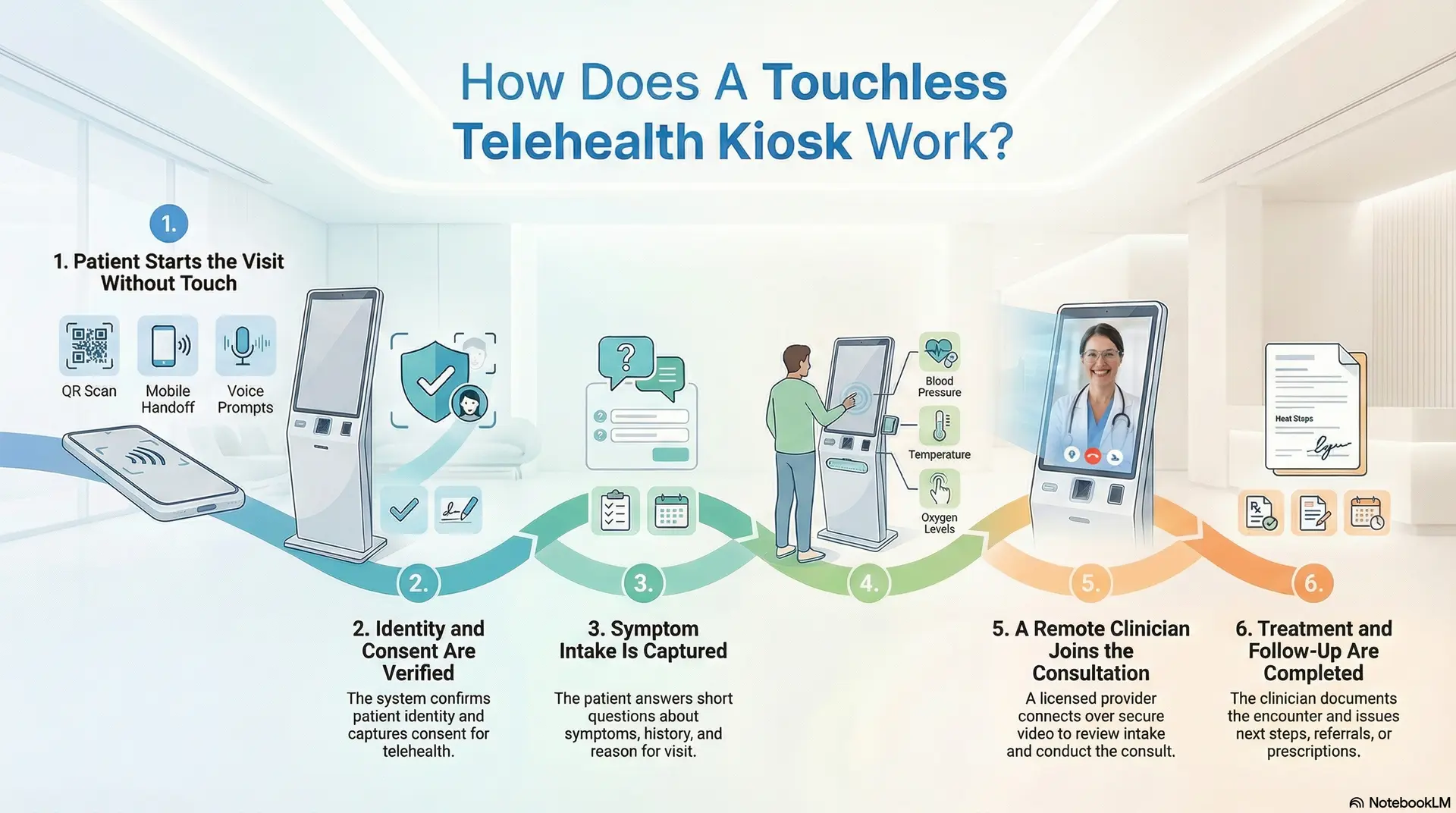
Step 1: Patient Starts the Visit Without Touch
The kiosk launches the visit through QR scan, mobile handoff, or voice prompts. This reduces shared surface contact. It also speeds up intake in busy locations.
Step 2: Identity and Consent Are Verified
The system confirms who the patient is using OTP, ID checks, or enterprise identity tools. It then captures consent for telehealth and data sharing. This creates a clean audit trail.
Step 3: Symptom Intake Is Captured
The kiosk guides the patient through short questions. It records symptoms, history, and reason for visit. In addition, it flags urgency based on predefined rules.
Step 4: Clinical Vitals and Measurements Are Collected
Integrated devices capture vitals such as blood pressure, temperature, and oxygen levels. The system attaches these readings to the visit record. This gives the clinician a real clinical context.
Step 5: A Remote Clinician Joins the Consultation
A licensed provider connects over secure video. They review intake and readings in real time. They then conduct the consult, just like a clinic visit.
Step 6: Treatment and Follow-Up Are Completed
The clinician documents the encounter and issues the next steps. If needed, they route referrals, prescriptions, or follow-ups. The platform also pushes records into connected systems.
A touchless kiosk works when the workflow stays simple for patients and is controlled by the enterprise. Each step protects privacy, supports compliance, and maintains clinical accountability. That is what turns a kiosk into a reliable access layer.
Why Healthcare Enterprises Are Deploying Touchless Telehealth Kiosks
Healthcare delivery is no longer confined to hospitals and clinics. Enterprises are being asked to meet patients where they already are, while still maintaining clinical quality, security, and cost discipline. Touchless telehealth kiosks are gaining traction because they address these demands without forcing organizations to redesign their entire care model.
Instead of acting as temporary access points, kiosks are now being deployed as part of long-term enterprise care strategies.
1. Expand Without Adding Physical Infrastructure
Opening new clinics requires capital, time, and long-term commitments. In contrast, touchless telehealth kiosks allow enterprises to introduce care access in locations such as campuses, workplaces, pharmacies, and community hubs.
This approach shortens the time to market. It also lets organizations test and scale access points without locking themselves into permanent real estate decisions.
2. Reduce Dependence on High-Cost Care Settings
Emergency rooms and urgent care centers often handle cases that do not require in-person treatment. Touchless kiosks redirect these encounters into virtual clinical workflows designed for appropriate acuity levels.
Over time, this reduces congestion in high-cost settings. It also helps enterprises manage care demand more predictably across service lines.
3. Enable Reliable Telehealth
Home-based telehealth assumes access to a private room, a stable connection, and a suitable device. Many patients do not have all three. Touchless kiosks solve this gap by providing enclosed, secure environments purpose-built for virtual care.
As a result, enterprises can extend telehealth access to populations that would otherwise be excluded.
3. Strengthen Infection Control
Healthcare access points in public or shared spaces face ongoing infection-control concerns. Touchless interfaces reduce reliance on shared touchscreens while preserving full clinical functionality.
This design supports safer interactions during seasonal illness spikes and improves readiness for future public health events.
4. Integrate With Existing Enterprise Systems
Healthcare leaders favor solutions that fit into current operating models. Touchless telehealth kiosks are deployed to integrate with EHRs, identity frameworks, scheduling systems, and analytics platforms.
This alignment prevents workflow fragmentation. It also ensures kiosks operate under the same governance and compliance standards as the rest of the enterprise.
5. Support Scalable, Repeatable Care Delivery
Enterprises look for solutions that behave consistently across locations. Touchless kiosks standardize how patients enter care, how data is captured, and how clinicians engage remotely.
This consistency makes it easier to scale programs, measure outcomes, and maintain operational control over time.
Healthcare enterprises are deploying touchless telehealth kiosks because they solve access, cost, and governance challenges at once. When designed as part of the enterprise care fabric, kiosks extend reach without adding fragility. This balance is what makes them a durable growth enabler rather than a short-term workaround.
85% Patients Get Fully Treated With Touchless Kiosks
Touchless telehealth kiosks are often viewed as access points for basic consultations. However, real-world deployment data shows they can resolve a far larger share of care needs than many enterprises expect. In operational environments, these kiosks are handling complete clinical encounters, not just intake or routing.
Data published by OnMed indicates that 85% of patients using its CareStation platform are fully diagnosed and treated without requiring escalation to a specialist. For enterprises, this statistic reframes how kiosks should be evaluated. They are not assistive tools. They are the frontline care infrastructure.
1. Why First-Encounter Resolution Matters at Scale
High-resolution rates change the economics of care delivery when most encounters close within the kiosk workflow, and downstream operational load decreases.
For healthcare enterprises, this means:
- Fewer referrals are moving into already-constrained specialist pipelines
- Reduced handoffs between systems and teams
- Lower administrative overhead tied to follow-up coordination
Over time, these effects compound across locations and service lines.
2. How Touchless Kiosks Achieve 85% Resolution
Resolution rates are not driven by hardware alone. They result from how clinical workflows, diagnostics, and decision support are orchestrated.
In practice, high-performing kiosks combine:
- Guided clinical intake that captures structured symptom data upfront
- Integrated diagnostic devices that support on-the-spot assessment
- Real-time virtual clinician access within governed protocols
Touchless interaction models remove friction without removing clinical rigor.
- Impact on High-Cost Care Diversion
OnMed also reports that 50 percent of patients using CareStations would have otherwise sought care at an emergency room or urgent care facility. This diversion effect is critical for enterprises managing cost exposure.
When kiosks absorb low-to-moderate acuity cases:
- Emergency departments preserve capacity for true acute needs
- Urgent care congestion declines
- Total cost per encounter drops without sacrificing care quality
This shifts kiosks from convenience tools to cost-control levers.
4. Why Deployment Speed Reinforces Resolution Outcomes
Care resolution only matters if kiosks can be deployed predictably. OnMed states that its CareStations can become fully operational in as little as 30 days from deployment start.
Fast deployment enables:
- Rapid response to access gaps
- Shorter pilot-to-production cycles
- Earlier realization of operational and financial impact
For enterprises, speed reduces the risk of stalled innovation.
An 85% treatment completion rate signals that touchless telehealth kiosks can function as legitimate points of care, not interim solutions. When designed around clinical workflows, diagnostics, and governance, they resolve the majority of encounters while diverting demand from higher-cost settings. This is why enterprises increasingly view kiosks as scalable care infrastructure rather than experimental technology.
Where Touchless Telehealth Kiosks Are Used in Real-World Healthcare
Touchless telehealth kiosks are not deployed in isolation. Enterprises place them where access gaps, cost pressure, or workflow constraints already exist. The value comes from choosing environments where a physical access point improves care delivery without adding operational burden.
Below are the most common real-world settings where kiosks deliver measurable impact.
1. Hospitals and Health System Campuses
Large hospital campuses use kiosks to manage demand outside traditional exam rooms. They support triage, follow-up visits, and low-acuity consultations that do not require in-person exams.
This helps preserve clinician time. It also reduces congestion in waiting areas while maintaining clinical oversight.
2. Outpatient Clinics and Specialty Centers
Clinics deploy kiosks to extend virtual services without increasing room count. Common use cases include follow-ups, medication reviews, and specialty consults that rely on structured data rather than physical exams.
Over time, this allows clinics to serve more patients without expanding their footprint.
3. Pharmacies and Retail Health Locations
Retail and pharmacy environments use kiosks for on-demand consultations and health screenings. Patients can speak with a remote clinician while staying within a familiar care setting.
For enterprises, this integrates clinical services into existing customer workflows without building standalone clinics.
4. Workplaces and Corporate Campuses
Employers place kiosks on large campuses to support workforce health programs. These include primary care access, wellness checks, and chronic condition management.
This reduces time away from work. It also helps organizations address health needs without managing full-on-site clinics.
5. Universities and Educational Institutions
Campuses use kiosks to provide convenient access for students and staff. Typical visits include minor illnesses, mental health check-ins, and follow-up care.
This approach reduces strain on campus health centers while improving access during peak periods.
6. Airports and Transit Hubs
High-traffic travel locations deploy kiosks for urgent consultations and travel-related care needs. Privacy and infection control are critical in these environments.
Touchless designs make it possible to deliver care without disrupting passenger flow.
7. Community and Public Health Locations
Public health programs use kiosks in community centers and shared facilities. These deployments support screening, follow-ups, and access for populations without reliable home telehealth setups.
This helps extend care reach without a permanent clinical infrastructure.
Touchless telehealth kiosks succeed when they are placed where traditional care models fall short. Across hospitals, retail, workplaces, and public spaces, they provide a controlled way to extend access. For enterprises, the key is aligning deployment locations with real operational needs rather than novelty.
Core Components of Touchless Telehealth Kiosks Like OnMed CareStation
Touchless telehealth kiosks succeed or fail based on their underlying components. At the enterprise level, these systems must operate reliably in public environments while meeting clinical, security, and compliance expectations. Platforms like OnMed CareStation are built as integrated care systems, not assembled hardware units.
Below are the core components enterprises prioritize when designing kiosks for long-term deployment.
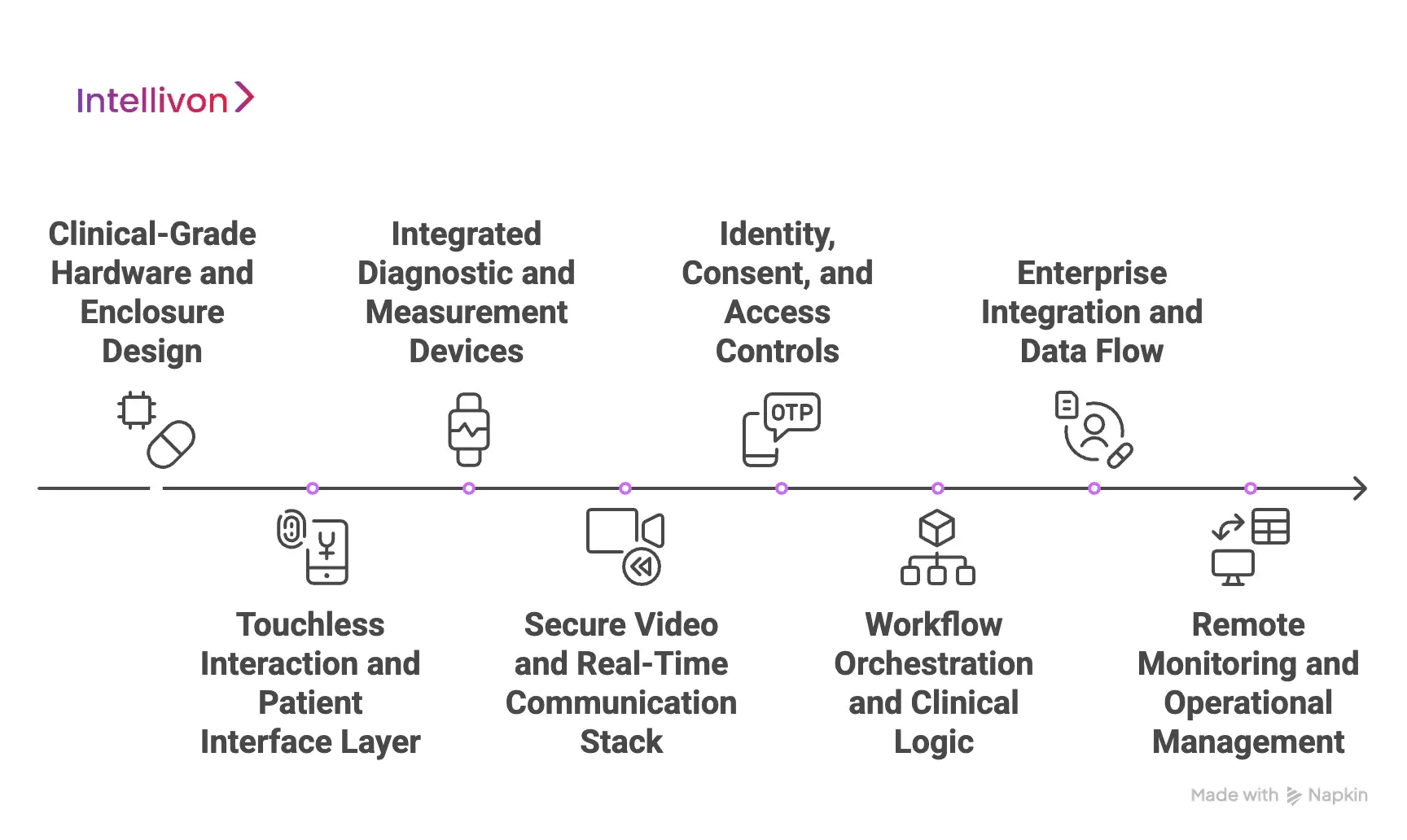
1. Clinical-Grade Hardware and Enclosure Design
Enterprise kiosks use medical-grade hardware designed for continuous operation. This includes high-resolution cameras, calibrated diagnostic devices, and sound-controlled enclosures that protect privacy.
The physical structure matters as much as the technology inside. Enclosed designs ensure consultations remain confidential, even in high-traffic locations.
2. Touchless Interaction and Patient Interface Layer
Touchless kiosks reduce shared surface contact through QR-based mobile handoff, voice guidance, or minimal-touch controls. These interaction models improve hygiene while keeping workflows intuitive.
For enterprises, consistency is critical. The interface must behave the same way across locations to support training, support, and compliance.
3. Integrated Diagnostic and Measurement Devices
Vitals collection is central to clinical credibility. Enterprise kiosks integrate devices such as blood pressure cuffs, thermometers, pulse oximeters, and digital stethoscopes.
These readings feed directly into the consultation workflow. Clinicians receive structured, real-time data instead of relying solely on patient-reported symptoms.
4. Secure Video and Real-Time Communication Stack
High-quality video is not optional in clinical care. Enterprise kiosks rely on encrypted, low-latency video systems designed for regulated environments.
This ensures clinicians can conduct thorough assessments. It also supports clear communication without technical interruptions.
5. Identity, Consent, and Access Controls
Every encounter must begin with verified identity and documented consent. Enterprise kiosks integrate authentication methods such as OTPs, ID validation, or enterprise identity systems.
These controls create audit-ready records. They also ensure access aligns with regulatory and organizational policies.
6. Workflow Orchestration and Clinical Logic
Behind the interface, the kiosk runs governed workflows. These define intake paths, escalation rules, and documentation requirements.
This orchestration ensures care delivery stays consistent. It also prevents ad hoc decisions that introduce risk at scale.
7. Enterprise Integration and Data Flow
Touchless kiosks must integrate cleanly with EHRs, scheduling systems, analytics platforms, and care management tools. Data flows should be structured, traceable, and secure.
This integration allows kiosks to strengthen existing operations rather than creating parallel systems.
8. Remote Monitoring and Operational Management
Enterprises require visibility across all deployed kiosks. Central dashboards monitor uptime, device health, usage patterns, and compliance signals.
This allows teams to address issues proactively. It also supports predictable performance as deployments scale.
Enterprise-grade touchless telehealth kiosks are defined by their components working together as a single system. Hardware, software, workflows, and governance must align from day one. When designed this way, kiosks become a reliable care infrastructure rather than isolated access points.
How Telehealth Kiosks Integrate With Existing Healthcare Systems
Telehealth kiosks only create enterprise value when they operate inside existing healthcare systems. When kiosks function as standalone tools, they introduce data silos, workflow gaps, and operational risk. For this reason, integration is treated as a foundational requirement in mature deployments.
Well-designed kiosks extend existing systems and do not replace them or sit outside established care operations.
1. Integration With EHR and Clinical Record Systems
Enterprise-grade kiosks integrate directly with EHR platforms to exchange visit details, vitals, and clinician documentation. Each encounter becomes part of the patient’s longitudinal record rather than a separate telehealth artifact.
This integration preserves clinical continuity. Providers review kiosk encounters alongside in-person visits, lab results, and historical data without switching systems or workflows.
2. Identity, Access, and Patient Matching
Telehealth kiosks rely on identity and access management systems to verify patients before care begins. These checks may include OTP verification, government ID matching, or enterprise IAM frameworks already in use.
Accurate patient matching prevents duplicate records and downstream reconciliation work. It also ensures consent, eligibility, and access controls remain consistent across all care channels.
3. Scheduling, Triage, and Care Routing
Kiosks integrate with scheduling and triage platforms to route visits based on acuity, clinician availability, or service-line rules. This prevents random clinician assignment and unmanaged demand spikes.
Care teams maintain visibility into incoming visits. Kiosk encounters follow the same routing logic as other digital or in-person access points.
4. Diagnostics and Data Normalization
Vitals and measurements captured inside the kiosk are structured before being sent to downstream systems. Normalization ensures consistency across analytics, population health tools, and reporting platforms.
Clean data flow supports clinical decision-making. It also reduces audit risk caused by incomplete or inconsistent records.
5. Billing, Coding, and Revenue Systems
Telehealth kiosks integrate with billing and revenue cycle platforms to support compliant coding and reimbursement. Encounter details, clinician notes, and visit metadata flow without manual handoffs.
This integration reduces revenue leakage. It also supports predictable financial operations as kiosk usage scales.
6. Analytics and Operational Intelligence
Enterprise deployments feed kiosk data into analytics platforms used by operations and leadership teams. These insights reveal utilization trends, resolution rates, and location-level demand patterns.
Over time, this data informs placement strategy, staffing models, and service expansion decisions.
Telehealth kiosks succeed when they behave like a natural extension of existing healthcare systems. Deep integration across clinical, operational, and financial platforms ensures continuity, compliance, and control. This alignment is what allows kiosks to scale without disrupting care delivery.
AI Features In Modern Telehealth Kiosks Like OnMed CareStation
AI plays a quiet but critical role in modern telehealth kiosks. Its purpose is not to replace clinicians or automate diagnosis. Instead, AI supports consistency, speed, and safety across high-volume, distributed care environments.
In platforms like OnMed CareStation, AI operates behind the scenes to guide intake, assist clinicians, and keep enterprise workflows predictable at scale.
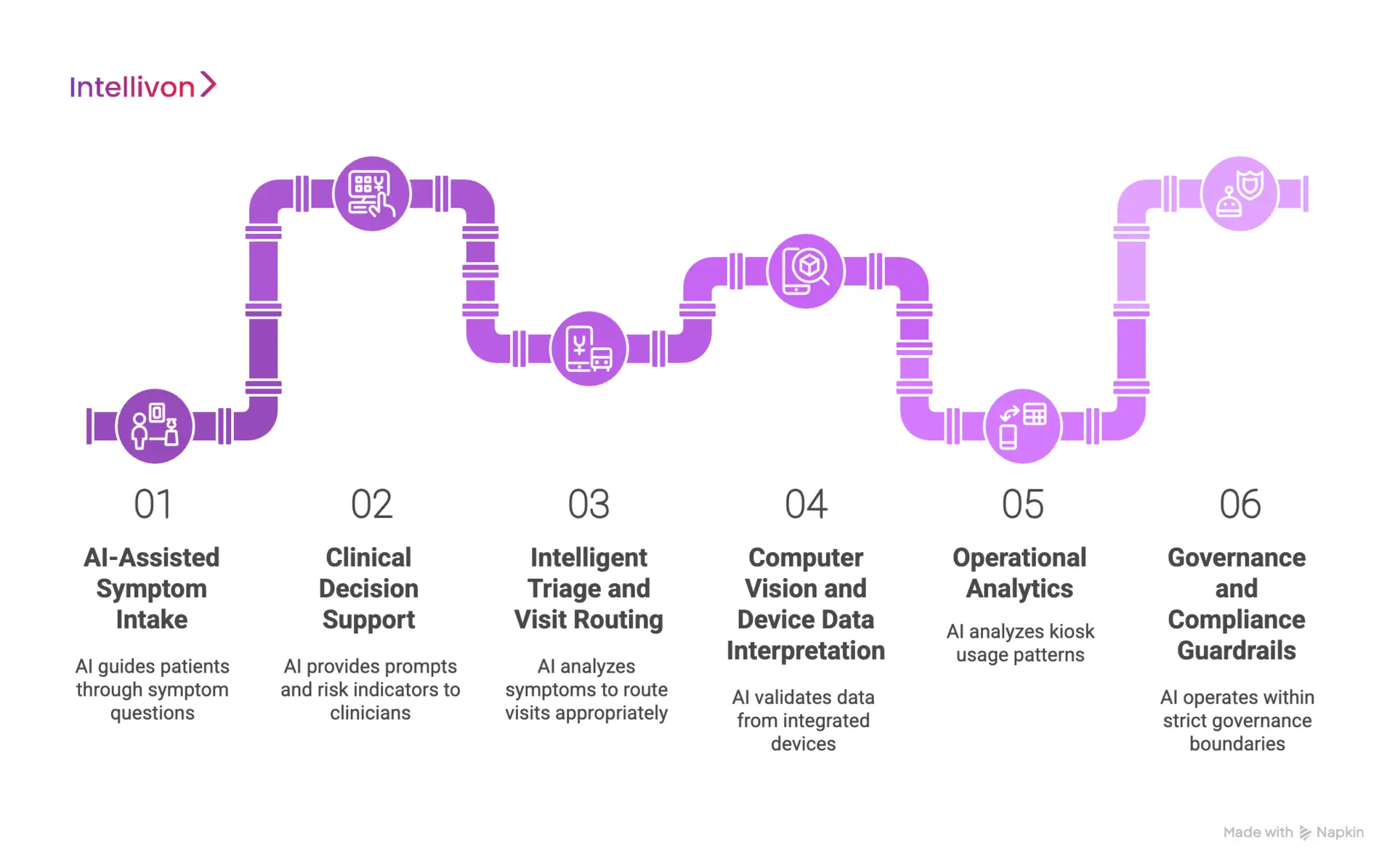
1. AI-Assisted Symptom Intake
AI helps structure the first interaction before a clinician joins. It guides patients through symptom questions, medical history, and visit intent using adaptive prompts.
As answers are captured, the system organizes information into clinically relevant formats. This reduces ambiguity and ensures clinicians receive usable context rather than free-text descriptions. Over time, this consistency improves both visit quality and documentation accuracy.
2. Clinical Decision Support
Modern kiosks use AI to assist clinicians, not override them. Decision support models surface relevant prompts, risk indicators, or follow-up questions based on the data collected during intake.
These signals help clinicians focus their time. They also reduce variation across encounters while preserving clinical judgment and accountability.
3. Intelligent Triage and Visit Routing
AI supports triage by analyzing symptoms, vitals, and visit intent against predefined rules. It helps determine urgency and routes visits to the appropriate clinician or service line.
This reduces misrouting and wait times. It also prevents low-acuity visits from entering workflows meant for complex care.
4. Computer Vision and Device Data Interpretation
Some kiosks use AI models to assist with interpreting inputs from integrated devices. This may include image clarity checks, audio quality validation, or signal consistency across sensors.
These checks improve data reliability before clinicians review it. They also reduce the need for repeat measurements during live consultations.
5. Operational Analytics
AI is used to analyze kiosk usage patterns, resolution rates, and operational signals across locations. This helps enterprises understand where kiosks perform well and where adjustments are needed.
Insights support smarter placement, staffing decisions, and service expansion without relying on manual reporting.
6. Governance and Compliance Guardrails
In enterprise deployments, AI operates within strict governance boundaries. Models follow defined scopes, log decisions, and support audit requirements.
This ensures AI strengthens care delivery without introducing regulatory risk or uncontrolled behavior over time.
AI in telehealth kiosks is most effective when it remains focused and disciplined. By supporting intake, triage, clinician decision-making, and operations, AI improves consistency without removing human oversight. This balance is what allows kiosks to scale safely across enterprise healthcare environments.
Deployment Models for Telehealth Kiosks at Scale
Scaling telehealth kiosks requires more than adding units to new locations. Enterprises must decide how kiosks are governed, supported, and integrated as the footprint grows. The deployment model determines whether kiosks behave as reliable infrastructure or become fragmented access points over time.
Mature organizations approach deployment as an operating model decision, not a hardware rollout.
1. Single-Site Pilot Deployments
Enterprises often begin with a single-site pilot to validate assumptions before committing to scale. These pilots allow teams to test clinical workflows, patient adoption, and system integrations in a controlled environment.
Early deployments surface issues around intake, identity verification, and clinician availability. Addressing these issues at the pilot stage reduces risk during broader rollout.
2. Multi-Site Regional Rollouts
After pilot validation, enterprises expand kiosks across regions or facility networks. Multi-site deployments require standardized configurations, centralized oversight, and consistent integration with enterprise systems.
This model supports growth while maintaining operational discipline. It ensures kiosks behave consistently across locations despite differences in patient volume or environment.
3. Hub-and-Spoke Deployment Models
In hub-and-spoke models, centralized clinical teams support multiple kiosk locations. The kiosks act as access points, while care delivery remains coordinated through a central hub.
This approach improves clinician utilization and simplifies staffing. It also allows enterprises to extend access into new areas without duplicating clinical resources.
4. Embedded Deployments in Partner Locations
Kiosks are often deployed inside partner environments such as pharmacies, workplaces, or educational campuses. These settings introduce shared responsibility for space, connectivity, and on-site coordination.
Successful deployments define clear boundaries. Enterprises must align on governance, data ownership, and operational support to avoid ambiguity as usage grows.
5. Fully Managed Enterprise Deployments
In fully managed models, enterprises centralize control over kiosk operations. This includes software updates, device health monitoring, compliance oversight, and issue resolution.
Central management reduces variability across locations. It also enables proactive maintenance and predictable performance at scale.
Deployment models shape how telehealth kiosks perform over time. Enterprises that plan for scale early avoid fragmentation and operational drift. When deployment aligns with governance and support structures, kiosks become a stable access infrastructure rather than a short-lived pilot.
How We Create Touchless Telehealth Kiosk Platforms Like OnMed
At Intellivon, we approach touchless telehealth kiosks as part of an enterprise care infrastructure. Each platform is designed to fit into existing healthcare environments, align with governance requirements, and remain operationally stable as deployments scale.
Our process reflects how large organizations actually build, deploy, and manage care systems over time. Below is our step-by-step approach.
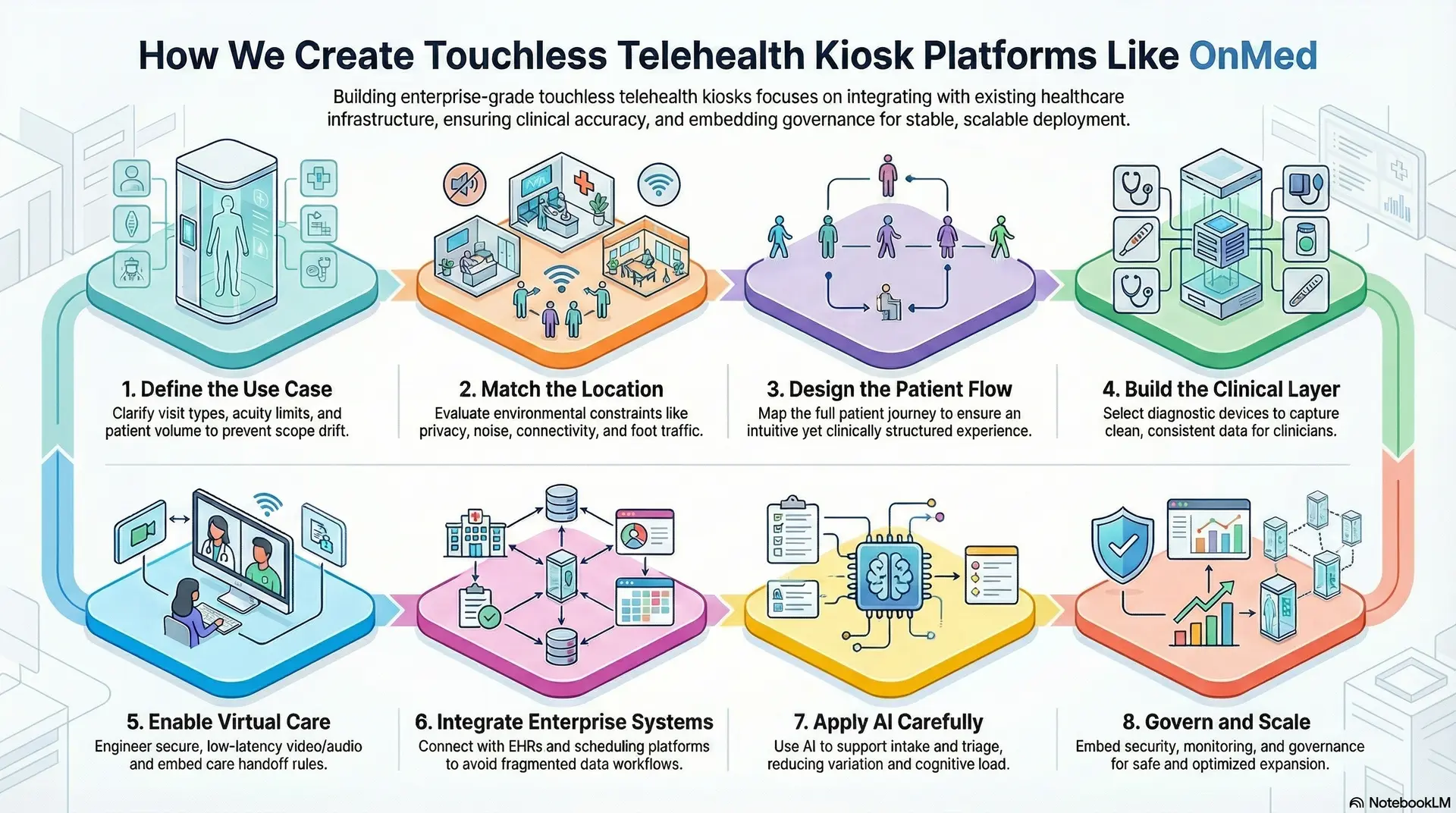
1. Define the Use Case
We start by clearly defining what the kiosk is meant to deliver. This includes visit types, acuity limits, clinical ownership, and expected patient volume. A kiosk intended for triage behaves very differently from one focused on follow-ups or medication reviews.
Clarifying intent early prevents scope drift later. It also ensures the kiosk supports real operational needs rather than generic access goals.
2. Match the Location
Next, we evaluate where the kiosk will operate. Physical environments introduce constraints around privacy, noise, connectivity, and foot traffic. A hospital corridor, corporate campus, or pharmacy setting each demands different design choices.
This step ensures the kiosk fits naturally into its surroundings. It also reduces friction for both patients and on-site staff.
3. Design the Patient Flow
We then map the full patient journey from entry to exit. This includes how the visit begins, how intake is completed, and how the next steps are communicated. Touchless interaction models are selected based on context, accessibility, and compliance needs.
The goal is to keep the experience intuitive while maintaining clinical structure. Simplicity improves adoption without compromising safety.
4. Build the Clinical Layer
The clinical layer defines how vitals and measurements are captured. We select appropriate diagnostic devices and design how data is validated, structured, and attached to each encounter.
Clinicians receive clean, consistent information during the consult. This reduces ambiguity and supports confident clinical decision-making.
5. Enable Virtual Care
We engineer secure, low-latency video and audio for real-world conditions. Public environments demand reliability, clarity, and privacy during consultations.
Care handoff rules are embedded into the workflow. Clinicians know when to conclude treatment, escalate care, or trigger follow-ups without manual coordination.
6. Integrate Enterprise Systems
Integration is treated as a core requirement. Kiosks connect with EHRs, scheduling platforms, identity systems, and analytics tools already in place.
This ensures kiosk encounters become part of the existing care ecosystem. It also avoids parallel workflows and fragmented data.
7. Apply AI Carefully
AI is used to support intake, triage, and operational consistency. It helps structure symptom data, flag risk indicators, and route visits appropriately.
AI does not replace clinicians. It reduces variation and cognitive load while keeping human oversight intact.
8. Govern and Scale
Finally, we embed governance, security, and monitoring across the platform. This includes access controls, consent management, audit logging, and centralized operational dashboards.
Ongoing visibility allows enterprises to optimize performance and expand deployments safely. Governance scales alongside usage rather than becoming a bottleneck.
Building touchless telehealth kiosks at scale requires discipline across design, integration, and governance. When each step is handled intentionally, kiosks evolve into a stable access infrastructure that supports growth instead of introducing risk. This is the standard enterprises expect when deploying care platforms at scale.
Cost Breakdown to Build a Touchless Telehealth Kiosk Platform
Building a touchless telehealth kiosk platform does not require a large, one-time capital outlay. Most enterprises begin with a focused foundation that supports secure virtual consultations, core device integration, identity governance, and essential interoperability. The platform then evolves as kiosk volume, locations, and service lines expand.
At Intellivon, we structure cost around platform readiness, not feature overload. This allows organizations to launch quickly, validate outcomes early, and scale responsibly without committing to unnecessary complexity upfront.
Estimated Cost Breakdown (USD 50,000–150,000)
| Cost Component | What It Covers | Estimated Range |
| Discovery & Kiosk Care Model Design | Use-case definition, visit scope, location fit, escalation rules, privacy constraints, and platform architecture | $6,000 – $14,000 |
| Patient Flow & Touchless UX Design | QR-based entry, intake workflows, accessibility logic, and visit completion flows | $5,000 – $12,000 |
| Clinical Device & Data Layer | Device integration, data validation, and clinician-ready vitals structuring | $6,000 – $16,000 |
| Secure Video & Virtual Care Engine | Encrypted video sessions, audio reliability, and consultation handoff logic | $6,000 – $14,000 |
| AI-Assisted Intake & Triage Logic | Structured symptom capture, routing rules, and basic decision support | $6,000 – $15,000 |
| EHR & Enterprise Integrations | HL7/FHIR interfaces, documentation sync, and workflow alignment | $8,000 – $20,000 |
| Identity, Consent, and Access Governance | Patient verification, consent capture, role-based access, and audit trails | $4,000 – $10,000 |
| Security and Compliance Controls | HIPAA safeguards, encryption, logging, and policy enforcement | $4,000 – $10,000 |
| Operational Analytics & Monitoring | Usage tracking, resolution metrics, uptime monitoring, and dashboards | $3,000 – $8,000 |
| Testing, Pilot, and Stabilization | QA, pilot rollout, clinician feedback, and system tuning | $4,000 – $11,000 |
Typical Investment Ranges
- Lean MVP Kiosk Platform: $50,000 – $85,000
Suitable for pilots, limited locations, and focused visit types. - Enterprise-Ready Phase 1 Platform: $95,000 – $150,000
Designed for multi-location rollout, deeper integration, and governed operations.
Final costs vary based on integration depth, compliance rigor, and the level of clinical oversight required at launch.
Factors That Influence the Cost of Touchless Telehealth Kiosk Platforms
Cost is driven by care complexity and governance, not by interface polish.
- Scope of Clinical Use Cases: Supporting simple consultations costs less than enabling multi-condition workflows and escalation logic.
- Depth of Enterprise Integration: Lightweight data exchange is cheaper, while bidirectional EHR and scheduling sync increases effort but reduces long-term friction.
- Compliance and Identity Requirements: Strong access controls and audit readiness raise upfront cost but protect the program at scale.
- AI and Automation Depth: Basic intake assistance is inexpensive. Advanced triage and analytics add cost but improve operational efficiency.
- Analytics and Executive Visibility: Minimal reporting shows activity. Enterprise dashboards explain outcomes, utilization, and ROI.
Conclusion
Touchless telehealth kiosks should be understood as operating layers within modern healthcare, not standalone devices placed for convenience. When designed with integration, governance, and clinical rigor in mind, they become scalable access models that extend care without increasing operational strain.
They allow enterprises to meet patients where they are while preserving control over workflows, data, and compliance. As healthcare continues to decentralize, kiosks provide a practical way to deliver consistent, high-quality care across locations. For organizations focused on growth, resilience, and long-term efficiency, this shift turns access expansion into a strategic advantage rather than a logistical challenge.
Build A Touchless Telehealth Kiosk Platform With Intellivon
At Intellivon, we build touchless telehealth kiosk platforms as enterprise operating layers, not standalone devices or point solutions placed at the edge of care. Our platforms are designed to govern how patients access care, how clinical encounters are delivered remotely, and how control is maintained across identity, workflows, and regulated infrastructure.
Each solution is engineered for healthcare organizations operating at scale. Platforms are infrastructure-first and compliance-led, with kiosks integrated into existing EHRs, identity frameworks, and operational systems. As deployments expand across locations, service lines, and populations, clinical oversight, data integrity, and operational predictability remain intact.
Why Partner With Intellivon?
- Enterprise-grade kiosk architecture aligned with access control, clinical governance, and scalable care delivery
- Deep interoperability expertise across EHRs, diagnostics, identity platforms, analytics stacks, and enterprise workflows
- Compliance-by-design delivery supporting HIPAA, audit readiness, role-based access, and governed data flows
- AI-assisted orchestration that supports intake, triage, and operations without replacing clinical judgment
- Proven enterprise delivery model with phased rollout, KPI-driven validation, and controlled scale
Talk to Intellivon’s healthcare platform architects to explore how a touchless telehealth kiosk platform can integrate into your existing ecosystem, reduce access friction, protect regulatory integrity, and scale care delivery with confidence.
FAQs
Q1. What is a touchless telehealth kiosk, and how does it work?
A1. A touchless telehealth kiosk is an enclosed, self-contained care environment that enables virtual clinical consultations without shared touchscreens. Patients initiate visits using QR codes, voice guidance, or minimal-contact interfaces. Integrated medical devices capture vitals, while a remote clinician conducts the consultation securely in real time.
Q2. How are touchless telehealth kiosks different from regular telehealth booths?
A2. Traditional telehealth booths often rely on basic video calls and limited diagnostics. Touchless telehealth kiosks function as full clinical access points. They integrate diagnostic devices, identity verification, consent management, and enterprise workflows, allowing complete encounters rather than simple consultations.
Q3. Are touchless telehealth kiosks HIPAA compliant?
A3. Yes, when designed correctly. Enterprise-grade kiosks enforce HIPAA through encrypted communications, role-based access controls, audit logging, and governed data flows. Compliance depends on platform architecture, not just hardware, which is why kiosks must integrate with existing healthcare security and governance systems.
Q4. Where are touchless telehealth kiosks typically deployed?
A4. They are commonly deployed in hospitals, outpatient clinics, pharmacies, workplaces, campuses, airports, and community health locations. These environments benefit from private, reliable access to care where personal devices or home telehealth setups are not always practical.
Q5. Can touchless telehealth kiosks integrate with existing EHR systems?
A5. Yes. Enterprise kiosks are designed to integrate with EHR platforms using standards such as HL7 and FHIR. This allows visit documentation, vitals, and clinician notes to become part of the patient’s longitudinal record, preserving continuity across in-person and virtual care.