Most clinical decisions happen inside Epic, and that is why tools built outside of it rarely get consistent use. When clinicians have to leave their workflow to access insights or automation, those tools quickly become optional, no matter how useful they seem.
Epic App Orchard tackles this issue by allowing custom applications to run directly within Epic. These applications use real-time patient and encounter context while adhering to Epic’s governance model. These applications operate within active clinical workflows where mistakes can have serious consequences. Additionally, they often need to connect with systems outside of Epic, such as medical devices, analytics platforms, payer infrastructure, and external data sources.
At Intellivon, we develop Epic App Orchard applications with a strong emphasis on workflow safety, interoperability beyond Epic, compliance-by-design engineering, and long-term functionality at scale. These directly influence whether an application becomes part of daily clinical work or fades into the background. In this blog, we will discuss how we approach each of these areas and explain why they are important for building tools that clinicians can truly trust and depend on.
Why Epic App Orchard Apps Are a Strategic Enterprise Investment
Epic App Orchard applications are increasingly viewed as strategic investments because they allow enterprises to extend Epic in ways that directly improve clinical adoption, operational efficiency, and long-term platform flexibility.
With the global healthcare interoperability solutions market growing from USD 3.4 billion in 2023 to USD 8.57 billion by 2030 at a 14.15% CAGR, Epic App Orchard applications are increasingly where this interoperability investment materializes in practice.

Key Takeaways:
- With 42.3% of the U.S. acute care EHR market in 2024, up from 39.1% the previous year, and 176 multispecialty hospitals added, Epic has become the primary innovation surface for a large share of enterprise healthcare systems.
- Since launching in 2017, Epic App Orchard has expanded to 411 applications from 500+ organizations, supporting 1,200 licenses and processing over three billion API messages, which indicates enterprise-scale usage rather than experimental adoption.
- Adoption Acceleration: Large academic health systems that adopted Epic App Orchard applications early report faster clinician adoption and measurable improvements across patient outcomes, cost control, and compliance. Because these apps live inside Epic workflows, they reduce friction at the point of care.
Cost Avoidance
Epic App Orchard applications reduce the need for custom EHR modifications, which are expensive to maintain and difficult to upgrade. Compared to standalone point solutions, they also lower long-term maintenance and integration overhead.
Scalability
With Epic holding 42.3% of the U.S. acute care EHR market, investments in App Orchard applications can reach more than 3 out of every 5 hospitals nationwide. This allows enterprises to scale innovation without redesigning solutions for each environment.
Epic App Orchard applications deliver measurable returns by improving adoption, reducing long-term costs, and scaling innovation across a large share of the healthcare market.
As Epic’s footprint and interoperability demands continue to grow, investing in Epic-native applications becomes a practical, future-ready decision rather than a speculative one.
What Is Epic App Orchard?
At its core, Epic App Orchard is not a traditional app marketplace. Instead, it functions as Epic’s governed platform layer for extending the EHR without modifying its core. Because of this design, healthcare organizations can introduce new capabilities inside Epic while preserving stability, safety, and compliance.
Rather than encouraging deep customization of Epic itself, App Orchard defines where and how external applications can operate. As a result, enterprises gain flexibility without inheriting the long-term risks that come with brittle EHR customizations.
Epic App Orchard exists because Epic increasingly operates as a platform, not only as a system of record. As care delivery becomes more digital, Epic needed a controlled way to support innovation without fragmenting clinical workflows or compromising reliability.
Why Epic built App Orchard
To understand App Orchard’s role, it helps to look at what Epic is intentionally avoiding.
- Preventing uncontrolled customization of core EHR logic
- Preserving predictable upgrade paths across customers
- Allowing innovation without destabilizing live clinical systems
What this means for enterprises
Because of this approach, enterprises benefit in several practical ways.
- Innovation happens around Epic, not inside its core code
- New capabilities can be added without increasing upgrade risk
- Platform governance stays centralized and consistent over time
How Epic App Orchard Governs Access, Security, and Distribution
Governance is the defining characteristic of Epic App Orchard. Third-party applications do not receive open-ended access to Epic data or workflows. Instead, Epic enforces clear boundaries that shape how apps interact with the system.
How access is controlled
Before an app runs inside Epic, it must operate within declared limits.
- Applications specify required data scopes in advance
- Access is limited to defined patients, encounters, or workflows
- Authentication and authorization follow Epic-enforced standards
How security and risk are managed
Once deployed, applications remain subject to ongoing oversight.
- Epic reviews applications before they are made available
- Data exchange occurs only through approved interfaces
- Activity remains traceable and auditable across environments
How distribution works
Just as importantly, App Orchard controls how apps reach enterprises.
- Applications are licensed rather than freely installed
- Versioning and updates follow defined release paths
- Organizations retain visibility into what runs in production
What Epic App Orchard Enables — and What It Restricts by Design
Epic App Orchard is intentionally opinionated. It enables specific forms of extension while restricting others to protect clinical and operational integrity.
What App Orchard enables
Within its boundaries, App Orchard supports meaningful extension.
- Native application launch inside Epic workflows
- Patient- and encounter-level context awareness
- Governed data exchange with external systems
- Workflow-aligned innovation without clinician disruption
What App Orchard intentionally restricts
At the same time, certain capabilities remain off-limits by design.
- Uncontrolled background processing
- Broad, unrestricted data extraction
- Deep modification of Epic’s core logic
- Bypassing Epic security and audit controls
These restrictions ensure Epic-native applications remain safe, predictable, and operable at enterprise scale.
Why This Model Matters for Large Enterprises
For large healthcare systems, App Orchard establishes a clear contract between innovation and control. It allows organizations to extend Epic meaningfully while still protecting stability, compliance, and long-term operability.
Consequently, successful Epic App Orchard initiatives start by designing within these constraints rather than attempting to work around them.
What Does “Building on Epic” Really Mean?
Teams often say they are “building on Epic,” but that phrase can mean very different things in practice. Sometimes it refers to moving data in and out of Epic. Other times, it means changing how work happens inside Epic. The difference matters because it affects adoption, risk, and long-term value.
This section clarifies what “building on Epic” actually means by breaking it into simple, practical categories. Once this distinction is clear, it becomes much easier to understand where Epic App Orchard fits and why it exists.
1. Connecting Systems to Epic (Integration)
In many cases, organizations connect external systems to Epic so data can flow between them. For example, a reporting tool may pull clinical data from Epic, or a billing system may send updates back.
In this model, Epic remains mostly unchanged. Clinicians still do their work elsewhere, and the external system becomes another place they must visit. While integration is useful, it rarely changes daily workflows inside Epic.
2. Extending Work Inside Epic (Epic-Native Apps)
Building inside Epic is different. Here, applications run directly within Epic workflows and use patient or encounter context in real time. Clinicians do not leave Epic to use them.
Epic App Orchard exists for this purpose. It allows organizations to introduce new capabilities inside Epic without modifying the EHR itself. As a result, work happens where clinicians already are, which improves adoption and reduces friction.
3. Changing Epic Itself (Customization)
Some organizations modify Epic directly through configuration or customization. This can be powerful, but it comes with trade-offs. Customizations are harder to maintain, more expensive to upgrade, and difficult to scale across large systems.
Because of these risks, enterprises limit direct customization and look for safer ways to extend Epic. App Orchard was designed to provide that safer alternative.
4. Where Epic App Orchard Fits
Epic App Orchard sits between integration and customization. It does not simply move data around Epic, and it does not change Epic’s core logic. Instead, it allows applications to extend workflows in a controlled, governed way.
This approach gives enterprises flexibility while preserving stability, security, and upgradeability. It also explains why App Orchard apps are treated differently from standalone tools or custom builds.
Understanding these differences helps organizations make better decisions. Integration solves data movement problems. At the same time, customization solves narrow workflow gaps but increases risk. However, Epic App Orchard enables workflow extension without breaking the system.
Once teams understand what “building on Epic” really means, they can choose the right approach and avoid costly mistakes later.
Types of Custom Applications Built on Epic App Orchard
Organizations use Epic App Orchard to build applications that run inside Epic workflows, not alongside them. These applications use patient and encounter context, respect Epic’s governance model, and fit naturally into everyday clinical and operational work.
Because they live where work already happens, these apps tend to see higher adoption and more predictable outcomes. Below are the most common categories of Epic App Orchard applications, explained simply and supported with real-world examples.
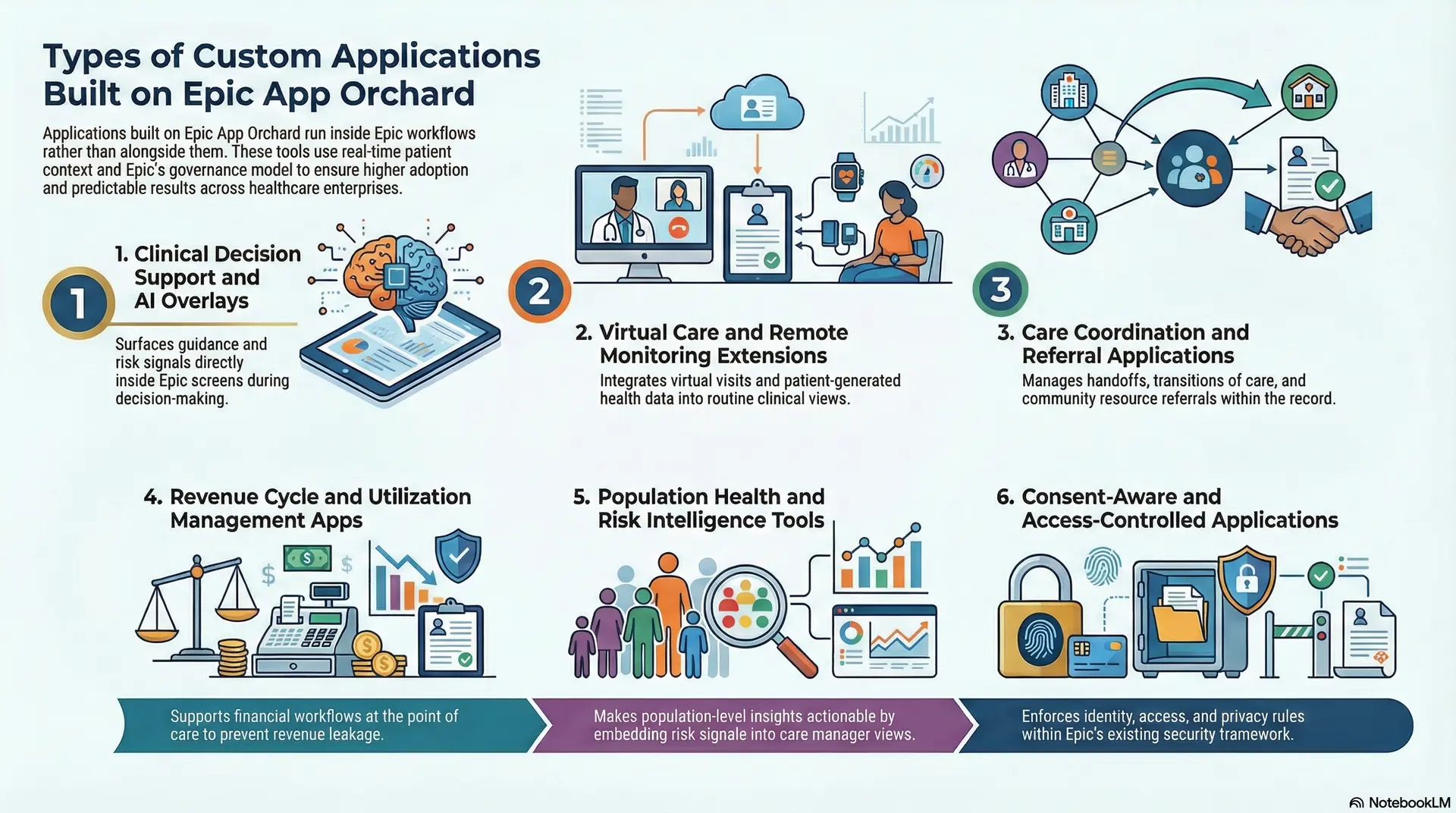
1. Clinical Decision Support and AI Overlays
These applications support clinicians while decisions are being made. They surface guidance, risk signals, or recommendations directly inside Epic screens, using real-time clinical context.
- Example: VisualDx: VisualDx launches inside Epic to support diagnostic decision-making. Clinicians can review differential diagnoses, clinical images, and evidence-based guidance without leaving the patient chart. Because the tool is embedded in the workflow, it gets used at the moment decisions are made rather than after the fact.
- Example: Stanson Health: Stanson Health integrates evidence-based guidelines into Epic ordering workflows. It prompts clinicians during order entry, rather than flagging issues later. As a result, organizations influence care decisions early while also supporting quality and utilization goals.
2. Virtual Care and Remote Monitoring Extensions
These applications extend Epic workflows to support virtual care and remote monitoring. They do not replace Epic. Instead, they bring virtual actions and data views into it.
- Example: Teladoc Health: Teladoc integrates with Epic so clinicians can launch virtual visits directly from Epic workflows. Visit context, documentation, and follow-up remain connected to the patient record. This keeps virtual care aligned with routine clinical work rather than operating as a separate system.
- Example: Validic: Validic brings patient-generated health data from remote devices into Epic views. Clinicians can review trends and respond to alerts without switching systems. Because the data appears inside Epic, teams are more likely to act on it consistently.
3. Care Coordination and Referral Applications
Care coordination apps help teams manage referrals, handoffs, and transitions of care. They reduce manual communication while improving visibility across teams.
- Example: CarePort: CarePort integrates into Epic to manage post-acute referrals and discharge planning. Care teams can view network availability and track patient movement from inside Epic. As a result, coordination becomes easier to manage and more transparent.
- Example: FindHelp: FindHelp connects Epic to community resource referrals. Clinicians can identify needs and place referrals directly from Epic, while tracking outcomes over time. Because referrals stay linked to the patient record, coordination becomes easier to audit and improve.
4. Revenue Cycle and Utilization Management Apps
These applications support financial workflows at the point of care. Their goal is to prevent revenue issues before claims are submitted.
- Example: AKASA: AKASA supports documentation and billing workflows inside Epic using automation. It helps identify gaps early, which reduces downstream rework and claim delays. By acting within Epic, issues are addressed before revenue leakage compounds.
- Example: Kyruus: Kyruus integrates with Epic scheduling to improve appointment matching and slot utilization. Staff continue working inside Epic while benefiting from smarter scheduling logic. This improves revenue capture without adding operational overhead.
5. Population Health and Risk Intelligence Tools
These applications surface population-level insights inside Epic workflows. They do not replace population health platforms, but they make insights actionable.
- Example: Health Catalyst: Health Catalyst provides risk and performance insights that can be viewed within Epic. Care teams see risk signals without switching systems. As a result, interventions become more proactive and consistent.
- Example: Arcadia: Arcadia integrates population health insights into Epic views. Clinicians and care managers can act on care gaps and risk stratification directly in the workflow. Embedding insights improves follow-through and accountability.
6. Consent-Aware and Access-Controlled Applications
These applications operate within Epic’s identity, access, and consent framework. They do not manage identity themselves, but they enforce existing rules.
- Example: Imprivata: Imprivata integrates with Epic to support secure authentication and access controls. Applications rely on these controls to ensure only authorized users act on sensitive data. This is critical for enterprise security and audit readiness.
- Example: OneTrust: OneTrust integrates consent logic into Epic-connected workflows. Applications check consent rules before allowing actions or data access.
As a result, privacy requirements are enforced without disrupting care delivery.
Although these applications serve different purposes, they share a common trait. They run inside Epic workflows, use Epic context, and respect Epic governance. That is what separates Epic App Orchard applications from standalone healthcare software. It is also why these apps scale more reliably across large enterprise environments.
How Epic App Orchard Apps Improve Revenue Cycle Performance by 20%+
Revenue cycle performance improves most when financial decisions happen as close to care delivery as possible. When documentation, eligibility, and authorization checks are deferred to downstream teams, small gaps turn into delays, denials, and write-offs. Epic App Orchard applications change this dynamic by embedding revenue logic directly into Epic workflows, where clinical and administrative decisions already happen.
Because these applications run natively inside Epic, they influence revenue outcomes in real time rather than relying on retrospective correction. As a result, enterprises shift revenue cycle work upstream, reducing leakage before it compounds across systems, teams, and billing cycles.
1. Documentation Accuracy at the Point of Care
Revenue leakage often starts with documentation that is technically complete but financially insufficient. Epic App Orchard apps address this by validating required fields, coding signals, and payer-specific requirements while clinicians and staff are still documenting inside Epic.
Because corrections happen early, enterprises avoid downstream rework and reduce the volume of claims that require manual intervention. Over time, this improves first-pass claim acceptance and stabilizes revenue performance across high-volume service lines.
2. Faster Prior Authorizations and Eligibility Checks
Authorization delays directly affect cash flow and staff productivity. Epic-native revenue cycle apps automate eligibility verification and authorization workflows within Epic, instead of pushing these checks into separate portals or back-office queues.
As a result, approvals move faster, fewer claims stall in pending states, and time-to-bill shortens. This has a compounding effect, especially in departments where authorization delays routinely slow reimbursement.
3. Lower Denials Through Early Validation
Denials are expensive not only because of lost revenue, but because of the labor required to resolve them. By embedding validation rules inside Epic, App Orchard apps flag potential issues at the moment they are created, when fixes are still straightforward.
Consequently, enterprises see fewer preventable denials and more predictable reimbursement cycles. Revenue cycle teams spend less time chasing avoidable errors and more time managing true exceptions.
4. Improved Schedule Utilization
Unused appointment slots represent lost revenue that cannot be recovered later. Epic App Orchard apps improve schedule utilization by embedding waitlist logic, slot optimization, and real-time availability directly into Epic scheduling workflows.
Because staff work within familiar systems, adoption remains high while fill rates improve. Importantly, these gains come without adding new scheduling tools or increasing administrative headcount.
5. Reduced Manual Rework and Labor Costs
Manual rework drives up revenue cycle costs quietly but consistently. When claims require repeated follow-ups, resubmissions, or reconciliations, labor costs rise even if revenue remains flat.
Epic-native automation reduces this burden by resolving issues upstream. Over time, enterprises lower administrative overhead and redirect revenue cycle resources toward higher-value activities rather than routine cleanup.
These improvements do not remain isolated to individual departments. Because Epic App Orchard apps deploy consistently across facilities, enterprises standardize revenue cycle performance across hospitals, regions, and service lines.
When combined, gains in documentation accuracy, authorization speed, denial reduction, and schedule utilization regularly translate into 20% or greater performance improvements across targeted revenue cycle functions.
Core Building Blocks of an Epic App Orchard–Native Application?
An Epic App Orchard–a native application is not built like a typical healthcare app. Because it runs inside Epic workflows, it must respect clinical context, security boundaries, and operational constraints from the start.
These applications succeed when teams design them around a few core building blocks. Each block plays a specific role, and skipping any one of them usually leads to adoption, performance, or compliance issues later.
1. Workflow Placement Inside Epic
Every Epic-native app must know where it lives inside Epic. This includes which screen it launches from, which users can see it, and at what point in the workflow it appears.
When apps launch at the right moment, clinicians do not have to search for them. As a result, the app becomes part of normal work rather than an extra step.
2. Patient and Encounter Context
Epic App Orchard apps rely on real-time context. They need to know which patient, encounter, or order they are working with as soon as they launch.
Without this context, apps force users to re-enter information. Over time, that friction reduces trust and usage, even if the app itself is useful.
3. Permission and Role Awareness
Epic-native apps must respect Epic’s role-based access model. This means different users see different actions, data, or capabilities based on their role.
By aligning with Epic permissions, apps stay compliant and predictable. More importantly, they avoid exposing sensitive data to the wrong users.
4. Governed Data Access
App Orchard applications do not have unrestricted access to Epic data. Instead, they access only what is required, through approved interfaces and scopes.
This controlled access protects patient privacy and simplifies audits. It also reduces risk when apps are updated or expanded over time.
5. External System Connectivity
Although these apps run inside Epic, they often rely on systems outside it. This includes analytics engines, AI models, device platforms, or payer systems.
The key is separation, and Epic handles workflow and context, while external systems handle specialized processing. This keeps the app responsive and maintainable.
6. Performance and Reliability Safeguards
Epic-native apps operate inside live clinical environments. Because of this, they must be fast, predictable, and resilient to failures.
Well-designed apps degrade gracefully. If an external service is unavailable, the Epic workflow continues without disruption.
7. Upgrade and Lifecycle Readiness
Epic environments change regularly through upgrades. Epic-native apps must be designed to survive these changes without constant rework.
This requires clear versioning, controlled dependencies, and ongoing monitoring. Over time, this reduces maintenance effort and operational risk.
Each building block supports a different aspect of safety, usability, or scalability. When combined, they allow Epic App Orchard apps to function as dependable enterprise tools rather than fragile add-ons.
Teams that understand these fundamentals build applications that last. Teams that ignore them often rebuild the same app more than once.
How We Build Enterprise-Grade Epic App Orchard Applications
Building on Epic App Orchard is not “app development plus integration.” Instead, it’s enterprise product engineering inside a regulated clinical environment, where workflow safety, governance, and uptime matter as much as features. Because of that, Intellivon follows a delivery approach that stays practical, auditable, and upgrade-safe from day one.
Below is our step-by-step process. Each step is designed to reduce risk early, so the application can scale across hospitals, service lines, and compliance requirements without constant rework.
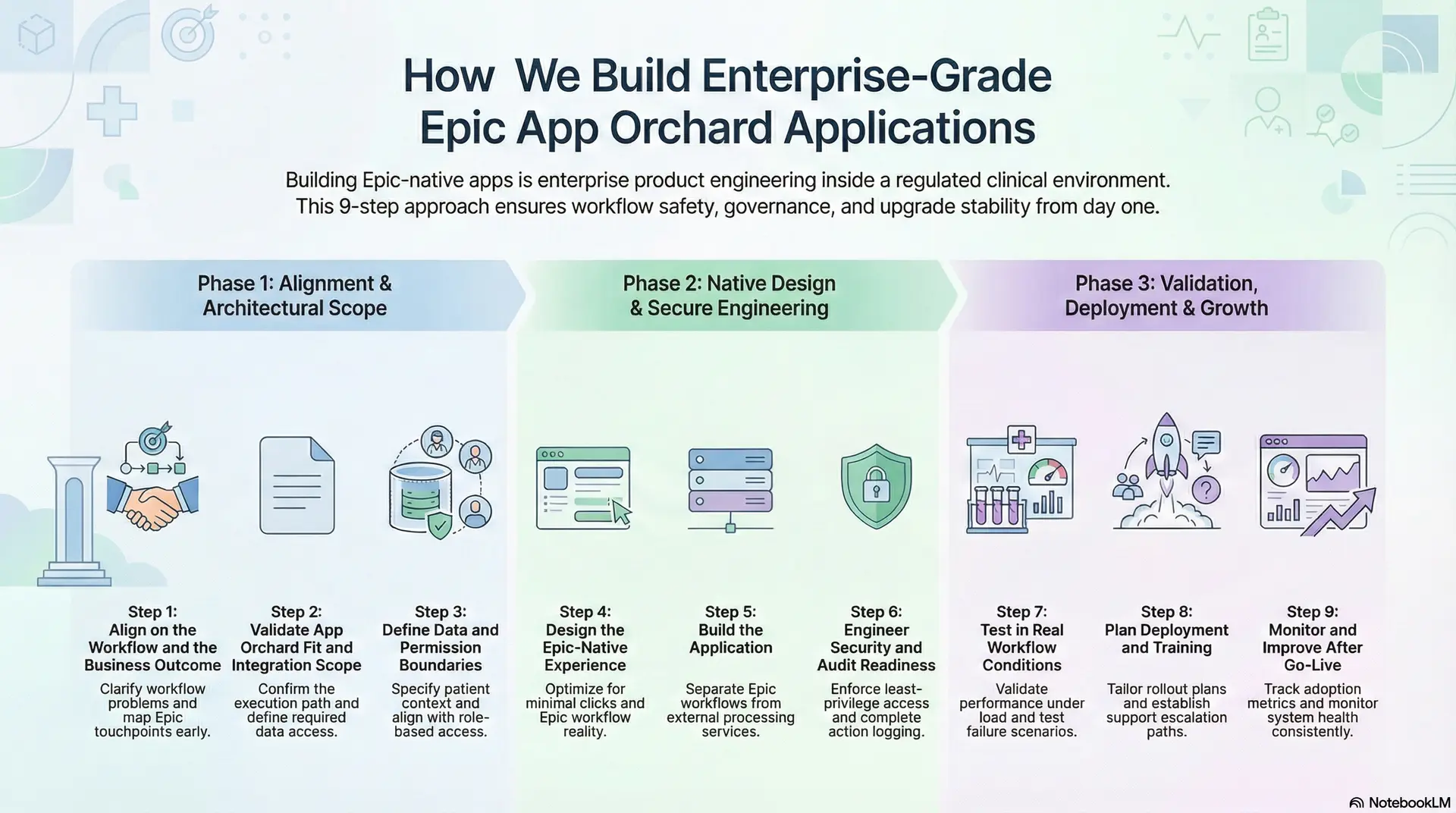
Step 1: Align on the Workflow and the Business Outcome
We start by clarifying the exact workflow problem and the measurable outcome the enterprise wants. This prevents “feature creep” and ensures the app improves real operational or clinical performance, not just UI convenience. At the same time, we identify who owns the workflow, who approves changes, and what success looks like.
Next, we map the Epic touchpoints the app must live within, including where it launches, which roles use it, and what actions it supports. Because Epic-native adoption depends on timing and placement, we lock workflow placement early.
Step 2: Validate App Orchard Fit and Integration Scope
Before design begins, we confirm that App Orchard is the right execution path. Sometimes the right answer is a simpler integration, and other times a workflow extension is required. Therefore, we evaluate the “build inside Epic” requirement against constraints like governance, upgrade impact, and operational ownership.
Then we define the integration scope in plain terms: what data the app needs, what systems it must connect to, and what decisions must happen inside Epic versus outside Epic. This avoids late surprises around permissions, data access, and performance.
Step 3: Define Data and Permission Boundaries
Epic-native apps succeed when they use the right context automatically. So we specify what patient, encounter, and order context the app requires at launch, and we define exactly how the app receives that context. In addition, we align the app’s behavior to Epic’s role-based access, so each user sees only what they should.
We also create clear data boundaries. That includes what the app reads, what it writes back, and what it never touches. Because auditability matters, we document these boundaries early and keep them consistent through delivery.
Step 4: Design the Epic-Native Experience
We design the app around Epic workflow reality, not an idealized product flow. This means we optimize for minimal clicks, clear actions, and safe defaults. At the same time, we design for interruptions, handoffs, and real clinical conditions, because that is where adoption is won or lost.
Then we confirm launch behavior inside Epic, including screen placement, context handoff, and role-based views. This ensures the app feels like part of Epic rather than a separate tool that happens to open from it.
Step 5: Build the Application
Most Epic-native apps still rely on systems outside Epic, such as analytics engines, AI models, device platforms, or payer systems. Because of that, we separate responsibilities clearly: Epic handles workflow and context, while external services handle heavy processing and integrations.
This architecture improves performance and reduces risk. If an external service slows down or fails, the Epic workflow must still remain usable. Therefore, we design graceful degradation paths and clear fallback behaviors from the beginning.
Step 6: Engineer Security and Audit Readiness
Security is not a checklist at the end. We bake it into the build through role-based access enforcement, least-privilege data access, encryption where required, and complete logging for sensitive actions. In addition, we align app behavior to enterprise compliance expectations, including audit trails and operational controls.
We also prepare the enterprise for governance. That includes documenting data flows, access rules, and system dependencies, so security and compliance teams can review changes quickly and confidently.
Step 7: Test in Real Workflow Conditions
Testing cannot be limited to unit tests and happy paths. We test using real workflow scenarios, including edge cases, interruptions, and role differences. At the same time, we validate performance under load so the application remains responsive inside Epic.
We also run failure testing for external dependencies. If an upstream API fails or latency spikes, the app should degrade gracefully without breaking the Epic workflow.
Step 8: Plan Deployment and Training
Deployment is not only a technical step. We plan how the app rolls out across departments, sites, or regions, and we align this plan to operational ownership. Because adoption depends on trust, we also provide clear training materials and workflow guidance, tailored to each role.
Then we establish support paths. That includes escalation rules, incident response, and feedback loops, so operational teams know exactly what to do when issues arise.
Step 9: Monitor and Improve After Go-Live
After launch, we track the metrics that matter, such as adoption, workflow completion, error rates, and financial or operational outcomes. Because enterprises need evidence, we set baselines early and report progress consistently.
We also monitor system health, performance, and integration stability. This allows us to catch issues early, while continuously improving the product without disrupting clinical operations.
Enterprise-grade Epic App Orchard applications succeed when teams treat them as regulated workflow products, not lightweight integrations. Intellivon’s step-by-step approach keeps workflow placement, governance, security, and operability at the center, so enterprises can scale Epic-native innovation without increasing risk.
Security, Compliance, and Governance For Building These Apps
Security, compliance, and governance are not supporting concerns when building Epic App Orchard–native applications. They are foundational requirements. Because these apps run inside live clinical workflows, even small gaps can create operational, regulatory, or patient safety risks.
For enterprises, the goal is not just to pass audits. It is to ensure applications remain trustworthy, controllable, and operable as they scale across users, departments, and facilities.
1. Security Is Designed In, Not Added Later
Epic-native applications must operate within strict security boundaries from day one. This includes how users authenticate, what data they can access, and what actions they are allowed to perform.
By aligning the app directly with Epic’s security model, enterprises avoid duplicate identity systems and inconsistent access rules. As a result, security behavior remains predictable and easier to manage.
2. Role-Based Access and Least Privilege
Not every user should see the same data or actions. Epic App Orchard applications must respect Epic’s role-based access controls and apply the principle of least privilege.
This means users only see what they need to perform their role. Over time, this reduces accidental exposure of sensitive data and limits the impact of misuse or error.
3. Controlled Data Access and Data Minimization
Epic App Orchard apps do not have unrestricted access to clinical or financial data. Instead, they access only what is required for their function, through approved and documented interfaces.
This approach protects patient privacy while simplifying audits. It also reduces risk when applications evolve or expand, because data access remains tightly scoped.
4. Auditability and Traceability
Enterprise environments require clear answers to simple questions: who accessed what, when, and why. Epic-native applications must generate audit trails that align with enterprise expectations.
By logging sensitive actions and data access consistently, organizations gain visibility without manual investigation. This becomes especially important during compliance reviews or incident response.
5. Compliance Alignment Across Regulations
Epic App Orchard applications often operate across multiple regulatory requirements, including HIPAA and internal enterprise policies. Compliance cannot be assumed just because the app runs inside Epic.
Instead, teams must align application behavior to existing compliance controls, documentation standards, and review processes. Doing this early prevents rework and approval delays later.
6. Governance and Change Control
Governance determines how applications evolve over time. This includes how changes are approved, how updates are rolled out, and how risks are assessed before deployment.
Strong governance ensures that updates do not disrupt workflows or introduce unintended behavior. It also helps enterprises maintain consistency across multiple Epic environments and facilities.
7. Vendor and Dependency Oversight
Epic-native apps often rely on external services, such as analytics platforms or AI engines. Governance must extend to these dependencies as well.
By documenting dependencies and ownership clearly, enterprises retain control even as the ecosystem grows. This reduces vendor lock-in risk and simplifies long-term maintenance.
Security, compliance, and governance work together. When designed properly, they allow Epic App Orchard applications to scale without increasing operational burden or regulatory risk. Enterprises that treat these areas as core design principles build applications that last. Those who treat them as afterthoughts often face costly remediation later.
What Are the Most Common Pitfalls in Epic App Orchard Implementations?
Epic App Orchard provides a governed way to extend Epic safely. Still, many implementations fail to deliver value because of avoidable design and execution mistakes. These issues usually surface after go-live, when fixing them becomes costly and disruptive.
Below are the most common pitfalls we see in Epic App Orchard projects, along with how Intellivon addresses them during delivery.
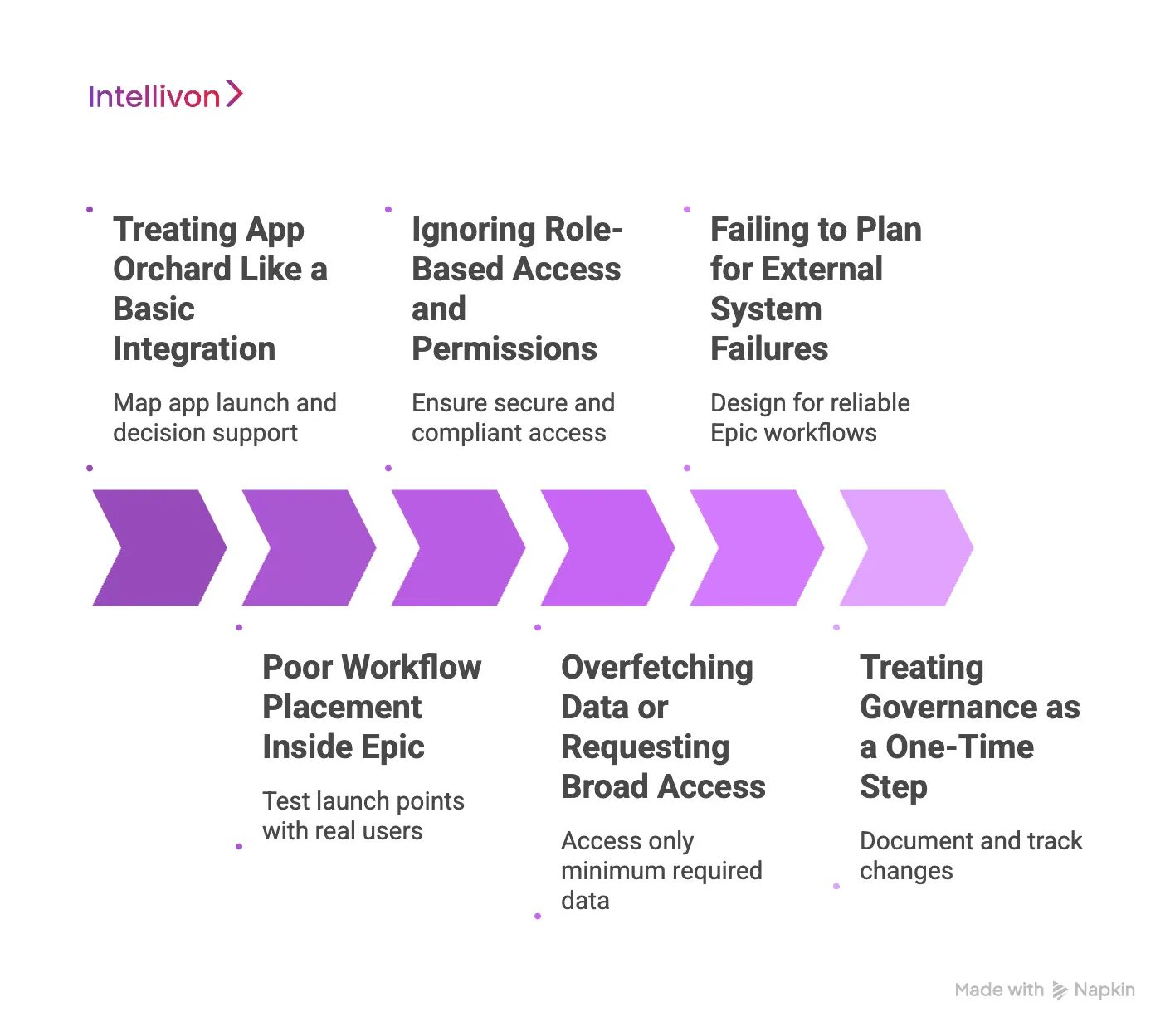
1. Treating App Orchard Like a Basic Integration
Teams sometimes approach App Orchard as a data integration exercise. They focus on exchanging information but ignore how the app fits into real Epic workflows.
As a result, the app technically works but feels disconnected. Clinicians must switch context or take extra steps, which quickly reduces adoption.
How Our Developers Solve It
We design every app as a workflow extension first, not an integration. From the start, we map where the app launches, who uses it, and what decision it supports.
By anchoring the app inside Epic workflows, usage becomes natural rather than forced.
2. Poor Workflow Placement Inside Epic
Even useful apps fail when they appear at the wrong moment. Some launch too early, others too late, or in areas users rarely visit.
Over time, the app is ignored simply because it does not align with how work actually happens.
How Our Developers Solve It
We validate workflow placement with real users before finalizing the design. We test launch points across roles and scenarios to ensure the app appears when it is most relevant.
This approach improves adoption without adding training burden.
3. Ignoring Role-Based Access and Permissions
Apps sometimes expose the same actions or data to all users. This creates security risks and confusion, especially in large enterprises with complex role structures.
Inconsistent access also slows down approvals and audits.
How Our Developers Solve It
Our developers align app behavior strictly to Epic’s role-based access model. Each role sees only what it needs to perform its function.
As a result, security remains predictable, and compliance reviews move faster.
4. Overfetching Data or Requesting Broad Access
Some apps request more data than they actually need. This increases privacy risk and raises red flags during governance reviews.
It also makes future changes harder, because data dependencies are unclear.
How Our Developers Solve It
We define and document data boundaries early. Apps access only the minimum data required, through approved interfaces.
This reduces risk while making audits and updates easier to manage.
5. Failing to Plan for External System Failures
Epic-native apps often rely on external services, such as analytics or AI platforms. When those services slow down or fail, the Epic workflow can break.
This creates frustration and undermines trust.
How Our Developers Solve It
Our experts design a clear separation between Epic workflows and external services. If an external system fails, the Epic workflow continues with safe defaults.
This ensures reliability in real clinical conditions.
6. Treating Governance as a One-Time Step
Some teams treat governance as something to complete before launch and then forget. Over time, undocumented changes and dependencies accumulate.
This makes audits painful and upgrades risky.
How Our Developers Solve It
We treat governance as an ongoing process. Changes are documented, reviewed, and tracked throughout the app’s lifecycle.
This keeps the app operable and auditable as it scales.
Most Epic App Orchard failures are the result of design shortcuts and unclear ownership. When teams address these risks early, applications scale smoothly across departments and facilities.
By following disciplined, workflow-first practices, enterprises build Epic-native applications that last rather than ones that need constant repair.
Conclusion
Epic App Orchard has become the safest way for enterprises to extend Epic without breaking workflows or increasing long-term risk. When applications are built to run inside Epic, they earn adoption naturally, respect governance boundaries, and scale more reliably across departments and facilities.
However, success depends on more than technical integration. It requires a clear understanding of workflow placement, security, interoperability, and lifecycle ownership from the start.
At Intellivon, we build Epic App Orchard applications as enterprise-grade products, not short-term solutions. Our approach prioritizes workflow safety, compliance-by-design, and upgrade readiness, while still enabling innovation beyond Epic.
For healthcare organizations investing in Epic-native applications today, this discipline is what turns custom builds into lasting strategic assets rather than one-off tools.
Build Epic-Native Applications With Intellivon
At Intellivon, Epic App Orchard applications are built as enterprise-grade workflow products, not as lightweight integrations or UI add-ons layered onto Epic. Every architectural and delivery decision prioritizes workflow safety, governance, and upgrade resilience, so applications remain reliable inside live clinical environments, not just during initial rollout.
As Epic environments scale across hospitals, service lines, and regions, stability becomes critical. Governance, security, and interoperability remain consistent even as usage grows and external systems evolve. Organizations retain control over workflows, data access, and compliance while extending Epic without introducing fragmentation or operational risk.
Why Partner With Intellivon?
- Enterprise-grade Epic-native architecture designed for regulated clinical workflows
- Proven delivery of App Orchard applications across complex, multi-site health systems
- Compliance-by-design approach aligned with Epic governance and enterprise audit needs
- Secure, modular architectures that separate Epic workflows from external services
- Upgrade-safe delivery models built to withstand Epic release cycles
- AI and automation enablement with clear controls and human oversight
Book a strategy call to explore how Intellivon can help you design, build, and scale Epic App Orchard applications that clinicians trust and enterprises can operate with confidence.
FAQs
Q1. What does it mean to build an Epic-native application?
A1. Building an Epic-native application means creating software that runs inside Epic workflows using patient and encounter context. These apps launch from Epic screens, respect Epic permissions, and follow Epic governance. As a result, clinicians do not need to leave Epic to use them.
Q2. How are Epic App Orchard apps different from Epic integrations?
A2. Epic integrations mainly move data between systems. In contrast, Epic App Orchard apps change how work happens inside Epic. Because they operate within workflows, they influence decisions earlier and see higher adoption than external tools.
Q3. Can Epic App Orchard apps connect to systems outside Epic?
A3. Yes, Epic-native apps often rely on external systems such as AI platforms, analytics engines, or device services. However, Epic handles workflow and context, while external systems handle processing. This separation improves reliability and performance.
Q4. How does Intellivon ensure security and compliance for Epic App Orchard apps?
A4. Intellivon designs security and compliance into every stage of development. Apps follow Epic’s role-based access, limit data access to what is required, and generate clear audit trails. This keeps applications compliant as they scale.
Q5. When should an enterprise build a custom Epic App Orchard application?
A5. Enterprises should build a custom app when workflows need to change inside Epic, not just exchange data. Custom builds make sense when adoption, governance, and long-term operability matter more than short-term functionality.