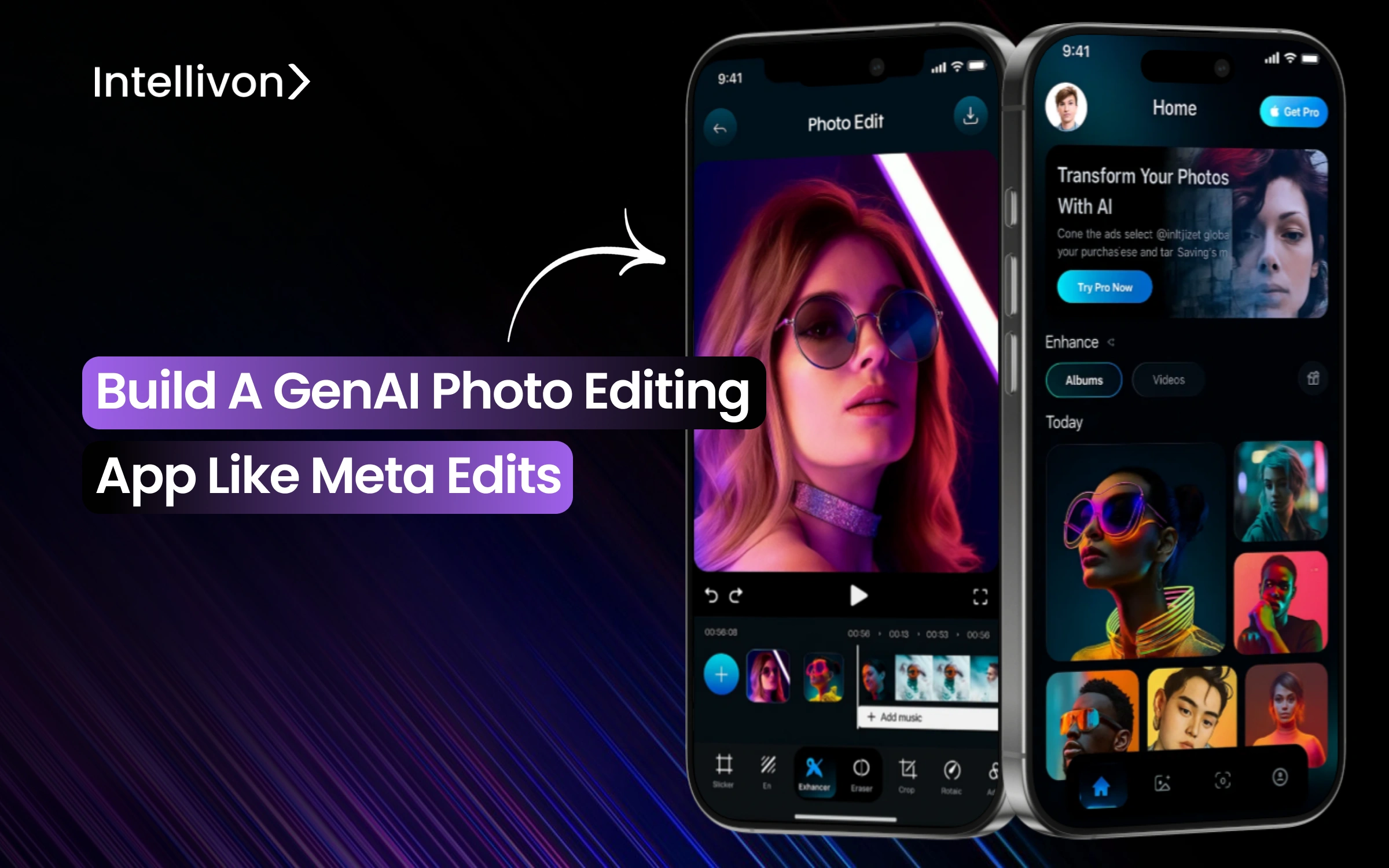
The rise of generative AI photo editing apps has reshaped how content is created, consumed, and monetized. When Meta launched Edits, the app drew millions of downloads within days, not just because it was new, but because it gave everyday users professional-grade editing power once reserved for experts. That shift signals a turning point.
What was once an experiment is now a proven business model, supported by scalable infrastructure, established monetization frameworks, and clear user demand. For decision-makers, the question lies in how fast they can build these apps with enterprise-grade precision.
At Intellivon, we design GenAI editing platforms that combine innovation with the realities of enterprise operations. Our solutions help global organizations shorten content production cycles, deepen audience engagement, and unlock new revenue streams while ensuring security, compliance, and long-term resilience. In this blog, we’ll explore Meta Edits as a flagship GenAI editing app, explore their monetization paths, and show you how Intellivon builds these apps from scratch.
Why Enterprises Should Invest In Building GenAI Editing Apps Now
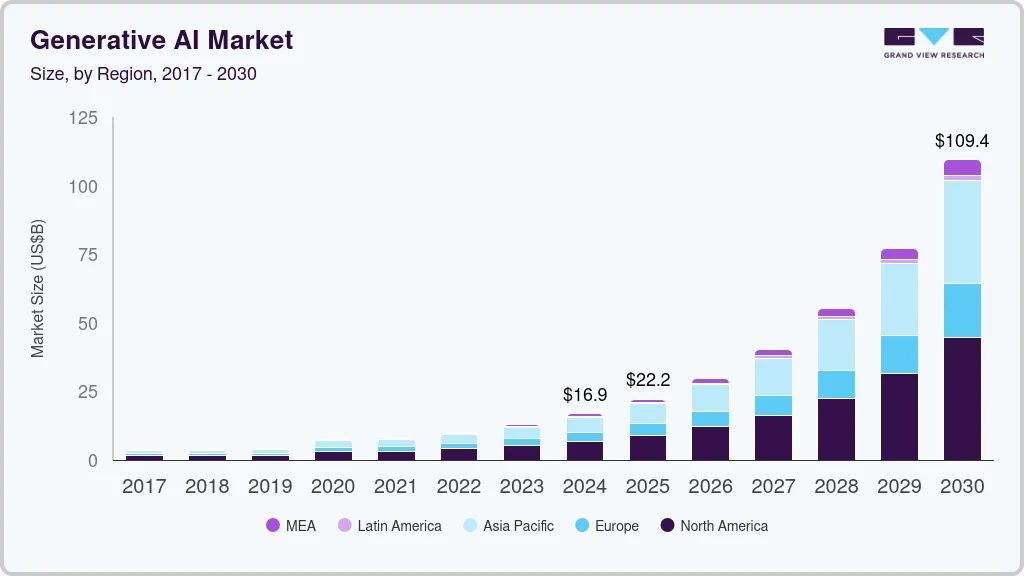
The global generative AI market was valued at USD 16.87 billion in 2024 and is projected to hit USD 109.37 billion by 2030, growing at a CAGR of 37.6%. A Grand View Research study places 2025 estimates at USD 22.2 billion, driven by the rapid expansion of text, code, and image generation use cases. This momentum highlights a fast-accelerating shift from experimentation to mainstream adoption.
Key Market Insights:
- The AI content creation tools market will grow from USD 5 billion in 2025 to USD 25 billion by 2033, at 25% CAGR.
- AI content creation subsegments could expand by USD 60.4 billion between 2025 and 2029, growing at 39.1% annually.
- The AI image editor market alone is forecast to rise from USD 7.77 billion in 2024 to USD 66.65 billion by 2032, at a 30.9% CAGR.
- GenAI app downloads reached 1.7 billion in H1 2025, up 70% year-over-year, while in-app revenue doubled to USD 1.87 billion.
- Global users spent 15.6 billion hours on GenAI apps in six months, with Asia holding 42.6% market share and North America holding 40% of the revenue.
- McKinsey and ISG report that 60%+ of enterprises now use generative AI in content workflows, with production use cases doubling year over year.
- EY’s 2025 study found GenAI automates 24% of tasks, reduces time spent on 42% more, and delivers a 2.6–2.8% productivity uplift.
- Adobe, Google, Microsoft, and OpenAI are embedding editing tools into SaaS platforms, enabling scalable enterprise adoption.
- The mobile AI apps market will expand by USD 91.01 billion from 2024 to 2029, supporting cloud and on-device integration.
- Enterprises deploying AI-driven editing tools see 40–50% faster content delivery cycles and up to 30% cost savings.
The convergence of market growth, maturing APIs, and scalable multimodal design makes 2025 a strategic inflection point. Enterprises that build GenAI editing ecosystems now can capture first-mover advantages, unlock automation-led productivity, and establish differentiation in competitive markets.
What Is a Gen AI Photo Editing App Like Meta Edits?
GenAI photo editing app uses advanced machine learning to understand, enhance, and even generate new image elements, enabling results that once required professional design studios. For enterprises, these apps are becoming integral to marketing workflows, creative pipelines, and engagement strategies.
Meta Edits is Meta’s strategic response to the rise of AI-powered creative tools that are reshaping how content is produced, distributed, and monetized. By examining how Edits emerged, what differentiates it, and the impact it has delivered, enterprises can extract valuable lessons for building their own GenAI-driven platforms.
How Meta Edits Became a Competitor to CapCut
1. Rapid Market Entry and Adoption
Launched in 2025, Edits crossed millions of downloads within its first week, immediately drawing comparisons to CapCut and Lensa. The launch was timed to capture surging demand for AI-enhanced editing and short-form content.
2. Platform Integration as Differentiator
While CapCut sits inside TikTok’s orbit and Lensa operates as a standalone app, Edits integrates directly with Instagram and Facebook. That integration eliminated friction for creators already using Meta’s platforms daily.
3. Direct Competitive Pressure
CapCut dominated TikTok workflows, and Lensa rode viral waves of AI portrait generation. Edits positioned itself as the bridge, offering both general editing and advanced AI features while keeping creators locked into Meta’s ecosystem.
Why Meta Edits Stands Out
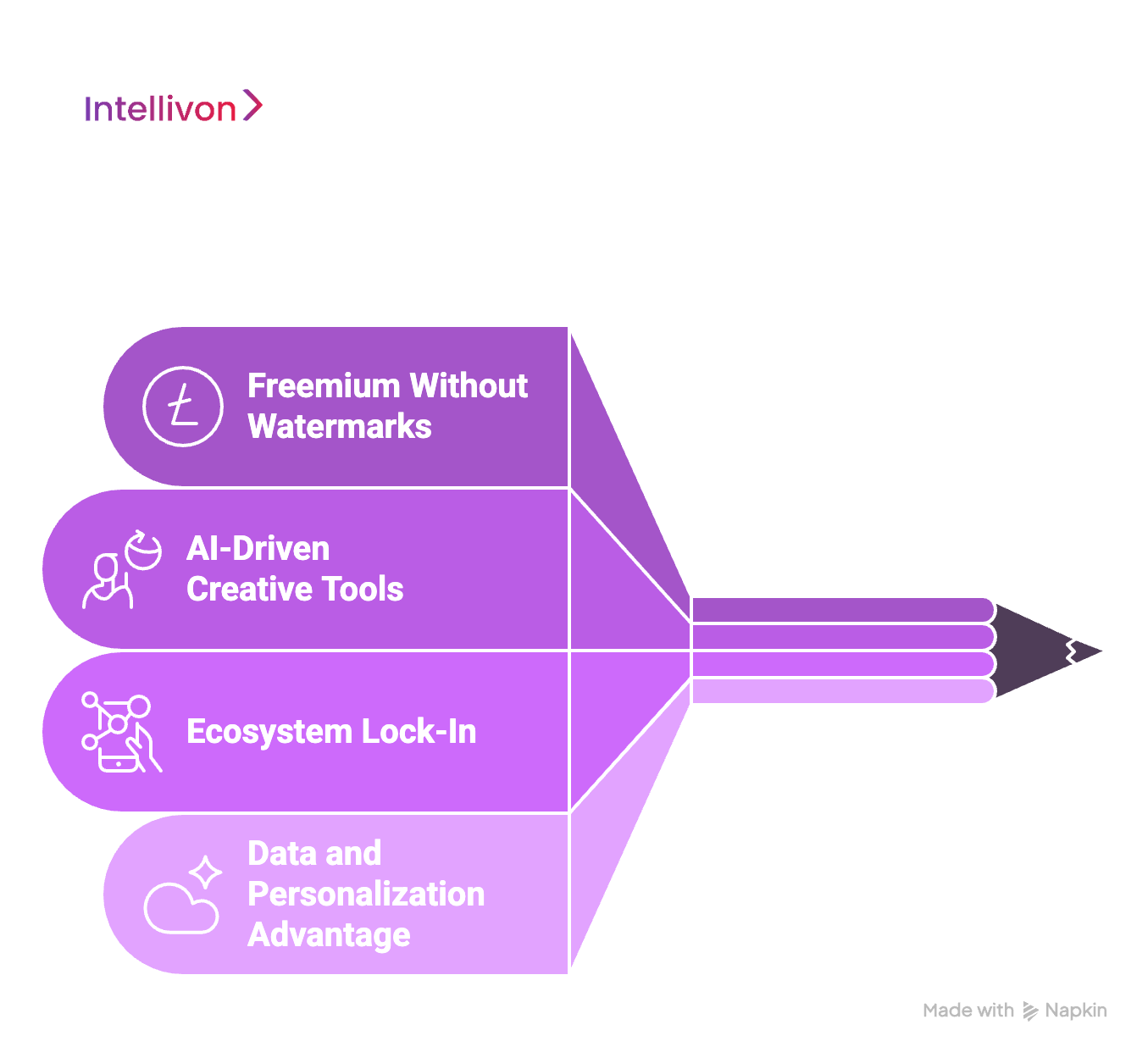
1. Freemium Without Watermarks
Edits disrupted expectations by offering free, watermark-free exports. Most competitors monetize early, but Meta prioritized rapid adoption over immediate revenue.
2. AI-Driven Creative Tools
Features like smart reframing, auto-edit recommendations, and generative backgrounds blend automation with creative flexibility, helping creators work faster without losing originality.
3. Ecosystem Lock-In
Because Meta Edits is embedded within Instagram and Facebook, users can publish directly without the need to transfer files. This seamless workflow increases stickiness and makes the app more valuable than standalone alternatives.
4. Data and Personalization Advantage
Meta’s vast data resources allow Meta Edits to refine AI models at scale. The result is more accurate background removal, smoother upscaling, and personalized editing suggestions unmatched by smaller rivals.
Business Impact of Meta Edits for Meta’s Ecosystem
1. Creator Retention
By providing editing tools in-house, Meta reduced reliance on external apps. Creators now stay inside the Meta ecosystem for both production and distribution.
2. Increased Engagement and Ad Revenue
More content creation leads to more posts. More posts drive engagement, which directly boosts advertising inventory and impressions across Meta’s platforms.
3. New Monetization Pathways
Although the app launched free, the roadmap includes premium AI effects, brand-sponsored templates, and potentially enterprise collaboration features. Each represents a future revenue channel.
4. Strengthened Competitive Moat
The combination of free access, strong AI features, and integration builds a defensible moat. Competitors can offer features, but they cannot replicate Meta’s platform reach.
Lessons Enterprises Can Learn from Meta Edits’ Success
1. Integration Over Isolation
The success of Edits comes not from novelty but from embedding editing into where users already spend their time. Enterprises building AI tools should follow the same principle.
2. Adoption Before Monetization
By delaying monetization, Meta gained scale and trust. Enterprises can learn that revenue follows when adoption and loyalty are firmly established.
3. Leverage First-Party Data
Meta’s advantage lies in refining AI with its own data. Enterprises with rich internal datasets can unlock the same edge if applied thoughtfully.
4. Simplify Complex AI for End Users
AI features succeed when hidden behind intuitive, one-tap actions. Enterprises should invest in user education and seamless design to accelerate uptake.
5. Embed Governance Early
Enterprises must not ignore governance. Embedding brand controls, data safeguards, and audit trails from day one ensures smoother enterprise adoption later.
Meta Edits demonstrates how a well-timed launch, coupled with smart integration and a user-first approach, can quickly redefine an industry segment. For enterprises, the takeaway is clear: success lies in blending AI capability with thoughtful design, adoption strategies, and governance. With that perspective, we can now explore what truly defines a GenAI photo editing app in today’s market.
Features A GenAI Photo Editing App Like Meta Edits Has
A best-in-class GenAI editor blends intuitive creation tools with reliable AI, tight platform integration, and enterprise controls. Keeping this in mind, Meta’s Edits is a useful benchmark. It launched free, watermark-free, and integrated with Instagram publishing, while adding AI styles and background changes that non-experts can use in minutes.
1. Camera, Capture, and Project Setup
Meta Edits treats capture as part of editing. The app exposes resolution, frame rate, dynamic range, flash, and zoom, so footage starts clean. It supports frame-accurate timeline editing with multiple layers and overlays, which reduces fix-it work later.
What to emulate:
- Quick project presets for Reels, Stories, Shorts.
- Auto proxies for smooth previews.
- Cloud save, so a phone swap does not break a project.
2. Core Editing That Feels Instant
Users expect trim, crop, split, and speed controls to feel native. Edits ships single-frame precision and a familiar timeline UX so teams can work fast without retraining.
Enterprise tip:
- Keyboard-like gestures on mobile speed repetitive edits for brand teams.
3. AI Backgrounds, Cutouts, and Restyle
This is where GenAI shines. Edits supports green screen, cutout, and generative scene changes, plus a growing set of preset AI prompts that restyle the first seconds of a clip. These effects can swap environments, recolor scenes, or apply themed looks. Preset prompts are free for now, with custom prompts planned. Quality varies by input, so good guidance matters.
What to emulate:
- Guardrails that block unsafe prompts.
- Hair-edge refinement and shadow preservation.
- A “best practices” tip when inputs are low-light or low-resolution.
4. Upscale, Enhance, and Relight
Editors need rescued footage to make it publishable. Edits include AI animation for images and audio enhancement to reduce noise and enhance voice clarity. Pair that with super-resolution, denoise, and smart color to normalize mixed lighting.
Practical add:
- One-tap “Match Shots” to align color and exposure across a sequence.
5. Smart Reframing and Aspect Automation
Creators repurpose one cut for many channels. A strong editor tracks faces and key objects to auto-reframe to 9:16, 1:1, and 16:9 while protecting the subject. This saves time and prevents awkward crops.
Implementation notes:
- Offer safe zones for captions and stickers by platform.
- Allow per-output watermark or ID for asset tracking.
6. Captions, Typography, and Brand Kits
Speech-to-text captions improve reach. Edits layers this with fonts, stickers, and effects, then lets creators style once and reuse. The enterprise version should carry brand kits for fonts, colors, lower-thirds, and intro-outro templates.
7. Templates, Presets, and Personalization
Speed comes from reusability. Meta pushes template-driven workflows that creators can tweak. At enterprise scale, add:
- Adaptive presets that learn team preferences.
- Locked brand templates for regulated content.
- A/B test templates with performance feedback.
8. Audio, Sound Effects, and Voice
Meta includes voice effects and sound tools, plus noise reduction. For enterprises, provide licensed libraries, region filters, and automatic loudness normalization for ads.
9. Direct Publishing and Social Integrations
Edits ties editing to publishing so posts go live faster and analytics come back in-app. It is watermark-free, which removes a common friction point versus CapCut Pro. Keep exports free of forced branding and provide compliant metadata for each destination.
10. Insights and Feedback Loops
Instagram surfaces insights to streamline creation. Your enterprise build should add:
- Per-template retention, CTR, and watch-time lift.
- Feature-level latency and quality scores.
- Creator feedback prompts to refine AI defaults.
11. Governance, Privacy, and Compliance
Enterprise adoption depends on trust:
- Workspace policies for storage regions and retention.
- PII detection for faces, badges, or documents in frame.
- Policy-enforced brand kits and export rules by market.
12. Performance, Reliability, and Cost Controls
Spikes can happen at any given moment, and a GenAI photo editing app should be ready. Design for autoscaling GPUs, queue smoothing, and graceful fallbacks to keep “edit basics” responsive while AI jobs render server-side. Offer credit limits and usage caps so teams can plan spending during campaigns.
Why These Features Convert
- Watermark-free exports remove an adoption barrier for creators.
- Integrated publishing reduces tool-switching and speeds campaigns.
- Preset AI styles deliver quick wins, and custom prompts serve power users later.
- Brand kits and approvals translate consumer delight into enterprise reliability.
The winning pattern blends fast core editing, accessible AI, and native publishing with enterprise-grade controls. With features mapped, the next section will cover how GenAI editors make money and which monetization paths align with enterprise goals.
How GenAI Photo Editing Apps Like Meta Edits Make Money
The success of Gen AI Photo Editing apps like Meta Edits shows that the technology alone doesn’t drive value. The real impact comes from how these platforms monetize at scale. Enterprises exploring this must think beyond one-time app sales.
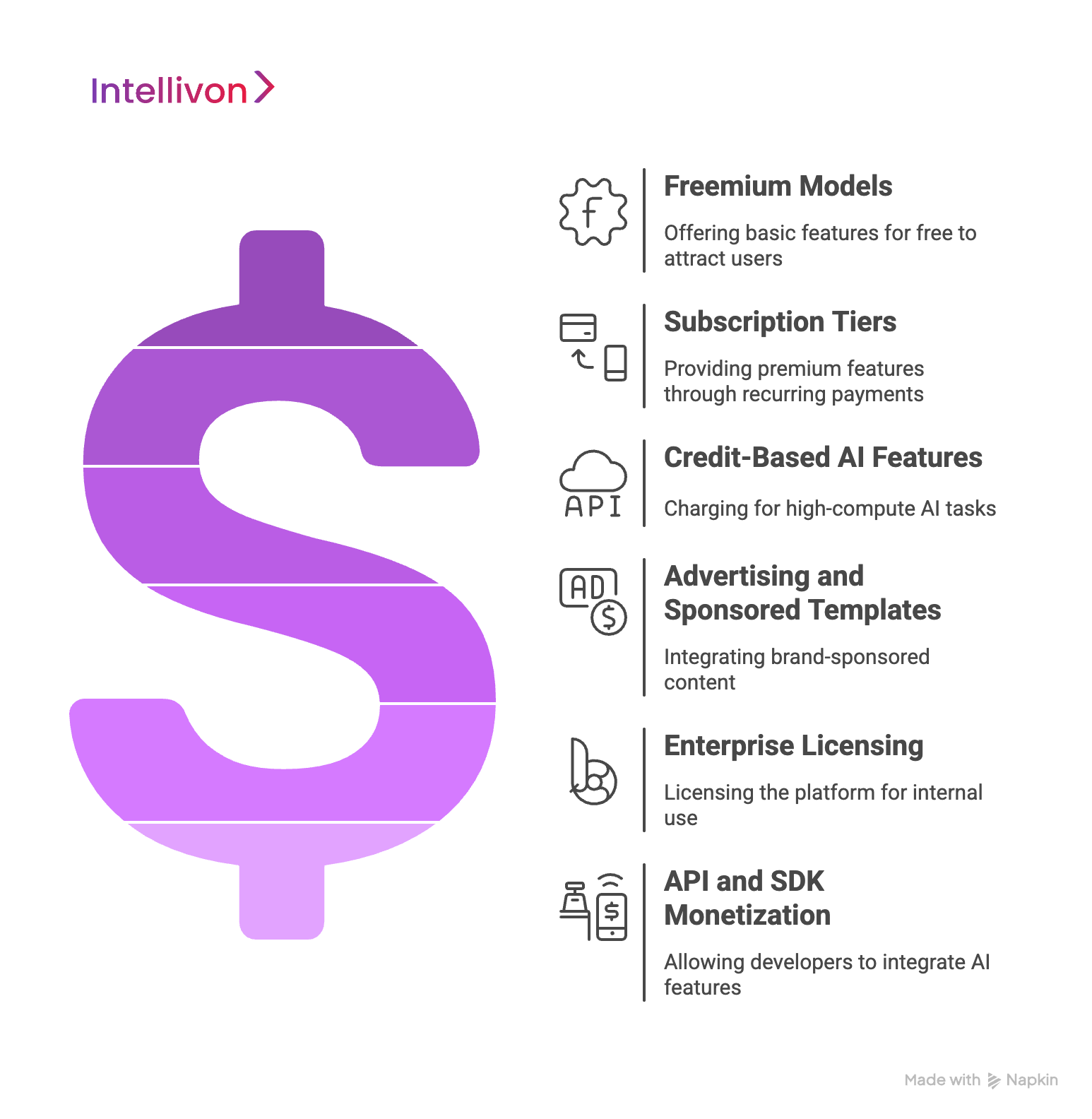
1. Freemium Models
Most consumer-facing editing apps succeed by offering core features for free while reserving advanced AI tools for premium tiers. This strategy builds adoption quickly and creates a natural funnel for paid conversions. For enterprises, freemium models allow early mass adoption while positioning premium AI services, like advanced upscaling or enterprise-specific templates, as paid add-ons.
2. Subscription Tiers
These apps have shown the power of recurring revenue. Users subscribe to access premium AI features, unlimited exports, or higher resolution outputs. In an enterprise context, subscriptions can extend to team-based licenses, offering role-based access, collaboration features, and compliance dashboards. This ensures predictable cash flow while matching enterprise budgeting models.
3. Credit-Based AI Features
Certain high-compute features, like custom AI prompts, large-scale background replacement, or batch upscaling, consume significant GPU resources. Many apps monetize this with a credit or token system, where users purchase additional processing power as needed.
For enterprises, this model offers transparency and control over usage costs, helping budget AI workloads effectively during campaigns or peak production cycles.
4. Advertising and Sponsored Templates
Consumer apps often rely on ads, but enterprise-grade platforms can use sponsored creative packs or branded templates. For example, a fashion brand could pay to have AI-generated seasonal styles integrated into the platform. This model provides non-intrusive monetization that adds value for end-users while giving brands visibility.
5. Enterprise Licensing and White-Label Solutions
Beyond consumer revenue, the largest opportunity lies in enterprise licensing. Organizations may want their own white-labeled GenAI editing suite for internal teams, content production pipelines, or customer-facing platforms. Here, monetization comes through annual licensing fees, customization services, and integration with enterprise systems like DAMs, CRMs, or CMS platforms.
6. API and SDK Monetization
As adoption scales, enterprises can expose their editing capabilities through APIs or SDKs. Developers integrate these functions, like AI cutouts, smart reframing, or generative backgrounds, into their own platforms and pay per API call. This creates a B2B revenue stream while positioning the enterprise as an infrastructure provider, not just an app owner.
GenAI editing apps succeed when they monetize across multiple layers, such as freemium adoption, subscription revenue, credit systems, branded experiences, enterprise licensing, and API services. For enterprises, the opportunity is not just consumer monetization, but creating an ecosystem where AI-powered editing becomes an ongoing revenue driver and productivity multiplier.
Tech Stack Required For A GenAI Photo Editing App Like Meta Edits
Meta Edits works because it combines a consumer-friendly interface with a sophisticated back end capable of handling millions of concurrent edits. For enterprises, the tech stack must also include controls for governance, integrations with existing systems, and predictable cost management.
1. Front-End Technologies
The front end is where users experience speed and simplicity. Most editing apps rely on React Native or Flutter for cross-platform delivery, ensuring parity between iOS and Android.
Advanced cases may still use native Swift (iOS) or Kotlin (Android) for better camera and GPU access. Web-based editors can be built with React.js or Angular, supported by WebAssembly for fast in-browser AI inference.
Key considerations for enterprises:
- Offline-first capability to allow edits when connectivity is weak.
- GPU acceleration on devices using Apple CoreML or TensorFlow Lite.
- Accessibility features to ensure compliance with global standards.
2. Back-End Architecture and Cloud
The back end orchestrates AI workloads and manages storage, user sessions, and publishing pipelines. A microservices-based architecture, often deployed on Kubernetes clusters, allows horizontal scaling. For enterprises, cloud providers like AWS, GCP, or Azure deliver the elasticity needed for unpredictable spikes in editing demand.
Important layers include:
- Load balancers and API gateways to distribute editing tasks.
- High-throughput storage for images and video (Amazon S3, Google Cloud Storage).
- CDNs to deliver final renders quickly to global users.
3. AI and Machine Learning Frameworks
The AI core is the differentiator. Popular frameworks include:
- TensorFlow, PyTorch, or JAX for building and training custom models.
- Diffusion models for background generation and style transfer.
- GANs (Generative Adversarial Networks) for photorealistic edits.
- Transformers for multimodal editing (text-to-image or text-to-edit commands).
Enterprises should design a model orchestration pipeline that routes tasks intelligently, allowing lightweight edits to run on-device while GPU-intensive jobs execute in the cloud.
4. Storage, Scalability, and MLOps Pipelines
At enterprise scale, managing AI models is as important as training them. MLOps platforms like Kubeflow or MLflow allow continuous integration, retraining, and monitoring of models.
Key functions include:
- Versioning of models for compliance audits.
- Model monitoring to detect drift and output quality degradation.
- Caching systems to avoid reprocessing unchanged frames, reducing costs.
5. Security, Compliance, and Data Governance Layers
Enterprises cannot deploy AI editors without addressing data security and compliance.
- Encryption at rest and in transit (AES-256, TLS 1.3).
- Regional data storage for GDPR, HIPAA, or CCPA compliance.
- Audit trails to track edits for regulated industries.
- Content safety filters to prevent misuse of generative features.
6. Integrations With Enterprise Systems
The true value emerges when editing tools integrate into existing workflows. Enterprises often require:
- Digital Asset Management (DAM) system integrations.
- CRM and CMS connectors for marketing teams.
- ERP hooks for campaign cost tracking.
- API-first design so third-party tools can call editing features programmatically.
Enterprises must think of it not as a single app, but as a layered platform, which is a system that balances user experience with governance, scalability, and integration. With the stack in place, the next step is to examine how the architecture should be designed to deliver enterprise-grade reliability.
How We Build GenAI Photo Editing Apps Step-By-Step
Building a GenAI photo editing app is a structured journey that balances technical innovation with enterprise priorities. The process moves from defining clear business outcomes to deploying scalable AI pipelines that can handle millions of edits securely. At Intellivon, we have refined this journey into a proven framework that helps global organizations move from idea to production without disrupting operations.
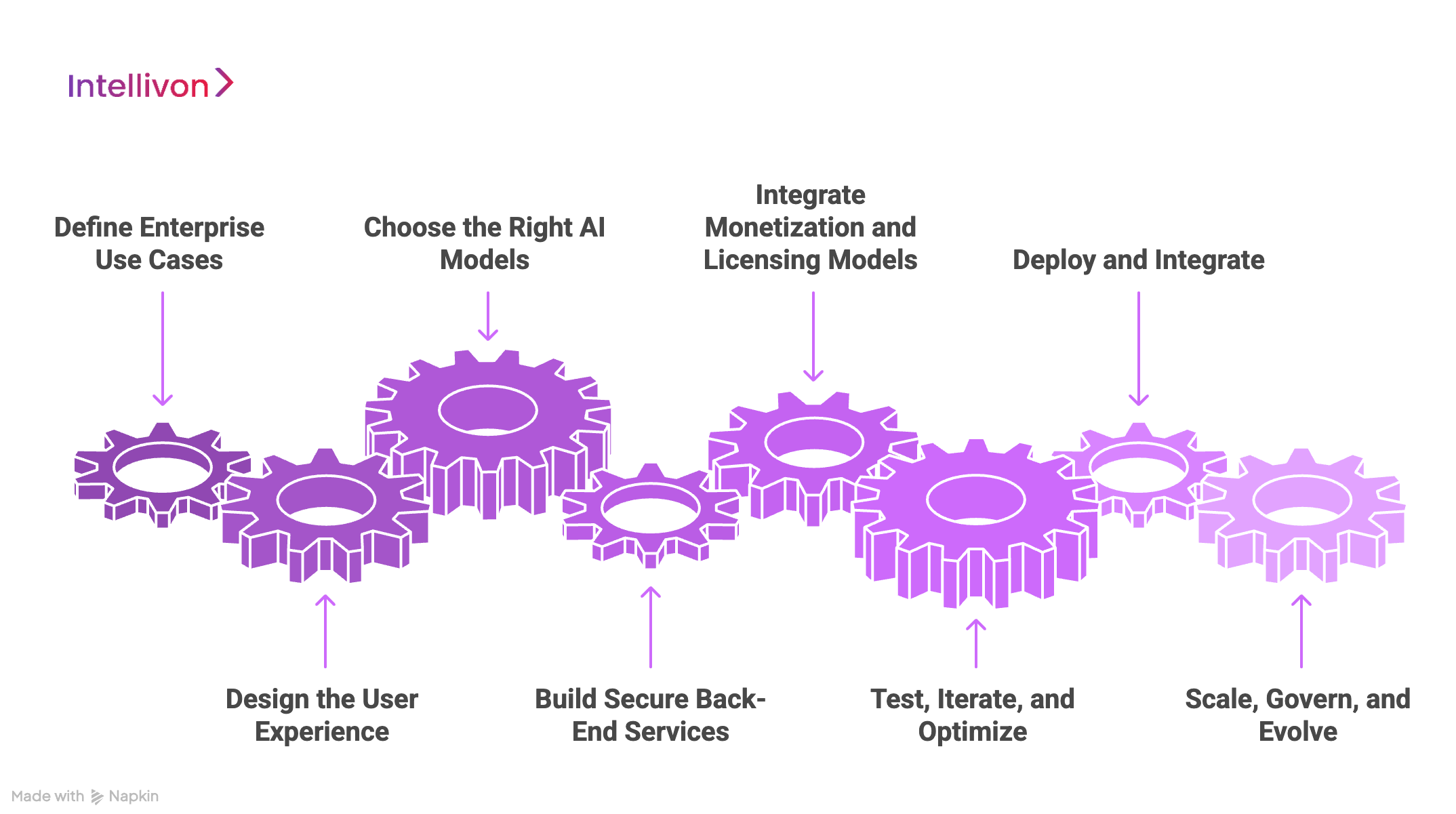
Step 1: Define Enterprise Use Cases
The process begins with clarity. Enterprises must identify what the app should achieve, whether it’s empowering marketing teams to accelerate campaigns, enabling customers to personalize content, or creating new monetization streams. At Intellivon, we work with stakeholders to align each feature with measurable business outcomes, ensuring the investment connects directly to ROI.
Step 2: Design the User Experience
AI editing is only as strong as its usability. The interface must make complex AI outputs feel natural and intuitive. We design workflows where creators can apply powerful edits in a single tap, while enterprises can enforce brand guidelines, approvals, and compliance controls behind the scenes.
Step 3: Choose the Right AI Models
From GANs to diffusion models, each use case requires a different AI approach. Intellivon’s architecture ensures that simple tasks run locally for speed, while high-compute workloads like background replacement or large-scale upscaling are routed to GPU-powered cloud servers. This hybrid approach keeps latency low and costs predictable.
Step 4: Build Secure Back-End Services
Enterprises demand resilience and compliance. We deploy microservices on Kubernetes clusters, ensuring each AI task can scale independently. Encryption, audit trails, and regional data residency controls are built in from day one, so enterprises stay compliant with GDPR, HIPAA, and other global standards.
Step 5: Integrate Monetization and Licensing Models
The app must generate sustainable revenue. Intellivon helps enterprises layer freemium adoption models with subscription tiers, credit-based usage for heavy AI features, and even API monetization for partners. By aligning monetization with enterprise goals, the platform evolves into a long-term growth driver rather than a one-off product.
Step 6: Test, Iterate, and Optimize
AI outputs must be trustworthy. We run extensive testing cycles with real-world data, capturing where models underperform and refining them through MLOps pipelines. Feedback loops ensure that the app’s AI gets smarter over time, while enterprises gain confidence that quality will not erode at scale.
Step 7: Deploy and Integrate
Launch is the beginning of value capture. We integrate the app with digital asset management (DAM) platforms, CRMs, and campaign analytics dashboards, ensuring edited content flows directly into enterprise workflows. This transforms the app from a creative tool into part of the enterprise’s core infrastructure.
Step 8: Scale, Govern, and Evolve
As adoption grows, so do demands on governance and performance. Intellivon provides monitoring systems that track usage, GPU consumption, and feature adoption. Enterprises can enforce governance through role-based access, approval workflows, and budget controls. Future updates, such as custom AI prompt support or collaborative editing, are rolled out without disrupting existing operations.
With Intellivon guiding this development journey, enterprises gain not just an app but a platform that accelerates content production, enhances engagement, and unlocks lasting growth.
How Much Does It Cost To Build A GenAI Photo Editing App Like Meta Edits
At Intellivon, we know enterprises need creative platforms that are powerful yet sustainable to build and operate. That’s why our pricing framework is flexible, aligning with your growth goals and compliance needs rather than forcing a one-size-fits-all package.
If initial projections exceed your budget, our team works closely with you to refine the scope while protecting the core value. Productivity, security, and enterprise-grade reliability always remain non-negotiable.
Estimated Phase-Wise Cost Breakdown
| Phase | Description | Estimated Cost Range (USD) |
| Discovery & Strategy Alignment | Business requirement gathering, workflow mapping, KPI definition, and compliance readiness (GDPR, HIPAA, SOC 2, regional laws) | $6,000 – $12,000 |
| Architecture & Design | System blueprinting, layered architecture planning (client, services, AI, governance), and integration mapping | $8,000 – $15,000 |
| Core Feature Development | Building modular, reusable editing functions (timelines, background removal, reframing, templates) | $12,000 – $25,000 |
| AI & Model Integration | Selecting models (GANs, diffusion, transformers), training pipelines, and inference optimization | $10,000 – $20,000 |
| Workflow Orchestration | Microservices, API integration, and compliance-focused audit trails for enterprise workflows | $10,000 – $22,000 |
| Platform Development & Customization | Dashboards, DAM/CRM connectors, and tailored user-facing experiences (mobile, web, enterprise portals) | $12,000 – $25,000 |
| Security & Compliance Alignment | Encryption, role-based access, content safety filters, and continuous audit monitoring | $8,000 – $15,000 |
| Testing & Quality Assurance | End-to-end testing, compliance checks, workflow simulations, and stress/performance optimization | $6,000 – $10,000 |
| Deployment & Scaling | Cloud rollout, GPU scaling, data residency setup, monitoring dashboards, and enterprise embedding | $6,000 – $12,000 |
Total Initial Investment Range: $50,000 – $150,000
Ongoing Maintenance & Optimization (Annual): 15–20% of initial build cost
Hidden Costs Enterprises Should Plan For
Even with a clear breakdown, certain costs often surface later in the process:
- Integration Complexity: Connecting legacy DAM, CRM, and CMS systems may require custom middleware and additional validation.
- Data Preparation: Cleaning, normalizing, and labeling enterprise-grade image datasets takes time and effort.
- Compliance Overhead: Regional regulations (GDPR, HIPAA, SOC 2) demand continuous monitoring, reporting, and legal review.
- Cloud Usage and Model Costs: Training or serving AI models can spike expenses if not optimized.
- Change Management: Onboarding, training, and adoption programs are essential to ensure teams actually use the system.
- Maintenance and Monitoring: Continuous patching, model updates, and observability prevent drift and downtime.
Best Practices to Avoid Budget Overruns
From Intellivon’s work with large-scale enterprise deployments, several practices consistently reduce long-term costs:
- Start Narrow, Expand Later: Pilot one high-value workflow, then expand once ROI is proven.
- Optimize AI Usage: Run lightweight models locally, cache frequent queries, and offload heavy tasks to cloud GPUs only when needed.
- Embed Compliance Early: Design for GDPR, HIPAA, and SOC 2 from day one to avoid costly redesigns later.
- Build Modular Features: Reusable modules power multiple functions, cutting development time for future upgrades.
- Enable Observability from Launch: Monitor task latency, GPU spend, and error rates continuously.
- Position Human-in-the-Loop as Value: Oversight builds trust, especially in regulated industries.
- Invest in Continuous Learning: Retrain models regularly to maintain quality and relevance.
Request a tailored quote from Intellivon today, and we’ll design a GenAI photo editing app that fits your budget, enforces compliance, and scales with your enterprise growth.
Overcoming Challenges in Building a GenAI photo Editing App Like Meta Edits
Building a GenAI photo editing app for enterprise use involves solving challenges that span infrastructure, governance, and adoption. Many organizations underestimate these realities. At Intellivon, proven frameworks address these obstacles directly, helping enterprises turn challenges into opportunities.
1. Managing High Compute Costs
Generative AI requires significant GPU resources. Features like diffusion-based restyling or high-resolution upscaling can cause cloud bills to spike if not managed carefully.
Intellivon’s approach: Hybrid architectures route lightweight edits to on-device inference while reserving GPUs for heavy workloads. Caching frequently used outputs and autoscaling clusters only during demand spikes ensures enterprises maintain predictable costs without sacrificing performance.
2. Ensuring Output Quality and Consistency
AI outputs can sometimes look polished in one scenario but fail in another, leading to inconsistent user experiences. For enterprises, this erodes trust quickly.
How Intellivon ensures stability: Human-in-the-loop validation is built into early deployments, while MLOps pipelines track performance continuously. If drift or degradation appears, retraining cycles and quality gates restore accuracy, delivering consistent results across diverse use cases.
3. Balancing Monetization With User Satisfaction
Monetization strategies often fail when adoption and revenue compete rather than complement each other. If users feel features are locked too early, engagement drops.
The Intellivon solution: Monetization is introduced in layers, like freemium adoption to capture users, subscription tiers for predictable income, credits for GPU-intensive edits, and API licensing for B2B expansion. This ensures revenue grows alongside user satisfaction, not at its expense.
4. Addressing Privacy, Bias, and Ethical Concerns
Generative AI presents real risks, from biased outputs to compliance violations. For enterprises, reputational and legal fallout can be severe.
The safeguard strategy at Intellivon: Platforms are designed with embedded content safety filters, role-based access controls, and audit trails. Data residency policies and encryption ensure alignment with GDPR, HIPAA, and SOC 2. This creates an environment where innovation does not come at the cost of compliance.
5. Scaling Infrastructure Without Service Disruption
Spikes in demand often overwhelm poorly designed systems, leading to latency or outages. At the consumer scale, this is inconvenient. At enterprise scale, it is unacceptable.
How Intellivon prevents downtime: Microservices, auto-scaling GPU clusters, and intelligent load balancing absorb traffic surges smoothly. Fallback mechanisms maintain core editing features while resources scale in the background, preserving a seamless user experience.
6. Keeping Pace With Rapid AI Advancements
The generative AI ecosystem evolves at breakneck speed. Today’s differentiator may become tomorrow’s commodity, leaving enterprises wary of long-term investments.
Future-proofing with Intellivon: Modular architectures with API-first designs and MLOps pipelines enable quick integration of new models without disrupting existing operations. Enterprises stay current with advancements while protecting their long-term investments.
Enterprises face formidable hurdles when building GenAI photo editing apps: compute costs, inconsistent quality, monetization risks, privacy issues, scalability bottlenecks, and rapid technology shifts. Intellivon’s frameworks convert them into competitive strengths. The outcome is a platform that remains scalable, compliant, and profitable while delivering trusted creative power to users. With challenges mapped and solved, the next step is to compare leading apps like Meta Edits, Lensa, and Remini, and uncover the lessons enterprises can apply.
Conclusion
GenAI photo editing apps have moved from novelty to necessity, reshaping how enterprises create, personalize, and monetize content. The success of Meta Edits shows the scale of opportunity but also highlights challenges, like cost, compliance, quality, and scalability.
Enterprises that act now secure first-mover advantage. Success depends not only on advanced technology but on aligning it with governance and strategy. That makes partnering with the right solution provider essential. The enterprises that choose wisely will accelerate workflows, unlock new revenue streams, and define how creative content drives growth in the digital economy.
Build Your GenAI Photo Editing App With Intellivon
At Intellivon, we design enterprise-grade GenAI platforms that are secure, scalable, and tailored to the way global organizations operate. Our frameworks combine advanced AI models, compliance-first design, and modular architecture to help you accelerate content production, deepen engagement, and unlock new revenue streams without disruption.
Why Partner With Intellivon?
- Tailored Solutions: Every platform is aligned with your workflows, user expectations, and compliance obligations.
- Compliance-First Design: Built to meet GDPR, HIPAA, SOC 2, and global audit standards from the start.
- Proven Enterprise Expertise: Over a decade of building AI-driven solutions that deliver measurable results across industries.
- Future-Ready Architecture: Cloud-native, API-first, and designed for seamless integration with DAM, CRM, ERP, and custom systems.
Book a discovery call with Intellivon today to explore how we can help you design a GenAI photo editing app that not only empowers creativity but also drives lasting enterprise growth.
FAQs
Q1. What makes Meta Edits different from other editing apps?
A1. Meta Edits stands out because it combines consumer-friendly simplicity with enterprise-scale infrastructure. Unlike most editing apps, it integrates advanced AI models into a seamless workflow, enabling one-tap generative edits while handling millions of concurrent users. Its real advantage is ecosystem integration, thereby keeping creators inside Meta’s platforms and monetizing engagement at scale.
Q2. How much revenue can a GenAI photo app generate?
A2. Revenue potential depends on adoption, features, and monetization models. Leading apps like Lensa and Remini have demonstrated millions in monthly earnings through subscription tiers, in-app purchases, and viral premium features. For enterprises, additional revenue streams emerge through enterprise licensing, API monetization, and branded creative packs. A well-executed platform can evolve into a long-term growth engine rather than a one-time app.
Q3. What is the best AI model for photo editing?
A3. There isn’t a single “best” model. The choice depends on the editing task. GANs remain strong for photorealistic enhancements, diffusion models excel at style transfer and generative fills, while transformers power text-to-edit capabilities. Enterprises often adopt a hybrid approach, orchestrating multiple models so each use case is optimized for both accuracy and efficiency.
Q4. How long does it take to build such an app?
A4. Timelines vary by scope. A minimum viable product with core AI features can take three to six months, while a fully enterprise-ready platform with integrations, compliance layers, and monetization can take nine to twelve months. The use of modular architectures and pre-trained models can accelerate delivery without sacrificing quality or governance.
Q5. Can enterprises integrate this with their existing workflows?
A5. Yes. A GenAI photo editing app can connect seamlessly with enterprise systems like DAMs, CRMs, CMS platforms, and ERP tools through APIs. This integration ensures edited assets flow directly into content pipelines, campaign dashboards, or marketing systems. When built with API-first design, the platform becomes part of the enterprise’s ecosystem rather than a standalone tool.