Digital classroom adoption has grown faster than expected. Over 85% of U.S. districts now have hybrid or fully digital learning environments. However, this change has revealed a serious risk to protecting student data. Every login, assignment submission, and message between teachers and students creates a record that must follow FERPA, COPPA, state privacy laws, and new international rules like GDPR.
Google Classroom set the gold standard for secure digital learning at scale by combining Google Workspace’s identity controls, strict data-minimization practices, and district-level admin governance. Its safety success comes from designing security, permissions, and data boundaries into the core architecture.
Intellivon engineers develop secure, compliant digital classroom platforms like Google Classroom with top-tier controls built into the infrastructure. We create solutions that provide the intuitive teacher experience of Google Classroom while incorporating your security policies, consent workflows, data residency requirements, and incident response plans into the system’s core. In this blog, we will break down how we build such compliant digital classrooms from the ground up.
Key Takeaways Of The Digital Classroom Platforms Market
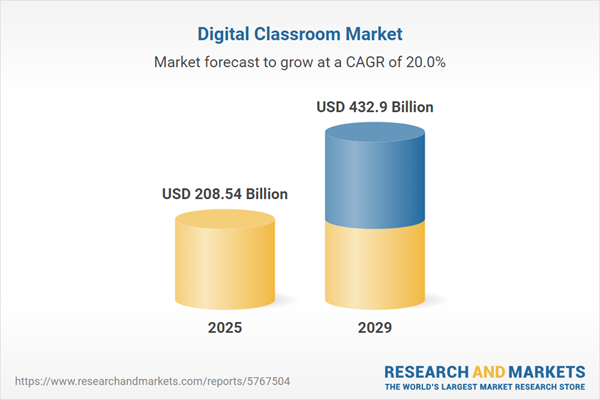
The digital classroom ecosystem is scaling at an unprecedented rate. According to a Research and Markets report, the sector is set to grow from $184.21 billion in 2024 to $208.54 billion in 2025, reaching $432.9 billion by 2029.
This growth is fueled by AR/VR, AI-driven learning models, and a rising focus on cybersecurity as districts look for platforms that protect student data, meet global compliance standards, and integrate seamlessly across devices.
Additional Market Growth Indicators
- Global digital classroom spending is expected to increase from $172.37 billion in 2025 to $445.24 billion by 2034, driven by LMS platforms and AI-powered education software.
- Market size is projected to move from $177.71 billion in 2025 to $318.82 billion by 2030, with cloud-based LMS tools dominating adoption.
- Privacy and data security concerns continue to be a primary barrier, pushing institutions toward platforms with strong consent, governance, and encryption models.
- The virtual classroom market alone is expanding from $18.23 billion in 2023 to $60.85 billion by 2032, supported by scalable cloud infrastructure and secure remote learning tools.
Safety-Focused Market Indicators
- Over 90% of EdTech tools collected more data than disclosed, increasing demand for strict data-minimization workflows.
- 82% of U.S. schools faced at least one cyberattack in 18 months, often due to unsecured vendors.
- 96% of school apps send student data to third parties, highlighting weak vendor controls across districts.
- Districts now list student-data safety as their top LMS selection factor, surpassing price and feature variety.
How Google Classroom Maintains Safety at Scale
- Built on data-minimization with no advertising usage of student information.
- Uses AI-driven threat detection across Workspace to spot unauthorized access.
- Enforces zero-trust controls, including 2FA, secure sharing, and audit logs.
- Maintains global certifications such as ISO 27001, SOC 2, and aligns with FERPA and COPPA.
- Enables region-based data storage and granular admin-level permissions.
Why This Market Is a Strong Investment Opportunity
The shift toward secure, cloud-native digital classrooms is accelerating. Institutions are actively replacing legacy systems with platforms that offer safety, compliance, and AI-enabled personalization.
With the category projected to surpass $400 billion globally, companies that build secure, compliant learning ecosystems can now capture growing budgets and long-term institutional partnerships.
What is The Safe Digital Google Classroom?
Google Classroom is designed as a secure, scalable learning environment built on Google Workspace’s identity controls, data-minimization standards, and district-level governance.
It uses identity-first controls, strict data boundaries, and administrator-level governance to ensure students, teachers, and staff interact in a protected environment. Its design reflects years of learning from global deployments, high traffic loads, and the privacy expectations of K–12 institutions.
Classrooms operate within the Google Workspace for Education suite, allowing districts to enforce permissions, monitor access, configure data-sharing rules, and align deployments with district compliance requirements.
How Does it Work?
Google Classroom works by combining identity management, secure content workflows, strict admin controls, and data-minimization practices to create a protected learning environment.
The following breakdown highlights the core layers that make its safety model reliable at scale.
1. Identity and Access Management (IAM)
Google Classroom uses Google Workspace IAM to control who enters a classroom and what level of access they receive. Schools can restrict enrollment domains, force multi-factor authentication, and require secure sign-ins.
Identity policies ensure only verified users enter the system, and permissions can be adjusted at the classroom, group, or organization levels.
This setup reduces unauthorized access risk, prevents link-based classroom exposure, and ensures districts maintain precise control over user roles.
2. Secure Content Exchange and Storage
Every file shared inside Google Classroom is stored within Google Drive under the institution’s Workspace domain. Access rules follow a “least privilege” approach. Students receive only the permissions needed to complete work, and teachers retain full oversight of submissions and comments.
Integrated audit logs track file access, changes, and sharing attempts. This helps districts investigate incidents quickly and prevents accidental public sharing.
3. Controlled Communication and Interaction
Google Classroom centralizes communication through comment threads, announcements, and teacher-led discussions. Schools can enable or restrict posting rights, mute students, or disable conversations entirely for specific classes.
Machine-learning filters act on inappropriate content, helping teachers maintain safe, respectful interactions. These controls minimize platform misuse and align classroom communication with district behavior policies.
4. Admin-Level Governance
Administrators manage the entire ecosystem from a central console. They define sharing rules, data regions, session lengths, device restrictions, and API-level integrations. The system supports audit logs, regulatory alignment, and automated monitoring for suspicious access.
This governance layer is one of Classroom’s strongest advantages. It gives districts complete visibility and allows them to enforce FERPA, COPPA, and state privacy standards.
5. Data-Minimization and Privacy Protections
Google Classroom does not use student data for advertising or commercial targeting. It collects only the information required to perform classroom functions. This privacy model is tightly integrated across Workspace, reducing the risk of cross-product profiling or unauthorized data use.
For districts responding to evolving privacy regulations, this approach provides long-term protection and limits compliance exposure.
Google Classroom works because its safety model is built into every layer. For enterprises developing their own digital classroom systems, this blueprint demonstrates that a secure learning environment comes from intentional architectural choices rather than isolated features.
What “Safety” Really Means in a Digital Classroom
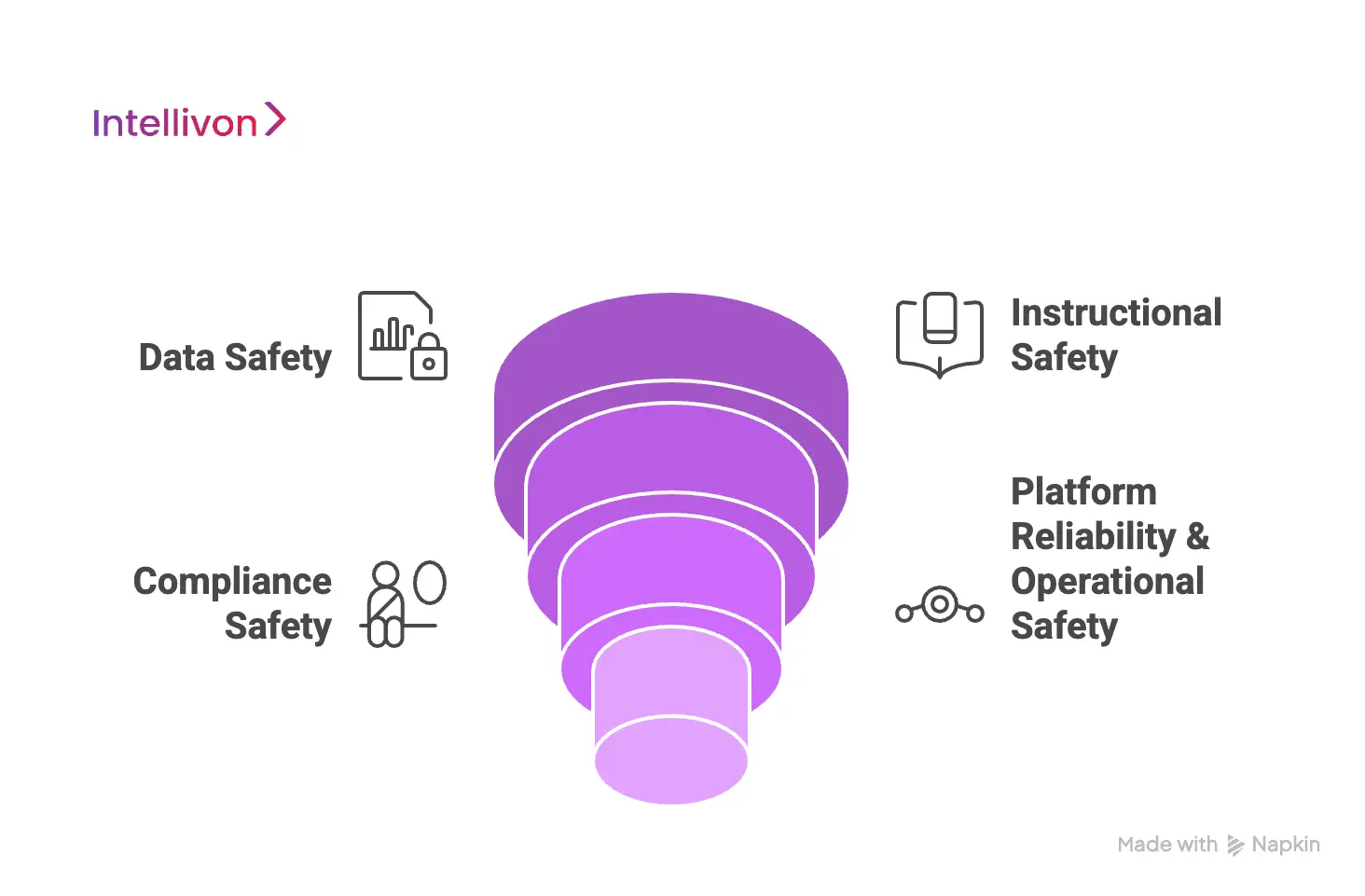
Safety in a digital classroom includes data protection, instructional integrity, compliance readiness, platform reliability, and secure student interaction models. A truly safe system anticipates risks before they affect students, teachers, or administrators. It also balances usability with governance, giving institutions the confidence to expand without adding unnecessary vulnerabilities.
Below is a breakdown of the safety domains that matter most when building a platform modeled after Google Classroom.
1. Data Safety
Data safety defines how student information is stored, accessed, processed, and shared. Digital classrooms handle a wide range of sensitive data, including academic records, behavioral insights, and personal identifiers.
To maintain data safety, platforms must include:
- secure access rules that prevent unauthorized entry
- encryption in transit and at rest
- tokenization and PII isolation
- clear data boundaries between classroom content and external apps
- audit logs mapping how data moves between systems
This domain lays the foundation for trust. When organizations protect data with the same precision as healthcare or finance systems, they minimize exposure and reduce compliance risk.
2. Instructional Safety
Instructional safety ensures that teaching and learning interactions happen in a protected environment. This goes beyond content filters. It covers how students collaborate, how AI-generated content is monitored, and how teachers oversee conversations or submissions.
Critical elements include:
- teacher-first control over posts, comments, and student discussions
- AI-driven content moderation that detects inappropriate material
- restricted access to external links and resources
- protected submission workflows that prevent tampering or deletion
- consistency between what students see and what teachers expect
Strong instructional safety helps districts maintain positive digital behavior and prevents unwanted content from disrupting learning.
3. Compliance Safety
Digital classrooms must comply with multiple regional and international regulations. These laws define what data can be collected, how long it must be retained, and how parents or guardians can request visibility or deletion.
A compliant platform aligns with:
- FERPA for student records
- COPPA for under-13 data handling and parental consent
- GDPR-K for minors under 16 in Europe
- state laws such as California’s SOPIPA, Illinois’ SDPA, and Texas student privacy statutes
Compliance safety is not a checkbox. It’s a governance model built into the product architecture so regulators, districts, and parents can trust the system from day one.
4. Platform Reliability & Operational Safety
Operational safety ensures the platform can support thousands or millions of users without performance drops or outages. When digital classrooms function as core instructional infrastructure, reliability becomes a safety requirement.
Core components include:
- scalable cloud architecture that handles peak traffic
- load balancing for live sessions and assessments
- disaster recovery and backup environments
- predictable uptime backed by strong SLAs
- proactive monitoring of devices, APIs, and session activity
This level of preparedness keeps learning environments stable and dependable, especially during high-stakes periods like exams, district rollouts, or statewide deployments.
Safety in a digital classroom is a collection of disciplined decisions across data governance, instructional design, regulatory alignment, and platform engineering. When these domains work together, districts gain the confidence to expand digital learning without compromising privacy, trust, or long-term reliability.
How 96% of School Apps Share Student Data With External Companies
Digital classrooms help schools move faster, support hybrid learning, and simplify assignments. However, when they lack strong safety architecture, they become one of the largest unseen risk zones in K–12 environments. Most of these risks are not caused by hackers. They come from weak permissions, unvetted apps, advertising trackers, unsafe SDKs, and integrations that quietly extract more student data than necessary.
For instance, A major study showed that 96% of school apps share student data with external companies, without parent consent. Unsafe digital classrooms do not fail loudly. They fail silently through thousands of small data leaks that accumulate into long-term privacy threats for children.
1. Third-Party Data Sharing
Independent audits reveal that most school apps are not designed with privacy in mind.
A major study showed that 96% of school apps share student data with external companies, and 78% send that data to advertising or analytics networks, usually without parental consent or district-level approval.
This data includes:
- device IDs
- usage patterns
- location metadata
- behavioral learning signals
These patterns violate COPPA’s “data-minimization” principles and FERPA’s “authorized use” expectations. More importantly, they turn a digital classroom into a commercial data pipeline instead of a protected learning ecosystem.
2. Student Data Sent to External Channels
One of the most alarming findings from Internet Safety Labs is how widely data is shared. School apps that shared data sent it to an average of 10.6 different third-party data channels, amplifying privacy risk across multiple companies.
This means:
- Districts cannot accurately map where student data is going
- Even a minor misconfiguration multiplies exposure
- A single unsafe vendor creates a ripple effect across the entire classroom stack
This is why vendor governance and SDK audits must be standard practice when building any digital classroom.
3. Learning Tools Track Children
In one of the most comprehensive global investigations, Human Rights Watch reverse-engineered 164 EdTech apps used in 49 countries. The results showed that 89% of these tools tracked children across the internet, even when they were promoted or mandated by ministries of education.
Tracking techniques included:
- persistent advertising identifiers
- fingerprinting technologies
- cross-site analytics
- hidden third-party cookies
These practices follow children outside the classroom and across unrelated websites, which is a direct violation of COPPA, GDPR-K, and most national child-data laws. This shows that even government-approved EdTech can be unsafe when security is not prioritized in product design.
4. Personal Data Sent to Major Ad Networks
Research highlighted in K–12 industry investigations shows a secondary risk where school apps transmit sensitive student data directly to major advertising networks. K12Dive, referencing ISL’s analysis, found that apps widely shared identifiers with:
- Google (49%)
- Facebook (14%)
When student data mixes with ad networks, children face:
- long-term profiling
- behavioral targeting
- invasive cross-app tracking
- data being sold to unknown brokers
This makes safe digital classrooms a compliance necessity, not a “nice-to-have.”
6. Cyberattacks Rising Across K-12 Systems
Unsafe digital classrooms increase district-wide vulnerability. Recent cybersecurity analysis shows:
- 82% of K–12 schools suffered at least one cyberattack in the last 18 months.
- Vulnerabilities in third-party systems caused 55% of these incidents.
These attacks range from ransomware to identity theft, often triggering:
- school closures
- financial losses
- permanent exposure of student records
This reinforces why district-grade digital classrooms must adopt zero-trust architecture, strong IAM, and secure vendor policies.
A safe digital classroom eliminates these risks by building protection into the architecture:
- data minimization
- consent-first workflows
- audited SDKs
- encrypted data flows
- verified vendor ecosystems
- real-time monitoring
- compliant identity systems
What Makes Google Classroom a Safety Benchmark?
Google Classroom is considered a safety benchmark because it minimizes data collection, centralizes security controls across Workspace, enforces strong identity management, and provides district-level governance. What sets Classroom apart is how safety is treated as a design principle, and not as a post-launch layer.
Below is a breakdown of the elements that position Google Classroom as the industry’s safety standard:
1. Minimal Student Data Collection
Google Classroom follows a strict data-minimization approach. Student information collected in the platform is limited to classroom operations and not shared with advertising systems. This separation between product functionality and commercial use is a core trust driver for districts evaluating long-term digital learning investments.
Key protections include:
- no ad-based student tracking
- no cross-product profiling of student activity
- limited metadata collection tied only to assignments and workspace files
- protections that restrict third-party access to student records
This model reduces privacy exposure while supporting compliance across global education regulations.
2. Secure Workspace Ecosystem
Google Classroom operates inside Google Workspace for Education, a highly governed environment that centralizes storage, collaboration, and access rules. Unlike LMS tools that connect to dozens of external apps, Classroom maintains tight control over how data flows through the ecosystem.
Key advantages include:
- classroom files stored securely in institution-controlled Drive
- Sheets, Docs, and Slides are governed by the same admin policies
- centralized threat detection across all Workspace apps
- reduced reliance on external apps that often trigger data leaks
This containment strategy is one of the main reasons Classroom remains reliable even during large-scale deployments.
3. Strong Identity Infrastructure
Identity management is the backbone of safety in digital classrooms. Google integrates Classroom deeply with Google Workspace IAM, allowing districts to define who can join, what permissions they have, and how accounts behave in different contexts.
Identity safeguards include:
- secure sign-ins with 2-step verification options
- domain-based access restrictions
- role-based permissions for students, teachers, and administrators
- controlled classroom enrollment and join-code security
These controls prevent unauthorized entry and create a predictable, governed access environment.
4. District-Level Admin Controls
One of Classroom’s most effective safety features is its admin console. Institutions can standardize security settings, enforce compliance policies, and monitor platform activity without compromising usability.
Admin capabilities include:
- detailed audit logs tracking every user action
- region-based data storage and retention settings
- sharing restrictions for internal vs. external domains
- device-level policies for Chromebooks and managed browsers
- configuration of third-party integrations and API access
This governance layer allows districts to deploy Classroom with confidence, knowing that compliance obligations can be met without engineering custom security frameworks.
Google Classroom sets the benchmark because its safety model is embedded in every component. For enterprises building their own platforms, the takeaway is clear: true safety comes from disciplined architecture, not fragmented add-ons.
Must-Have Features for a Safe Digital Classroom Like Google Classroom
A safe digital classroom requires identity governance, controlled content workflows, moderated communication, device-level safeguards, and real-time monitoring to protect students and ensure compliance.
The following capabilities form the backbone of a platform that can support protected learning environments at scale.
1. Secure Classroom Creation & Role-Based Access
A safe system begins with well-defined access boundaries. Each user should have the exact level of permission required, which is no more or no less.
1. Role-Based Access Control (RBAC)
RBAC establishes distinct permissions for teachers, students, and administrators. Each role controls what information a user can view, modify, or manage inside the platform.
2. Dynamic Permissioning
Dynamic controls allow institutions to modify access instantly. Teachers can adjust commenting rights, presentation roles, or submission settings depending on classroom needs.
3. SSO and Identity Workflows
Strong identity workflows connect the classroom platform to existing school directories. SSO and MFA ensure verified access, while automatic de-provisioning removes accounts as soon as a user exits the institution.
2. Controlled Content Sharing & Assignments
Content movement is one of the most sensitive areas in digital classrooms. Proper controls protect instructional materials and maintain the integrity of academic work.
1. Document Access Rules
Teachers can restrict downloading, printing, or resharing of classroom files. These controls ensure materials stay within authorized boundaries.
2. Assignment Access Expiration
Submission windows can automatically open and close. Once the deadline passes, student access to certain files or submission portals is removed to preserve fairness.
3. Version Control
Version histories allow administrators or teachers to revert to previous states if unauthorized changes occur. This supports transparency and audit readiness.
3. Moderated Communication Channels
Real-time communication is essential, but must remain controlled. Moderation layers help maintain respectful, safe interactions.
1. AI/NLP-Powered Chat Filtering
Language models can detect harmful or inappropriate messaging patterns. The system flags or holds content before it reaches other students.
2. Customized Banned Keyword Lists
Institutions can define prohibited terms that align with school policies. These words are automatically blocked or reviewed upon use.
3. Teacher-First Moderation
Messages or posts may require teacher approval before appearing to the class. This ensures educators remain the primary gatekeepers of digital interactions.
4. Built-In File Safety & Malware Scanning
Classroom platforms often become entry points for malware if file sharing isn’t properly controlled.
1. Sandbox Upload Processing
Uploaded files are isolated and analyzed before being made available to others. This prevents harmful content from spreading in real time.
2. Antivirus and Anti-Malware Scanning
Files are compared against known threat databases. Any dangerous file is quarantined and flagged for administrative review.
3. URL Safety and Filtering
External links are checked against phishing and malware lists. Unsafe URLs are blocked automatically.
5. Multi-Layered Device Safety
Device-level controls reinforce platform safeguards, especially during tests or monitored learning sessions.
1. On-Device Restrictions
Policies can limit access to specific apps, websites, or system functions during active classroom sessions.
2. Screen Monitoring (Policy-Based)
Teachers may view controlled snapshots of student screens during live sessions. These views support focus and academic integrity within defined privacy rules.
3. Assessment Lockdown Mode
During exams, a lockdown browser prevents tab switching, application access, copying, and screenshots.
6. Real-Time Alerts & Audit Trails
A secure platform must offer visibility into actions and anomalies. These features support incident response and compliance documentation.
1. Safety Incident Alerts
Automated triggers notify teachers or administrators when issues arise, such as flagged language, malware uploads, or explicit content attempts.
2. Suspicious Login Detection
AI models identify unusual login behavior, such as access from multiple countries or unfamiliar devices.
3. Immutable Audit Logs
All actions are recorded in tamper-proof logs. These logs support investigations, third-party audits, and legal reporting.
Compliance Framework A Safe Digital Classroom Must Align With
Safe digital classrooms must align with FERPA, COPPA, GDPR-K, state privacy laws, and district governance policies to protect student data and ensure regulatory readiness.
Below are the core frameworks every enterprise-grade digital classroom must satisfy to be deployable across districts and global markets.
1. FERPA (Family Educational Rights and Privacy Act)
FERPA governs how student education records are managed in the United States. A digital classroom must respect strict boundaries around access, storage, and parent rights.
1. Student Record Protections
The platform must isolate student academic data and limit access to authorized personnel. Grades, attendance, behavioral notes, and assessment submissions must remain inside protected environments with clear permission rules.
2. Access Rights
FERPA requires that parents or eligible students can review and request updates to their records. The system should provide a reliable, auditable method for handling these requests, ensuring transparency and regulatory alignment.
2. COPPA (Children’s Online Privacy Protection Act)
COPPA applies when platforms serve children under 13. Compliance requires verifiable parental involvement and a strict approach to data collection.
1. Under-13 Consent
The platform must support secure workflows for obtaining and validating parental consent before collecting any personal information. Schools need tools to manage, track, and prove consent for every child.
2. Parental Controls
Parents must be able to view the data collected about their child, request deletion, and revoke consent. The system should make these actions simple, fast, and fully traceable.
3. GDPR-K (EU GDPR for Minors Under 16)
European regulations extend heightened privacy protections for minors, making data-minimization and purpose clarity non-negotiable.
1. Minimal Data Collection
GDPR-K requires collecting only the data strictly necessary for the classroom to function. This influences architecture by reducing optional fields, disabling unnecessary logs, and restricting background analytics.
2. Clear Purposes & Data Deletion
The platform must clearly outline why each data point is collected. It must also include a complete deletion workflow that honors the “right to be forgotten,” erasing all traces of a child’s data upon request.
4. State-Level Privacy Laws (California, Illinois, Texas, and others)
Several U.S. states have added additional layers of protection that digital classrooms must comply with to be legally deployable.
1. Contractual Obligations
State laws often require vendors to enter into detailed agreements defining use limitations, security controls, and boundaries around commercial use. The platform must support these obligations with configurable settings and transparent data behavior.
2. Breach Notification Requirements
Time-sensitive reporting rules apply when data exposure occurs. The platform must have incident detection, automated logging, and structured notification workflows to support legal responsibilities.
5. District Technology Governance Policies
Beyond federal and state law, each district operates with its own governance structure that dictates how edtech tools are procured, deployed, and monitored.
1. Procurement & Integrations
Districts require thorough security reviews before approving new systems. The platform must integrate safely with Student Information Systems (SIS), Learning Management Systems (LMS), and identity providers without increasing risk.
2. Security Audits & Vetting
Most districts require annual SOC 2 audits, penetration testing, and comprehensive security reports. The platform’s architecture should simplify these assessments with clear documentation, immutable logs, and transparent data handling practices.
Compliance frameworks shape the technical backbone of every safe digital classroom. They dictate how data is handled, how users are identified, and how incidents must be addressed. This alignment becomes a competitive advantage, not just a legal obligation.
Our Step-by-Step Guide to Creating a Safe Digital Classroom Platform
Intellivon builds safe digital classrooms through a structured framework, such as compliance mapping, secure data architecture, LMS development, SIS/LMS integrations, safety dashboards, audits, and enterprise-scale deployment.
At Intellivon, this approach is delivered through a clear, repeatable framework that helps institutions launch platforms ready for district operations and long-term scale.
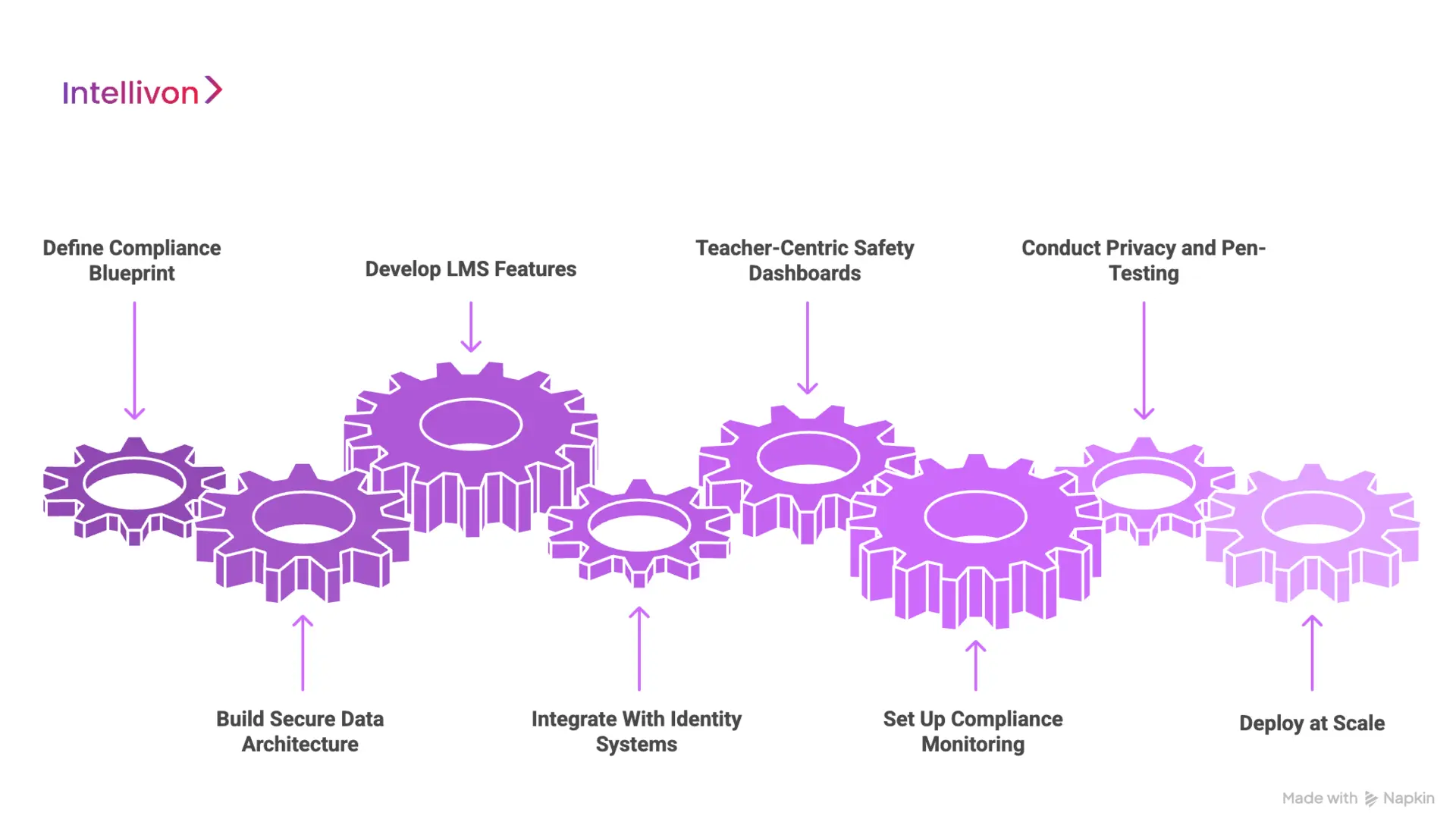
Step 1: Define the Compliance Blueprint
Intellivon begins with a detailed discovery phase that maps data flows, consent requirements, and user permissions. This step clarifies what can be collected, how it must be stored, and which regulatory standards apply.
By aligning legal, product, and engineering teams early, we eliminate ambiguity and ensure the platform meets FERPA, COPPA, GDPR-K, and district rules from the start.
Step 2: Build Secure Data Architecture
With compliance defined, we design a hardened data environment. PII is isolated, access is tightly controlled, and all data travels through encrypted channels.
Tokenization, role-based authorization, and clear retention policies form the core of this blueprint. The result is a platform that is resilient, auditable, and ready for large-scale institutional use.
Step 3: Develop LMS Features
Intellivon then builds the core learning functionalities, which include classrooms, assignments, grading, and collaboration, while embedding safety controls into each workflow.
Teachers receive full oversight tools, students operate within protected boundaries, and administrators can trace every interaction. This structure prevents misuse and keeps classroom activity aligned with district policies.
Step 4: Integrate With Identity Systems
A digital classroom must fit cleanly into existing school infrastructure. We connect the platform with systems such as Clever, ClassLink, OneRoster, PowerSchool, Canvas, and Microsoft EDU.
These integrations ensure accurate enrollment, synchronized rosters, and seamless authentication without adding operational burden to IT teams.
Step 5: Teacher-Centric Safety Dashboards
Safety is most effective when educators have real-time visibility. Intellivon builds dashboards that surface alerts, content flags, behavior anomalies, and system-wide activity.
Teachers gain a clear view of what’s happening in their classrooms, while administrators can track trends and intervene when needed.
Step 6: Set Up Compliance Monitoring
Every action within the platform generates immutable audit logs. Our experts configure automated monitoring, breach detection triggers, and incident documentation workflows that help institutions stay compliant under FERPA, COPPA, GDPR-K, and state privacy laws.
This ensures the platform remains audit-ready at all times.
Step 7: Conduct Privacy and Pen-Testing
Before deployment, the platform undergoes rigorous validation. Intellivon conducts internal and third-party penetration tests, policy reviews, and SOC-style security checks.
These evaluations confirm the platform can withstand real-world threats without exposing student or district data.
Step 8: Deploy at Scale
Finally, we prepare the platform for wide adoption. This includes scalable hosting, onboarding workflows, training materials, and district-wide rollout plans.
Whether the environment supports 5,000 students or 500,000, the infrastructure is designed to grow without adding risk.
This step-by-step framework allows Intellivon to deliver safe, compliant digital classrooms that can operate inside complex educational ecosystems. Each stage strengthens security, simplifies governance, and prepares the platform for long-term institutional trust.
Cost To Create A Safe Digital Classroom Like Google Classroom
Building a Google Classroom–style platform requires investment in identity governance, secure data architecture, content workflows, safety controls, and district-grade compliance. Costs vary based on the scope, integrations, and level of security expected by the institution.
At Intellivon, we design cost models that align with regulatory requirements, SIS/LMS ecosystems, and long-term instructional goals. Each decision balances engineering depth with responsible budgeting. When organizations work with limited resources, we define a focused roadmap that maintains FERPA, COPPA, and state-level compliance without compromising safety or usability.
Estimated Phase-Wise Cost Breakdown
| Phase | Description | Estimated Cost (USD) |
| Discovery & Compliance Blueprint | Requirements, data-flow mapping, FERPA/COPPA/GDPR-K alignment, admin policy design | 6,000 – 12,000 |
| Secure Architecture & Multi-Tenant Setup | Cloud-native design, PII isolation, encryption, IAM rules | 8,000 – 15,000 |
| Core Classroom & Assignment Module | Class creation, assignments, submissions, grading workflows | 10,000 – 20,000 |
| Communication & Moderation Layer | AI/NLP filtering, message review tools, reporting workflows | 6,000 – 12,000 |
| Content & File Safety Engine | Sandbox uploads, malware scanning, safe link handling | 8,000 – 14,000 |
| Teacher & Admin Dashboards | Visibility tools, safety insights, behavior monitoring | 10,000 – 20,000 |
| SIS/LMS & SSO Integrations | OneRoster, Clever, ClassLink, PowerSchool, Canvas, SAML/OAuth | 6,000 – 12,000 |
| Security & Compliance Engineering | Audit logs, breach detection, least-privilege enforcement | 6,000 – 10,000 |
| Testing, QA & Security Validation | Pen-testing, privacy checks, scalability and load testing | 6,000 – 10,000 |
| Pilot, Training & Rollout Support | District onboarding, educator training, workflow optimization | 6,000 – 10,000 |
Total Initial Investment Range: $60,000 – $175,000 USD
Annual Maintenance & Optimization: 15–20% of initial build
Hidden Costs Organizations Should Plan For
- Integration Complexity: Different SIS/LMS systems require mapping, testing, and workflow customization.
- Compliance Workloads: District audits, data-protection assessments, privacy agreements, and policy updates require ongoing support to remain aligned with FERPA, COPPA, and state regulations.
- Data Governance & Normalization: Institutions use multiple data formats across grade levels and schools.
- Cloud Consumption Costs: File scanning, assignment processing, AI moderation, and real-time analytics affect compute usage.
- Change Management & Training: Training, onboarding, and continuous support must be factored into operating costs.
- AI Model Maintenance: Content moderation and behavior analytics require periodic updates and re-tuning to handle new patterns, languages, or safety scenarios.
Best Practices to Avoid Budget Overruns
- Start With a Clear Scope: Deploy core classroom and assignment capabilities first. Expand into analytics, dashboards, and advanced safety features as adoption grows.
- Embed Compliance Early: Building privacy and identity rules from the start prevents costly redesigns after audits or district reviews.
- Use Modular Architecture: Microservices-based design reduces future development costs and simplifies upgrades.
- Optimize Cloud Usage: Balance real-time processing with scheduled tasks to control compute and storage expenses.
- Maintain Observability: Monitor session activity, access patterns, and workflow health to prevent costly failures or performance issues.
- Iterate With Real User Data: Refine features, adjust safety policies, and optimize workflows based on real classroom behavior and teacher feedback.
A Google Classroom–style platform is a long-term investment in instructional quality, safety, and district trust. Intellivon supports organizations with transparent pricing, strategic planning, and engineering built for enterprise-scale security and sustainability.
Conclusion
Creating a safe digital classroom requires more than strong features. It demands a security-first architecture, clear compliance alignment, disciplined data governance, and thoughtful design that supports teachers at scale. Platforms modeled after Google Classroom succeed because safety is embedded into every interaction, not added later. As districts expand hybrid learning and regulatory expectations tighten, institutions need solutions they can trust for long-term stability and growth.
With the right engineering partner, a secure digital classroom becomes a competitive strength. Intellivon helps organizations build platforms that protect students, reduce risk, and prepare for the future of learning.
Build a Safe Digital Classroom Like Google Classroom With Intellivon
At Intellivon, we develop secure digital classroom platforms that combine identity-first protection, compliance-driven architecture, and district-scale reliability.
Each platform is engineered for enterprise-level demands. It remains secure, compliant, and stable during peak activity. From encrypted data flows to moderated communication channels and role-based access, every component is built to support safe, scalable digital learning from the first deployment cycle.
Why Partner With Intellivon?
- Compliance-First Architecture: Aligned with FERPA, COPPA, GDPR-K, state privacy laws, and district vendor-governance policies.
- Secure Classroom Intelligence: Role-based access, dynamic permissions, safe content workflows, and AI-powered moderation that support safe and orderly digital learning.
- Teacher Workflow Optimization: Tools that streamline assignments, grading, communication, and oversight.
- District-Wide Interoperability: OneRoster, Clever, ClassLink, PowerSchool, Canvas, Skyward, and Google/Microsoft identity integrations for seamless operations.
- Enterprise-Scale Cloud Infrastructure: Multi-tenant resilience, elastic scaling, zero-downtime updates, and high availability during high-traffic learning and assessment periods.
- Continuous AI and Safety Evolution: MLOps pipelines refine moderation models, strengthen anomaly detection, and improve risk classification over time.
- Zero-Trust Security Foundation: Encrypted data pipelines, strict IAM controls, device safeguards, sandboxed uploads, and continuous monitoring to protect student information.
- Designed for District Adoption: Teacher-friendly interfaces, leadership dashboards, and consistent usability that support rapid adoption and long-term fidelity across schools.
Book a strategy call with Intellivon to explore how a custom-built, Google Classroom–style digital ecosystem can strengthen instructional quality, safeguard student data, and scale reliably across your entire district or enterprise network.
FAQs
Q1. What makes a digital classroom platform “safe” at an enterprise level?
A1. A safe digital classroom uses identity governance, encrypted data flows, moderated communication, and compliant data-handling processes. Safety depends on how well the platform controls user access, protects files, filters content, and aligns with regulations like FERPA, COPPA, and GDPR-K.
Q2. How do schools ensure student data stays private in digital classroom environments?
A2. Privacy is protected through strict access rules, strong identity verification, and clear data boundaries between classroom content and external apps. Effective platforms use encrypted storage, audit logs, safe file workflows, and data-minimization practices.
Q3. What integrations are required to build a secure classroom like Google Classroom?
A3. Secure platforms must integrate cleanly with Student Information Systems (PowerSchool, Skyward), identity providers (Google, Microsoft, SAML/OAuth), and district-level tools like Clever, ClassLink, and OneRoster. These integrations ensure accurate rosters, controlled access, and smooth authentication.
Q4. How does AI improve safety and monitoring in digital classrooms?
A4. AI supports real-time content filtering, plagiarism detection, behavioral anomaly detection, and early-warning signals for self-harm or bullying. NLP models scan communication channels for unsafe language, while monitoring engines flag suspicious login patterns or unauthorized access attempts.
Q5. What does it cost to build a safe digital classroom similar to Google Classroom?
A5. Costs typically range from $60,000 to $175,000 depending on scope, integrations, compliance depth, and security expectations. Expenses include architecture design, identity workflows, LMS features, safety engines, SIS/SSO integrations, and audit systems. Ongoing maintenance averages 15–20% annually.