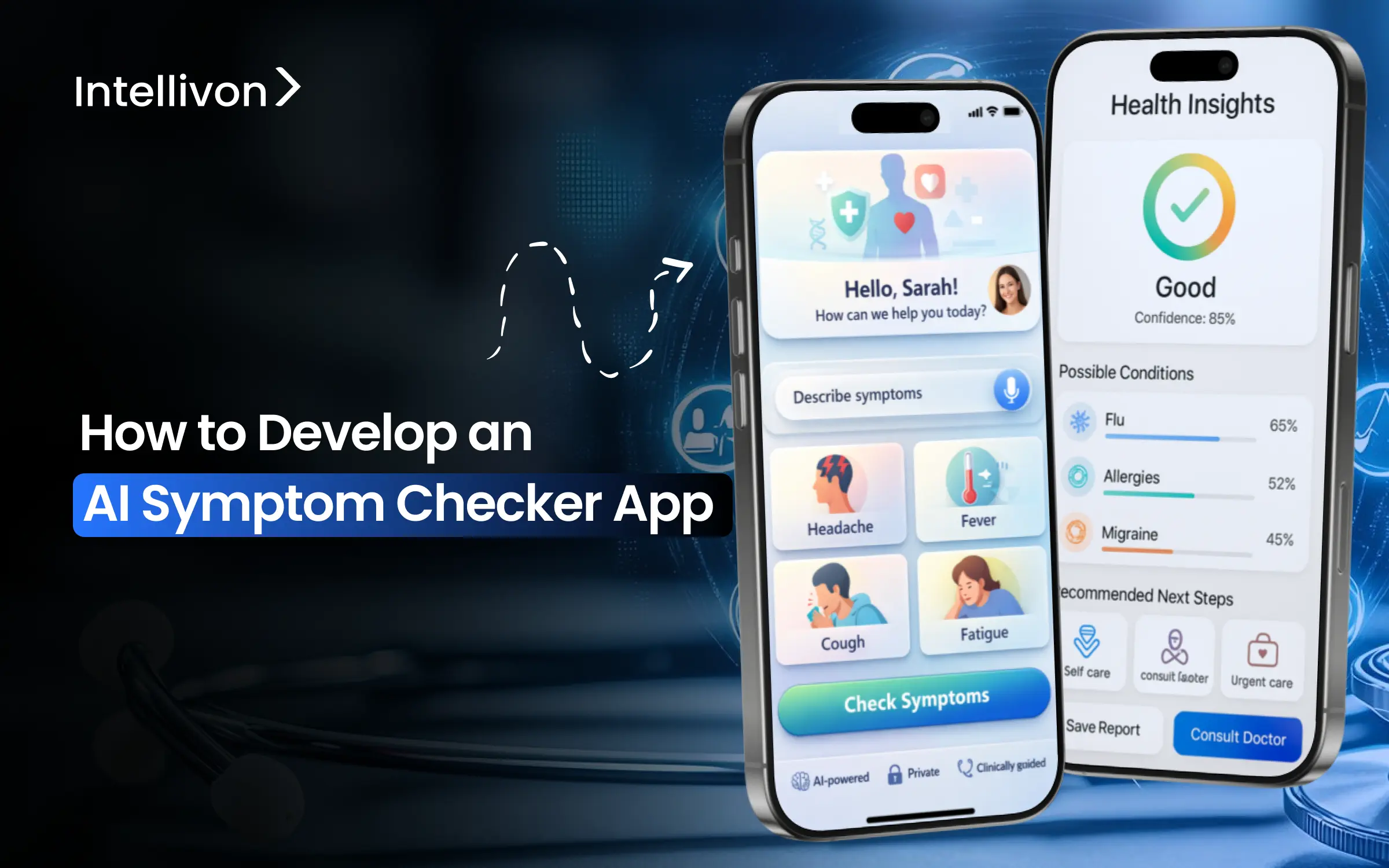
Most people check ChatGPT before thinking about the emergency room when dealing with any sudden ailment. AI symptom checkers help fill this gap. They provide quick guidance on what to do next and help ease the pressure on healthcare systems.
These apps use natural language processing, medical knowledge databases, and decision-tree algorithms to evaluate symptoms and suggest the right level of care. However, creating an AI-driven symptom checker app involves understanding medical accuracy needs, data privacy laws like HIPAA, and the ethical duty of giving health advice.
Our healthcare platform team has built AI-based systems for organizations looking for real operational improvements, not just basic AI features. Through this work, we have identified where symptom checker projects falter, where costs can unexpectedly increase, and which design choices lead to lasting success. This blog explains how we create an AI symptom checker app from the ground up. It covers practical AI use, risk factors, and the scalability issues that matter in real business settings.
Key Takeaways of The AI Symptom Checker Market
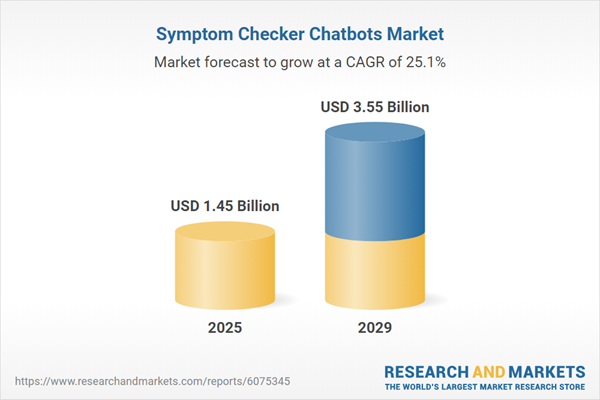
AI symptom checker apps have emerged as one of the most active growth areas within healthcare AI. In 2025, the segment is estimated to generate approximately $1.45 billion in value and is expected to more than double by 2029, reaching nearly $3.6 billion, driven by annual growth exceeding 25%.
These apps rely on NLP and ML to interpret reported symptoms, surface likely conditions, and guide care pathways. In enterprise deployments, they are increasingly connected to telehealth platforms and electronic medical record systems to support end-to-end clinical workflows.
Market Insights:
- The symptom checker chatbots market expanded from $1.16 billion in 2024 to $1.45 billion in 2025, driven by the rise in health tech investments.
- Forecasts show exponential growth to $3.55 billion by 2029, fueled by AI/ML advancements, wearable integration, and multilingual support.
- Broader AI diagnostics, including symptom checkers, hit $1.94 billion in 2025, targeting $10.28 billion by 2034 at 20.37% CAGR.
- Telehealth integration cuts consultation time, with 70% patient preference for virtual care and 150% visit growth.
- Enterprises embed these in virtual care apps for risk prediction and workflow automation, as seen in U.S. hospitals like Kaiser, reducing hospitalizations via AI-guided triage.
Healthcare enterprises are investing in AI symptom checker apps because the gains are measurable. AI-driven clinical decision support has shown a 20% reduction in diagnostic and treatment errors across care settings.
Studies also report a 15% improvement in clinician decision accuracy, especially during early intake and triage. At the operational level, AI adoption is linked to 10–15% lower provider costs, driven by fewer unnecessary consultations and faster intake workflows. For organizations managing rising demand with limited clinical capacity, these improvements enable scale without adding proportional risk or headcount.
What is an Enterprise AI Symptom Checker App?
An enterprise AI symptom checker app is a regulated clinical intake application that structures patient-reported symptoms before care begins. Instead of static forms, it uses adaptive questions that change based on severity, duration, and risk signals. Therefore, patients provide clearer inputs with less back-and-forth.
The app applies AI-driven clinical reasoning to interpret symptom patterns. However, it does not diagnose. Instead, it estimates urgency, flags red risks, and recommends the next care step. As a result, intake becomes faster and more consistent.
In addition, the app produces structured, clinician-ready summaries that fit existing workflows. Unlike consumer tools, enterprise deployments operate under defined governance rules and approved pathways. Consequently, users are routed to self-care, virtual consults, specialty referrals, or escalation. Every decision is logged for audit and can be integrated with EHR and telehealth systems.
At scale, it becomes a control layer. It reduces ambiguity early and supports clinical accountability.
How It Works
An AI symptom checker app follows a structured flow designed to reduce uncertainty early.
Instead of collecting symptoms passively, it guides users through a controlled intake process. As a result, clinical teams receive clearer, more actionable information before care begins.
Step 1: Guided Symptom Entry
First, the app prompts users with adaptive questions. These questions change based on previous answers, age, and reported severity. Therefore, irrelevant inputs are avoided, and critical details surface earlier.
Step 2: Clinical Reasoning and Risk Assessment
Next, AI models analyze symptom patterns against known clinical signals. However, the system does not diagnose conditions. Instead, it evaluates urgency, flags risk indicators, and narrows possible care directions.
Step 3: Care Pathway Determination
Then, the app maps symptoms to approved care pathways. Consequently, users are guided toward self-care, virtual consultation, specialty review, or escalation, based on enterprise rules.
Step 4: Structured Output and Handoff
Finally, the app generates a structured clinical summary. In addition, this output integrates with EHR and telehealth systems, reducing repeat intake during consultations.
Overall, the app works by structuring decisions before clinicians engage. By doing so, it reduces friction, improves routing accuracy, and preserves clinical accountability from the first interaction.
Where AI Is Used Inside an AI Symptom Checker App
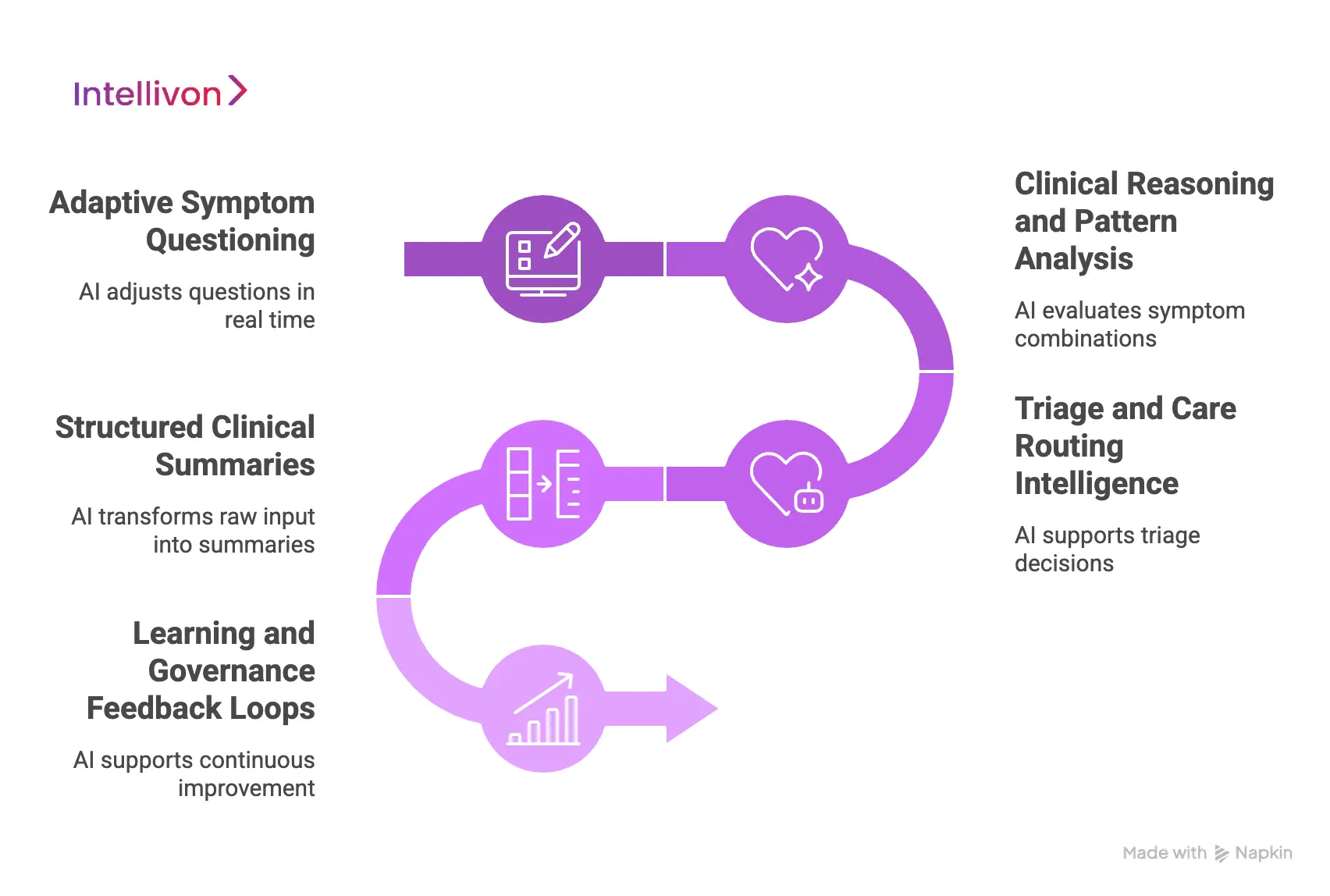
AI in a symptom checker app operates across multiple decision layers that shape intake, reasoning, and routing. Therefore, understanding where AI is applied matters more than knowing which model is used.
At enterprise scale, these layers work together to reduce uncertainty early. As a result, downstream clinical and operational workflows remain controlled.
1. Adaptive Symptom Questioning
First, AI controls how symptoms are collected. The app adjusts questions in real time based on prior answers, reported severity, and risk factors. Consequently, users are not forced through static or irrelevant flows.
This adaptive approach improves signal quality. In addition, it reduces incomplete or misleading symptom descriptions.
2. Clinical Reasoning and Pattern Analysis
Next, AI evaluates symptom combinations against learned clinical patterns. However, this layer does not diagnose conditions. Instead, it estimates likelihood ranges and identifies concerning signals.
Therefore, risk is surfaced earlier. As a result, potential escalation paths are identified before clinician review.
3. Triage and Care Routing Intelligence
Then, AI supports triage decisions. It determines whether symptoms align with self-care, virtual consultation, specialty review, or escalation. Consequently, care pathways activate with fewer manual interventions.
At scale, this routing logic stabilizes demand. Moreover, it reduces unnecessary consult volume.
4. Structured Clinical Summaries
In parallel, AI transforms raw symptom input into structured summaries. These summaries highlight what matters most at the moment of care. As a result, clinicians spend less time reconstructing context.
In addition, structured outputs integrate cleanly with EHR and telehealth systems.
5. Learning and Governance Feedback Loops
Finally, AI supports continuous improvement. Outcomes, overrides, and clinician feedback are monitored over time. Therefore, models adjust while staying within governance boundaries.
This ensures performance improves without sacrificing control.
Overall, AI is embedded across the symptom checker app, not layered on top. By guiding input, reasoning through risk, routing care, and structuring outputs, it reduces decision friction early. Consequently, enterprises gain scale without losing clinical accountability.
AI Symptom Checker Apps Reduce “Uncertain Care Decisions” by 13%–15% at Intake
Uncertainty at intake is one of the most expensive problems in healthcare operations.
When patients are unsure about what level of care they need, systems absorb the cost downstream. This shows up as unnecessary consultations, delayed escalation, and avoidable clinical back-and-forth.
Primary studies on AI symptom checker apps show a 13%–15% reduction in “uncertain” care decisions immediately after symptom assessment. That shift happens before clinicians get involved, which is why the impact compounds across workflows.
1. Why “Uncertainty” Is a Real Operational Cost
Uncertain intake decisions slow everything that follows. Care teams spend time re-triaging, patients enter the wrong pathway, and capacity planning becomes reactive instead of predictable.
In large systems, even small reductions in uncertainty matter. A 13%–15% drop at the front door translates into fewer low-value consults and clearer prioritization for higher-risk cases.
2. How AI Symptom Checkers Create Clarity at Intake
AI symptom checker apps guide users through adaptive questioning. Instead of open-ended descriptions, symptoms are structured around severity, duration, and risk signals.
This process helps users converge on a clearer intent. In real deployments, users move away from “not sure what to do” toward a defined care action, whether that is self-care, virtual consultation, or escalation.
3. What This Means for Enterprise Care Routing
Clearer intent at intake improves routing accuracy. When uncertainty drops, care pathways activate faster and with fewer overrides.
Over time, this reduces load on triage teams and stabilizes demand patterns. Enterprises gain better control without adding staff or tightening access rules.
AI symptom checker apps deliver value by clarifying intent before care begins. By structuring symptom input early, they remove friction that would otherwise surface across clinical, operational, and financial layers. This is why enterprises see intake intelligence as a leverage point, not a feature.
Enterprise Use Cases for AI Symptom Checker Apps
AI symptom checker apps deliver value when they are embedded into real workflows. At enterprise scale, they support access control, risk management, and operational efficiency across multiple care settings.
Therefore, the strongest use cases focus on where demand first enters the system and where uncertainty is most costly.
1. Virtual Care Front-Door Screening
Many enterprises use AI symptom checker apps as the first step before virtual consultations. Instead of allowing every request to convert into a clinician visit, symptoms are structured and assessed upfront. As a result, low-acuity cases are guided toward self-care, while higher-risk cases are prioritized correctly.
This reduces unnecessary consult volume and protects clinician capacity. In addition, triage decisions become more consistent across regions and service lines. Over time, this front-door control improves access without tightening eligibility rules.
2. Chronic Care Symptom Monitoring
For chronic programs, symptom fluctuations often signal risk before vital signs change. AI symptom checker apps enable regular, low-friction symptom reporting between scheduled visits.
Consequently, emerging issues are identified earlier and routed for review before escalation occurs. This reduces avoidable hospitalizations and reactive interventions. Moreover, care teams gain better visibility without increasing manual monitoring workload. At scale, this supports proactive care models rather than episodic intervention.
3 Post-Discharge Follow-Up
Post-discharge periods carry a high risk and high cost. AI symptom checker apps are used to guide patients through structured symptom check-ins after discharge. As a result, concerning trends are flagged early, while normal recovery patterns are filtered out.
This prevents unnecessary readmissions and reduces inbound calls to care teams. In addition, follow-up decisions are documented consistently for audit and quality reporting. Enterprises benefit from improved outcomes without expanding transitional care teams.
4. Employer and Population Health Programs
Large employers and population health initiatives face demand spikes without a clinical context. AI symptom checker apps provide structured intake before directing individuals into care pathways. Therefore, employees or members are guided toward appropriate resources instead of defaulting to urgent care or emergency services.
This lowers overall utilization while maintaining safety. Moreover, symptom data can be aggregated to identify emerging trends across populations. Over time, this supports better capacity planning and preventive strategies.
5. Insurance and Pre-Care Navigation
Payers and risk-bearing entities use AI symptom checker apps to guide members before care is accessed. Instead of denying access, symptoms are assessed and routed according to clinical appropriateness.
As a result, members receive clearer guidance and fewer dead ends. This reduces downstream disputes and improves satisfaction. In addition, utilization patterns become more predictable and defensible. For enterprises, this balances cost control with member trust.
Across these use cases, the pattern remains consistent. AI symptom checker apps deliver value by structuring demand before it reaches clinicians. Consequently, enterprises gain scale, control, and predictability without sacrificing safety or experience.
Architecture of an Enterprise AI Symptom Checker App
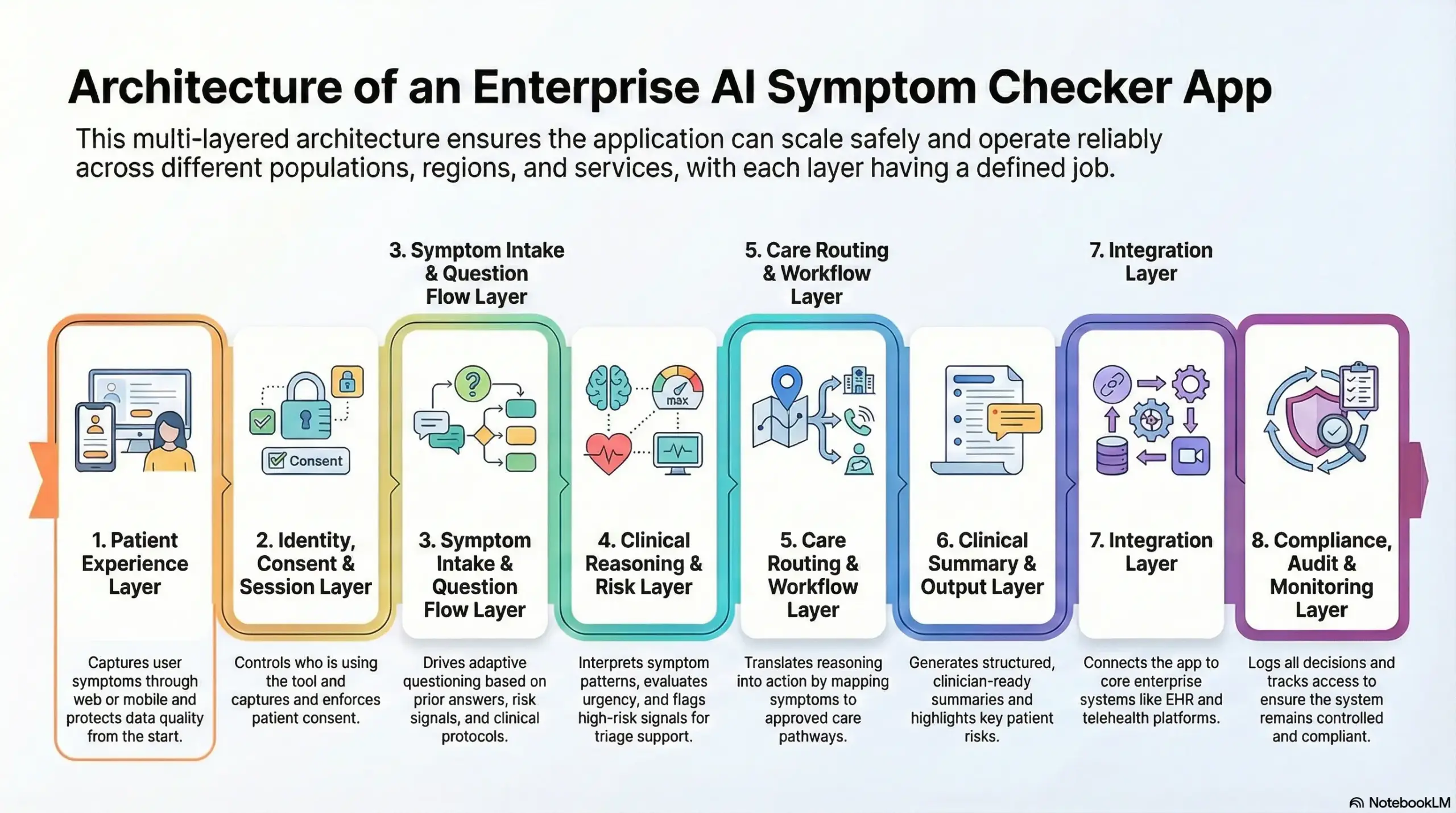
An enterprise AI symptom checker app is only as strong as its architecture. Therefore, this section breaks the system into clear layers.
Each layer has a defined job, clear boundaries, and auditable behavior. As a result, the app can scale safely across populations, regions, and service lines.
1. Patient Experience Layer
This is where symptoms are captured. Users interact through web, mobile, or an embedded module inside an existing portal. In addition, this layer handles language, accessibility, and input validation.
Therefore, it protects data quality from the first screen. It also sets expectations by showing escalation disclaimers and consent prompts.
Tech used
- Mobile SDKs
- Web frameworks
- Form validation engines
- Localization libraries
- Accessibility tooling
2. Identity, Consent, and Session Layer
This layer controls who is using the tool and under what permissions. It manages authentication when needed and supports guest flows when allowed.
However, consent is the key function here. Therefore, the system captures consent at the point of symptom entry and enforces it across downstream actions. Session controls also prevent data leakage and support secure resumable flows.
Tech used
- OAuth
- OpenID Connect
- MFA
- Consent management modules
- Session tokens
3. Symptom Intake and Question Flow Layer
This layer drives adaptive questioning. It decides what to ask next based on prior answers, risk signals, and clinical protocols. As a result, the tool avoids static questionnaires and reduces incomplete histories.
In addition, it standardizes symptom terminology so reasoning remains consistent. This layer also supports guardrails, such as minimum required questions for high-risk scenarios.
Tech used
- Decision graphs
- Rules engines
- Clinical ontologies
- NLP parsers
- State machines
4. Clinical Reasoning and Risk Layer
This layer interprets symptom patterns and evaluates urgency. It estimates likely condition groups, flags red risks, and scores uncertainty. However, it should not present diagnosis claims. Therefore, the focus stays on triage support and safe escalation.
In addition, this layer enforces conservative behavior when inputs are unclear. As a result, the system remains defensible in audits.
Tech used
- Probabilistic models
- Risk scoring
- Threshold logic
- Confidence calibration
- Red-flag classifiers
5. Care Routing and Workflow Layer
This layer translates reasoning into action. It maps symptoms to approved care pathways, such as self-care, virtual consult, specialty review, or escalation. Therefore, it must align with enterprise policies, service availability, and routing rules.
In addition, it can trigger scheduling handoffs, call center tasks, or clinician review queues. As a result, triage becomes operational, not theoretical.
Tech used
- Triage protocols
- Workflow engines
- Routing rules
- Queue management
- Scheduling APIs
6. Clinical Summary and Output Layer
This layer generates structured summaries for care teams. It converts symptom narratives into clinician-ready formats, highlights key risks, and preserves timeline context.
In addition, outputs are designed for EHR ingestion and telehealth handoffs. Clinicians spend less time re-asking intake questions. This also improves documentation consistency across service lines.
Tech used
- Structured templates
- Medical summarization models
- Terminology mapping
- FHIR resources
- Output validators
7. Integration Layer
This layer connects the symptom checker app to enterprise systems. It exchanges data with EHR, telehealth, analytics, and messaging platforms.
However, integration should not be an afterthought. Therefore, interfaces must be stable, versioned, and monitored. In addition, the layer should support retries and fallbacks for clinical reliability. As a result, workflows do not break during peak usage.
Tech used
- FHIR APIs
- HL7 interfaces
- Webhooks
- API gateways
- Event streams
8. Compliance, Audit, and Monitoring Layer
The compliance layer ensures the platform remains controlled over time. It logs decisions, tracks access, and preserves audit trails for every critical step. In addition, it supports policy enforcement for retention, minimization, and regional data boundaries. Therefore, the system remains compliant as programs scale.
Monitoring also detects drift, routing anomalies, and escalation spikes early.
Tech used
- Audit logs
- RBAC
- Encryption
- SIEM
- Drift monitoring
These layers work together to keep the app safe, scalable, and reliable. Therefore, architecture should be designed with clinical accountability, not just software structure. When each layer is clear and governed, the symptom checker becomes a trusted enterprise infrastructure rather than a risky point tool.
Core Features of an Enterprise AI Symptom Checker App
Enterprise deployments succeed when features support real workflows. Therefore, the focus is not on conversational polish, but on control, safety, and consistency. Each feature must reduce ambiguity at intake while fitting cleanly into existing systems. As a result, the app earns clinician trust and operational adoption.
1. Adaptive Symptom Intake
This feature controls how symptoms are collected. Instead of static forms, questions adjust based on earlier responses, age, and reported severity. Therefore, irrelevant prompts are removed early. In addition, critical details surface faster.
This improves signal quality at the first interaction. Over time, intake becomes more consistent across users and channels.
2. Risk and Red-Flag Detection
Risk detection operates continuously during symptom entry. The system watches for severity markers, duration thresholds, and escalation triggers. However, it remains conservative by design.
Therefore, uncertain cases are routed upward rather than dismissed. This protects patients and limits downstream liability. As a result, safety improves without overloading clinicians.
3. Care Pathway Routing
Routing determines what happens next. Symptoms are mapped to approved pathways such as self-care, virtual consult, specialty review, or escalation. Consequently, users receive clear guidance instead of generic advice.
This reduces misrouted visits and manual triage effort. In addition, routing rules can align with enterprise policies and availability.
4. Structured Clinical Summaries
This feature converts raw input into clinician-ready summaries. Key symptoms, risks, and timelines are highlighted clearly. Therefore, clinicians spend less time reconstructing context.
In addition, summaries integrate with EHR and telehealth workflows. Documentation becomes faster and more consistent across encounters.
5. Governance and Audit Controls
Governance features ensure accountability. Every decision, rule, and escalation is logged for review. As a result, enterprises can audit behavior and explain outcomes.
Consent enforcement and access controls operate automatically. This supports compliance as programs scale across regions.
6. Analytics and Performance Visibility
Analytics provide insight beyond individual encounters. Enterprises can track uncertainty rates, routing patterns, and escalation trends. Therefore, leaders see where demand shifts over time.
These insights inform capacity planning and policy refinement. In addition, performance data supports continuous improvement.
Together, these features form a control system, not a chatbot. By focusing on intake quality, safety, routing, and governance, the app delivers predictable outcomes. Consequently, enterprises gain scale and confidence without sacrificing clinical accountability.
How We Build AI Symptom Checker Apps for Enterprises
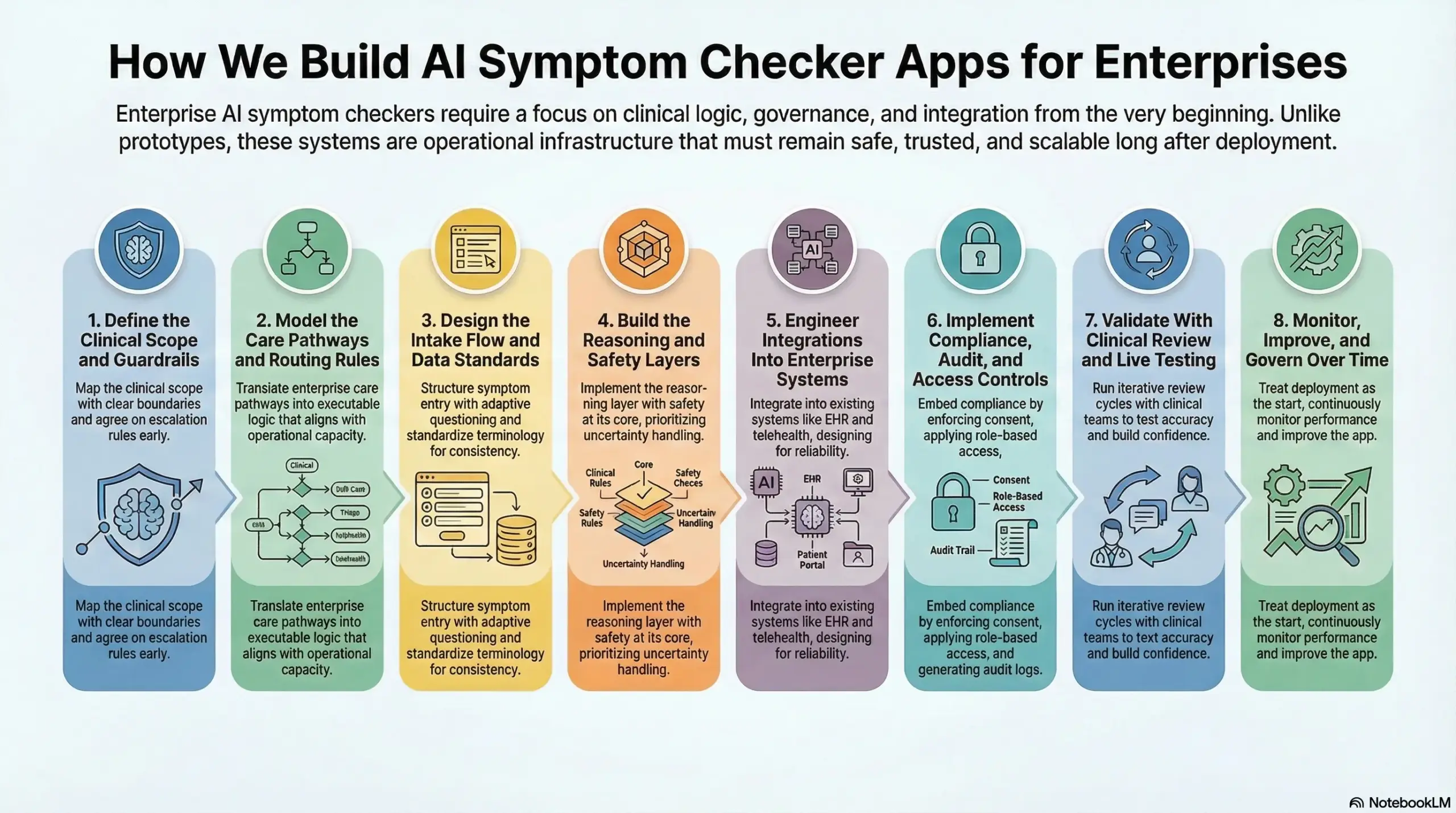
Enterprises do not struggle to launch prototypes. They struggle to launch systems that remain safe, trusted, and scalable after month six.
Therefore, our build approach focuses on clinical logic, governance, and integration from the start. We treat the symptom checker as operational infrastructure, because that is how it behaves in production.
Step 1: Define the Clinical Scope and Guardrails
First, we map the clinical scope with clear boundaries. We identify the populations, conditions, and channels the app will support. In addition, we define what the app will never do, such as making diagnosis claims. Therefore, the team avoids risky design drift later.
We also agree on escalation rules early, because those decisions shape every downstream workflow.
Step 2: Model the Care Pathways and Routing Rules
Next, we translate enterprise care pathways into executable routing logic. We align pathways with service lines, capacity constraints, and regional protocols. However, routing cannot be generic.
Therefore, we build rules that match how the organization actually delivers care. As a result, the app guides users into pathways that teams can support operationally.
Step 3: Design the Intake Flow and Data Standards
Then, we design the intake experience around signal quality. We structure symptom entry with adaptive questioning, risk prompts, and clear language.
In addition, we standardize terminology so reasoning remains consistent. Therefore, clinical summaries become usable across departments. This step also reduces rework, because the data model is stable from day one.
Step 4: Build the Reasoning and Safety Layers
After that, we implement the reasoning layer with safety at its core. We combine probabilistic modeling with policy-driven thresholds and red-flag checks.
However, raw accuracy is not the success metric. We prioritize uncertainty handling, escalation behavior, and safe failure modes. As a result, the system remains defensible in audits and trusted by care teams.
Step 5: Engineer Integrations Into Enterprise Systems
Next, we integrate the symptom checker into existing systems. We connect to EHR, telehealth, scheduling, and care operations platforms. In addition, we design integration workflows for reliability, not just connectivity. Therefore, handoffs continue working during peak demand. This is where many builds break, so we validate early and iterate fast.
Step 6: Implement Compliance, Audit, and Access Controls
Then, we embed compliance into how the app behaves. We enforce consent at symptom entry and carry it through downstream actions. In addition, we apply role-based access and generate audit-ready logs.
Enterprises maintain accountability across workflows. This also supports regional rollout, because governance remains consistent across locations.
Step 7: Validate With Clinical Review and Live Testing
After that, we validate outputs with clinical reviewers using real scenarios. We test escalation decisions, routing accuracy, and summary quality.
However, validation is not a one-time gate. Therefore, we run iterative review cycles until confidence stabilizes. As a result, rollout risk decreases and adoption increases.
Step 8: Monitor, Improve, and Govern Over Time
Finally, we treat deployment as the start of the lifecycle. We monitor drift, escalation spikes, and routing anomalies. In addition, we capture clinician overrides and outcome signals.
Therefore, we improve performance without losing governance. This ensures the app remains useful as demand patterns change.
This build approach keeps the symptom checker practical in production. We focus on trust, integration, and safety because those determine long-term value. Through this, enterprises gain a governed intake layer that reduces friction, supports better routing, and preserves clinical accountability at scale.
Cost to Build an AI Symptom Checker App
For healthcare enterprises starting with focused diagnostic intake use cases, such as pre-consultation triage, virtual care routing, or early risk screening, an AI symptom checker app can be built within a controlled, enterprise-ready budget.
At Intellivon, we structure AI symptom checker cost models around operational impact, regulatory exposure, and measurable downstream ROI. Instead of attempting to replicate full clinical decision-making, we focus on building a symptom intelligence core that supports clinicians, integrates with existing care workflows, and scales safely across populations. This approach keeps early investment predictable while preserving long-term extensibility.
Estimated Phase-Wise Cost Breakdown
| Phase | Description | Estimated Cost (USD) |
| Clinical & Diagnostic Discovery | Symptom scope definition, triage logic design, risk boundaries, regulatory mapping, success metrics | 12,000 – 20,000 |
| Architecture & Platform Blueprint | Symptom engine architecture, data flow design, escalation logic, security and compliance framework | 15,000 – 30,000 |
| Core AI Symptom Checker Development | Symptom input flows, question sequencing logic, triage pathways, clinical handoff rules | 30,000 – 55,000 |
| Medical Knowledge & Data Integration | Symptom libraries, condition mappings, clinical guidelines, normalization pipelines | 18,000 – 35,000 |
| AI Intelligence Layer | Probabilistic risk scoring, differential suggestion models, NLP-driven intake workflows | 20,000 – 40,000 |
| Security, IAM & Compliance Controls | Role-based access, encryption, consent capture, audit logging | 12,000 – 22,000 |
| Analytics & Diagnostic Reporting | Triage accuracy tracking, escalation rates, clinician adoption insights | 8,000 – 15,000 |
| Testing, QA & Clinical Validation | Workflow testing, edge-case validation, safety checks, compliance readiness | 10,000 – 18,000 |
| Pilot Deployment & Team Enablement | Controlled rollout, clinician onboarding, workflow refinement | 12,000 – 20,000 |
Total Initial Investment Range:
USD 135,000 – 255,000
This range supports a secure, enterprise-grade AI symptom checker deployed for a defined diagnostic scope, integrated into live care workflows, and governed under healthcare compliance requirements.
Annual Maintenance and Optimization
Ongoing costs typically include infrastructure management, knowledge base updates, security monitoring, model tuning, and platform support.
Most enterprises plan for 12–20% of the initial build cost annually, depending on usage volume and expansion pace.
Approximate annual cost:
USD 18,000 – 50,000 per year
When orchestration, escalation, and governance are engineered correctly from the start, these costs remain stable and predictable.
Hidden Costs Enterprises Should Plan For
Even well-designed AI symptom checker platforms introduce growth-related cost factors over time:
- Expanding symptom coverage or adding new clinical domains
- Supporting additional care pathways or service lines
- Regional regulatory changes and validation requirements
- Increased cloud usage from higher intake volumes
- Ongoing model evaluation, retraining, and clinical governance
- Internal change management as clinician adoption scales
Accounting for these early prevents budget stress during expansion phases.
Best Practices to Stay Within the USD 135K–255K Range
Enterprises that control AI symptom checker costs consistently:
- Start with a clearly bounded diagnostic intake use case
- Limit early deployment to one region and regulatory environment
- Use modular architecture to add conditions incrementally
- Embed escalation, consent, and auditability from day one
- Measure triage accuracy, escalation quality, and operational impact within the first 90 days
This approach ensures the platform demonstrates clinical and operational value before broader capital allocation.
Talk to Intellivon’s healthcare platform architects to receive a phased cost estimate aligned with your AI symptom checker roadmap, compliance landscape, and long-term digital health strategy.
Top Examples of AI Symptom Checker Apps And How They Make Money
AI symptom checker apps in the market today differ significantly in how they apply AI and generate revenue. Some are built around deep clinical reasoning, while others prioritize care routing or virtual visit efficiency. These differences influence integration complexity, risk exposure, and business sustainability.
Reviewing a few established platforms helps enterprises understand how AI design choices translate into real operating models and monetization strategies.
Ada Health
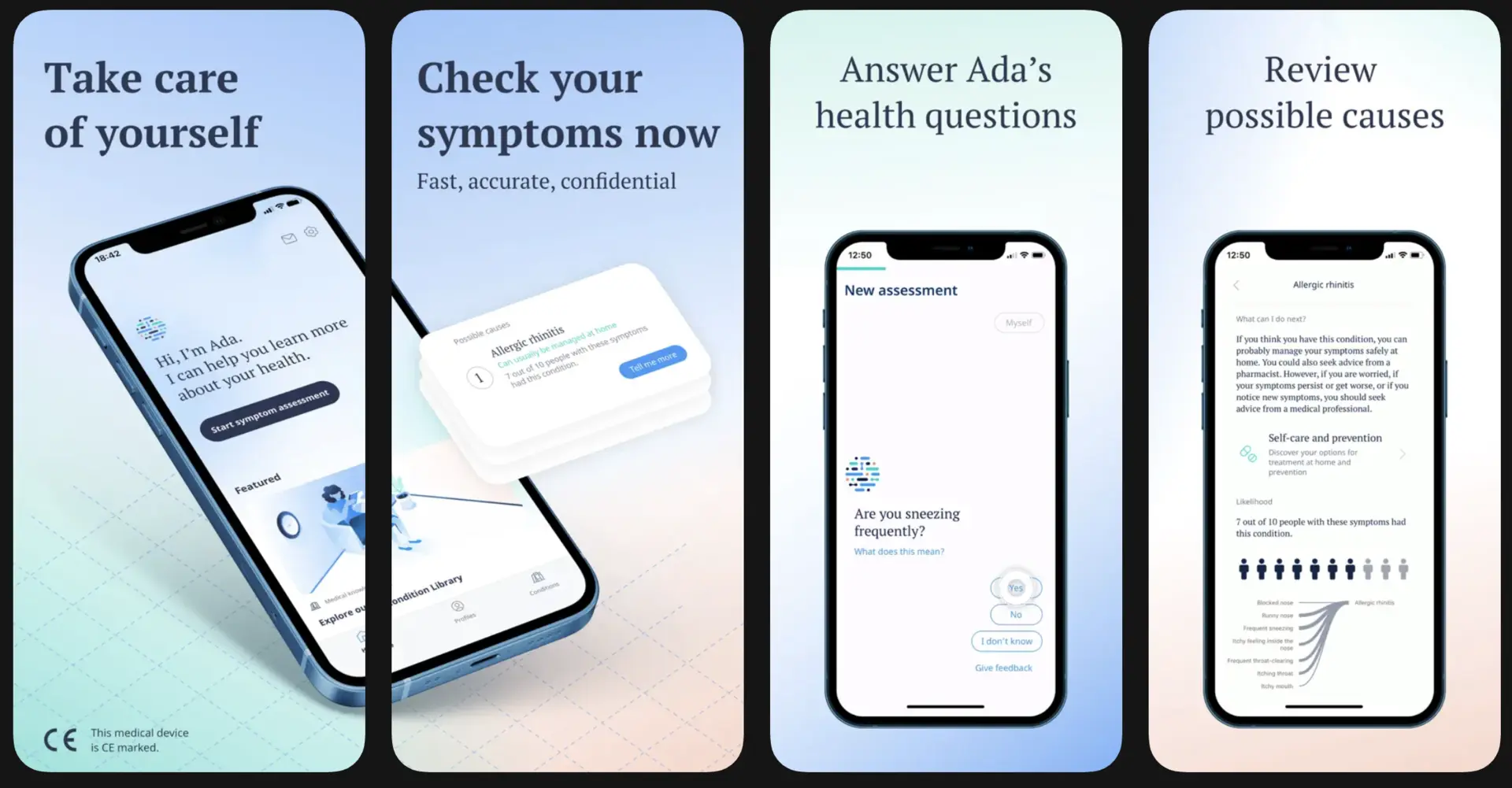
Ada Health centers its product on probabilistic symptom reasoning. Users enter symptoms through guided questioning, while the system continuously updates likelihood scores for condition groups.
Therefore, the experience feels structured rather than conversational. AI models analyze symptom combinations, demographics, and risk markers to surface likely explanations and urgency guidance.
However, the platform avoids diagnostic claims and instead emphasizes triage support. From a business perspective, Ada monetizes primarily through enterprise licensing with health systems, employers, and insurers. As a result, AI becomes a decision-support layer embedded into broader care programs.
2. Babylon Health

Babylon Health integrates symptom checking directly into its virtual care offering. The symptom checker acts as a pre-consult intake step before users reach clinicians.
Consequently, AI helps structure the consultation rather than replace it. Machine learning models guide questioning and assess urgency, while NLP processes free-text inputs. In addition, outputs flow directly into clinician workflows during virtual visits.
Babylon monetizes through subscriptions, employer contracts, and payer partnerships. Therefore, AI supports scale by reducing clinician time per consultation.
3. Buoy Health
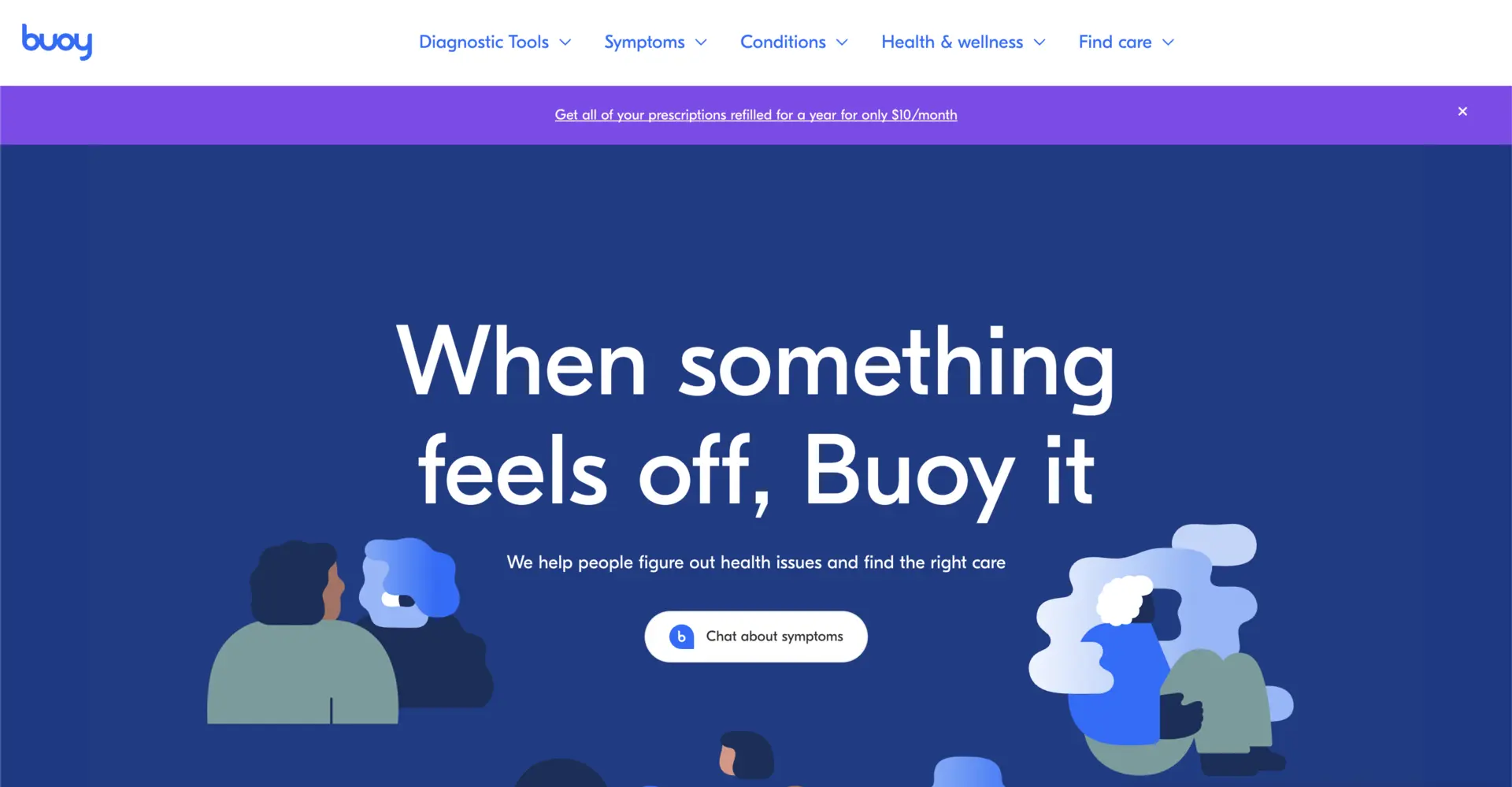
Buoy Health focuses heavily on care navigation. Users begin with symptom entry, and the system guides them toward appropriate next steps.
AI models evaluate symptom patterns and match them to care options rather than condition labels. As a result, the emphasis stays on routing decisions. Buoy’s AI combines probabilistic reasoning with rules tied to local care availability.
On the business side, Buoy monetizes through partnerships with providers and health plans. Therefore, value is created by deflecting unnecessary visits and improving access alignment.
4. Infermedica
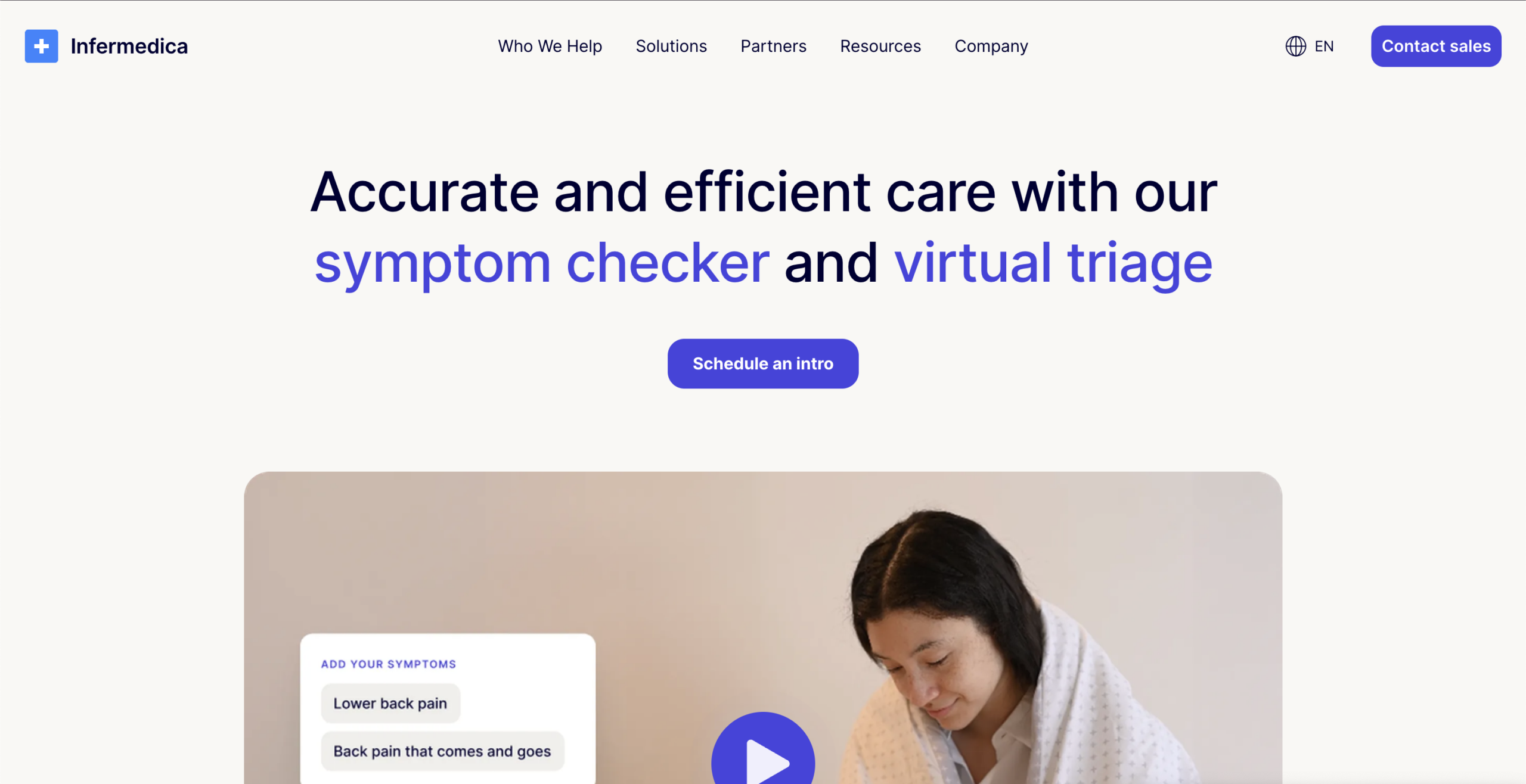
Infermedica positions itself as a clinical logic platform. Its symptom checker relies on a medically curated knowledge base combined with AI-driven reasoning.
Users are guided through structured questions designed to mirror clinical thinking. Consequently, outputs remain consistent and explainable. AI is used to manage probability calculations, risk scoring, and question sequencing.
Infermedica monetizes through B2B licensing to healthcare organizations and digital health vendors. As a result, AI functions as a modular component within larger enterprise systems.
These examples show that AI symptom checker apps differ more in design philosophy than in surface features. Some emphasize reasoning depth, others prioritize routing or integration.
How We Manage Risk In AI Symptom Checker Apps?
At Intellivon, risk management is not a checkpoint at the end of development. Instead, it is built into how the app is designed, tested, and operated. Because symptom checkers sit at the front door of care, even small errors can scale quickly. Therefore, every decision is shaped around safety, accountability, and audit readiness.
1. Define Clear Clinical Boundaries Upfront
First, we establish what the app will and will not do. Our systems support intake and triage, not diagnosis or treatment decisions. Therefore, language, outputs, and recommendations are tightly constrained.
This prevents misuse and avoids shifting clinical responsibility away from care teams. As a result, ownership remains clear at all times.
2. Design Conservative Escalation Logic
Next, we bias escalation toward safety. When symptom data is incomplete, conflicting, or high risk, the app routes users upward.
Consequently, edge cases are reviewed rather than filtered out. This approach may increase short-term escalations, but it significantly reduces downstream clinical and legal exposure.
3. Keep Humans in the Loop Where It Matters
We never remove clinicians from critical decisions. High-risk and ambiguous cases trigger review points where humans can intervene.
Therefore, routing, summaries, and outcomes remain correctable. These interventions are also logged and analyzed, which strengthens the system over time.
4. Make Every Decision Traceable
Every question, rule, and routing decision is logged with context. As a result, enterprises can explain why a pathway was chosen at any moment. This level of traceability supports audits, incident reviews, and clinician trust. Nothing operates as a black box.
5. Monitor Continuously After Launch
Finally, we treat deployment as the start of risk management. We monitor escalation rates, anomaly patterns, and drift signals continuously. Therefore, issues are detected early and corrected within governance controls. This keeps the app safe as usage scales and behavior changes.
At Intellivon, risk-free does not mean risk-ignored. It means risk is anticipated, controlled, and governed at every layer. By combining strict boundaries, conservative escalation, human oversight, and continuous monitoring, we ensure AI symptom checker apps remain safe, defensible, and trusted at enterprise scale.
Conclusion
AI symptom checker apps are no longer experimental tools. They have become a critical control point for how care demand enters modern healthcare enterprises. When built correctly, they reduce uncertainty at intake, protect clinical capacity, and improve routing decisions without compromising safety or governance. However, these outcomes depend on architecture, risk design, and integration choices made early in development.
For organizations looking to scale responsibly, this is not just a technology initiative but an operating decision. At Intellivon, we build enterprise-grade AI symptom checker apps with this reality in mind, helping healthcare leaders turn intake intelligence into a durable growth enabler rather than a short-term cost fix.
Build An AI Symptom Checker App With Intellivon
At Intellivon, we build AI symptom checker apps as enterprise intake systems, not lightweight chat tools or isolated triage widgets. Our solutions are designed to structure symptom data at scale, reduce uncertainty at the front door of care, and route users into governed pathways that align with real clinical and operational workflows. Every build prioritizes safety, clarity, and integration from day one.
Each platform is engineered for enterprise healthcare environments. Architectures are compliance-led, integration-ready, and designed to remain predictable as usage grows across populations, service lines, or regions. As programs scale, governance, performance, and clinical accountability remain intact, enabling measurable operational and financial impact over time.
Why Partner With Intellivon?
- Enterprise-first architecture aligned with clinical intake, triage, and care-routing workflows
- Deep interoperability expertise across EHRs, telehealth platforms, care operations, and secure enterprise systems
- Compliance-by-design delivery supporting HIPAA, GDPR, consent enforcement, auditability, and AI governance
- AI-driven intake orchestration for risk detection, escalation control, and structured clinical summaries
- Scalable, cloud-native execution with phased rollout, controlled expansion, and continuous optimization
Book a strategy call to explore how an enterprise-grade AI symptom checker app can improve intake efficiency, reduce downstream friction, and scale safely across your organization, with Intellivon as your long-term delivery partner.
FAQs
Q1. What is an AI symptom checker app used for in enterprise healthcare?
A1. An AI symptom checker app is used to structure patient-reported symptoms before care begins. It helps enterprises reduce intake uncertainty, improve triage accuracy, and route users into appropriate care pathways. As a result, clinical teams receive clearer context and spend less time reconstructing patient histories.
Q2. How accurate are AI symptom checker apps in real-world healthcare settings?
A2. Accuracy varies widely based on design choices. Enterprise-grade apps focus on safe triage and uncertainty handling rather than diagnosis. When built correctly, they improve decision consistency at intake and reduce inappropriate care routing, while preserving clinician oversight for high-risk cases.
Q3. How do AI symptom checker apps integrate with EHR and telehealth systems?
A3. Enterprise AI symptom checker apps integrate through standardized APIs and clinical data formats. They pass structured symptom summaries into EHRs and virtual care platforms, reducing duplicate intake during consultations. This ensures continuity across digital and clinical workflows without disrupting existing systems.
Q4. What does it cost to build an AI symptom checker app for enterprises?
A4. Costs are driven by clinical modeling, AI reasoning layers, system integrations, and compliance requirements. Most investment goes into safety, governance, and interoperability rather than UI or basic AI models. Long-term value depends on how well the app scales across workflows and regions.
Q5. How does Intellivon ensure AI symptom checker apps are safe and compliant?
A5. Intellivon embeds risk controls into every layer of the build. This includes conservative escalation logic, human-in-the-loop review, audit-ready decision logging, and continuous monitoring. As a result, AI symptom checker apps remain defensible, compliant, and trusted as usage scales.