

Key Takeaways:
- For a live streaming app to work properly, it needs analytics, a payment system, and reliable delivery during high-traffic periods.
- The appropriate architecture will be based on four factors: the number of people broadcasting, the number watching simultaneously, the amount of delay that can be tolerated, and how much the viewers are willing to spend within the app.
- It is not necessary for most companies to construct the whole streaming stack on their own. This is because they can have control over the app, the user data, the payments, the entitlements, the analytics, and the product experience while making use of well-established infrastructure for ingest, transcoding, CDN delivery, or WebRTC.
- A bespoke live streaming platform typically involves development costs ranging from $70,000 to $300,000, and there are additional expenses after the launch for streaming usage, CDN delivery, storage, DRM, payment fees, and other third-party services.
- Intellivon’s method of constructing live streaming platforms involves first considering the business model, latency, concurrency, and viewer economics, after which it develops the appropriate custom product and monetization layers around the streaming infrastructure based on those requirements.
The development of a live streaming app involves creating the real-time systems needed for broadcasting, all of which have to function together so that viewers can watch, chat, and pay without the stream failing. In most of the cases, when viewers keep leaving during a broadcast, the real problem lies below the surface, specifically in the way the app manages real-time load.
A basic CDN arrangement may assist with playback, but it is incapable of overcoming latency since such latency was never designed to handle real-time interaction. The thing that actually closes this gap is a build that matches the appropriate protocol, which is to use WebRTC when interactivity is most important, and use HLS or DASH when scale is most important. If you get this right, the stream will stop buffering. Viewers will stay on the site longer, become more engaged, and begin to trust the platform once again, which is generally when genuine revenue increases are seen.
At Intellivon, our team has built real-time platforms in this manner, beginning with the architecture and designing the monetization strategy from the start rather than putting it in afterward. This blog examines the various features of a live streaming app, looks at the architecture step by step, and explains the actual cost at each stage, so that by the end you know precisely what the platform we build will look like.
What is a Live Streaming App?
A live streaming app lets people broadcast video in real time and lets others watch, react, and join in as it happens. Unlike a regular video app, nothing is pre-recorded. The moment someone starts talking or playing, viewers see it almost instantly. This is what makes formats like live shopping, fitness classes, and virtual events work.
A working live streaming app typically includes:
- Real-time video capture and broadcasting from a phone, camera, or desktop
- Instant delivery to viewers across devices with minimal delay
- Live chat, reactions, or polls so viewers can engage as it happens
- Recording and playback, so the stream stays available after it ends
Together, these pieces turn a simple broadcast into an interactive experience viewers actually stay for.
How Big Is the Live Streaming Market Right Now
The live streaming market is worth $97.39 billion in 2026 and is on track to hit $318.56 billion by 2031, growing at 26.74% a year.
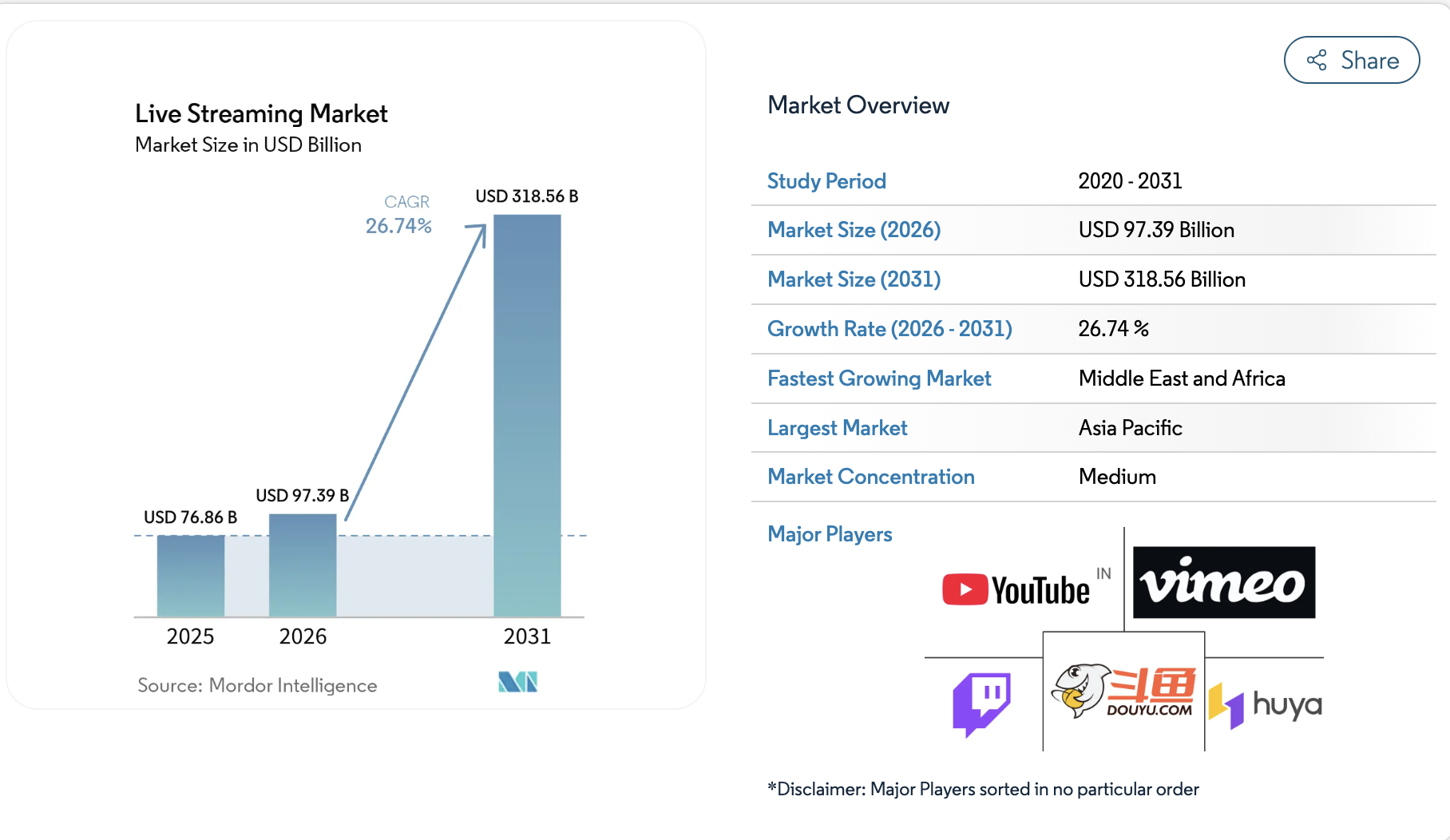
That kind of growth rarely shows up this late in a market’s life. So founders entering the market now are actually arriving while the room is still filling up.
Right now, a handful of names dominate consumer attention:
- Twitch Interactive
- YouTube Live (Alphabet Inc.)
- Huya Inc.
- DouYu International Holdings
- Vimeo Livestream
These are the major companies operating in the live streaming market today. Naturally, competing with them head-on for the same general audience is a losing game. Instead, the real opportunity sits elsewhere, and that’s exactly what the next section breaks down.
Where the Real Growth Is: B2B and Vertical Streaming
Consumer platforms own the mass audience, but the fastest growth is coming from B2B and vertical streaming, built for one specific industry rather than everyone.
- Enterprise streaming: spending is rising fast, driven by hybrid work permanence, virtual events, and corporate communications, scaling from a smaller but higher-margin base.
- Interactive formats: meanwhile, these are growing faster than the market average, as live commerce, gamified audience participation, and real-time engagement features become table stakes.
- Telehealth streaming: here, the priority is secure, low-latency video built around patient privacy, not entertainment.
- Fintech and trading platforms: similarly, real-time video needs to tie directly into live market data.
- Live commerce: in this case, product demos and orders happen in the same live session.
Ultimately, none of these need to out-build Twitch. What they need is an architecture built around one audience, done well, which is exactly the decision every founder faces next: which streaming protocol actually fits the product you’re building.
Which Streaming Protocol Actually Fits Your App
Before comparing anything, it helps to know what these actually are. A streaming protocol is simply the set of rules your app uses to send video from a broadcaster to a viewer.
Each one was built for a different job, which is exactly why picking the wrong one causes problems later.
Here’s what each protocol actually does:
- WebRTC: sends video in real time, built for things like video calls, not large broadcasts.
- RTMP: an older protocol that sends video to a server, which then delivers it to many viewers.
- SRT: designed to send video reliably even over weak or unstable internet connections.
- HLS/DASH: breaks video into small chunks and delivers them to viewers at scale, the same way Netflix or YouTube does.
So when founders default to WebRTC for everything, it’s usually because it sounds the most advanced, not because it fits the product. After all, WebRTC was built for small, real-time conversations, not broadcasting to thousands of viewers at once. In practice, the protocol that fits your product depends on what your users need to do, not what sounds impressive.
Here’s how all four compare side by side:
Streaming Protocols Comparison
| Protocol | Latency | Scalability | Firewall Traversal | Cost to Implement |
| WebRTC | Sub-500ms | Hard to scale, needs an SFU | Needs TURN servers for tough cases | High |
| RTMP | ~5 seconds | Scales well with CDNs | TCP-based, usually firewall-friendly | Low to moderate |
| SRT | ~200ms | Scales via relay chains or edge conversion | UDP-based, often needs explicit rules | Moderate |
| HLS/DASH | 6 to 30 seconds | Built for mass scale | CDN-native, no issues | Low |
Since each protocol trades off latency against scale, the real question isn’t which one is “best.” Rather, it’s which tradeoff your product can actually live with.
1. When Sub-Second Latency Is Worth the Engineering Cost
Sub-second latency sounds impressive, but it’s expensive to build and maintain. So before committing to it, it helps to ask whether your users would actually notice the delay.
- Worth it: live auctions, competitive gaming, and telehealth consultations, where a delay of even a second or two breaks the experience.
- Not worth it: sports broadcasts, concerts, and other lean-back entertainment, where viewers aren’t reacting in real time anyway.
In other words, sub-second latency should be a decision tied to your use case, not a default setting.
2. Using RTMP/SRT Ingest with WebRTC for the Interactive Layer
Instead of picking one protocol for the entire product, most well-built platforms mix them. Typically, RTMP or SRT handles ingest from the broadcaster, since both are reliable and CDN-friendly. WebRTC then powers only the interactive layer, like live chat or guest video, where speed actually matters to the user.
This hybrid approach is becoming the standard pattern for scaled streaming architecture, since it avoids forcing one protocol to do a job it wasn’t designed for. As a result, founders get the reliability of RTMP or SRT along with the responsiveness of WebRTC, without overbuilding the entire platform around real-time latency it doesn’t actually need.
Core Features of a Live Streaming App
Every live streaming platform is built around four product layers: broadcaster tools, viewer tools, engagement features, and platform management. Together, these layers turn a basic video feed into a product people actually return to. Here’s what each layer needs to include.
1. Broadcaster Features
These are the tools a creator uses to go live and manage the stream:
- Create, schedule, start, and stop broadcasts
- Stream title, description, categories, and tags
- Thumbnail management
- OBS integration and mobile broadcasting
- Camera, microphone, and bitrate controls
- Stream preview, health monitoring, and reconnection support
2. Viewer Features
On the other side, viewers need a smooth, flexible watching experience:
- Live video player with adaptive quality and full-screen playback
- Captions, replay, and live DVR
- Follow creators and get notifications
- Search, categories, watch history, and favorites
3. Live Engagement Features
This is where a stream turns into an interactive experience:
- Real-time chat, reactions, live polls, and Q&A
- Viewer counts and multi-host streaming with guest invitations
- Tips, virtual gifts, and Super Chat-style messages
4. Admin and Moderation Features
Behind the scenes, admins need control over both users and content:
- User and stream management
- Content reporting, chat moderation, and user blocking
- AI content moderation and stream termination
- Creator approval, payment management, and platform analytics
5. Analytics Features
Finally, analytics tell you what’s actually working:
- Concurrent viewers, watch time, and retention
- Buffering and playback errors
- Engagement, revenue, and subscription conversion
- Creator performance
Together, these five layers cover everything a live streaming app needs, from the first broadcast to the data that shows whether it’s working.
Features to Build First and Features to Add Later
Not every feature belongs in version one. The right approach is to split features into three stages, MVP, growth, and enterprise, and build each stage only when the platform is actually ready for it.
This is also what keeps a $70,000 MVP from quietly turning into a $200,000 project before a single user logs in.
1. MVP Features
These are the essentials needed to launch and validate the product:
- Registration and login
- Broadcaster dashboard and stream setup
- Live player with adaptive bitrate
- Chat and basic moderation
- Payments, viewer analytics, and an admin panel
2. Growth Features
Once the platform has real users, these features help increase engagement and retention:
- Multi-host streaming, polls, and Q&A
- Recommendations and creator profiles
- Advanced analytics and notifications
- DVR, clips, and simulcasting
3. Enterprise Features
Finally, these features matter once the platform is scaling or operating in a regulated space:
- DRM and geo-restriction
- Multi-CDN delivery
- SSO and role-based permissions
- Advanced moderation and audit logs
- Enterprise analytics and dedicated streaming infrastructure
This staged approach works because a $70,000 to $90,000 MVP doesn’t need enterprise-grade DRM or multi-CDN failover on launch day. Those features earn their cost once there’s real traffic and real revenue to protect.
So the smarter path is to launch lean, validate demand, and layer in growth and enterprise features as the platform actually needs them, not because a feature list says they’re available.
The Engagement Features That Actually Retain Viewers
Engagement features are what turn a stream into something viewers stay for, instead of just glancing at and leaving. Chat, polls, multi-host formats, and moderation all work together to build that stickiness.
So the question worth asking isn’t “which features should I add,” it’s “which of these actually keeps viewers watching longer.”
Here’s what drives that retention:
- Real-time chat that makes viewers feel part of the moment
- Polls and Q&A that turn passive watching into active participation
- Multi-host formats that add variety and personality to a stream
- Moderation that keeps the experience safe enough for people to stick around
1. Real-Time Chat, Polls, and Q&A
Chat and polls feel simple to add, but done wrong, they slow down the entire stream. The trick is architecting them as a separate real-time layer, so message delivery doesn’t compete with video for the same bandwidth and processing.
- Route chat through a dedicated WebSocket connection, not the video pipeline
- Batch poll and Q&A updates instead of pushing every vote individually
- Cache viewer counts instead of recalculating them on every request
Handled this way, chat and polls add engagement without adding lag to the stream itself.
2. Multi-Host and Co-Streaming
Multi-host streaming looks like a small feature on a spec sheet, but it’s one of the most underestimated builds on this list. Each additional host means syncing multiple video feeds, managing bandwidth for each one, and keeping everything in sync in real time.
- Each host needs their own ingest and encoding pipeline
- The platform needs to merge multiple feeds without adding visible delay
- Bandwidth requirements multiply with every host added to a stream
Because of this, multi-host support is usually a growth-stage feature, not an MVP one.
3. AI Content Moderation
Once a platform has live chat, moderation stops being optional. Without it, one bad actor can undo the trust a platform spent months building, and in some cases, create real legal exposure.
- AI moderation flags harmful content in real time, before a human ever sees it
- Automated filters catch spam and abuse at a scale manual moderation can’t match
- Escalation paths route serious violations to a human moderator instantly
So while chat and polls drive engagement, moderation is what makes it safe enough to keep running.
The 5-Layer Architecture Behind Every Live Streaming Platform
Every live streaming platform is built on five layers: ingest, transcoding, delivery, playback, and backend infrastructure. Together, they take a raw video feed from a broadcaster’s camera and turn it into a smooth stream on a viewer’s screen.
This is exactly what you’re paying for when a development team quotes you a build.
Layered Architecture Of A Live Streaming Platform
| Layer | What It Does | Tools and Technologies |
| Ingest | Captures the live feed from the broadcaster and sends it to the platform | Mobile broadcasting SDKs (iOS/Android), OBS integration, RTMP/SRT/WebRTC ingest servers |
| Transcoding and Packaging | Converts the raw feed into multiple bitrates and formats so it plays smoothly on any connection | AWS Elemental MediaLive/MediaPackage, Wowza Streaming Engine, Ant Media Server, H.264/HEVC, CMAF |
| CDN and Delivery | Distributes the stream to viewers worldwide without buffering under load | AWS CloudFront, Cloudflare Stream, multi-CDN failover |
| Playback | Renders the stream on the viewer’s device, along with DVR and rewind controls | Cross-device players (iOS, Android, Roku, Apple TV), live rewind, multi-destination simulcast |
| Backend Infrastructure | Keeps the entire system running reliably after launch | Kubernetes orchestration, CI/CD pipelines, monitoring tools like Datadog |
Each layer depends on the one before it, so a weak transcoding setup will bottleneck even the best CDN, and a fragile backend will undo good playback performance.
As a result, the real cost of a live streaming build is making sure all five work together without a weak link.
Choosing the Right Streaming Protocol and Latency
The right streaming protocol depends on the job, not on which one sounds the most advanced. Ingest, delivery, and interaction each call for a different protocol, and mixing them up is usually what causes either high costs or a poor viewing experience.
Streaming Protocols Compared by Use Case
| Protocol | What It’s For | Best Suited For |
| RTMP | Getting video into the platform (ingest, not delivery) | OBS, professional encoders, established creator workflows |
| SRT | Reliable contribution feeds over unstable networks | Professional broadcasting, remote production, unreliable networks, high-value events |
| HLS | Delivering streams to large viewer audiences | Events, entertainment, creator streaming, large audiences, broad device compatibility |
| Low-Latency HLS / CMAF | Faster delivery when a few seconds of delay matters | Sports, auctions, interactive events, live shopping |
| WebRTC | True real-time, back-and-forth interaction | Video calls, live classrooms, auctions, gaming, multi-host sessions, telehealth, interactive broadcasts |
Hybrid Streaming Architecture
Instead of forcing every viewer onto WebRTC, most well-built platforms combine protocols by role. Hosts and participants use WebRTC for real-time interaction, while the wider audience watches through HLS or LL-HLS.
This pattern matters because putting thousands of viewers on WebRTC is expensive and hard to scale, when most of them are watching, not interacting. So by splitting the load this way, the platform gets real-time interaction where it’s needed and reliable scale everywhere else.
Monetization Models Ranked by How Fast They Generate Revenue
There are four realistic ways to monetize a live streaming platform: tips and virtual gifts, ad insertion, pay-per-view or subscriptions, and protecting that revenue with DRM once it exists. Ranked by how quickly they typically start generating revenue, here’s how each one works and when it actually fits.
1. Virtual Gifts, Tips, and Super Chat: Best for Creator-Led Platforms
These monetize engagement directly, so revenue can start from the very first stream, even with a small audience.
- Requires payment rails built for small, frequent transactions
- Works best when viewers already feel connected to a specific host
- Needs real-time balance updates so gifts and tips reflect instantly on screen
2. Server-Side Ad Insertion (SSAI)
Meanwhile, ad-supported models generate revenue without needing viewers to pay directly, but they depend on technical infrastructure most platforms underestimate.
- SSAI inserts ads directly into the video stream server-side, so they can’t be blocked
- Ads are delivered using the VAST standard, which most ad networks expect by default
- Works best once a platform already has consistent viewership to attract advertisers
3. Pay-Per-View and SVOD: Best for Established Audiences
By contrast, paywalled content only works once an audience trusts the platform enough to pay before watching, which is exactly why it rarely suits a brand-new platform.
- PPV suits one-off, high-value events like concerts or exclusive broadcasts
- SVOD suits platforms with a steady stream of recurring content
- Both require an established audience willing to pay upfront
4. DRM and Geo-Restriction: Protecting Revenue from Piracy
Once a platform is finally generating real revenue, protecting that revenue becomes just as important as generating it in the first place.
- DRM, using standards like Widevine and FairPlay, prevents unauthorized copying of paid content
- Geo-restriction blocks access in regions where a platform doesn’t hold streaming rights
- Apple’s HLS authoring specification outlines exactly how DRM should be implemented for compliant playback across devices
Together, these four models cover most of what a live streaming platform can realistically monetize, from a creator’s first tip to a fully paywalled, DRM-protected event. So ultimately, the right starting point is the one that fits the audience you already have.
How We Develop A Live Streaming App Development
At Intellivon, we build every live streaming app through six connected phases: discovery, architecture, design, backend development, frontend development, and testing.
Each phase feeds directly into the next, so decisions made early, like use case and concurrency, shape everything that gets built afterward. This is the same process we’ve refined across every real-time platform we’ve delivered.
1. Product Discovery
First, our team starts by defining exactly what the platform needs to do before writing a single line of code. This phase alone often prevents the most expensive mistakes, since a wrong assumption here gets more costly to fix the further along the build gets.
- Target audience and streaming use case
- Monetization model
- Broadcaster type and viewer devices
- Expected concurrency and geographic markets
Once these are clear, we can size the infrastructure correctly instead of guessing at it later.
2. Architecture Planning
Next, we move into architecture decisions that determine how the platform will actually perform under real usage. This is also where latency requirements from earlier in this blog get translated into an actual technical plan.
- Latency requirements and streaming protocols
- Managed versus self-hosted infrastructure
- CDN, transcoding, and data storage
- Scaling model
These choices are what separate a platform that holds up under load from one that buckles the first time traffic spikes, so we treat this phase as non-negotiable before any design work begins.
3. UI and Product Design
From there, our design team builds around how broadcasters and viewers actually behave, not just how the product looks on a screen. Since a live streaming app has two very different user types, broadcasters and viewers, both experiences get designed separately, then unified.
- Broadcaster experience and viewer experience
- Discovery and chat
- Paywall
- Creator dashboard and admin dashboard
Because these interfaces are where users spend the most time, we design them to feel simple, even when the systems behind them are genuinely complex.
4. Backend and Streaming Development
After design is signed off, our engineers build the systems that keep the platform running behind the scenes. This is typically the most engineering-intensive phase, since it’s where ingest, transcoding, and real-time features all come together into one working system.
- APIs and authentication
- Media integration
- Chat and payments
- Notifications, entitlements, and moderation
Every one of these systems has to work together in real time, which is why we build and test them incrementally, rather than all at once.
5. Frontend and Mobile Development
Once the backend is stable, we build the frontend in a deliberate order, starting with web, then iOS, then Android. This sequencing is designed to validate the product before committing budget to every platform simultaneously.
- Web application first, to validate the product quickly
- iOS next, followed by Android
- TV applications added later, once viewing patterns justify the investment
By building this way, we catch usability issues early, when they’re still cheap to fix.
6. Testing and Launch
Finally, before anything goes live, our QA team runs the platform through a full range of real-world conditions, not just a basic functionality check.
- Playback testing and device testing
- Network testing and load testing
- Payment testing
- Stream failure testing and security testing
Only once a platform passes every one of these checks do we consider it ready for real users, since a single missed edge case at launch can undo months of careful architecture work.
Altogether, this six-phase process is how we’ve approached every live streaming build for over a decade, moving from discovery through to launch without skipping the steps that usually cause platforms to fail under real traffic.
Live Streaming App Development Cost in 2026
A custom live streaming platform typically costs $70,000 to $300,000 to build, excluding ongoing video infrastructure, CDN usage, and third-party licensing. Where a project lands in that range depends on which phases and features actually get built.
Cost Breakdown by Development Phase
| Phase | Cost Range | Covers |
| Discovery and Architecture | $8,000 – $20,000 | Product planning, architecture, protocol selection, scaling plan, security planning |
| UX and Product Design | $8,000 – $25,000 | Viewer flows, creator flows, admin dashboard, monetization, mobile interfaces |
| Core Platform Development | $25,000 – $100,000 | Backend, APIs, streaming integration, accounts, chat, analytics, admin tools |
| Monetization and Advanced Features | $12,000 – $60,000 | Subscriptions, PPV, ads, creator payments, DRM, AI moderation, recommendations |
| Testing and Deployment | $7,000 – $40,000 | Device testing, load testing, security, infrastructure, production launch |
On top of the build, ongoing maintenance typically runs 15 to 20 % of the original development budget annually. This covers bug fixes, updates, and platform improvements, and it’s separate from the actual cost of streaming usage, like CDN bandwidth and video processing, which scales with viewership.
So while the full range spans $70,000 to $300,000, the real number comes down to how many of these phases apply to your specific build, not a single flat quote.
Top 5 Live Streaming Apps and How They Make Money
Live streaming apps rarely rely on one revenue stream. Instead, smaller platforms often combine subscriptions, virtual gifts, creator payouts, and commissions.
So the real lesson for founders is that monetization works best when it’s built into the viewing experience, not added on as a separate payment screen.
1. 17LIVE Uses Virtual Gifts and Fan Subscriptions
Here, viewers support individual streamers directly through Baby Coins, the “Army” subscription system, and event-based gifting.
- Virtual gifts, subscriber badges, leaderboards, live events
- Takeaway: fandom itself becomes the monetization engine.
2. Tango Combines Subscriptions, Gifts, and Premium Broadcasts
By contrast, broadcasters set their own subscription tiers, while competitive multi-host battles turn gifting into entertainment.
- Live gifts, subscriber-only content, multi-host battles, creator bonuses
- Takeaway: viewers spend without ever leaving the stream.
3. LiveMe Turns Virtual Gifts Into Its Core Creator Economy
Similarly, gifting doubles as both a platform revenue stream and a creator incentive, especially through PK battles.
- Virtual gifts, PK battles, multi-person video rooms, leaderboards
- Takeaway: virtual goods work best when the product gives a visible reason to buy them.
4. Picarto Monetizes a Smaller Creative Community
Rather than competing for a mass audience, Picarto instead connects streaming directly to commissioned artwork.
- Kudos tipping, subscriber emotes, commission listings, low-latency streaming
- Takeaway: a smaller vertical platform can monetize more deeply than a general one.
5. Nimo TV Uses Gifts and Fan Communities Around Gaming Streams
Meanwhile, Fan Club badges and creator levels tie ongoing gift activity to repeat viewer interaction.
- Virtual gifts, Fan Clubs, creator levels, gaming-focused discovery
- Takeaway: gamification drives spending without charging for basic viewing.
What These Five Apps Show About Live Streaming Monetization
Across all five, none of these products treats monetization as a single “Subscribe” button. Instead, each one combines multiple mechanics at once:
| Platform | Main Model | What Drives Spending |
| 17LIVE | Gifts + subscriptions | Fan status, gifting |
| Tango | Gifts + subscriptions + premium | Battles, exclusive access |
| LiveMe | Gifts + creator rewards | PK battles, social interaction |
| Picarto | Subscriptions + tips + commissions | Artist communities |
| Nimo TV | Gifts + creator rewards | Gaming communities, Fan Clubs |
Ultimately, then, the best model comes down to matching what viewers already do inside the stream, whether that’s PPV for sports, subscriptions for a creator community, or transactions built directly around live commerce.
Why Founders Choose Intellivon for Live Streaming App Builds
Building a live streaming platform means getting protocol selection, architecture, and monetization right at the same time, which is exactly where most teams fall short. Founders choose Intellivon because we’ve spent over a decade building real-time systems where getting this balance wrong isn’t an option.
- 10+ years of real-time systems experience, not just general app development, applied directly to streaming architecture
- Protocol-matched builds, choosing WebRTC, RTMP, SRT, or HLS based on your actual use case, not a default stack
- Phased delivery, from discovery through launch, so budget goes toward what the platform needs at each stage
- Regulated-industry expertise, including HIPAA- and SOC 2-compliant builds for healthcare and fintech streaming
- Monetization built in from day one, not bolted on after launch, across gifts, subscriptions, PPV, and ads
- Scalable infrastructure by default, using Kubernetes, CI/CD, and multi-CDN patterns built for real traffic
- Direct engineering access, not layers of account managers, so decisions move as fast as the build does
If you’re ready to turn this into an actual architecture and budget for your platform, book a free strategy call with our team, and we’ll map out exactly what your build needs, phase by phase.
Conclusion
Building a live streaming app comes down to a few real decisions: the right protocol, a five-layer architecture that scales, features staged by phase, and a monetization model that fits your audience.
Skip any of these, and the platform will likely buckle the moment real traffic hits it. Get them right instead, and the app holds up under load, keeps viewers watching longer, and gives you a clear path to monetize from the very first stream, without overbuilding for scale you don’t have yet.
FAQs
Q1. How much does it cost to build a live streaming app like Twitch or Bigo Live?
A1. A platform at that scale typically costs $150,000 to $300,000, since it needs full monetization, moderation, and multi-CDN infrastructure. For a smaller MVP, though, costs start around $70,000. So the real number depends on how many features from the full scope you actually need at launch.
Q2. Why is WebRTC not always the right choice for a live streaming app?
A2. WebRTC was built for real-time conversations, not large broadcasts. As a result, scaling it to thousands of viewers requires complex SFU infrastructure, which drives up both cost and complexity. So for most platforms, WebRTC works best for the interactive layer, not the entire viewer base.
Q3. How long does it take to build a live streaming platform from scratch?
A3. An MVP typically takes 3 to 5 months, while a full-featured, enterprise-grade platform can take 8 to 12 months. The timeline mainly depends on how many protocols, monetization models, and compliance requirements are involved. Either way, phased delivery keeps timelines predictable.
Q4. Do I need DRM for a live streaming app?
A4. Not always. DRM, using standards like Widevine or FairPlay, is essential when content is paid or exclusive, since it prevents piracy. However, for free or ad-supported streams, DRM usually isn’t necessary. So the real deciding factor is your monetization model, not the platform itself.
Q5. Is HIPAA compliance required for a live streaming healthcare or telehealth app?
A5. Yes, if the platform handles patient data or video consultations. HIPAA compliance affects how data is stored, transmitted, and accessed throughout the platform. Intellivon has built HIPAA-compliant streaming systems for telehealth clients before, so this is factored into the architecture from day one.
Q6. What’s the difference between an OTT app and a live streaming app?
A6. An OTT app primarily delivers on-demand content, like a video library, while a live streaming app focuses on real-time broadcasts. That said, many platforms eventually combine both. So the distinction matters most early on, when deciding which architecture to prioritize first.

