

Key Takeaways:
-
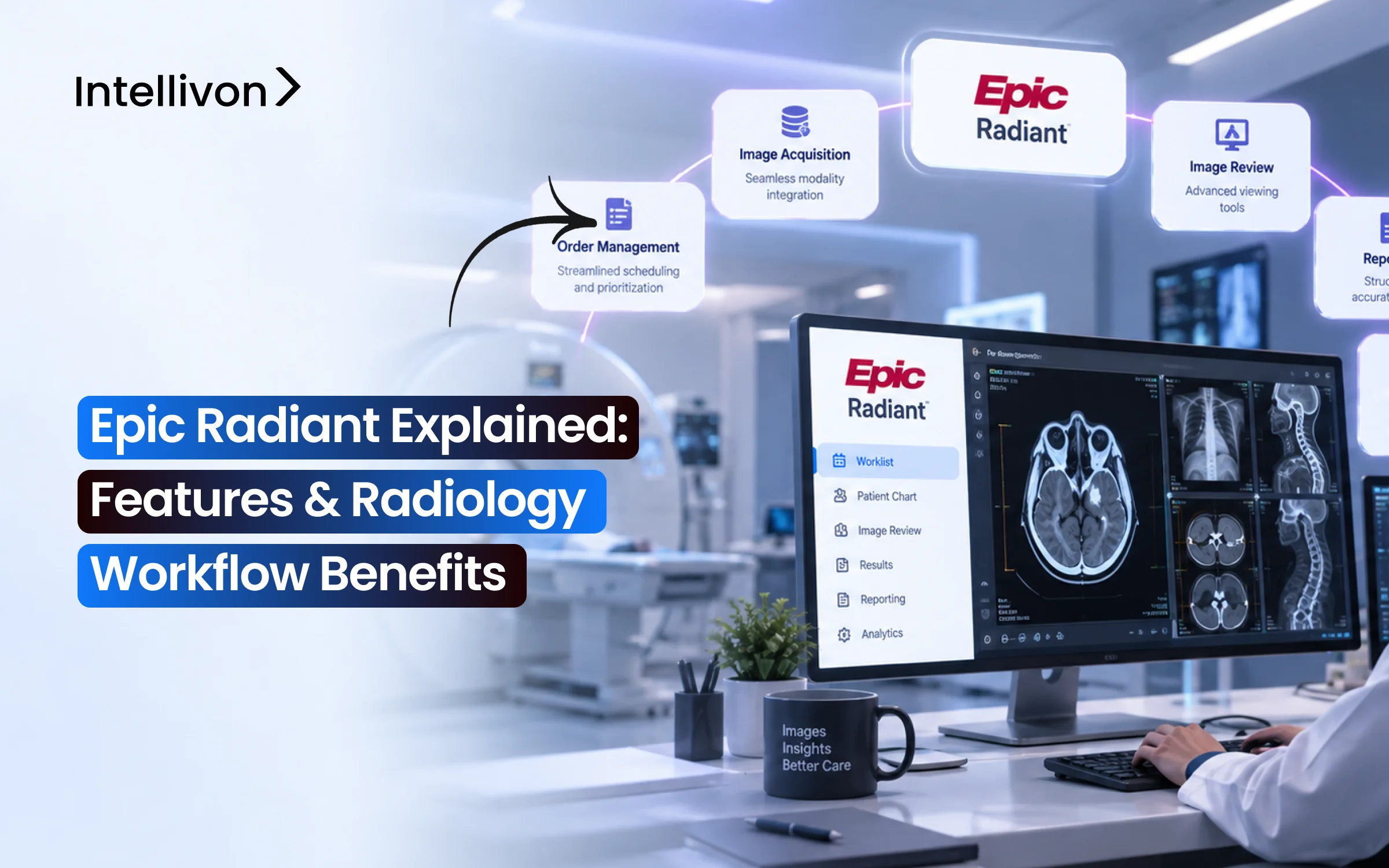
The radiology information system that Epic uses is Radiant and deals with imaging orders, scheduling, patient preparation, and billing as part of its overall Epic EHR.
-
The main features of the system cover the whole radiology workflow, since Radiant connects the schedulers, the technologists, the radiologists, the different imaging modalities, PACS, the reporting tools, and the referring clinicians from the moment the order is placed until the final result is received.
-
The biggest benefits regarding workflow are fewer manual tasks, a shorter turnaround time, and better visibility. Teams can keep track of the status of the exams, prioritize the STAT studies, manage their worklists, monitor scanner usage, and keep a closer watch on the critical results.
-
The cost of combining Custom Radiant and improving the workflow usually falls between $70,000 and $300,000. This amount can be spent on PACS and modality integrations as well as on analytics, automation, testing, training, and the various improvements carried out after go-live. Licensing from Epic and from third parties is separate.
-
Intellivon makes use of Epic Radiant as its main clinical system and then incorporates all the different integrations, dashboards, automation features, data pipelines, and AI tools because the standard Radiant workflows are not adequate.
Epic Radiant is the radiology component provided by Epic, and the key features it includes, such as order entry, scheduling, DICOM worklists, and reporting, were created with the aim of getting rid of the gaps in a workflow that, in other cases, depends on a number of scattered phone calls and paper documents. The actual benefit of the new workflow for the majority of radiology teams is the removal of these gaps, since, in their absence, a scan could be lost at some point between the front desk, the scanner room, and the reading list.
Radiant performs only as well as the way it has been set up, which means that if a hospital fails to develop interfaces specifically for its own order sets, PACS, and dictation system, the same delays reappear, now concealed behind a more attractive screen. It is exactly when this configuration work is done properly that it becomes clear whether Radiant will actually succeed in eliminating the workflow gaps it is meant to address or simply shift the bottleneck to a less obvious location.
Having considered this, Intellivon has developed the kinds of systems that are linked to Epic, making gradual progress and beginning with the interfaces. In this blog, we examine Radiant’s key features, the workflow benefits it offers at each stage, and the real cost of such a project.

What Is Epic Radiant and What Does It Do?
Epic Radiant is Epic’s radiology information system, or RIS. It manages the clinical and operational workflow surrounding medical imaging, from the original imaging order and appointment through exam acquisition, interpretation, reporting, results, and charge capture.
However, Radiant does not store the images themselves. Instead, it coordinates everyone and everything involved in getting that image from order to final report.
1. Epic Radiant Is the Radiology Information System Inside Epic
A RIS manages the administrative and clinical steps around an imaging exam, not the pixels. Because Radiant lives inside Epic, it connects directly to the patient’s full record, so a radiologist reading a chest CT can see prior labs, medications, and notes without switching systems.
This is why the distinction matters: Radiant manages the workflow around imaging, whereas PACS manages the images themselves.
2. Who Uses Epic Radiant?
Beyond radiology, Radiant also touches several roles across the hospital. In total, it serves:
- Referring physicians placing orders
- Radiology schedulers and registration teams
- Technologists and sonographers acquiring exams
- Radiologists and residents reading studies
- Radiology managers tracking operations
- Billing and charge capture teams
- Clinical informatics and IT integration staff
3. What Parts of Radiology Does Epic Radiant Manage?
Before the deeper feature breakdown below, it helps to see the functional scope in one place:
- Orders
- Scheduling
- Authorization and preparation
- Check-in
- Modality workflow
- Technologist documentation
- Exam status
- Radiologist worklists
- Reporting
- Critical results
- Charge capture
- Analytics.
4. Where Epic Radiant Fits Between the EHR, RIS, and PACS
Given how often these terms get confused, here’s the breakdown.
- Epic EHR stores the wider longitudinal clinical record. Epic Radiant, meanwhile, coordinates the radiology workflow.
- At the same time, PACS stores and displays the medical images, while imaging modalities produce those images.
- Reporting tools then support dictation and structured reporting on top.
5. Epic Radiant vs PACS at a Glance
| Function | Epic Radiant | PACS |
| Imaging order workflow | Yes | Limited |
| Scheduling | Yes | Usually no |
| Patient and exam status | Yes | Partial |
| Technologist workflow | Yes | Partial |
| Image storage | No | Yes |
| Diagnostic image viewing | Through integration | Yes |
| Radiologist worklists | Yes | Often |
| Reporting workflow | Yes | May integrate |
| Billing and charge data | Yes | Usually no |
As the table shows, Radiant is therefore not simply “Epic for radiologists.” Instead, it is the workflow layer connecting the people and systems involved in an imaging exam.
Why Radiology Departments Are Standardizing on Epic Radiant in 2026
Radiology departments are standardizing on Epic Radiant because most already use Epic as their main EHR. Keeping radiology on a separate RIS means extra logins, broken data handoffs, and slower results. So once a hospital adopts Epic, radiology rarely stays on its own system for long.
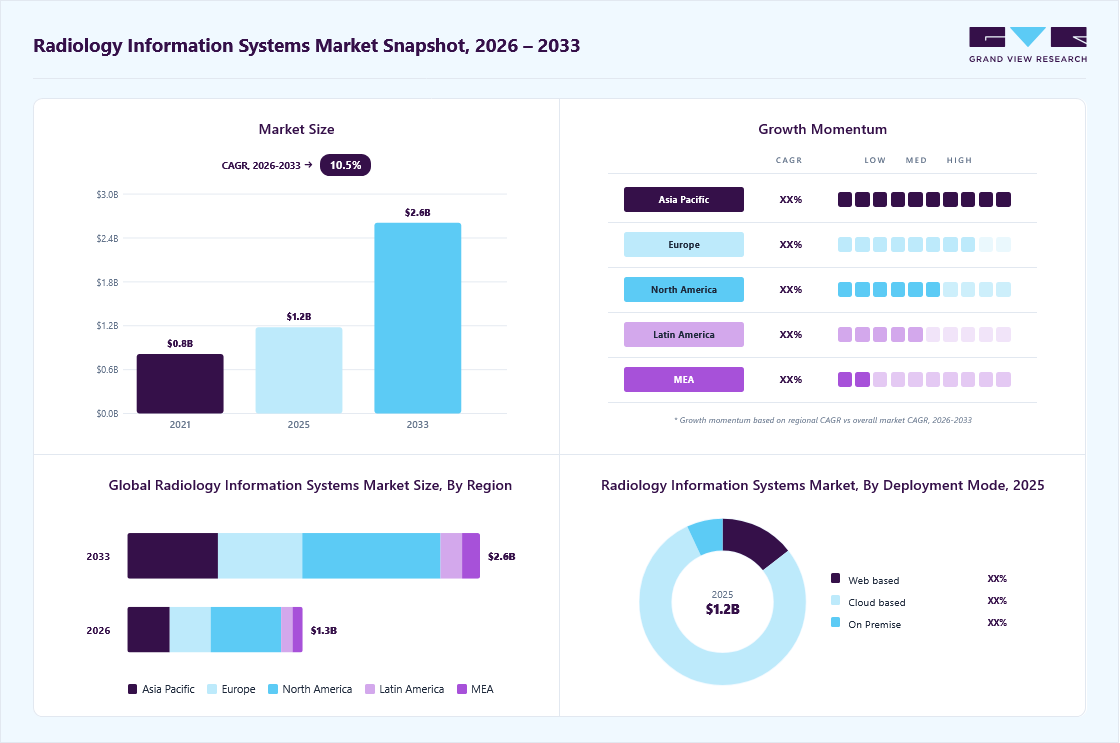
This shift also matches real market growth. In fact, the global radiology information systems market was valued at USD 1.3 billion in 2026 and is projected to grow at a 10.5% CAGR through 2033, driven largely by EHR-connected platforms like Radiant.
1. Epic’s Large EHR Market Share Pulls Radiology In
Epic already holds the biggest share of the US hospital EHR market. This pushes radiology departments to move onto Radiant instead of running a separate system.
- Fewer connections to maintain between EHR and RIS
- One login and one patient record across departments
- Faster IT support since Epic already owns the relationship
2. Named Competitors Still Lead Standalone Deployments
Fujifilm Synapse, GE Centricity, Sectra, and PowerScribe remain common outside Epic hospitals, especially where PACS came before the EHR decision.
- Fujifilm Synapse leads independent imaging centers
- PowerScribe remains the dictation standard in non-Epic shops
- Sectra and GE serve large academic and enterprise systems
In short, market growth and Epic’s own reach are pushing radiology toward Radiant. Still, named alternatives hold ground outside Epic environments.
How Epic Radiant Fits Into a Modern Radiology Department
Epic Radiant sits at the center of a radiology department’s daily operations, connecting orders, scheduling, exam workflow, and reporting into one system.
Because it lives inside Epic, it also links every step to the patient’s broader clinical record. This context matters before looking at individual features.
1. Epic Radiant as a Radiology Information System
Radiant functions as the department’s operational backbone. It carries each order through scheduling, exam performance, technologist documentation, and radiologist reporting, all while tracking patient and exam status at every step.
Since it runs inside Epic, referring physicians and radiologists see the same record without switching platforms.
2. What Epic Radiant Manages
Radiant covers the full order-to-result lifecycle. Specifically, it manages:
- Imaging orders and scheduling
- Patient preparation and check-in
- Exam workflow and technologist documentation
- Radiologist reading worklists
- Reporting, results, and charge capture
- Operational analytics
3. What Radiant Does Not Replace
Radiant coordinates workflow, but it does not perform every function in the imaging stack. It does not replace PACS, VNA, diagnostic viewers, imaging modalities, voice recognition platforms, or specialist imaging software.
Instead, it integrates with these systems to keep the overall workflow connected, which is exactly the kind of interface work Intellivon has built across Epic-connected imaging environments.
4. Epic Radiant vs PACS
The table below shows where each system’s responsibility begins and ends.
| Area | Epic Radiant | PACS |
| Imaging orders | Yes | Limited |
| Scheduling | Yes | Usually no |
| Exam workflow | Yes | Partial |
| Image storage | No | Yes |
| Diagnostic viewing | Integrated | Yes |
| Reporting workflow | Yes | Integrated |
| Patient clinical record | Yes | No |
Together, these distinctions show Radiant’s real role. It does not store or display images. Instead, it manages the people, orders, and steps that make imaging happen.
Epic Radiant Features Used Across the Imaging Workflows
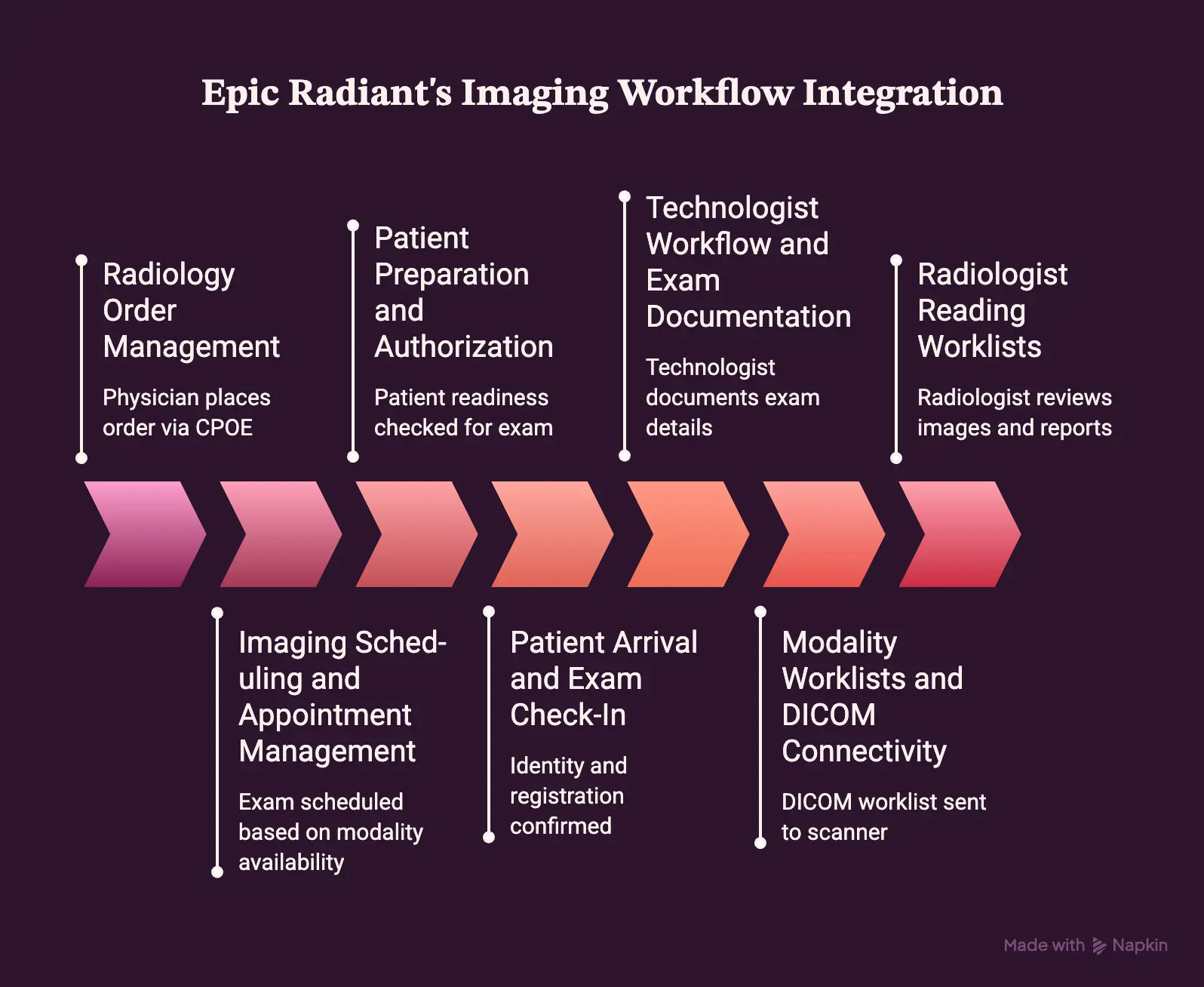
Epic Radiant’s features map directly onto each stage of the imaging workflow, from the moment a physician places an order to the moment a bill goes out. Each module below solves a specific handoff problem.
Together, they form the feature set that makes Radiant a true radiology information system rather than a simple order tracker.
1. Radiology Order Management
Radiant captures every imaging order the moment a physician places it through CPOE, then routes it by priority and specialty. Orders carry a priority flag, either routine, urgent, or STAT, which determines how fast scheduling and technologists act on them.
- Real-time order status visible to referring physicians
- Automatic routing based on exam type and location
- Order modification and cancellation tracking with audit history
2. Imaging Scheduling and Appointment Management
Once an order is active, Radiant schedules the exam using rules-based templates tied to modality availability. Schedulers see open slots across CT, MRI, X-ray, and ultrasound resources in real time.
- Scheduling templates by modality and department
- Pre-scheduling for multi-step or contrast-dependent exams
- Resource management across rooms, staff, and equipment
3. Patient Preparation and Authorization
Before an exam happens, Radiant checks that the patient is actually ready for it. This includes contrast requirements, documented allergies, and insurance prior authorization status.
- Automated prep instructions tied to exam type
- Allergy and contrast reaction flags pulled from the chart
- Insurance verification and prior authorization tracking
4. Patient Arrival and Exam Check-In
When a patient arrives, front desk staff confirm identity and registration status inside Radiant. This step updates exam readiness across the department instantly.
- Real-time arrival status visible to technologists
- Identity verification tied to the scheduled order
- Department-wide visibility into which exams are ready to begin
5. Technologist Workflow and Exam Documentation
Technologists work from a dedicated worklist that shows every exam assigned to them for the day. As they perform the exam, they document contrast use, supplies, and radiation dose directly in Radiant.
- Technologist worklists sorted by room and priority
- Contrast, dose, and supply documentation during the exam
- Status updates that move the exam to the reading queue
6. Modality Worklists and DICOM Connectivity
Radiant generates the DICOM Modality Worklist, which sends patient demographics, accession numbers, and exam identifiers straight to the scanner.
This eliminates manual re-entry across CT, MRI, X-ray, ultrasound, PET/CT, nuclear medicine, and fluoroscopy equipment. DICOM MPPS then reports exam progress back to Radiant automatically.
- Modality worklist integration across major imaging equipment
- Automatic accession number and demographic transfer
- MPPS status updates without manual technologist input
7. Radiologist Reading Worklists
Radiologists work from a prioritized queue that surfaces STAT studies first and routes exams by subspecialty. From the worklist, they launch directly into PACS with full prior-exam context already loaded.
- Subspecialty routing for neuro, MSK, body, and cardiac reads
- Prior exam comparison pulled automatically into the worklist
- One-click PACS launch from the reading queue
Taken together, these ten modules cover the entire imaging lifecycle, not just isolated tasks. Each one hands off cleanly to the next, which is what keeps an order moving from physician to final report without manual chasing. That connected handoff, more than any single feature, is what defines Radiant’s actual value.
Epic Radiant Radiology Workflow From Order to Final Result
Epic Radiant’s workflow moves an imaging order through eight connected stages, from the initial physician request to the final signed report.
Because each stage hands off automatically to the next, nothing sits idle waiting on a phone call or a paper form. Here’s what that journey actually looks like inside the department.
Step 1: The Clinician Places the Imaging Order
The workflow begins the moment a referring physician enters an order through CPOE. At this point, they select the procedure and document the clinical indication, then flag priority and any contrast requirements.
- Procedure selection tied to clinical indication
- Priority flagged as routine, urgent, or STAT
- Contrast requirements and clinical notes attached upfront
Step 2: Radiant Routes and Schedules the Exam
Once the order is placed, Radiant routes it to the correct modality and site. From there, it applies scheduling rules to find an open slot, while also checking authorization requirements before the appointment locks in.
- Automatic routing by modality and department
- Scheduling rules matched to appointment type and urgency
- Authorization status checked before confirming the slot
Step 3: The Patient Completes Pre-Exam Requirements
Before the exam date, Radiant tracks the steps that confirm the patient is actually ready. This includes safety screening questions, along with relevant lab values and any allergy or contrast history. Meanwhile, prior authorization gets finalized in the background.
- Safety and contrast screening questions completed
- Required labs and allergy history reviewed
- Prior authorization finalized ahead of the visit
Step 4: The Patient Arrives and the Exam Becomes Active
When the patient checks in, staff confirm identity and registration. As soon as that happens, the exam’s status updates instantly across the department, so the technologist team can see it’s ready to begin.
- Identity confirmed against the scheduled order
- Registration completed at check-in
- Real-time readiness status visible to technologists
Step 5: The Modality Receives the Study
Next, Radiant sends the exam details to the scanner through the DICOM Modality Worklist. This includes the patient’s demographics, accession number, and exam type, which means the technologist never has to re-type this information manually.
- Patient and exam details transmitted automatically
- Accession number attached before acquisition starts
- No manual data entry required at the scanner
Step 6: The Technologist Performs and Documents the Exam
As the technologist performs the exam, they document contrast administration, radiation dose, and any supplies used directly in Radiant. If a repeat image becomes necessary, that gets logged too, before the exam is finally marked complete.
- Contrast and dose documented during acquisition
- Supply usage tracked alongside the procedure
- Exam marked complete once acquisition finishes
Step 7: Images Move to PACS for Review
Once acquisition ends, the images transfer automatically to PACS, and to a VNA where one is in place. At the same time, the study becomes available for review alongside any prior imaging for comparison.
- Images routed automatically from modality to PACS
- Prior studies pulled in for side-by-side comparison
- Study availability updated once transfer completes
Step 8: The Study Enters the Radiologist Worklist
Finally, the completed study lands in the radiologist’s reading queue, sorted by priority and subspecialty. Because STAT exams surface first, work assignment happens automatically based on who’s covering that queue, with no manual reassignment needed.
- STAT studies prioritized at the top of the queue
- Subspecialty routing to the appropriate reader
- Work assignment handled without manual reassignment
From order to worklist, each step passes forward automatically, which is exactly why manual chasing disappears. That same connectivity, in turn, determines how fast a critical finding reaches the right physician, which is covered next.
Epic Radiant Workflow Benefits for Radiology Teams
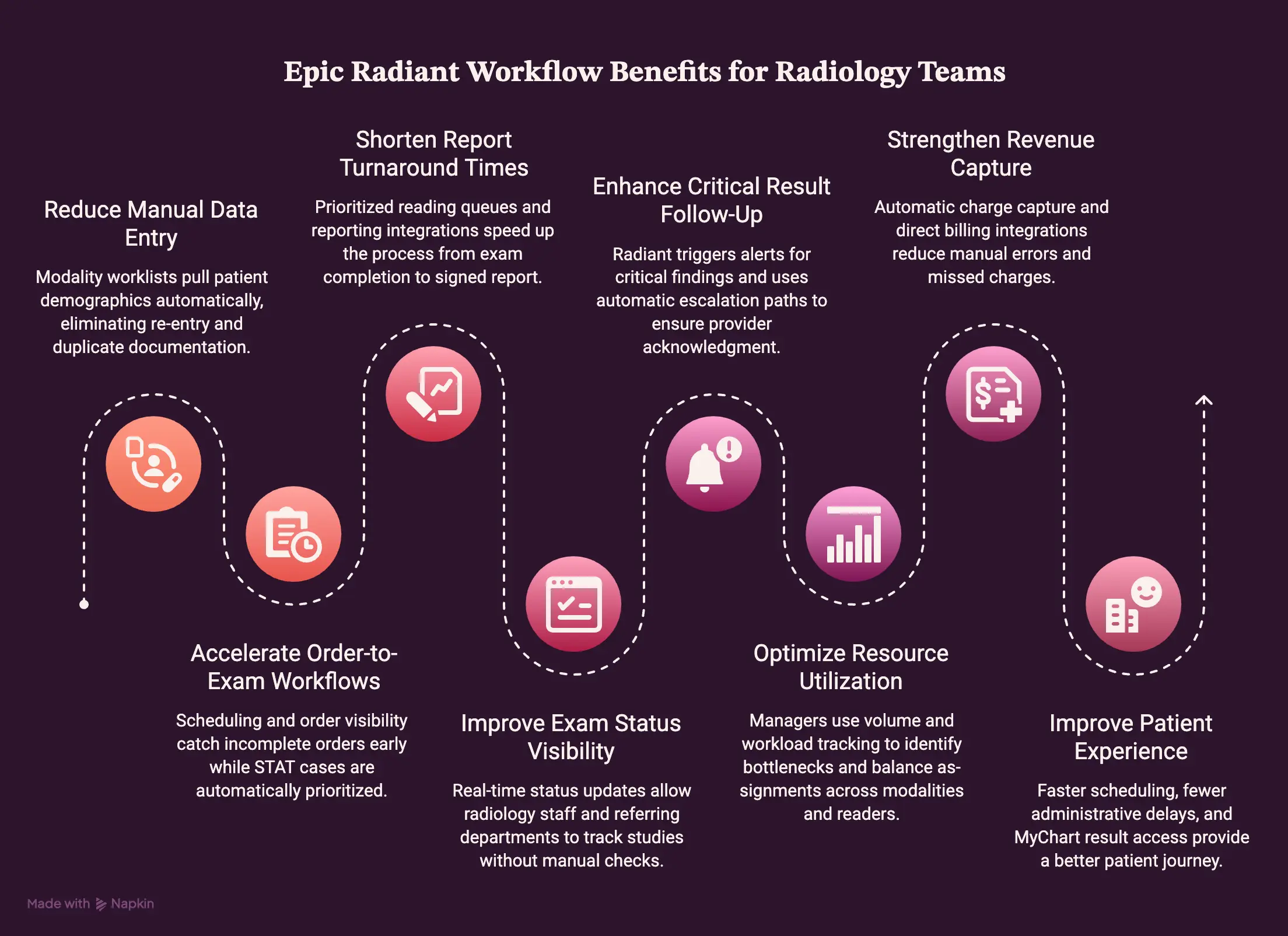
Epic Radiant’s workflow benefits for radiology teams come down to less manual data entry, faster order-to-exam times, shorter report turnaround, and stronger revenue capture. These gains show up because order entry, scheduling, worklists, and reporting all work off the same shared data instead of separate handoffs.
Here’s what that shift actually produces for radiology teams.
1. Less Manual Data Entry Between Epic and Imaging Systems
Because modality worklists pull patient demographics automatically, technologists no longer re-enter the same information the front desk already captured. This shared patient context also reduces duplicate documentation between Epic and the scanner.
That said, this benefit only holds if the interface between Radiant and the modality is configured correctly.
- Fewer demographic re-entry steps at the scanner
- Shared patient context across registration and imaging
- Reduced duplicate documentation between systems
2. Faster Order-to-Exam Workflows
Since scheduling and order visibility work together, staff catch incomplete orders before they reach the exam room instead of after.
Preparation tracking further reduces last-minute delays, while STAT prioritization pushes urgent cases ahead automatically.
- Fewer incomplete orders reaching the scheduling stage
- Preparation status tracked before the appointment date
- STAT exams automatically prioritized over routine orders
3. Shorter Radiology Report Turnaround Times
Radiologist worklists prioritize studies by urgency, so reading queues surface STAT and subspecialty cases without manual sorting.
Combined with reporting integrations, this shortens the gap between exam completion and signed report. TAT monitoring then makes that improvement measurable over time.
- Prioritized reading queues reduce time to first read
- Reporting integrations speed up dictation-to-signature
- TAT data tracked and reported at the department level
4. Better Visibility Into Exam Status
Every exam moves through clear status stages, including scheduled, arrived, started, completed, ready to read, preliminary, and final.
Because this status updates in real time, both radiology staff and referring departments know exactly where a study stands. This matters most when a referring physician is waiting on results for an inpatient decision.
- Real-time status visible across scheduled, active, and reading stages
- Referring physicians see progress without calling the department
- Fewer status-check interruptions for radiology staff
5. Better Critical Result Follow-Up
When a radiologist flags a critical finding, Radiant triggers an alert that requires acknowledgment from the ordering provider.
If that acknowledgment doesn’t happen, escalation paths kick in automatically. This creates an auditable communication trail instead of a verbal handoff that’s easy to lose track of.
- Automatic alerts triggered on critical findings
- Escalation when a provider doesn’t acknowledge in time
- Auditable trail for every critical result communication
6. Better Radiologist and Modality Utilization
Because Radiant tracks volume across every modality and reader, managers can see where scanner capacity sits idle and where radiologist workload is heaviest.
This visibility makes bottlenecks obvious instead of anecdotal. Over time, that data also supports fairer productivity comparisons across the team.
- Volume distribution visible across modalities and shifts
- Radiologist workload tracked for balanced assignment
- Bottlenecks identified before they affect turnaround time
7. Stronger Revenue Capture
Since charge capture happens automatically at exam completion, fewer completed procedures fall through without a corresponding charge.
At the same time, coding data ties directly to the documented exam, which reduces manual coding errors. Billing integrations then carry that data straight into the revenue cycle system.
- Automatic charge capture tied to exam completion
- Reduced missed charges from manual entry gaps
- Direct billing integration reduces coding delays
8. Better Patient Experience
Patients feel these operational changes directly, starting with faster scheduling and clearer preparation instructions. At the same time, fewer administrative delays mean less waiting between referral and appointment.
Consequently, MyChart communication then gives patients easier access to their own results without a phone call.
- Faster scheduling and clearer prep instructions
- Fewer administrative delays between referral and exam
- Easier result access through MyChart
9. Feature to Benefit to KPI Summary
| Feature | Operational Benefit | KPI Affected |
| Modality worklists | Less manual data entry | Documentation error rate |
| Order and scheduling rules | Faster order-to-exam workflow | Order-to-appointment time |
| Radiologist worklists | Shorter report turnaround | Report turnaround time (TAT) |
| Exam status tracking | Better visibility across teams | Status-check call volume |
| Critical result alerts | Faster, auditable follow-up | Critical result acknowledgment time |
| Volume and workload analytics | Better utilization | Scanner and reader utilization rate |
| Automated charge capture | Stronger revenue capture | Missed charge rate |
| MyChart integration | Better patient experience | Patient satisfaction scores |
Taken together, these benefits show that Radiant’s real value isn’t any single feature. It’s the operational shift that happens when every stage of the workflow shares the same data in real time.
How Epic Radiant Connects With PACS, Modalities, and the Rest of Epic
Epic Radiant connects to the rest of the imaging stack through four main channels: PACS for images, DICOM for scanners, HL7 for orders and events, and FHIR for external applications. Each connection handles a different layer of the workflow, so no single interface carries the whole load.
- PACS and Diagnostic Viewer Integration: To begin with, Radiant hands off study and patient context to PACS, which then displays the images and prior exams. Because of this context launch, a radiologist opens a study directly from the worklist without a second login.
- DICOM Integration With Imaging Modalities: From there, the Modality Worklist sends patient identifiers to the scanner, while MPPS reports exam progress back. Together, these two DICOM services move images and status automatically, without manual re-entry.
- HL7 Integration for Orders, Results, and Patient Events: Meanwhile, HL7 messages carry ADT events, orders, results, and cancellations between Radiant and outside systems, usually through an interface engine that routes each message correctly.
- FHIR and API Integration: More recently, FHIR and SMART on FHIR have started supporting newer use cases, including custom applications and AI tools that need patient context. Even so, DICOM and HL7 still handle the core imaging and messaging workflow more reliably today.
Beyond these four channels, Radiant also links to other Epic modules. Epic Cadence Integration coordinates patient scheduling and enterprise appointments alongside imaging resources, while Epic Beaker Integration supplies lab values, such as contrast-related labs, that imaging exams require as prerequisites.
Similarly, Epic OpTime and Procedural Integration connect interventional radiology to operating room scheduling and shared documentation.
Together, these connections show that Radiant doesn’t work in isolation. It depends on a wider integration layer to function as intended.
Radiant Workflows for Different Imaging Specialties
Radiant workflows shift depending on the imaging specialty, since CT, mammography, nuclear medicine, and interventional radiology each carry different safety checks, timing requirements, and documentation needs.
Even so, the core order-to-report structure stays the same across all of them. Here’s how each specialty adds its own layer on top of that structure.
1. CT and MRI Workflows
Because both modalities often require contrast, Radiant tracks screening questions and protocol selection before scheduling is confirmed. In addition, MRI requires implant and device safety screening, since the magnetic field introduces its own risks.
- Contrast screening and renal function checks before the exam
- MRI-specific device and implant safety questionnaires
- Protocol selection tied to the clinical indication
2. X-Ray and Ultrasound Workflows
In contrast, these high-volume outpatient studies move through Radiant with simpler scheduling, since most don’t require contrast or extensive prep. As a result, turnaround stays fast, and portable studies still route through the same worklist structure as in-department exams.
- Streamlined scheduling for high daily volume
- Minimal pre-exam screening for most studies
- Portable study documentation handled within the same worklist
3. Mammography Workflows
Because mammography carries specific federal requirements, Radiant tracks MQSA-related documentation alongside standard breast imaging steps. Beyond that, follow-up tracking matters more here, since callback and biopsy recommendations need consistent monitoring.
- MQSA compliance documentation built into the workflow
- Follow-up and callback tracking for abnormal findings
- Structured reporting aligned to BI-RADS categories
4. Nuclear Medicine and PET/CT Workflows
These studies depend heavily on timing, since radiopharmaceutical administration and uptake periods must align precisely with scheduling. Consequently, Radiant documents preparation instructions and dose timing more closely than in standard imaging.
- Radiopharmaceutical dose and timing documentation
- Uptake period scheduling built into appointment rules
- Specialized prep instructions communicated to patients in advance
5. Interventional Radiology Workflows
Finally, IR procedures bring the most documentation overlap, since they involve medications, supplies, and nursing steps similar to OpTime’s surgical workflows. On top of that, billing becomes more complex here, given the procedural and device charges involved.
- Procedural documentation shared across nursing and radiology teams
- Medication and supply tracking tied to the procedure
- Closer alignment with OpTime-style procedural billing
Across every specialty, Radiant applies the same order-to-report backbone, then layers on the specific safety checks and documentation each modality demands. That consistency is what lets a department run CT, mammography, and IR through one system without maintaining separate workflows for each.
Epic Radiant Security, Compliance, and Imaging Governance
Epic Radiant handles security, compliance, and imaging governance through role-based access controls, audit trails, dose and contrast documentation, and clear data ownership rules between Epic and PACS.
Because radiology touches some of the most sensitive records in a patient’s chart, these controls aren’t optional add-ons. Here’s how each piece works.
1. HIPAA and PHI Protection
Radiant restricts access to imaging records using role-based permissions, so a scheduler sees different data than a radiologist. This follows the minimum necessary standard, meaning staff only reach the PHI required for their specific task.
As a result, sensitive imaging data stays compartmentalized even within a single department.
- Role-based access tied to job function
- Minimum necessary access applied to PHI
- Compartmentalized visibility across scheduling, technologist, and reading roles
2. Audit Trails and User Activity
Every access, change, and result view in Radiant gets logged automatically, which creates a full accountability trail. Because this history is timestamped and user-specific, compliance teams can trace exactly who touched a record and when.
This becomes especially important during audits or when investigating a reported error.
- Access history logged for every user interaction
- Changes and result activity timestamped automatically
- Full accountability trail available for compliance review
3. Radiation Dose and Contrast Documentation
Radiant tracks radiation dose and contrast administration at the point of care, so this data doesn’t rely on after-the-fact reconstruction. Reactions and allergies get documented alongside the exam itself, which supports both patient safety and quality monitoring.
Over time, this documentation also feeds dose-tracking programs required for accreditation.
- Dose tracking captured during exam documentation
- Contrast reactions and allergies logged in real time
- Data feeds ongoing quality and accreditation monitoring
4. Mammography and Specialty Reporting Requirements
Since mammography falls under MQSA, Radiant builds regulatory reporting directly into that specialty workflow rather than treating it as a separate process. Other specialty workflows carry similar reporting obligations, and Radiant applies the same structured approach across each one.
This keeps regulatory documentation consistent instead of handled ad hoc by department.
- MQSA-specific documentation built into the mammography workflow
- Structured reporting applied consistently across specialty workflows
- Regulatory data captured at the point of documentation, not after
5. Imaging Data Governance
Radiant governs patient identity, accession numbers, and exam-level data as the source of truth for the imaging encounter, while PACS owns the actual image files. Because both systems stay synchronized through shared identifiers, duplicate studies get flagged rather than silently created.
This division of ownership between Epic and PACS is what keeps the two systems from working off conflicting data.
- Patient identity and accession numbers are governed by Radiant
- PACS retains ownership of the image files themselves
- Shared identifiers prevent duplicate or conflicting studies
Across all five areas, Radiant’s compliance model works the same way. It captures the required data at the moment care happens, rather than reconstructing it later, which is what makes the audit trail and regulatory reporting reliable.
Common Epic Radiant Implementation Problems
Epic Radiant problems typically trace back to configuration choices made during implementation, not flaws in the platform itself. Poor interface design, mismatched worklists, and disconnected scheduling all stem from decisions that could have gone differently at build time.
Here are the six issues that come up most often, along with how Intellivon addresses each one.
1. Duplicate Work Between Epic and PACS
When system ownership isn’t clearly defined during implementation, staff often enter the same data twice, once in Radiant and again in PACS. This usually happens because the interface wasn’t built to carry every required field automatically.
To fix this, our experts map data ownership between the two systems before the interface is built, so each field has exactly one source of truth.
2. Incorrect Patient or Study Matching
Mismatched patient or study records happen when accession numbers, DICOM metadata, or order mapping don’t stay aligned across systems. Since a single mismatch can misroute an entire study, this creates both a safety risk and a documentation gap.
To prevent this, our team validates identifier mapping end-to-end during testing, rather than waiting for errors to surface in production.
3. Radiologist Worklists That Do Not Match Clinical Priorities
Sometimes a worklist technically works but still doesn’t reflect how a department actually prioritizes cases, so STAT studies sit behind routine ones or specialty routing sends the wrong reader the wrong exam. This gap usually comes from generic default rules instead of real workload patterns.
Because of this, our specialists build worklist logic around each department’s actual assignment rules and subspecialty coverage.
4. Slow Scheduling and Authorization Workflows
When patient access, preparation, and payer workflows aren’t connected to scheduling, authorization delays push appointments back or force manual follow-up. This disconnect usually stems from scheduling rules built in isolation from prep and authorization steps.
To close this gap, our engineers connect scheduling directly to authorization status, so an appointment can’t move forward until its prerequisites are met.
5. Reporting Workflows With Too Many Systems
Reporting feels fragmented when radiologists move between Radiant, PACS, voice recognition, and sometimes an external tool just to finish one report. Every extra system adds unnecessary clicks and another point where the workflow can break.
Our team consolidates these handoffs wherever integration allows, so reporting stays inside as few systems as possible.
6. Poor Analytics After Go-Live
Many departments collect data after go-live without first defining what TAT, productivity, or utilization should actually measure. Consequently, dashboards fill up with numbers nobody can act on.
Our analysts define workflow baselines before go-live, so every KPI tracked afterward ties back to a clear, pre-agreed benchmark.
Across all six problems, the pattern repeats itself: issues that surface after go-live almost always trace back to decisions made, or skipped, during implementation. Catching them at that stage is what separates a Radiant rollout that runs smoothly from one that needs constant firefighting afterward.
What Epic Radiant Customization and Integration Costs in 2026
Custom integration, optimization, analytics, automation, and AI work around Epic Radiant generally costs $70,000 to $300,000, excluding Epic licensing and third-party software fees.
Epic Radiant Customization Cost Breakdown
| Project Scope | Typical Range |
| Workflow discovery | $10K to $25K |
| Integration engineering | $25K to $90K |
| Analytics and extensions | $15K to $85K |
| Testing and go-live | $15K to $55K |
| Optimization | $5K to $45K |
| Total custom scope | $70K to $300K |
1. Discovery and Workflow Planning: $10,000 to $25,000
This phase covers system inventory, workflow mapping, architecture decisions, and the implementation plan itself.
2. Integration and Core Engineering: $25,000 to $90,000
Here, the build connects PACS, DICOM, HL7, APIs, and modality integrations, along with ongoing interface monitoring.
3. Analytics, Automation, and Custom Extensions: $15,000 to $85,000
This covers dashboards, automation, custom worklists, AI features, and connections to external applications.
4. Testing, Training, and Go-Live: $15,000 to $55,000
This phase includes UAT, workflow validation, security testing, staff training, and production deployment.
5. Stabilization and Optimization: $5,000 to $45,000
Post-launch, this covers interface tuning, support, performance fixes, and workflow adjustments.
Ongoing Maintenance
Annual maintenance typically runs 15% to 20% of the initial custom engineering cost.
What Pushes a Project Toward $300,000
Multiple hospitals, many modalities, multiple PACS systems, legacy RIS migration, custom worklists, AI features, complex analytics, IR workflows, third-party integrations, and extensive data migration all push costs toward the upper range.
Need to scope your Radiant integrations before setting the budget? Talk to Intellivon’s team.
Why Founders Building Around Epic Radiant Work With Intellivon
Founders building around Epic Radiant work with Intellivon because of a proven interoperability track record, direct Epic experience, a phased delivery approach, and verified client results.
1. 11+ Years Building Healthcare Interoperability and Imaging Systems
- Building interoperability layers and EHR-connected platforms since 2017
- Direct hands-on experience with FHIR, HL7, and DICOM standards
- A decade of healthcare integration work, not a first attempt
2. Direct Experience With Epic, FHIR, and Radiology-Adjacent Builds
- Implemented a SMART on FHIR integration with Epic EHR for a remote patient monitoring platform
- Delivered real-time data retrieval, write-back, and OAuth 2.0 authentication
- Built HIPAA-compliant deployment on the same standards Radiant depends on
3. A Phased, Audit-First Delivery Approach
- Discovery and workflow mapping completed before any interface is built
- Testing and validation done before go-live, not after
- The same phased structure that prevents post-launch firefighting
4. Verified Client Results
- Clients cite strong project management and compliance attention
- A healthcare client reported improved risk identification post-launch
Ready to scope your Radiant integration? Talk to Intellivon’s team.
Conclusion
Epic Radiant closes the gaps between order, exam, and report, but only when its interfaces are configured with the same care as the workflow itself.
As covered throughout this guide, that means clear data ownership, tested identifier mapping, and worklists built around real clinical priorities, not generic defaults.
Consequently, the departments that get the most from Radiant are the ones that treat implementation as a design decision, not a checkbox. Ultimately, the platform’s value comes down to how deliberately it gets built.
FAQs
Q1. Is Epic Radiant a RIS or a PACS?
A1. Epic Radiant is a RIS, not a PACS. It manages the workflow around imaging, including orders, scheduling, and reporting, whereas a PACS stores and displays the actual images. Because of this distinction, Radiant depends on PACS integration rather than replacing it.
Q2. Does Epic Radiant integrate with PACS systems?
A2. Yes, Radiant integrates with PACS systems, including Fujifilm Synapse, GE Centricity, and Sectra. It hands off study and patient context so radiologists can launch directly into image viewing. As a result, PACS and Radiant work together rather than duplicating each other’s functions.
Q3. Does Epic Radiant support DICOM and modality worklists?
A3. Yes, Radiant generates the DICOM Modality Worklist, which sends patient demographics and accession numbers directly to the scanner. It also receives MPPS updates as the exam progresses. Consequently, technologists avoid manually re-entering patient information at each modality.
Q4. Can Epic Radiant work with PowerScribe or Dragon Medical?
A4. Yes, Radiant supports integration with both PowerScribe and Dragon Medical for voice recognition and dictation. Since reporting still happens within Radiant’s structured workflow, radiologists get faster dictation without losing the reporting and sign-off structure already in place.
Q5. How does Epic Radiant support interventional radiology?
A5. Radiant supports IR through procedural documentation, medication tracking, and billing workflows that overlap with Epic OpTime. Because IR involves more complex charges than standard imaging, this connection matters for accurate coding. It therefore reduces the documentation gap between radiology and procedural teams.
Q6. Can hospitals add AI tools around Epic Radiant?
A6. Yes, hospitals can add AI tools around Radiant through FHIR and API integrations, particularly for reporting assistance or worklist prioritization. Because DICOM and HL7 still handle the core imaging workflow, AI features typically layer on top rather than replacing existing connections.

