Key Takeaways:
-
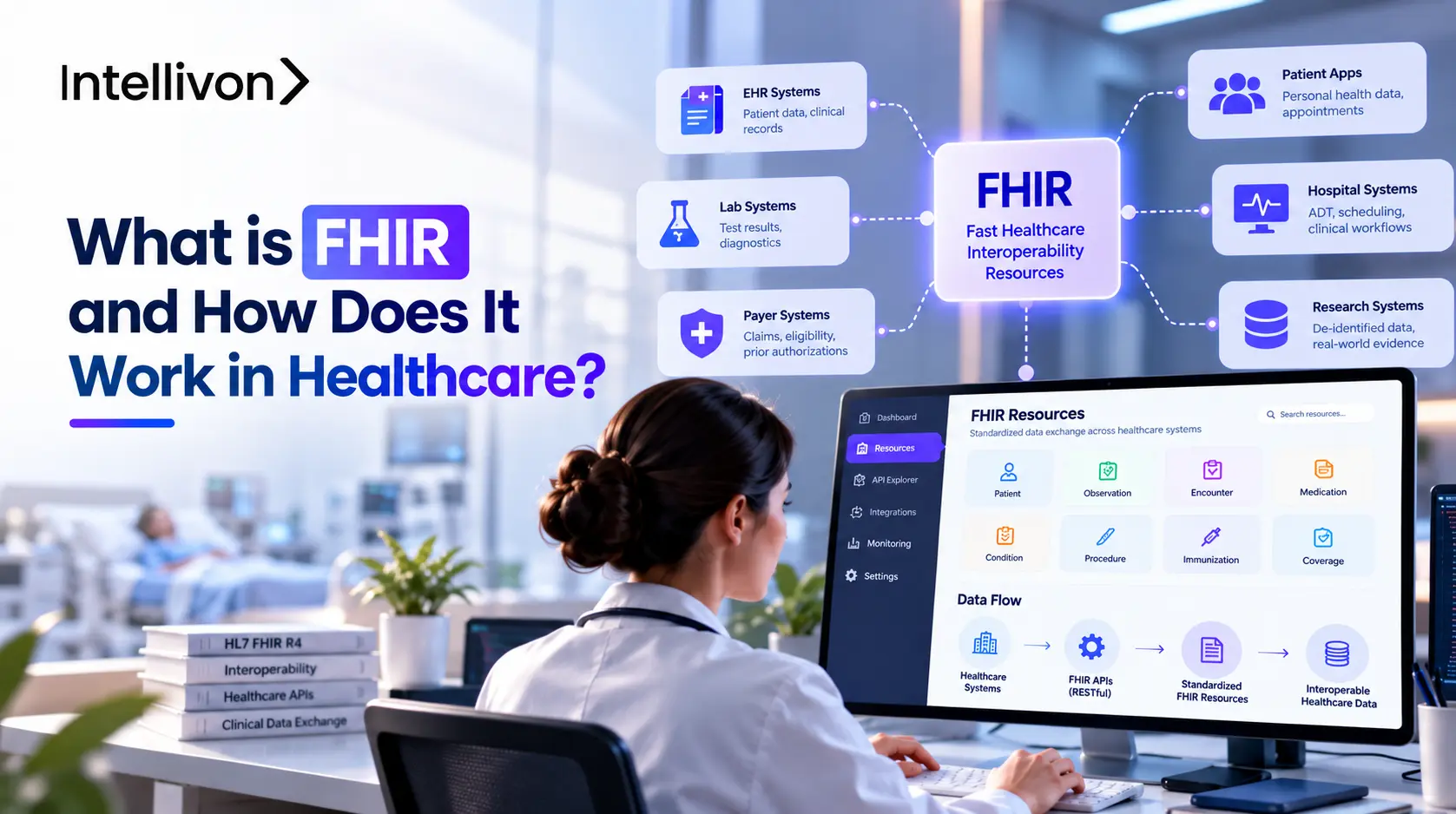
Basically, FHIR is a common method for healthcare systems to share patient data without each application having to use a completely different language.
-
It does so by dividing up health information into smaller parts, such as Patient, Observation, or Encounter, and then allowing apps to request these through APIs.
-
In actual healthcare products, FHIR typically acts as an intermediary between the app and various systems such as EHRs, labs, payer platforms, or remote monitoring tools.
-
While it does make the exchange of data much easier, you still have to cope with permissions, messy data, differences between vendors, and older systems.
-
Intellivon designs the integration using FHIR, which ensures that the data moves safely between the various systems that your healthcare product relies on.
FHIR is an open standard developed by HL7 and stands for Fast Healthcare Interoperability Resources. It enables healthcare systems to exchange patient data via web APIs. It divides records into small, labeled sections known as resources, for instance, Patient or Observation. If a patient app requests lab results from a hospital’s FHIR server, the server will return them in JSON or XML.
FHIR isn’t legally mandatory for all products, but since current US federal regulations are encouraging many organizations to use FHIR-based APIs, it usually determines whether or not your product can link to hospitals and payers. For this reason, it makes good business sense for founders to understand FHIR early on.
We begin in this blog by explaining how FHIR works and how it compares to HL7 v2, HL7 v3, CDA, and DICOM. Then we look at some real-world use cases and examine the cost of a FHIR-ready product according to phase. Finally, we discuss when it is not appropriate to go with FHIR and what should be decided upon before engaging a partner such as Intellivon.

Why Healthcare Needed FHIR in the First Place
Healthcare needed FHIR because patient data sits in many separate systems that describe the same clinical facts in different ways. Older standards moved that data through large messages, documents, and custom interfaces that were hard to extend.
FHIR solved this by offering one shared model and familiar web technology, such as REST APIs. As a result, apps can request specific pieces of health data instead of rebuilding a new connection for every system.
1. Healthcare Data Still Lives Across Separate Systems
A single patient’s record often spans many systems, and each one stores its own slice. Moreover, these systems often name and structure the same clinical concept differently.
- EHRs: visits, diagnoses, and clinician notes
- Labs: test orders and results
- Pharmacy: prescriptions and fills
- Imaging: scans and radiology reports
- Payers: claims and coverage
- Telehealth, RPM, and patient apps: visit data, device readings, and self-reported data
- Example: one system stores blood pressure as a free-text note, while another stores it as a coded number.
2. Older Integration Methods Were Harder to Extend
Healthcare did have standards before FHIR. However, those approaches were built for different needs and grew harder to adapt over time.
- HL7 v2: message-based and flexible, so implementations differ between sites.
- HL7 v3: a formal, complex model that proved harder to adopt.
- CDA: shares whole clinical documents rather than individual data items.
- Point-to-point interfaces: each pair of systems needs its own custom link, so every new system adds more connections to maintain.
3. FHIR Brought Healthcare Closer to Modern Web APIs
FHIR changed the unit of exchange. Instead of treating healthcare exchange only as large messages or documents, it lets applications work with smaller structured Resources through familiar web technologies.
- A Resource is a small structured unit, such as a Patient or an Observation.
- Apps request only what they need, such as a single lab result.
- Exchange uses standard web methods, the same HTTP approach other web APIs follow.
- Similarly, Google Cloud describes FHIR as a common data model combined with REST-based exchange, supporting JSON, XML, and RDF.
FHIR matters because it gives different systems a shared contract for requesting and exchanging healthcare information. Separate systems and hard-to-extend interfaces created the need. Smaller Resources delivered over web APIs answered it.
What FHIR Actually Means in a Healthcare Product
In a healthcare product, FHIR is a standard that defines two things: how health data is structured and how applications exchange it. It is not software, a database, or an EHR. HL7, a non-profit standards organization, maintains the specification. Products then implement it so they can share patient information with other systems.
In short, FHIR is a shared set of rules, and your product follows those rules to connect with other systems.
1. FHIR Is a Standard, Not a Piece of Software
Founders often treat FHIR like a product they can buy. However, it is a specification, so it describes rules rather than delivering features.
- Not an EHR: it does not store charts or run clinical workflows.
- Not a database: your data still lives in your own storage.
- Not an integration vendor: it does not connect systems for you.
- A specification maintained by HL7: anyone can implement the published rules.
2. FHIR Defines How Healthcare Data Is Structured
FHIR organizes health data into Resources, which are small, labeled units of information. Because each Resource has a defined structure, every system knows what to expect.
- Patient: demographics and identifiers
- Observation: a measurement, such as a lab value or heart rate
- Encounter: a visit or interaction
- Condition: a diagnosis or health problem
- MedicationRequest: a prescription order
- Appointment: a scheduled visit
- Coverage: insurance details
- DiagnosticReport: results from a lab or imaging study
3. FHIR Also Defines How Applications Exchange That Data
The standard covers more than the shape of the data. It also defines common ways for applications to work with that data.
- Create: add a new Resource, such as a new Patient
- Read: retrieve a specific Resource
- Update: change an existing Resource
- Search: find Resources that match given criteria
- Exchange: send groups of Resources between systems
This combination of standardized data structures and API behavior is one reason FHIR differs from simply sending arbitrary JSON between two healthcare systems, as ONC Health IT describes.
In a healthcare product, FHIR is a specification, not a tool you install. It defines what health data looks like through Resources and how applications create, read, update, search, and exchange that data. Together, those two parts give separate systems a common set of rules.
Why Healthcare Apps Without FHIR Support Get Blocked by US Health Systems in 2026
Healthcare apps without FHIR support can get blocked because major US health systems and payers now connect third-party apps through FHIR APIs. Epic, Oracle Health, and athenahealth all publish FHIR R4 APIs.
Meanwhile, CMS rule CMS-0057-F requires many payers to build FHIR APIs by January 1, 2027. An app that cannot speak FHIR can face slower custom integrations. That is why many founders plan FHIR support before launch, not after.
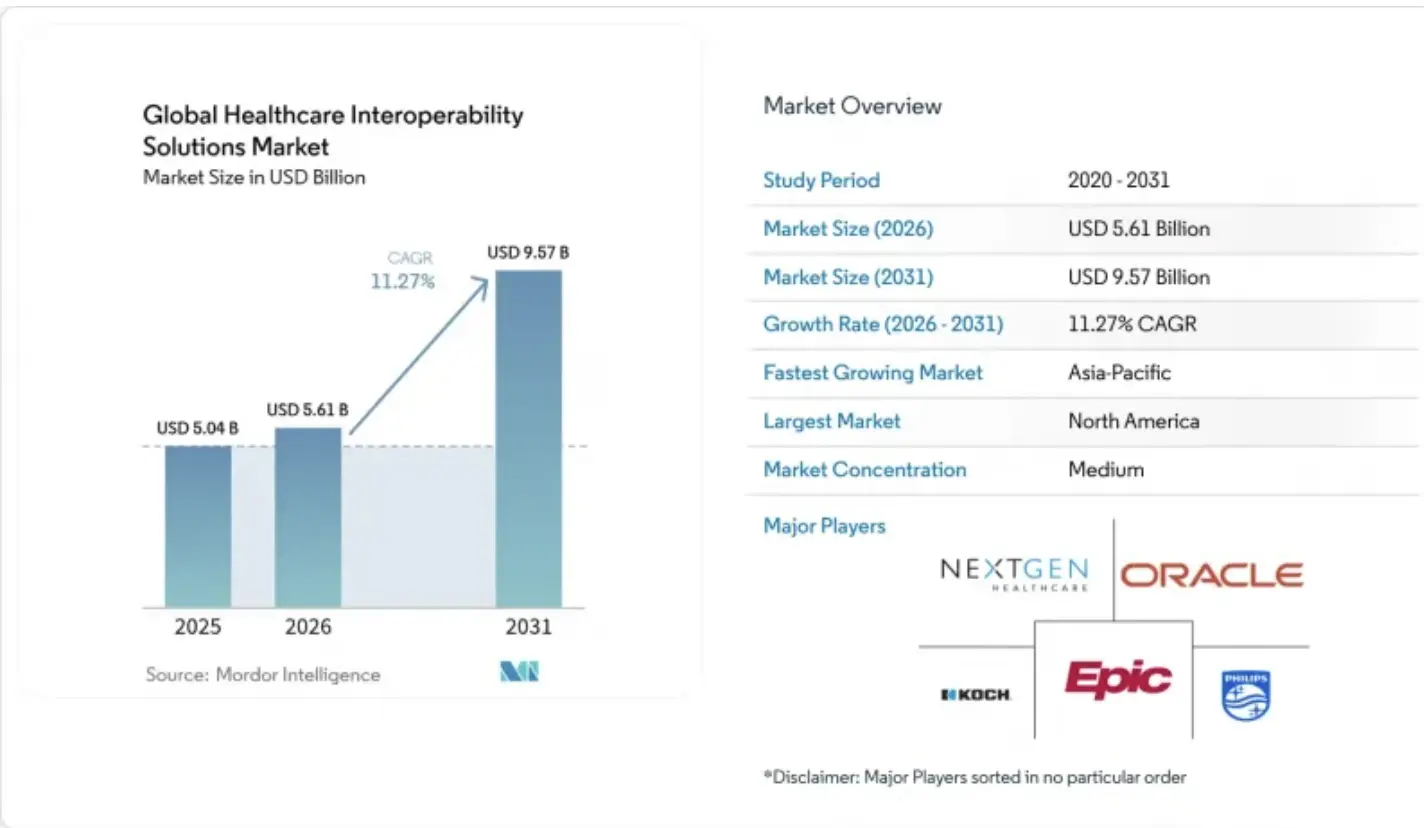
Mordor Intelligence estimates that the market value for healthcare interoperability solutions will be USD 5.61 billion in 2026, up from the 2025 figure of USD 5.04 billion, and that projections for 2031 show it will have reached USD 9.57 billion, representing a growth rate of 11.27% CAGR from 2026 through to 2031.
1. What CMS-0057-F Changed on January 1, 2026
CMS finalized this rule in January 2024, and it phases in over two dates. However, it applies to payers, not directly to app makers.
- Who it covers: Medicare Advantage plans, state Medicaid and CHIP programs, Medicaid managed care, and Qualified Health Plan issuers on the federal exchanges.
- January 1, 2026: payers must answer prior authorization requests within 72 hours (urgent) or seven days (standard) and give a specific denial reason.
- January 1, 2027: payers must run FHIR-based Patient Access, Provider Access, Payer-to-Payer, and Prior Authorization APIs, according to the CMS fact sheet.
- Required standard: FHIR Release 4.0.1.
2. Which Major Systems Already Expose FHIR APIs
Three large vendors already publish FHIR APIs. As a result, a FHIR-ready app has a clear path into their systems.
- Epic: Epic on FHIR gives developers a free sandbox and client registration. A 2025 Epic presentation cites more than 500 FHIR APIs.
- Oracle Health (Cerner): its Millennium Platform offers FHIR R4 APIs, and Oracle no longer supports the older DSTU 2 versions.
- athenahealth: it publishes FHIR R4 endpoints for athenaOne.
Health systems and payers are building around FHIR APIs, and federal deadlines in 2026 and 2027 reinforce that direction. The rule binds payers rather than app makers, yet it shapes what your product must connect to. Both market estimates point to steady growth.
How FHIR Works From EHR to Healthcare App
When a healthcare app needs data, it sends a request to the EHR’s FHIR endpoint. The EHR’s FHIR layer translates its internal records, and the app receives a standard Resource it can read. The same six steps apply whether the app wants a lab result, a medication, or an appointment.
Below, one illustrative patient, Maria, a 58-year-old with high blood pressure, takes us through each of the six steps in order.
Step 1: The App Requests a Specific Type of Data
Maria’s care team uses a care-management app. The app needs her latest blood pressure readings, so it asks for only that.
- It identifies Maria by her patient ID.
- It requests Observation Resources, the type used for measurements.
- It narrows results by date or sorts newest first, using FHIR search parameters.
Step 2: The Request Reaches the FHIR Endpoint
The request goes to the FHIR endpoint, a web address where the EHR’s FHIR server or API layer listens. However, the EHR does not necessarily store its internal database in FHIR format.
- Many systems keep data in their own internal structure.
- A FHIR facade translates that data into FHIR on demand, as InterSystems describes.
- Likewise, FHIR community discussions note that legacy systems usually translate between their internal format and FHIR.
- The server also checks that the app is allowed to ask.
Step 3: The System Returns a FHIR Resource
The server answers with an Observation Resource holding Maria’s reading. It can arrive as JSON or XML, and many apps choose JSON.
- The Resource follows the standard Observation definition.
- Details can still vary by vendor, so apps test against each system.
Step 4: The App Reads the Standard Fields
Because the Observation has a defined structure, the app knows where each fact sits. Consequently, it can read the reading without custom parsing.
- Patient reference: links the reading to Maria
- Measurement: the systolic and diastolic values
- Units: mmHg
- Date: when the reading was taken
- Code: identifies the measurement as blood pressure
- Status: shows whether the result is final
Step 5: The App Uses the Data in Its Own Workflow
Once the app reads the fields, the data becomes part of its own logic. Maria’s reading can now drive several actions.
- Populate a patient dashboard.
- Run clinical decision support rules.
- Trigger an RPM alert if the reading is high.
- Update her care plan.
- Feed an AI model.
Step 6: Approved Data Can Flow Back to the EHR
Reading from an EHR and writing into one are not automatically equivalent. Writing needs its own permission from the organization.
- Support for writing varies by vendor.
- An approved app might send back a new Observation, such as a home reading.
- Each organization decides which writes it accepts.
Every FHIR exchange follows the same path: the app asks for a specific Resource, the FHIR layer translates, and the app reads standard fields. Reading is the easy part. Writing back depends on permission and on what each EHR allows.
H2. The FHIR Building Blocks That Make Exchange Work
Six FHIR concepts matter most when building a product: Resources, references, bundles, profiles, extensions, and search parameters. Resources hold individual pieces of health data, and references link them into a patient record. Bundles move several Resources together. Profiles narrow the base model to a program’s rules, while extensions cover data the base model lacks. Search parameters decide which data comes back. Together, these concepts determine how easily your product exchanges data.
1. Resources Represent Individual Healthcare Concepts
Each Resource describes one healthcare concept in a defined structure. The standard has grown from 49 Resources in early drafts to 145, according to ONC, so most products use only a handful.
- Patient: Demographics and identifiers for one person.
- Observation: A measurement, such as blood pressure or a lab value.
- Encounter: A visit or interaction between a patient and a provider.
- Condition: A diagnosis or health problem.
- MedicationRequest: A prescription or medication order.
- DiagnosticReport: Results from a lab or imaging study.
2. References Connect Resources Into a Patient Record
FHIR does not need one enormous Patient object containing everything. Instead, Resources point to each other.
- An Observation references the Patient it belongs to.
- An Encounter can reference the Condition it addressed.
- Apps fetch only the linked Resources they need.
3. Bundles Move Multiple Resources Together
A Bundle is a container that carries several Resources in one exchange. Consequently, apps avoid making many separate requests.
- Search results: a list of matching Resources.
- Transactions: a group of changes that succeed or fail together.
- Documents: a packaged set of Resources, such as a clinical summary.
- Batch exchange: independent requests sent in one call.
4. Profiles Make Generic Resources More Specific
FHIR provides the base model, which is intentionally flexible. At the same time, a profile states how a particular organization or program expects a Resource to be used.
- Profiles can require fields the base model leaves optional.
- They can limit which codes are allowed.
- For example, CMS-0057-F requires the US Core Implementation Guide for its APIs.
5. Extensions Cover Data Outside the Base Resource
Extensions exist because no base model can cover every clinical or business need. At the same time, they are a formal way to add data while staying within FHIR.
- Each extension is defined, not improvised.
- One 2025 research paper cites a finding that base Resources cover about 65% of information needs.
- Many extensions are custom, so partners must agree on them first.
6. Search Parameters Control Which Data Comes Back
Search parameters filter requests so an app receives only what it needs. As a result, responses stay small and relevant.
- Patient: whose data to return
- Date: readings after a chosen day
- Status: only final results
- Code: one type of measurement, such as blood pressure
Resources describe single healthcare concepts, and references join them into a record. Bundles carry groups of Resources, while profiles and extensions control how strictly and how flexibly they are used. Search parameters then narrow each request to the data an app actually needs.
SMART on FHIR Controls Who Can Access the Data
SMART on FHIR controls access by adding an authorization layer on top of FHIR. First, an app registers with the EHR and asks for permission. Then, it receives an access token and presents it to call protected FHIR endpoints.
Because the token carries scopes, the app can only read or write what it was allowed to. In short, FHIR defines the data exchange, while SMART on FHIR decides who may use it and what they may touch.
1. FHIR Defines the Data Exchange
FHIR sets how health data is structured and requested. However, it does not decide who is allowed to ask.
- First, Resources define the shape of the data.
- Next, the API defines how apps request it.
- Finally, authorization comes from a separate layer, which HL7 builds on OAuth 2.0.
2. SMART Adds the App Launch and Authorization Layer
SMART App Launch is HL7’s framework for connecting apps to EHR data. HL7 describes an app receiving authorization, then using its access token to call protected FHIR endpoints.
- To begin, the app registers with the EHR’s authorization service.
- Next, it sends the user to the EHR’s authorization endpoint.
- After approval, it exchanges the authorization code for an access token.
- Finally, it presents the token to request FHIR Resources.
3. OAuth 2.0 Provides Access Tokens and Scopes
An access token works like a temporary pass the app shows with each request. Meanwhile, scopes define what that pass allows.
- For example, an app may receive permission to read Patient and Observation data but not write medication orders.
- Similarly, SMART scopes correspond to FHIR resource types, so permissions stay specific.
- In practice, the scope user/Encounter.rs lets an app read and search Encounters the user can access.
- In addition, the offline_access scope can request a refresh token for getting new access tokens later.
4. EHR Launch Gives an App Patient and User Context
SMART apps can launch from inside an EHR session. As a result, the EHR can tell the app who is using it and which patient is open.
- Embedded apps open directly inside the clinician’s workflow.
- Likewise, launch context lets the server pass details, such as the current patient ID.
- Consequently, the clinician does not search for the patient again.
- By contrast, standalone launch happens outside the EHR, so the app can ask for a patient to be selected at launch time.
Overall, FHIR defines the data and how apps request it, while SMART on FHIR decides who may ask. Apps register, receive access tokens through OAuth 2.0, and work within scopes that limit what they can read or write. In addition, EHR launch passes patient and user context, so embedded apps open in the right place.
FHIR R4 and R5 Are Not Interchangeable Versions
Businesses in the US should expect FHIR R4 first. CMS API rules still reference R4 (4.0.1), and Epic, Oracle Health, and athenahealth all publish R4 endpoints. R5 is a newer release with structural changes to data types and resources, so systems on different releases may need mapping between them.
Therefore, “latest” does not mean “compatible.” In practice, that makes version choice a business decision, not a technical preference.
1. R4 Remains Central to U.S. Production Integrations
R4 anchors the regulated US ecosystem. Specifically, CMS lists FHIR Release 4.0.1 for each of its payer APIs.
- First, the pairing: CMS lists R4 alongside US Core and SMART App Launch implementation guides.
- Next, a nuance: CMS shows newer US Core 6.1.0 and SMART 2.0.0 beside older versions, and some older standards expired on January 1, 2026.
- Meanwhile, vendors: Oracle Health has replaced DSTU 2 support with R4, and athenahealth publishes R4 endpoints.
2. R5 Advances the Standard but Does Not Replace R4 Overnight
R5 is a real step forward, yet adoption follows the systems you connect to. HL7 publishes a list of structural differences between R4 and R5, which shows the two are separate releases.
- For example, the list tracks changed data types and elements that moved from required to optional.
- As a result, “latest” does not automatically mean “the version your target EHR supports.”
- However, CMS has proposed letting industry move to newer standard versions as ONC adopts them. That remains a proposal, not a current rule.
3. Version Choice Follows the Systems You Must Connect
Do not pick R4 or R5 because one is newer. Instead, let your connections decide.
- EHR: use the version your target vendor exposes.
- Payer: follow the release its APIs use.
- Implementation guide: each guide names the FHIR release it builds on.
- Required workflow: prior authorization, patient access, and bulk export each carry their own requirements.
- Regulatory framework: CMS and ONC rules set the versions you must support.
R4 and R5 are separate releases, not drop-in replacements. R4 remains the version US regulators and major EHR vendors reference, while R5 advances the standard without replacing R4 overnight. Consequently, the right version is whichever one your required systems already support.
Where FHIR Is Already Used Across Healthcare
FHIR is already used across six areas of healthcare: EHR app integration, patient-facing apps, remote patient monitoring, clinical decision support, AI applications, and payer workflows. Each area uses the same Resources and APIs for a different purpose.
For example, a patient app reads records, while a payer system exchanges prior authorization data.
Therefore, learning these use cases shows where FHIR fits your own product idea, and which one best matches your first release.
1. EHR and Third-Party App Integration
Third-party apps connect to EHRs through FHIR APIs and SMART on FHIR. As a result, they can add features without replacing the EHR.
- Epic-connected apps: Epic on FHIR gives developers a sandbox, client registration, and documentation.
- Oracle Health connected apps: its Millennium Platform APIs let developers use FHIR in SMART applications.
- Clinical workflow tools: scheduling aids and charting helpers can open inside the clinician’s session.
2. Patient-Facing Health Apps
Patients can authorize apps to pull their own health data. Moreover, federal rules now push payers toward exposing that data through FHIR APIs.
- Records and labs: the CMS Patient Access API covers claims, encounter information, and lab results.
- Medications: apps can show prescriptions through Resources such as MedicationRequest.
- Claims: payers share coverage and claims data directly with patient apps.
3. Remote Patient Monitoring
Remote patient monitoring relies heavily on the Observation Resource. Specifically, HL7’s Personal Health Device guide describes uploading home device measurements as FHIR Observations.
- Devices such as thermometers and glucose monitors generate the readings.
- A gateway translates the data and sends it to the care team’s systems.
- Notably, HL7 states the guide does not specify how the data is used. See Intellivon’s remote patient monitoring work.
4. Clinical Decision Support
Decision support works best inside the clinician’s workflow. Accordingly, CDS Hooks lets an EHR call an outside service at specific moments.
- Hooks: workflow events, such as opening a chart, trigger the call.
- FHIR Resources: the service receives the patient data it needs.
- Cards: recommendations return to the clinician on screen.
- SMART apps: deeper tools can open from those recommendations.
5. Healthcare AI Applications
FHIR can standardize the input layer for AI. However, FHIR itself does not make an AI system clinically safe.
- Clinical copilots: structured chart data feeds the assistant.
- Risk models: consistent fields simplify model inputs.
- Summarization: Resources give a clear record to summarize.
- Care management and population health models: the same structure supports patient lists.
- Still required: validation, monitoring, and human oversight. Intellivon’s healthcare AI agent work reflects this.
6. Payer and Prior Authorization Workflows
Payer workflows are the most time-sensitive use case. In fact, CMS requires impacted payers to implement or enhance FHIR-based Patient Access, Provider Access, Payer-to-Payer, and Prior Authorization APIs, with major compliance beginning January 1, 2027.
- Prior authorization decisions are due within 72 hours (urgent) or seven days (standard) beginning in 2026.
- This creates demand for claims processing tools.
FHIR already supports app integration, patient access, device monitoring, decision support, AI inputs, and payer workflows. Each use case builds on the same Resources, but the safeguards differ. Consequently, the best starting point is the workflow where your product needs shared data first.
What FHIR Does Not Solve by Itself
No, two systems that support FHIR will not automatically work together. FHIR standardizes how data is structured and requested. However, vendors implement it differently, source data can be messy, and patients must be matched across systems. Organizations also use different clinical codes and workflows.
As a result, a FHIR endpoint is a starting point for integration, not proof of working interoperability. Real projects therefore still need testing, mapping, and clean-up work for every connection.
1. Vendors Can Interpret the Same Standard Differently
Two systems can follow the same standard and still behave differently. Consequently, an integration that works with one vendor may fail with another.
- Different support: EngineerBabu reports that Epic, Cerner, and athenahealth differ in supported resources, search parameters, pagination, and authentication.
- Separate instances: Epic notes that each customer has its own instance of Epic.
- Known drawbacks: InteliChart cites versioning problems and inconsistent implementation.
2. FHIR Does Not Fix Poor Source Data
FHIR carries data, but it does not clean it. Therefore, flawed records stay flawed after they are exchanged.
- Missing codes: a result arrives without a standard code.
- Duplicate patients: one person appears as two records.
- Inconsistent identifiers: each system numbers patients differently.
- Free text: key facts sit in notes instead of structured fields.
- Incomplete records: expected fields simply arrive empty.
3. FHIR Does Not Solve Patient Matching
Patient matching decides whether records belong to the same person. According to HL7’s identity matching guide, it determines whether records correctly refer to one individual, within or across organizations.
- MRN: a medical record number is local to one organization.
- MPI: a master patient index links records, but its design is outside HL7’s guide.
- Demographic matching: names, birth dates, and addresses often differ between systems.
- Cross-organization identity: one patient may hold multiple identities, which fragments the record.
4. FHIR Does Not Standardize Every Clinical Workflow
Two organizations may exchange the same Observation Resource and still use it differently. For example, one may record home readings as Observations, while another stores only clinic readings.
- Each organization decides how and when it records data.
- Implementation guides and partner agreements narrow these differences.
5. FHIR Does Not Replace Terminology Mapping
FHIR Resources still depend on clinical code systems. Meanwhile, HL7’s mCODE guide shows how each system serves a different purpose.
- SNOMED CT: disorders, body structures, and findings.
- LOINC: observation and laboratory codes.
- RxNorm: medication codes.
- ICD-10-CM: diagnosis codes.
- Local codes: these still need mapping to the standard systems.
FHIR makes interoperability more structured. It does not remove integration engineering. Vendor differences, source data quality, patient matching, workflow variation, and terminology mapping all remain as work. Intellivon’s data integration practice addresses these gaps.
Security and Compliance Still Sit Around FHIR
No, using FHIR does not make an application HIPAA compliant. FHIR defines how health data is structured and exchanged, but it does not secure your systems, train your staff, or sign your agreements. HIPAA compliance comes from the safeguards, policies, and contracts around the API.
Therefore, a FHIR API is one component inside a larger security and compliance program. It still needs encryption, access controls, audit logs, and consent handling.
1. FHIR Does Not Make a Product HIPAA Compliant
FHIR is a data standard, not a compliance program. In contrast, the HIPAA Security Rule sets safeguards for protecting electronic PHI.
- Administrative: policies, risk analysis, and staff training.
- Physical: facility, workstation, and device controls.
- Technical: access control, audit controls, and transmission security.
2. OAuth Controls Access, Not the Entire Security Program
OAuth 2.0 decides who may call an endpoint. However, it does not protect the rest of your system.
- Tokens and scopes limit what an app can request, as HL7’s SMART guide describes.
- OAuth does not encrypt stored data.
- It does not log activity or train your team.
3. PHI Still Needs Encryption and Access Controls
Protected health information needs safeguards even after a valid request. Specifically, encryption is addressable under HIPAA, which means it is customizable, not optional.
- Encrypt data in transit between systems.
- Encrypt stored data where risk analysis supports it.
- Give each user a unique ID.
- Set automatic logoff for idle sessions.
Intellivon’s cybersecurity practice covers this layer.
4. Auditability Matters for Every Data Exchange
Audit controls are a required HIPAA standard, according to a Security Rule specification list. Consequently, every exchange should leave a record.
- Log who accessed which Resource, and when.
- Track exports and bulk requests.
- Review logs regularly.
- Use them to investigate incidents.
5. Consent Rules Depend on the Workflow
Consent requirements change with the data and the use. Moreover, several rules can apply at once.
- HIPAA: governs most clinical data exchange.
- 42 CFR Part 2: where relevant, HHS requires separate patient consent for substance use disorder counseling notes.
- Patient authorization: an app’s SMART approval is a technical step, so confirm whether legal consent is also required.
- Payer rules: CMS lets patients opt out of Provider Access API sharing and opt in to Payer-to-Payer exchange.
- Organization policies: each health system may add its own limits.
A FHIR API does not make a product HIPAA-compliant. OAuth controls access, while encryption, access controls, audit logs, and consent handling protect the data around it. Compliance remains a program, not a feature of the standard.
What It Costs to Build a FHIR Healthcare Integration
A custom FHIR healthcare integration typically costs $70,000 to $300,000, depending on the EHRs, workflows, data direction, security requirements, and number of interfaces involved. Below, a phase-by-phase table shows where the money goes.
At the same time, API and integration development takes the largest share, because each added EHR or interface needs its own build and testing. Costs also depend on whether the product only reads data or also writes back to the EHR.
FHIR Integration Cost Breakdown by Phase (2026)
| Phase | Indicative Cost | What It Covers | What Moves the Price |
| Discovery and Clinical Workflow Mapping | $8,000 to $20,000 | Clinical workflow, target systems, data contracts, target Resources, and access requirements | Number of workflows and stakeholders |
| Architecture and FHIR Data Mapping | $12,000 to $35,000 | Mapping internal data to FHIR Resources, profile and implementation guide selection, terminology mapping, and version choice | Data quality, number of code systems, custom extensions |
| API and Integration Development | $25,000 to $100,000 | FHIR API layer, EHR connectors, search and error handling, and write-back where needed | Number of EHRs and interfaces, read-only vs read and write |
| Security, Authentication, and Compliance | $10,000 to $35,000 | SMART on FHIR and OAuth 2.0, encryption, audit logging, access controls, and consent handling | Regulatory scope, such as HIPAA or 42 CFR Part 2 |
| Testing and EHR Certification Work | $10,000 to $40,000 | Sandbox and production testing, vendor app review, and onboarding requirements | Differences between EHR vendors and sites |
| Deployment, Monitoring, and Go-Live | $5,000 to $20,000 | Cloud setup, monitoring, alerting, and go-live support | Hosting model and support hours |
| Total project range | $70,000 to $300,000 | End-to-end production integration | Scope, vendors, and data direction |
Ongoing maintenance: typically plan around 15% to 25% of initial development cost annually, depending on vendors, interfaces, monitoring, and change frequency. For example, a $150,000 build implies roughly $22,500 to $37,500 per year.
A production FHIR integration generally lands between $70,000 and $300,000. The number of EHRs, workflows, interfaces, and the direction of data flow set where a project falls in that range. API development is the largest line item, and annual maintenance adds a further 15% to 25% of the initial build.
Planning an EHR or FHIR integration? Intellivon can scope the resources, systems, security requirements, and integration paths before development begins.
How Intellivon Builds FHIR-Connected Healthcare Products
A capable FHIR development partner handles eight things. These are workflow mapping, system discovery, Resource selection, identity and terminology design, SMART and FHIR connectivity, security and consent, workflow-based testing, and post-go-live monitoring. This is how we build FHIR-connected healthcare products at Intellivon.
Each step exists for one reason: the integration has to remain useful after the demo. Consequently, we treat the demo as the starting point and the production workflow as the real test.
1. Map the Clinical Workflow Before the API
We start with the clinical workflow, not the endpoint. First, we sit down with the clinical owner, because IT alone cannot sign off on how care actually runs.
- We identify which system creates the data and which one consumes it.
- Decide whether the flow is read-only, write-back, or both.
- We define what event triggers each exchange.
- We name the person accountable for data accuracy.
2. Identify EHRs, Payers, and Data Sources
Next, we list every system the product must touch. Notably, two hospitals on the same EHR brand can behave differently, so we treat each site as its own target. Our EHR integration guide covers the wider architecture.
- We confirm which EHRs are in scope, such as Epic, Oracle Health, or athenahealth.
- We check which payer APIs apply, including those required under CMS-0057-F.
- Include labs, pharmacies, and connected devices.
- Meanwhile, we start vendor enrollment early, because approval timelines run on their own clock.
3. Define the Required FHIR Resources
Then we choose only the Resources the product needs. As a result, scope stays tight and testing stays realistic.
- We start from a small set, such as Patient, Observation, Encounter, Condition, and MedicationRequest.
- We write a data contract that separates required fields from optional ones.
- Confirm the FHIR release each partner supports, which is usually R4.
- We select the implementation guides and profiles each partner expects.
4. Design Identity, Terminology, and Data Mapping
Before we build connectors, we design how records and codes line up. Otherwise, a connector simply moves badly matched data faster.
- Identity: we plan MRN handling, MPI use, and demographic matching.
- Terminology: we map local codes to SNOMED CT, LOINC, RxNorm, and ICD-10-CM.
- Low-confidence matches: we route them to manual review instead of auto-merging.
- Reversibility: we keep merge decisions reversible.
5. Build SMART and FHIR Connectivity
Now we build the connection itself. Specifically, we register the app, request scopes, and implement the launch flow.
- We use SMART App Launch with OAuth 2.0 for user-facing apps.
- We request the narrowest scopes that work, for example, read access to Observation without write access to MedicationRequest.
- Support EHR launch for embedded apps and backend services for system-to-system access.
- Finally, we prove each connection in the vendor sandbox first.
6. Add Security, Consent, and Audit Controls
FHIR does not make a product HIPAA-compliant, so we add the layers around it. Our cybersecurity work covers this stage.
- We encrypt data in transit and at rest.
- Assign unique user IDs and role-based access.
- We log every exchange for later review.
- We handle consent according to the workflow, including HIPAA, 42 CFR Part 2 where relevant, and payer rules.
7. Test Against Real Healthcare Workflows
A sandbox connection does not prove production behavior. Therefore, we test full workflows with the people who will use them.
- We run unit and interface tests on every transformation.
- We run end-to-end tests across the whole workflow.
- Hold user acceptance testing with clinical staff.
- We send malformed and incomplete messages on purpose, since production traffic includes edge cases.
- We validate each site before go-live.
8. Monitor Vendor Changes After Go-Live
Integration work continues after launch. In fact, vendors change APIs, versions, and requirements, and Oracle Health has already retired its DSTU 2 APIs in favor of R4.
- We alert on failed or delayed messages.
- We run a daily reconciliation that compares expected and received messages.
- Track vendor version changes and CMS deadlines, including January 1, 2027.
- We plan maintenance at roughly 15% to 25% of the initial build per year, through our managed sustenance service.
These eight steps are what keep an integration useful after the demo. Workflow mapping, data contracts, identity, terminology, security, testing, and monitoring each prevent a different kind of rework. Skipping any one of them usually shows up later as a failed exchange at a real hospital.
Why Healthcare Founders Hire Intellivon for FHIR Work
Founders hire Intellivon for FHIR work because the hard parts of an integration are rarely the API calls. Instead, they are workflow mapping, vendor differences, patient matching, terminology, security, and long-term monitoring.
We have spent 11+ years delivering AI solutions, and we plan for those problems before development begins. As a result, you get a scoped build, not a demo that fails in production.
Here is what you get when you work with Intellivon:
- First, FHIR and HL7 data pipeline work: we build FHIR, HL7, and clinical data pipelines as a core service, not a side project.
- Next, workflow-first scoping: we map the clinical workflow with the clinical owner before any build starts, so the integration fits how care actually runs.
- In addition, vendor-specific EHR planning: we plan separately for Epic, Oracle Health, athenahealth, and other vendors, because each one differs in access, sandboxes, and approval.
- Then, identity and terminology are built first: we design patient matching and SNOMED CT, LOINC, RxNorm, and ICD-10-CM mapping before we write connectors.
- Likewise, security is designed in: we build around HIPAA, SOC 2, and GDPR requirements from the architecture stage, with encryption, access controls, audit logs, and consent handling.
- Beyond that, AI-ready data foundations: our 200+ AI specialists build clinical decision support, remote monitoring, and healthcare AI agents on top of clean FHIR data.
- Meanwhile, phased delivery: we move from discovery to build to testing to go-live in stages, so you see progress and control budget at each phase.
- Finally, support after launch: we monitor failed messages, track vendor and CMS changes, and plan maintenance at roughly 15% to 25% of the initial build per year.
Therefore, if you are weighing a FHIR build, Intellivon’s custom healthcare solutions team can scope your Resources, systems, and security requirements before you commit a development budget.
To start, book a call and walk through your workflow with our US-based and India-based engineering teams.
Conclusion
In short, FHIR is the standard that lets healthcare systems exchange structured data through web APIs. However, it does not remove integration engineering. Vendor differences, patient matching, terminology mapping, security, and consent still need work.
Therefore, founders should scope the workflow, systems, and Resources first, then budget roughly $70,000 to $300,000 for a production build. Finally, plan for upkeep after launch, because vendors and CMS requirements keep changing. A clear scope turns FHIR from a risk into a real advantage.
FAQs
Q1. What does FHIR stand for in healthcare?
A1. FHIR stands for Fast Healthcare Interoperability Resources, and people pronounce it “fire.” It is an open standard that defines how health data is structured and exchanged between systems. In practice, it lets apps, EHRs, labs, and payers share information through web APIs. Finally, HL7, a standards organization, maintains it.
Q2. Is FHIR the same thing as HL7?
A2. No, but they are closely related. FHIR is a standard created and maintained by HL7, so it is part of HL7, not a competitor. Moreover, HL7 also publishes older standards, such as HL7 v2 and CDA. Therefore, when someone says “HL7,” they may mean the organization or an older standard.
Q3. Is FHIR an API or a data format?
A3. FHIR is both, which causes the confusion. It defines a data format through Resources such as Patient and Observation. It also defines an API, meaning the web-based way apps request and exchange those Resources, and ONC describes it as an API-focused standard. Therefore, the format describes the data, while the API moves it.
Q4. Does FHIR replace HL7 v2?
A4. No, FHIR does not fully replace HL7 v2 today. Many hospital systems still send HL7 v2 messages for admissions, orders, and results. Meanwhile, FHIR handles modern API access, such as app integration and patient data requests. Consequently, many products need both, with FHIR for new connections and HL7 v2 for legacy feeds.
Q5. What is the difference between FHIR R4 and R5?
A5. R4 and R5 are separate FHIR releases with structural differences, so they are not interchangeable. R4 (4.0.1) is the version CMS references for its payer APIs, and major EHR vendors publish R4 endpoints. Therefore, support R4 first, unless your target system requires R5. In short, follow the version your connections use.
Q6. Does every EHR support FHIR?
A6. No, not every EHR supports FHIR the same way, so one integration will not connect to all of them. Epic, Oracle Health, and athenahealth publish FHIR R4 APIs. However, Resources, search behavior, and access rules differ by vendor and by site. Therefore, plan separate testing and enrollment for each EHR you target.
Q7. Does using FHIR make an app HIPAA compliant?
No, using FHIR does not make an app HIPAA compliant. FHIR defines how data is structured and exchanged, not how it is protected. Therefore, you still need encryption, access controls, audit logging, and consent handling. Additionally, SMART on FHIR and OAuth 2.0 control app access, but not the whole program.