Key Takeaway:
- By integrating EHR systems with those of companies such as Epic, Oracle Health, MEDITECH, and athenahealth, it is possible to connect with labs, pharmacy services, imaging systems, billing systems, telehealth services, RPM systems, analytics tools, and other healthcare applications.
- FHIR R4 is well suited to modern API-based data exchange, whereas HL7 v2 is still used for many hospital orders, results, admissions, and scheduling workflows. Support is also available for more specific use cases through SMART on FHIR, CDS Hooks, and DICOM.
- Reliable integration also requires matching patients, mapping of terminology, secure authentication, data validation, the establishment of write-back rules, testing, monitoring, and having a recovery procedure when an interface fails.
- The cost of custom EHR integration is typically between $70,000 and $300,000. The exact budget will vary according to the number of EHRs, the number of connected systems, the data flows, the vendor’s requirements, and whether or not bidirectional clinical data exchange is needed.
- Here’s how Intellivon builds EHR integrations: it connects healthcare applications to existing EHR systems using FHIR, HL7, APIs, integration engines, and custom middleware, with the EHR remaining the central clinical system.
A hospital sets up a custom interface to link one lab system to Epic and does the same thing for the next system, and five years later has no idea how half of the interfaces actually work. That is the actual situation with most EHR integration projects: they begin with a single connection and, over time, become an unmanaged network of point-to-point interfaces that no one except the original engineer ever understands.
Yet merely being FHIR-compliant in name only seldom ensures that two systems can actually exchange data smoothly. Different vendors’ interpretations of the same FHIR resource lead to translation gaps, so that one system’s ‘compliant’ data becomes a parsing error for another system. As a result, this gap becomes evident when looking at a large scale: only 43% of non-federal acute care hospitals regularly take part in all four interoperability areas, even after many years of adopting FHIR.
We have developed EHR integration architectures for groups that are moving away from their complicated point-to-point interfaces, and the solution begins with the integration engine and the data mapping layer beneath that, well before FHIR or HL7 come into play. That is why this blog looks at integration architecture, along with the FHIR R4 and HL7 v2 patterns, SMART on FHIR authentication, CDS Hooks, and patient identity matching on a workflow-by-workflow basis.
What EHR Integration Must Connect Across a Healthcare Enterprise
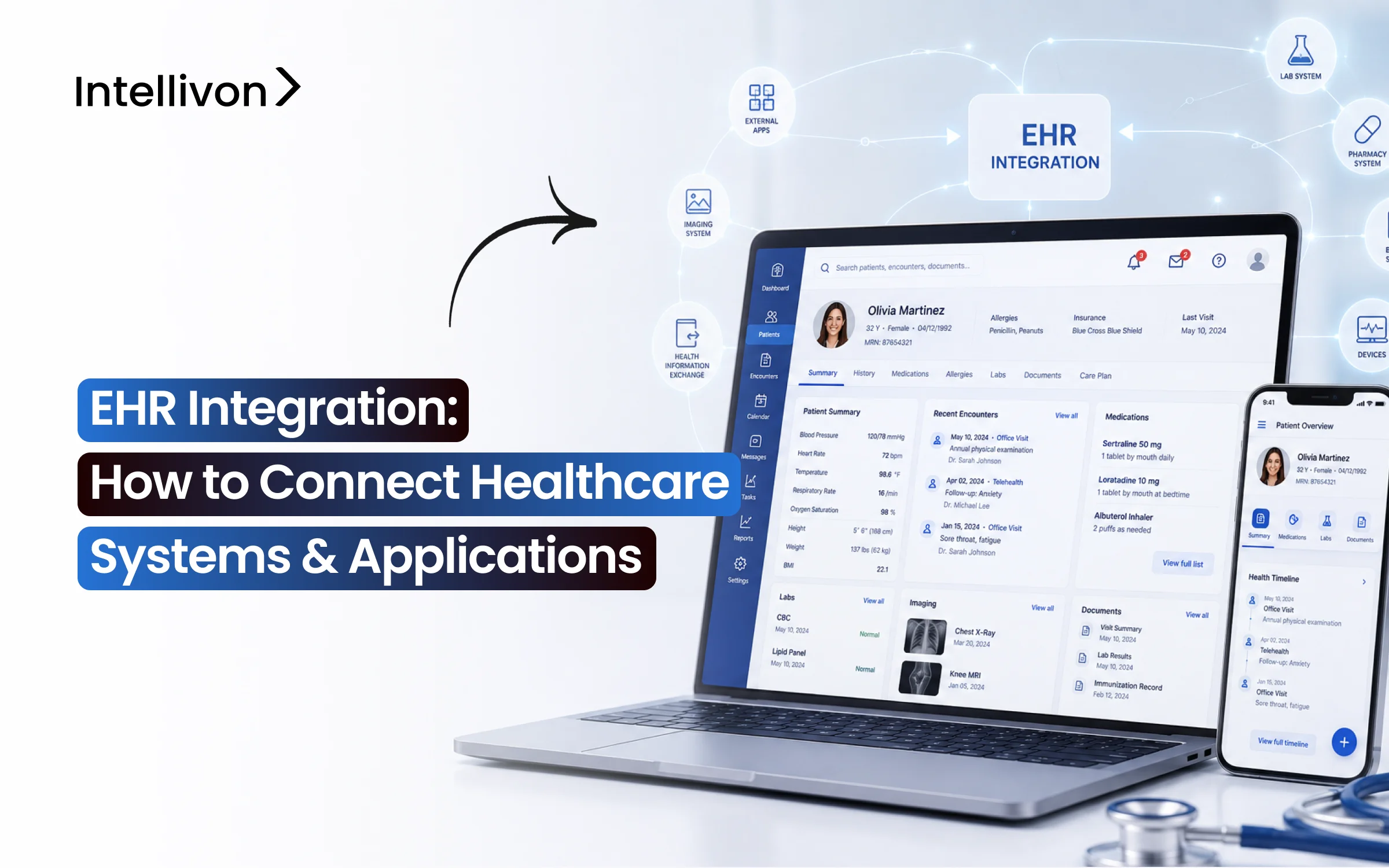
EHR integration means building controlled connections between the EHR and every system involved in patient care or hospital operations. Each connection follows one of four patterns: read, write, event-driven, or embedded.
Once you know which pattern a workflow needs, you can scope the build correctly instead of guessing at cost or timeline.
The Four EHR Connection Patterns
| Connection | What Happens | Example |
| Read | Application retrieves EHR data | AI tool reads medications and observations |
| Write | External system adds approved data | RPM device posts blood pressure readings |
| Event-driven | EHR sends events when data changes | ADT discharge triggers a care-management workflow |
| Embedded | Application launches inside EHR context | SMART on FHIR app opens directly in-chart |
This isn’t a new taxonomy. Integration engine vendors describe connections in roughly the same terms internally, which is exactly why it’s worth starting here instead of jumping straight to architecture. So before picking a platform, map which pattern each downstream system actually needs.
In practice, that mapping spans the full enterprise: laboratory (LIS), imaging (RIS/PACS), pharmacy, revenue cycle and claims, scheduling, telehealth, patient portals, RPM and wearables, behavioral health, population health analytics, HIE/QHIN networks, data warehouses, and AI-based clinical decision support tools.
Each system also carries a different risk profile, which is where most scoping documents fall short.
Scoping Framework by System
| System | Required Data | Read/Write | Latency | Standard | Clinical Risk |
| LIS | Lab results | Read | Near real-time | HL7 v2 ORU | High |
| RPM device | Vitals | Write | Batched | FHIR Observation | Medium |
| Revenue cycle | Claims data | Read/Write | Daily batch | X12/FHIR Claim | Low |
The gap between reading and writing data is still real at the industry level. In its most recent hospital data brief, ONC reported that nearly two in three hospitals enabled patients to electronically submit some kind of patient-generated health data to the EHR in 2024, with about half of hospitals using standards-based APIs to support that submission.
The global healthcare IT integration market, the category EHR integration sits within, was valued at $5.28 billion in 2025 and is projected to reach $10.91 billion by 2030, growing at a 15.7% CAGR.
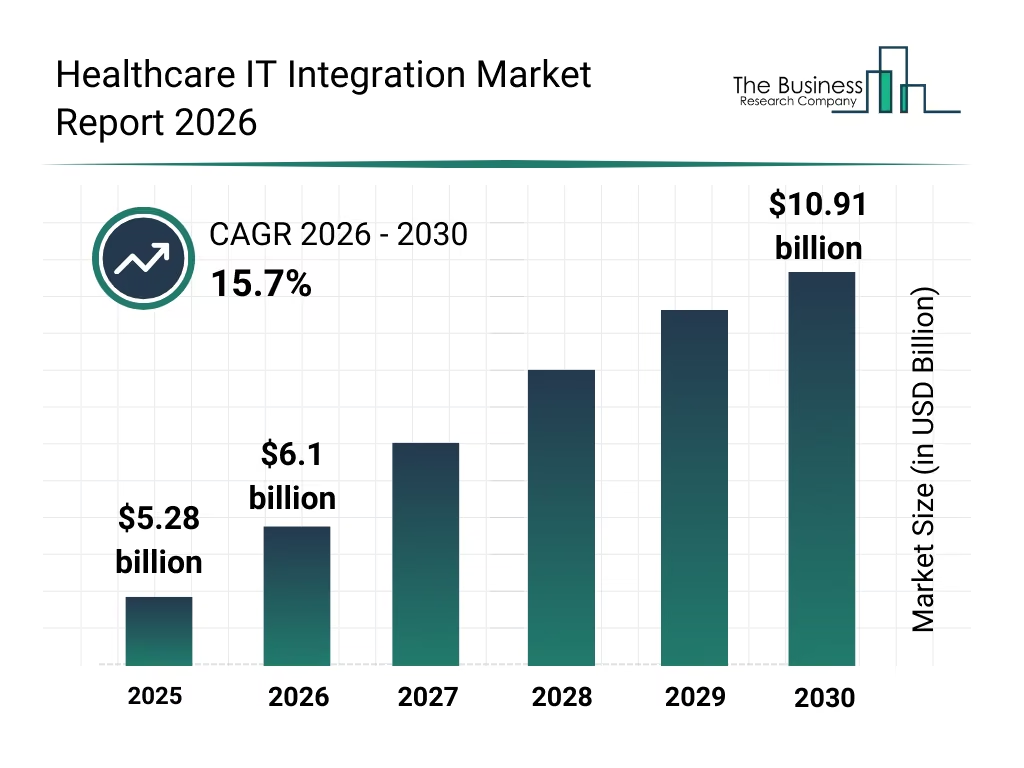
That growth outpaces the broader EHR software market, driven by interoperability mandates, connected-care demand, and rising integration spend across hospital networks.
What an Enterprise EHR Integration Architecture Looks Like
An enterprise EHR integration architecture is the wiring that decides whether every future connection gets built once or rebuilt five times.
In general, five patterns cover almost every real deployment: point-to-point, HL7 interface engine, managed middleware, an integration hub, and multi-EHR architecture for networks running more than one EHR system. Overall, each trades setup speed for long-term maintenance differently.
1. Direct point-to-point integration
Point-to-point integration builds one direct connection between two specific systems, typically over an API or file transfer. As a result, it’s the fastest pattern to stand up for a single connection, but it scales poorly once a third system needs the same data.
- First, each new system pair needs its own connector, authentication, and error handling
- Consequently, ten systems connected point-to-point can require up to 45 unique connections
- Therefore, one EHR upgrade risks breaking several connections at once
- In short, this pattern is best suited to a single, well-defined connection, not a growing system count
2. HL7 interface engine architecture
An HL7 interface engine sits between the EHR and downstream systems, receiving HL7 v2 messages like ADT, ORM, and ORU. From there, it routes and transforms these messages without touching the source system directly.
- For instance, engines such as Mirth Connect and Rhapsody handle message queuing and retry logic in one place
- Because of this, dozens of point-to-point links get replaced with a single managed pipeline
- Even so, most hospitals still run HL7 v2 feeds underneath any newer FHIR layer
- Additionally, this engine serves as a central point for monitoring and troubleshooting interface failures
3. Managed EHR integration middleware
Managed middleware, delivered as iPaaS platforms like Redox, handles both HL7 v2 and FHIR R4 traffic through prebuilt EHR connectors. As a result, teams integrate against one consistent API instead of each vendor’s raw interface.
- Specifically, the vendor maintains connector updates, authentication changes, and EHR-specific quirks
- In turn, this shifts ongoing maintenance off the internal team and onto a subscription cost
- Typically, this approach works best for organizations connecting to three or more EHR vendors
- Over time, subscription cost often runs lower than maintaining custom connectors long-term
4. Enterprise integration hub architecture
An integration hub, built on an enterprise service bus pattern, centralizes routing, transformation, and monitoring for every connection across the organization, not just EHR-specific traffic. In other words, it becomes the single layer everything else reports to.
- Specifically, it combines the interface engine and middleware layers under shared governance
- Meanwhile, it provides audit logging and alerting from a single console
- Generally, this fits health systems already running 15 or more active interfaces
- At this scale, visibility and audit trail matter as much as the connections themselves
5. Multi-EHR architecture for hospital networks
Multi-EHR architecture connects two or more separate EHR instances, common after mergers, where Epic at one hospital and Cerner at another must share patient data reliably. Because of that, identity resolution becomes the deciding factor.
- First, it requires a master patient index to match records across instances
- Next, it needs a hub or middleware layer that normalizes each EHR’s data before routing it
- Otherwise, a weak MPI undermines every connection built on top of it
- For that reason, identity matching is typically the first build item in any multi-EHR project
Overall, these patterns aren’t mutually exclusive. In practice, most enterprises start with an engine or middleware and add a hub as connection count grows, and the choice made here decides how expensive every future connection becomes.
With the wiring settled, the next logical question is what actually flows through it: FHIR resources.
How to Implement EHR Integration From Discovery to Go-Live
Implementing EHR integration follows seven steps, from mapping the clinical workflow through deploying monitoring, and skipping any one of them is where most projects run into rework later.
In short, discovery and data contract work happen before a single connector gets built, and testing and monitoring happen after, not as an afterthought.
Step 1: Map the clinical workflow and data direction
Mapping the clinical workflow means identifying exactly which system originates the data, which system consumes it, and whether the connection needs to read, write, or both, before any build work starts.
- Source system and destination system
- Read, write, or bidirectional direction
- What triggers the data movement
- Required latency, real-time versus batch
- End users who depend on the data
- The clinical owner accountable for accuracy
We run this mapping as a structured workshop with the clinical informatics owner in the room, not just IT, because clinical sign-off at this stage prevents rework after go-live.
Once the workflow is mapped, the data itself needs a formal definition, which is where the data contract comes in.
Step 2: Define the EHR data contract
A data contract specifies exactly which FHIR resources or HL7 v2 messages the integration will use, along with every required field, identifier, and terminology code set involved.
- FHIR resources or HL7 v2 message types
- Required fields versus optional fields
- Identifiers such as MRN and NPI
- Terminology sets: LOINC, SNOMED CT, RxNorm
- Validation rules for each field
- Field-level mappings between systems
- Provenance, tracking where each data point originated
Intellivon documents this contract before writing a single connector, since a field added after the build starts usually means redoing the mapping layer, not just adding a line of code.
With the contract defined, the next decision is which integration standard actually carries it.
Step 3: Select the integration standard and architecture
Choosing the standard means matching the data contract to the right transport: FHIR R4 for modern API access, HL7 v2 for legacy ADT and order feeds, SMART on FHIR for embedded apps, or DICOM for imaging.
- FHIR R4
- HL7 v2
- SMART on FHIR
- CDS Hooks
- DICOM
- Proprietary vendor APIs
Intellivon defaults to FHIR R4 wherever the source EHR supports it, but keeps HL7 v2 as the fallback for older interfaces, because forcing FHIR onto a system that doesn’t natively support it adds cost without adding reliability.
Once the standard is set, the integration needs permission to actually talk to the EHR.
Step 4: Secure vendor access and authentication
Securing access means enrolling as a registered application with the EHR vendor, completing OAuth 2.0 client registration, and defining the exact SMART on FHIR scopes the integration needs.
- Vendor enrollment (Epic App Orchard, Cerner Code, athenahealth Marketplace)
- OAuth 2.0 client credentials
- SMART on FHIR scopes
- Sandbox environment testing
- Production authorization approval
Our experts start vendor enrollment in parallel with the build work, not after, since Epic and Cerner sandbox-to-production approval can take four to eight weeks on its own, independent of engineering timelines.
With access secured, the actual connectors and transformation logic get built next.
Step 5: Build the integration and transformation layer
Building the integration layer means writing the connectors, routing rules, and data transformations that move information between systems in the format each side expects.
- Connectors and routing rules
- Field-level mappings and transformations
- MPI matching logic
- Terminology service calls
- Message queues and error handling
Intellivon builds the terminology mapping and MPI matching logic before the connectors themselves, because a connector that moves badly matched or badly coded data is worse than no connector at all.
Before anything reaches a live clinical workflow, it has to survive testing against real conditions.
Step 6: Test with real clinical workflows
Testing an EHR integration means validating it at four levels: unit tests on individual transformations, interface tests between systems, end-to-end tests across the full workflow, and user acceptance testing with clinical staff.
- Unit testing on transformations
- Interface testing between systems
- End-to-end workflow testing
- UAT with actual clinical staff
- Negative testing with malformed or incomplete messages
- Performance testing under real message volume
Intellivon runs negative testing deliberately, sending malformed or incomplete messages on purpose, because production EHR traffic includes edge cases that clean sandbox data never surfaces.
Testing proves the integration works once. Monitoring is what proves it keeps working.
Step 7: Deploy monitoring, reconciliation, and recovery
Deploying monitoring means tracking ACK and NACK responses for every message, automating retries on failure, and building reconciliation reports that catch messages that silently never arrived.
- ACK/NACK tracking per message
- Automated retry logic and dead-letter queues
- Alerting on failed or delayed messages
- Full audit trail and message replay
- Daily reconciliation reporting
We treat reconciliation as a daily automated check, not a manual audit, comparing expected message counts against received counts so a silent failure gets caught within hours instead of surfacing as a missing lab result weeks later.
Taken together, these seven steps are what separates an integration that survives an EHR upgrade from one that breaks with it. Once monitoring and recovery are live, the system is ready to run in production, not just pass a demo.
FHIR R4, HL7 v2, SMART on FHIR, or CDS Hooks: Where Each Fits
These four standards solve different problems. So the anchor point worth remembering is this: FHIR-first does not mean FHIR-only.
In fact, most enterprise integrations run all four side by side, not one instead of the rest.
1. Use FHIR R4 for modern resource-based data exchange
FHIR R4 structures healthcare data into resources, accessed through standard REST patterns. As a result, a FHIR-based system reads and writes data the way a modern web API would, not through custom message parsing.
- GET to read a resource, POST to create one
- PUT or PATCH for updates
- Search parameters to query across resources
- Bundles to group related resources together
- Transactions to commit multiple changes atomically
In practice, most integrations focus on a core set of resources: Patient, Encounter, Observation, DiagnosticReport, MedicationRequest, Condition, Procedure, AllergyIntolerance, DocumentReference, CarePlan, Appointment, and Claim.
For example, Oracle Health exposes these R4 resources directly through its Millennium Platform APIs.
2. Use HL7 v2 for event-driven hospital workflows
HL7 v2 still governs real-time hospital events. That’s because core clinical systems generate these messages underneath any newer FHIR layer.
- ADT for admissions, transfers, and discharges
- ORM for orders
- ORU for results
- SIU for scheduling
- MDM for clinical documents
- DFT for financial transactions
These messages travel over MLLP transport. Meanwhile, ACK and NACK responses confirm delivery, backed by queues and retry logic whenever a receiving system goes down.
3. Use SMART on FHIR when the app lives inside the EHR
SMART on FHIR adds authorization and context on top of FHIR’s data layer. In other words, FHIR supplies the API, while SMART supplies the login and the context around it.
- OAuth 2.0 for authorization
- EHR launch, opening from inside the chart
- Standalone launch, opening independently
- Scopes defining exactly what data is accessible
- Patient context and clinician context
- Backend services for system-to-system access without a user present
4. Use CDS Hooks when the workflow needs clinical triggers
CDS Hooks fires a service call at a specific point in a workflow. Then, it returns cards with suggestions back into the EHR in real time.
- A hook defines the trigger point
- A service processes the request
- Prefetch supplies context data upfront
- Cards return suggestions or recommendations
- Common triggers: medication ordering, encounter start, order review, risk alerts
Overall, these four standards cover data access, event messaging, authorization, and real-time triggers.
Ultimately, most enterprise builds combine at least two of them, and the mistake to avoid is treating this as one technology choice instead of four tools for four different jobs.
5. Use DICOM for medical imaging exchange
DICOM handles the actual transfer and storage of medical images, working alongside HL7 or FHIR, which carry the order and report data around that image. In short, DICOM moves the pixels, while HL7 v2 or FHIR moves the context.
- Images move between modality, PACS, and viewer over DICOM
- HL7 ORM messages typically trigger the imaging order
- HL7 ORU or a FHIR DiagnosticReport carries the resulting report
- RIS and PACS coordinate scheduling and storage on top of DICOM
Since imaging rarely runs on one standard alone, it’s worth seeing where every workflow in this section actually lands.
Which Standard Fits Which Clinical Workflow
| Workflow | Primary standard |
| Patient demographics | FHIR / ADT |
| Orders | HL7 ORM / FHIR |
| Lab results | HL7 ORU / FHIR |
| Imaging | DICOM + HL7/FHIR |
| Embedded app | SMART on FHIR |
| Clinical alerts | CDS Hooks |
| Scheduling | SIU / Appointment |
Taken together, this table is the real answer to “which standard should I use?”
Rather than picking one protocol for the whole integration, each workflow gets matched to the standard actually built for it, and most enterprise builds end up touching five or six of these at once.
How Different Healthcare Systems Connect With the EHR
Connecting the EHR to healthcare systems it doesn’t already share code with is where an integration architecture proves itself.
Specifically, each system below needs the standard, direction, and priority actually mapped in Step 1, not a generic connector.
1. Laboratory and LIS integration
Lab systems send results back to the EHR as HL7 ORU messages or FHIR DiagnosticReport resources, usually triggered by an ORM order.
- Typically, this connection runs bidirectional: orders out, results in
- Because critical values need immediate action, latency stays near real-time
2. Radiology, RIS, PACS, and imaging integration
Similarly, imaging combines DICOM for the images with HL7 or FHIR for orders and reports, as covered above.
- Meanwhile, RIS manages scheduling and workflow
- Alongside it, PACS stores and retrieves the images
3. Pharmacy and medication integration
In turn, pharmacy systems consume FHIR MedicationRequest resources and return dispensing status, closing the loop between order and administration.
- To standardize drug identification, RxNorm codes are used throughout
- Additionally, e-prescribing adds a third, often external, system
4. Revenue cycle and payer integration
From there, billing systems pull encounter and diagnosis data from the EHR, then push claims out through a clearinghouse using X12 or FHIR Claim resources.
- Increasingly, prior authorization runs through FHIR as well
- Because accuracy drives reimbursement, ICD-10 and CPT codes matter most here
5. Telehealth and patient portal integration
Next, telehealth platforms typically launch through SMART on FHIR, pulling patient context directly from the active encounter.
- Consequently, portal write-backs use FHIR Patient and Appointment resources
6. Remote patient monitoring and wearable integration
Likewise, RPM devices write vitals into the EHR as FHIR Observation resources, usually on a batched rather than real-time schedule.
- Often, IoT gateways sit between the device and the EHR
7. Analytics and data warehouse integration
By contrast, population health platforms extract data in bulk, often through FHIR Bulk Data Export rather than resource-by-resource calls.
- This data typically feeds tools like Clarity, Caboodle, or a BI layer
8. AI and clinical decision support integration
Finally, AI models read structured FHIR data and return recommendations through CDS Hooks, keeping the AI layer decoupled from the EHR’s core data model.
- In the same way, ambient documentation tools follow this pattern
Across all eight, the pattern repeats: match the standard to the workflow, and only then build the connection, correctly, instead of patching it after the fact.
Epic, Oracle Health, MEDITECH, and athenahealth Need Different Plans
A common standard does not erase vendor-specific implementation differences. In fact, while FHIR R4 covers the data model, each vendor still gates access, sandboxes, and production approval through its own program.
1. Epic integration
To start, Epic’s ecosystem runs through several distinct programs, and conflating them is a common planning mistake.
- First, open.epic offers a free, ungated FHIR sandbox for early evaluation
- From there, Epic on FHIR (fhir.epic.com) provides specifications and client registration
- Additionally, Vendor Services adds paid developer support and Toolbox access
- Once live, apps appear in the Connection Hub directory within Showroom
- Meanwhile, Interconnect handles legacy web services and HL7 interfaces alongside FHIR
- On top of this layer, SMART on FHIR and CDS Hooks both run
2. Oracle Health Millennium integration
Similarly, Oracle Health structures its developer path around the Millennium Platform, with FHIR R4 as the required foundation going forward.
- Specifically, FHIR R4 replaces the retired DSTU2 APIs entirely
- Alongside that, SMART and OAuth 2.0 handle authorization and context
- In addition, SMART Backend Services support system-to-system access without a user
- From there, the code Console manages app registration and credentials
- Finally, a secure sandbox precedes tenant-specific production provisioning
3. MEDITECH Expanse integration
By contrast, MEDITECH Expanse mixes modern and legacy access depending on the facility.
- On one hand, FHIR APIs cover newer data exchange use cases
- On the other hand, legacy interfaces still carry much of the real-time HL7 traffic
- Meanwhile, the Greenfield ecosystem supports third-party app development
- As a result, facility-specific configuration means access varies by site, not just by version
4. athenahealth and smaller EHR vendors
Likewise, smaller vendors vary widely in how much they expose and how they gate access.
- Overall, API availability and FHIR support differ by platform
- Typically, partner or developer program access is required upfront
- Even so, local configuration and proprietary gaps still show up per client
| Vendor | API access model |
| eClinicalWorks | Developer partner program, FHIR + proprietary API |
| NextGen | Open API program, FHIR R4 support |
| Veradigm | Partner-gated API access, limited public sandbox |
Ultimately, two hospitals running the same EHR brand should not be treated as identical integration targets.
Because local configuration, permissions, and workflows still vary, a sandbox connection is never a guarantee that production will behave the same way- a gap developer forums raise constantly about Epic sandbox-to-production transitions specifically.
Build 2026 Security and Compliance Into the EHR Integration Layer
Compliance requirements change what gets built, not just what gets reviewed. So the rules below shape the actual architecture: authentication scopes, encryption paths, and audit design, not a checklist layered on afterward.
1. Security architecture
To start, HIPAA and a signed BAA define the baseline for any vendor touching PHI.
- First, PHI minimization limits what each connector can read or write
- Similarly, encryption applies both in transit and at rest, without exception
- Additionally, RBAC or ABAC controls determine access at the role or attribute level
- From there, OAuth 2.0 with least-privilege scopes governs every application connection
- Meanwhile, backend services authenticate without a user present, using client credentials
- Alongside that, audit trails log every access event for later review
- Furthermore, consent management and break-glass access handle emergency exceptions
- Overall, zero-trust principles assume no connection is trusted by default
2. ONC interoperability
Since January 1, 2026, USCDI v3 became the required baseline under the ONC Health IT Certification Program.
- As a result, FHIR R4 and SMART app launches must align with this updated data set
- Even so, information blocking rules still prohibit unreasonable restrictions on data sharing
- Where applicable, TEFCA and QHIN connectivity extend exchange beyond a single HIE
3. Sensitive records
For substance use disorder records specifically, 42 CFR Part 2 imposes stricter consent rules than standard HIPAA.
Therefore, integrations touching behavioral health data need separate handling for those records.
4. Payer workflows
Where EHR integration extends into prior authorization, CMS-0057-F applies. Notably, some operational provisions, like decision turnaround times, already took effect January 1, 2026.
However, the FHIR API requirements themselves, covering Patient Access, Provider Access, Payer-to-Payer, and Prior Authorization APIs, generally take effect January 1, 2027.
Taken together, these rules don’t just constrain what gets built. Instead, they determine the authentication model, the audit design, and the API surface from day one, which is exactly why compliance belongs in the architecture phase, not a review at the end of it.
What EHR Integration Costs in 2026: $70K–$300K by Project Scope
Custom EHR integration development typically requires a $70,000–$300,000 budget when the project includes production connectivity, mapping, testing, security, and operational hardening.
This is a planning range for the custom engineering work itself, not an EHR vendor license fee. So the real cost driver is scope: how many systems, how many workflows, and how many EHR instances are involved.
Cost by Integration Scope
| Integration scope | Budget | Typical build |
| Focused integration | $70K–$110K | One EHR, 1–2 workflows, limited FHIR/HL7 |
| Enterprise integration | $110K–$200K | FHIR + HL7, bidirectional flows, mapping, monitoring |
| Multi-EHR integration | $200K–$300K | Several EHRs/sites, integration hub, advanced identity and orchestration |
From there, cost also breaks down by project phase, since each phase draws on a different mix of engineering time.
Phase-by-Phase Budget
| Phase | Planning range |
| Discovery and workflow mapping | $10K–$20K |
| Architecture, data contracts and security | $10K–$30K |
| API/interface development and mapping | $25K–$115K |
| Testing, UAT and production validation | $15K–$60K |
| Go-live, monitoring and handoff | $10K–$35K |
Importantly, these figures represent scope bands per phase, not line items to add at their maximum values.
A focused integration lands at the low end of each phase, while a multi-EHR program pushes several phases toward the high end at once, which is what produces the $200K-plus totals.
Timeline follows the same scope logic:
- Focused integration: 12–16 weeks
- Enterprise integration: 4–6 months
- Multi-EHR program: 6–9 months
Once live, maintenance still carries a cost. Specifically, plan for roughly 15–25% of the initial engineering cost annually, covering monitoring, vendor API changes, mapping updates, security patches, and new workflow requests as they come up.
Planning an Epic, Oracle Health, MEDITECH, or multi-EHR integration? Get an architecture and cost breakdown before committing the full engineering budget.
Use Middleware or Hire a Partner: What Should You Do?
The right approach depends less on budget and more on where the complexity actually sits. So this decision framework maps the situation to the starting point that fits it.
Situation to Starting Point
| Situation | Better starting point |
| 1–2 known EHR endpoints | Direct integration |
| Many repetitive HL7 feeds | Integration engine |
| Many EHR vendors with limited team | Managed middleware |
| Integration is core IP | Custom integration |
| Multi-site enterprise + complex governance | Custom hub/partner |
| Standard connector already solves workflow | Buy/use native connector |
| Mixed FHIR + HL7 + proprietary workflows | Hybrid |
Build directly when control matters
Direct integration fits when the connection itself is part of the product, not just supporting infrastructure.
- Integration is product IP, not overhead
- When endpoint count stays manageable
- Custom mapping logic matters more than speed
- Direct security control is non-negotiable
- When transaction volume stays predictable
Use middleware when connection breadth matters
By contrast, middleware makes sense when time-to-connect outweighs owning the full infrastructure stack.
- Especially for teams connecting to three or more EHR vendors at once
- Since the vendor absorbs connector maintenance and updates
Bring in a healthcare integration partner when complexity crosses teams
Eventually, several signals together mean the project has outgrown a single internal team:
- Multiple EHR vendors in scope at once
- HL7 and FHIR running side by side
- Write-back into the EHR, not just reads
- EMPI and terminology mapping across sites
- An embedded SMART app or AI/CDS component
- 24/7 clinical workflows with no downtime tolerance
- Migration away from legacy interfaces
- A multi-hospital deployment spanning several EHR instances
Ultimately, one or two of these signals alone don’t demand outside help.
But when three or more show up together, that’s usually the point where complexity has crossed past what a single internal team can absorb alone.
Connect Healthcare Apps/Software Without Rebuilding Your EHR Stack
If your team is connecting Epic, Oracle Health, MEDITECH, athenahealth, or a multi-hospital environment to clinical, financial, or AI systems, here’s what that work looks like with Intellivon:
- Map the clinical workflow, data direction, and system owners before any build starts
- Scope the integration standard: FHIR R4, HL7 v2, SMART on FHIR, CDS Hooks, or DICOM
- Handle vendor-specific enrollment and OAuth setup for Epic, Oracle Health, MEDITECH, and athenahealth
- Build the MPI, terminology mapping, and data contract layer before writing connectors
- Design for HIPAA, ONC/USCDI v3, and CMS-0057-F requirements from the architecture stage, not after
- Support single-EHR builds and multi-EHR, multi-hospital architectures alike
- Test against real clinical workflows, including negative and load testing, not just sandbox data
- Set up monitoring, reconciliation, and alerting so failures surface in hours, not weeks
Our team has delivered over 500 AI and healthcare projects, led by developers with backgrounds at MAANG and FAANG companies, with HIPAA, SOC2, and GDPR built into the process from day one, not bolted on afterward.
Conclusion
EHR integration ultimately comes down to matching the right standard, architecture, and vendor process to each workflow, not forcing every connection through one method.
Consequently, FHIR R4, HL7 v2, SMART on FHIR, and CDS Hooks each solve a different problem, and most enterprise builds use several at once. Therefore, the real decision isn’t build versus buy in the abstract.
Instead, it’s whether the complexity, from multiple EHRs to write-back workflows, has crossed what one internal team can carry alone.
FAQs
Q1. If EHRs support FHIR, why do we still need vendor-specific integration?
A1. FHIR defines a shared structure, but each vendor implements it differently through custom profiles, optional fields, and local configuration. Consequently, permissions, workflows, and endpoint behavior still vary by site. Therefore, a connection tested against one Epic or Oracle Health instance often needs rework before it works identically at another.
Q2. Do we still need an HL7 interface engine if we are FHIR-first?
A2. Often, yes. Even in FHIR-first architectures, existing hospital workflows still generate HL7 v2 event feeds like ADT, ORM, ORU, and SIU underneath. As a result, an interface engine remains necessary to capture those real-time events, since FHIR alone doesn’t yet cover every legacy trigger point.
Q3. Can an Epic sandbox integration go straight into production?
A3. No. A working sandbox connection still requires customer-specific configuration, credentials, permissions, and validation before go-live. Additionally, each hospital site runs its own testing cycle. Developer community threads consistently show sandbox-to-production transitions failing for exactly this reason, not because the underlying code was wrong.
Q4. Should we connect directly to Epic or use EHR middleware?
A4. The decision rule: connect directly for one or two well-defined endpoints, and use middleware once you’re supporting three or more EHR vendors. In short, direct connections offer more control at low scale, while middleware trades some control for maintenance the vendor absorbs instead.
Q5. What does an AI application need from an EHR integration?
A5. Most AI applications read Patient, Encounter, Observation, Condition, MedicationRequest, DiagnosticReport, Procedure, and DocumentReference resources. Beyond data access, though, provenance, authorization, and auditability matter just as much. Meanwhile, any write-back into the EHR needs to stay controlled and scoped, not open-ended.
Q6. How do we prevent duplicate patients across connected EHR systems?
A6. An MPI or EMPI resolves this through demographic matching, comparing identifiers like name, date of birth, and MRN against a confidence score. When confidence falls below a set threshold, the record routes to manual review instead of auto-merging. Ultimately, clear merge and unmerge policies keep incorrect matches reversible.