Key Takeaways:
-
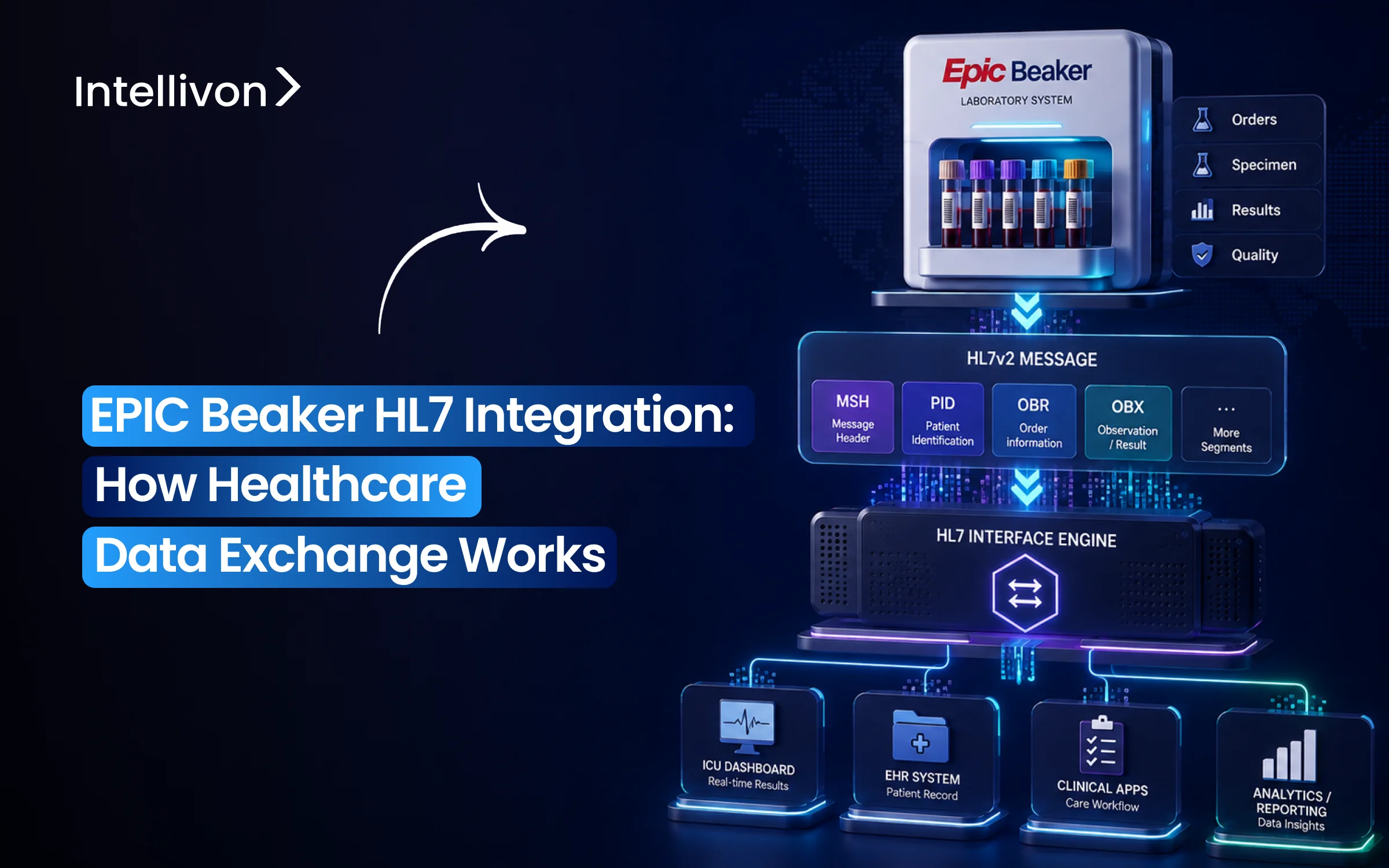
Epic Beaker exchanges laboratory data through defined HL7 v2 interfaces, handling orders to instruments and returning results inbound.
-
Epic Bridges sits on the Epic side, managing outbound orders to reference labs and external receiving systems.
-
MLLP/TCP, middleware engines, message mapping, ACK handling, code normalization, and interface monitoring form the surrounding integration layer.
-
HIPAA controls, PHI safeguards, interface validation, logging, and auditability are required across every Beaker integration point.
-
How Intellivon builds and validates Epic Beaker HL7 v2 integration projects costing $70,000 to $300,000 depending on interface complexity.
Epic Beaker HL7 integration is what actually moves a lab result from an analyzer to a chart, not the FHIR API most teams assume handles it. In fact, over 95% of hospitals still run HL7 v2 for core lab and instrument connections, according to a 2026 HL7 vs FHIR comparison. However, Beaker’s FHIR endpoints matter for outside systems pulling data, while the messages carrying results between instruments, middleware, and Beaker itself are still HL7 v2 today.
That distinction shapes every design decision underneath it. For instance, an ORU message with a malformed OBX segment can fail silently, leaving a critical result stuck in a queue instead of a chart. Meanwhile, choosing the right integration engine, Mirth Connect, Rhapsody, or Cloverleaf, determines how much of that failure gets caught automatically versus discovered during an audit. As a result, teams that skip proper message validation early tend to spend far more time troubleshooting later.
In this blog, we’ll cover HL7 v2 message structure, ORM and ORU design, middleware selection, and error handling. Additionally, we’ll look at how this compares to a pure FHIR approach.

What Is Epic Beaker HL7 Integration?
Epic Beaker HL7 integration is the interface layer that connects Epic’s laboratory information system with external diagnostic instruments, middleware, and reference labs using standardized HL7 v2 messages. This bridge automates the bidirectional exchange of patient demographics, lab orders, specimen tracking data, and clinical test results.
According to market research from Grand View Research, the global healthcare interoperability solutions market will expand at a 14.15% CAGR through 2030. Consequently, enterprise health systems are accelerating interface modernization to eliminate diagnostic data silos.
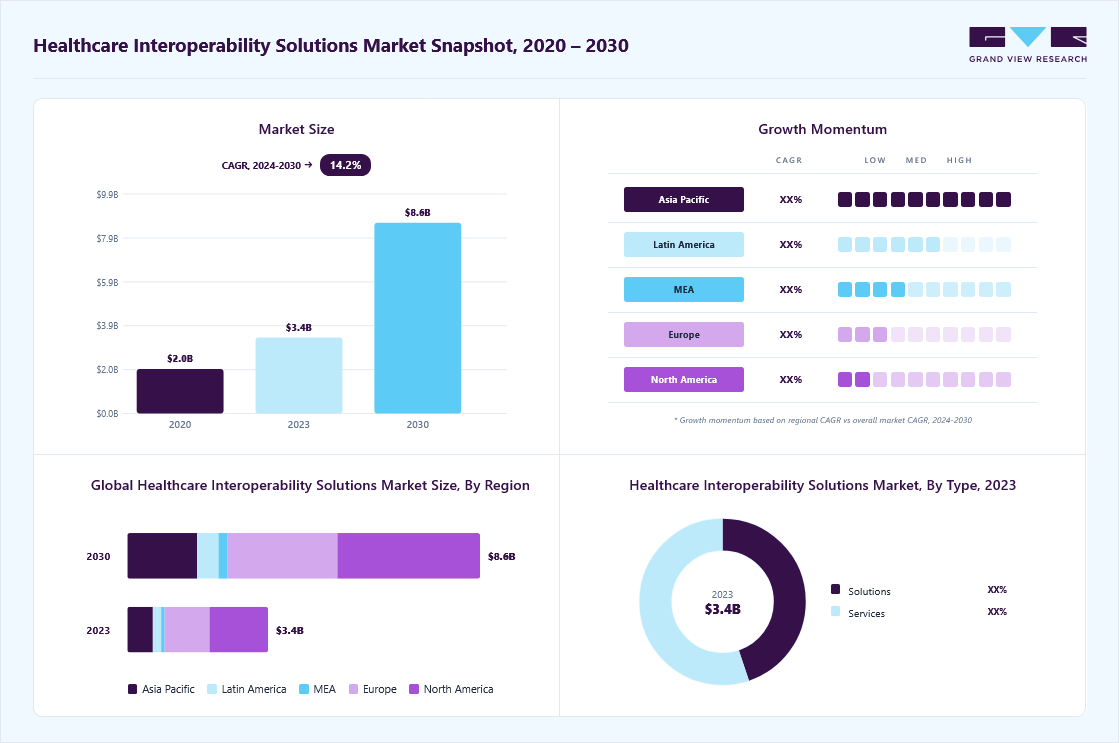
This capital investment directly reflects the clinical urgency of automated laboratory data exchange.
1. What Epic Beaker Does Inside the Laboratory
Epic Beaker operates as the native Laboratory Information System (LIS) within the Epic EHR software ecosystem.
It standardizes pathology operations, manages high-throughput testing, and automates reporting through two primary modules:
- Beaker Clinical Pathology (CP): Automates high-volume testing workflows for hematology, urinalysis, clinical chemistry, microbiology, and blood bank operations.
- Beaker Anatomic Pathology (AP): Coordinates tissue tracking, surgical pathology, histology processing, cytology screening, and autopsy reporting.
- Laboratory Order Management: Translates physician clinical orders into structured internal laboratory accession records with distinct container barcodes.
- Specimen Tracking: Logs the chain of custody from initial bedside phlebotomy collection to benchtop processing, cold storage, and disposal.
- Result Management: Applies automated delta checks, flags critical values, and files verified findings directly to the unified clinical chart.
This native laboratory management layer relies directly on external messaging standards to interact with laboratory hardware.
2. What HL7 Means in a Beaker Environment
Health Level Seven (HL7) v2 is an event-driven messaging standard that structures laboratory data into discrete text segments separated by pipe (|) delimiters.
Therefore, unlike REST APIs that rely on request-polling cycles, HL7 interfaces instantly push notifications whenever a real-world clinical trigger event occurs:
- Event-Driven Architecture: Every physical action, such as patient admission or specimen collection, creates and sends an immediate, dedicated message.
- Segments and Fields: Each message consists of standardized rows (MSH for headers, PID for patient identity, OBR for order requests, OBX for discrete observation results).
- Deterministic Directionality: The interface establishes explicit roles between a sending application (order placer) and a receiving application (order filler).
- Trigger Event Sequences: An order trigger (ORM^O01 or OML^O21) notifies the lab, while a result trigger (ORU^R01) returns completed values.
Consequently, understanding the message syntax leads directly to evaluating the interface engine that manages this transmission.
3. What an Epic Beaker HL7 Interface Actually Does
An HL7 interface is an active processing engine that translates, routes, and validates data between Beaker and third-party systems.
Therefore, rather than acting as a simple network cable, the interface performs multi-step message transformations:
- Message Construction & Parsing: Converts raw database transactions into valid HL7 v2 syntax and parses incoming instrument strings into relational database values.
- Code Normalization & Translation: Maps local analyzer test mnemonics to standard LOINC codes and SNOMED terms required by Beaker.
- Data Transformation & Filtering: Strips unsupported HL7 segments, restructures sub-fields, and converts date-time strings to match recipient specifications.
- Validation & Flow Control: Inspects mandatory fields (PID-3, OBR-4, OBX-3), issues application-level ACK receipts, and routes failed payloads to dead-letter queues.
- Audit Logging & Security: Encrypts clinical payloads in transit and preserves timestamped audit logs for HIPAA compliance.
These mechanisms catch malformed specimen packets before they lead to lost clinical orders. To coordinate these translation steps within the Epic core, organizations configure Epic’s proprietary interface software.
4. Where Epic Bridges Fits Into Beaker Integration
Epic Bridges is the specialized communications gateway built directly inside Epic to control inbound and outbound interface connections.
It functions as the central clearinghouse that links internal Beaker workflows to external integration engines and devices:
- Channel Management: Bridges manages dedicated TCP/IP ports and queues for each connected analyzer, reference laboratory, and downstream clinical system.
- Interface Profiles: It maintains system-specific communication rules, data validation scripts, and segment-level formatting parameters.
- Queue Optimization: The engine regulates message flow rates, preventing high-volume hematology lines from overwhelming EHR database servers during shift changes.
- Trigger Mapping: Bridges links clinical events inside Beaker to outbound message generation routines without requiring custom database triggers. This architectural split ensures health systems can update third-party analyzers without modifying core Epic database rules.
This clear separation of responsibilities across the LIS, interface gateway, transport protocol, and integration middleware establishes the baseline for building resilient, high-volume laboratory data exchange pipelines.
What Epic Beaker HL7 Integration Actually Connects
Epic Beaker HL7 integration connects central laboratory workflows to the physical diagnostic ecosystem and external healthcare networks. Specifically, it establishes bidirectional HL7 v2 messaging between Epic and external analyzers, middleware engines, commercial reference laboratories, blood bank systems, and digital pathology platforms.
This connection infrastructure ensures automated test execution and real-time result delivery across all diagnostic domains.
1. Core Laboratory and Diagnostic Endpoints
Modern laboratory data exchange requires distinct messaging pipelines for every diagnostic category. Because each instrument and facility enforces unique communication standards, connection designs route HL7 payloads to specialized endpoints:
- Laboratory Analyzers & Middleware: High-throughput chemistry, hematology, and coagulation tracks connect through middleware platforms (such as Data Innovations Instrument Manager) to ingest orders and return raw discrete values.
- Reference Laboratories: External commercial facilities (such as Quest Diagnostics and Labcorp) exchange send-out test orders and preliminary or final diagnostic results.
- Point-of-Care (POC) Devices: Bedside glucometers, blood gas analyzers, and urinalysis devices stream immediate point-of-care results into Beaker charts.
- Specialty LIS & Blood Bank Systems: Third-party transfusion medicine platforms receive unit numbers and product codes while broadcasting transfusion status notifications.
- Digital Pathology Systems: Image Management Systems (IMS) link digitized whole-slide images to surgical pathology cases using bi-directional metadata synchronization.
For a deeper breakdown of data access strategies, see our guide on Epic Beaker API Integration and Data Architecture.
Consequently, separating diagnostic endpoints is essential for defining technical ownership boundaries across systems.
2. Separation of Concerns: Workflow vs. Interface Layers
Healthcare organizations often confuse internal Beaker configuration with external HL7 interface engineering. However, maintaining this architectural boundary prevents system-wide configuration failures when diagnostic hardware changes:
- Beaker Build Layer: Focuses on internal LIS workflows, test compendiums, specimen collection rules, and result auto-verification criteria.
- Epic Bridges Layer: Operates as the native communications gateway, managing queue priorities, trigger definitions, and TCP/IP port bindings.
- Middleware & Integration Engine Layer: Performs data normalization, segment filtering, character encoding, and LOINC translation between systems.
- Receiving Application Layer: Governs physical analyzer run queues, robotic specimen routing, and device-specific test execution.
| Architectural Layer | Primary Functional Owner | Core Technical Responsibility |
| Beaker CP/AP | Laboratory Analysts | Defines order entry rules, master test catalogs, and clinical workflow logic. |
| Epic Bridges | Epic Interface Engineers | Configures communication ports, message triggering, and queue balancing. |
| Integration Middleware | Healthcare Integration Engineers | Executes message mapping, code normalization, and transport retries. |
| Diagnostic Endpoints | Instrument Vendors / External Labs | Processes analytical specimens, generates raw data, and flags device flags. |
Therefore, decoupling the clinical LIS build from the messaging middleware ensures that updates to external instrument firmware do not destabilize central Epic database queues.
Establishing clear endpoint boundaries allows interface architects to pinpoint exactly where data transforms as it moves across clinical systems.
How Epic Beaker HL7 Data Exchange Works End to End
Epic Beaker HL7 data exchange operates as a continuous, closed-loop messaging cycle that coordinates clinical order placement, physical specimen collection, diagnostic testing, and discrete result delivery. Standardized messages bridge doctor orders in the electronic chart directly with laboratory analyzers.
Consequently, critical diagnostic information moves across hospital departments in real time without manual re-keying or paperwork delays.
1. Order Creation and Outbound Laboratory Messaging
Initially, the integration lifecycle begins when a provider enters an electronic lab order into the patient record. Next, Epic Beaker registers the diagnostic request, while Epic Bridges packages and broadcasts an outbound laboratory order:
- Trigger Events: The system automatically creates outbound transmissions whenever clinicians place new tests, add tests to existing blood draws, change order priority, or cancel orders.
- Tracking Numbers: Outbound messages attach unique clinical tracking identifiers so hospital departments can follow orders across multiple facilities.
- Patient Context: The interface bundles crucial context, including the patient’s room assignment, attending physician, insurance details, and clinical urgency.
- System Packaging: Finally, the gateway formats these clinical details into standard outbound message structures that laboratory middleware can easily interpret.
Furthermore, once the digital order transmits, the physical blood or tissue sample must align perfectly with the digital record.
2. Specimen Collection and Identification
Subsequently, phlebotomists collect and label the physical sample at the patient bedside or collection center. Because exact synchronization between physical test tubes and digital charts prevents dangerous sample mix-ups, the interface enforces strict data rules:
- Accession Numbers: Beaker generates unique tracking barcodes for every tube, linking physical containers directly to the electronic medical record.
- Collection Timestamps: In addition, the system records the exact date and minute of collection to monitor sample freshness and shelf life.
- Specimen Details: Outbound data packages specify container tube top colors, required chemical additives, collection body sites, and transport temperatures.
- Positive Patient Identification: Meanwhile, nurses scan patient wristbands and tube barcodes at the bedside to confirm identity before drawing blood.
As a result, benchtop analyzers receive correctly labeled specimens ready for immediate testing.
3. Result Generation and Return to Beaker
After the automated analyzer finishes testing the sample, it sends the calculated values back to Epic. Therefore, this automated incoming workflow eliminates manual transcription mistakes:
- Data Transmission: Analyzers feed raw measurements through middleware engines that assemble secure inbound result files.
- Value Mapping: The incoming feed extracts test names, numeric findings, standard measurement units, and normal reference baselines.
- Abnormal Highlighting: Simultaneously, the system flags critically high, low, or dangerous values so emergency care teams are alerted instantly.
- Chart Filing: Ultimately, Epic Bridges validates the incoming test data and posts the verified results straight into the patient chart for doctor review.
Following result transmission, the interface engine verifies complete message delivery.
4. Acknowledgement and Reconciliation
Finally, every transmitted message requires automated technical verification to guarantee data delivery. Thus, built-in safety protocols resolve communication issues without losing patient tests:
- Delivery Confirmations: First, the receiving system returns an immediate technical confirmation confirming that the message arrived safely.
- Error Flags: However, if a message contains missing patient information or unrecognized test names, the system issues an error alert.
- Automated Resends: Additionally, the network automatically pauses and resends messages if hospital network traffic temporarily disconnects.
- Error Queues: Consequently, unresolved messages land in an interface analyst work queue, preventing clinical orders from being lost unnoticed.
In summary, this closed-loop exchange architecture guarantees that every diagnostic sample maps reliably from bedside draw to final chart filing.
Epic Beaker HL7 Integration Architecture Explained
Epic Beaker HL7 integration architecture relies on a multi-tiered pipeline that connects clinical software applications directly to physical diagnostic hardware. Specifically, it separates user workflow management, network message transport, data transformation, and instrument execution across dedicated technical layers.
Consequently, this layered structure isolates high-volume diagnostic bench traffic from core EHR database operations.
1. Layer-by-Layer Architecture Breakdown
To maintain low latency and data consistency, each architectural component executes a specific functional role during the data exchange lifecycle:
- Epic Beaker: Functions as the primary sending application for outbound test orders and the receiving application for verified discrete results.
- Epic Bridges: Governs channel configuration, manages transmission queues, and monitors port connectivity across outbound and inbound pipelines.
- HL7 v2 Interface: Packages clinical database changes into standard segment-based strings using character encoding protocols.
- MLLP / TCP Layer: Handles minimal lower layer protocol message framing over persistent TCP/IP network sockets.
- Integration Engine: Manages complex routing, message transformation, segment filtering, and custom dead-letter queue buffering.
- Laboratory Middleware: Interfaces directly with physical instruments, coordinating specimen routing, rerun rules, and device-level communications.
- External Diagnostic Endpoints: Executes analytical testing on chemistry analyzers, hematology lines, or send-out reference platforms.
Furthermore, determining where to place specialized middleware within this stack represents a vital design decision.
2. Where Laboratory Middleware Is Actually Required
While integration engines manage enterprise data routing, physical laboratory instruments often speak proprietary, non-standard protocols that require dedicated laboratory middleware.
Therefore, middleware platforms (such as Data Innovations Instrument Manager) serve as an essential translation and control bridge:
- Legacy Protocol Translation: Converts raw ASTM, serial, and proprietary instrument formats into standardized HL7 strings before reaching Epic Bridges.
- Quality Control & Auto-Verification: Applies technical rules, delta checks, and Westgard quality control evaluations prior to result release.
- Robotic Specimen Routing: Directs automated track lines, centrifuge systems, and aliquotting hardware across high-throughput lab benches.
- Multi-Device Consolidation: Aggregates data feeds from dozens of individual bench analyzers into a single, unified HL7 stream for the EHR.
Consequently, implementing dedicated middleware reduces connection design complexity by preventing health systems from building hundreds of point-to-point interfaces inside Epic Bridges.
In summary, combining Epic Bridges, enterprise integration engines, and specialized lab middleware creates a resilient, high-volume messaging backbone across the healthcare enterprise.
HL7 Messages and Segments Used With Epic Beaker
Epic Beaker HL7 integration relies on standardized message families and structured text segments to execute clinical laboratory workflows. Rather than sending unstructured text, these interfaces package patient demographics, order requests, and analytical results into deterministic HL7 v2 formats.
Consequently, diagnostic systems can parse, map, and process high-volume laboratory transactions without data loss.
1. Core HL7 Message Families in Beaker Workflows
Every operational step inside the laboratory triggers a specific HL7 message type. However, supported message types depend entirely on the specific Epic interface specification rather than a generic implementation assumption:
| Message Type | Role in Epic Beaker Integration | Clinical Workflow Context |
| ORM^O01 | General Order Message | Manages legacy laboratory order creation, modifications, and clinical cancellations. |
| OML^O21 / OML^O33 | Laboratory Order Message | Transmits modern lab-specific orders with rich specimen and container details. |
| ORU^R01 | Unsolicited Observation Message | Returns discrete, structured test results and qualitative findings to Beaker. |
| ACK | General Acknowledgment | Confirms technical message receipt or rejects invalid data packets (AA, AE, AR). |
| ADT (A01–A40) | Admission, Discharge, Transfer | Synchronizes patient demographics, room transfers, and identity merges with the LIS. |
| ORL^O22 | Laboratory Order Response | Returns formal order placement confirmations from external reference laboratories. |
For a deeper breakdown of enterprise application connectivity, see our guide on the Cost to Build Epic-Integrated Healthcare Applications.
Furthermore, each message family contains specific data rows called segments to organize discrete clinical variables.
2. Essential HL7 Segments in Laboratory Messaging
HL7 messages divide clinical data into structured, pipe-delimited segment rows. Each segment fulfills a dedicated functional role during transmission:
| Segment | Full Name | Key Purpose in Epic Beaker Interfaces |
| MSH | Message Header | Identifies sending and receiving applications, timestamps, security, and HL7 version. |
| PID | Patient Identification | Carries Master Patient Index (MPI) numbers, legal names, and birth dates. |
| PV1 | Patient Visit | Defines encounter numbers, patient class (Inpatient/Outpatient), and nursing units. |
| ORC | Common Order | Manages placer/filler order tracking numbers, ordering providers, and order status flags. |
| OBR | Observation Request | Specifies the ordered battery or panel (such as a Complete Blood Count) and collection date. |
| OBX | Observation / Result | Contains the discrete analyte measurement, numeric value, reference range, and abnormal flag. |
| SPM | Specimen | Details specimen source types, collection body sites, and fixatives. |
| SAC | Specimen Container | Carries physical container details, tube barcodes, and aliquot tracking data. |
| NTE | Notes and Comments | Transmits free-text pathologist interpretations, specimen rejections, and test footnotes. |
Subsequently, interface engineers must verify that connected third-party systems align on segment definitions across different HL7 standards.
3. HL7 Versions: Handling v2.3 Through v2.6
Healthcare systems often assume that Beaker interfaces treat all HL7 v2 versions interchangeably. In reality, external laboratory analyzers, reference lab gateways, and hospital endpoints frequently operate on different version releases:
- Version Variations: Legacy instruments frequently communicate using HL7 v2.3 or v2.4, whereas modern diagnostic platforms operate on v2.5.1 or v2.6.
- Segment Evolution: Advanced segments like SPM (Specimen) and SAC (Container) were introduced in v2.5 to replace embedded OBR specimen subfields.
- Specification Alignment: Epic interface specifications control the exact version schema, requiring interface engines to execute version-aware transformations.
- Standardized Profiles: For outbound public health reporting and result workflows, Epic specifications align with HL7 v2.5.1 Laboratory Results Interface (LRI) and Electronic Laboratory Reporting (ELR) implementation guides.
For a deeper breakdown of enterprise compliance standards, see our guide on Healthcare Software Development: A Complete Guide for 2025.
In summary, validating exact message types, segment fields, and version compatibility guarantees reliable data parsing across all connected diagnostic instruments.
Integrating Analyzers, Middleware, and Reference Labs
Integrating analyzers, middleware, and reference laboratories with Epic Beaker establishes an automated diagnostic network across internal hospital benches and external commercial testing facilities.
By decoupling physical instrument drivers from central EHR database logic, healthcare organizations process diverse test menus while maintaining continuous data flow.
Consequently, clinical laboratories achieve rapid turnaround times, minimize manual transcription errors, and scale high-throughput testing operations.
1. Analyzer and Instrument Integrations
Clinical laboratories rely on automated diagnostic analyzers to run chemistry, hematology, and immunoassay panels. Therefore, connecting these hardware devices to Epic Beaker requires standardized messaging profiles:
- Automated Chemistry Lines: High-throughput systems from vendors such as Abbott (Alinity), Roche (Cobas), and Siemens Healthineers (Atellica) ingest order queues and return discrete photometric measurements.
- Hematology & Coagulation Tracks: Platforms from Sysmex and Beckman Coulter stream cell counts, differential scattergrams, and clot-timing results directly into laboratory review queues.
- Specialized Immunoassay & Mass Spectrometry: Systems from Thermo Fisher Scientific process complex toxicology and therapeutic drug monitoring panels with specialized calibration curves.
- Bidirectional Instrument Interfacing: Epic supports bidirectional communication profiles, allowing analyzers to query specimen barcodes on the track and return completed results automatically.
For a deeper breakdown of enterprise application connectivity, see our guide on Epic EHR Integration: Architecture, APIs, and Best Practices.
Furthermore, orchestrating these diverse diagnostic devices requires dedicated software platforms to translate raw machine data.
2. Middleware and Interface Engines: Distinct Roles
Healthcare technology teams frequently confuse general integration engines with specialized laboratory middleware.
However, these systems fulfill entirely different architectural functions:
| Platform / Category | Primary Architectural Role | Key Functional Focus |
| Data Innovations Instrument Manager | Specialized Laboratory Middleware | Direct instrument driver translation, specimen tracking, and automated delta-check verification. |
| NextGen Connect (Mirth) | General Integration Engine | Open-source message transformation, protocol translation, and custom JavaScript routing channels. |
| Rhapsody Integration Engine | Enterprise Healthcare Integration | High-volume message filtering, intelligent routing, and complex clinical workflow orchestration. |
| Lyniate Cloverleaf | Enterprise HL7 Switching | Multi-facility message brokering, high-throughput queuing, and enterprise infrastructure management. |
| Interfaceware Iguana | Rapid Interface Development | Fast Lua-based scripting, custom data mapping, and agile endpoint prototyping. |
Consequently, integration engines manage broad enterprise message transport across hospital networks, whereas instrument middleware communicates directly with benchtop hardware to control physical testing workflows.
3. Reference Laboratory and Send-Out Workflows
When health systems cannot process specialized or low-volume tests on site, they route specimens to external reference laboratories. Thus, managing these send-out pipelines requires comprehensive compendium synchronization:
- Master Compendium Mapping: Integration channels translate internal Beaker procedure codes to commercial test codes used by Quest Diagnostics, Labcorp, or academic medical centers.
- Outbound Specimen Manifests: Interfaces transmit patient demographics, insurance billing details, and collection container tracking numbers to external testing hubs.
- Returned & Corrected Results: Inbound result feeds parse complex reference laboratory observations, including amended reports, preliminary findings, and historical delta comparisons.
- Automated Provider Routing: Epic Beaker files completed send-out results straight to the ordering physician’s review inbox, eliminating manual document scanning.
Subsequently, advanced diagnostic centers extend these pipelines to accommodate non-standard molecular and genomic data.
4. Custom Laboratory and Molecular Workflows
Specialized molecular testing and pharmacogenomics (PGx) generate complex diagnostic files that standard instrument drivers cannot parse natively.
For example, researchers at the University of Florida Health Pathology Laboratory solved this bottleneck by combining Epic Bridges, NextGen Connect, and custom Python middleware to automate RT-PCR and genomic data feeds:
- Automated Assay Extraction: Custom middleware scripts ingest raw spreadsheet exports directly from specialized instruments, bypassing manual data entry.
- Dynamic Variant Translation: Middleware pipelines map target genetic regions and amplification values into discrete clinical interpretation codes.
- Structured Payload Assembly: The system compiles completed findings into standardized HL7 result packets and places them on monitored network drives.
- Seamless EHR Ingestion: NextGen Connect picks up outgoing files and feeds them through Epic Bridges straight into Beaker for automated chart filing.
In summary, combining direct analyzer connections, specialized middleware, and enterprise integration engines provides the flexibility required to run routine testing and complex molecular workflows side by side.
How to Implement Epic Beaker HL7 Integration Step by Step
Implementing Epic Beaker HL7 integration requires a disciplined, multi-stage engineering methodology that bridges clinical workflow requirements with network messaging specifications. Specifically, executing interface builds in controlled stages ensures deterministic data routing, zero message loss, and full regulatory compliance.
As a result, healthcare systems deploy scalable laboratory connections that perform reliably under peak clinical volumes.
Step 1: Map Laboratory Workflows and System Boundaries
Initially, interface architects must document the complete operational path of orders, specimens, and results across all hospital departments. Establishing clear system boundaries before writing code prevents interface failure during clinical handoffs:
- Boundary Definition: Identify the exact source system (Epic Beaker), target endpoints (analyzers or reference labs), and intermediate routing nodes.
- Lifecycle Rules: Map operational logic for new order entry, add-on testing, clinical cancellations, and specimen accessioning workflows.
- Downtime Procedures: Establish manual requisition and batch catch-up protocols when network connections or benchtop instruments go offline.
Intellivon develops an integration responsibility matrix before interface development begins. This matrix establishes operational ownership across laboratory analysts, interface engineers, and third-party instrument vendors.
Step 2: Define the HL7 Interface and Message Contract
Subsequently, teams define the structural messaging specifications required for every transactional event. Creating a detailed interface specification document ensures exact syntactic alignment between systems:
- Trigger Specifications: Document exact message triggers (ORM^O01, OML^O21, ORU^R01) for every clinical event.
- Segment Profiling: Define mandatory and optional fields across MSH, PID, PV1, ORC, OBR, OBX, and SPM segments.
- Schema Governance: Document custom Z-segments, local delimiters, data type rules, and null-flavor handling conventions.
Intellivon creates version-aware HL7 v2 interface specifications that reconcile discrepancies between legacy instrument outputs and modern Epic Bridges schemas. This contract prevents parsing rejections before network channels open.
Once data contracts are finalized, engineers construct the underlying network communication infrastructure.
Step 3: Build Transport, Routing, and Network Security
After defining message schemas, engineers establish secure, low-latency communication channels between hospital networks and external endpoints. Standardizing the network stack guarantees continuous packet delivery:
- Protocol Framing: Configure Minimal Lower Layer Protocol (MLLP) wrappers over persistent TCP/IP network sockets.
- Network Topologies: Assign dedicated static IP addresses, define bidirectional port numbers, and isolate interface traffic on separate subnets.
- Security & Encryption: Implement Transport Layer Security (TLS) wrapping or IPsec VPN tunnels to safeguard Protected Health Information (PHI) in transit.
Intellivon builds multi-threaded communication channels within integration engines like NextGen Connect and Rhapsody. This transport architecture includes persistent disk queuing to prevent data loss during network interruptions.
Following secure transport configuration, teams connect specialized laboratory middleware.
Step 4: Configure Laboratory Middleware and Device Drivers
Next, engineers configure specialized lab middleware to bridge general integration channels with benchtop diagnostic instruments. This layer manages device-specific communication protocols:
- Driver Configuration: Deploy specific instrument drivers (such as Data Innovations Instrument Manager) to communicate with physical analyzers.
- Specimen Sorting: Configure automated aliquotting, track routing, and specimen barcoding rules for automated chemistry lines.
- Auto-Verification Logic: Establish technical verification algorithms, delta checks, and Westgard quality control rules directly within middleware.
Intellivon standardizes middleware translation layers to aggregate data from multiple benchtop analyzers into consolidated HL7 streams. This setup eliminates the need to configure separate point-to-point connections inside Epic Bridges.
After middleware deployment, teams implement clinical terminology mappings.
Step 5: Implement Data Normalization and Error Handling
Subsequently, interface engineers implement transformation logic to standardize clinical vocabularies, units of measure, and error recovery channels. This ensures that incoming test values file correctly into the medical chart:
- Terminology Mapping: Map local instrument test codes and mnemonic strings to standard LOINC codes and SNOMED CT concepts.
- Value Normalization: Convert numeric decimals, measurement units, and reference range formats to match Epic Beaker database requirements.
- Fault Tolerance: Configure automated application acknowledgment (ACK) processing, retry thresholds, and dead-letter queues for unparsed payloads.
For a deeper breakdown of data architecture, see our guide on Building Smart EHR Systems with AI Capabilities.
Intellivon embeds automated schema validation and idempotency checks into the transformation pipeline. This prevents duplicate result filing when network retries occur.
With transformation rules in place, teams begin end-to-end interface validation.
Step 6: Execute Comprehensive End-to-End Testing
Before production deployment, engineers execute rigorous test matrices to validate interface performance across expected and unexpected clinical scenarios. Testing must verify the entire communication chain:
- Scenario Testing: Validate happy-path orders, missing required fields, patient identity merges, add-on tests, and cancelled orders.
- Edge-Case Validation: Simulate network drops, rejected acknowledgments, amended test findings, and critical panic value alerts.
- Downtime Simulation: Test high-volume queue replay to verify that backlogged messages process in order after system recovery.
The College of American Pathologists (CAP) recommends testing complete interface chains and conducting focused validation after any software update. Intellivon uses synthetic HL7 test suites to stress-test interface channels under simulated peak-volume conditions.
Following successful testing, the interface team executes the production cutover.
Step 7: Execute Live Go-Live and Establish Interface Monitoring
Finally, teams cut over to live production channels and establish 24/7 interface surveillance. Continuous monitoring ensures rapid intervention before data backlogs impact patient care:
- Production Cutover: Transition TCP/IP ports from test harnesses to live production analyzers during low-volume operational maintenance windows.
- Live Message Auditing: Monitor real-time transaction logs and verify that initial production results file accurately into patient records.
- Automated Alerting: Configure real-time alerts for socket disconnections, queue depth thresholds, and elevated error acknowledgment rates.
Intellivon deploys enterprise monitoring dashboards that track message latency and channel health in real time. This operational visibility allows engineering teams to resolve network hiccups before lab workflows stall.
Implementation Timelines by Project Scope
Planning realistic project timelines depends on interface complexity, instrument availability, and endpoint readiness:
| Project Scope | Typical Planning Range | Key Milestone Dependencies |
| Single Established Interface | 8–12 Weeks | Standard analyzer driver deployment, basic field mapping, and unit testing. |
| Multiple Departmental Interfaces | 12–20 Weeks | Middleware consolidation, multi-bench testing, and Epic Bridges queue tuning. |
| Complex Reference Lab & Molecular Program | 20–36 Weeks | Custom middleware scripting, master compendium mapping, and CAP/HIPAA validation. |
In summary, following this structured implementation lifecycle ensures that laboratory interfaces deliver reliable, high-throughput data exchange across the enterprise
Epic Beaker HL7 Integration Development Cost
A custom Epic Beaker HL7 integration typically requires a development budget of $70,000 to $300,000, depending on interface count, laboratory workflows, mapping complexity, middleware, validation, and production-support requirements.
Consequently, healthcare organizations must evaluate technical scope early to forecast capital allocation accurately.
1. Implementation Budget Breakdown by Development Phase
Specifically, financial planning requires allocating funds across each technical phase of the interface lifecycle. However, these figures represent professional implementation planning estimates rather than proprietary Epic software licensing fees:
| Development Phase | Budget Range (USD) | Primary Deliverables |
| Discovery & Interface Specification | $8,000 – $20,000 | Message profiling, trigger documentation, and workflow boundary definition. |
| Architecture & Workflow Design | $10,000 – $25,000 | Channel topology, network routing diagrams, and queuing strategy. |
| HL7 Interface & Channel Development | $20,000 – $70,000 | Inbound/outbound channel builds, MLLP configuration, and parsing logic. |
| Mapping & Data Normalization | $10,000 – $35,000 | LOINC, SNOMED, local mnemonic translation, and unit conversions. |
| Middleware & Analyzer Integration | $10,000 – $45,000 | Driver configuration, track routing, and instrument middleware setup. |
| Security & Compliance Controls | $5,000 – $20,000 | TLS encryption, VPN tunnels, audit logging, and HIPAA compliance verification. |
| Testing & Laboratory Validation | $7,000 – $35,000 | Edge-case simulations, CAP validation matrices, and end-to-end QA. |
| Go-Live & Stabilization | $5,000 – $20,000 | Cutover execution, live queue monitoring, and error remediation. |
For a deeper breakdown of software budgeting variables, see our guide on AI Compliance Software Development Cost Guide 2026.
Furthermore, understanding the technical variables that shift projects within these ranges prevents unexpected budget expansion.
2. Ongoing Maintenance and Operational Support
Beyond the initial build, healthcare systems must budget for continuous lifecycle management. Therefore, organizations should allocate approximately 15% to 25% of the initial development cost annually for ongoing support:
- Interface Monitoring: Proactive surveillance of socket connectivity, dead-letter queues, and message latency.
- Compendium Updates: In addition, routine mapping updates for new laboratory test codes, LOINC revisions, and analyzer firmware patches.
- Regression Testing: Validation cycles during biannual Epic software upgrades and instrument replacements.
In summary, accurate upfront cost modeling and phased engineering execution allow healthcare systems to deploy high-performing laboratory interfaces within predictable capital budgets.
How Intellivon Builds Epic Beaker HL7 Integrations
Intellivon engineers Epic Beaker HL7 integrations as resilient enterprise data pipelines rather than basic point-to-point connections.
Specifically, we isolate diagnostic instrument traffic from core EHR database operations while maintaining strict data integrity, automated failure recovery, and HIPAA compliance across every transactional boundary.
Consequently, clinical laboratories achieve continuous high-throughput test processing without operational downtime.
Core Engineering Capabilities and Technical Execution
Our integration practice combines laboratory informatics expertise with distributed systems engineering:
- Workflow-First Architecture: We map complete order entry, specimen accessioning, delta-check verification, add-on testing, and cancellation paths before configuring interface channels.
- Hybrid Interoperability Standards: Our teams deploy hybrid data architectures combining event-driven HL7 v2 messaging (ORM, OML, ORU) with FHIR R4 resources (DiagnosticReport, Observation) and SMART on FHIR authorization.
- Production Reliability Engineering: We implement multi-threaded channel buffering, automated network reconnect logic, and dead-letter queues to prevent dropped messages during peak hospital volumes.
- Granular Data Normalization: Interfaces execute bidirectional mapping across local analyzer mnemonics, LOINC procedure codes, and SNOMED CT clinical terms.
- Compliance and PHI Security: Every pipeline incorporates TLS 1.3 encryption, IPsec VPN tunneling, role-based access policies, and automated audit logging under Business Associate Agreement (BAA) standards.
- Decoupled Middleware Modernization: We preserve native Epic Beaker workflows while deploying external middleware (such as Data Innovations Instrument Manager or Mirth Connect) to handle proprietary instrument protocols.
- Automated Interface Surveillance: Engineering teams configure real-time monitoring dashboards that track socket connection health, queue depths, and error acknowledgment rates.
- Comprehensive Validation Testing: We execute synthetic HL7 test suites simulating edge cases, patient merges, amended results, and panic value notifications to satisfy College of American Pathologists (CAP) guidelines.
For a deeper breakdown of multi-system architectures, see our guide on How to Build an EHR Integration Platform for Hospitals.
Verified Implementation Proof
- AI-Driven EHR Integration for Predictive Outcomes: Engineered a bidirectional EHR integration layer combining HL7 event triggers with FHIR APIs to extract discrete clinical observations for real-time risk modeling.
- AI-Powered Remote Patient Monitoring Platform: Built a secure clinical data pipeline integrating Epic using SMART on FHIR and HL7 data feeds for continuous telemetry ingestion.
- EHR-Agnostic Interoperability Layer: Designed a multi-facility message normalization engine that standardizes non-standard laboratory codes across diverse clinical endpoints before ingestion into centralized hospital databases.
If you are planning an Epic Beaker HL7 integration or modernizing high-volume laboratory messaging pipelines, connect with our engineering team today.
Book a Free Strategy Call with Intellivon to review your interface architecture, scope custom middleware drivers, and establish a predictable development roadmap.
Conclusion
Successful Epic Beaker HL7 integration requires viewing laboratory data exchange as a complete clinical lifecycle rather than a basic network pipe. Therefore, health systems must align Epic Bridges with specialized middleware to orchestrate high-volume message queues over MLLP channels.
Additionally, engineering teams must enforce rigorous LOINC code mapping, precise specimen identity tracking, and comprehensive validation. When organizations combine automated error recovery, real-time interface monitoring, and strict HIPAA security controls, diagnostic workflows run reliably. Ultimately, this disciplined architecture ensures fast, accurate lab results reach clinicians at the point of care.
FAQs
Q1. Do we need direct Epic access to integrate a lab instrument with Beaker?
A1. Direct Epic database access is rarely required because third-party devices communicate through Epic Bridges using standard interface specifications. However, your integration team must coordinate closely with certified Epic interface analysts. Consequently, you will need access to customer test environments to validate port connections, message triggers, and acknowledgment loops.
Q2. Can an analyzer connect directly to Epic Beaker without middleware?
A2. Direct connections are technically possible, but clinical laboratories should prioritize standard middleware platforms first. Specifically, middleware handles proprietary instrument drivers, automated delta checks, and robotic specimen routing. Therefore, organizations should only deploy direct point-to-point connections when device simplicity and specific workflow constraints clearly justify skipping the middleware layer.
Q3. Should Epic Beaker HL7 use MLLP/TCP or REST APIs?
A3. Standard HL7 v2 messaging relies almost exclusively on Minimal Lower Layer Protocol (MLLP) over TCP/IP sockets for high-throughput, event-driven laboratory orders and results. Conversely, RESTful FHIR APIs serve on-demand queries, clinical decision support, and patient apps. Thus, most enterprise Beaker architectures operate MLLP and REST in parallel.
Q4. How should failed HL7 messages and rejected results be handled?
A4. Interface channels must automatically capture negative application acknowledgments (ACK^AE or ACK^AR) and trigger bounded network retries. If errors persist, the engine routes malformed payloads into a quarantined dead-letter queue. Subsequently, automated alerts notify interface analysts to reconcile missing codes, correct syntax errors, and reprocess the messages.
Q5. Does Epic Beaker HL7 integration need AI models?
A5. No, an Epic Beaker HL7 integration functions perfectly through deterministic parsing and mapping rules without machine learning. However, specialized AI models can optionally enhance interface monitoring, detect message anomalies, or assist LOINC code mapping. Nevertheless, deterministic validation rules must always remain the final clinical authority for filing patient results.
Q6. What needs to be retested after an Epic, middleware, or analyzer upgrade?
A6. Following any system update, engineering teams must execute targeted regression testing aligned with College of American Pathologists (CAP) guidelines. Specifically, revalidate order triggers, result filing, corrected reports, abnormal flags, reference ranges, and code tables. Furthermore, confirm that network socket transport, failover mechanisms, and acknowledgment behaviors continue operating normally.
To Sum It Up
- An HL7 message can be syntactically valid and still be clinically wrong if order, specimen, code, unit, or patient mapping is incorrect.
- The difficult part of Beaker integration is rarely transmitting an ORU message. At the same time, it is preserving clinical meaning from order placement through final result filing.
- FHIR does not eliminate the need for HL7 v2 in many laboratory workflows. At the same time, the strongest architecture often lets both standards do different jobs.
- Interface monitoring must measure rejected and unmatched clinical events, not simply whether a TCP connection is online.
- A standard instrument workflow usually favors a validated connector. Consequently, custom development earns its cost when the workflow or orchestration itself is differentiated.