Key Takeaways:
- FHIR is more appropriate for new healthcare applications, APIs, cloud-based products, and all other situations that require easier access to data.
- HL7 can still be found in hospitals, particularly when it comes to areas such as admissions, lab results, and other old but important procedures.
- Many teams do not actually decide to go with one rather than the other. Instead, they keep using HL7 since it already functions and employ FHIR for the new components.
- The choice between FHIR and HL7 actually depends on what kind of system you are developing and the systems it needs to interface with.
- Instead, Intellivon generally goes with that arrangement rather than forcing everything to conform to a single standard, since this is usually the more practical approach.
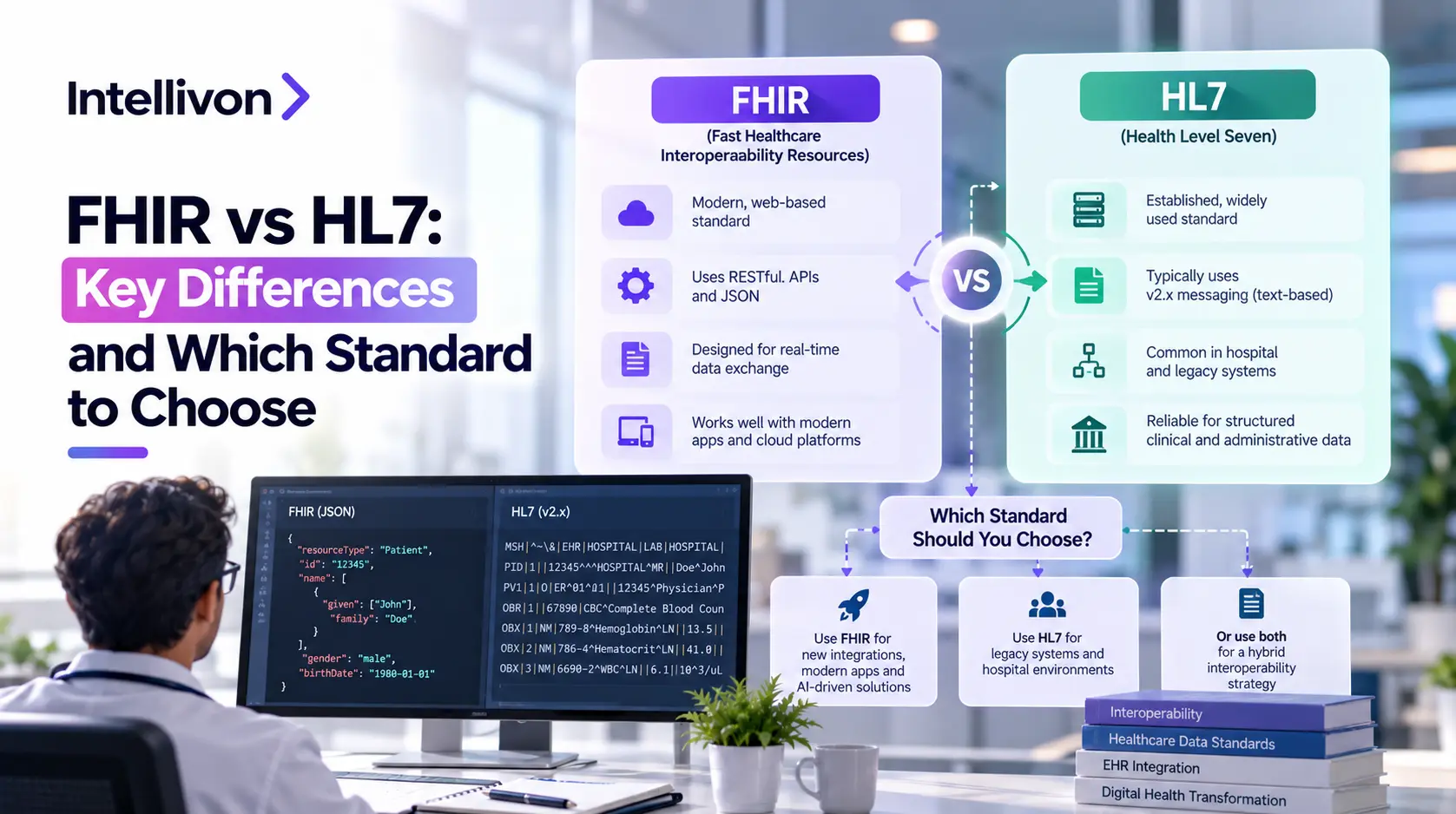
The difference between FHIR and HL7 is really about scope. HL7 is the organization that creates health data standards. When people talk about FHIR versus HL7, they are often comparing HL7 v2, the messaging standard, with FHIR.
HL7 v2 sends data using pipe-delimited messages. These messages carry things like admissions and lab results between systems inside a hospital. FHIR works differently. It lets applications get data through web APIs like most modern software services do. This makes FHIR more flexible and easier to use with today’s technology. This is the reason why v2 is appropriate for existing hospital feeds, while FHIR is suitable for patient apps, cloud products, and API-based compliance work.
Since most actual builds end up making use of both options, we’re going to explain how each of the two standards works and help you to decide which one is suitable for your product. We’ll also look at how a hybrid arrangement functions, what the cost of an integration will be in 2026, and when it’s not a good idea to choose FHIR within your budget.
At Intellivon, we develop custom healthcare software for entrepreneurs, so our focus will be on the decision you have to make before employing a team, not on providing a coding tutorial.

HL7 v2 vs FHIR Side by Side: What Changes for Your Product
HL7 v2 and FHIR differ in how they structure, move, and secure data, and each difference changes what you build and who you hire. At the same time, HL7 v2 sends compact text messages between systems that already trust each other, while FHIR lets apps request specific records through web APIs.
As a result, v2 connects existing hospital systems faster, while FHIR connects new apps and outside partners faster, so your product type usually decides.
HL7 v2 vs FHIR
| Factor | HL7 v2 | HL7 v3 and CDA | FHIR |
| First released | 1989 | 1990s (CDA arrived with v3) | 2011 (R4 normative in 2019) |
| Core design | Event-driven messages | Rigid, model-based messages and documents | Resource-based web API |
| Data format | Pipe-delimited text | XML | JSON or XML |
| Data structure | Segments and fields, meaning set by position | Strict information model | Named, self-describing resources |
| How data moves | Pushed when an event occurs (ADT, ORU, ORM) | Messages or documents | Requested on demand through REST |
| Transport | Private network, usually via an interface engine | Varies by implementation | HTTPS web calls |
| Security | TLS and network-level controls | Depends on implementation | TLS, OAuth 2.0, SMART on FHIR scopes |
| Learning curve | Needs healthcare-specific terms and vendor knowledge | Steep | Gentler for web developers |
| Cloud and mobile fit | Limited | Limited | Strong |
| Typical use | Admissions, lab results, orders inside hospitals | Clinical documents (CDA), limited new adoption | Patient apps, APIs, payer and regulatory exchange |
| Best when | Connecting existing systems | Rarely a new choice | Building new apps and partner access |
1. Pipe-Delimited Segments vs JSON Resources
HL7 v2 packs data into positions separated by pipes, so meaning depends on where a value sits. FHIR, however, labels each value by name inside a JSON or XML resource.
- Debugging: v2 messages need a specification beside them, while FHIR reads almost like plain English.
- Hiring: web developers already know JSON, so FHIR widens your talent pool.
- Reuse: FHIR resources, like Patient or Observation, can be fetched independently.
2. Event Messaging vs RESTful APIs
HL7 v2 pushes a message whenever something happens, such as a patient admission. FHIR, in contrast, waits for an app to ask for what it needs.
- v2 delivery: messages usually run through an interface engine like Mirth or Rhapsody over a private connection.
- FHIR delivery: apps connect through standard web requests, which suits mobile and cloud products.
- Fit: messaging works better for real-time internal alerts, while APIs work better for on-demand access.
3. Why HL7 v3 and CDA Never Replaced v2
HL7 v3 tried to fix v2’s looseness with stricter rules. According to Rhapsody, it proved too complex and lacked backward compatibility with v2.
- Complexity: v3 demanded heavy modeling, so teams faced a steep learning curve.
- Compatibility: Because v3 broke from v2, hospitals kept their working interfaces.
- CDA: This clinical document format still exists, but it covers documents, not live data exchange.
4. Security: OAuth 2.0 and SMART on FHIR vs Network-Level Controls
Both standards emphasize TLS and strong authentication. FHIR adds permission-based access through OAuth 2.0 and SMART on FHIR.
- v2 approach: access usually depends on private network connections.
- FHIR approach: SMART on FHIR scopes limit which data an app can see.
- Why it matters: that control becomes essential once you ship a patient-facing app.
5. Scalability and Learning Curve for Cloud, Mobile and AI Teams
FHIR fits cloud, mobile, and AI products because it speaks the web’s language. Meanwhile, HL7 v2 asks developers to learn healthcare-specific terms first.
- v2 effort: teams must learn segments, trigger events, and vendor quirks like custom Z-segments.
- FHIR effort: one API pattern can serve many partners, and named fields feed analytics and AI pipelines more easily.
- Caution: FHIR servers vary by version and supported resources, so test every partner.
In short, HL7 v2 is compact and proven inside the hospital, while FHIR is readable and ready for modern apps. HL7 v3 and CDA added rigor but never won adoption. Your choice affects debugging time, security design, and how easily you can hire.
Where HL7 Still Runs Everyday Healthcare Workflows
HL7 v2 still carries the daily traffic of most hospitals, including patient movement, lab orders and results, appointments, and pharmacy orders sent between departments. Each event triggers a short message, and because these feeds already work reliably across many clinical systems, hospitals rarely replace them.
As a result, HL7 v2 stays the better choice when two internal systems exchange real-time events and neither side opens data to outside apps.
1. Admissions, Discharges, and Transfers
ADT messages announce each time a patient is admitted, moved, or discharged. Other systems then update their records without anyone re-entering data.
- ADT: the abbreviation covers admission, discharge, and transfer.
- Patient movement: one bed change can notify billing and nursing systems at once.
- Census events: hospitals use these feeds to track current occupancy.
2. Lab Orders and Results
Labs rely on two message types, ORM for orders and ORU for results. Together, they link the lab information system (LIS) to the EHR.
- ORM: carries the clinician’s order to the lab.
- ORU: returns finished results to the patient chart.
- LIS to EHR: results arrive automatically, so staff skips manual entry.
3. Scheduling and Clinical Events
SIU messages share appointment changes, such as new bookings, reschedules, and cancellations. Departmental systems then stay in sync.
- SIU: the message type used for scheduling updates.
- Appointments: one change reaches every system that needs it.
- Departmental systems: radiology and similar units receive the same updates.
4. Pharmacy and Other Hospital Interfaces
Pharmacy, imaging, and billing systems also depend on v2 feeds. Hospitals built these interfaces over decades, so each one supports several others.
- Pharmacy: medication orders flow to dispensing systems.
- Risk: Onix warns that rebuilding working v2 interfaces adds risk without benefit.
- Routing: engines like Mirth and Rhapsody manage these feeds.
In short, HL7 v2 powers admissions, labs, scheduling, and pharmacy through event messages that hospitals already trust. Replacing working feeds adds risk without a clear payoff. Therefore, v2 remains the better fit for internal, real-time exchange.
Where FHIR Fits Into Modern Healthcare Products
FHIR fits any product that shares specific health data through standard web APIs. That includes patient apps, cloud platforms, payer systems, AI tools, and connected health devices. Because FHIR speaks the same language as modern web software, outside developers can connect without learning healthcare-specific message formats.
Therefore, a new digital health product should usually start with FHIR, then add HL7 v2 only where existing hospital systems still require it.
1. Patient and Provider Applications
Apps that show or update patient data need a clean way to read records. FHIR provides that through standard APIs, so developers skip custom connections.
- Patient portals: patients view their records through one standard API.
- Clinician tools: apps pull chart data directly into the care workflow.
- Mobile health products: lightweight JSON suits phones.
- Third-party apps: SMART on FHIR lets outside apps request limited access.
2. Cloud Healthcare Platforms
Cloud services exchange data through API calls, not private message channels. FHIR matches that model, so one platform can serve many connected systems.
- Consistent access: every service requests the same resources the same way.
- Growth: standard web infrastructure handles rising request volumes.
- Reuse: each new partner connects to existing endpoints.
3. Payer and Insurance Data Exchange
CMS requires impacted payers to build FHIR-based APIs, with key compliance deadlines generally beginning January 1, 2027, according to the CMS fact sheet. Here, FHIR is a compliance requirement, not a preference.
- Patient Access API: members see their data, now including prior authorizations (excluding drugs).
- Provider Access API: in-network providers can retrieve patient data.
- Payer-to-Payer API: data moves when a patient changes plans, with permission.
- Prior Authorization API: it supports electronic requests and responses.
4. Healthcare AI and Analytics Platforms
AI tools need structured, labeled inputs. FHIR resources supply them, so models read fields by name instead of parsing text.
- Patient: demographics and identifiers.
- Encounter: visits and care episodes.
- Observation: vitals and lab values.
- Condition and MedicationRequest: diagnoses and prescriptions, both frequently used in startup builds.
5. Remote Monitoring and Connected Health Apps
Monitoring products collect readings and share them with care teams. FHIR retrieval works better here because apps request only what they need.
- On demand: an app fetches the latest Observation instead of waiting for pushed messages.
- Lightweight: JSON runs well on phones and wearables.
- Controlled access: SMART on FHIR scopes limit what each app sees.
In short, FHIR suits products that share data beyond a single hospital, from patient apps to payer systems and AI tools. CMS rules make it mandatory for several payer APIs.
FHIR vs HL7 Differences That Affect Your Product
The main FHIR vs HL7 differences are how data is packaged, how it moves, and how access is controlled. HL7 v2 sends event messages in pipe-delimited text, while FHIR exposes resources through web APIs in JSON or XML.
Because of that, v2 suits internal hospital feeds, whereas FHIR suits apps and partner access. Those choices change your architecture, security design, and maintenance effort, so the table below shows each difference first.
FHIR vs HL7 Differences
| Area | HL7 v2 | FHIR |
| Exchange model | Event messages | Resources and APIs |
| Typical format | Pipe-delimited | JSON/XML |
| Data structure | Segments | Resources |
| Communication | Push/event-driven | REST/API plus other exchanges |
| Querying | Limited | Native API queries |
| Web/mobile support | Limited | Designed for modern applications |
| Customization | Z-segments common | Profiles and extensions |
| Security model | Usually external | Works with modern authorization patterns |
| Common environment | Hospital systems | Apps, platforms, payer exchange |
| Modern development | More specialized | Familiar web technologies |
| Legacy compatibility | Very strong | Often requires translation layer |
1. Messages vs Resources
HL7 v2 reports what happened, while FHIR describes what exists. This changes how you store and reuse data.
a. HL7 v2 Sends Clinical Events
- Each message announces an event, such as an admission or a lab result.
- The receiver must read the whole message to find what it needs.
b. FHIR Organizes Data Into Resources
- Each resource, such as Patient, stands on its own.
- Apps can fetch or update one resource without touching the rest.
2. Pipe-Delimited Data vs JSON and XML
Developers receive very different payloads. One needs a specification beside it, while the other reads almost like plain English.
- HL7 v2: values sit between pipes, so position gives them meaning.
- FHIR: values carry names inside JSON or XML.
- Result: FHIR is easier to debug and to hire for.
3. Push-Based Messaging vs API-Based Access
The two standards start from opposite triggers. Therefore, they suit different products.
- HL7: something happens, and a message is sent.
- FHIR: an application can request or update a resource.
4. HL7 Segments vs FHIR Resources
Many v2 segments correspond to FHIR resources, but the match is rarely exact. Onix warns that translation is not field-for-field.
- PID often maps to Patient.
- PV1 often maps to Encounter.
- OBX often maps to Observation.
- Local conventions and missing data break one-to-one mapping.
5. Custom Interfaces vs Standardized Profiles
Every hospital customizes v2 differently. FHIR, in contrast, adds structure to customization.
- Z-segments: sites add their own fields, so interfaces vary.
- Profiles: these set rules for how a resource is used.
- Implementation guides: they define shared requirements for a use case.
6. Security and Authentication
v2 usually relies on private networks. FHIR, on the other hand, supports modern authorization.
- OAuth 2.0: apps get tokens instead of open access.
- SMART on FHIR: it standardizes how apps launch and authenticate.
- Scoped access: each app sees only approved data.
7. Development and Maintenance Effort
FHIR lowers the barrier for new developers. However, neither standard removes ongoing work.
- Learning curve: v2 needs healthcare-specific knowledge, while FHIR uses familiar web skills.
- Debugging and testing: named fields speed both.
- Vendor variation: FHIR servers differ by version and supported resources.
- Interface upkeep: v2 interfaces need maintenance per site.
In short, HL7 v2 moves events through customized feeds, while FHIR shares standardized resources through APIs. FHIR improves security options and developer speed, but neither standard removes vendor variation or maintenance. Your product’s partners and users decide which differences matter most.
HL7 v2 vs FHIR Looks Different in a Real Data Exchange
In a real lab workflow, HL7 v2 pushes a result message to the EHR the moment the lab finishes, while FHIR lets an app request that same result when it needs it. Both flows can run for the same patient at the same time.
At the same time, the hospital backend receives an ORU message, and the patient app retrieves the result as a JSON Observation. So the real difference is who starts the exchange, and what format the receiver gets.
One Lab Result, Two Exchange Paths
| Stage | HL7 v2 flow | FHIR flow |
| Starting point | Patient gets a test, and the lab system (LIS) creates a result | A patient or clinician opens an app and wants the result |
| Who starts the exchange | The lab system sends it | The app asks for it |
| What travels | An ORU result message | A request for an Observation or DiagnosticReport resource |
| Route | LIS → interface engine → EHR | App → FHIR API → authorized response |
| Role of the interface engine | Routes and translates messages (for example, Mirth or Rhapsody) | Optional, but often sits behind the API as a translation layer |
| Transport | Usually a private hospital network | HTTPS over the web |
| Access control | Usually network-level and interface configuration | OAuth 2.0 token with scoped access (SMART on FHIR) |
| Timing | Pushed when the result is finalized | On demand, whenever the app asks |
| Payload format | Pipe-delimited segments | JSON (or XML) resource |
| How the receiver reads it | Needs a specification to know what each position means | Reads named fields directly |
| Confirmation | Receiver returns an acknowledgment message | Server returns the resource or an error status |
| Typical recipient | EHR and other internal clinical systems | Patient app, portal or third-party app |
| Best fit | Real-time routing inside the hospital | Authorized access for apps and partners |
In short, the same lab result travels as a pushed ORU message to the EHR and as a requested Observation to the app. HL7 v2 handles internal routing, while FHIR handles on-demand, authorized access. As a result, hospitals often run both flows for the same patient.
HL7 v3 vs FHIR: A Different Comparison Again
HL7 v3 versus FHIR is a different decision from HL7 v2 versus FHIR, because v3 was a model-heavy redesign that rarely won adoption. CDA, the clinical document format introduced with v3, still appears in many records, while FHIR uses modular resources and APIs that apps can call directly.
Therefore, the real question for most founders is whether you must read legacy CDA documents, not whether to pick v3 for a new build.
HL7 v3, CDA and FHIR at a Glance
| Area | HL7 v3 and CDA | FHIR |
| Origin | 1990s, created to fix v2’s looseness (CDA arrived with v3) | 2011, created by HL7 International |
| Design approach | Rigid, model-heavy, built for plug-and-play messaging | Modular, built from small resources |
| Typical format | XML | JSON or XML |
| Main purpose | v3: structured messaging. CDA: clinical documents | Resources, APIs and other exchanges |
| Implementation difficulty | Steep learning curve | Gentler for web developers |
| Compatibility with v2 | None, which made switching hard | Often needs a translation layer, and runs alongside v2 |
| Data access | Whole messages or documents | Individual resources through API queries |
| Adoption today | v3 limited. CDA still used for documents | Growing, and required for several payer APIs |
| Typical use | Clinical documents and continuity records | Apps, platforms and payer exchange |
| Role in a new build | Rarely chosen, mostly read from legacy sources | Default choice for new APIs |
| Migration path | Not automatic, so CDA workflows may remain | Can run beside existing CDA and v2 workflows |
| Same decision as v2 vs FHIR? | No, because v3 is rarely a live option | Yes for v2, because v2 is widely deployed |
In short, HL7 v3 added rigor but also complexity, and it lacked backward compatibility with v2. CDA remains in use for clinical documents, while FHIR offers a more modular route through resources and APIs.
Which Standard Fits Each Healthcare Use Case
The right standard depends on who needs the data, so the decision table below maps each common healthcare use case to a likely approach. In general, HL7 v2 fits internal hospital feeds, FHIR fits new apps and payer exchange, and a hybrid setup fits products that connect several systems.
However, treat these as starting points, since your partners, vendors, and existing systems can still change the answer for your specific product.
Standards Fitting Each Healthcare Use Case
| Use Case | Likely Approach | Main Reason |
| Hospital ADT feed | HL7 v2 | Internal systems already exchange admission events in v2 |
| Lab result feed | HL7 v2 or hybrid | v2 routes results inside the hospital, while FHIR adds app access |
| New patient app | FHIR | Web APIs and scoped access suit patient-facing products |
| Provider-facing SaaS | FHIR | Standard APIs connect to many customers, where each EHR supports them |
| EHR-connected AI platform | Hybrid | FHIR supplies structured inputs, while v2 carries live events |
| Payer data exchange | FHIR | CMS requires FHIR-based APIs, with deadlines generally from January 1, 2027 |
| Legacy hospital integration | HL7 v2 | Existing systems already speak v2 |
| Mobile health application | FHIR | Lightweight JSON and on-demand retrieval fit phones |
| Multi-EHR interoperability | Hybrid | Different EHRs support different standards and versions |
| Existing CDA document workflow | Maintain or progressively modernize | FHIR does not automatically replace working document flows |
1. Hospitals With Existing Clinical Interfaces
Hospitals already run working v2 feeds for admissions, labs, and orders. Therefore, most keep v2 and add FHIR only where outsiders need access.
- Internal events: keep v2 for real-time exchange between departments.
- Outside access: add FHIR for patient apps and partners.
- Risk: Onix warns that rebuilding working v2 interfaces adds risk without benefit.
2. Health Tech Startups Building New Products
Startups have no legacy feeds to protect. As a result, building FHIR-native is usually the cleaner path.
- Start with FHIR: use it for your own APIs.
- Plan for v2 intake: Damco advises expecting v2 data from existing hospital ecosystems.
- Limit scope: build only the resources your product needs, such as Patient and Observation.
3. Payers and Health Plans
CMS requires impacted payers to build FHIR-based APIs, with key deadlines generally beginning January 1, 2027, per the CMS fact sheet. Here, FHIR is a compliance requirement.
- Required APIs: Patient Access, Provider Access, Payer-to-Payer, and Prior Authorization.
- Flexibility: CMS allows a FHIR-only or FHIR and X12 combination for prior authorization.
4. Laboratories and Diagnostic Platforms
Labs send results into hospital systems that already expect ORU messages. Consequently, v2 often stays, while FHIR serves outside access.
- v2: pushes results to EHRs.
- FHIR: exposes Observation or DiagnosticReport to apps.
- Hybrid: fits labs that serve both audiences.
5. Patient-Facing Applications
Patients use phones, so apps need lightweight, permission-based access. FHIR provides both.
- JSON: runs well on mobile.
- SMART on FHIR: scopes limit which data an app can see.
- Testing: FHIR servers vary by version and supported resources, so test each partner.
6. Healthcare AI Products
AI products need structured inputs and live signals. Therefore, many use both standards.
- FHIR: supplies inputs like Patient, Condition, and Observation.
- v2: EngineerBabu says real-time clinical events likely need v2 processing alongside FHIR.
- One layer: normalize both inputs before they reach your models.
7. Multi-EHR Enterprise Platforms
Each EHR supports different standards and versions. Hence, a hybrid architecture usually works best.
- Integration engine: tools like Mirth or Rhapsody translate between standards.
- Normalized core: keep protocol details out of product code.
- CDA: maintain document intake where partners still send it.
In short, HL7 v2 fits internal hospital feeds, FHIR fits new apps and payer exchange, and hybrid fits AI and multi-EHR products. CMS rules make FHIR mandatory for payers. Your product type and your partners’ systems should drive the final choice.
FHIR Is Usually Better for New Apps, With One Catch
No, a healthcare startup should not choose FHIR automatically, because FHIR suits most new apps but not every connection those apps need. FHIR works well with modern web stacks, so new products usually start there.
However, many hospitals you connect to still run HL7 v2, and their FHIR support can differ from vendor to vendor. Therefore, treat FHIR as your default for new APIs, then confirm what each partner actually supports before you commit.
1. New Products Can Start With Modern APIs
FHIR uses JSON and REST, which most developers already know. As a result, new teams ship faster and hire more easily.
- Familiar stack: web frameworks and cloud tools work with FHIR directly.
- Regulation: several payer APIs must use FHIR, per the CMS fact sheet.
- Reach: patient apps and partners connect through one API pattern.
2. The Hospital You Connect to May Still Depend on HL7
Here is the catch. Your app may be modern, but the hospital behind it may not be.
- Installed base: Onix notes that most hospital systems speak v2 and may not expose FHIR for what you need.
- No replacement: EngineerBabu states that FHIR does not replace v2 in production environments.
- Live events: real-time clinical alerts often still arrive as v2 messages.
3. FHIR Support Does Not Guarantee Identical Implementations
Two vendors can both claim FHIR support and still behave differently. Therefore, test every partner instead of trusting the label.
- Versions: servers differ across DSTU2, STU3, R4, and R5, according to DEV Community.
- Coverage: supported resources and search parameters vary.
- Validation: some servers enforce rules strictly, while others do not.
- Implementation guides: they set shared rules for a use case, which narrows these gaps.
4. Your Product May Need Both From Day One
Many products ingest v2 from hospitals while serving FHIR to apps. Consequently, a hybrid setup is often the realistic starting point.
- Practical rule: Damco advises building FHIR-native while expecting v2 data from existing systems.
- Translation layer: an integration engine, such as Mirth or Rhapsody, connects the two worlds.
- Scope: start with the few resources your product needs.
In short, FHIR is the sensible default for new apps because it matches modern development and regulation. Still, hospitals that run HL7 v2 and uneven FHIR implementations mean you should verify each partner. Many startups therefore plan for both standards from the start.
Why Many Healthcare Platforms Use HL7 and FHIR Together
Yes, organizations can use HL7 v2 and FHIR together, and in practice most large healthcare platforms run both side by side. HL7 v2 keeps carrying existing clinical event feeds, FHIR exposes data to modern apps and outside partners, and an integration layer translates between them.
Because of that, hospitals can add FHIR without disturbing working interfaces, so the setup becomes one stable core, one standard API surface, and one translator.
1. HL7 Handles Existing Clinical Event Feeds
Admissions, lab results, and orders already move as v2 messages. Therefore, hybrid platforms leave these feeds alone.
- Stability: feeds that work today keep working.
- Reality: a hospital in 2026 almost always uses both standards, according to Pasquale Pillitteri.
2. FHIR Exposes Data to Modern Applications
Patient apps, portals, and partners need web-friendly access. FHIR provides it without exposing the internal feeds.
- On-demand access: apps request only the resources they need.
- Controlled sharing: scoped authorization limits what each app sees.
3. An Integration Layer Translates Between Them
The integration layer connects the two worlds. It usually combines four functions.
- Interface engine: receives and routes v2 messages.
- Normalization: cleans local variations into consistent data.
- Mapping: converts v2 fields into FHIR resources.
- API layer: serves the result to apps.
4. One Canonical Model Can Reduce Integration Sprawl
Without a shared model, every new partner needs its own custom connection. A canonical model gives all connections one internal format.
- Fewer custom links: each source maps once, not once per partner.
- Cleaner product code: DEV Community recommends keeping protocol details out of core logic.
5. Mirth and Rhapsody Can Support Mixed Environments
Many hospitals already run integration engines. Consequently, Mirth Connect and Rhapsody often become the bridge between standards.
- Boundary role: Mirth can translate between the v2 and FHIR sides in real time, as Nirmitee describes.
- Invisible change: upstream systems keep sending v2 unchanged.
6. Hybrid Architecture Avoids Rip-and-Replace Migration
Replacing every v2 interface at once is costly and risky. However, a hybrid setup lets you modernize one interface at a time.
- Lower risk: working feeds stay live.
- Phased spend: add FHIR where apps, partners, or regulators require it.
- Mindset: Nirmitee treats coexistence as a feature, not a bug.
In short, HL7 v2 and FHIR work together through an integration layer that translates between them. HL7 keeps internal event feeds stable, while FHIR opens data to apps and partners. As a result, hybrid architecture lets organizations modernize gradually instead of replacing everything at once.
Is FHIR Replacing HL7 in Healthcare?
FHIR is expanding rapidly, but HL7 v2 is not disappearing from hospital infrastructure. FHIR’s official specification explicitly allows it to work alongside established standards, so organizations do not have to choose one and discard the other. Hospitals keep v2 for internal event feeds, while FHIR spreads through apps, APIs, and payer exchange.
Therefore, FHIR is not replacing HL7 v2 in any near-term sense. The two standards are settling into complementary roles instead.
1. Why HL7 v2 Will Remain for Existing Hospital Workflows
Hospitals built their admissions, lab, and order feeds on v2 over decades. Because those feeds work, replacing them adds cost and risk.
- Installed base: Onix notes that most hospital systems speak v2 fluently.
- Daily use: A hospital in 2026 almost always runs both standards, per Pasquale Pillitteri.
- Low payoff: rebuilding a working v2 interface rarely improves outcomes.
2. Why FHIR Adoption Is Accelerating Outside Those Workflows
FHIR grows where apps and patients need data. As a result, patient access shows the clearest adoption signal.
- API access: ONC data reports that approximately 9 in 10 hospitals enabled patient access through an API in 2024.
- Standards-based APIs: seven in 10 hospitals reported using standards-based APIs for patient access, per the same brief.
- Gaps remain: smaller and independent hospitals lag in FHIR-based access.
3. Federal Rules Are Increasing FHIR Adoption
Federal policy pushes FHIR in specific areas. However, no rule requires every healthcare product to use it.
- CMS: impacted payers must build FHIR-based APIs, with key deadlines generally beginning January 1, 2027, per the CMS fact sheet.
- ONC: HealthIT.gov reports that over 95% of certified health IT developers met the standards-based API requirements effective in 2022.
- Scope: These rules target certified systems and impacted payers, not every app.
4. The Likely Direction Is Coexistence and Gradual Modernization
FHIR will not make HL7 v2 obsolete soon. Instead, organizations will modernize one interface at a time.
- Coexistence: most organizations run FHIR alongside v2 and CDA, according to First Line Software.
- Gradual change: new interfaces use FHIR, while working v2 feeds stay.
In short, FHIR is growing quickly in apps, patient access, and payer exchange, supported by federal rules. HL7 v2 remains the backbone of existing hospital feeds. Both standards will coexist while organizations modernize gradually.
When Moving From HL7 to FHIR Actually Makes Sense
Moving from HL7 to FHIR makes sense when a clear business signal exists. Those signals include costly v2 maintenance, a need for external API access, faster integrations, and new regulation. It does not make sense just because FHIR is newer.
In most cases, you can modernize without replacing your EHR or your working feeds. Therefore, add FHIR at the edges first, and leave stable interfaces alone. Doing so keeps risk low while you capture the benefits.
1. Your Existing Interfaces Are Becoming Hard to Maintain
Aging v2 interfaces often become expensive to support. As a result, small changes start taking weeks instead of days.
- Custom mappings everywhere: Onix notes that every site uses Z-segments differently.
- Undocumented interfaces: nobody remembers why a field maps the way it does.
- High support burden: each new v2 integration is basically its own project, according to Bacancy.
- Vendor dependencies: one vendor often controls how an interface changes.
2. You Need External API Access
v2 was built for systems behind a firewall. However, outside parties need standard, web-friendly access.
- Patient apps: Nirmitee notes that the mobile ecosystem speaks REST and JSON.
- Partner platforms and analytics: one API pattern serves many consumers.
- AI: models read named fields more easily than pipe-delimited text.
- Payer connectivity: payers must provide FHIR-based APIs.
3. You Need Faster Product Integrations
Every custom v2 connection adds delay. Consequently, product teams wait on integration work before they can ship.
- Repeatable pattern: FHIR lets one integration approach serve many partners.
- Less custom work: standard resources reduce one-off mapping.
- Caution: test each partner, since FHIR support varies.
4. You Are Modernizing Without Replacing the EHR
You can add FHIR without touching your EHR. Instead, you translate at the integration layer.
- Upstream stays the same: Nirmitee explains that existing v2 interfaces keep working as they do today.
- Facade approach: EngineerBabu recommends a FHIR facade, not a replacement.
5. Regulation Is Creating New API Requirements
Rules push FHIR in specific areas. However, they do not cover every product.
- CMS: impacted payers must meet FHIR API requirements, generally beginning January 1, 2027, per the CMS fact sheet.
- Check scope: confirm whether your organization is an impacted payer.
In short, migrate when maintenance costs, external API needs, integration speed, or regulation justify it. You can usually modernize alongside your EHR and existing feeds. Stable v2 interfaces can stay where they already work.
HL7 to FHIR Migration Does Not Mean Replacing Everything
Migrating from HL7 to FHIR does not mean replacing every interface. It means adding FHIR where it creates value, while working v2 feeds keep running. Therefore, most organizations modernize in phases, translating data at an integration layer instead of rebuilding upstream systems.
So full replacement is rarely required, and it can be the riskiest option. A phased path keeps clinical operations stable while you build what apps, partners, and regulators actually need.
1. Inventory Existing HL7 Interfaces First
You cannot size a migration without knowing what exists. Therefore, an interface inventory sets the scope, the budget, and the order of work.
- Count and classify: list every interface, its sender, and its receiver.
- Check readiness: Nirmitee rates interfaces by FHIR readiness, from neither side supporting FHIR to both sides ready.
- Find the unknowns: undocumented interfaces carry the most risk.
2. Decide Which Workflows Actually Need FHIR
Not every workflow benefits from FHIR. As a result, you should migrate only where a clear driver exists.
- Good candidates: patient apps, partner access, analytics, and payer APIs.
- Poor candidates: stable internal feeds that already work.
3. Map HL7 Events Into FHIR Resources
Mapping converts v2 data into FHIR resources. Conceptually, common pairs look familiar, but they are not exact.
- PID often maps to Patient.
- PV1 often maps to Encounter.
- OBX often maps to Observation.
- Not field for field: Onix warns that local conventions and missing data make reconciliation the hard part.
- Context matters: Nirmitee notes that mapping depends on the message type, such as ORM versus ORU.
4. Preserve Interfaces That Already Work
Working feeds do not need a rewrite. Instead, leave them alone and translate at the boundary.
- Same behavior: Nirmitee explains that existing v2 interfaces keep working exactly as they do today.
- Lower risk: you avoid retesting every connected system.
5. Introduce FHIR Around New Workflows
New workflows are the safest place to start. Consequently, FHIR arrives without disturbing clinical operations.
- FHIR first, v2 untouched: EngineerBabu says teams usually build the FHIR layer first and leave v2 feeds alone.
- Facade, not replacement: it recommends a FHIR facade and a narrow first release.
6. Move in Phases Instead of One Big Migration
Phasing spreads cost and limits risk. Therefore, each stage should deliver value before the next begins.
- Start narrow: choose a few resources and one use case.
- Expand gradually: add interfaces as value becomes clear.
- Accept coexistence: Nirmitee treats it as a feature, not a bug.
In short, HL7 to FHIR migration means inventorying interfaces, choosing the workflows that need FHIR, and mapping data carefully. Working feeds stay in place, new workflows adopt FHIR, and the move happens in phases.
What FHIR vs HL7 Means for EHR Integration
Use FHIR where the EHR exposes the data you need through APIs, and HL7 v2 where it already pushes the events. Most real projects end up using both. Each EHR vendor supports a different mix of FHIR APIs, traditional interfaces, and proprietary APIs, so the vendor’s name alone does not settle the question.
Therefore, let your workflow and the interfaces actually available decide, then hide the differences behind one integration layer.
1. Epic Integrations May Require Multiple Approaches
Large EHRs rarely offer one path to every data type. As a result, an Epic project often combines several methods.
- FHIR APIs: these suit app access to records such as Patient and Observation.
- Traditional interfaces: v2 feeds still carry events like admissions and results.
- Vendor APIs: some functions may sit outside the standards.
2. Oracle Health Integrations Can Also Span Both Standards
Oracle Health projects follow the same logic. Consequently, you should confirm which interfaces your specific site has enabled.
- FHIR where available: use it for on-demand, authorized access.
- v2 for events: PubNub notes that legacy EHR environments often rely on HL7 v2 messaging.
- Site variation: enabled features can differ between customers.
3. MEDITECH and Other EHRs Add Their Own Constraints
Smaller and older platforms bring different limits. However, the same hybrid pattern usually still applies.
- Version differences: FHIR servers vary across DSTU2, STU3, R4, and R5, per DEV Community.
- Limited FHIR coverage: Onix notes that many hospital systems may not expose FHIR for what you need.
- Plan for v2: expect to ingest v2 where FHIR falls short.
4. The EHR Vendor Does Not Make the Decision for You
The vendor sets what is possible, not what is right. Instead, the workflow and the available interfaces decide.
- Real-time events: v2 often fits best.
- App or partner access: FHIR usually fits best.
- Always verify: test each customer’s actual interfaces before committing.
5. Your Integration Layer Should Hide Vendor Differences
A shared layer keeps vendor quirks out of your product. Therefore, each new EHR becomes a mapping task instead of a rebuild.
- Anti-corruption layer: DEV Community recommends one layer that speaks both standards and exposes clean, normalized data inward.
- One internal model: your product code never sees vendor details.
- Related service: this is the work behind data integration.
In short, EHR integrations rarely rely on one standard or one path. Epic, Oracle Health, and MEDITECH each support different mixes, so verify what your site enables. A single integration layer keeps those differences away from your product.
How Much a FHIR or HL7 Integration Costs in 2026
A custom healthcare integration using FHIR, HL7, or both typically costs $70,000 to $300,000, depending on systems, workflows, mapping complexity, write-back requirements, and deployment scale.
At the same time, the phase ranges below add up to that band. A simple read-only feed lands near the bottom, while a multi-site build with write-back lands near the top.
Costs are planning ranges, so a scoped estimate should confirm your actual figure. Therefore, use the table to budget, then validate each phase against your own systems.
Cost by Phase
| Phase | Typical range | What it covers | What pushes it higher |
| Discovery and integration mapping | $10,000 to $30,000 | Systems, workflows, message inventory, API availability, data mapping plan | Many interfaces, undocumented feeds |
| Architecture and security design | $10,000 to $35,000 | Interface layer, API gateway, identity, authentication, audit design | Multiple sites, strict compliance needs |
| FHIR and HL7 integration development | $25,000 to $120,000 | Building interfaces, FHIR APIs, and the translation layer | Write-back, many resources, many EHRs |
| Mapping and data normalization | $10,000 to $45,000 | Converting v2 fields to FHIR resources, cleaning local variations | Heavy Z-segment use, missing data |
| Testing and validation | $10,000 to $35,000 | Partner testing, data validation, security checks | Vendor variation, many partners |
| Deployment and production monitoring | $5,000 to $35,000 | Go-live, alerting, error handling | Multi-site rollout, uptime demands |
| Total build | $70,000 to $300,000 | ||
| Ongoing maintenance | 15% to 25% of build cost per year | Updates, monitoring, partner changes | More interfaces, FHIR version changes |
Ongoing Maintenance
Plan for 15% to 25% of the initial development cost each year. For a $150,000 build, that means roughly $22,500 to $37,500 annually.
- Drivers: interface count, partner changes, and FHIR version updates.
- Why it recurs: feeds break when connected systems change.
In short, a FHIR or HL7 integration runs $70,000 to $300,000, with development and mapping driving most of the spread. Maintenance adds 15% to 25% annually. Scope, partners, and write-back needs decide where your project lands.
Planning an HL7, FHIR, or hybrid integration? Get a workflow-level integration estimate before choosing the architecture. Book an estimate call
How Intellivon Builds Around FHIR and HL7 Together
Intellivon builds mixed healthcare environments by starting with the clinical workflow, not the standard. We keep working HL7 v2 interfaces in place, add FHIR where apps, partners, or regulators need access, and translate between them inside one integration layer. Security and monitoring cover both standards.
Delivery then runs in controlled phases, so clinical operations stay stable while new capabilities go live. This is the approach we bring to founders choosing between FHIR, HL7, or both.
1. We Map the Clinical Workflow Before Choosing the Standard
The standard follows the workflow. Therefore, we trace who needs which data, and when, before we pick a protocol.
- Start with events and consumers: a lab result routed to an EHR is a different problem from a patient viewing it in an app.
- Check what exists: we confirm which interfaces each system already exposes.
- Define success first: our Evaluate stage sets metrics before any build begins.
2. Existing HL7 Interfaces Stay Where They Still Make Sense
Working v2 feeds carry real clinical traffic. As a result, we leave stable interfaces alone and avoid rebuilding them for novelty.
- Keep internal event feeds: admissions, orders, and results often stay on v2.
- Reduce risk: untouched feeds need no retesting across connected systems.
3. FHIR Is Added Around Modern Access Requirements
FHIR goes where outside access is needed. Consequently, new capabilities arrive without disturbing the core.
- Apps and partners: FHIR APIs serve patient apps, analytics, and AI products.
- Payer needs: FHIR covers CMS-driven API requirements.
- Scoped access: each consumer sees only approved data.
4. Translation Happens Inside the Integration Layer
One layer converts between standards. This keeps vendor and protocol differences out of your product code.
- Our relevant work: Intellivon lists FHIR, HL7, and transaction data pipelines among its data engineering services.
- Named evidence: [Intellivon to add: EHR integration project]
- Platforms and engines: [Intellivon to add: FHIR integration platform, interoperability layer, or HL7-to-FHIR transformation engine]
5. Security and Observability Sit Across Both Standards
Security and monitoring should not depend on which protocol carries the data. Therefore, we design them once, across the whole layer.
- Access control: authentication and authorization apply to every path.
- Audit and alerting: failed messages and access events stay visible.
- Compliance: our security stack includes HIPAA-aligned practices.
6. Migration Happens in Controlled Phases
Phasing limits risk and spreads cost. Instead of one big cutover, we move one workflow at a time.
- Evaluate: define goals and success metrics.
- Explore: prototype and prove a narrow use case.
- Execute: integrate, deploy, and monitor after launch.
In short, we choose the standard after we understand the workflow, keep working HL7 feeds, and add FHIR where access demands it. One integration layer, shared security, and phased delivery keep the whole environment stable.
Why Healthcare Teams Choose Intellivon for Integration
Implementation experience matters because the standards are public, but the hard parts are not. FHIR and HL7 specifications tell you what a message or resource looks like in theory. They do not tell you how a specific hospital customized its feeds, how a vendor’s FHIR server behaves, or how to translate between them safely.
Those gaps are where integration projects lose time and budget, so experience matters most there.
1. Healthcare Interoperability Experience
Our work covers FHIR and HL7 data pipelines, SMART on FHIR, EHR integration, and healthcare AI. Consequently, we have seen how real systems differ from their specifications.
- Client evidence: our Clutch reviews include healthcare projects involving SMART on FHIR and AI integrations.
- Named work: [Intellivon to add: one named healthcare integration project and outcome]
- Why it matters: Onix notes that local v2 conventions are where projects spend their time.
2. Legacy and Modern Systems Are Designed Together
We design for hybrid environments, not for one standard. Therefore, working HL7 feeds and new FHIR APIs share one architecture from the start.
- One integration layer: v2 and FHIR sit behind a single normalized model.
- Vendor variation: FHIR servers differ by version and supported resources, per DEV Community, so we test each partner.
3. Integration Is Delivered in Phases
Each phase delivers something you can review. As a result, risk stays low and spending stays visible.
- Discovery: inventory systems, workflows, and interfaces.
- Architecture: design the integration layer and security.
- Integration and testing: build, map, and validate with each partner.
- Rollout: deploy with monitoring in place.
The FHIR vs HL7 difference is only the first half of your decision. The second half is which of your interfaces stay on HL7 v2, which move to FHIR, and what that costs, typically $70,000 to $300,000.
If you are weighing that decision for your own product, Intellivon can map your workflows and give you a phase-by-phase estimate before you commit to an architecture. Start with our custom healthcare solutions team, or book a call to walk through your systems.
Conclusion
In short, the FHIR vs HL7 difference comes down to how data moves between systems. HL7 v2 pushes events inside hospitals, while FHIR serves apps, partners, and payers through APIs. Therefore, most healthcare products end up using both standards, joined by one shared integration layer.
Meanwhile, the right split depends on your workflows and partners, and the cost typically runs $70,000 to $300,000. Finally, to map yours, talk with Intellivon’s custom healthcare solutions team before you commit to an architecture.
FAQs
Q1. Is FHIR replacing HL7 v2?
A1. No, not in the near term. FHIR adoption is growing, with ONC reporting that 7 in 10 hospitals used standards-based APIs for patient access in 2024. However, HL7 v2 still supports established hospital event workflows. Therefore, most organizations run both and modernize gradually.
Q2. Is FHIR actually part of HL7?
A2. Yes. HL7 International publishes FHIR, so it belongs to the HL7 family. People still compare them because “HL7” usually means HL7 v2, the older messaging standard. Therefore, the useful comparison is HL7 v2 versus FHIR, not HL7 versus FHIR.
Q3. Should a new healthcare app use FHIR or HL7?
A3. Usually FHIR for the application-facing layer. However, HL7 v2 may still be required behind it when you connect to hospital systems that send events in v2. Consequently, many startups build FHIR-native and ingest v2 where needed, as Damco advises.
Q4. Can FHIR and HL7 v2 work together?
A4. Yes. Many integrations receive HL7 v2 events, normalize the data, and expose approved portions through FHIR APIs. As a result, upstream systems keep sending v2 unchanged, so you do not have to migrate everything. An integration engine such as Mirth or Rhapsody typically handles the translation.
Q5. Is FHIR easier to implement than HL7?
A5. Partly. Modern developers often find FHIR’s REST and JSON model more familiar than v2 segments. However, real projects still involve profiles, terminology, identity, authorization, vendor variation, and testing. Therefore, FHIR lowers the learning barrier, but it does not remove integration complexity.
Q6. What is the difference between HL7 v2 and HL7 v3?
A6. HL7 v2 is message-based and event-driven. HL7 v3 is a model-heavy redesign that proved complex and lacked backward compatibility. CDA is its clinical document format. In contrast, FHIR uses modular resources and APIs, which helped it gain wider adoption.