Key Takeaways:
- Juggling patient needs is tough. Compass Rose tries to keep risk checks, care gaps, patient outreach, care plans, referrals, social needs, and post-hospital follow-ups all together so things don’t get missed.
- Old-school spreadsheets and outdated care tools often left people confused about tasks and responsibilities. Compass Rose makes it easier to see who’s doing what and what’s still left to handle.
- Many large health systems want Compass Rose to talk to other software, like insurance platforms, community provider tools, different messaging systems, analytics, and stuff that isn’t Epic.
- Customizing Compass Rose can mean connecting to FHIR or HL7, adding automation, or bringing in AI.
- Intellivon helps with these set-ups and connections, while Epic keeps running as the main clinical system.
A care coordinator who carries out gap outreach using a spreadsheet manages to close only a small part of the gaps that she is required to close, and by the time she makes up the difference, the measurement period has already ended. That is the situation underpinning most of the current Compass Rose Epic conversations: health systems are trying to work out if replacing spreadsheets and phone trees with a dedicated platform actually results in enough improved outcomes to warrant the change.
Nevertheless, the truthful answer varies according to the particular workflow in question. The extent to which risk stratification, referral tracking, and care gap closure improve when moving from paper differs in each case, and treating the whole migration as a single decision masks this difference. Manual care gap outreach generally manages to reach only 15 to 25% of a patient panel before the measurement period ends, whereas platforms designed for that workflow achieve a closure rate above 55%, a difference large enough to affect the calculations.
We have previously carried out this kind of before-and-after analysis on Epic modules, and the results never remain the same throughout all workflows since in some cases the changes are negligible while in others they are complete. That is why this blog looks at Compass Rose compared to conventional workflows step by step, focusing on risk stratification, care gap management, outreach, transitions of care, and quality reporting, so that you can judge where the benefits are valid and where they fall short.

What Changes When Care Coordination Moves Into Compass Rose Epic
Compass Rose changes care coordination from a collection of loosely connected activities into a task-driven longitudinal workflow. Traditional systems often depend on people remembering what happens next.
Compass Rose instead organizes patients around care-management programs, episodes, outreach, assessments, tasks, care plans, and follow-up activities.
University of Iowa’s Compass Rose training materials explicitly document this structure, covering qualifying patient identification, enrollment, episodes, outreach, assessments, tasks, care plans, and plans of care as connected components rather than separate tools.
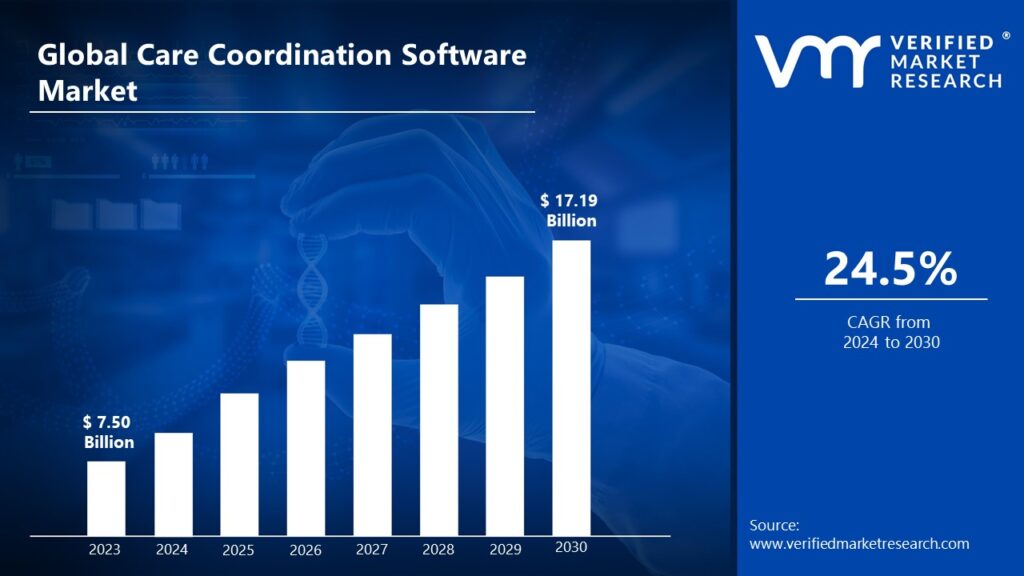
Care coordination becomes financially strategic when healthcare organizations take direct responsibility for patient outcomes, quality scores, and total spending. Because of this shift, the global care coordination software sector is expanding rapidly at a 24.5% CAGR to hit $17.19 billion.
1. How Traditional Care Coordination Usually Works
In many legacy programs, the workflow depends heavily on individual memory and manual tracking rather than system-enforced structure.
- A patient is identified as eligible for a program
- A spreadsheet or patient list gets updated manually
- Coordinator reviews the chart separately
- The patient is called, and a separate note gets entered
- A follow-up date is recorded by hand
- The referral is tracked outside the main system
- A second person checks whether the task was completed
- Program results are compiled and reported manually
This is a common legacy model, not a universal one. However, where it persists, it tends to produce specific and predictable problems. Staff memory becomes a dependency, spreadsheet ownership becomes unclear when someone is out, and documentation gets duplicated across the chart and the tracking sheet.
Consequently, handoffs between coordinators become inconsistent, work queues stay siloed by department, and leadership has no reliable way to measure coordinator productivity.
2. How Compass Rose Changes the Operating Model
Compass Rose replaces that dependency with a defined sequence. A patient who meets program criteria is qualified, enrolled into an episode, and prioritized by risk.
From there, the system assigns a care manager, generates tasks and outreach, attaches a care plan intervention, tracks referrals or follow-up, and captures outcome status directly into program analytics.
3. The Real Difference Is Workflow Ownership
The distinction is not that Compass Rose adds automation for its own sake. Instead, every important care-management activity can have a defined patient, program, owner, status, and next action.
That structural accountability is what drives the rest of this comparison.
Compass Rose gives care coordination a structured operating system, so accountability lives in the workflow instead of in any one person’s memory.
Epic Compass Rose vs Traditional Care Management at a Glance
Epic Compass Rose differs from traditional care coordination primarily in how work is identified, assigned, documented, followed up, and measured.
Traditional workflows can accomplish the same clinical activities, but they often require staff to connect several systems and manual processes.
Compass Rose, in contrast, puts more of that execution into a shared longitudinal workflow inside Epic.
Epic Compass Rose vs Traditional Care Management
| Workflow | Traditional Coordination | Epic Compass Rose |
| Patient identification | Staff pull manual lists or run periodic reports to find patients | System applies defined criteria to identify qualifying populations automatically |
| Patient attribution | Coordinators assign patients locally, often based on department or convenience | Patients are organized into structured panels tied to programs |
| Risk stratification | Scores are calculated manually or pulled from static, outdated reports | Risk scores drive prioritization directly within the coordinator’s workflow |
| Enrollment | A coordinator manually decides and records program eligibility separately | Patients are enrolled into defined programs or episodes automatically |
| Care gaps | Gaps surface only during periodic chart or list reviews | Gaps appear as prioritized, ranked work inside the worklist |
| Outreach | Staff make calls and log outcomes in separate systems | Outreach follows a structured workflow with built-in tracking |
| Care plans | Plans live in scattered notes or standalone documents | Plans are shared, longitudinal, and visible across the care team |
| Tasks | Work gets assigned informally through email or verbal handoff | Tasks appear on structured worklists tied to specific owners |
| Transitions | Discharge follow-up relies on a static, paper-based checklist | Follow-up is structured and tracked through the transition workflow |
| Referrals | Handoffs often stay open-loop, with no visibility into outcomes | Referrals are trackable end to end within the same system |
| SDOH | Needs are captured in a form or a narrative note | Screening results link directly to a follow-up intervention |
| Team communication | Coordination happens over scattered emails and secure messages | The whole care team sees shared visibility into workflow status |
| Reporting | Someone manually aggregates data from multiple disconnected sources | Activity data is captured structurally as the work happens |
| Productivity | Coordinator output is difficult to quantify or benchmark | Task and outreach completion is measured automatically over time |
| Program outcomes | Outcomes get reported separately, disconnected from daily workflow | Outcomes are measured at the program level, built in |
What Compass Rose Does Not Replace
Compass Rose restructures workflows rather than clinical judgment. It does not replace nurses, social workers, pharmacists, or care managers, and it cannot substitute for the clinical judgment those roles apply.
Likewise, community partnerships, patient engagement, and thoughtful program design remain human responsibilities.
According to Epic’s Compass Rose care management overview, the platform is positioned to support these roles with structured workflow, not to operate independently of them.
The difference becomes most visible when the same patient-management activity is compared step by step, since Compass Rose changes how the work moves rather than who does it.
What Real Compass Rose Implementations Actually Show in Practice
Published Compass Rose implementations show that the strongest benefits are often operational rather than immediate clinical miracles.
Organizations report greater workflow standardization, visibility, task tracking, and program structure, but implementation can also introduce transition costs, training requirements, and temporary workflow friction.
That evidence, in turn, gives leaders a more useful basis for estimating their own migration than vendor feature lists.
1. UC Davis — Standardization Improved More Than Speed
Before Compass Rose, UC Davis managed care coordination through a workaround outside the EHR entirely. According to a published UC Davis Compass Rose implementation study:
- A secure Excel spreadsheet handled assessments, lab monitoring, medication access, refills, and coordination tasks
- Problems included accidental deletion, large-file crashes, lack of standardization, and manual outcome tracking
- Planning began roughly six months before implementation
- Legacy data required reformatting, importing, and staff validation
- A planned two-week data lag let teams keep using legacy workflows temporarily, so patient care was not disrupted
- Compass Rose improved workflow standardization, transparency, data integrity, and measurement capability
- The study did not find significant improvement in overall refill-documentation time or satisfaction
- Prescription turnaround increased slightly during the measured period
Technology creates infrastructure. The workflow redesign around it determines whether that infrastructure actually improves operations.
2. CareOregon — Legacy Platform Replacement at Scale
CareOregon ran a formal RFP process before selecting Compass Rose over competing care-management platforms. Per CareOregon’s published implementation roadmap:
- Initial build and training took place in Q3 2023
- Go-live occurred on November 6, 2023
- More than 200 care coordinators actively use the system
- Optimization and program expansion have continued since launch
Go-live is not the finish line. Instead, enterprise Compass Rose implementation becomes an ongoing operating program.
3. OCHIN — Adoption Still Requires Implementation Support
OCHIN activated Compass Rose across its Epic network well ahead of full-scale research recruitment. Based on OCHIN’s Compass Rose adoption research:
- More than 180 member organizations were actively using Compass Rose when researchers began recruitment in March 2024
- Research emphasizes that care teams still need implementation strategies aligned with local workflows
- Organizational context, not a single standard rollout, shapes how adoption actually plays out
Installing the tool and adopting the workflow remain two separate milestones.
4. Corewell Health — Analytics Finds the Patient, Workflow Executes Care
At Corewell Health, the analytics layer and the execution layer work as separate, connected steps rather than one combined process:
- Predictive analytics identifies a targeted patient population first
- That population feeds directly into a care-management intervention
- A customized Compass Rose workflow is built around that intervention
- Longitudinal follow-up carries the intervention through to completion
Analytics finds who needs attention. The workflow layer is what actually executes and tracks the care.
Across all four organizations, the pattern repeats. Compass Rose delivers structure, visibility, and measurement, while the operational gains still depend on how well the workflow gets redesigned around it.
Migrating Into Epic Compass Rose Without Disrupting Care Workflows
A Compass Rose migration is not primarily a data-transfer project. Instead, it is a workflow migration.
Consequently, active patients, care plans, unresolved tasks, outreach history, program rules, ownership, integrations, reporting definitions, and frontline behaviors all need to move together without interrupting ongoing care.
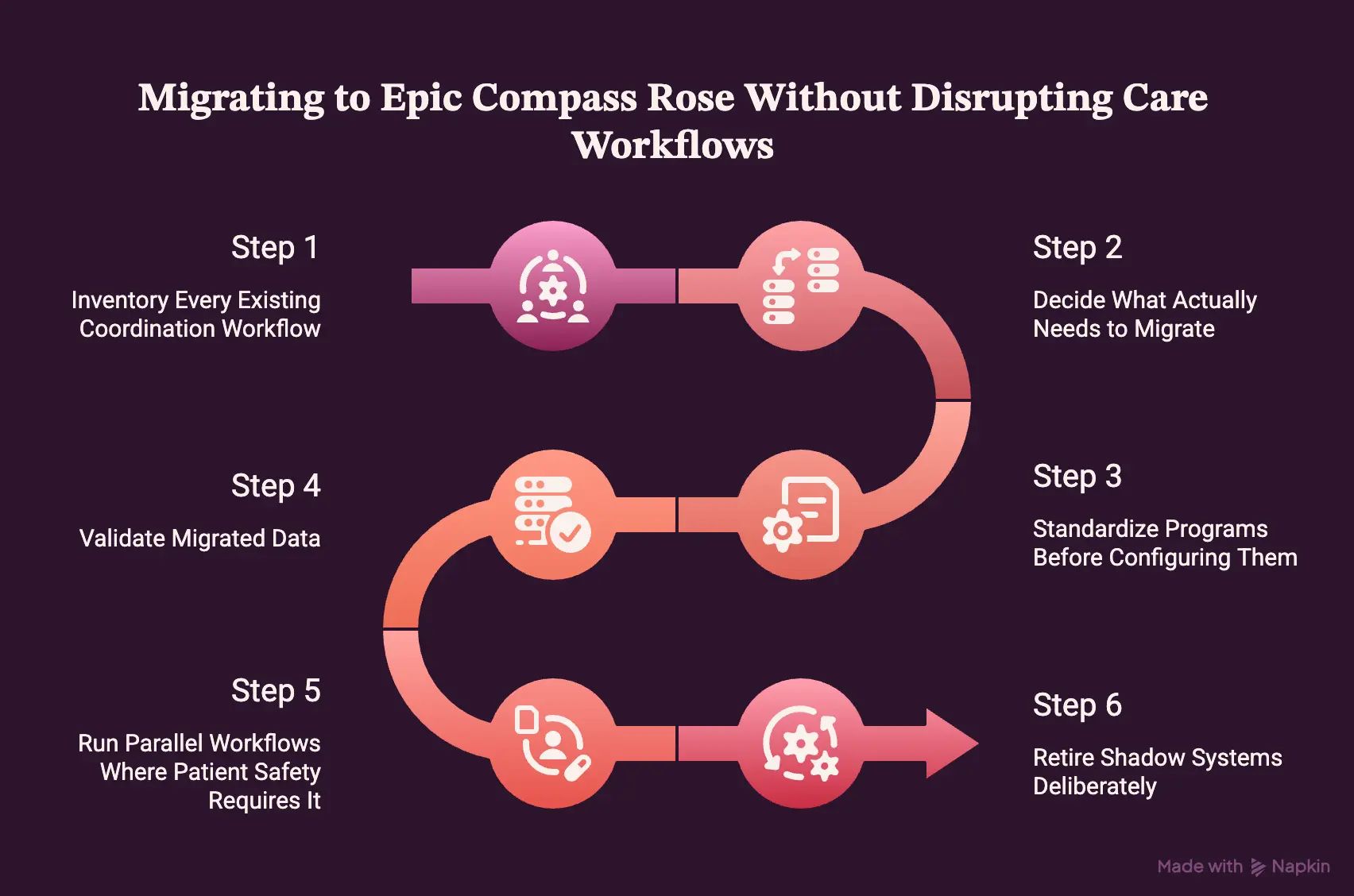
Step 1 — Inventory Every Existing Coordination Workflow
Every coordination workflow in active use needs documentation before migration planning starts. Otherwise, undocumented workflows tend to resurface later as gaps in the build.
- Excel sheets and shared drives used for patient tracking
- Local databases and legacy care-management platforms
- Existing Epic work queues and email-based workflows
- Phone logs, reports, paper forms, and local templates
Typically, Intellivon runs this inventory as structured interviews across coordination, clinical, and reporting staff simultaneously, since shadow workflows rarely surface in a single conversation. From there, the next question becomes which of these workflows actually need to carry forward.
Step 2 — Decide What Actually Needs to Migrate
Not every historical record belongs in the new system. In fact, migrating years of dead operational data slows the build without adding value. Instead, priority should go to what active care depends on right now.
- Active patients and current program enrollment
- Open tasks and unresolved referrals
- Active care plans and recent outreach
- Current risk information and clinically relevant history
Because scope creep is common at this stage, Intellivon treats this step as a data relevance filter first, separating what clinical teams need immediately from what can stay archived. Once scope is set, the programs themselves need structure before configuration begins.
Step 3 — Standardize Programs Before Configuring Them
Each program needs a defined structure before it gets built into Compass Rose. Otherwise, configuring an undefined program simply digitizes existing inconsistency.
- Objective, eligibility, and exclusions
- Enrollment logic and risk tier
- Care-plan template and task set
- Outreach cadence, escalation, and graduation criteria
Intellivon typically documents this structure as a program charter before any build work starts, so configuration decisions trace back to an agreed definition rather than individual preference. With programs standardized, attention shifts to the data moving into them.
Step 4 — Validate Migrated Data
Imported data needs staff validation before teams rely on it fully. Similarly, UC Davis required this same validation step for legacy information before its Compass Rose workflow went live, according to the UC Davis implementation study.
- Patient identity and program assignment
- Owner and outstanding task status
- Due date and care-plan status
Because validation errors surface later as clinical or billing problems, Intellivon builds this as a dedicated checkpoint rather than a final review. Once data is validated, the transition itself needs to happen without breaking continuity of care.
Step 5 — Run Parallel Workflows Where Patient Safety Requires It
Legacy and new workflows should run in parallel wherever patient safety depends on continuity. Rather than switching everything off at once, UC Davis maintained its legacy workflow during a planned two-week validation period for exactly this reason.
- Continue legacy documentation temporarily for active, high-risk patients
- Cross-check task completion across both systems during the overlap
- Set a fixed end date for parallel operation in advance
Intellivon builds this overlap window directly into the migration timeline, rather than treating it as a contingency. Afterward, the legacy systems still need to be closed out deliberately.
Step 6 — Retire Shadow Systems Deliberately
Once data is validated, shadow systems need active retirement, or they quietly return. Consequently, a planned retirement step prevents that from happening.
- Disable spreadsheet workflows and shared trackers
- Archive required history for compliance
- Communicate the new source of truth clearly
- Document exceptions and monitor for workarounds
Otherwise, Excel tends to reappear within six weeks. A correct migration can still fail if staff do not adopt the workflow, which makes organizational change a separate implementation problem.
The Integration Architecture Compass Rose Needs at Enterprise Scale
Compass Rose can manage the coordination workflow inside Epic, but enterprise programs sometimes don’t operate on Epic data alone.
Claims, laboratory results, remote monitoring, community referrals, payer data, messaging platforms, and analytics systems often sit outside the EHR entirely.
As a result, the integration architecture built around Compass Rose determines whether care managers actually receive a complete enough picture to act.
Layer 1 — Epic Clinical and Care-Management Systems
The foundation layer stays inside Epic itself, where Compass Rose already shares data with related clinical modules.
- Compass Rose for coordination workflow
- Healthy Planet for population health data
- MyChart and In Basket for patient and team communication
- Chronicles as the underlying clinical data store
Layer 2 — Interoperability
Interoperability standards connect Compass Rose to systems Epic does not own, though deployments rarely need every standard at once.
FHIR R4 handles modern, resource-based data exchange, while SMART on FHIR governs app-level integration within Epic’s interface.
Meanwhile, HL7 v2 and ADT feeds still carry most admission and discharge events across older interface engines.
According to ONC’s interoperability standards documentation, FHIR adoption continues to expand, but HL7 v2 remains common in production healthcare integrations today.
Layer 3 — External Data
Beyond Epic’s own ecosystem, care managers often need data that originates elsewhere entirely.
- Payer claims and external encounter data, typically 30–60 days behind clinical events
- Pharmacy and remote patient monitoring feeds
- Community system and CRM data for social service referrals
- Telephony and SMS platforms for outreach documentation
Because claims data lags behind clinical activity, CMS interoperability guidance recommends treating claims feeds as a supplement to clinical data, not a real-time substitute for it.
Layer 4 — Analytics
Once clinical and external data exist together, analytics tools turn that data into reportable, actionable output.
Reporting Workbench and SlicerDicer handle native Epic reporting for coordinators working day-to-day, while Clarity and Caboodle support the structured warehousing enterprise reporting teams depend on.
From there, Power BI, Tableau, Snowflake, or Databricks extend that data into dashboards built for executive and payer-facing reporting.
Layer 5 — Security and Governance
Every layer above depends on PHI moving safely and traceably across systems, which makes this layer non-negotiable rather than optional.
HIPAA-compliant access controls, encryption in transit and at rest, and role-based permissions need to apply consistently across Epic and every connected external system.
In addition, audit trails covering data access, integration calls, and AI-driven decisions become required infrastructure once care management decisions touch multiple platforms, according to HHS HIPAA Security Rule guidance.
Layer 6 — AI and Decision Support
AI belongs at the top of this stack, and only once governed data exists beneath it. Otherwise, predictions run on incomplete or inconsistent data.
- Risk prediction and patient classification
- Prioritization logic for care manager worklists
- NLP for unstructured clinical notes
- Outreach timing and channel optimization
Integration architecture determines whether Compass Rose sees the whole patient or only the slice documented inside Epic, and governance has to run underneath every layer, not sit bolted on at the end.
Once the integration layer exists, AI becomes useful, but only for clearly defined decisions built on top of governed data.
Where Automation and AI Can Extend Compass Rose Workflows
Automation and AI add the most value around Compass Rose when they solve a specific operational decision: which patient needs attention, which workflow has stalled, what information should be surfaced, or which outreach requires escalation.
However, they should support the underlying Compass Rose workflow and clinical judgment, never operate independently of either.
1. Workflow Automation
Automation handles repetitive coordination triggers that otherwise depend on someone remembering to check.
- Overdue task alerts routed to the assigned coordinator
- Referral status updates pulled automatically
- External data sync across connected systems
- Triggered outreach and escalation rules
2. Predictive Risk
Predictive models flag risk earlier than manual scoring typically allows.
- Readmission and deterioration risk
- Utilization forecasting
- Missed follow-up prediction
3. NLP and Case Summaries
NLP condenses scattered documentation into something a coordinator can act on quickly.
- Social barriers surfaced from notes
- Recent activity and unresolved issues summarized
- Outstanding tasks pulled into one view
4. Workflow-Stall Detection
Stall detection catches work that has quietly gone dormant, according to AHRQ’s care coordination measurement framework.
- No outreach after discharge
- Referral open too long
- Stale care plan
- Repeated failed contact
Automation and AI work best as a layer that catches what manual tracking misses, rather than as a separate system running alongside the workflow.
How Intellivon Extends Compass Rose Without Changing Epic
Custom Compass Rose work should extend the Epic environment rather than create a parallel care-management platform that competes with it.
Intellivon’s role, therefore, is to identify what should remain native to Compass Rose and build only the integrations, data pipelines, analytics, automation, and AI capabilities that the existing Epic environment does not already provide.
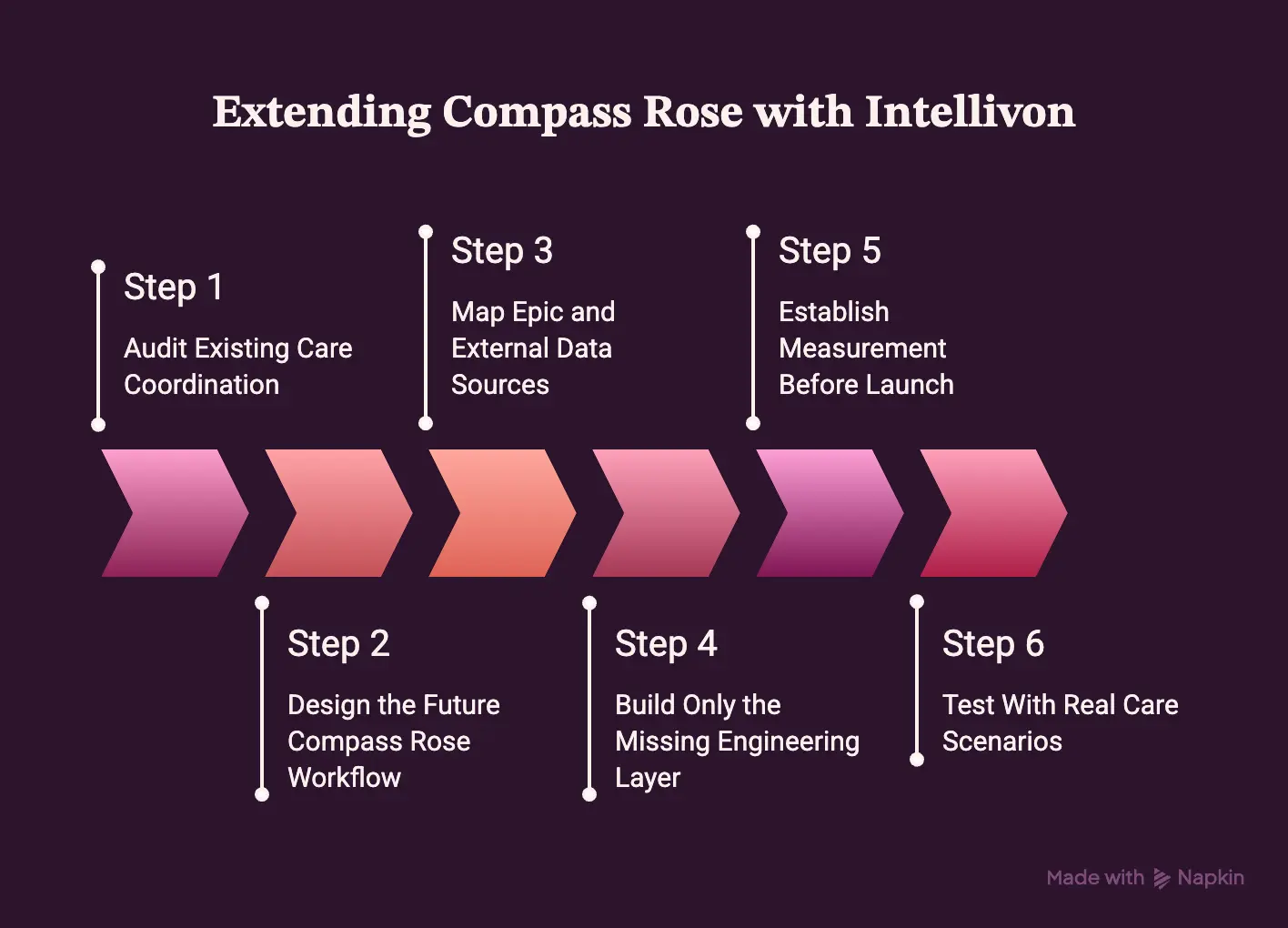
Step 1 — Audit Existing Care Coordination
Every engagement starts with a full audit of how care coordination actually runs today, not how policy documents describe it. This step captures the gap between documented workflow and daily practice before any build decisions get made.
Technically, this means reviewing every program, team, workflow, tool, spreadsheet, system, KPI, and pain point already in use, alongside every integration touching the coordination process.
Intellivon typically runs this as structured interviews across coordination, clinical, and reporting staff simultaneously, since workflow gaps tend to surface at the handoffs between roles rather than within a single one.
Output: A current-state workflow map.
From there, that map becomes the baseline against which the future Compass Rose workflow gets designed.
Step 2 — Design the Future Compass Rose Workflow
The future workflow gets built by mapping each current step directly onto a Compass Rose capability, then flagging what still needs custom engineering. This sequencing prevents teams from building custom solutions for problems Compass Rose already solves natively.
Specifically, each current step is mapped to its Compass Rose capability, any custom requirement beyond that capability, the responsible role, and the KPI it affects.
Therefore, Intellivon documents this as a shared blueprint reviewed with clinical and operations leadership together, so the future workflow reflects both technical feasibility and frontline reality.
Output: A future-state workflow blueprint.
Once the target workflow is defined, the data it depends on needs to be mapped next.
Step 3 — Map Epic and External Data Sources
Every data source feeding the future workflow needs identification before integration work begins, since undocumented sources tend to surface as gaps after go-live. This step draws the line between what Compass Rose already has and what needs to be connected.
The mapping covers Epic data, claims, labs, community systems, remote patient monitoring, messaging platforms, and third-party applications.
Our experts build this map against the organization’s actual Epic configuration, since two health systems on Epic can still run meaningfully different builds underneath the same modules.
Output: An integration map.
With sources identified, the engineering work shifts to building only what is genuinely missing.
Step 4 — Build Only the Missing Engineering Layer
Engineering effort should target the specific gap between what Compass Rose provides natively and what the organization actually needs, rather than rebuilding functionality that already exists. This keeps the Epic environment stable while extending its practical reach.
Depending on the gap identified, this can include FHIR and HL7 integration, custom APIs, ETL pipelines, analytics dashboards, workflow automation, or AI services.
Therefore, Intellivon treats Epic as the clinical and care-management source of truth throughout this step, building the governed technical layer around it rather than replacing any part of it.
Output: Production integration architecture.
Once the architecture is built, its impact needs a measurable baseline before launch.
Step 5 — Establish Measurement Before Launch
Baseline metrics need to exist before launch, or post-launch improvement becomes impossible to prove. This step turns the project from a technical rollout into something leadership can actually evaluate.
Baselines typically cover care-gap closure, outreach completion, referral completion, program enrollment, task volume, coordinator time, utilization, and quality measures.
At the same time, Intellivon builds this as a pre/post scorecard tied directly to the KPIs identified in Step 2, so results map back to the original business case.
Output: A pre/post ROI scorecard.
With measurement in place, the workflow still needs validation against real scenarios before full rollout.
Step 6 — Test With Real Care Scenarios
The workflow gets tested against real care scenarios, not synthetic test data, before it goes live across the organization. This step catches gaps that clean test data typically hides.
Scenarios include a high-risk discharge, failed outreach attempt, transportation barrier, external referral, medication-access problem, and stale task.
Intellivon runs these as live walkthroughs with actual coordinators, since frontline staff surface edge cases that documentation alone rarely captures.
Output: A validated production workflow.
Epic remains the clinical and care-management source of truth. Intellivon builds the governed technical layer around it, extending what Compass Rose does natively rather than duplicating it.
How Much Custom Compass Rose Engineering Costs: $70K–$300K
Custom integration, analytics, automation, migration, and AI work around Epic Compass Rose typically requires a $70,000–$300,000 engineering budget. This range covers custom engineering only.
At the same time, Epic’s own licensing and implementation costs are billed separately by Epic and are not included here.
Custom Compass Rose Engineering Cost Table
| Custom Workstream | Planning Range |
| Discovery + workflow mapping | $10K–$25K |
| Architecture + integration design | $10K–$30K |
| FHIR/HL7/API integrations | $15K–$60K |
| Data migration | $10K–$35K |
| Workflow automation/extensions | $15K–$60K |
| Custom analytics/BI | $15K–$45K |
| AI models or intelligent automation | $20K–$60K |
| Security/testing/go-live | $10K–$35K |
| Typical overall engagement | $70K–$300K |
These categories overlap significantly rather than stacking cleanly. A discovery phase, for instance, often folds directly into architecture design, so adding every column’s maximum together overstates the real cost.
1. A $70K Project Usually Looks Like This
Smaller engagements tend to share a similar profile:
- One care-management program in scope
- Limited data migration from a single legacy source
- A small number of integrations
- Simple dashboards built on existing reporting
- Reasonably mature existing Epic build
- Limited or no AI components
2. A $150K–$200K Project Usually Adds
Mid-sized engagements typically expand scope in a few consistent directions:
- Several programs running in parallel
- Legacy data migration across multiple sources
- Custom BI beyond native Epic reporting
- Payer or external system integrations
- Workflow automation across coordination tasks
- Deployment across multiple care team roles
3. A $250K–$300K Project Usually Includes
Enterprise-scale engagements tend to combine most of the following:
- Health-system-wide scope
- Multiple facilities or care sites
- Major legacy platform migration
- Multiple concurrent integrations
- Advanced analytics and predictive modeling
- AI components layered onto governed data
- Extensive security review and testing
4. Ongoing Custom Engineering and Maintenance
Ongoing maintenance for custom Compass Rose work typically runs 15%–25% of the initial engineering cost annually.
This applies specifically to custom work built around Epic, not to Epic’s own licensing or support fees.
Several factors drive that percentage up or down:
- Epic upgrades requiring interface revalidation
- Changing program rules and enrollment criteria
- Model monitoring for AI or predictive components
- BI and payer feed maintenance
- Quality measure updates over time
Scope is what moves a project from $70K to $300K, since most engagements combine several overlapping categories rather than maxing out every line item.
Build Your Custom Compass Rose Extension With Intellivon
If your organization already runs Epic, the difficult part is rarely deciding whether Compass Rose belongs in your care-management strategy.
It is deciding what should stay native to Compass Rose and what needs to be engineered around it, so the platform reflects how your teams actually coordinate care rather than a generic configuration.
That is the scoping work Intellivon does directly, covering:
- Care coordination workflow audits across programs, teams, and legacy tools
- FHIR, HL7, and API integration with claims, labs, RPM, and community systems
- Data migration from spreadsheets, legacy platforms, and paper-based workflows
- Custom analytics and BI connected to Clarity, Caboodle, Power BI, or Snowflake
- Workflow automation and AI-based risk prioritization, stall detection, and outreach
- HIPAA-aligned security, audit trails, and governance across every integration point
Because each of these decisions depends on your specific Epic build and existing coordination workflows, a scoping conversation is usually the fastest way to get an accurate cost range, rather than estimating from feature lists alone.
Talk to Intellivon’s solution architects for a workflow audit, integration map, and cost range aligned to your organization’s Compass Rose migration.
Conclusion
Epic Compass Rose changes care coordination from scattered manual tracking into a structured, measurable workflow.
However, the platform alone does not guarantee results. Instead, outcomes depend on migration planning, program standardization, integration architecture, and staff adoption working together. UC Davis and CareOregon’s implementations both show this clearly: the technology creates infrastructure, while workflow redesign determines the actual gain.
Therefore, the real decision facing leaders is not whether Compass Rose works. It is whether their organization is ready to build around it correctly.
FAQs
Q1. Is Epic Compass Rose Better Than Traditional Care Coordination?
A1. Usually, yes, when an Epic-based organization has enough scale and workflow complexity to justify structured patient programs, tasks, outreach, and longitudinal tracking. However, it is not automatically better when the primary problem is staffing shortages or fragmentation across multiple EHR systems, since Compass Rose cannot solve either of those on its own.
Q2. Can Compass Rose Replace Excel-Based Care Coordination?
A2. Yes, many spreadsheet functions involving patient lists, tasks, outreach, assessments, and program tracking can move into a more structured workflow. That said, migration still requires data validation and workflow redesign, as UC Davis’s implementation showed when moving off a legacy Excel-based system.
Q3. Is Compass Rose the Same as Epic Healthy Planet?
No, and they are not competing products. Instead, Healthy Planet focuses on population-health identification and analytics, while Compass Rose focuses on longitudinal care-management execution. Consequently, organizations typically use Healthy Planet to identify populations and Compass Rose to manage the ongoing coordination work that follows.
Q4. Does Compass Rose Automatically Reduce Readmissions?
A4. No, it does not reduce readmissions by itself. Rather, it helps operationalize transition and care-management programs by structuring tasks, outreach, and follow-up. Ultimately, however, the clinical intervention itself, not the software, is what determines the actual outcome for the patient.
Q5. Does Compass Rose Require FHIR or HL7?
A5. Not for every native Epic workflow, since much of the platform runs on Epic’s own internal data model. However, FHIR and HL7 become necessary once external systems, third-party applications, event feeds, or connected devices need to exchange information with Compass Rose.
Q6. Can AI Be Added to Compass Rose?
A6. Yes, AI can be layered around governed Compass Rose workflows for risk prioritization, NLP, workflow-stall monitoring, and outreach optimization. That said, AI should support these decisions rather than make clinical care-management judgments independently, since accountability still needs to sit with a care team member.
Q7. What Data Should We Migrate From a Legacy Care Management System?
A7. Priority should go to active patients, current program enrollment, open tasks, active care plans, and outstanding referrals. In addition, recent outreach history and clinically relevant history matter, while older, inactive records generally do not need to migrate at all.