Key Takeaways:
- Epic OpTime is used by hospitals to plan and manage surgical care, patient status, and OR reporting.
-
The OR teams manage capacity using OpTime, including the management of room schedules, surgeon blocks, block releases, add-on cases, case duration, turnover time, and cancellations.
-
OpTime covers the entire surgical workflow, including PreOp readiness, day-of-surgery care, IntraOp nursing, Epic Anesthesia, PACU, and PostOp documentation.
-
Hospitals are able to connect OpTime to other systems that deal with supply chain, sterile processing, pathology, billing, analytics, and external applications by means of HL7, FHIR, APIs, and other interfaces that are supported by Epic.
-
The amount that Intellivon charges for its support of Epic OpTime through a custom integration, along with analytics, automation, and the use of AI within the existing Epic environment, is between $70,000 and $300,000, without including the cost of Epic licensing.
Surgical block times are released late, cases end up running behind schedule, and the utilization data usually comes in after the operating room day has already finished. Epic OpTime was developed to overcome these pain points by incorporating block scheduling, case documentation, and OR workflows into a single system rather than keeping the schedule separate from what actually takes place in the room.
Yet running OpTime does not in itself remedy problems with turnover and utilization. Even when the preference cards do not match those required for a case or when the documentation is left incomplete at time-out, the room still runs slowly, regardless of how clean the schedule appears. That is why this blog looks at OpTime from start to finish: it examines block scheduling, preoperative and intraoperative documentation, anesthesia and nursing workflows, PACU care, operative reports, and the analytics that show what is actually working.
OpTime has been set up for surgical teams that are experiencing this particular turnover issue, and the solution usually doesn’t begin with the schedule. Rather, it begins with whether the preference cards, order sets, and documentation templates align with the way the operating room actually operates, and that is the real decision that every surgical services leader has to make.

What Is Epic OpTime and Why Do Hospitals Use It?
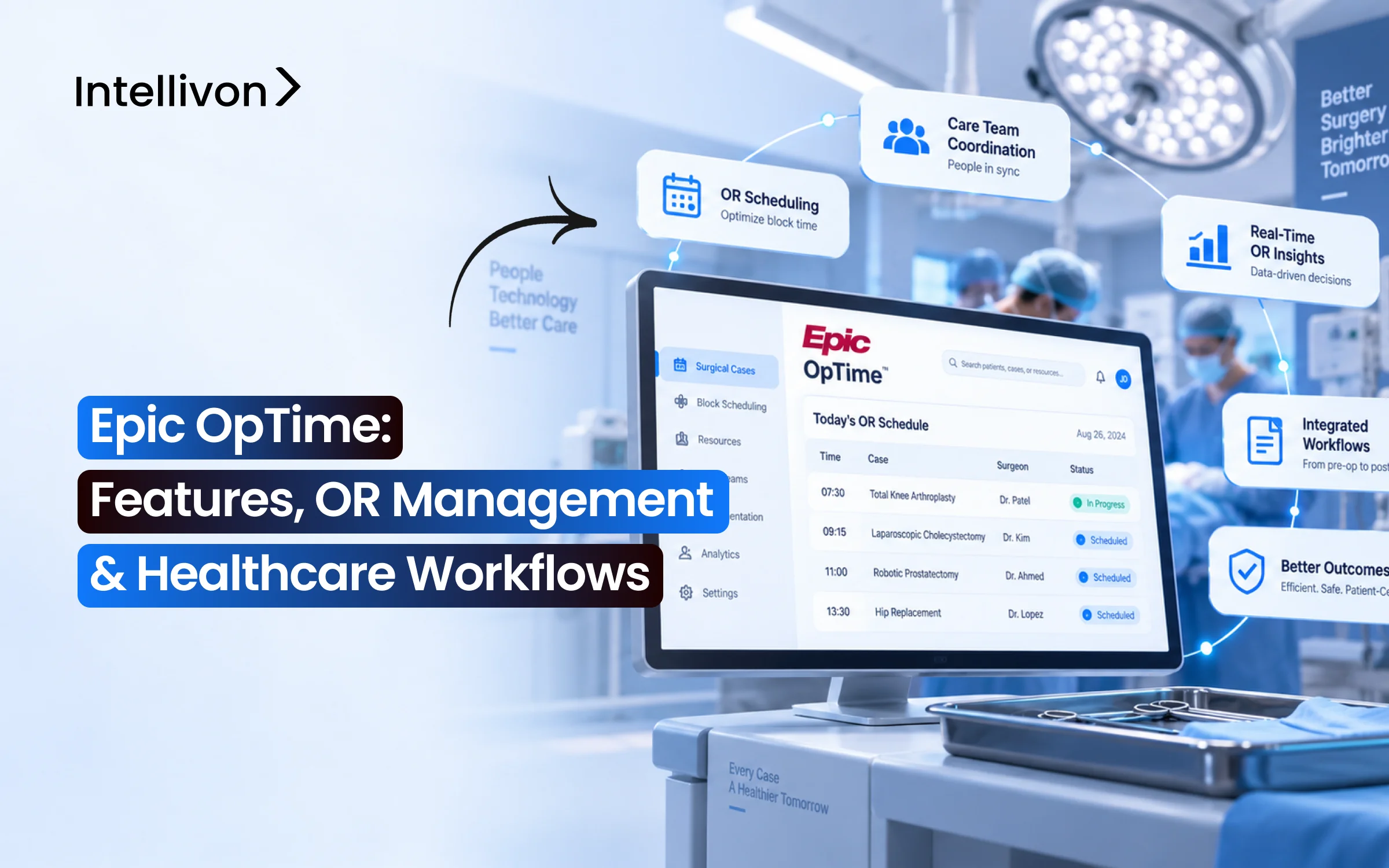
Epic OpTime is Epic’s perioperative application for planning, running, documenting, and analyzing surgical care. Hospitals use it to coordinate the case schedule, OR resources, clinical documentation, supplies, patient movement, and operational data inside the wider Epic environment.
Therefore, it sits directly inside the core EHR to eliminate clinical blind spots between surgical suites, inpatient units, and billing.
Key operational areas governed by the platform include:
- Surgical Services and Procedural Areas: Coordinates inpatient operating rooms, ambulatory surgical suites, endoscopy units, and cardiac catheterization labs.
- Surgery Scheduling and OR Resources: Matches room availability, equipment, and surgical teams against incoming case booking requests.
- Surgeon Preference Cards and Supplies: Links specific case carts, instrumentation, and consumables to surgical scheduling rules to reduce waste.
- Perioperative Documentation and Reporting: Tracks pre-op assessments, circulating nurse logs, implant data, and surgical KPI metrics across the perioperative continuum.
Why Health Systems Rely on Epic OpTime to Protect Surgical Margins
According to Grand View Research, the global operating room management software market is growing at a 13.0% CAGR to reach $9.6 billion by 2033.
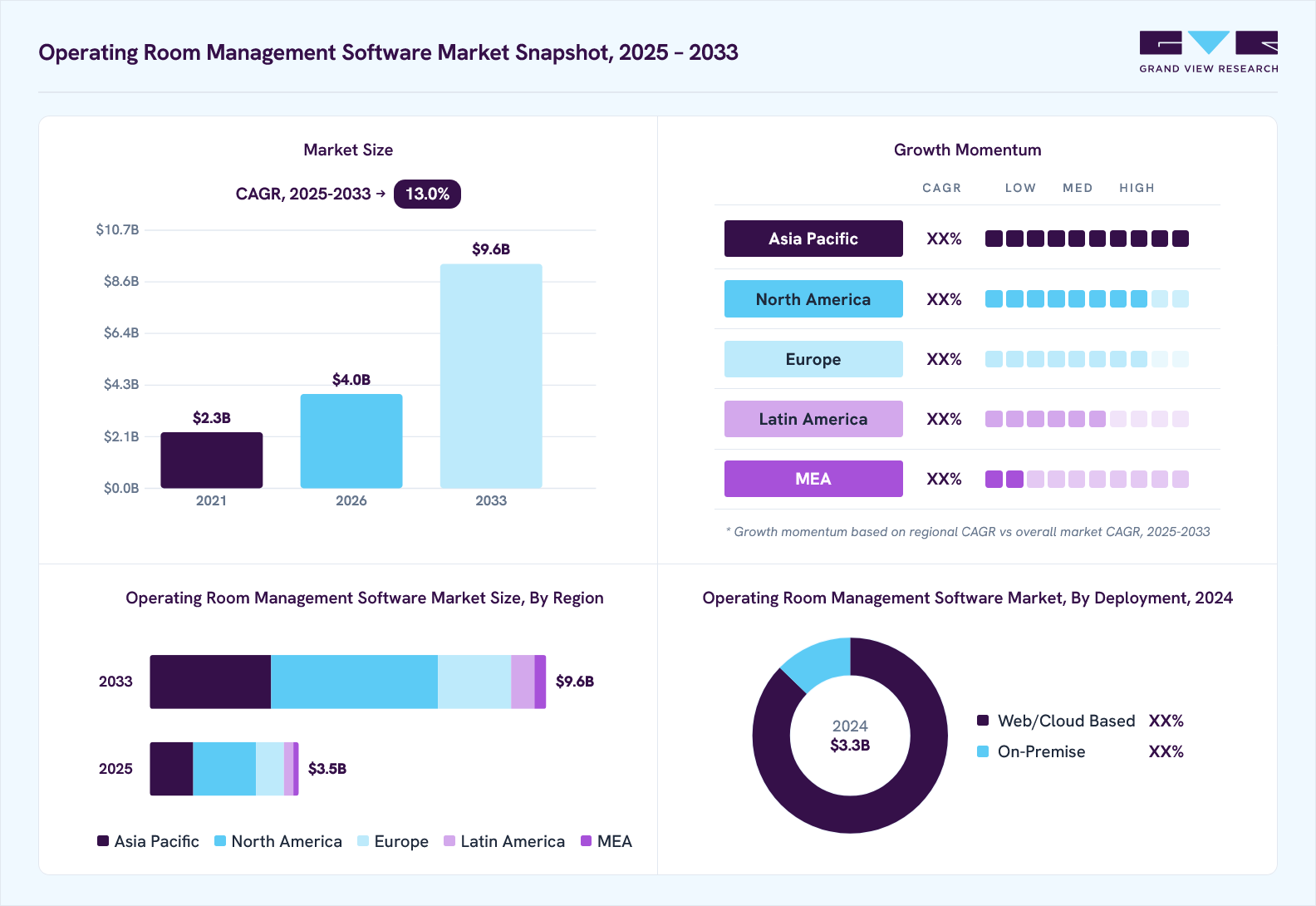
This sustained growth reflects an urgent provider need to curb procedural overhead, maximize surgical block capacity, and streamline perioperative care.
Operating room suites drive roughly 60% of hospital revenue, but uncoordinated schedules destroy perioperative margins.
At the same time, Epic OpTime prevents financial leaks by synchronizing clinical readiness, material inventory, and room allocation directly across the enterprise EHR.
- Mitigating Unscheduled OR Idle Time: One minute of operating suite time averages $46 to $62 in direct expenses. OpTime deploys automated pre-admission testing alerts and pre-op checklists, ensuring patient readiness before wheels-in occurs.
- Reclaiming Canceled Case Revenue: Same-day cancellations cost facilities $3,350 to $8,600 per incident in foregone procedural margin. OpTime tracks NPO compliance and missing surgical order sets, allowing schedulers to backfill open slots rapidly.
- Eliminating Supply Overages: Inaccurate surgeon preference cards trigger substantial sterile supply waste per case. OpTime reconciles real-time circulating nurse documentation with central sterile processing, preventing costly inventory over-pulling.
Consequently, health systems treat this perioperative platform as mission-critical infrastructure rather than a simple digital scheduling calendar.
What Are the Main Epic OpTime Features?
Epic OpTime provides twelve core capabilities that unify surgical scheduling, clinical documentation, implant tracking, and perioperative analytics into a single enterprise system.
These integrated features eliminate communication silos between procedural teams, ensure accurate case charging, and maintain total visibility over OR resource consumption.
Consequently, surgical departments streamline patient throughput while protecting procedural margins.
Comprehensive Comparison of Epic OpTime Core Features
| Epic OpTime Feature | What It Does |
| Case Requests | Captures procedural requirements, surgeon assignments, anatomical laterality, expected duration, and anesthesia needs |
| Snapboard | Helps schedulers manage room assignments, balance daily case loads, and handle rapid cancellations or reschedules |
| Block Scheduling | Allocates dedicated suite capacity to surgical service lines and automatically releases unused time into open booking |
| Pre-Op Documentation | Tracks patient readiness through H&P verification, digital consents, pre-op checklists, and nursing assessments |
| Intra-Op Documentation | Records circulating nurse workflows, surgical timeouts, count reconciliation for sponges and sharps, and procedural timestamps |
| Post-Op Documentation | Supports PACU recovery charting, Aldrete scoring, postoperative order execution, and operative notes |
| Preference Cards | Defines required sterile instrumentation, disposable supplies, equipment settings, and surgeon-specific variations |
| Status Boards | Tracks live patient transit, active room states, procedural delays, and interdisciplinary care team assignments |
| Implant Tracking | Records medical device serial numbers, UDI barcodes, tissue tracking, and pathology specimen routing |
| Charge Capture | Converts surgical minutes, consumed implants, and procedural supplies into scrubbed billing data |
| OR Reporting | Measures suite utilization, turnover intervals, first-case on-time starts, and overall surgical cancellation volume |
Mastering these individual core features establishes the operational baseline necessary for connected perioperative workflows. However, achieving peak efficiency requires coordinating these tools across the entire surgical pathway, from initial clinic booking to final post-anesthesia discharge.
Without this end-to-end integration, health systems risk bottlenecks that undermine room capacity and revenue capture.
How Epic OpTime Manages Surgical Scheduling and OR Capacity
Epic OpTime coordinates surgical demand and room availability by turning case requests into structured perioperative bookings. First, schedulers balance room constraints, specialized staffing, and surgeon schedules through configured templates.
Consequently, perioperative suites maintain steady throughput while preventing costly procedural delays.
- Case Booking and Approval: First, the system converts surgical requests into confirmed bookings by cross-referencing surgeon credentials, room type, and procedure duration.
- OR Schedule Templates: Next, templates map staffed operating hours to clinical needs, thereby enforcing resource limits before cases lock.
- Block Scheduling and Allocation: Meanwhile, block tools reserve dedicated procedural hours for specific service lines, high-volume surgeons, or shared specialty groups.
- Block Release Rules: In addition, automated rules reclaim idle capacity within set release windows, so other teams can book unused rooms promptly.
- Add-On and Urgent Cases: When emergencies arise, the software prioritizes urgent procedures by matching clinical acuity with available open suites.
- Scheduling Conflict Resolution: Simultaneously, built-in logic flags overlapping surgeon assignments, missing anesthesia coverage, and conflicting specialty equipment in real time.
- Case-Duration Estimates: Finally, baseline algorithms calculate expected duration from historical averages to balance the daily operating slate.
Recent surgical case duration research confirms that structured workflow configuration directly curbs room idle time.
Therefore, improving OpTime workflow configuration materially improves scheduling accuracy before predictive AI is added. As a result, perioperative teams achieve stable daily schedules and protect clinical margins.
How OpTime Coordinates OR Rooms, Teams, and Surgical Resources
Epic OpTime coordinates daily perioperative execution by connecting surgical rooms, staff rosters, and clinical equipment in real time. First, the platform verifies that every room matches the clinical needs of the booked procedure.
Then, managers assign clinical personnel and track equipment availability across all suites. Consequently, perioperative leadership maintains complete situational control throughout the surgical day.
- OR Room Assignment: First, schedulers match each scheduled procedure to the right surgical room based on specialty needs and built-in equipment.
- Surgeon Assignment: Next, the system assigns the primary surgeon, assisting fellows, and surgical services directly to the case record.
- Anesthesia Assignment: Meanwhile, the board maps attending anesthesiologists and CRNAs to rooms based on daily shifts and clinical availability.
- Nursing and Surgical Tech Assignments: Additionally, supervisors assign circulating nurses, scrub nurses, and surgical technologists to ensure balanced staffing across rooms.
- Equipment Availability: Simultaneously, OpTime tracks capital devices and specialty instruments, alerting teams immediately if two rooms request the same asset.
- Case Status Tracking: Finally, live Status Boards display clear patient milestones from pre-op intake, room entry, and incision to PACU recovery.
For a deeper breakdown of system connectivity across intensive clinical settings, see our guide on Epic Beaker data integration for the ICU dashboard.
Ultimately, tracking these live operational milestones keeps surgical rooms running on schedule. However, avoiding day-of-surgery bottlenecks also requires verifying patient clinical readiness long before wheels enter the operating room.
How Epic OpTime Supports the Pre-Op, Surgery Day, and Post-Op Workflows
Epic OpTime supports the entire surgical pathway by tracking clinical readiness from early pre-admission through post-anesthesia recovery. First, the software verifies clinical clearances before the day of surgery arrives.
Then, it guides surgical teams through perioperative handoffs, intraoperative charting, and post-op discharge.
Consequently, hospitals eliminate procedural delays while maintaining high standards of patient safety.
1. How Epic OpTime Supports Pre-Op Workflows
Before patients arrive at the hospital, OpTime gathers clinical documentation and verifies testing results.
Therefore, care teams identify potential clinical risks days ahead of the scheduled procedure.
| Pre-Op Stage | Clinical Focus | Workflow Action |
| Pre-Admission Testing | Labs, diagnostics, clearances | Reviews diagnostic results and flags missing specialist clearances |
| Preoperative Assessment | H&P, allergies, medications | Verifies active history, reconciles home meds, and calculates risk scores |
| Surgical Consent | Procedure and laterality | Confirms signed legal consent with anatomical site verification |
| Pre-Op Orders | Antibiotics, fluids, labs | Activates signed-and-held orders for immediate nursing execution |
| NPO & Instructions | Fasting rules, home meds | Tracks patient fasting compliance and arrival timing |
| Surgical Readiness | Final clinical green light | Displays clear status badges showing the patient is cleared for surgery |
2. How OpTime Supports the Day-of-Surgery Workflow
On the day of the operation, the software guides perioperative nurses through a step-by-step intake sequence.
Thus, staff move patients safely into the operating room without missing mandatory safety steps.
| Step | Milestone | Nursing & Clinical Action |
| 1 | Arrival & Check-In | Confirms hospital arrival and registers patient into the perioperative track |
| 2 | Patient Identification | Scans wristbands to match demographic and clinical identity records |
| 3 | Pre-Op Assessment | Re-checks baseline clinical status and verifies surgical skin prep |
| 4 | Vital Signs & IV Access | Captures intake vitals and documents peripheral or central venous lines |
| 5 | Medication Delivery | Administers prescribed pre-op sedatives and prophylactic antibiotics |
| 6 | Final Readiness | Completes the surgical safety checklist before wheels-in approval |
| 7 | OR Transfer & Timeout | Transfers patient to the suite and logs the WHO surgical pause before incision |
3. How Epic Anesthesia Integrates With OpTime During Surgery
Epic Anesthesia operates alongside OpTime to provide specialized documentation for gas, sedation, and patient monitoring.
While OpTime tracks surgical nursing and materials, Epic Anesthesia records continuous physiological trends and drug delivery.
| Clinical Domain | Anesthesia Focus | Technical Action |
| Pre-Anesthesia Workup | Airway assessment, ASA score | Establishes the formal anesthesia care plan and intubation strategy |
| Intraoperative Record | Continuous physiological log | Pulls direct telemetry data from operating room monitors |
| Medication & Fluids | Sedatives, paralytics, blood | Records exact drug dosages, IV fluid totals, and blood product units |
| Airway Management | Tube placement, ventilation | Documents endotracheal tube sizing, blade types, and oxygenation |
| Anesthesia Modalities | General, Regional, and MAC | Tailors flowsheets for nerve blocks, spinal needles, or conscious sedation |
| PACU Handoff | Post-op clinical transition | Transmits sedation recovery scores and airway stability status to nurses |
4. How OpTime Supports PACU and Post-Op Workflows
After surgical closure, OpTime manages recovery tracking from post-anesthesia care through final patient departure.
As a result, care teams maintain continuous monitoring as patients awaken and stabilize.
| Recovery Stage | Clinical Goal | Documentation Action |
| PACU Admission | Bedside handoff | Logs arrival time, immediate vital signs, and surgical site dressings |
| Recovery Assessment | Pain and sedation scoring | Tracks pain scores, Aldrete recovery thresholds, and post-op vitals |
| Post-Op Orders | Pain relief, IV weaning | Executes surgeon recovery orders, nausea treatments, and diet steps |
| Phase 2 Recovery | Ambulatory progression | Prepares outpatient individuals for ambulation, hydration, and voiding |
| Operative Notes | Surgical summary | Prompts the surgeon to complete or dictate the formal operative record |
| Patient Disposition | Safe transfer or discharge | Generates discharge instructions or arranges handoffs to inpatient units |
Ultimately, connecting these perioperative phases creates a smooth journey from intake through discharge.
Where AI Actually Helps Epic OpTime Workflows
AI delivers real financial returns in Epic OpTime only when applied to specific predictive bottlenecks rather than generic automation. First, health systems must configure standard OpTime scheduling templates, preference cards, and order sets correctly.
Then, targeted machine learning models resolve complex perioperative operational friction:
- Case-Duration Prediction: Algorithms evaluate surgeon history, patient BMI, and procedural complexity to forecast room time far more accurately than static averages.
- Dynamic OR Scheduling: In addition, models analyze turnover intervals to sequence add-on cases into open room gaps automatically.
- Cancellation Risk Scoring: Predictive tools flag patients with high no-show probabilities, allowing staff to confirm clearances days in advance.
- Preference Card Optimization: Machine learning audits item consumption logs, trimming unneeded sterile supplies from case carts.
- Supply Prediction: Simultaneously, demand models forecast specialized implant needs to avoid expensive rush orders.
- Ambient Clinical Documentation: Voice AI transcribes perioperative nursing handoffs and operative summaries directly into structured flowsheets.
- Billing Anomaly Detection: Finally, pattern recognition flags missing surgical implants and unbilled procedural minutes before final claim generation.
Ultimately, AI serves as an optimization layer rather than a replacement for core governance. Configure the perioperative workflow first, and add AI where predictive precision creates measurable operational value.
How OpTime Connects With Epic and Third-Party Systems
Epic OpTime coordinates surgical care by exchanging clinical, operational, and inventory data across the entire hospital technology ecosystem. According to Epic’s integration data, its health network processes over 45 billion monthly transactions across 60,000 active interfaces and 2,000 certified vendors.
Therefore, OpTime uses diverse interoperability standards to synchronize perioperative workflows with external platforms:
- HL7 v2 Interfaces: OpTime processes real-time ADT feeds, surgical orders, and clinical documents. Specifically, Epic provides an Incoming Materials Management HL7 v2 interface to map item masters from supply chains.
- FHIR R4 APIs: The platform exposes standard REST endpoints for Patient, Encounter, Procedure, ServiceRequest, and Observation resources, ensuring structured read-and-write access for digital perioperative workflows.
- SMART on FHIR Applications: Clinical teams launch custom applications directly within OpTime charts using secure OAuth 2.0 handshakes, preserving user context and patient scopes.
- Epic-Specific Web Services: Because industry standards cannot cover every surgical use case, Epic provides purpose-built SOAP and proprietary web services for granular scheduling transactions.
- Supply Chain and ERP Platforms: Integrations with Workday and Infor track consumable costs, reconcile implants, and automate inventory deductions against surgical preference cards.
- Laboratory and Pathology Systems: OpTime synchronizes with internal tissue labs and pathology platforms to monitor intraoperative frozen sections in real time. For a deeper breakdown of laboratory integration, see our guide on epic beaker api.
- Sterile Processing Systems: Bidirectional interfaces track instrument trays, wash cycles, and autoclave sterilization records to verify that specialty surgical sets are sterile before case booking.
- Enterprise Analytics Platforms: Data extracts feed directly into Clarity and Caboodle, enabling health systems to build custom OR dashboards within Power BI or cloud warehouses.
Connecting these technical pipelines guarantees accurate perioperative documentation and material tracking.
How to Implement or Optimize Epic OpTime Without OR Disruption
Successful Epic OpTime rollouts avoid clinical disruption by following a structured deployment methodology. First, leaders audit current perioperative practices and establish boundaries between core EHR functions and external systems. Then, cross-functional teams validate end-to-end interfaces and deliver role-specific training before cutting over.
Consequently, surgical departments protect daily procedural volumes while transitioning to standardized digital operations.
Step 1: Map the Current Surgical Workflow
First, mapping the surgical pathway identifies how cases flow through the hospital before configuration starts. Teams document every step from surgical case requests, scheduling, and pre-op clearance through intraoperative care. Furthermore, analysts track anesthesia records, PACU handoffs, supply consumption, billing, and operational reporting.
At this stage, our team blueprints these end-to-end perioperative pathways, capturing baseline operational milestones and undocumented staff handoffs across every surgical department.
Once teams complete this baseline, they can pinpoint specific operational breakdowns.
Step 2: Identify the Operational Problems
Next, identifying bottlenecks prevents health systems from simply digitizing broken surgical processes. Perioperative leaders analyze historical data to locate unused block time, inaccurate case durations, missing consents, and outdated preference cards. In addition, they highlight duplicate nursing documentation, prolonged room turnovers, and lost surgical charges.
To resolve this, technical audits across legacy scheduling archives and clinical logs isolate the root causes of procedural delays and billing leakage before software design starts.
After discovering these vulnerabilities, leaders must divide tasks between native Epic features and external integrations.
Step 3: Decide What Stays Native to Epic
Then, establishing clear architecture boundaries ensures protected clinical workflows remain fully governed within core Epic applications. Routine clinical documentation, physician order signing, surgical case records, scheduling constraints, and access controls belong strictly inside Epic. Preserving these functions inside the native patient chart maintains compliance, simplifies upgrades, and protects the legal medical record.
Our engineering practice designs architectures that preserve this native boundary, ensuring clinical safety rules and foundational chart governance remain untouched within OpTime.
Defining these boundaries clarifies which external tools require specialized connectivity.
Step 4: Decide What Gets Built Around OpTime
Deciding what gets built around OpTime allows organizations to extend functionality without disrupting native governance. High-value builds include supply chain integrations, cross-system data synchronization, business intelligence dashboards, predictive case-duration models, and automated interface monitors.
Intellivon builds around the governed Epic environment where an organization needs integration, analytics, automation, or AI that the existing OpTime workflow does not provide.
For a deeper breakdown of system connectivity, see our guide on web development best practices.
Step 5: Build and Validate Interfaces
Building and validating interfaces ensures continuous data flow between OpTime, materials management, and external clinical applications. Engineers verify HL7 and FHIR mappings, patient identifiers, event sequencing, and exception handling routines. Additionally, testing protocols validate duplicate message filtering, downtime recovery, and post-interface inventory reconciliation.
Constructing resilient, monitored interface pipelines at this stage intercepts failed messages before they cause downstream perioperative delays.
After confirming interface feeds, teams must validate the entire surgical journey.
Step 6: Test the Full Surgical Journey
Next, integrated testing must evaluate the entire perioperative lifecycle rather than verifying individual software screens in isolation. Validation teams run end-to-end simulations tracing a case from clinic request and block booking to pre-op check-in. The test continues through intraoperative nursing, anesthesia, PACU recovery, preference cards, charge reconciliation, and reporting.
Running full-lifecycle integration rehearsals across multi-specialty surgical scenarios ensures data handoffs work smoothly between clinical, inventory, and revenue systems.
Following thorough journey validation, organizations must prepare their clinical staff.
Step 7: Train by Role
Next, role-based education ensures each clinical professional masters the specific OpTime tools required for daily patient care. As demonstrated in UI Health Care’s OpTime curriculum, courses separate schedulers from pre- and post-op nursing, intraoperative circulators, anesthesia providers, surgeons, and surgical technologists. This targeted separation eliminates confusion and builds operational confidence.
Structuring tailored, role-specific operational playbooks and simulation workshops ensures perioperative personnel master their unique clinical workflows before cutover.
With clinical teams prepared, leadership launches the platform.
Step 8: Go Live and Measure Adoption
Finally, tracking post-launch adoption metrics enables perioperative managers to address operational variances before they cause procedural backlogs. During the immediate go-live window, support teams track ticket volume, scheduling errors, incomplete nursing documentation, and interface failures.
Over subsequent weeks, leadership monitors preference card revisions, duration accuracy, first-case on-time starts, and turnover times.
Deploying real-time operational telemetry and adoption tracking models ensures interface exceptions are resolved quickly, stabilizing workflows and safeguarding procedural volume.
Disciplined post-launch measurement ensures sustainable workflow adoption across the surgical department.
What Epic OpTime Optimization Costs in 2026
Custom Epic OpTime integration, analytics, workflow optimization, automation, and AI projects typically cost $70,000–$300,000, excluding Epic licensing and Epic-provided implementation fees.
Health systems fund these targeted technical initiatives to resolve operational bottlenecks without altering protected Epic core governance.
Consequently, investment levels scale with architectural scope, integration complexity, and multi-site operational requirements.
- $70,000–$100,000 (Focused Optimization): Best for a single hospital optimizing one or two perioperative pathways. Covers preference-card rationalization, minor block scheduling rule adjustments, and basic status dashboard fixes.
- $120,000–$200,000 (Multi-Workflow Integration): Designed for busy facilities connecting multiple external feeds. Encompasses materials management integrations, PACU and anesthesia data pipelines, custom Clarity/Caboodle perioperative reports, and automated schedule scrubbing.
- $220,000–$300,000 (Enterprise Extension): Built for multi-hospital health systems requiring cross-facility governance. Delivers predictive case-duration machine learning, enterprise BI telemetry, complex automated supply chain synchronization, and custom perioperative integrations.
Recommended Phase Breakdown
| Project Phase | Typical Investment Range |
| Workflow & Architecture Assessment | $10,000–$25,000 |
| Integration & Data Engineering | $20,000–$80,000 |
| Workflow & Analytics Development | $20,000–$75,000 |
| AI & Automation Extensions | $20,000–$80,000 |
| Testing, Training & Go-Live | $10,000–$40,000 |
| Total Project Scope | $70,000–$300,000 |
Note: Technical project phases run concurrently; therefore, individual maximum phase figures do not aggregate into the final total.
Following initial go-live, organizations should allocate 15%–25% of the original build investment annually for ongoing technical maintenance.
This recurring budget supports annual Epic version upgrades, interface schema updates, model drift monitoring, regression validation, and clinical terminology adjustments.
Extend Epic OpTime Without Rebuilding The Entire System
If your OpTime environment already handles clinical documentation but operational friction persists, complete system overhauls are unnecessary. Instead, engineering targeted extensions around your core configuration bridges operational gaps while keeping native clinical governance fully intact inside Epic.
- Audit Integration Bottlenecks: Identify failing data feeds across HL7 and FHIR pipelines before they disrupt daily surgical schedules.
- Rationalize Preference Cards: Reconcile documented surgical usage against case cart pulls to prevent expensive sterile supply waste.
- Refine Block Scheduling Rules: Automate block release triggers to return unused room capacity to open booking windows promptly.
- Eliminate Documentation Redundancies: Align nursing flowsheets and intraoperative checklists to reduce administrative charting burdens on clinical teams.
- Connect Materials Management: Synchronize enterprise ERP systems to automate implant tracking and real-time inventory reordering.
- Enhance Case Duration Precision: Replace static historical averages with custom predictive variables to stabilize the daily operating slate.
- Unify Perioperative Dashboards: Extract granular Clarity and Caboodle records into enterprise business intelligence platforms for executive visibility.
- Protect Native Epic Governance: Maintain core patient records, order signing, and clinical safety protocols strictly within standard Epic modules.
Intellivon maps your perioperative architecture to identify what belongs inside Epic and what should be engineered around it.
To audit your perioperative data pipelines and resolve operational bottlenecks without OR disruption, book a Call to Discuss Your Epic OpTime Project.
Conclusion
Maximizing perioperative margins requires balancing clinical documentation with precise operational scheduling. First, standardizing Epic OpTime ensures safe patient transitions, compliant charting, and accurate charge capture across surgical suites.
Then, engineering targeted data pipelines around the platform resolves persistent scheduling bottlenecks, supply waste, and analytics gaps without disrupting native EHR governance.
Consequently, healthcare organizations protect procedural revenue and expand room capacity. Ultimately, disciplined workflow design combined with purpose-built technical integration transforms perioperative operations into a reliable driver of enterprise growth.
FAQs
Q1. What is Epic OpTime used for?
A1. Epic OpTime is used for managing surgical scheduling, preference cards, perioperative documentation, and operating room management. First, it coordinates case bookings and staff assignments across procedural suites. Furthermore, it tracks clinical progress from pre-op intake through PACU recovery. Consequently, health systems maintain complete visibility over surgical resources and procedural billing.
Q2. Does Epic OpTime include anesthesia documentation?
A2. No, Epic OpTime does not directly handle specialized anesthesia charting. Instead, healthcare organizations pair OpTime with Epic Anesthesia. As UI Health Care structures it, anesthesia operates as a distinct perioperative workflow across pre-op, intra-op, and post-op care. Therefore, OpTime tracks surgical nursing and supplies while Epic Anesthesia records physiological telemetry.
Q3. How does Epic OpTime handle OR block scheduling?
A3. Epic OpTime allocates surgical capacity through configurable schedule templates and reserved block time. Specifically, it assigns suite hours to designated surgical services or individual providers. In addition, automated block release rules return unused hours to open booking when release windows expire. Consequently, perioperative teams balance predictable surgeon access with high room utilization.
Q4. Can Epic OpTime integrate with supply chain systems?
A4. Yes, Epic OpTime connects with external materials management systems like Workday and Infor. Epic provides an official HL7 v2 incoming materials management interface to synchronize item masters and sterile supplies. Furthermore, custom interfaces update surgeon preference cards based on actual stock levels. Thus, hospitals maintain precise inventory records and prevent procedural delays.
Q5. Does Epic OpTime support FHIR and HL7 integrations?
A5. Yes, Epic OpTime supports both FHIR and HL7 interfaces depending on the data workflow. Specifically, systems use HL7 v2 feeds for real-time messaging such as ADT updates, orders, and materials synchronization. Meanwhile, FHIR R4 APIs and proprietary web services handle discrete data queries. Consequently, health systems exchange perioperative data securely across clinical platforms.