Key Takeaways:
-
Documentation automation captures encounter audio, extracts structured data, and generates specialty-specific clinical notes.
-
Ambient voice, clinical NLP, LLM note generation, FHIR R4 integration, and HIPAA controls are core requirements.
-
CDI checks, EHR write-back, audit trails, and physician approval workflows ensure safe production-grade deployment.
-
Custom platforms cost $90,000 to $280,000 with MVPs delivered in 12 to 16 weeks.
-
Intellivon builds documentation automation around real clinical workflows, not generic transcription demos.
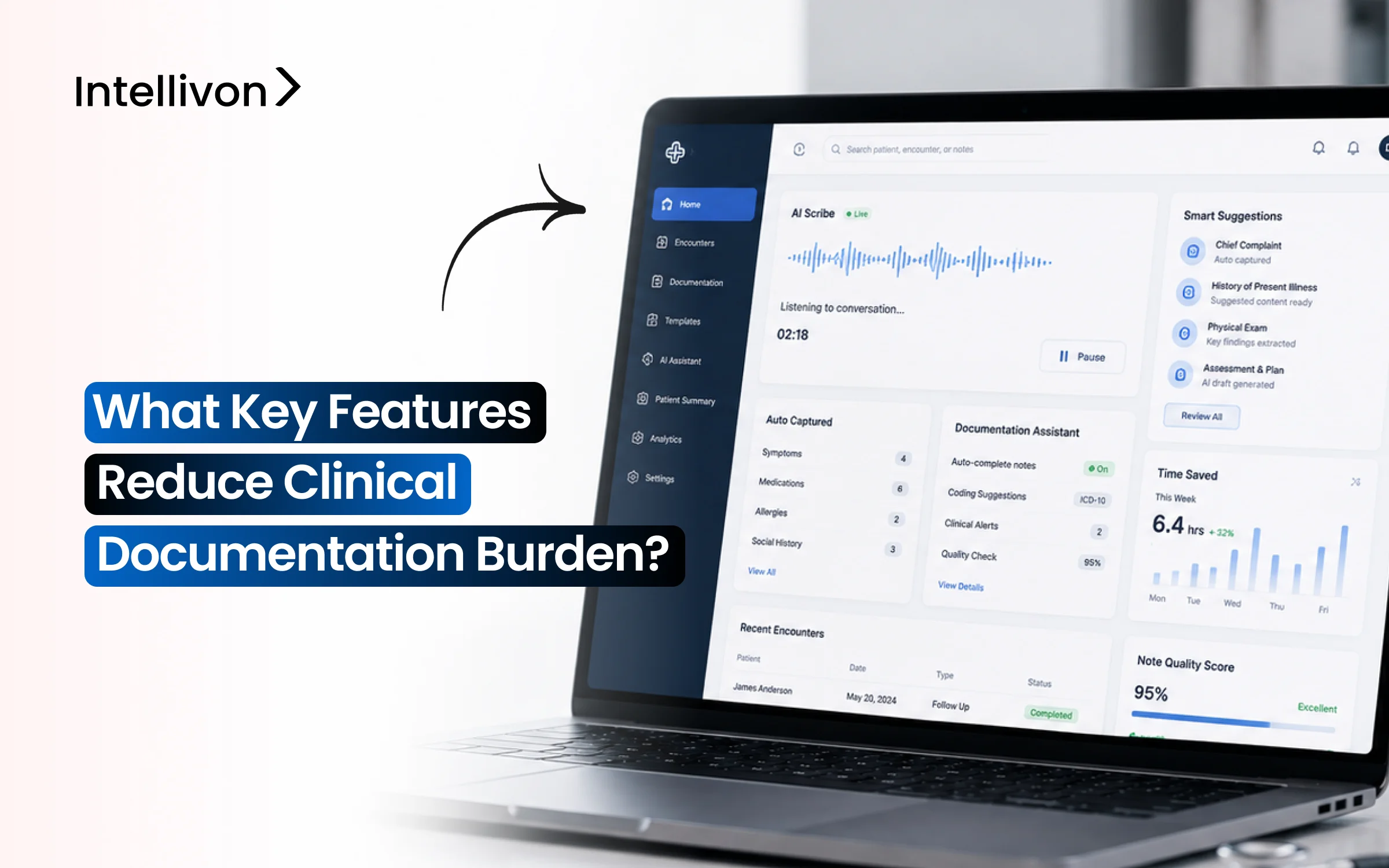
Clinical documentation becomes lighter when the right features quietly remove the work clinicians repeat all day. Instead of making doctors type, rebuild notes, search charts, and copy details back into the EHR, documentation automation features should help them capture the visit, review the note faster, and close charts with less after-hours work.
However, ambient capture alone does not solve the full burden. The real value comes when voice capture, specialty templates, patient context retrieval, EHR write-back, physician review, and burden analytics work as one workflow. A 2025 JAMA Network Open study found that ambient AI reduced time in notes per appointment from 6.2 to 5.3 minutes. That improvement becomes more meaningful when the platform is built to finish documentation, not just draft it.
Intellivon has spent over 10 years building healthcare AI systems with this practical approach: controlled AI, clean EHR integration, HIPAA-ready governance, and clinician approval built in from the start. This blog breaks down the features, architecture, compliance needs, cost ranges, and prioritization framework, so you can choose the right documentation automation build scope before committing budget.
What is a Clinical Documentation Automation Platform?
A clinical documentation automation platform uses ambient voice recognition and large language models to turn patient-physician conversations into structured clinical notes. This software captures real-time audio, extracts clinical data, and builds structured documents like SOAP notes or discharge summaries. Consequently, it cuts manual charting time from 15 minutes down to under two minutes per patient encounter.
This infrastructure integrates directly with your existing EHR system through secure APIs to update records automatically. Ultimately, these automation tools eliminate hours of manual entry and significantly lower clinical documentation fatigue for busy healthcare staff.
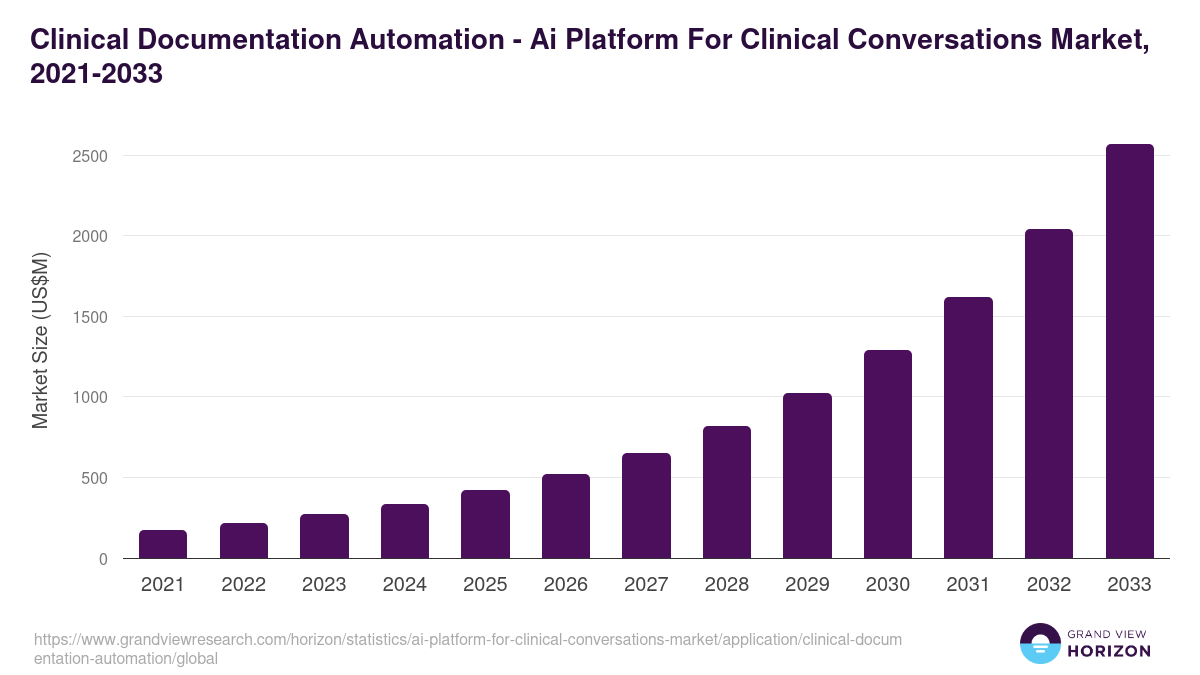
This spending surge shows that health systems are no longer treating automated charting as an experiment. Instead, hospitals are actively treating these tools as essential infrastructure to protect their staff from burnout and fix broken clinical workflows.
What Causes Burden on Clinical Documentation Automation Platforms?
The immediate burden driving the adoption of clinical documentation automation software stems from bloated administrative protocols, fragmented electronic health record data silos, and restrictive regulatory compliance frameworks.
Consequently, clinicians spend up to 2 hours on clerical tasks for every single hour of direct patient care. Addressing this operational strain requires targeted features that eliminate systemic friction points within the provider workflow.
1. Fragmented EHR Interface Workflows
A typical clinical charting task can require over 300 mouse clicks across dozens of separate screens to log basic patient metrics.
When patient history, current medications, and clinical notes are cordoned off into isolated modules, physicians encounter significant cognitive switching fatigue during every visit.
2. Rigid Billing and Compliance Documentation
To secure proper healthcare reimbursement under current MACRA MIPS and ICD-10 guidelines, clinicians must capture hyper-specific, exhaustive structured data fields.
Translating a conversational patient encounter into complex risk-adjustment documentation manually adds substantial time to the post-visit charting workflow.
3. Insufficient Ambient Audio Optimization
Standard dictation systems often fail to isolate a physician’s clinical assessment from ambient exam room noise or overlapping patient conversations.
Without advanced speaker diarization, which differentiates who is speaking in real time, the raw audio captures errors, forcing clinicians to spend additional hours manually rewriting and editing draft notes.
Ultimately, the primary cause of clinical documentation burden is the technical friction between rigid EHR infrastructure and human conversational workflows. Resolving this operational gridlock requires modern software to actively extract, structure, and write back data directly to the medical record without manual human intervention.
What Documentation Automation Features Actually Reduce Burden?
The documentation automation features that reduce burden most directly are ambient voice capture, real-time transcription, specialty-specific note generation, structured data extraction, EHR write-back, physician review workflows, and documentation quality checks.
These features reduce typing, duplicate entry, EHR click burden, and after-visit documentation time because they target the exact moments where clinicians lose time.
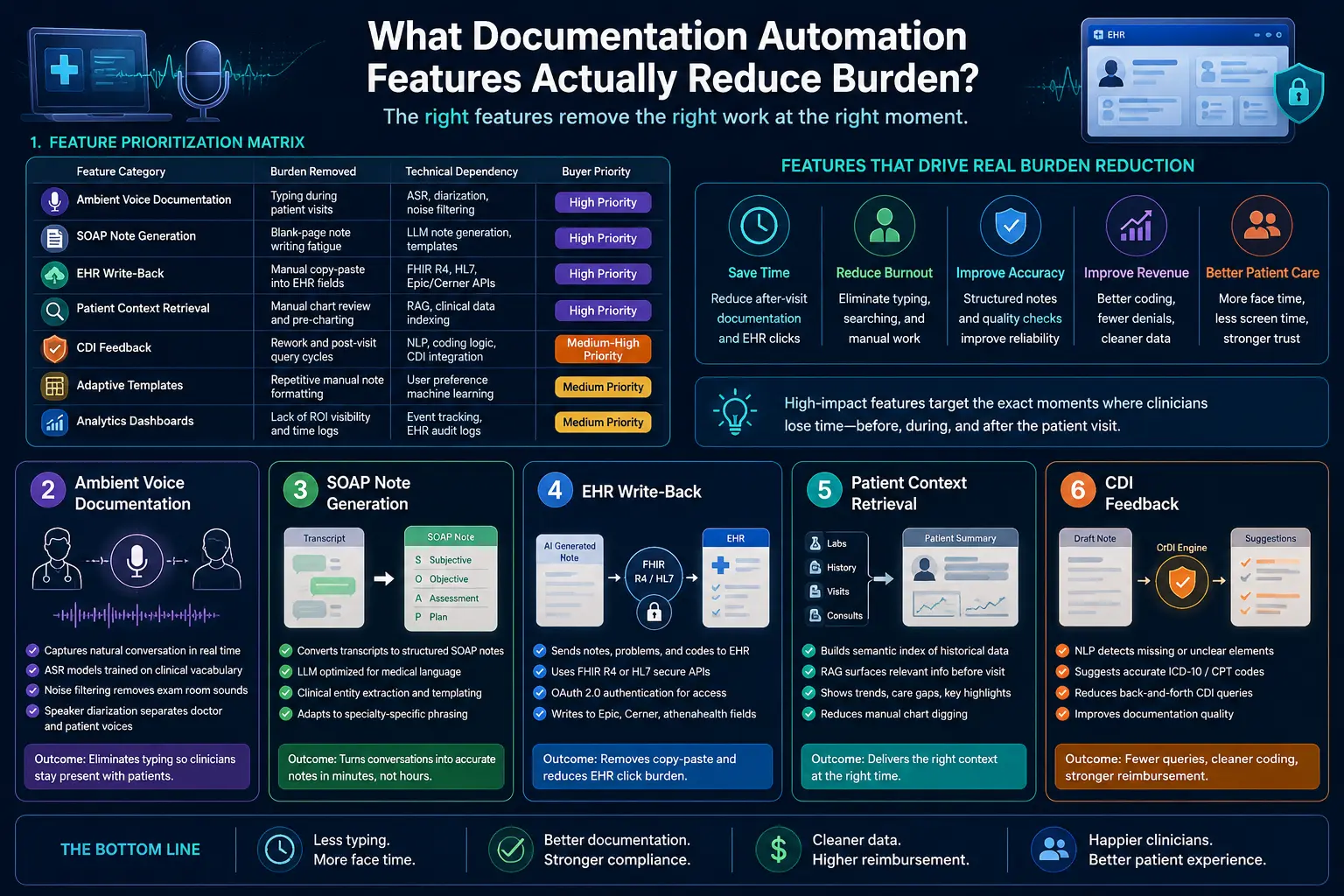
1. The Feature Prioritization Matrix
Evaluating clinical software requires separating essential infrastructure from superficial add-ons. The high-yield features focused on documentation automation must eliminate active physical tasks like typing, searching, and copy-pasting.
The table below classifies these core capabilities by operational impact and technical architecture.
| Feature Category | Burden Removed | Technical Dependency | Buyer Priority |
| Ambient Voice Documentation | Typing during patient visits | ASR, diarization, noise filtering | High Priority |
| SOAP Note Generation | Blank-page note writing fatigue | LLM note generation, templates | High Priority |
| EHR Write-Back | Manual copy-paste into EHR fields | FHIR R4, HL7, Epic/Cerner APIs | High Priority |
| Patient Context Retrieval | Manual chart review and pre-charting | RAG, clinical data indexing | High Priority |
| CDI Feedback | Rework and post-visit query cycles | NLP, coding logic, CDI integration | Medium-High Priority |
| Adaptive Templates | Repetitive manual note formatting | User preference machine learning | Medium Priority |
| Analytics Dashboards | Lack of ROI visibility and time logs | Event tracking, EHR audit logs | Medium Priority |
2. Ambient Voice Documentation Features
Ambient voice documentation uses advanced acoustic processing to capture natural conversational audio between a physician and a patient during an encounter.
This technology operates continuously in the background, eliminating the need for a clinician to maintain eye contact with an EHR screen or type notes during a physical examination.
Technically, this process depends on advanced speech recognition models that are explicitly trained on diverse clinical vocabularies and medical terminology.
- It incorporates multi-channel background noise filtering to remove ambient exam room sounds like medical equipment or HVAC humming.
- It utilizes advanced speaker diarization to separate the voice of the doctor from the patient automatically, ensuring the conversational audio stream maps precisely to the correct speaker roles.
3. SOAP Note Generation Features
SOAP note generation features automatically transform unformatted conversational transcripts into highly structured, medically accurate progress notes within minutes of a patient visit. This capability targets the intense cognitive exhaustion of drafting subjective observations, objective findings, clinical assessments, and treatment plans from scratch.
This system passes the anonymized transcript to a large language model optimized for clinical text processing and medical language understanding.
- The underlying software utilizes clinical entity extraction to group raw statements into standard Subjective, Objective, Assessment, and Plan categories.
- It applies prompt engineering and custom templates to ensure the output accurately mirrors the specific phrasing styles preferred by different medical specialties.
4. EHR Write-Back Features
EHR write-back features allow an automation platform to securely insert generated notes, updated problem lists, and discrete medical codes directly into specific electronic health record fields.
Without this feature, clinicians must manually copy text from an external AI window and paste it into multiple separate tabs within their legacy health record software. To achieve this, the application utilizes secure API endpoints built on the modern FHIR R4 standard or legacy HL7 messaging channels.
- The platform authenticates through the hospital infrastructure using secure OAuth 2.0 protocols to locate the exact patient record matching the active visit ID.
- It then delivers the structured text payload directly to the specific note fields or discrete data rows in Epic, Cerner, or athenahealth systems.
5. Patient Context Retrieval Features
Patient context retrieval features automatically summarize past medical history, old laboratory results, and historical specialist consultations before a provider enters the exam room.
This capability streamlines the pre-charting workflow, saving clinicians from digging through years of confusing PDF attachments and unorganized chronological charts. Technically, the system builds a semantic search index of the historical chart using advanced vector embedding models.
- When a patient schedules a visit, the platform runs localized retrieval-augmented generation pipelines to surface only the most relevant historical data points related to the upcoming visit reason.
- This data populates a unified pre-visit summary dashboard, giving the doctor instant visibility into historical trend lines and open care gaps.
For a deeper breakdown of how data retrieval optimizes institutional data access, see our guide on Intellivon Data Engineering Services. This ensures that your clinical staff has accurate context at the point of care without conducting slow manual searches.
Documentation Automation Features Should Be Ranked By Clinical Impact
Documentation automation features should be ranked by the amount of clinician work they remove, the risk they introduce, and the infrastructure they require. High-impact features reduce documentation time immediately.
Conversely, lower-impact features improve note quality, analytics, or downstream revenue only after the core workflow is stable.
1. The Documentation Burden Reduction Scorecard
The scorecard ranks features across five dimensions: time saved, click reduction, physician trust, EHR dependency, and compliance risk. Technically, you must score each feature from 1 to 5 across specific metrics.
- This framework tracks the pajama time reduction clinicians can feel.
- Measures active EHR click burden reduction during charting.
- Evaluates critical note accuracy improvement features in real time.
- Charts integration complexity alongside HIPAA and PHI exposure risks.
- Flags the immediate need for human-in-the-loop review interfaces.
2. High-Impact Features For The First Release
The first release must include features that reduce active physician effort during and immediately after the encounter.
Therefore, ambient voice documentation, SOAP note generation, inline editing, one-click note approval, and EHR write-back usually deliver the fastest visible results. Mechanically, the initial system architecture must bundle core engineering tools.
- The system deploys ambient AI documentation features during the visit.
- Runs real-time transcription features alongside post-visit transcription features.
- Processes clinical data using AI medical scribe features.
- Accelerates documentation using automated progress note automation pipelines.
- Populates templates using structured data extraction features instantly.
3. Second-Wave Features That Improve Quality And Revenue
Second-wave features improve documentation quality, coding accuracy, care continuity, and revenue integrity after clinicians trust the core note workflow.
These include CDI feedback, HCC capture documentation features, risk adjustment documentation, quality measure documentation, and coding suggestion features documentation. From a technical perspective, this phase integrates advanced analytics layers.
- The software activates clinical documentation improvement systems automatically.
- Provides real-time CDI feedback to the reviewer.
- Computes automated documentation quality scoring metrics instantly.
- Screens entries using automated note completeness checking tools.
- Suggests codes using ICD-10 suggestion clinical notes engines.
4. Interactive Patient Portal and Care Plan Automation
Advanced automation platforms integrate portal documentation and care tracking features directly into the clinician review loop. Consequently, this setup auto-generates patient-facing materials, after-visit summary generation artifacts, and care plan documentation features from the primary clinical transcript.
This process requires natural language generation engines to translate complex medical jargon.
- Coordinates data from remote patient monitoring documentation channels.
- Processes audio from telehealth visit documentation features seamlessly.
- Formats text using patient-reported outcome documentation styles.
- Pulls patient-generated health data into the clinical file.
- Pushes summaries directly to patient portal documentation features.
5. Multi-Encounter Continuity and Collaborative Sharing
Modern clinical workflows demand documentation tools that span multiple historical patient encounters and care teams. Specifically, these features enable cross-visit documentation continuity, collaborative documentation features, and automated care team documentation sharing across separate medical departments. Technically, this requires distributed data pipelines to track data.
- Aggregates longitudinal patient context retrieval features across charts.
- Deploys files using multi-specialty template support networks.
- Tracks entries using role-based access documentation tools.
- Routes tasks via custom co-signature workflow features.
- Signs off notes using attestation workflow automation scripts.
Prioritizing automated charting features by immediate clinical impact ensures rapid reduction of administrative burnout. Advanced coding, compliance, and patient communication capabilities should follow once the core transcription loop is stable.
The Architecture Behind Clinical Documentation Burden Reduction Features
Clinical documentation burden reduction features need a connected architecture that captures audio, processes clinical language, retrieves patient context, generates notes, validates quality, routes physician review, and writes approved content into the EHR.
Hence, without this architecture, the platform becomes a basic transcription tool rather than a true enterprise EHR documentation burden reduction platform.
1. Core Architecture Layers
| Architecture Layer | What It Does | Example Technologies | Risk If Missing |
| Audio Capture | Records encounter audio | Wearable microphones, mobile apps | Incomplete visit capture |
| ASR Layer | Converts speech to text | Medical ASR, noise filtering | Inaccurate conversation text |
| Clinical NLP | Extracts structured facts | Named entity recognition, NLP | Unstructured, messy output |
| LLM Generation | Drafts official documentation | Clinical LLMs, specialty templates | Generic, unhelpful drafts |
| RAG Context | Pulls deep chart history | Vector indexing, secure search | Missing critical history |
| Review Layer | Supports fast provider edits | Inline editing interfaces, widgets | Low physician trust |
| EHR Write-Back | Sends final data to chart | FHIR R4 standard APIs, HL7 | Heavy copy-paste burden |
| Governance | Tracks platform compliance | Role-based access, encryption | Serious PHI exposure risk |
2. Audio Capture And Speech Processing Layer
The audio layer captures the encounter without forcing rigid dictation formats. It uses ambient voice documentation features.
- The system connects via mobile documentation features and tablet tools.
- Uses multi-channel background noise filtering during patient visits.
- Identifies separate speakers using background speaker diarization clinical modules.
- Routes packets into real-time transcription features for text parsing.
- Resolves phrases using medical vocabulary recognition microservices instantly.
3. Clinical NLP And Structured Data Extraction Layer
The NLP layer converts raw transcript text into structured clinical facts. It extracts entities automatically.
- The system evaluates text using deep clinical language understanding features.
- Labels specialized medical terms via named entity recognition clinical nodes.
- Groups patient issues through background automated diagnosis extraction features.
- Isolates prescriptions instantly using medication extraction feature pipelines.
- Tracks objective metrics via vital signs documentation automation routines.
4. LLM Note Generation And Smart Template Layer
The note generation layer turns clinical facts into usable documentation. It builds progress notes.
- The model synthesizes clean prose using specialized LLM note generation features.
- Shapes paragraphs using responsive smart template features for EHR layouts.
- Matches specific medical provider preferences using adaptive template learning tools.
- Populates historical files through secure dynamic template population modules.
- Builds operational documents including automated discharge summary generation files.
5. RAG Patient Context Retrieval Layer
The RAG layer retrieves relevant patient history before and during documentation. It indexes files.
- The core application implements secure retrieval-augmented generation clinical workflows.
- Optimizes provider readiness using customized pre-charting automation tools.
- Reduces typing by utilizing patient history auto-population scripts.
- Traces long-term patient issues using chronic disease documentation features.
- Preserves narrative structure using cross-visit documentation continuity links.
An enterprise architecture requires a continuous data pipeline from audio ingestion to secure FHIR-based EHR integration. Omitting layers turns solutions into isolated transcription tools, which increases manual charting work.
What Features Reduce EHR Documentation Burden During The Visit?
The features that reduce EHR documentation burden during the visit are ambient listening, real-time transcription, specialty-specific recognition, patient history auto-population, order set documentation, and care plan documentation features.
These reduce screen focus during the encounter and allow clinicians to stay present while the system captures usable documentation.
1. Minimizing In-Visit Cognitive Friction
The administrative burden during patient encounters is primarily cognitive and interactional. Therefore, clinicians must not switch constantly between patient conversations and complex EHR fields. Ambient AI documentation features should run quietly in the background to capture medical data smoothly.
- The software logs patient concerns, clinical assessments, and follow-ups.
- Uses ambient voice documentation to track patient-provider dialogue.
- Captures multi-speaker interactions via real-time transcription features.
- Parses unique medical terminology using specialty-specific recognition engines.
- Records virtual consultations through telehealth visit documentation features.
- Tracks distributed remote encounters using virtual care documentation tools.
2. In-Visit Action and Care Order Automation
Clinical software must automate the immediate tasks that follow a patient assessment. Consequently, order entry automation features must capture intent from conversational speech directly. This prevents physicians from wading through nested menus to finalize routine treatment plans.
- The application loads predefined workflows using order set documentation templates.
- Validates treatment options using clinical decision support integration nodes.
- Structures immediate steps using care plan documentation features.
- Builds longitudinal management timelines via treatment plan automation scripts.
- Confirms compliance rules using clinical protocol documentation software.
During-visit automation must eliminate attention-switching rather than creating an extra screen for providers. The most effective systems keep patient encounters completely natural while preserving overall note quality.
What Features Reduce After-Hours Documentation Time?
The features that reduce after-hours documentation time are post-visit note drafting, one-click note approval, inline editing, specialty templates, note completeness checking, and EHR write-back. These capabilities directly reduce pajama time because they shorten the gap between the patient encounter and the signed clinical note.
1. Eliminating the Post-Visit Review Gridlock
True after-hours documentation reduction depends on swift draft generation rather than raw transcript delivery. Clinicians require immediate, high-fidelity summaries so they can verify information before leaving the clinic. Therefore, optimizing the time to sign clinical notes is a critical executive performance metric for health systems.
- The system processes background dialogue via post-visit transcription features.
- Formats the conversational history using SOAP note generation features.
- Accelerates documentation finalization through automated progress note automation.
- Displays the final text within a clean physician review interface design.
- Minimizes total charting delay to lower documentation after-visit time.
- Prevents charting backlogs to deliver a visible pajama time reduction clinicians can feel.
2. Rapid Note Editing and Verification Features
Physicians must simply approve the generated clinical note rather than rebuilding it from scratch. Consequently, the user interface must prioritize speed, allowing clinicians to make quick corrections easily. A continuous documentation feedback loop ensures the underlying model learns style preferences over time.
- The application supports rapid sign-off using one-click note approval buttons.
- Allows immediate text modifications via inline editing features documentation.
- Updates the underlying algorithms using specialized note accuracy improvement features.
- Catches potential compliance omissions through real-time documentation error detection.
Reducing after-hours charting depends entirely on how fast a clinician can trust, edit, and sign the note.
If review workflows take as long as manual typing, the platform fails to reduce burden. This is why automated EHR write-back remains a core infrastructure requirement.
EHR Integration Features Decide Whether The Platform Saves Time
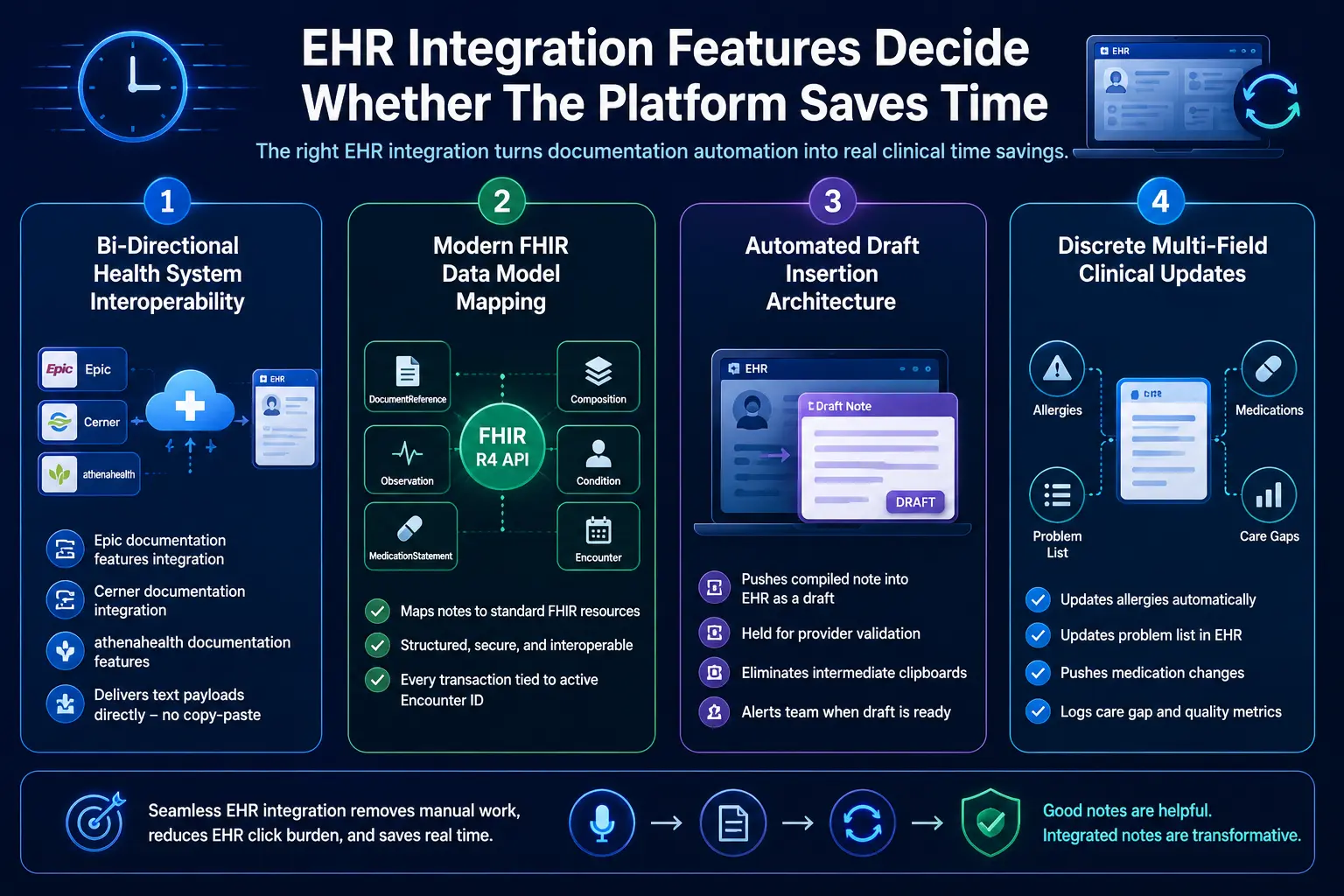
EHR integration documentation features determine whether automation removes work or shifts it to copy-paste. A useful platform needs Epic documentation features integration, Cerner documentation integration, athenahealth documentation features, EHR write-back features, structured data capture EHR, FHIR R4 documentation API, and HL7 integration documentation.
1. Bi-Directional Health System Interoperability
EHR write-back features serve as the true operational boundary for modern clinical software platforms. Without bi-directional communication channels, a platform simply creates another isolated software silo for providers. Therefore, establishing native HL7 integration documentation pathways is essential for seamless record updates.
- The system connects to enterprise software using Epic documentation features integration.
- Coordinates data sharing loops using custom Cerner documentation integration.
- Routes data into outpatient charts via athenahealth documentation features.
- Delivers text payloads directly without manual user transfer steps.
2. Modern FHIR Data Model Mapping
Achieving true structured data capture EHR requires mapping clinical notes to specific web data resources. Specifically, the software utilizes a secure FHIR R4 documentation API to transmit records. This ensures that every conversational element maps to its proper clinical data model.
- The system wraps the final note using the standard DocumentReference model.
- Structures highly complex multi-part charts through the Composition resource.
- Posts verified objective patient metrics using the Observation schema.
- Documents active clinical complaints using the standard Condition profile.
- Updates historical provider prescriptions using the MedicationStatement resource.
- Pairs every transaction directly with the current active Encounter ID.
3. Automated Draft Insertion Architecture
The platform must push clinical notes directly into the medical record as preliminary drafts. Consequently, this setup saves physicians from juggling external windows or retyping data entirely. The automation engine formats the data payload to match existing provider template structures.
- The application drops compiled text directly into designated EHR note sections.
- Holds the file in a pending state for final validation.
- Eliminates intermediate clipboards to lower overall EHR click burden.
- Alerts the medical team once a new draft is ready.
4. Discrete Multi-Field Clinical Updates
Advanced integration engines do more than just drop large blocks of text into charts. They parse the text to update discrete fields, problem lists, and allergies concurrently. For a deeper breakdown of EHR integration economics, see our guide on Healthcare Platform Development Costs.
- Identifies newly mentioned patient allergies during the ambient visit.
- Updates active problem lists automatically within the medical record.
- Pushes confirmed medication changes directly into the pharmacy module.
- Logs preventative care tracking metrics in the appropriate tab.
EHR integration is where documentation automation becomes operational. Without write-back, the system may produce a good note but still leave clinicians doing manual transfer.
Once integration is solved, compliance and review controls become the next priority.
Compliance Features Every AI Documentation Platform Needs
AI documentation platforms need HIPAA-compliant documentation features, PHI protection documentation AI, BAA requirements documentation vendors, audit trail documentation features, role-based access documentation, encryption, human review, and model monitoring.
These controls protect patient data while keeping every AI-generated note traceable, reviewable, and defensible.
1. End-to-End ePHI Data Protections
Compliance is far more complex than simple vendor paperwork. Because the system touches protected health information (ePHI) at capture, transcription, generation, storage, review, and write-back, technical safeguards must be continuous. Therefore, the architecture must shield data fields using enterprise safeguards.
- The system deploys strict HIPAA-compliant documentation features during data ingestion.
- Wraps conversational pipelines with real-time PHI protection documentation AI modules.
- Mandates executed agreements that meet BAA requirements and documentation vendors’ protocols.
- Secures all stored data using standard data encryption documentation platform layers.
- Isolates tenant profiles natively to prevent cross-institutional data bleeding completely.
2. Clinical Traceability and Human Oversight Controls
AI outputs must remain strictly draft documentation until a licensed clinician reviews and approves them. To meet regulatory transparency expectations, every generated note must preserve clear source traceability metrics back to the original transcript. Consequently, the user interface enforces clinician-in-the-loop validation milestones.
- The application provides granular controls using human-in-the-loop review features.
- Routes note editing tasks through a verified documentation approval workflow.
- Facilitates joint clinical signing using electronic co-signature workflow features.
- Confirms final electronic charting validation via attestation workflow automation tools.
3. Tamper-Evident Monitoring and Governance Auditing
Every interaction between an automated model and an electronic health record must be recorded permanently. System logs must capture operation-level activities to detail precisely which clinical agent modified data within the medical file. Specifically, this monitoring framework protects institutional data integrity during compliance reviews.
- The infrastructure logs granular transactions using audit trail documentation features.
- Restricts software interface permissions via role-based access documentation tools.
- Saves all generated drafts securely using persistent model output logging.
- Logs patient privacy permissions using mandatory in-visit consent capture flags.
- Cleans temporary data nodes using strict programmatic data retention controls.
- Tracks database queries explicitly using real-time access reason tracking tools.
Compliance features must be engineered directly into the software architecture before deployment rather than treated as a checklist item during procurement. The most secure systems maintain absolute clinician authority while auditing every single automated data touchpoint across the clinical network.
AI Models Required For Clinical Documentation Automation
AI documentation features reduce clinician burnout when multiple models work together. A production platform usually needs ASR, speaker diarization, clinical NLP, named entity recognition, LLM note generation, RAG retrieval, CDI classification, coding suggestion models, quality scoring, and monitoring models that detect drift, omissions, and hallucinated content.
1. Multi-Model Clinical Engine Pipelines
| Model / Engine | Role | Example Output | Safety Control |
| ASR Engine | Converts speech to transcript | Raw encounter transcript | Confidence score threshold |
| Diarization | Separates different speakers | Patient vs. physician labels | Speaker overlap filtering |
| Clinical NLP | Extracts structured facts | Diagnosis, meds, and labs | Medical entity validation |
| LLM Pipeline | Generates official documentation | Formatted SOAP notes | Core prompt guardrails |
| RAG Network | Retrieves chart context | Prior historical summaries | Explicit source citations |
| CDI Classifier | Locates document gaps | Missing acuity specificity | Reviewer approval prompts |
| Coding Model | Suggests industry codes | ICD-10, CPT, HCC tags | Human final confirmation |
| Quality Model | Scores the compiled note | Overall completeness score | Full system audit trail |
2. Acoustic and Text Alignment Processing
One large language model cannot handle clinical automation alone. Instead, production software deploys highly specialized acoustic tools first. These systems isolate raw voice vectors before text generation begins.
- The automatic speech recognition (ASR) framework translates speech to text.
ResearchGate - Processing tool applies multi-speaker diarization algorithms concurrently.
- Splits dialogue into distinct patient and clinician lines.
- Strips background room noise using acoustic filtering mechanisms.
- Routes clean conversational text strings to downstream nodes.
3. Medical Language Extraction and Validation
The text string moves into dedicated clinical language processing layers. Consequently, this step extracts complex clinical entities before drafting starts. This protects data accuracy across every medical chart note.
- The system deploys custom clinical entity extraction models automatically.
- Tags mentions of prescriptions using named entity recognition.
- Extracts explicit anatomical procedures from the raw transcript.
- Cross-references extracted metrics against verified master drug indexes.
- Validates terminology arrays prior to note composition phases.
4. Generative Note Construction and Context Grounding
The platform utilizes specialized generative models to assemble the note. However, the application must ground these drafts using localized data pools. This architecture effectively prevents standard language model factual errors.
- The generation pipeline ingests structured entities using clinical LLMs.
- Applies strict prompt guardrails to shape documentation sections.
- Injects historical charts via retrieval-augmented generation networks.
- Attaches verified source citations directly to every sentence.
- Outputs complete clinical drafts matching target provider formats.
5. Compliance and Revenue Integrity Classification
The final architectural layer evaluates documentation quality and billing codes. Thus, specific classification networks scan text for hidden revenue risks. This step optimizes downstream hospital billing workflows safely.
- The system runs specialized CDI classification algorithms across text.
- Flags missing diagnostic specificity before note submission events.
- Evaluates overall text using automated documentation quality scoring.
- Suggests accurate billing markers via ICD-10 suggestion engines.
- Queues recommendations inside the human reviewer validation interface.
The model layer must support the clinical workflow rather than defining it. Healthcare buyers should analyze exactly how individual models communicate, isolate data access, and implement multi-tiered guardrails to protect patient safety.
What Features Should Be Custom-Built Versus Bought?
Buy standard transcription, generic speech capture, and commodity hosting when your workflows are simple. At the same time, custom-build specialty templates, EHR write-back, CDI logic, RAG patient context retrieval, analytics, approval workflows, and enterprise governance when your clinical environment, compliance exposure, or product roadmap requires control.
1. Deciding When to Buy Existing Software
Off-the-shelf vendor solutions operate effectively under highly restricted operational conditions. Specifically, buying pre-built software works best for small clinics utilizing standardized documentation structures daily. These environments typically require minimal system customization and function without deep database write-back mechanisms.
- The workflow requires standard progress notes without big structural changes.
- Clinic operates without complex multi-system hospital network infrastructure.
- Clinical staff tolerate copying and pasting notes into fields manually.
- System configuration rules avoid complex custom data localization mandates.
- Medical group bypasses advanced localized predictive revenue risk profiling.
2. Deciding When to Custom-Build Platforms
Hospital networks and digital health IT companies require owned, highly adaptable system architectures.
Therefore, custom software construction becomes necessary when managing specialty medical workflows across separate regional clinics. Building a custom infrastructure ensures your organization retains full control over product development timelines.
- The deployment targets massive, multi-facility institutional hospital network frameworks.
- System serves distinct medical specialties requiring highly precise vocabularies.
- Platform functions as a commercial multi-tenant software-as-a-service product.
- Data flows require simultaneous multi-EHR database integration endpoints securely.
- Application runs deep real-time clinical documentation improvement checks natively.
3. Build Versus Buy Feature Matrix
| Capability Category | Buy Off-The-Shelf | Custom-Build Platform |
| Basic Transcription | Yes | Rarely |
| Ambient Audio Capture | Often | Sometimes |
| Specialty Templates | Sometimes | Often |
| EHR Write-Back | Sometimes | Often |
| RAG Patient History | Rarely | Often |
| CDI Integration | Rarely | Often |
| HCC Risk Adjustment | Sometimes | Often |
| Analytics Dashboard | Sometimes | Often |
| Multi-Tenant SaaS | Rarely | Yes |
| Governance Workflows | Sometimes | Often |
4. Evaluating Platform Integration Economics
Building custom components requires aligning engineering milestones with clear institutional budgeting boundaries. For a deeper breakdown of ambient AI build economics, see our guide on Ambient AI Documentation Build Costs. This step ensures financial outlays directly back workflow efficiency goals.
- Custom development projects typically establish fixed, predictable upfront software investments.
- Internal teams retain complete architectural ownership of internal database infrastructure rows.
- Custom engineering scales efficiently without generating expensive recurring per-seat vendor fees.
- System updates deploy directly without waiting for external vendor roadmap schedules.
The build-versus-buy decision should follow workflow complexity rather than raw technology excitement.
A single clinic may excel using an off-the-shelf tool, whereas large hospital networks or health IT companies require a controlled, custom-integrated platform.
How Much Do Documentation Automation Features Cost To Build?
A custom documentation automation platform usually costs $90,000–$280,000 for an MVP-to-production build, depending on specialty coverage, EHR integration depth, AI model complexity, compliance controls, and analytics scope. Simple pilots can start near $50,000, while multi-specialty enterprise systems can exceed $350,000.
Breakdown of Software Development Costs
| Development Phase | Typical Cost Range | What It Covers |
| Discovery & Workflow Mapping | $8,000–$20,000 | Specialty workflows, note types, burden metrics, compliance scope |
| UX Prototype & Review Design | $12,000–$30,000 | Review screen, inline editing, one-click approval, feedback loop |
| Audio Capture & ASR Pipeline | $18,000–$45,000 | Transcription, diarization, noise handling, mobile/tablet support |
| Clinical NLP & Data Extraction | $25,000–$60,000 | Diagnosis, medications, labs, vitals, procedures, history |
| LLM Note Generation & Templates | $25,000–$70,000 | SOAP notes, progress notes, discharge summaries, specialty templates |
| RAG Patient Context Retrieval | $20,000–$55,000 | Chart retrieval, pre-charting, cross-visit context |
| EHR Integration & Write-Back | $35,000–$100,000 | FHIR R4, HL7, Epic/Cerner/athenahealth integration |
| HIPAA, Audit, & Governance | $15,000–$45,000 | Encryption, RBAC, audit logs, BAA support, access controls |
| Analytics & ROI Dashboards | $15,000–$40,000 | Documentation time, approval rate, edit rate, burden dashboards |
| Testing, Validation, & Rollout | $20,000–$55,000 | UAT, specialty validation, monitoring, training |
Managing Long-Term Operating Expenditures
Plan for ongoing maintenance at 18%–30% of the initial build cost per year. This operational budget covers constant model performance monitoring and regular clinician-style updates. Additionally, engineering resources must maintain compliance as infrastructure scales over time.
- Funds API changes required to maintain Epic and Cerner web services.
- Supports routine security patches protecting central database records.
- Updates specific algorithms via automated note accuracy improvement features.
- Incorporates field updates based on direct provider performance data.
Budget planning should separate speech capture, note generation, integration, compliance, and analytics. This makes scope easier to defend with finance and clinical leadership. Cost rises when moving from drafting notes to safely writing structured data into the EHR.
How To Build A Clinical Documentation Automation Platform
Building a clinical documentation automation platform requires six stages: workflow mapping, feature prioritization, architecture design, model development, EHR integration, and clinical validation.
Each stage should connect directly to burden metrics such as documentation time, after-hours charting, EHR clicks, note accuracy, and physician approval speed.
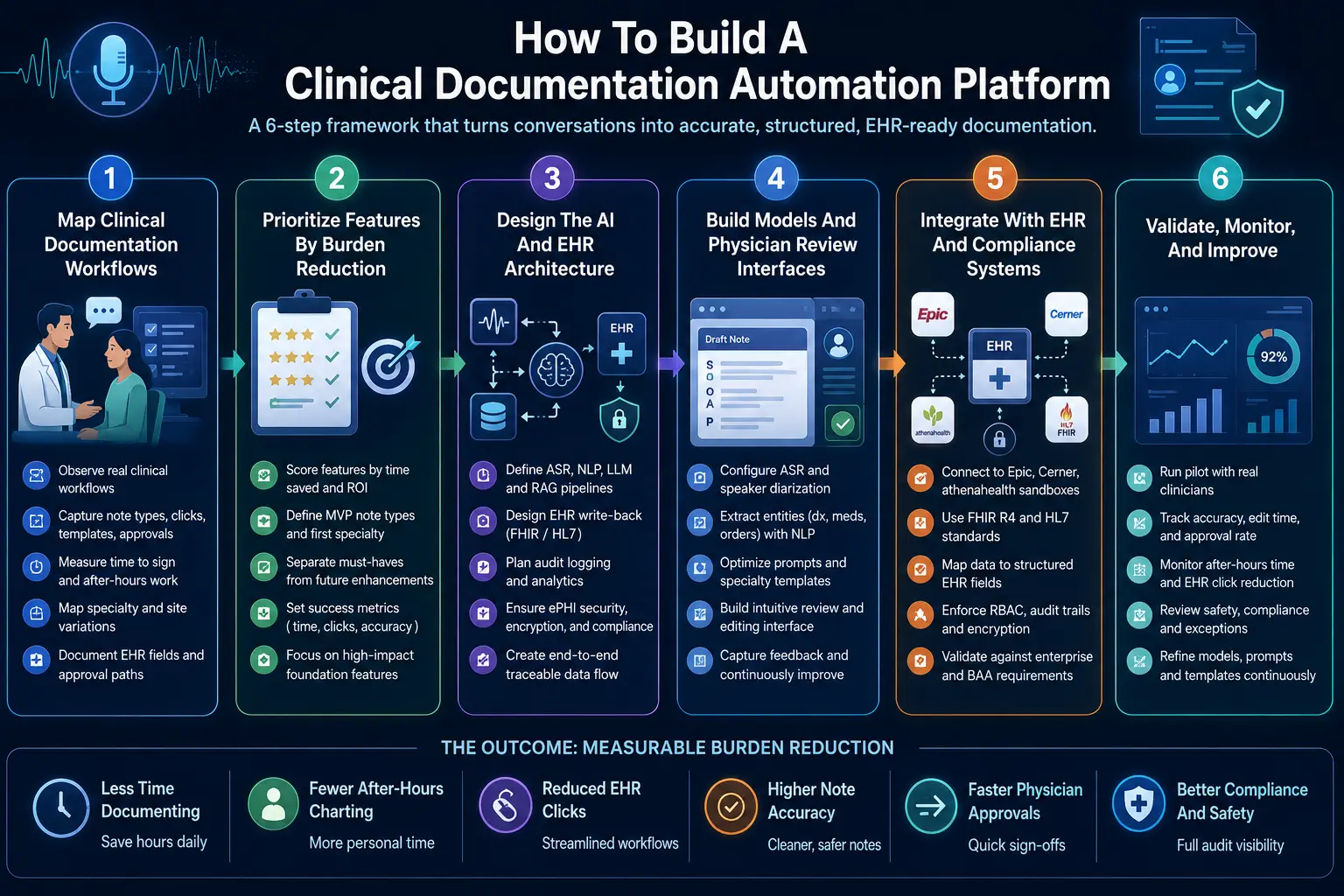
Step 1 — Map Clinical Documentation Workflows
The build should start by mapping how clinicians document before, during, and after visits. This includes note types, templates, EHR clicks, after-visit documentation time, approval steps, co-signature requirements, CDI queries, coding dependencies, and specialty variation across sites. Technically, your team must execute strict data gathering phases.
- Observe physical physician documentation workflows directly within local examination rooms.
- Identify highly repetitive typing sequences and unoptimized interface mouse click patterns.
- Capture precise baseline time to sign clinical notes across different provider shifts.
- Map specific note types by specialty to isolate custom formatting requirements early.
- Document exact destination EHR fields, active templates, and internal administrative approval workflows.
Step 2 — Prioritize Features By Burden Reduction
Feature prioritization should rank each capability by time saved, clinician trust, technical dependency, compliance risk, and ROI visibility.
Ambient capture, note generation, physician review, and EHR write-back usually rank higher than advanced analytics or coding suggestions in the first release. From a technical perspective, you must structure the development scope tightly.
- Build a standard feature scorecard comparing operational effort against immediate time savings.
- Decide baseline MVP note types to prevent engineering teams from over-scoping deliverables.
- Define your first specialty cohort to run controlled software testing phases.
- Separate immediate must-have features from advanced downstream revenue cycle platform enhancements.
- Set clear, measurable success metrics around calculated daily charting time reduction percentages.
Step 3 — Design The AI And EHR Architecture
The architecture should connect audio capture, ASR, clinical NLP, LLM note generation, RAG retrieval, physician review, EHR write-back, audit logging, and analytics.
This creates a controlled pipeline where every AI-generated note remains traceable from source encounter to final signed record. Mechanically, the software engineering team outlines system components.
- Define high-accuracy ASR and clinical NLP language processing pipeline vendor endpoints.
- Select your preferred LLM deployment approach based on institutional privacy policies.
- Design a responsive RAG knowledge retrieval network to index historical charts securely.
- Define the exact EHR write-back method using standardized web service technologies.
- Create a tamper-evident audit and real-time model accuracy monitoring software framework.
- Plan strict ePHI handling, data transport security, and end-to-end database encryption.
Step 4 — Build Models And Physician Review Interfaces
Model development should focus on usable clinical output, not raw generation quality alone.
The platform must produce concise notes, structured fields, confidence signals, editable sections, and feedback loops that help physicians correct errors quickly without rebuilding the note manually. Operationally, front-end design must complement core model execution layers.
- Configure baseline ASR models and multi-speaker diarization services for clinical use.
- Build specific NLP entity extraction layers to flag diagnoses and prescriptions automatically.
- Design specialized LLM prompts or execute managed base model fine-tuning iterations.
- Create dynamic specialty template logic that adjusts according to active provider profiles.
- Add native inline editing tools directly inside the centralized web interface layout.
- Add custom physician feedback capture elements to track draft-to-final text updates.
Step 5 — Integrate With EHR And Compliance Systems
EHR integration should let approved documentation flow into the right note, field, or clinical object without copy-paste.
The platform needs FHIR R4 documentation API support, HL7 integration documentation, role-based access, audit trails, encryption, and approval controls before production use. Structurally, developers open communication paths to core database arrays.
- Connect directly to enterprise Epic, Cerner, or athenahealth database sandboxes safely.
- Support standard resources and official clinical note entry automated workflows.
- Map newly extracted conversational facts to specific structured health record database fields.
- Add granular user identity profiles and strict role-based data access control tools.
- Log every automated AI action inside a secure compliance validation repository permanently.
- Validate technical system infrastructure against enterprise safety standards and active BAA requirements.
Step 6 — Validate, Monitor, And Improve
Validation should measure note accuracy, edit time, approval rate, time to sign notes, after-hours documentation reduction, EHR click reduction, physician satisfaction, and compliance exceptions.
A production system should improve through feedback while preserving a full audit trail. Technically, system administrators institute ongoing operational quality reviews.
- Run live pilot testing phases with small groups of active medical clinicians.
- Compare generated initial AI drafts against finalized signed notes to track discrepancies.
- Monitor specific model error categories including missing context or factual formatting slips.
- Track multi-facility specialty-level software adoption trends using central platform telemetry tools.
- Review safety events or data delivery exceptions alongside medical compliance supervisors.
- Update prompt structures, model weights, and system template files using aggregated feedback.
Building a production-ready clinical documentation platform requires shifting focus away from standalone model accuracy toward end-to-end pipeline integration.
True operational burden reduction only occurs when mapped workflows, custom interface design, and secure EHR database communication layers function as a single system.
Build An AI Clinical Documentation Automation Platform With Intellivon
Intellivon helps hospitals, specialty practices, EHR product teams, and healthtech companies build AI clinical documentation automation platforms that reduce real documentation work.
The focus stays on ambient capture, note generation, EHR write-back, physician review, HIPAA controls, and measurable time savings, so the platform supports clinicians without adding another workflow to manage.
A. Start By Mapping Documentation Burden
Intellivon first studies how clinicians document before, during, and after each visit. This includes note types, EHR clicks, after-hours charting, specialty templates, approval steps, and repeated manual work. This helps define the right automation scope before any model or feature is built.
B. Design The AI Documentation Architecture
The platform architecture connects ambient voice capture, transcription, clinical NLP, LLM note generation, patient context retrieval, and physician review. Each layer has a clear role, so the system does more than produce a transcript. It creates usable documentation that fits the clinical workflow.
C. Build EHR Integration And Write-Back
Intellivon builds the integration layer that lets approved notes move back into Epic, Cerner, athenahealth, or other EHR systems. This can include FHIR R4, HL7, structured data capture, note insertion, and audit-ready write-back workflows that reduce copy-paste work.
D. Add Compliance And Review Controls
Every platform includes HIPAA-ready controls for PHI protection, access permissions, audit trails, encryption, and clinician approval. AI-generated notes remain reviewable before they enter the record. This keeps physicians in control while giving leaders the governance they need for production use.
E. Measure The Time Clinicians Get Back
Intellivon adds dashboards that track documentation time, note approval speed, after-hours charting, edit rate, EHR click reduction, and physician adoption. This helps clinical and product leaders see which features reduce burden and which workflows need further improvement.
Ready To Build Your Clinical Documentation Automation Platform?
If you are planning an AI documentation platform, Intellivon can help you define the feature roadmap, build the architecture, integrate the EHR, add compliance controls, and launch a system that reduces documentation time in real clinical settings.
Conclusion
Clinical documentation automation works best when every feature removes a real task from the clinician’s day. Ambient capture, clinical NLP, LLM note generation, RAG patient context, physician review, EHR write-back, compliance controls, and ROI analytics must work together.
When planned around workflow evidence, these features reduce documentation time, after-hours charting, and EHR clicks while keeping clinicians in control of the final clinical record and care team documentation quality over time.
Things To Know About Documentation Automation Features
Q1. How much do documentation automation features cost to build?
A1. A custom documentation automation platform usually costs $90,000–$280,000 for an MVP-to-production build. However, a narrow ambient scribe pilot can start near $50,000. Meanwhile, multi-specialty platforms with EHR write-back, RAG, CDI logic, analytics, and HIPAA controls can exceed $350,000 because they require deeper integration, validation, governance, and testing in production environments.
Q2. How long does clinical documentation automation development take?
A2. A focused clinical documentation automation MVP usually takes 12–16 weeks when it covers one specialty, one EHR, and two or three note types. However, a production rollout takes 5–9 months because EHR write-back, physician review, compliance validation, model monitoring, and workflow testing must work safely across real clinical settings too.
Q3. What AI features reduce clinical documentation time fastest?
A3. Ambient voice documentation, real-time transcription, SOAP note generation, inline editing, one-click approval, and EHR write-back usually reduce clinical documentation time fastest. Together, these features remove typing, copy-paste, and note rebuilding. As a result, clinicians spend less time finishing charts and more time reviewing accurate documentation before final sign-off every day.
Q4. What features reduce EHR documentation burden in hospitals?
A4. The best EHR documentation burden reduction features include pre-charting automation, patient history auto-population, specialty templates, structured data extraction, physician review workflows, and FHIR R4 write-back. However, hospitals should prioritize features that shorten note completion first. Then, they can add CDI, coding, analytics, and quality-measure documentation features later as workflows mature.
Key Takeaways
- AI documentation does not reduce burden unless the physician can approve the note faster than they could write it manually.
- EHR write-back is not a backend feature. It is the difference between automation and another copy-paste workflow.
- Ambient transcription helps during the visit, but RAG patient context and smart templates reduce the work before and after the visit.
- Documentation automation ROI should be measured through time to sign notes, after-hours EHR time, edit rate, and approval rate.
- Custom AI makes sense when documentation is tied to specialty workflows, CDI, risk adjustment, EHR integration, and enterprise governance.