Key Takeaways:
- Clinical workflow automation needs EHR integration, task orchestration, role-based routing, and care pathway automation.
- Alert escalation, clinical documentation integration, AI summary support, and workflow analytics drive measurable impact.
- FHIR R4, HL7, RBAC, PHI encryption, and human-in-the-loop review ensure compliant production deployment.
- Focused MVPs cost $70,000 to $120,000 while multi-department enterprise builds reach $180,000 to $300,000.
- How Intellivon builds clinical workflow automation as production healthcare infrastructure, not isolated automation scripts.
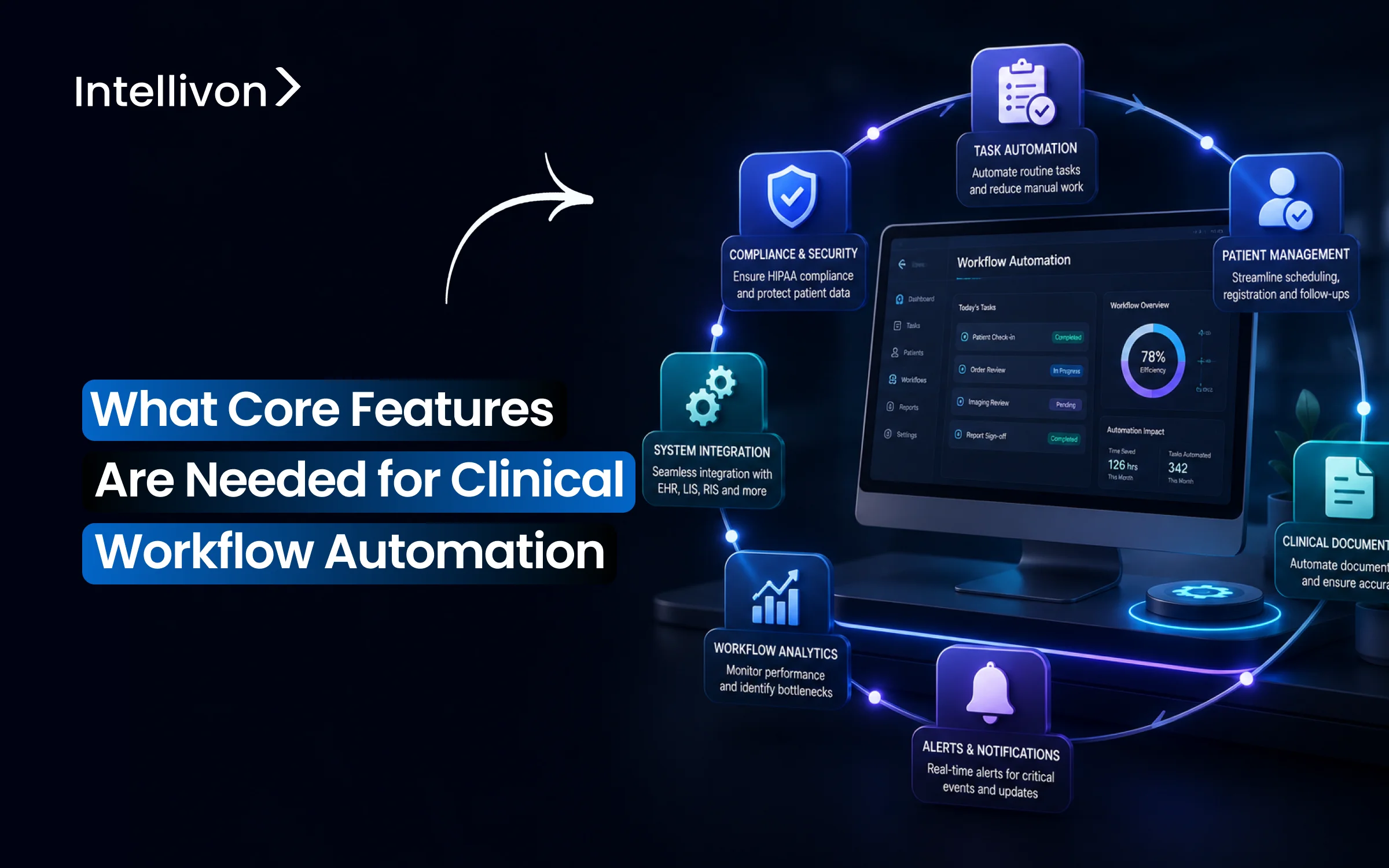
When you start mapping workflow automation features for a hospital network, six categories keep showing up. They are order automation, care team communication, alert escalation, EHR integration, AI documentation, and compliance controls. Getting that list right matters, but it does not solve what nursing staff lives with every shift. Tasks still slip through handoffs, alerts still go unacknowledged, and coordination still depends on memory.
So which feature actually closes that gap? It comes down to escalation logic, the part most vendors treat as an afterthought. When an early warning score or critical lab alert fires but nobody acknowledges it within minutes, the workflow has technically run, yet nothing has happened. Hospitals that build automatic re-escalation into their alert pathways cut average response time by up to 35%. In fact, early warning systems with built-in escalation reduce failure-to-rescue events by up to 20% within the first year.
Intellivon builds that escalation layer directly into clinical workflow automation, instead of bolting it on after a near-miss forces the issue. That sequencing is what this blog walks through. It covers every feature category, from order automation and care team handoffs to alert escalation, EHR and FHIR integration, AI-assisted documentation, and HIPAA compliance controls. By the end, you will have a framework to scope your build or evaluate any vendor.

What is a Clinical Workflow Automation Platform?
A clinical workflow automation platform is a centralized software layer that coordinates, schedules, and executes operational tasks across hospital IT networks without manual human intervention. This technology routes patient data, triggers clinical alerts, and syncs tasks across multiple care teams automatically.
By replacing manual paperwork and phone chains with rule-based digital triggers, these platforms eliminate coordination delays and reduce staff burnout.
Components of a Clinical Workflow Automation Platform
A clinical workflow automation platform relies on four core components to orchestrate hospital operations. These modular layers connect your existing software, process clinical data, and route tasks to the right care team members instantly.
- Task Orchestration Engine: The central brain that executes care pathways and schedules role-based task routing based on real-time triggers.
- Integration Framework: The connectivity layer utilizing HL7 and FHIR R4 workflow API features to sync with Epic or Cerner platforms.
- Rules and Alerts Processor: An automated engine that evaluates clinical protocols, triggers sepsis alerts, and handles critical results notification.
- Workflow Analytics Dashboard: A visual control panel that tracks task completion and helps managers achieve workflow bottleneck identification.
For a deeper look into what a clinical workflow automation platform does in a healthcare enterprise and how it helps synergize workflows, read our guide on How To Build an AI Healthcare Automation Platform.
Why Clinical Workflow Automation Is Becoming Non-Negotiable
Physician burnout, rising administrative costs, and accelerating AI adoption are colliding inside every health system right now.
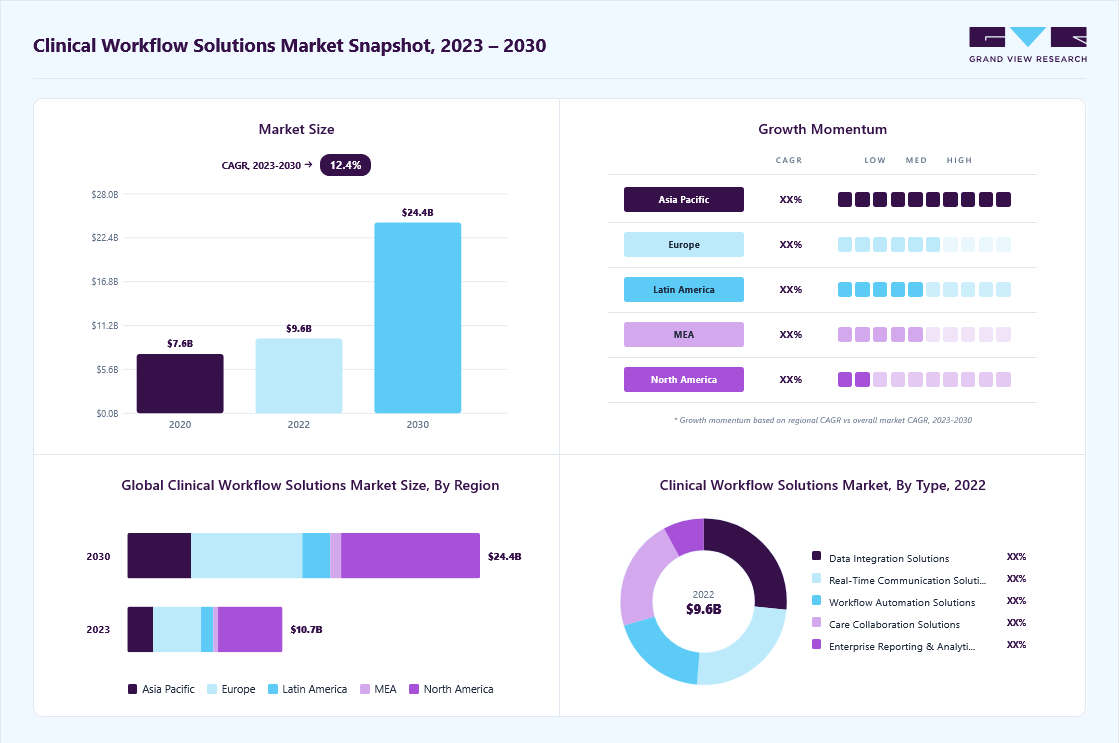
So when you look at why clinical workflow automation has moved from nice-to-have to mandate, the answer is not one trend, but several happening together. In fact, each section below shows exactly how, and why hospitals can no longer treat automation as optional.
1. Physician Burnout Is the Primary Driver
Burnout is the primary driver behind automation adoption. Nearly 50% of physicians report burnout symptoms, and administrative burden is the top contributor.
As a result, clinicians lose up to 34% of their workday to non-clinical tasks, including 16 minutes per patient on EHR documentation alone, while 92% of healthcare organizations separately report significant staffing challenges.
2. The Administrative Cost Burden Is Massive
Administrative complexity costs the U.S. health system $372 billion every year, and that number keeps growing.
However, automation already clawed back $258 billion in cost avoidance during 2024, a 17% jump from the year before. Even so, $16.3 billion in additional savings remains untapped through workflow automation alone, while insurance verification still costs $90 billion annually on its own.
3. AI Adoption Is Accelerating Fast
AI adoption in healthcare is moving faster than almost any other sector. As a result, hospital AI usage climbed from 66% to 71% in a single year, and physician AI utilization jumped from 38% to 66%, a 78% year-over-year increase.
Today, 86% of organizations already use AI in some form, and that share is projected to reach 80% adopting intelligent automation by the end of 2025.
4. Manual Processes Are Leaking Revenue
Manual processes actively leak revenue. In fact, 86% of claim denials trace back to poor documentation, and 1 in 4 denied claims never get recovered at all.
Manual workflows also run error rates 30% higher than automated systems, which then costs a mid-size hospital anywhere from $25,000 a month to $300,000 a year.
5. Clinical Workflow Automation Adoption Is Climbing Fast
Adoption itself is accelerating just as fast as the technology improves. As of March 2023, 30% of U.S. hospitals and health systems had already implemented clinical workflow automation, and that figure was expected to double to 61% by 2024.
In turn, nearly half, 48% of companies already using it, plan to expand into more clinical settings, while 35% of healthcare organizations had separately adopted robotic process automation.
6. Hospital Size Still Shapes AI Adoption
Hospital size still determines how fast AI gets adopted. Large hospitals with more than 400 beds report 90 to 96% AI usage, while smaller hospitals under 100 beds sit at just 53 to 59%.
Even so, the gap is closing as software adoption grows at a 32.8% CAGR, and NLP tools lead the pack at a 33.2% CAGR.
Clinical workflow automation is no longer optional, and the math already proves it. Burnout, $372 billion in administrative costs, and 86% AI adoption have converged into one mandate every hospital now has to act on.
Clinical Workflow Automation Feature Checklist for Hospitals
A clinical workflow automation feature checklist must include task routing, EHR integration, care pathway logic, alert escalation, documentation support, patient communication, analytics, audit trails, HIPAA controls, and configurable workflow templates.
These specific software elements allow healthcare systems to standardize operations safely. Consequently, clinical operations leaders can eliminate human error without forcing every distinct medical department into the same rigid digital process.
1. Automation Features Checklist
| Feature Category | Required Capability | Why It Matters | MVP or Enterprise |
| Task orchestration | Assign, route, track, and close tasks | Prevents handoff delays | MVP |
| Role-based routing | Routes by nurse, physician, pharmacist, case manager | Protects accountability | MVP |
| EHR integration | Reads and writes relevant data | Avoids duplicate entry | MVP |
| Alert escalation | Escalates overdue or critical tasks | Reduces missed action | MVP |
| Care pathway automation | Standardizes pathway steps | Reduces variation | Enterprise |
| AI documentation | Drafts summaries and structured notes | Reduces documentation load | Enterprise |
| Analytics dashboard | Tracks bottlenecks and ROI | Supports leadership reporting | MVP |
| Audit trail | Logs every action and override | Supports compliance | MVP |
2. Identifying Essential Hospital Capabilities
When planning a deployment, directors often ask what features clinical workflow automation needs to impact patient care immediately. The best features for clinical workflow automation focus entirely on removing communication friction between nursing and medical staff.
Therefore, hospital workflow automation core features must prioritize live data synchronization to prevent medical errors. Enterprise clinical workflow automation features expand on this by adding cross-facility data routing and machine learning pipelines.
3. The Minimum Viable Feature Set
A minimum viable product (MVP) must not attempt to automate every single department at once because over-engineering early phases causes user resistance. Instead, software architects recommend automating one high-volume, high-friction operational area before expanding your technical scope.
For example, a hospital can achieve fast ROI by automating specific, high-risk operational sequences.
- Discharge checklist automation features: Coordinates pharmacy clearances, transport scheduling, and patient education before departure.
- Lab result routing automation features: Delivers critical data directly to the treating physician with automatic delivery confirmation.
- Care gap closure workflow features: Identifies missing preventative screenings during patient intake and schedules them automatically.
- ED throughput automation features: Speeds up triage workflow automation features to decrease emergency department boarding times.
- Medication reconciliation automation features: Matches admission histories against current hospital orders to catch drug interactions.
4. The Advanced Enterprise Feature Set
Enterprise builds expand beyond localized clinical task automation platform features to unify entire multi-facility healthcare delivery networks under a single operational model.
This tier provides complete workflow configuration flexibility features so clinical informatics leads can alter operational rules on demand.
These platforms ensure that physicians, nurses, and specialists remain aligned across physical and digital environments.
- Multi-department workflow support features: Standardizes care transitions as patients move from the ED to the ICU.
- Specialty-specific workflow templates features: Provides pre-built clinical protocol automation features for cardiology, oncology, and pediatrics.
- Low-code workflow builder features: Allows clinical analysts to design and publish new care pathways without writing backend code.
- Multi-device workflow support features: Provides secure mobile workflow access features for clinicians on the move.
- Offline workflow capability features: Allows field nurses to document care without an active internet connection.
- Real-time workflow synchronization features: Ensures that data updates instantly across all connected screens across the health system.
Selecting the correct features prevents your automation layer from becoming an operational bottleneck. Balancing baseline MVP utility with enterprise flexibility ensures long-term clinician adoption and measurable hospital ROI.
To understand how these feature sets function in production, see our guide on Healthcare Billing Automation Platform Development. Navigating these technical tiers helps systems calculate their initial development budgets accurately.
Clinical Workflow Automation Architecture: 7 Core Layers
Clinical workflow automation architecture requires seven structural layers: data ingestion, patient identity, workflow engine, rules and protocol logic, AI assistance, user experience, and governance. Each distinct layer must support real-time clinical events, EHR context, PHI security, audit logging, and measurable workflow performance across departments.
This architectural segregation ensures the clinical task automation platform features remain resilient, secure, and easily maintainable.
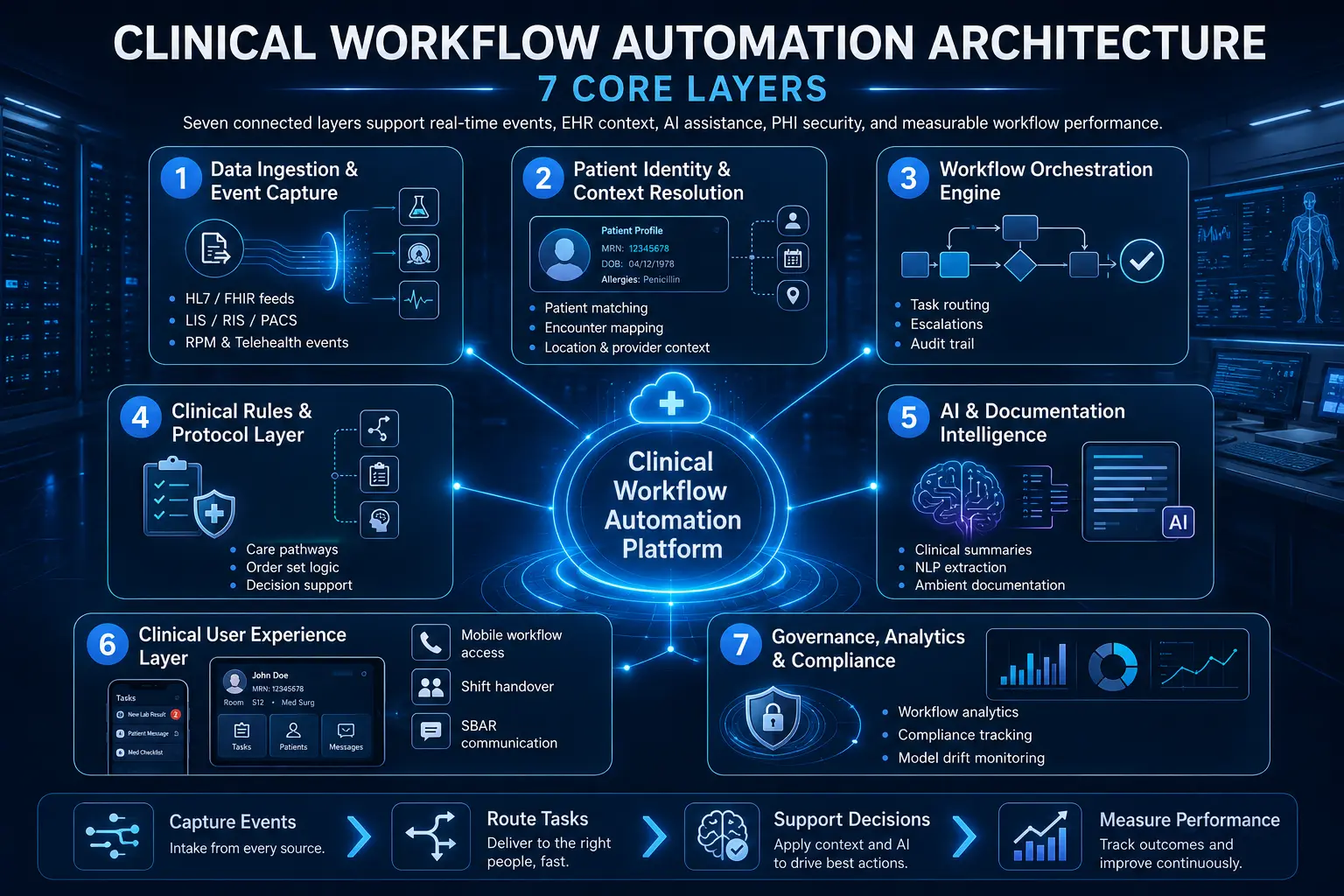
Layer 1 — Data Ingestion and Event Capture
The ingestion layer serves as the baseline data entry point for the entire automation network. It functions by capturing live operational and medical events from EHRs, laboratory information systems (LIS), radiology information systems (RIS), PACS, pharmacy software, patient portals, and remote monitoring hardware.
This ingestion happens continuously to feed downstream orchestration components.
- HL7 integration workflow features: Parses standard v2 and v3 messages including ADT feeds, admissions, discharges, and transfers.
- FHIR R4 workflow API features: Uses modern RESTful APIs to subscribe to real-time clinical resources and data changes.
- Lab order workflow automation features: Captures incoming requisitions and routes processing milestones to care teams.
- Imaging order workflow features: Flags new radiology requests and monitors fulfillment status inside the RIS.
- Remote patient monitoring workflow features: Ingests biometric telemetry directly from cellular or Bluetooth consumer devices.
- Telehealth workflow integration features: Triggers virtual check-in sequences when a patient enters a digital waiting room.
Layer 2 — Patient Identity and Context Resolution
This layer matches incoming clinical events to the correct individual patient file and active hospital stay. Misaligned data matching creates wrong-patient tasks, duplicate alerts, and unreliable dashboards that threaten patient safety.
Consequently, the resolution engine reconciles cross-platform identifiers to build a singular, trusted view of the active care setting.
- Patient matching: Validates medical record numbers (MRNs) across disjointed ancillary databases.
- Encounter mapping: Links incoming lab or imaging data to the specific current hospital admission.
- Practitioner mapping: Connects tasks to the specific attending physician, resident, or nurse on shift.
- Location mapping: Tracks physical placement down to the facility, wing, floor, and room number.
- Bed and unit context: Updates bed management workflow features when a patient shifts departments.
- Patient portal integration workflow features: Verifies digital credentials when patients update information from home.
Layer 3 — Workflow Orchestration Engine
The orchestration engine acts as the central router that assigns, escalates, and monitors every internal hospital task. It handles the core execution logic of task orchestration clinical workflows to keep operations moving forward without relying on manual phone calls.
If an asset or user fails to respond, the engine dynamically reroutes the workload.
- Task assignment automation features: Matches unassigned nursing duties to available floor staff based on current acuity.
- Role-based task routing features: Directs medication tasks to pharmacists and clinical questions to physicians automatically.
- Exception handling workflow features: Reroutes orders when a designated specialist is out of the office.
- Escalation workflow automation features: Alerts a clinical supervisor when a critical task remains unaddressed past its deadline.
- Workflow audit trail features: Records the exact timestamp of task creation, view, modification, and completion.
Layer 4 — Clinical Rules and Protocol Layer
This operational layer contains the structured medical logic that drives standardized clinical pathways. It evaluates real-time data against evidence-based hospital protocols to ensure compliance across all shifts.
By translating static medical guidelines into active computer logic, it provides inline support directly inside the clinician’s active workspace.
- Clinical protocol automation features: Triggers specific safety checklists when a patient matches risk criteria.
- Care pathway automation features: Maps the chronological progression of a patient through a standard surgical procedure.
- Order set automation features: Pre-populates bundles of laboratory, nursing, and imaging requests based on diagnosis.
- Clinical decision support integration features: Cross-references patient vitals against pharmacy databases to prevent medication contraindications.
- Quality measure workflow integration features: Flags missing document elements needed for institutional quality metrics.
Layer 5 — AI and Documentation Intelligence Layer
The intelligence layer uses natural language processing and machine learning to analyze unstructured text and draft administrative records. It offloads manual entry burdens by converting natural clinician speech and free-text notes into structured databases.
This layer operates with a strict human-in-the-loop clinical workflow features model to guarantee safety.
- NLP clinical text extraction features: Pulls discrete medical codes and diagnoses from typed unstructured progress notes.
- LLM-powered workflow automation features: Summarizes extensive historical medical files to brief incoming shift workers.
- Generative AI clinical summary features: Creates clean, concise summaries of long hospital stays for discharge paperwork.
- Retrieval-augmented generation clinical workflow features: Queries localized hospital guidelines to answer specific operational questions.
- Ambient AI documentation workflow features: Transcribes live patient-doctor conversations into formatted clinical notes automatically.
Layer 6 — Clinical User Experience Layer
The user experience layer delivers tasks and alerts to clinicians on their preferred physical devices. It prioritizes scannability and speed to ensure that alerts do not cause alarm fatigue or disrupt active bedside care.
This layer unifies communication tools, so care teams can hand off tasks without data loss.
- Mobile workflow access features: Delivers secure, encrypted push notifications to smartphones and tablets.
- Multi-device workflow support features: Syncs active task sheets between desktop workstations and mobile devices.
- Shift handover workflow features: Compiles current patient statuses for the incoming nursing shift.
- SBAR communication automation features: Formats clinical updates into Situation, Background, Assessment, and Recommendation structures.
- Rounding workflow automation features: Organizes daily patient lists logically by physical room proximity.
Layer 7 — Governance, Analytics, and Compliance Layer
The final layer tracks overall platform performance, system security, and machine learning model health. It translates raw operational data into visual reports so management can identify internal hospital bottlenecks.
Additionally, this layer monitors automated AI models to prevent performance degradation over time.
- Workflow analytics dashboard features: Provides real-time visual tracking of key performance indicators across departments.
- Task completion tracking features: Measures the exact time elapsed between task creation and final resolution.
- Workflow bottleneck identification features: Flags specific operational areas where tasks consistently stall.
- Compliance tracking workflow features: Monitors system usage to ensure total adherence to internal protocols.
- Regulatory reporting workflow features: Formats operational data for automated submission to health oversight agencies.
- MLOps workflow automation pipeline features: Manages the retraining and deployment of clinical risk prediction models.
- Model drift monitoring workflow features: Checks live AI outputs to catch drops in prediction accuracy early.
Building a modern hospital platform requires clear boundaries between data ingestion, rules logic, and user delivery layers. This decoupled structure ensures you can update individual AI models or clinical protocols without risking core database stability.
For a deeper breakdown of enterprise healthcare automation architecture, see our guide on How to Develop a Medical Claims Automation Platform.
Structuring these technical layers correctly sets up the foundation needed to implement specific, high-priority medical alert systems.
Task Orchestration Features That Reduce Manual Handoffs
Task orchestration features reduce manual handoffs by assigning clinical work to the right person, at the right time, with the right patient context. These features support clear task ownership, precise due times, automated escalation paths, sequence dependencies, live status visibility, and verifiable closure evidence across multi-disciplinary teams.
Consequently, hospitals can eliminate the administrative blind spots that typically stall patient care during daily shift changes.
1. Role-Based Task Assignment
A modern hospital requires distinct, specialized work areas that cater to the specific licensing and operational duties of different staff members. Rather than forcing everyone into a single unorganized feed, the platform must segregate work into targeted, functional modules.
This is where clinical task automation platform features become operationally useful by maintaining clear clinical boundaries.
- Nurse task queues: Track active bedside duties, vitals schedules, and medication administration workflow features.
- Physician review queues: Centralizes pending consult requests, critical lab reviews, and order entry workflow features.
- Pharmacy verification queues: Isolates high-risk prescriptions requiring immediate pharmacist validation and compounding clearance.
- Case manager discharge queues: Collects post-acute placement requests, insurance authorizations, and transport coordination steps.
- Lab and imaging follow-up queues: Gathers pending diagnostic data requiring provider review and formal data closure.
2. Dependency-Based Workflow Sequencing
Certain clinical tasks cannot start until a prior operational or medical action closes completely to ensure patient safety. Setting up strict sequential rules prevents care teams from skipping critical verification steps during hectic shifts.
This programmatic structure guarantees that downstream operations only trigger once prerequisites pass validation.
- Discharge checklist automation features: The final discharge checklist cannot close before medication reconciliation automation features are finished.
- Pre-op workflow automation features: The surgical readiness marker cannot close before explicit pre-op medical clearance is documented.
- Referral workflow automation features: Outbound specialty consults cannot transmit before necessary clinical documentation and charts are attached.
- Lab result routing automation features: A critical diagnostic alert cannot close before the ordering provider issues a formal acknowledgment.
3. Exception Handling and Fallback Routing
When real-world hospital operations diverge from ideal care pathways, the orchestrator must handle those deviations without stalling.
Automated fallback rules ensure that patient data never sits unaddressed in an inactive queue when a clinician gets called into an emergency. The system dynamically routes around human unavailability to keep care moving forward.
- Missing data handling: Flags incomplete order requisitions and routes them back to the creator for instant correction.
- Overdue task handling: Drops unaddressed high-priority tasks into active secondary backup alerts automatically.
- Unavailable clinician routing: Senses logged-out states or active surgery blocks and shifts tasks to active on-call staff.
- Escalation to charge nurse: Elevates unread nursing tasks to the floor manager when initial response limits expire.
- Escalation to attending physician: Bypasses residents and alerts the primary attending if a critical lab result sits unacknowledged.
- Manual override with reason capture: Allows authorized staff to break standard protocols provided they type an explicit operational reason.
4. Real-Time Status Tracking
To improve long-term hospital operations, leadership must have total transparency into active, historical, and stalled workflows. This tracking layer must function continuously across all connected devices to provide an unalterable record of hospital activity.
It changes raw operational timestamps into actionable insights for continuous quality refinement.
- Task completion tracking features: Records the exact time elapsed between initial order placement and final clinical execution.
- Workflow audit trail features: Uniquely logs every single view, click, modification, and override for strict regulatory compliance.
- Real-time workflow synchronization features: Guarantees that task states change instantly across mobile apps and central nurses’ stations.
- Workflow bottleneck identification features: Pinpoint specific diagnostic or physical departments where care handoffs consistently delay patient discharge.
Effective task orchestration changes hospital operations from a reactive, phone-dependent model into a proactive, exception-driven workflow. By automating basic task routing and fallback logic, health systems protect patient safety while giving hours back to tired clinicians.
For a deeper look at how to structure these data models safely, see our guide on How to Build PHI-Secure Enterprise Healthcare Platforms. Building this coordination foundation prepares health systems to address critical alert routing and emergency escalation logic.
Alert Escalation Features for Critical Results and Risk Signals
Alert escalation features make clinical workflow automation safer by ensuring critical results, abnormal vitals, deterioration signals, overdue tasks, and unresolved handoffs reach the right role before delay becomes harm.
These features prioritize severity, route tasks by responsibility, suppress duplicate noise, and record acknowledgement evidence. Consequently, clinical teams can respond to acute patient changes without managing messy communication channels.
1. Critical Results Notification Features
When a diagnostic test reveals a life-threatening value, the platform must deliver that data to the treating clinician instantly. The system bypasses standard message boards to open a direct, high-priority communication link.
If the primary contact remains unreachable during a set response window, the system adjusts the path dynamically to protect patient safety.
- Lab result routing automation features: Bypasses basic charting steps to deliver critical panic values to the physician’s mobile device.
- Radiology result routing: Surfaces critical structural findings like a pneumothorax directly to the active care team.
- Ordering physician acknowledgement: Tracks the exact timestamp when a provider views and confirms receipt of a critical result.
- Backup provider escalation: Routes the diagnostic alert to the designated on-call colleague if the initial provider does not respond within fifteen minutes.
- Time-to-acknowledgement tracking: Logs performance data to help administration measure institutional diagnostic closed-loop compliance.
2. Early Warning and Deterioration Workflows
Automating clinical safety requires continuous assessment of physiological trends rather than isolated milestone reviews. The automation platform acts as an ambient surveillance engine that flags early signs of patient decline.
To prevent false positives, high-risk alerts need human review, clear clinical thresholds, and explicit override capture.
- Early warning score automation features: Synthesizes multiple vital sign inputs to track overall patient stability scores.
- Sepsis alert workflow features: Combines temperature, heart rate, and lab markers to flag potential infections early.
- Deterioration detection workflow features: Notifies the rapid response team when algorithmic markers show sudden physiological decline.
- Vitals monitoring alert features: Warns bedside nurses when individual telemetry inputs cross safe operational lines.
- RPM alert triage: Separates genuine at-home biometric drops from basic equipment disconnects or telemetry noise.
3. Escalation Workflow Automation Features
The core value of an escalation engine lies in its ability to enforce accountability when a critical task stalls. The software follows a strict, time-delimited hierarchy to ensure that no urgent request goes unnoticed.
This structured escalation path functions completely automatically, creating an unalterable paper trail as it progresses.
- First alert: Delivers an initial, quiet notification to the primary assigned clinician’s active workspace.
- Reminder alert: Sends a high-priority vibration or tone to the clinician if the task remains unread after five minutes.
- Escalation to covering provider: Redirects the task to the designated cross-covering clinician if the primary owner is engaged in a procedure.
- Escalation to charge nurse: Elevates floor-level nursing delays to the active unit manager for hands-on operational support.
- Escalation to service line leader: Alerts the department director if systemic resource constraints cause major care delays.
- Audit log closure: Documents every notification milestone, recipient identity, and final resolution step for internal safety reviews.
4. Alert Fatigue Controls
The Agency for Healthcare Research and Quality (AHRQ) emphasizes that excessive, non-actionable digital alerts cause dangerous clinician fatigue and missed safety signals.
Therefore, a platform must filter out low-value data to keep care teams focused on true emergencies. The system uses advanced grouping logic to ensure that every alert demands clear clinical action.
- Duplicate suppression: Blocks redundant notifications when multiple systems flag the same abnormal laboratory value.
- Severity scoring: Organizes incoming notifications dynamically so true emergencies always sit above routine tasks.
- Alert grouping: Combines related operational alerts into a single cohesive update to prevent continuous device buzzing.
- Role-specific alert preferences: Limits non-urgent updates to specific administrative windows based on current staff duties.
- Quiet hours for non-urgent tasks: Delays standard administrative reminders until the beginning of daytime shifts.
- Clinical validation metrics: Tracks alert-to-action ratios to help informatics teams adjust noisy clinical thresholds.
Modern alert escalation turns static EHR data fields into active, time-sensitive defensive measures. By combining strict escalation logic with smart alert suppression, hospitals can protect patients while preventing staff burnout.
EHR Integration Features for Epic, Oracle Health, and HL7
EHR integration features determine whether clinical workflow automation reduces overall work or simply adds another digital dashboard for staff to manage.
A production-grade platform should support FHIR R4 APIs, legacy HL7 v2 event feeds, Epic and Oracle Health workflows, patient identity mapping, strict database write-back rules, SMART on FHIR authentication frameworks, immutable audit logs, and proactive failure monitoring dashboards.
Consequently, health systems can achieve bidirectional data consistency across all physical facilities without creating dangerous information silos.
1. Read-Only vs. Write-Back Integration
A read-only connection limits software utility because it only allows external systems to look at clinical data without altering it. In contrast, write-back integration supports instant task completion, live documentation updates, order status changes, and structured data capture directly within the main medical record.
Therefore, selecting write-back capabilities helps your business remove double-entry chores for busy floor staff.
- EHR integration workflow features: Synchronizes background scheduling, registration tracking, and clinical checklists across separate software tools.
- Epic workflow automation integration: Embeds external tasks directly into native Epic In Basket queues and Hyperspace communication modules.
- Cerner workflow automation integration: Connects automated clinical alerts straight to Oracle Health CareAware and PowerChart clinician views.
- FHIR R4 workflow API features: Uses web-native REST methods to modify active hospital records securely using standard JSON payloads.
2. HL7 and FHIR Workflow Scope
Modern clinical orchestration requires a blend of real-time web services and traditional event-driven notification channels. For this reason, software systems must ingest legacy messages while exposing modern data objects to web applications.
In addition, this combined data footprint ensures compliance with current federal sharing mandates.
- HL7 ADT feeds: Processes standard pipe-delimited v2 messages for instant admission, discharge, and transfer tracking.
- FHIR Patient and Encounter: Establishes the core identity and active stay context for incoming automation scripts.
- FHIR Observation and Condition: Monitors real-time clinical data like lab results, vital signs, and documented diagnoses.
- FHIR MedicationRequest and ServiceRequest: Tracks active pharmacy orders, specialist consults, and nursing task requisitions.
- FHIR DiagnosticReport: Pulls official text interpretations and structured metrics from radiology or laboratory networks.
3. Patient Portal and Communication Integration
True clinical workflow automation must extend beyond the physical hospital walls to include the patient as an active participant. By linking automated internal tracking layers to outbound channels, hospitals can keep families updated without adding to nursing phone work.
This integrated approach closes care loops automatically while maintaining a warm, professional patient experience.
- Patient portal integration workflow features: Pushes self-scheduling links and post-acute checklists directly into the patient’s personal account.
- Patient communication workflow features: Triggers automated, secure SMS texts to check on recovery milestones after a patient goes home.
- Preventive care reminder automation features: Evaluates historical charts to message patients who are overdue for routine health screenings.
- Patient education automation features: Delivers tailored recovery brochures automatically based on the documented discharge codes.
- Referral workflow automation features: Transmits necessary clinical charts to external specialists to speed up outbound appointment booking.
4. Integration Failure Monitoring
Because networks experience unexpected blinks and drops, an enterprise platform must have built-in safety buffers to handle data interruptions gracefully. A lack of interface oversight creates data gaps that directly threaten patient safety during critical care handoffs.
Therefore, your technical team needs real-time dashboards to catch and repair stuck data pipelines before clinicians notice a delay.
- Failed message queue: Holds broken or unparsed data payloads in a secure silo for technical review.
- Retry logic: Re-transmits failed API requests automatically using exponential backoff timers to handle brief network blinks.
- Interface downtime alerts: Notifies on-call software engineers immediately when a primary EHR data pipe stops responding.
- Data mismatch logs: Flags incoming records that contain conflicting patient names, dates, or medical record numbers.
- Duplicate patient warnings: Identifies potential double charts before bad data can attach to an incorrect individual file.
- Manual reconciliation queue: Provides an administrative interface where data analysts can resolve conflicting medical records safely.
EHR integration should never feel like a superficial add-on that forces doctors to toggle between different software tabs. Setting up deep, bidirectional write-back rules ensures that automated operational tasks sync directly into your primary medical database.
For a deeper breakdown of interoperability build economics, see our guide on the cost to develop a healthcare data interoperability platform. Reviewing these connectivity costs helps hospital networks prepare for the financial realities of building advanced documentation intelligence tools.
AI-Powered Clinical Workflow Features and Guardrails
AI-powered clinical workflow features should assist with summarization, prioritization, extraction, routing, prediction, and documentation, but they must not silently make high-risk clinical decisions.
The safest operational architecture uses explicit human review, confidence scores, algorithmic explainability, continuous model monitoring, strict PHI data controls, and clear escalation rules for uncertain outputs.
Consequently, healthcare organizations can safely use machine learning to remove administrative burdens while keeping licensed human practitioners firmly in control.
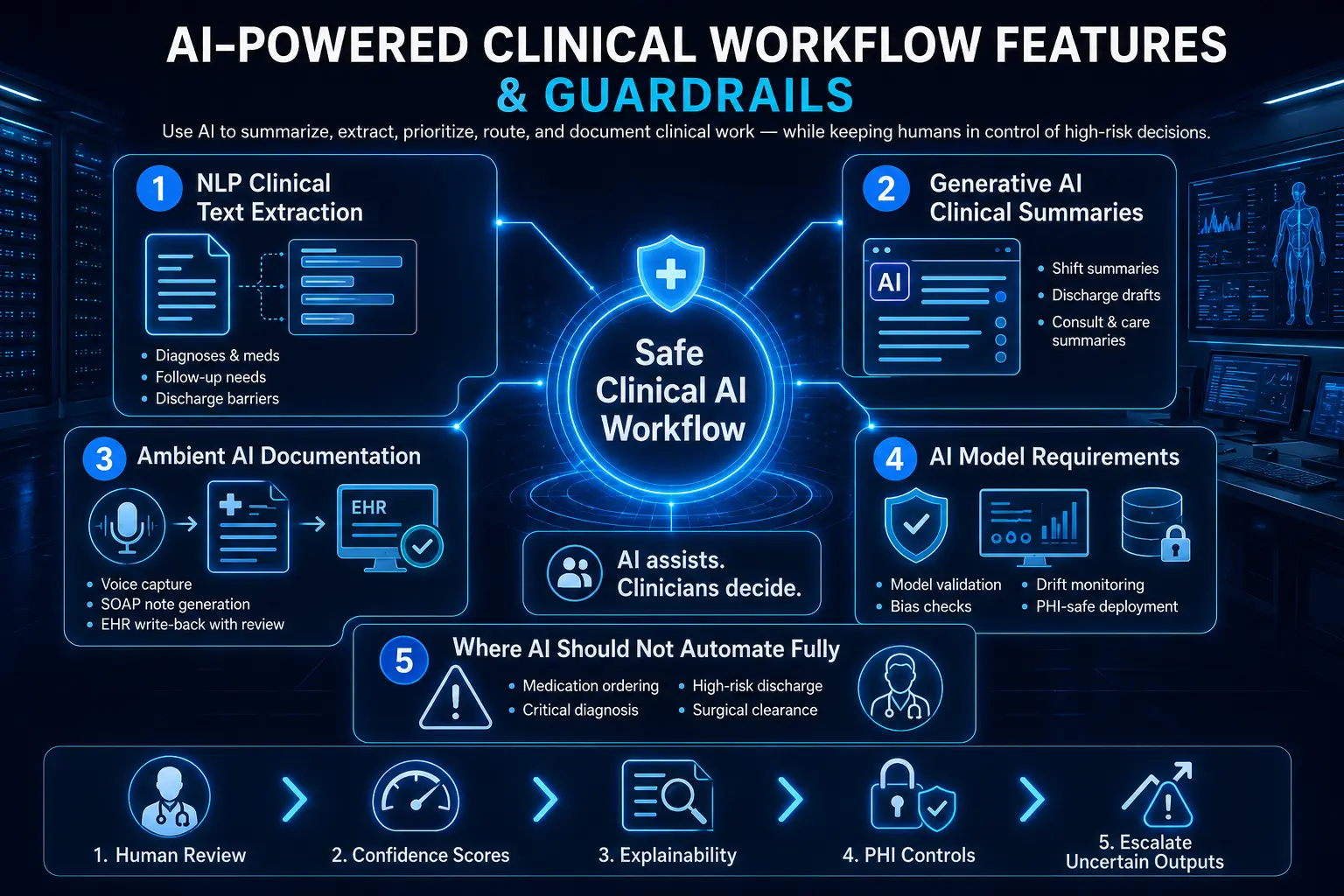
1. NLP Clinical Text Extraction Features
A massive amount of clinical data sits trapped within unstructured formats like free-text progress notes, typed messages, and scanned specialist reports. Natural language processing (NLP) resolves this by scanning text documents to pull out discrete medical fields automatically.
This translation feeds directly into your primary orchestration engine to trigger downstream operational checklists.
- Eiagnoses: Identifies active medical conditions to update the patient’s structural problem list.
- Extracting medication names: Pulls newly mentioned pharmaceutical names, dosages, and routes during transitions of care.
- Extracting follow-up needs: Flags required appointments or outpatient laboratory orders mentioned in doctor notes.
- Extracting discharge barriers: Spots social or physical blockers like missing home equipment to warn case managers early.
- Extracting pending results: Monitors open diagnostic tracking lists for missing data points before shift changes occur.
- Extracting referral details: Gathers specific diagnostic justifications to pre-populate outbound specialty clinic requisitions.
2. Generative AI Clinical Summary Features
Large language models can process extensive electronic charts to produce highly readable summaries tailored for specific hospital transitions. These LLM-powered workflow automation features help incoming clinicians absorb hours of medical history in seconds.
By using retrieval-augmented generation clinical workflow features, the system grounds every generated text block in verified, source-linked medical records.
- Shift summary: Compiles recent vital sign swings, medication modifications, and nursing notes for incoming floor staff.
- Rounds summary: Distills active physiological parameters and laboratory changes to brief multidisciplinary medical teams.
- Discharge summary draft: Generates a concise narrative overview of a patient’s entire hospital stay for post-acute providers.
- Consult summary: Highlights core specialty findings and structural recommendations for the primary attending team.
- Care management summary: Organizes complex social and financial background factors to guide long-term care plans.
- Patient message draft: Formats complex post-discharge medical directions into clear, everyday language for home use.
3. Ambient AI Documentation Workflow Features
Ambient documentation software captures the natural conversation between a clinician and a patient during an examination to offload typing work.
This background tool processes audio feeds securely, removing the need for intrusive computer input during face-to-face medical visits. Once verified by the provider, the finalized draft pushes seamlessly into the active EHR.
- Ambient voice capture: Uses directional microphone arrays to isolate speech clearly in busy examination rooms.
- Real-time transcription: Converts raw clinical speech into accurate text streams using specialized medical dictionaries.
- Speaker diarization: Distinguishes between the patient’s description of symptoms and the doctor’s physical exam findings.
- Structured note generation: Formats conversational speech into standard medical note styles like subjective, objective, assessment, and plan (SOAP) structures.
- Physician review workflow: Displays the generated draft note alongside the transcript for rapid clinician verification.
- EHR write-back: Populates discrete data fields across the central patient database instantly upon provider signature.
Voice documentation tools work best when they function as part of a connected clinical routing layer. Linking ambient capture to active chart searches ensures that medical notes remain accurate and contextually complete.
For a deeper breakdown of documentation automation features, see our guide on what key features reduce clinical documentation burden. Reviewing these text-generation frameworks allows engineering teams to implement the necessary backend validation pipelines required for algorithmic safety.
4. AI Model Requirements
Deploying large models within a hospital network requires strict infrastructure controls to ensure prediction consistency and data privacy. Your technical engineering group must maintain a comprehensive MLOps workflow automation pipeline features framework to oversee model health continuously.
This protective technical foundation stops silent performance drops before they can impact patient charting pipelines.
- Model validation: Evaluates new software models against verified clinical gold-standard datasets before publishing them.
- Drift monitoring: Tracks live output behavior to catch drops in text quality over time.
- Bias checks: Audits background outputs continuously to ensure equitable prediction accuracy across diverse patient demographics.
- Prompt logging: Records every instruction format variation to analyze system performance changes across departments.
- PHI-safe deployment: Isolates underlying machine learning pipelines within encrypted, zero-retention cloud environments.
- Human-in-the-loop approval: Mandates that a licensed provider manually review, adjust, and sign off on every automated draft.
5. Where AI Should Not Automate Fully
Maintaining high clinical credibility requires setting up clear, non-negotiable boundaries around what automated systems are allowed to do.
To protect patient safety, software should never operate autonomously within high-stakes clinical domains where errors cause immediate physical harm. Instead, technology must function purely as an advisory tool that surfaces information for human sign-off.
- Medication ordering: Prescribing drugs requires human pharmacological review to confirm correct dosing choices.
- Critical diagnosis: Issuing official medical diagnoses remains the exclusive legal responsibility of a licensed clinician.
- High-risk discharge decisions: Sending a complex patient home requires a human care manager’s practical evaluation.
- Sepsis override decisions: Changing active emergency screening alerts requires conscious human diagnostic review at the bedside.
- Surgical clearance: Clearing a patient for physical operations demands a personal, hands-on clinical risk evaluation.
- Legal medical necessity determinations: Reviewing insurance coverage parameters requires expert human compliance oversight.
Incorporating strict operational boundaries prevents machine learning models from making uncontrolled decisions. Treating AI as a supportive assistant protects hospital safety while recovering hours of lost documentation time.
HIPAA-Compliant Clinical Workflow Automation Features
HIPAA-compliant clinical workflow automation features protect protected health information (PHI) through role-based access controls, robust encryption protocols, Business Associate Agreement (BAA) coverage, clear data retention policies, and automated incident response workflows.
Therefore, establishing these core security controls ensures your automated systems safeguard patient privacy across all digital endpoints.
1. PHI Security Clinical Workflow Platform Requirements
Securing patient data requires implementing comprehensive physical, technical, and administrative protections across your entire enterprise cloud environment. To prevent unauthorized visibility, clinical data must remain unreadable during both active transit and long-term storage.
In addition, health systems must enforce automated access constraints to guarantee that only verified, active staff members can interact with sensitive charts.
- Encryption at rest: Secures physical databases, cold storage backups, and localized server caches using Advanced Encryption Standard (AES-256).
- Role-based access control workflow features: Restricts digital task lists so employees can only see files required for their specific immediate clinical duties.
- MFA and SSO: Authenticates user identities through multi-factor checks connected to centralized enterprise single sign-on infrastructure.
- Session timeout: Terminates idle clinical software sessions automatically after set periods of inactivity to protect unattended physical workstations.
- Device access policies: Blocks unauthorized mobile hardware or personal smartphones from connecting to internal hospital data streams.
- Secure cloud controls: Isolates machine learning models and data storage layers within highly secure, private cloud virtual networks.
2. Workflow Audit Trail Features
Maintaining a highly compliant data ecosystem demands complete visibility into every single interaction that occurs within your digital environment. For this reason, the platform must compile an unalterable, chronological log of all task activities and user interactions across departments.
This clear tracking history serves as your primary verification asset during official institutional security audits.
- Accessed a patient task: Logs the exact unique username and IP address of every staff member who opens a care checklist.
- Changed task status: Records the identity of the person who moves an operational step from pending to completed.
- Acknowledged alert: Captures the explicit confirmation signature when a treating provider reads an urgent medical update.
- Overrode recommendation: Documents instances where a clinician chooses to bypass a standard automated care protocol step.
- Exported data: Flags and records any internal administrative attempt to print, copy, or download protected medical files.
- Timestamp and reason capture: Attaches precise, atomic network times and mandatory justification text notes to all structural record modifications.
3. BAA Requirements Workflow Automation Vendors Must Meet
Healthcare institutions cannot build or expand clinical task automation platform features without establishing clear legal agreements regarding data liability. For this reason, external software development partners must assume direct legal responsibility for maintaining federal privacy standards.
Consequently, verifying these institutional agreements protects your health system from third-party operational liabilities.
- Business associate agreements: Mandates a signed corporate BAA that outlines direct legal liability for all handled patient data streams.
- Subprocessor inventory: Requires complete transparency and formal approval regarding any secondary cloud, database, or API infrastructure utilities used.
- Data residency: Restricts all active processing, machine learning evaluation, and data storage footprints strictly to localized domestic servers.
- Breach notification process: Outlines immediate, legally binding timelines for reporting potential security data anomalies to hospital leadership teams.
- Security review: Subjecting all codebases and backend systems to regular, independent third-party vulnerability scans and penetration assessments.
- Vendor risk management: Enforces continuous monitoring frameworks to ensure external engineering teams maintain high structural security baselines over time.
4. Zero-Trust Architecture Workflow Automation Controls
Modern security strategies operate under the assumption that perimeter defenses can fail, meaning every individual transaction requires continuous verification. For this reason, implementing an advanced zero-trust framework ensures that no user or application gains unmonitored privileges inside your network. This rigorous defense-in-depth layout isolates critical medical systems from potential external compromises.
- Least privilege: Limits baseline application permissions to the absolute minimum access required to execute specific operational tasks.
- Network segmentation: Splits core database layers, user interfaces, and external API connectors into completely isolated digital zones.
- Service-level identity: Validates the cryptographic identity of every internal software service before permitting data exchanges to occur.
- API authorization: Enforces continuous token validation routines to secure data pipelines connecting external tools to core EHR systems.
- Continuous logging: Pumps system telemetry, validation checks, and transaction logs into automated central tracking repositories continuously.
- SIEM integration: Connects all security logs to centralized security information and event management platforms for real-time threat monitoring.
Building a compliant clinical platform requires a thorough commitment to end-to-end data tracing and zero-trust engineering principles. By hardcoding audit trails and encryption routines into the ingestion layer, hospitals protect patient privacy without adding operational latency.
Reviewing these compliance costs helps operational management evaluate the total capital required to construct a production-ready enterprise platform.
Workflow Analytics Features That Prove ROI and Bottlenecks
Workflow analytics features prove whether automation is improving clinical operations or just moving tasks into a new system. The dashboard must track cycle time, task completion, overdue work, alert acknowledgement, handoff delays, discharge blockers, EHR time saved, user adoption, exception rates, and ROI by department.
Consequently, clinical operations leaders can use objective data to identify exact friction points instead of relying on subjective staff complaints.
1. Operational Metrics to Track
Evaluating platform efficacy requires continuous measurement of specific time-based milestones across the patient care journey. This background tracking calculates the precise duration of administrative handoffs between separate medical teams.
By monitoring these operational baselines, management can see exactly how fast data moves from initial system entry to final clinical action.
- Average task completion time: Calculates the exact minutes elapsed between a digital task being generated and its final closure.
- Time from order to acknowledgement: Measures how long an ordering provider takes to view and confirm an active diagnostic alert.
- Time from result to provider review: Monitors the window between a laboratory publishing a value and the clinician opening that specific file.
- Time from discharge order to discharge completion: Tracks the total transit delay as patients move out of physical hospital beds.
- Handoff completion rate: Compiles the percentage of shift-change checklists completed fully without skipped verification blocks.
- Escalation rate: Measures how frequently routine tasks stall long enough to trigger automated secondary supervisor alerts.
- Exception rate: Counts how often staff members use manual text overrides to bypass standard care pathway sequences.
2. Clinical Workflow Bottleneck Identification Features
The analytics layer unifies disparate platform logs to isolate hidden operational delays that stall overall patient throughput. This predictive engine flags specific departments or digital connections where work items consistently pile up.
Identifying these visual constraints allows informatics teams to alter underlying protocol logic before delays cause chronic emergency department boarding.
- Department-level bottlenecks: Pinpoints specific physical units where task completion times deviate from institutional averages.
- Role-level bottlenecks: Flags specialized staff positions that face disproportionate task volumes during specific shifts.
- Workflow dependency bottlenecks: Highlights sequential care steps that consistently stall downstream operations due to prerequisite delays.
- EHR interface bottlenecks: Monitors latent data synchronization drops between the external automation platform and core Epic or Cerner databases.
- Alert overload bottlenecks: Identifies specific clinical thresholds that trigger excessive notifications, resulting in clinician alarm fatigue.
3. Adoption Analytics
Software cannot deliver operational value if floor staff create offline workarounds to avoid using the digital interface. For this reason, the platform monitors user interaction patterns to verify genuine software adoption across all active units.
This tracking helps training coordinators spot specific groups that require additional technical onboarding support.
- Login frequency: Tracks how often distinct team members interact with the mobile workflow interface during their shifts.
- Task closure rates: Compiles the ratio of assigned tasks closed directly within the application versus those left abandoned.
- Override rates: Measures how often specific clinicians choose to manually silence or dismiss automated clinical decision prompts.
- Manual workaround reports: Flags instances where staff duplicate digital documentation using legacy physical paperwork or verbal chains.
- User feedback loops: Collects inline, single-tap clinician sentiment ratings directly under completed task blocks to gauge software friction.
- Training completion: Connects system access permissions to the verified completion of mandatory digital safety modules.
4. ROI Measurement Features
Demonstrating tangible platform value requires translating time savings into clear financial and quality metrics. According to industry analyses, mature automation systems help institutions reduce documentation time per encounter, minimize insurance denial rates, and lower staff turnover by actively mitigating clinical burnout scores.
- Staff time saved: Quantifies the total administrative hours recovered by eliminating manual charting and phone coordination chains.
- Reduced duplicate entry: Calculates the cost savings achieved by using bidirectional write-back rules to eliminate dual data logging.
- Shorter discharge delays: Maps decreased length-of-stay metrics to expanded bed capacity and improved institutional throughput revenue.
- Lower missed follow-up rates: Tracks the reduction in post-acute care complications resulting from automated outbound patient tracking.
- Reduced call volume: Measures the drop in internal hospital phone traffic following the launch of automated role-based queues.
- Better care gap closure: Correlates automated intake screening alerts with increased institutional compliance on federal quality star ratings.
- Reduced manual coordination costs: Measures the drop in total operational overhead achieved by replacing dedicated phone-routing roles with automated orchestration engines.
Gathering objective performance metrics ensures hospital networks can justify software expansion budgets to financial stakeholders. By converting background log timestamps into clear ROI readouts, health systems turn technical efficiency into a measurable operational asset.
For a deeper look at how to scale value from initial pilots to full enterprise deployments, see our guide on the development cost for an enterprise population health platform. Reviewing these analytical frameworks sets up the foundation needed to build an accurate development budget.
How Much Do Clinical Workflow Automation Features Cost
Clinical workflow automation features usually cost $70,000 to $300,000 to build, depending on workflow scope, EHR integration depth, AI model use, compliance controls, and department count. A narrow MVP costs $70,000 to $120,000, while a multi-department enterprise platform costs $180,000 to $300,000.
Consequently, health systems can control costs by standardizing a single high-friction operational pathway before investing in wide cross-facility expansions.
1. Cost by Build Tier
| Build Tier | Cost Range | Best Fit | Included Scope |
| Focused MVP | $70,000–$120,000 | One workflow, one department | Task routing, basic EHR integration, dashboards, audit logs |
| Controlled clinical platform | $120,000–$180,000 | Two to three departments | Role routing, escalation, FHIR/HL7, patient communication, compliance |
| Enterprise workflow platform | $180,000–$300,000 | Multi-department hospital network | AI summaries, care pathway automation, advanced analytics, governance |
2. Cost Breakdown by Development Phase
| Development Phase | Cost Range | What It Covers |
| Discovery and workflow mapping | $8,000–$20,000 | Current-state maps, bottlenecks, roles, success metrics |
| Architecture and data model | $12,000–$35,000 | Workflow engine, patient context model, event schema |
| EHR and system integration | $18,000–$60,000 | FHIR R4, HL7, Epic, Oracle Health, LIS, RIS, portal integrations |
| Core orchestration MVP | $20,000–$55,000 | Task routing, dependencies, escalation, exception handling |
| AI and documentation features | $18,000–$55,000 | NLP extraction, LLM summaries, ambient documentation integration |
| Security and compliance | $10,000–$35,000 | RBAC, audit logs, encryption, BAA support, access controls |
| Testing, pilot, and rollout | $10,000–$30,000 | UAT, training, go-live support, adoption analytics |
3. Ongoing Maintenance Cost
Annual maintenance usually costs 15% to 25% of the initial software build budget. For example, a $120,000 MVP should budget $18,000 to $30,000 per year, while a $300,000 enterprise platform requires $45,000 to $75,000 annually.
Therefore, accounting for these recurring cycles prevents operational downtime and ensures system stability as external networks evolve.
- EHR API updates: Adjusts integration code when core hospital databases modify their underlying data endpoints.
- HL7 interface monitoring: Oversees continuous transmission pipelines to fix pipe-delimited message drops early.
- Security patches: Deploys routine software security updates to maintain total protection against infrastructure vulnerabilities.
- Workflow rule updates: Alters automated care pathway configurations to incorporate updated clinical protocols on demand.
- AI model monitoring: Audits production machine learning pipelines continuously to capture and resolve model drift issues.
- Dashboard changes: Modifies visual analytical data blocks to support evolving institutional performance metrics reporting.
- Compliance evidence updates: Compiles system access logs continuously to provide fresh verification documentation for state safety auditors.
Estimating the complete lifetime cost of software development requires budgeting for both initial implementation phases and recurring system upkeep. By pairing clear baseline development ranges with long-term maintenance percentages, healthcare leadership can secure stable funding approvals.
Reviewing these budget tiers prepares engineering teams to answer frequently asked implementation questions from executive stakeholders.
Build a Clinical Workflow Automation Platform With Intellivon
Intellivon helps healthcare teams build clinical workflow automation platforms around real hospital workflows, EHR integration, AI assistance, compliance controls, and measurable operational outcomes.
The work starts with workflow mapping, then moves into architecture, integration, automation logic, AI support, testing, rollout, and monitoring across care delivery environments.
1. Map Clinical Workflows Before Building Features
Intellivon starts by mapping how clinical work actually moves across departments, teams, systems, and patient touchpoints. This includes discharge planning, ED triage, lab result routing, medication reconciliation, rounding workflows, and patient communication workflows.
This step helps teams identify where delays, duplicate work, missed handoffs, and manual follow-ups happen. It also prevents the platform from becoming another dashboard that adds work instead of reducing it.
By mapping workflows first, Intellivon defines which tasks should be automated, which should stay clinician-led, and which need human review before action.
2. Design the Workflow Architecture
Intellivon designs clinical workflow automation architecture around interoperability, routing logic, compliance, and role-specific task movement. The platform can connect with EHRs through FHIR R4, HL7 interfaces, custom APIs, and secure integration layers.
The architecture includes role-based routing, task orchestration, audit trails, PHI controls, exception handling, and workflow status tracking. This gives nurses, physicians, care coordinators, and administrative teams the right task at the right time.
The goal is to make automation fit into the clinical operating model, not force staff to adapt to another disconnected system.
3. Add AI Where It Reduces Real Work
Intellivon adds AI where it can reduce repetitive effort, improve prioritization, or speed up documentation support. This can include clinical summaries, NLP extraction, ambient documentation workflows, care gap prioritization, and intelligent task recommendations.
However, AI decisions are not treated as automatic clinical authority. Intellivon builds human-in-the-loop review into sensitive workflows, especially when the output affects care coordination, documentation, escalation, or patient communication.
The team also supports drift monitoring, performance checks, and governance controls so AI remains useful after deployment.
4. Build for Compliance and Scale
Clinical workflow automation must be secure, auditable, and scalable from the first release. Intellivon builds platforms with HIPAA safeguards, BAA support, RBAC, zero-trust architecture, workflow audit trails, MLOps governance, and scalable infrastructure.
These controls help healthcare teams protect PHI, track workflow actions, manage user permissions, and monitor AI-supported workflows over time. They also make the platform easier to expand across departments, facilities, and clinical use cases.
For hospitals and health systems, this matters because automation only creates value when it can operate safely in production.
Plan Your Clinical Workflow Automation Build
Clinical workflow automation works best when it starts with one high-friction workflow and expands after measurable results.
Intellivon helps healthcare teams scope the first build, define integration needs, identify automation opportunities, and design a compliant platform that can scale across care operations.
Conclusion
Workflow automation features for clinical care should reduce manual coordination without removing clinical accountability. The strongest platforms connect EHR data, task routing, alert escalation, care pathways, AI documentation, patient communication, analytics, and compliance controls into one governed workflow layer.
Additionally, a focused build usually starts at $70,000–$120,000, while a deeper enterprise platform can reach $180,000–$300,000. Hospitals should prioritize workflows where delays are measurable, ownership is clear, and integration access is realistic.
Things To Know About Workflow Automation Features
Q1. How much do clinical workflow automation platform features cost?
A1. Clinical workflow automation platform features usually cost $70,000–$300,000 to build. Typically, an MVP with task routing, dashboards, EHR data access, and HIPAA controls costs $70,000–$120,000. However, multi-department platforms with AI summaries, FHIR/HL7 integration, escalation workflows, and analytics usually reach $180,000–$300,000.
Q2. How long does clinical workflow automation development take?
A2. A focused clinical workflow automation MVP usually takes 10–16 weeks. However, a production platform with EHR integration, alert escalation, compliance controls, user testing, and pilot rollout usually takes 4–7 months. Meanwhile, multi-department hospital networks should plan 7–12 months across ED, nursing, discharge, pharmacy, lab, and imaging workflows.
Q3. What integration requirements matter most?
A3. The most important integration requirements are FHIR R4 APIs, HL7 v2 feeds, Epic or Oracle Health connectivity, identity mapping, SMART on FHIR authentication, audit logging, and failure monitoring. Without these, the platform cannot reliably read, route, and write workflow data. As a result, automation becomes another manual coordination layer.
Q4. Are HIPAA-compliant clinical workflow automation features enough?
A4. HIPAA-compliant clinical workflow automation features are necessary, but they are not enough alone. The platform also needs secure configuration, BAA coverage, role-based access, audit trails, encryption, minimum necessary access, incident response workflows, and staff training. Therefore, compliance depends on both software design and daily operational discipline.
Q5. Why do EHR workflow automations break?
A5. EHR workflow automations break when teams rely on screen-based bots, unstable UI paths, incomplete field mapping, missing exception logic, or weak monitoring. However, API-first integration, HL7 event feeds, FHIR resources, retry queues, and interface failure dashboards make clinical automation more reliable than fragile RPA scripts.
Key Takeaways
- Hospitals do not need more dashboards. They need workflow automation features that move tasks across roles, departments, and systems with audit-ready accountability.
- AI clinical workflow automation works best when it summarizes, extracts, prioritizes, and routes work, not when it silently makes high-risk clinical decisions.
- The most expensive workflow automation mistake is skipping EHR integration depth. A cheap tool becomes costly when staff still copy data between systems.
- A $70,000 MVP can prove value when it focuses on one painful workflow. A $300,000 platform should support multi-department orchestration, AI assistance, compliance, and ROI analytics.
- Clinical workflow automation should start with discharge, critical results, medication reconciliation, referrals, or ED triage because these workflows expose handoff delays quickly.