

Key Takeaways:
-
Epic Kaleidoscope takes care of all matters concerning eye care within the Epic system. If a patient turns up for an eye examination, the doctor can quickly note what they observe, write out a prescription when necessary, review the scans, order further tests, and ensure that the patient receives the appropriate follow-up care.
-
For instance, there are simple tools available for testing how well you can see, for measuring the pressure in your eyes, for carrying out detailed scans, for testing your side vision, and for taking photographs of your eyes.
-
Epic Kaleidoscope can be arranged for various kinds of eye specialists, for example those who specialise in glaucoma, retina problems, cataracts, corneal issues, children’s eye care, laser surgery, or people who require contact lenses.
-
Epic Kaleidoscope doesn’t come cheap, since most practices end up paying between $70,000 and $300,000. The cost depends on the number of machines that need to connect, whether old data has to be transferred, the types of reports or automations required, and the complexity of the clinic’s setup.
-
How Intellivon helps: Intellivon sets up the integrations, the imaging connections, the analytics, and the custom workflows surrounding Epic Kaleidoscope without taking over Epic’s core system.
Epic Kaleidoscope features specialized capabilities like SmartPhrase documentation, DICOM imaging support, and IOL calculation. Alongside that, it handles exam-to-billing workflows and subspecialty use cases covering glaucoma, retina, and cataract care. As a result, all of this lives inside one connected record in Epic Hyperspace, instead of being scattered across separate applications.
Yet the extent of unification goes no beyond the equipment which feeds the system. Since more than 95% of ophthalmology practices in the United States at present make use of dedicated diagnostic hardware, the reliability of Kaleidoscope’s documentation is entirely based on the quality of the way those devices are integrated into the chart from the beginning.
Intellivon has spent over 11 years on that integration work and has, as a result, created SMART on FHIR pipelines which enable non-native imaging devices to be connected directly to Epic instead of requiring teams to manually deal with the gaps. This blog looks at Kaleidoscope’s key features, its exam and subspecialty workflows, the specific ophthalmology use cases, how we solve implementation errors, and the real cost.

What Is an Epic Kaleidoscope and What Does It Do?
Epic Kaleidoscope is Epic’s dedicated ophthalmology module, built for eye exam documentation, imaging integration, and subspecialty workflows like glaucoma and retina care. It sits inside Epic Hyperspace rather than functioning as separate software.
As a result, ophthalmologists, technicians, and administrators all work from one connected patient record instead of switching between disconnected systems.
1. How Epic Kaleidoscope Fits Into EpicCare Ambulatory
EpicCare Ambulatory handles general outpatient documentation across every specialty. However, it lacks the ophthalmology-specific tools eye care demands, such as visual acuity tracking or refraction documentation.
That’s why more than 95% of U.S. ophthalmology practices now run dedicated specialty software instead of relying on generic EHR modules alone.
- Shares the same patient chart and scheduling engine as EpicCare
- Adds ophthalmology-specific exam templates, SmartPhrases, and SmartLinks
- Connects DICOM imaging directly into the encounter, not a separate viewer
2. Who Uses Epic Kaleidoscope
Ophthalmologists and optometrists rely on Kaleidoscope for daily exams, procedures, and prescriptions. Meanwhile, technicians use it for pre-visit testing, imaging, and worklist management.
Administrators, in turn, depend on its reporting tools for billing, coding, and compliance tracking.
- Physicians: exam documentation, diagnosis, and treatment planning
- Technicians: visual acuity, refraction, and diagnostic imaging capture
- Administrators: billing reconciliation and quality reporting
3. Why Ophthalmology Needs a Specialty EHR Workflow
Eye care depends heavily on visual data: fundus images, OCT scans, and precise measurements like intraocular pressure. Consequently, a generic EHR forces clinicians into text-heavy workarounds for findings better captured visually.
Specialty workflows like Kaleidoscope close that gap, which is exactly why adoption keeps accelerating across ophthalmology practices.
- Visual acuity and refraction are hard to describe accurately in free text
- OCT, fundus, and topography scans need visual review, not narrative notes
- Cataract and glaucoma procedures require structured, subspecialty-specific templates
Kaleidoscope answers the “what” and “why” by layering ophthalmology-specific tools onto Epic’s core platform, giving physicians, technicians, and administrators one shared record instead of fragmented systems.
Why Healthcare Organizations Use Epic Kaleidoscope
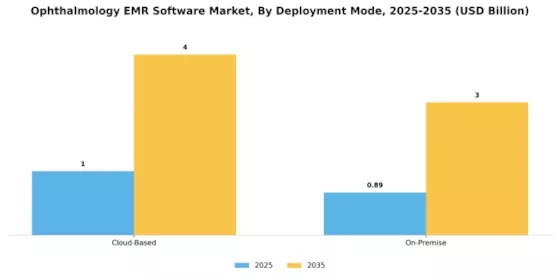
Health systems adopt Kaleidoscope because standard Epic Ambulatory workflows, in short, weren’t built for ophthalmology’s visual, device-heavy documentation needs. Indeed, the global ophthalmology EMR software market is growing at a 10.29% CAGR, as more practices move toward specialty-built tools.
Naturally, for organizations already running Epic, extending that investment through Kaleidoscope makes far more sense than layering on a separate system.
1. Keep Ophthalmology Records Inside Epic
Above all, Kaleidoscope keeps eye care data inside the same Epic database as every other specialty. As a result, IT teams avoid managing a second vendor relationship just for ophthalmology.
2. Reduce Duplicate Documentation
- SmartPhrases and SmartLinks pull existing chart data into new notes automatically
- Consequently, technicians and physicians document once instead of re-entering the same findings
- Meanwhile, templates auto-populate from prior visits, cutting redundant charting time
3. Connect Eye Exams With the Rest of the Patient Record
Since ophthalmology patients often carry systemic conditions like diabetes, connecting eye findings to the full medical record improves care coordination.
In fact, Epic itself recommends Kaleidoscope for most eye clinics where ophthalmologists serve as primary providers, specifically for this reason.
4. Manage Ophthalmology Workflows in One System
From scheduling to imaging to billing, every workflow runs through one platform. Therefore, administrators track the entire patient journey without switching tools.
5. Support Different Ophthalmology Specialties
Additionally, Kaleidoscope includes workflows for glaucoma, oculoplastics, neuro-ophthalmology, and pediatric ophthalmology, letting one system serve every subspecialty in the department instead of requiring separate tools per specialty.
Altogether, these advantages explain why health systems choose Kaleidoscope over generic workflows, not because it’s the only option, but because it removes duplicate work across an already-connected system. From here, though, the actual feature set inside Hyperspace deserves a closer look.
Epic Kaleidoscope Features for Ophthalmology
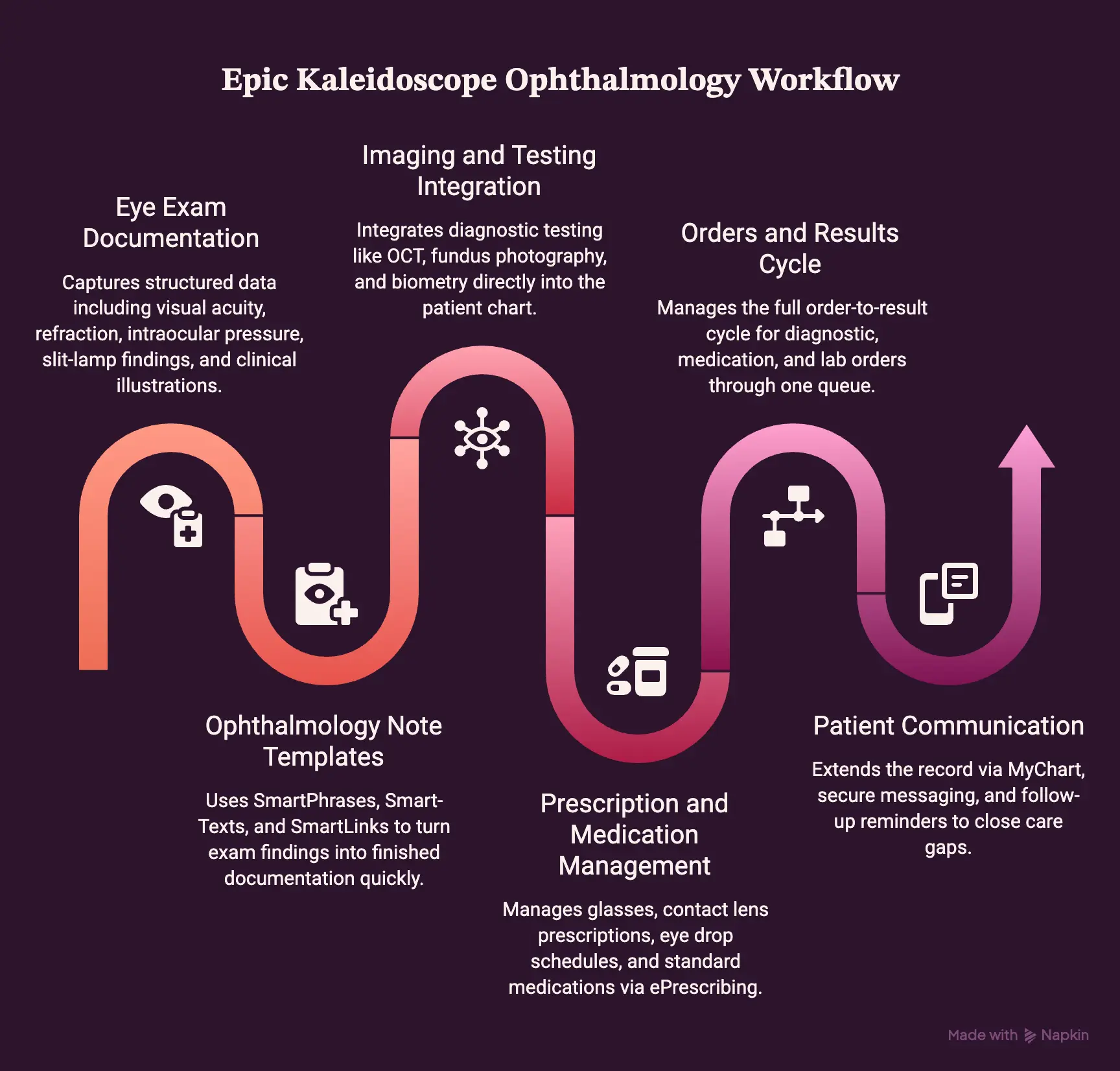
Epic Kaleidoscope’s feature set covers six core areas: exam documentation, note templates, imaging, prescriptions, orders, and patient communication. Together, these tools handle nearly every touchpoint in an ophthalmology visit.
In fact, Epic positions Kaleidoscope as the recommended module for any clinic where ophthalmologists work as primary providers, precisely because of this breadth.
1. Eye Exam Documentation
At the core, Kaleidoscope captures the structured data every eye exam produces. Consequently, clinicians document consistently across visits and providers.
- Visual acuity, refraction, and intraocular pressure readings
- Slit-lamp examination findings
- Anterior and posterior segment findings
- Ophthalmology drawings for annotated clinical illustrations
2. Ophthalmology Note Templates
Beyond raw data capture, note templates turn exam findings into finished documentation quickly. SmartPhrases and SmartTexts, for instance, auto-populate repeated language, while SmartLinks pull in prior results. Specialty templates and custom eye exam forms then adapt to each subspecialty’s specific needs.
3. Ophthalmology Imaging and Testing
Imaging is where ophthalmology diverges most sharply from general medicine. As a result, Kaleidoscope integrates diagnostic testing directly into the chart rather than treating it as a separate system.
- OCT and visual field testing
- Fundus photography and retinal imaging
- Fluorescein angiography
- Corneal topography and keratometry
- Biometry and IOL measurements for surgical planning
4. Prescription and Medication Management
Similarly, prescribing tools account for ophthalmology’s unique output: glasses and contact lens prescriptions alongside standard medications.
Eye drop schedules, meanwhile, get their own tracking logic, since dosing frequency varies by drug and diagnosis. ePrescribing then routes everything electronically, closing the loop.
5. Orders and Results
From there, Kaleidoscope manages the full order-to-result cycle. Diagnostic test orders, medication orders, and lab orders all flow through one queue.
Once results return, review and routing tools push them to the right provider automatically.
6. Patient Communication
Finally, patient-facing tools extend the record beyond the clinic visit. MyChart gives patients direct access to results and scheduling, while secure messaging and In Basket route provider-to-patient and provider-to-staff communication. Follow-up reminders, in turn, help close care gaps for chronic conditions like glaucoma.
Altogether, these six feature groups explain what Kaleidoscope actually does inside a chart, not just what it’s marketed as. However, features alone don’t show how a visit unfolds in practice.
How the Epic Kaleidoscope Ophthalmology Workflow Works
The Epic Kaleidoscope ophthalmology workflow moves through seven connected steps: scheduling, registration, technician workup, imaging, physician exam, orders, and billing.
Each step, in turn, feeds data into the next, so nothing gets re-entered along the way. Below, each step is broken down in the order it actually happens.
Step 1: Schedule the Ophthalmology Visit
To begin with, scheduling determines everything that follows in the visit. Specifically, choosing the right visit type ensures the correct exam template loads automatically.
From there, staff schedules any required testing alongside the appointment itself, while provider or clinic templates control which slots are even available.
Step 2: Complete Registration and Pre-Visit Work
Next, registration confirms the patient and their coverage before the clinical visit begins. First, insurance verification runs, followed by any referrals or prior authorization the visit requires.
Meanwhile, pre-charting lets staff prepare the chart in advance, which ultimately shortens the technician’s workup later.
Step 3: Complete the Technician Workup
Once registration clears, the technician workup captures the baseline clinical data. Patient history comes first, followed by visual acuity, refraction, and tonometry readings.
Then, initial testing rounds out this step, giving the physician a complete picture before the exam even starts.
Step 4: Complete Ophthalmology Testing and Imaging
At this point, diagnostic imaging adds the visual data ophthalmology depends on most.
- OCT and visual field testing
- Fundus and retinal imaging
- Topography and corneal testing
- Biometry and cataract testing
Each result, as a result, attaches directly to the encounter, so the physician reviews everything in one place.
Step 5: Complete the Ophthalmologist Exam
With testing complete, the physician exam pulls every prior step together. First, the provider reviews technician findings alongside images and test results, then completes the eye examination itself.
Finally, the diagnosis and treatment plan close out the clinical portion of the visit.
Step 6: Complete Orders and Prescriptions
After diagnosis, orders and prescriptions translate the plan into action. Medications, glasses, and contact lens prescriptions all route through the same order screen.
Similarly, procedures and referrals follow that same workflow, so nothing requires a separate system.
Step 7: Complete Billing and Follow-Up
Lastly, billing and follow-up close the loop on the visit. Charge capture and CPT/ICD-10 coding pull directly from the documented exam, which reduces manual entry errors. Follow-up scheduling and patient communication, meanwhile, wrap up the encounter, so the patient’s next visit is already queued before they leave.
Altogether, these seven steps show how Kaleidoscope’s features from the previous section actually function in a live visit, not as isolated tools but as one continuous workflow. Still, workflow alone doesn’t reveal how well the system serves each ophthalmology subspecialty.
How Epic Kaleidoscope Connects With Ophthalmology Devices
Epic Kaleidoscope connects with ophthalmology devices through DICOM, HL7, and FHIR interfaces that send patient data to diagnostic equipment and pull results back into the chart automatically.
This device-level integration, in fact, matters more in ophthalmology than almost any other specialty, since every visit depends on multiple imaging and testing devices working in sync with the EHR.
1. Why Device Integration Matters in Ophthalmology
Without proper integration, staff re-key patient data into each device manually, which introduces errors and slows down visits. Consequently, three benefits drive most integration projects:
- Reduces manual patient entry across every connected device
- Keeps images and results tied to the correct patient automatically
- Makes test results easier to review inside one chart
2. OCT Integration
For OCT devices, Kaleidoscope first sends patient demographics to the scanner before the test begins. Afterward, results and images flow back into the workflow, attaching directly to that day’s encounter.
3. Visual Field Integration
Similarly, visual field testing starts with scheduling the test alongside the visit. Once complete, results connect to the patient record without a separate upload step.
4. Fundus Camera and Retinal Imaging Integration
This same pattern extends to fundus photography, retinal imaging, and fluorescein angiography, all of which route back into the encounter as structured, viewable data.
5. Corneal Topography and Keratometry Integration
Corneal mapping and refractive surgery measurements follow the same integration path, feeding directly into pre-surgical documentation.
6. Biometry and IOL Integration
Likewise, cataract measurements and IOL calculation data flow into surgical planning automatically, which keeps biometry results tied to the correct procedure.
7. DICOM, HL7 and FHIR in Kaleidoscope Integrations
Underneath all of this, three standards do the actual work. DICOM handles image transfer for OCT, fundus, and topography devices. HL7 typically carries order and result messages between older ophthalmology equipment and Epic.
FHIR, meanwhile, powers newer SMART on FHIR connections for real-time, standards-based data exchange.
When a device doesn’t speak any of these natively, middleware or a dedicated image management system usually bridges the gap.
Device integration, in short, is where Kaleidoscope’s imaging features either work seamlessly or create daily friction, depending entirely on setup quality. This is precisely the layer where Intellivon’s engineering team steps in, connecting imaging hardware that falls outside Epic’s native support list directly into Kaleidoscope, so technicians never fall back on manual workarounds.
Epic Kaleidoscope Use Cases by Ophthalmology Specialty
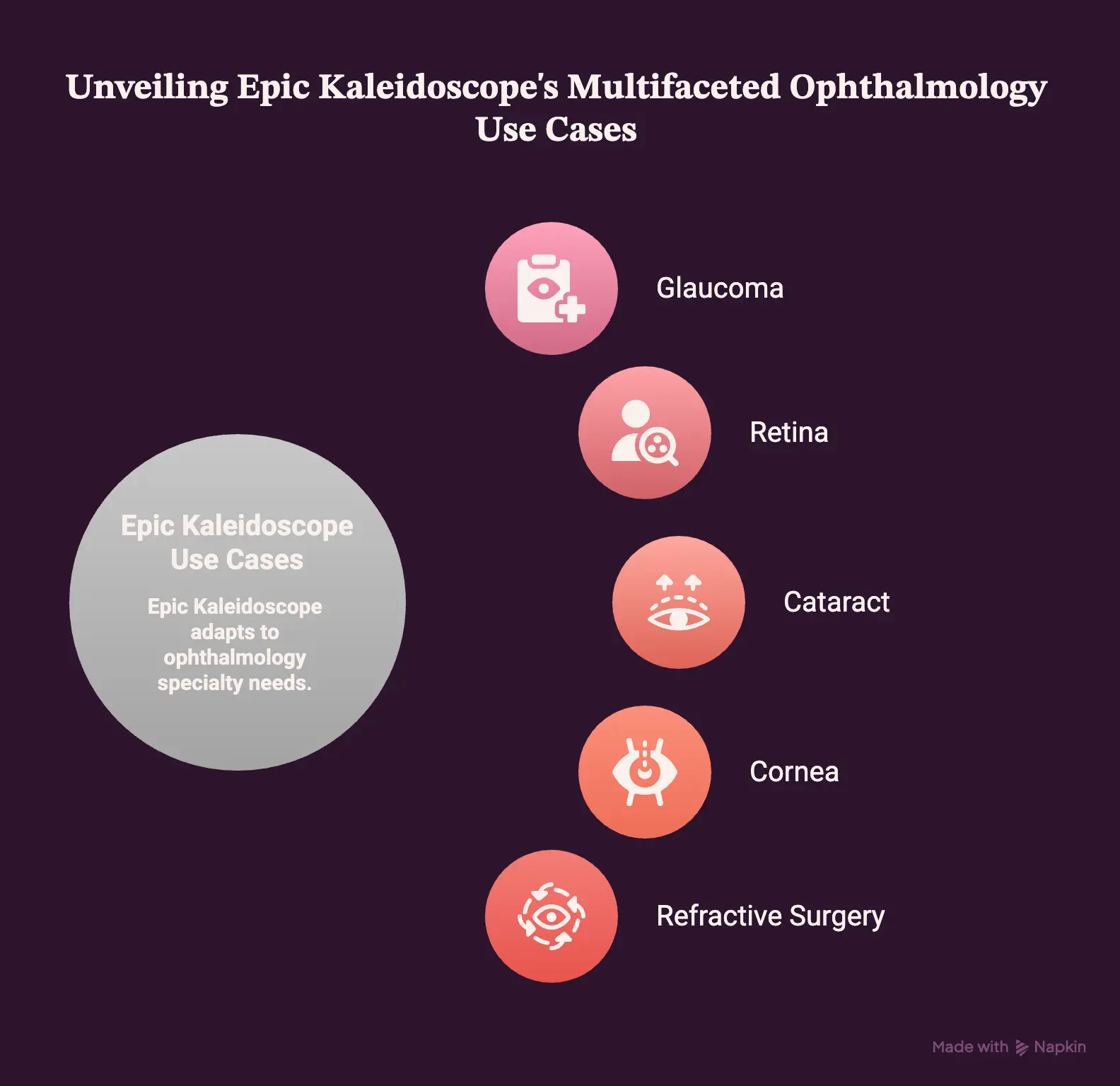
Epic Kaleidoscope supports distinct workflows across seven ophthalmology specialties, each built around that subspecialty’s specific documentation and tracking needs.
Rather than applying one generic template everywhere, Kaleidoscope adapts its tools to what each condition actually requires. Below, each specialty’s core use cases are broken out.
1. Glaucoma
For glaucoma, tracking trends over time matters more than any single visit. As a result, Kaleidoscope centers on longitudinal data:
- IOP tracking across visits
- Medication tracking and adherence
- OCT progression analysis
- Visual field progression analysis
2. Retina
Retina care, meanwhile, depends heavily on imaging and procedural documentation.
- Diabetic retinopathy staging
- Macular degeneration monitoring
- Retinal imaging review
- Intravitreal injection tracking
3. Cataract
Cataract workflows, in turn, span the full surgical journey from evaluation to recovery.
- Cataract evaluation and grading
- Biometry measurements
- IOL calculation
- Surgical planning
- Postoperative follow-up
4. Cornea
For corneal conditions, mapping and disease documentation take priority. Corneal topography and keratometry feed directly into diagnosis, while dedicated templates capture corneal disease progression accurately.
5. Refractive Surgery
Similarly, refractive surgery workflows cover LASIK and PRK from preoperative testing through postoperative follow-up, keeping every measurement tied to the same surgical record.
Across all seven specialties, Kaleidoscope’s real strength lies in adapting one platform to genuinely different clinical needs, rather than forcing every subspecialty through the same template. That said, adoption still comes down to cost, which the next section breaks down by phase.
Epic Kaleidoscope Analytics and Reporting
Epic Kaleidoscope analytics and reporting run through three layers: operational dashboards, clinical outcome tracking, and quality reporting, each pulling from the same underlying data that Kaleidoscope captures during the visit.
Beyond native tools, practices can also extend reporting through SlicerDicer, Clarity, external BI platforms, or AI-driven analysis, depending on how deep the insight needs to go.
1. Ophthalmology Dashboards
For day-to-day operations, dashboards track the metrics that keep a clinic running.
- Patient volume by provider and location
- Appointment and no-show rates
- Procedure volume by type
- Provider productivity
2. Clinical Analytics
Clinically, Kaleidoscope also tracks outcomes across chronic and procedural care.
Glaucoma progression, retina outcomes, cataract outcomes, and injection tracking all draw from longitudinal exam data rather than single visits.
3. Quality Reporting
For compliance, meanwhile, quality reporting ties directly into value-based care requirements.
Diabetic eye exam completion, MIPS measures, IRIS Registry submissions, and care gap tracking all pull from the same documented encounters, so nothing needs separate manual reporting.
4. Choosing the Right Reporting Tool for Ophthalmology Data
Since native dashboards only go so far, most practices eventually extend reporting through one of four additional tools. Each, however, suits a different depth of analysis:
| Tool | Best For | Limitation |
| Epic SlicerDicer | Fast, self-service cohort exploration | Can’t search free-text notes or data outside Epic |
| Epic Clarity | Deep, structured reporting across the full database | Requires SQL and dedicated report-building expertise |
| Power BI or Tableau | Custom visualizations and cross-system dashboards | Needs a data pipeline connecting Epic to the BI tool |
| AI on ophthalmology data and images | Pattern detection across imaging and outcomes at scale | Requires custom model development and validation |
Native Kaleidoscope dashboards handle daily operations and quality reporting well, but deeper clinical insight, especially across imaging data, usually requires one of these four extensions.
Epic Kaleidoscope Integrations With Other Epic Modules
Epic Kaleidoscope doesn’t function as a standalone module. Instead, it connects into six other Epic applications, plus external systems through FHIR and HL7, to cover scheduling, surgery, communication, analytics, and billing from one platform.
1. Epic Cadence for Scheduling
First, Epic Cadence handles the scheduling layer that determines which exam template and testing sequence loads for each visit. Since Kaleidoscope depends on visit type to trigger the right workflow, this integration sits upstream of nearly everything else.
2. Epic OpTime for Eye Surgery
For surgical cases, Epic OpTime picks up where Kaleidoscope’s cataract and refractive surgery documentation leaves off. Biometry and IOL calculations flow directly into surgical planning, so the OR team works from the same data the clinic already captured.
3. Epic MyChart for Patient Communication
Meanwhile, MyChart extends Kaleidoscope data to patients directly, giving them access to results, prescriptions, and appointment scheduling without a phone call.
4. Epic Haiku for Mobile Access
Similarly, Haiku lets providers review charts, images, and results from a mobile device, which matters most for on-call coverage or multi-site practices.
5. Epic Clarity and SlicerDicer for Analytics
As covered in the previous section, Clarity and SlicerDicer both pull from Kaleidoscope’s documented data for reporting, ranging from quick cohort searches to deep structured analysis.
6. Epic Revenue Cycle for Billing
On the financial side, Revenue Cycle picks up CPT and ICD-10 coding straight from the documented exam, which keeps charge capture tied to what was actually performed.
7. FHIR and HL7 for External Systems
Finally, FHIR and HL7 extend Kaleidoscope beyond Epic entirely, connecting it to non-Epic devices, labs, and third-party platforms that a practice might already run.
Altogether, Kaleidoscope touches nearly every corner of the Epic ecosystem, which is exactly why integration quality determines how well it actually performs.
Intellivon works across this full stack, from Cadence-level scheduling logic to FHIR connections with outside systems, building the integration layer that makes Kaleidoscope function as one system instead of six loosely connected ones.
Common Epic Kaleidoscope Implementation Challenges
Even with strong features, Epic Kaleidoscope implementations run into recurring challenges that slow adoption and frustrate clinical staff. Most of these stem from configuration and workflow design, not the platform itself.
Understanding them upfront, therefore, helps practices plan around them rather than discover them mid-rollout.
1. Complicated Eye Exam Templates
Out of the box, default templates often include far more fields than a given subspecialty actually needs. As a result, physicians waste time navigating sections that don’t apply to their patients. A retina specialist, for instance, rarely needs strabismus fields cluttering the same screen.
Consequently, practices that skip template customization during implementation inherit this bloat permanently. Over time, that extra friction compounds across hundreds of visits per week, slowing down exactly the workflow Kaleidoscope was meant to speed up.
2. Slow Ophthalmology Documentation
Similarly, when SmartPhrases and SmartLinks aren’t configured properly, documentation reverts to manual typing. This defeats the entire purpose of specialty templates in the first place. Physicians end up typing findings that should auto-populate from technician data already captured earlier in the visit.
As a result, exam-to-note time increases instead of decreasing, which is the opposite of what a specialty module should deliver. Proper SmartTool configuration is the difference between a fast workflow and a frustrating one.
3. Poor Device Integration
As covered earlier, weak DICOM, HL7, or FHIR configuration forces staff back into manual data entry. Consequently, the imaging benefits Kaleidoscope promises never materialize in daily use. Technicians end up keying patient data into each device separately, then manually uploading results afterward.
This especially affects practices running third-party diagnostic equipment outside Epic’s native support list. Without proper middleware or integration engineering, that equipment simply doesn’t talk to Kaleidoscope the way it should.
4. Duplicate Data Entry
Related to that, technicians and physicians sometimes re-enter the same findings when templates aren’t linked correctly. This directly contradicts the efficiency gains the module is meant to provide. Visual acuity captured by a technician, for example, should never need re-entry by the physician minutes later.
Nevertheless, this happens often when template mapping is rushed during go-live. Fixing it usually requires revisiting the underlying template configuration rather than retraining staff, since the root cause is technical, not human.
5. Imaging Results in Different Systems
Meanwhile, practices running devices outside Epic’s native support list often end up with results split across two systems. Consequently, physicians toggle between Kaleidoscope and a separate imaging viewer just to complete one exam. That fragmentation recreates the exact problem Kaleidoscope was supposed to solve.
Over time, this also complicates historical comparison, since scans from the same patient live in different places depending on when they were captured. A unified image management layer typically resolves this.
6. Different Workflows Across Ophthalmology Specialties
Finally, a single generic configuration rarely serves glaucoma, retina, cataract, and pediatric workflows equally well. Each specialty documents differently, so forcing one template across all of them creates friction somewhere. Consequently, practices running multiple subspecialties need deliberate, specialty-specific configuration rather than a one-size-fits-all rollout.
Altogether, these 9 challenges share a common root: implementation quality, not the platform itself, determines whether Kaleidoscope actually delivers on its promises. That distinction becomes especially important when weighing native Epic costs against custom configuration and integration work, covered next.
How to Improve Epic Kaleidoscope Workflows
Improving Epic Kaleidoscope workflows comes down to nine deliberate fixes, addressing the exact challenges covered in the previous section.
Here’s how our experts at Intellivon approach each one when optimizing Kaleidoscope for an ophthalmology practice.
1. Simplify Eye Exam Templates
First, we audit default templates against what each subspecialty actually documents. Unused fields get removed entirely rather than hidden, since hidden fields still slow down navigation.
As a result, physicians see only the sections relevant to the patient in front of them.
2. Reduce Duplicate Documentation
Next, we map SmartLinks and SmartPhrases so technician data flows into physician notes automatically. Consequently, findings get documented once, not twice, across the same visit.
This mapping work requires understanding exactly where each data point originates in the workflow.
3. Improve Technician Workflows
Similarly, we restructure technician worklists into a consistent, logical sequence. Visual acuity, refraction, and tonometry, for example, appear in the order technicians actually perform them. This reduces screen-switching and keeps the workup moving efficiently.
We also build clear handoff points between technician and physician directly into the template. That way, physicians immediately see what’s already been captured, rather than hunting for it across multiple screens.
4. Automate Device Data Transfer
From there, we build direct DICOM, HL7, or FHIR connections for devices that aren’t automatically talking to Kaleidoscope, eliminating manual re-entry entirely. Automating this step, in particular, tends to save the most time across a high-volume imaging day.
For devices outside Epic’s native support list, this usually means custom middleware, purpose-built so third-party equipment behaves like a natively supported device inside the chart.
5. Improve Imaging Access
Additionally, we consolidate imaging so physicians view every scan type from one screen instead of switching between viewers, directly resolving the fragmentation problem covered earlier.
OCT, fundus, and topography results get unified into a single image management layer.
We also migrate historical images into this same layer wherever possible, preserving comparison data that matters clinically for conditions like glaucoma and retina progression.
6. Standardize Common Workflows
Meanwhile, we standardize the pieces that genuinely are common across every ophthalmology visit, such as scheduling logic and registration steps.
Doing so reduces training time for new staff and keeps front-desk and intake processes consistent across every provider in the practice.
7. Keep Specialty Workflows Separate
At the same time, we deliberately avoid forcing every subspecialty through one shared template. Glaucoma, retina, and cataract workflows stay distinct, even while sharing the same underlying platform.
This balance, standardized where it helps and separated where it doesn’t, is what prevents the one-size-fits-all friction covered in the previous section.
8. Improve Analytics and Reporting
Furthermore, we extend native dashboards where SlicerDicer or Clarity fall short, frequently connecting Power BI or Tableau for deeper visualization. This gives practice leadership visibility into procedure volume, outcomes, and quality metrics without waiting on manual report requests.
Where AI-driven analysis adds real value, particularly across imaging data, we layer that in as a separate, validated extension rather than bolting it onto native tools.
Together, these optimizations turn Kaleidoscope from a capable but generic platform into one configured specifically around how a practice actually works. That configuration work, naturally, carries its own cost, which the next section breaks down in full.
Epic Kaleidoscope Implementation Cost
Custom integration, workflow optimization, analytics, migration, automation, and extension work around Epic Kaleidoscope generally costs $70,000 to $300,000.
This does not represent Epic licensing or ophthalmic device costs, both of which health systems negotiate separately with their respective vendors.
That range breaks down across five phases:
| Phase | Cost Range |
| Workflow and device discovery | $8,000 – $20,000 |
| Architecture and integration design | $12,000 – $35,000 |
| Integration and custom development | $25,000 – $120,000 |
| Migration, testing, and security | $15,000 – $70,000 |
| Training, go-live, and optimization | $10,000 – $55,000 |
Beyond the initial build, ongoing maintenance typically runs 15% to 25% of the total build cost annually, covering updates, security patching, and continued optimization as workflows evolve.
What Makes an Epic Kaleidoscope Project More Expensive?
Several variables push a project toward the higher end of that range:
- Number of ophthalmology devices requiring integration
- Number of practice locations
- The number of ophthalmology specialties in scope
- Legacy data migration
- Historical image migration
- Custom analytics beyond native dashboards
- AI and automation development
- External application integrations
Projects touching multiple locations, several subspecialties, and legacy imaging migration simultaneously tend to land closer to $300,000, while single-location, single-specialty integration work often stays under $150,000.
Why Healthcare Organizations Work With Intellivon Around Epic Kaleidoscope
Epic Kaleidoscope gives ophthalmology practices a strong foundation, but as this guide has shown, its real performance depends on configuration and integration work most implementations skip. Here’s specifically how we close those gaps:
- Device integration: DICOM, HL7, and FHIR connections get built for OCT, fundus, and topography devices outside Epic’s native support list, so results flow into the chart automatically instead of manual re-entry.
- Template simplification: Eye exam templates get audited and rebuilt by subspecialty, stripping out irrelevant fields so physicians navigate only what applies to the patient in front of them.
- Documentation speed: SmartPhrases and SmartLinks get mapped so technician findings flow into physician notes automatically, eliminating duplicate charting.
- Imaging consolidation: OCT, fundus, and topography results get unified into one image management layer, ending the toggle between Kaleidoscope and separate viewers.
- Historical data migration: Legacy imaging and chart data get migrated into Kaleidoscope while preserving the progression history glaucoma and retina care depend on.
- Custom analytics: Native dashboards get extended with Power BI, Tableau, or AI-driven analysis when SlicerDicer and Clarity reporting fall short.
- Specialty-specific workflows: Distinct workflows get configured for glaucoma, retina, cataract, and pediatric care instead of forcing one template across every subspecialty.
- Custom extensions: Where native Kaleidoscope has a genuine gap, targeted applications get built that integrate back into the chart via FHIR.
Book a free strategy call with Intellivon to walk through your current Kaleidoscope setup and get a clear plan for closing these gaps.
Conclusion
Epic Kaleidoscope, in the end, gives ophthalmology practices a genuinely strong foundation, covering exam documentation, imaging, and subspecialty workflows inside one connected record.
However, as this guide has shown, its real value depends entirely on implementation quality, not just feature availability. Without proper device integration, template configuration, and workflow design, that same platform creates friction instead of removing it.
Therefore, the practices getting the most from Kaleidoscope are the ones treating implementation as an ongoing discipline, not a one-time setup, and building around it accordingly.
FAQs
Q1: What is Epic Kaleidoscope used for?
A1: Epic Kaleidoscope is Epic’s ophthalmology module, used for exam documentation, imaging integration, and subspecialty workflows like glaucoma and retina care. Specifically, it lets ophthalmologists, technicians, and administrators work from one connected patient record inside Epic Hyperspace, instead of switching between separate documentation and imaging systems throughout the visit.
Q2: What are the main Epic Kaleidoscope features?
A2: Core features include eye exam documentation, SmartPhrase-driven note templates, DICOM imaging integration, IOL calculation, prescription management, and MyChart patient communication. Together, these cover exam-to-billing workflows in one platform. Additionally, subspecialty-specific templates support glaucoma, retina, cataract, and pediatric ophthalmology without requiring separate systems for each.
Q3: How does an ophthalmology visit work in Epic Kaleidoscope?
A3: A visit moves through seven steps: scheduling, registration, technician workup, imaging, physician exam, orders and prescriptions, then billing and follow-up. Each step, in turn, feeds data into the next, so nothing gets re-entered along the way. This connected sequence is what separates Kaleidoscope from a generic EHR workflow.
Q4: Can Epic Kaleidoscope connect to OCT and visual field devices?
A4: Yes, Kaleidoscope connects to OCT and visual field devices through DICOM, HL7, or FHIR interfaces, sending patient demographics to the device and pulling results back into the encounter automatically. However, devices outside Epic’s native support list typically need middleware or custom integration work to connect properly.
Q5: Does Epic Kaleidoscope support DICOM?
A5: Yes, DICOM is the primary standard Kaleidoscope uses for image transfer from OCT scanners, fundus cameras, and topography devices. As a result, images attach directly to the patient encounter rather than living in a separate viewer, which keeps imaging and clinical documentation in the same chart.
Q6: Can Epic Kaleidoscope work with Epic OpTime?
A6: Yes, Kaleidoscope integrates with OpTime for surgical cases, particularly cataract and refractive surgery. Biometry and IOL calculation data captured in Kaleidoscope flow directly into OpTime’s surgical planning tools, so the OR team works from the same measurements the clinic already documented, without re-entry.

