Key Takeaways:
-
Epic Cadence provides management for the scheduling aspects of patient access. It assists the healthcare team in managing providers’ schedules, appointments, available slots, booking policies, cancellations, waitlist management, and other scheduling processes.
-
Automation could be used to minimize the workload around scheduling. Healthcare organizations could implement automation for appointment booking, reminders, cancellation recovery, and other repetitive activities in patient access.
-
Native Epic tools should be used for managing workflows that they already cover. Applications of API and FHIR would help in connecting external applications, while RPA technology should be preferred when there is no proper connection for legacy systems.
-
There are several benefits of implementing automation, such as improved scheduling process, reduced no-shows, efficient utilization of provider capacity, and decreased administrative workload.
-
At Intellivon, our experts create automation, AI, and integration layers customized to the existing Epic environment rather than replacing Epic Cadence. Based on the specific requirements such project undertakings typically cost from $70,000 to $300,000
Hospitals running Epic mostly have Cadence turned on. What’s missing, in a lot of cases, is the configuration work that makes it run itself. Cadence helps automate referrals by sending referrals right into available appointment slots according to specialty. Along with scheduling, Cadence sends automated alerts via MyChart, texts, and emails. Moreover, self-scheduling windows allow the patient to book themselves into appointments without having to call in.
However, getting there requires eligibility checks that need to pull from real-time payer data. Meanwhile, without demand forecasting built into the scheduling templates, some gaps sit open instead of getting filled automatically. Similarly, referrals only route themselves correctly when the rules behind them are actually configured. Otherwise, a staff member ends up making that call manually.
This post covers how Cadence handles scheduling automation, referral routing, pre-registration, and check-in end to end. It also walks through what a proper implementation and integration costs when built with a development and integration partner like Intellivon.
What Is Epic Cadence and How Does It Support Patient Access?
Epic Cadence is the master scheduling software inside the Epic electronic health record system. Specifically, it works like an air traffic controller for hospital appointments.
It matches a patient’s medical needs to the right doctor, exam room, and time slot. As a result, clinics run on time and avoid double-booking mistakes.
1. Core Scheduling Tools Managed by Epic Cadence
Epic Cadence uses clear clinical rules to organize daily operations. In addition, it cuts down manual paperwork for front-desk staff.
- Doctor Schedules and Work Templates: Sets up the exact hours doctors see patients and actively blocks time for administrative charting.
- Visit Types and Booking Rules: Matches the correct appointment length to the patient’s specific health issue automatically.
- Cancellations and Waitlists: Quickly detects open slots from last-minute cancellations and instantly offers them to waiting patients.
- Referral Tracking: Directs incoming doctor referrals to the right specialist without staff needing to sort manual faxes.
- Direct Patient Scheduling: Allows patients to book their own visits online at any hour of the day.
2. How Epic Cadence Connects Across the Hospital System
Cadence works hand-in-hand with other Epic modules. Consequently, it guides a patient smoothly from initial sign-up to final billing.
| Epic System | Main Job | How It Helps the Patient |
| Epic Cadence | Appointment Scheduling | Finds open slots, organizes doctor calendars, and automatically fills cancellations. |
| Epic Prelude | Patient Registration | Confirms address details and verifies insurance coverage before the visit. |
| Epic MyChart | Patient App and Portal | Lets patients book visits, fill out forms, and check in directly from a phone. |
| Grand Central | Hospital Bed Tracking | Assigns inpatient beds and tracks patient movement during overnight hospital stays. |
| Epic Resolute | Medical Billing | Calculates out-of-pocket costs, collects copays, and processes insurance claims. |
When patients schedule complex virtual visits through Cadence, hospitals often connect these appointments directly to specialized telemedicine app development services to handle video streaming and remote device check-ins.
Ultimately, when Cadence is configured properly, clinics eliminate long phone wait times and reduce staff burnout. Therefore, this reliable setup creates the exact foundation health systems need to deploy intelligent robotic process automation.
Why Patient Access Automation Is Growing Across Healthcare
Healthcare organizations are adopting patient access automation because routine scheduling, registration, eligibility checks, and patient communication are shifting to digital channels. In fact, the goal is not merely reducing manual paperwork. Instead, it enables patients to secure care faster while helping hospitals maximize existing clinical staff and provider capacity.
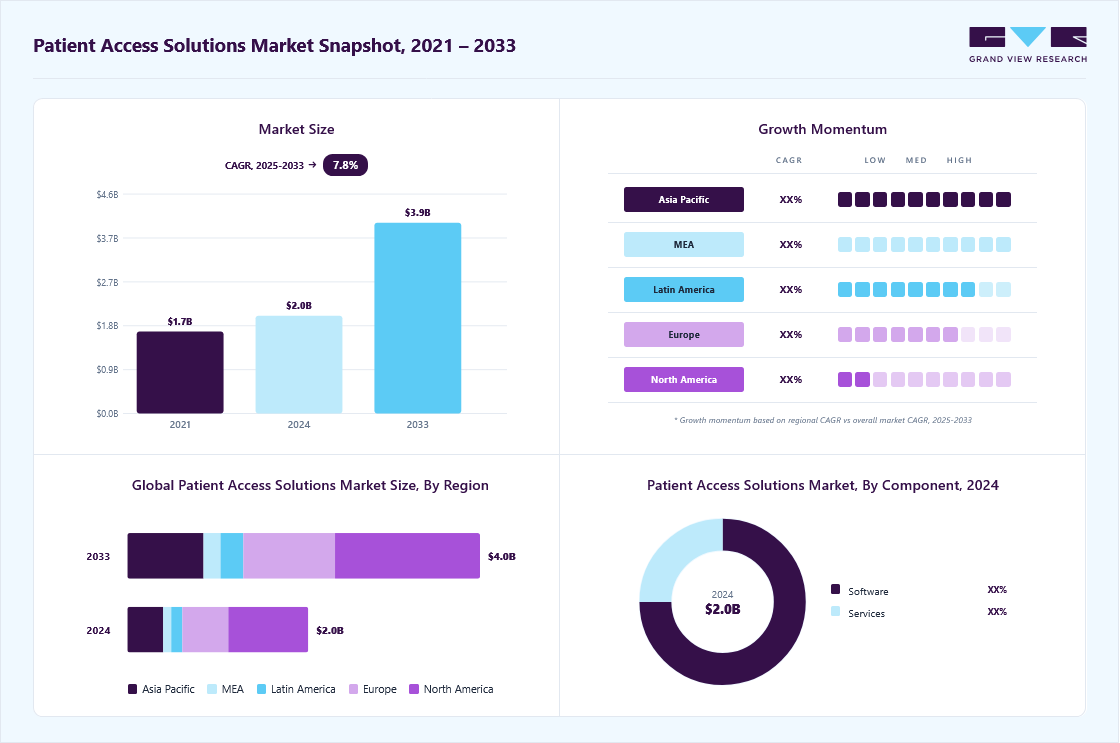
According to market data from Grand View Research, the patient access solutions market is valued at roughly $2.2 billion in 2026. Furthermore, industry analysts project it will reach about $4 billion by 2033, growing at an annual rate of approximately 7.8%.
1. More Patients Expect Digital Access
Modern patients expect to manage their healthcare just like online banking or booking a flight. Therefore, healthcare networks are shifting routine tasks to self-service digital channels.
- Online Booking and Mobile Scheduling: Patients can select their own visit times anytime on mobile devices.
- Digital Registration and Forms: Intake questionnaires, consent documents, and symptom screeners are completed prior to arrival.
- Automated Confirmations and Rescheduling: Text messages allow patients to confirm or change dates without calling an office.
- Telehealth Entry: Virtual visits launch smoothly through consumer apps without requiring front-desk check-in.
When engineering these patient-facing scheduling interfaces, development teams apply standard web development best practices to deliver accessible, fast-loading, and mobile-responsive intake forms. Consequently, health systems move routine access tasks to digital channels while staff focus on complex cases.
2. Health Systems Need to Reduce Manual Scheduling Work
Hospital call centers struggle with high call volumes and repetitive clerical workflows. Therefore, automating basic administrative tasks protects staff from operational burnout.
- Call-Center Load Reduction: Software handles simple inbound booking requests automatically.
- Automated Slot Searches: System logic matches provider availability in seconds without manual calendar scrolling.
- Streamlined Registration: Demographic entry and insurance verification run instantly in the background.
- Referral and Reminder Follow-ups: Automated queues track incoming doctor referrals and send reminder notices.
According to industry benchmark data from the CAQH Index Report, automating manual front-end transactions like eligibility and registration saves providers billions annually in administrative labor.
In addition, Experian Health’s State of Patient Access Survey highlights that 49% of healthcare leaders see automated registration and insurance verification as the single biggest factor in preventing intake delays.
Meanwhile, automated exception routing allows front-desk staff to focus on patients with complex clinical requirements.
3. Provider Capacity Needs Better Management
Empty exam rooms and last-minute cancellations directly harm clinic revenue and patient health outcomes. Because of this reality, automation plays a vital role in capacity optimization.
- Unused Appointment Slots: Intelligent rules identify and fill open gaps across daily doctor templates.
- Automated Waitlist Fills: Openings from sudden cancellations are immediately offered to waiting patients.
- Specialty Demand Balancing: Patient intake is routed evenly across available physicians to prevent bottlenecks.
- Provider Utilization: Real-time schedule monitoring ensures exam rooms and clinical staff stay fully booked.
Research from the Medical Group Management Association (MGMA) indicates that unmanaged patient no-shows cost the U.S. healthcare system an estimated $150 billion annually.
However, clinics using automated digital reminders and two-way confirmation loops consistently stabilize their show rates and protect provider productivity.
4. Patient Access Is Becoming More Connected
Healthcare intake can no longer operate as a disconnected set of phone calls and paper forms. Instead, all communication layers must communicate with central clinical records in real time.
- EHR and Scheduling Integration: Front-end patient apps sync directly with core hospital scheduling engines.
- CRM and Contact Centers: Phone agents view live patient context alongside digital booking requests.
- Payer System Links: Eligibility and prior authorizations are processed automatically before the visit occurs.
- Unified Telehealth Portals: Virtual visit platforms launch directly from confirmed schedule records.
For Epic-based organizations, this trend increases the importance of connecting patient-facing workflows directly with Cadence rather than creating an isolated third-party scheduling system.
Patient access automation is expanding because healthcare organizations must handle rising digital demand without ballooning their administrative staff costs.
As these workflows become more connected, Epic Cadence provides the scheduling foundation while automation handles the surrounding patient journey. The next question is what organizations actually gain when they automate those workflows.
How Epic Cadence Automates End-to-End Patient Access Workflows
Epic Cadence connects every step of patient access into one synchronized pipeline. It automatically moves patients from the initial booking request and identity check directly into provider matching, insurance verification, and mobile check-in.
Consequently, this smooth digital path removes phone delays, stops double-bookings, and delivers live operational analytics directly to clinic leaders.
1. Scheduling and Appointment Matching
Cadence uses smart clinical rules to pair patient needs with the right doctor calendar. Following clear web development best practices ensures that self-scheduling patient apps run fast and load smoothly across mobile phones.
- Decision Logic Routing: Directs patients to the correct specialty using brief symptom questions.
- Provider Template Matching: Locks the right appointment duration without overlapping clinical blocks.
- Resource Coordination: Automatically reserves exam rooms and diagnostic equipment during slot selection.
2. Registration and Financial Clearance Handoffs
Once booked, Cadence hands patient records directly to Epic Prelude for background data checks. As a result, staff avoid manual data entry errors.
- Demographic Verification: Confirms patient identity and contact info against central master indexes.
- Real-Time Eligibility: Runs instant electronic coverage checks directly with health insurance payers.
- Prior Authorization Flagging: Routes procedures requiring insurance approval directly into clearance queues.
3. Reminder, Cancellation, and Waitlist Automation
Cadence manages schedule openings automatically to protect provider time. Therefore, clinic calendars stay full even when plans change.
- Two-Way Text Reminders: Sends confirmation prompts that let patients confirm or cancel with one tap.
- Automated Slot Detection: Identifies open appointment spots instantly when a cancellation happens.
- Fast Pass Waitlists: Texts the newly opened slot to next-in-line patients to fill gaps immediately.
4. Digital Check-In and Post-Booking Communication
Finally, patients complete administrative tasks before stepping foot in the clinic. In addition, every action feeds live clinical dashboards.
- Mobile Pre-Check: Lets patients upload photo IDs, sign forms, and pay copays through MyChart.
- Arrival Tracking: Updates front-desk status boards the moment a patient arrives on site.
- Operational Analytics: Feeds wait times and room utilization metrics into Clarity reporting.
In short, automating the patient access journey through Cadence replaces chaotic administrative handoffs with a single, continuous digital pipeline.
This integrated infrastructure eliminates manual phone triage while protecting health system revenue.
Key Benefits of Epic Cadence Patient Access Automation
Epic Cadence patient access automation helps healthcare organizations schedule patients faster, reduce repetitive staff work, recover unused appointment capacity, and improve provider utilization.
In fact, the strongest operational gains occur when Cadence scheduling rules combine with digital self-service, automated communication, and real-time analytics.
Consequently, health systems deliver a smoother booking experience while protecting clinical revenue.
1. Faster Appointment Scheduling
Automated logic instantly matches patient needs with open calendar slots. Therefore, clinics eliminate phone tag and manual schedule searching.
- Automated Slot Searches: System algorithms scan provider templates across multi-facility networks in milliseconds.
- Clinical Rule Matching: Decision trees pair specific patient symptoms with the exact appointment type required.
- Resource Coordination: Simultaneously secures the correct exam room, clinical equipment, and physician.
As a result, health systems drastically shorten the overall time from initial patient request to confirmed booking.
2. Fewer Missed Appointments
Automated communication loops give health systems continuous opportunities to prevent and recover lost appointments. While automation does not eliminate no-shows entirely, it gives staff reliable tools to manage them proactively.
- Interactive Text Confirmations: Two-way SMS prompts let patients confirm or cancel with a single tap.
- Instant Cancellation Recovery: Openings from canceled visits trigger immediate text alerts to waitlisted patients.
- Targeted Outreach: Proactive reminders target high-risk appointments to ensure patients remember their scheduled time.
3. Better Use of Provider Schedules
Maximizing doctor calendar capacity represents one of the largest operational wins for healthcare executives.
For instance, WakeMed Health & Hospitals optimized Epic scheduling and Fast Pass waitlists to generate 75,000 additional annual patient visits and a 21% increase in outpatient revenue.
- Schedule Gap Elimination: Intelligent rules prevent awkward, unbookable 15-minute holes in provider templates.
- Accurate Slot Durations: Standardized visit types ensure complex visits receive appropriate clinical time blocks.
- Balanced Demand: Intake rules distribute patient volume evenly across clinic locations and care teams.
4. Less Manual Work for Patient Access Teams
Automating routine administrative tasks protects front-desk workers and call-center agents from operational burnout.
- Clerical Task Elimination: Software handles basic appointment lookups, registration forms, and reminder calls automatically.
- Automated Referral Queues: Digital worklists organize incoming orders without manual fax sorting.
- Exception-Based Routing: The system flags complex insurance disputes or edge cases for experienced staff review.
Importantly, staff members do not disappear from the access workflow. Instead, they shift their focus toward high-touch patient advocacy and clinical coordination.
5. Easier Access for Patients
Patients receive a modern, transparent consumer booking experience directly on their personal mobile devices.
- 24/7 Digital Self-Service: Patients book, reschedule, or cancel visits anytime without waiting on hold.
- Instant Confirmation: Automated notices deliver clear arrival times, driving directions, and pre-visit instructions.
- Fast Pre-Arrival Clearance: Digital forms allow patients to complete registration and copays from home.
6. Higher Revenue From Existing Capacity
Access automation drives substantial top-line financial growth by capturing appointments that would otherwise go unused.
- Preventing Schedule Leakage: Rapid digital booking keeps patients within the hospital network.
- Higher Referral Conversion: Automated outreach captures physician orders before patients seek outside care.
- Lower Cost per Booking: Self-service digital scheduling costs significantly less than manual call-center intake.
Ultimately, health systems expand their overall clinical revenue by utilizing their existing provider capacity more effectively rather than hiring additional physicians.
Epic Cadence automation creates the most value when it improves both sides of patient access: the patient gets a faster, simpler scheduling experience, while the organization reduces manual work and uses available capacity more effectively.
Native Epic functionality can handle many of these workflows, but not every patient-access problem ends inside Epic. That is where custom automation becomes relevant.
Which Epic Cadence Patient Access Workflows Can Be Automated?
Epic Cadence provides deep native tools to automate scheduling, cancellations, and intake rules directly inside the EHR.
However, complex access tasks, such as external payer authorizations, intelligent call routing, and cross-platform intake, often require external API connections, robotic process automation (RPA), or machine learning layers.
Patient Access Workflow Automation Matrix
The breakdown below highlights the native automation capabilities of Epic Cadence alongside the integration layers required to build an end-to-end automated intake engine:
| Workflow | Native Automation Potential | Additional Integration & Tooling |
| Appointment Search | High | FHIR Scheduling APIs (/Appointment, /Slot) for consumer mobile apps |
| Self-Scheduling | High | Epic MyChart, Open Scheduling widgets, and patient web portals |
| Waitlist Recovery | High | Epic Fast Pass with automated bidirectional SMS outreach |
| Referrals | Medium–High | E-referral routing queues and external provider portal integrations |
| Eligibility Verification | Cross-module | Direct EDI/X12 270/271 payer clearinghouse connections via Epic Prelude |
| Prior Authorization | Cross-system | Payer API integrations, specialized RPA bots, and payer portal scrapers |
| Reminders & Confirmations | High | Omnichannel platforms (automated SMS, voice IVR, and email triggers) |
| Call Center Scheduling | Medium | CCaaS platforms, conversational AI voice agents, and CTI screen pops |
| Digital Intake | Medium–High | MyChart digital questionnaires and custom web intake forms |
| Check-In & Arrival | High | Mobile geofencing, arrival kiosks, and MyChart e-check-in |
| No-Show Prediction | AI Augmentation | Predictive machine learning models and customized risk-scoring pipelines |
| Demand Forecasting | AI Augmentation | Caboodle analytics, Clarity reporting databases, and external ML layers |
For organizations evaluating broader clinical system optimizations alongside scheduling pipelines, our analysis of OpenEMR implementation for nurses highlights how structured interface design directly reduces administrative documentation load.
Ultimately, maximizing patient access performance requires pairing Cadence’s built-in scheduling logic with purpose-built external automations.
When these layers work together, health systems eliminate manual data entry while expanding self-service capacity.
Native Epic vs FHIR vs RPA vs AI: Which Automation Fits Best?
Healthcare systems achieve the highest return on investment by matching each patient access bottleneck to the right technical layer. Specifically, organizations should default to native Epic features first, standard interfaces second, bots for technical gaps third, and predictive AI or LLMs exclusively for probabilistic and conversational tasks.
This structured hierarchy prevents brittle custom builds while maximizing operational stability.
1. Native Epic Tools for Direct Workflows
Health systems should prioritize native Epic Cadence and MyChart features whenever built-in software logic already satisfies the operational goal.
- Template and Slot Configuration: Leverages core Cadence rules to enforce clinic visit durations and doctor availability.
- Fast Pass Waitlists: Automatically identifies canceled openings and offers slots to queued patients.
- MyChart Direct Scheduling: Provides patients with secure, self-service booking options across standard web browsers.
Relying on native configurations preserves EHR stability and avoids third-party subscription costs.
2. Supported Interfaces for External Data Exchange
When third-party apps, digital intake tools, or customer relationship management (CRM) software must exchange data with Epic, engineering teams should use approved interfaces.
- HL7 and EDI Feeds: Transmit standard demographic information and electronic insurance eligibility requests.
- FHIR Scheduling APIs: Connects patient-facing mobile apps directly to live slot data using standard Appointment and Slot resources.
- Connection Hub Integrations: Enables authorized external software vendors to read and write booking records safely.
Integrating external web apps with these live clinical interfaces mirrors how engineering teams use the Epic Beaker API to synchronize laboratory orders and diagnostic data without disrupting core workflows.
3. Robotic Process Automation (RPA) for True System Gaps
Robotic process automation (RPA) should be deployed specifically when repeatable access workflows cross legacy portals or user interfaces that lack modern APIs.
- Payer Portal Prior Authorizations: Automates repetitive clinical form submissions across legacy insurance websites.
- External Provider E-Referrals: Transcribes structured patient data from static PDF faxes directly into Epic workqueues.
- Non-Integrated State Registries: Cross-references state immunization databases to update clinic records prior to scheduled visits.
Bots bridge disconnected external systems effectively, but IT teams must actively monitor them for interface layout changes.
4. Predictive Machine Learning for Operational Decisions
Machine learning models excel at calculating statistical likelihoods rather than executing static business rules.
- No-Show Probability Scoring: Predicts which patients are likely to miss appointments based on historical attendance patterns.
- Intelligent Double-Booking: Identifies safe opportunities to double-book slots for high-risk no-show profiles.
- Demand Forecasting: Analyzes seasonal intake trends to help clinic managers staff exam rooms accurately.
Deploying predictive algorithms for scheduling decisions follows the same data-driven architecture seen in clinical decision support examples, where statistical models alert staff to operational risks in real time.
5. Large Language Models (LLMs) for Conversational Orchestration
Large language models (LLMs) should function as conversational agents that guide patients through intake, rather than acting as primary databases.
- Natural Language Triage: Understands patient symptom descriptions in plain text and routes them to appropriate care tiers.
- Interactive Booking Guidance: Answers complex patient questions during web-based or phone-based intake.
- Multilingual Intake Support: Translates pre-registration forms and intake questions into a patient’s preferred language.
Importantly, LLMs pass structured parameters to Epic Cadence via APIs to finalize bookings, ensuring clinical scheduling rules remain deterministic.
Choosing the right automation tool prevents health systems from over-engineering simple workflows or building fragile integrations.
By reserving RPA and AI for complex gaps, organizations protect system stability while expanding digital capacity.
How AI Improves Patient Scheduling in Epic Cadence
AI helps Epic Cadence by finding the best open appointment slots before a booking is made. Specifically, smart computer models look at past patient visits, predict busy clinic days, and quickly fill canceled spots.
As a result, clinics see more patients every day while Epic still controls the final scheduling rules.
1. Predicting Missed Appointments
Smart software looks at past visit patterns to guess if a patient might miss an upcoming doctor visit.
- Simple Risk Scoring: Uses basic statistical math to set a normal risk score for routine visits.
- Smart Decision Trees: Uses fast machine learning models like XGBoost and LightGBM to check booking delays, weather, and drive times.
- Helpful Patient Reminders: Sends extra text reminders or offers bus and ride help to patients who need support getting to the clinic.
2. Forecasting Clinic Demand
Predictive tools estimate how many patients will need care so managers can plan doctor work hours.
- Time Trend Tracking: Spots regular booking patterns, like high winter flu visits or summer physicals.
- Department Breakdowns: Splits visit forecasts across primary care, heart clinics, and local neighborhood offices.
- Smart Staff Planning: Matches front-desk workers and open exam rooms directly to expected patient crowds.
3. Filling Canceled Visits Quickly
When a patient cancels, smart sorting tools pick the best replacement patient from the waitlist instead of guessing.
- Insurance and Rule Checks: Makes sure the patient’s insurance is active and that they match the visit type before sending a message.
- Smart Patient Ranking: Puts patients at the top of the list based on medical need and how quickly they usually reply.
- Fast Text Offers: Sends quick text alerts to top-ranked patients so open slots get filled in minutes.
4. Chatbots for Easy Booking
Helpful digital assistants talk with patients online and follow strict hospital safety rules.
- Simple Language Understanding: Reads what a patient types about their symptoms, preferred town, and free days.
- Step-by-Step Actions: Turns patient messages into clean digital commands without making up false facts.
- Direct Epic Checks: Looks directly at Epic Cadence open slots to make sure the booking rules are met before confirming.
5. Routing Hard Cases to Human Staff
Automated systems quickly send complicated or dangerous situations directly to trained clinic workers.
- Emergency Alerts: Sends patients with sudden, severe symptoms straight to a registered triage nurse.
- Complex Multi-Step Visits: Hands cancer care or surgery bookings requiring special machines directly to clinical coordinators.
- Insurance Problem Flags: Alerts billing staff when insurance approvals or coverage checks fail to clear.
AI should decide how to prioritize access opportunities, while Epic remains the authority on whether an appointment can actually be booked. By pairing smart predictions with strict Epic rules, clinics stop losing money on empty exam rooms.
How Epic Cadence Connects With Other Healthcare Systems
Epic Cadence acts as the central scheduling core, but it rarely operates in isolation. Instead, it connects to front-end mobile apps, call center software, and insurance portals through a multi-tier integration architecture.
By using standardized APIs, secure gateways, and real-time data pipelines, health systems allow external tools to read doctor availability and book visits safely.
1. Patient-Facing Channels
Patients interact with scheduling through multiple consumer touchpoints. These front-end channels capture appointment requests and send them directly to the backend.
- Epic MyChart & Native Apps: Offer self-service scheduling, intake questionnaires, and pre-arrival check-in.
- Health System Websites: Embeds open-scheduling widgets for new patients without requiring login accounts.
- Conversational AI & Contact Centers: Powers phone bots and chat agents that help patients book visits via natural dialogue.
2. Orchestration and Middleware Layer
An enterprise orchestration layer sits between consumer apps and Epic to protect data security. This layer manages traffic, checks business logic, and enforces clinical rules.
- API Gateway & Routing: Directs incoming web requests to the right clinical endpoints while throttling traffic spikes.
- Identity & Consent Management: Confirms patient identity across systems and tracks legal privacy permissions.
- Audit Logging & Rule Validation: Records every access attempt to maintain HIPAA compliance and data integrity.
3. Core Epic Application Layer
Inside the EHR ecosystem, Cadence collaborates with specialized Epic modules to complete the full patient access lifecycle.
- Cadence & Prelude: Manages slot logic, provider templates, patient registration, and insurance verification.
- Epic Cheers & CRM: Unifies contact center phone trees, marketing outreach, and patient service histories.
- Resolute & Analytics: Calculates out-of-pocket patient estimates and exports operational data to Clarity and Caboodle.
4. Interoperability and Standard Interfaces
Modern healthcare integrations rely on open standards to exchange scheduling data securely between different vendors.
- FHIR Scheduling Resources: Uses standard FHIR R4 resources like Appointment, Schedule, and Slot to query and write bookings.
- SMART on FHIR & OAuth 2.0: Authenticates third-party applications securely without exposing raw user credentials.
- HL7 SIU Feeds & Integration Engines: Sends traditional scheduling update messages to downstream departmental systems.
5. External Healthcare Systems
Finally, Cadence connects with third-party platforms across the wider healthcare ecosystem to streamline administrative operations.
- Telehealth Platforms: Automatically generates secure video visit links upon booking confirmation.
- Payer Clearinghouses: Exchanges electronic eligibility and prior authorization data with insurance companies.
- Provider Directory Platforms: Synchronizes physician profiles, accepted insurance plans, and location data across web directories.
When health systems connect these layers properly, patient scheduling flows effortlessly from a simple website click directly into a doctor’s calendar. This robust architecture ensures data stays accurate, secure, and compliant across every digital channel.
Security and Compliance Controls for Epic Patient Access Automation
Automated patient access workflows must protect sensitive Protected Health Information (PHI) while strictly complying with federal HIPAA regulations.
Specifically, healthcare organizations maintain security by enforcing the Minimum Necessary standard, encrypting all patient data, and isolating automated service accounts through strict Role-Based Access Controls (RBAC).
As a result, hospitals scale digital scheduling without exposing clinical infrastructure to data leaks or compliance penalties.
1. Identity, Access, and Bot Governance
Every automated bot or software agent must operate under the same strict security rules as human hospital staff.
- Role-Based Access Control (RBAC): Restricts automated scripts to specific clinic locations and visit types, strictly enforcing the Minimum Necessary rule.
- Dedicated Service Accounts: Assigns unique, trackable digital credentials to each bot rather than sharing generic administrator logins.
- OAuth 2.0 and Ephemeral Tokens: Uses temporary, short-lived security tokens for all API sessions to prevent unauthorized system entry.
2. PHI Protection and Encryption Standards
Patient health data requires multi-layered defense mechanisms whether moving across networks or resting in databases.
- AES-256 Encryption at Rest: Protects stored demographic data, insurance cards, and appointment records across all database clusters.
- TLS 1.3 Encryption in Transit: Secures active network communication between patient-facing booking portals and Epic backend servers.
- Granular Audit Trails: Logs every system query, slot reservation, and demographic update with exact timestamps for compliance auditing.
3. Patient Consent and Exception Queuing
Automated systems must respect patient communication choices and flag ambiguous clinical requests for human intervention.
- Communication Preference Checks: Automatically verifies patient consent before sending SMS reminders or placing voice calls.
- Deterministic Exception Routing: Diverts incomplete insurance records or failed identity matches into specialized front-desk work queues.
- Human Approval Boundaries: Requires certified clinical coordinator review for high-risk specialty appointments or surgical intake.
4. Vendor Compliance and Upgrade Resilience
Enterprise healthcare integrations must survive vendor audits and routine quarterly EHR software updates.
- Signed Business Associate Agreements (BAAs): Enforce legal compliance across all external software vendors, cloud hosts, and AI providers.
- Continuous Monitoring & Alerting: Tracks automated transaction failure rates to detect broken UI elements or blocked network connections instantly.
- Pre-Release Regression Testing: Validates all RPA bots and API pipelines against Epic release environments prior to production upgrades.
Rigorous compliance controls transform automated scheduling from an operational liability into a resilient enterprise asset.
By enforcing granular access limits and validating every update against Epic release environments, health systems protect patient trust while maintaining continuous uptime
How Much Does Epic Cadence Patient Access Automation Really Cost?
A custom Epic Cadence patient access automation layer typically requires a $70,000–$300,000 development budget, excluding Epic licensing and the healthcare organization’s internal staffing costs.
The overall price depends heavily on workflow scope, the number of clinical specialties, and the depth of external integrations.
Consequently, healthcare leaders must evaluate their specific interface requirements to project realistic capital expenditures.
Implementation Cost Breakdown by Phase
| Implementation Phase | Estimated Budget Range | Technical Scope & Key Deliverables |
| Access-Workflow Discovery | $8,000 – $20,000 | Clinical pathway mapping, scheduling rule audits, and intake gap analysis. |
| Cadence & Integration Design | $12,000 – $35,000 | Architectural blueprints, provider template strategy, and security model definition. |
| FHIR & HL7 Integration | $20,000 – $70,000 | Building FHIR /Appointment endpoints, HL7 SIU feeds, and API middleware. |
| RPA & AI Components | $15,000 – $80,000 | Payer portal bots, no-show predictive models, and conversational intake bots. |
| QA, Security & UAT | $10,000 – $35,000 | HIPAA vulnerability scanning, load testing, and clinical user acceptance testing. |
| Deployment & Training | $5,000 – $30,000 | Go-live cutover, operational monitoring setup, and front-desk staff onboarding. |
| Total Build Cost | $70,000 – $300,000 | End-to-end custom patient access automation deployment. |
Building a production-ready scheduling layer involves structured planning, engineering, and validation phases. Beyond initial development, annual maintenance typically runs between 15% and 25% of the total build cost.
This ongoing budget covers continuous Epic quarterly release regression testing, API token monitoring, and bot maintenance for updated payer web portals.
Key Drivers That Shift Your Budget
System complexity directly shapes whether an implementation stays near the baseline or climbs toward the upper tier.
- What pushes a project toward $300,000: Deploying across multi-hospital networks, managing large provider directories, and supporting dozens of subspecialties. In addition, adding custom conversational AI bots, multiple consumer booking apps, legacy payer screen-scraping bots, and real-time enterprise analytics significantly increases engineering hours.
- What keeps a project near $70,000: Restricting automation to a focused outpatient workflow, limiting deployment to a few standard primary care specialties, and relying strictly on native Epic FHIR APIs without custom RPA bots or complex machine learning models.
Ultimately, understanding these architectural cost drivers allows health systems to phase their capital investments effectively.
By standardizing core interfaces before introducing complex AI layers, organizations protect their engineering budgets while delivering measurable capacity gains.
Why Intellivon Builds Around Epic Instead of Replacing Core Systems
Intellivon builds custom patient access layers around Epic rather than attempting to replace proven clinical infrastructure. Specifically, our engineering teams treat Epic as the immutable source of truth, extending its scheduling power with resilient external APIs, deterministic RPA bots, and governed AI models.
Consequently, health systems gain modern digital capabilities without disrupting hospital operations or violating enterprise data governance.
- Epic Remains the Single Source of Truth: All appointment slots, provider availability rules, and clinical bookings resolve inside native Epic Cadence tables to ensure data integrity.
- External Integration Logic: Middleware runs outside Epic’s core database, using standard FHIR APIs and HL7 feeds to protect EHR stability during high-volume consumer traffic.
- Controlled AI Permissions: Machine learning models receive sanitized, role-restricted clinical datasets, ensuring patient privacy while preventing unstructured model hallucinations during booking.
- Targeted RPA Deployment: Software bots are deployed strictly across legacy payer portals and non-integrated state registries where native APIs do not exist.
- Upgrade-Resilient Architecture: Every integration pipeline includes automated regression suites to guarantee uptime across Epic’s quarterly release cycles.
- Continuous Security Monitoring: Real-time audit pipelines track every automated transaction to maintain strict HIPAA compliance and zero-trust data access.
If your healthcare network is evaluating how to automate patient scheduling, reduce no-show rates, or build custom self-service portals around Epic Cadence, our engineering team can help.
Conclusion
Automating patient access with Epic Cadence transforms fragmented scheduling into a reliable, continuous intake pipeline.
By combining native EHR rules with targeted RPA and governed AI models, health systems recover lost capacity, lower staff burnout, and deliver effortless patient booking without ever compromising core clinical data integrity.
FAQs
Q1. Does Epic Cadence patient access automation require AI?
A1. No, AI is not required to automate core scheduling. In fact, Epic Cadence successfully automates slot searches, waitlists, and reminders using native clinical rules alone. Consequently, health systems usually add AI only when they need predictive no-show scoring or natural language conversational intake bots.
Q2. When should hospitals use RPA with Epic Cadence?
A2. Hospitals should use robotic process automation (RPA) strictly when standard interfaces do not exist. Specifically, organizations should follow a native-first, API-second, and RPA-third rule. Therefore, bots are best reserved for bridging manual steps across legacy insurance payer websites or external faxed referral queues.
Q3. Can AI agents schedule appointments directly into Epic?
A3. Yes, but they must operate through strictly controlled API boundaries. Specifically, conversational AI agents collect patient details and check live availability via approved integration gateways. As a result, Epic Cadence always validates clinical scheduling rules and authorizes the final transaction to prevent accidental booking errors.
Q4. What FHIR resources support Epic scheduling integrations?
A4. Epic scheduling integrations rely primarily on standard FHIR R4 Appointment, Schedule, and Slot resources. Furthermore, systems frequently use Patient and Coverage resources to verify demographics and insurance details. Availability always depends on your specific Epic software version and active endpoints.
Q5. Why do open Cadence slots sometimes not appear in MyChart?
A5. Open slots often remain hidden because provider templates restrict web booking. In addition, decision logic rules, visit type mismatches, or patient insurance eligibility filters can hide available times. Therefore, clinic managers must properly align MyChart open-scheduling settings with underlying provider templates.
Q6. Should hospitals build custom automation or optimize Epic first?
A6. Hospitals should always optimize their native Epic Cadence configuration before investing in custom builds. In fact, refining provider templates, visit types, and built-in rules resolves most basic bottlenecks. Consequently, custom development should only target true integration gaps or external patient engagement workflows.