Key Takeaways:
- You’re looking at prices from about $70,000 up to $300,000 for healthcare RPA platform development in 2026.
- It is capable of carrying out tasks such as processing claims, granting approvals, arranging schedules, and making payments.
- The cost increases if you add tasks, more system connections, more bots, and more security features.
- Annual maintenance costs are 15 to 25 percent of the original construction cost.
-
Intellivon designs tailored RPA platforms for healthcare that are compatible with the systems that you currently use.
In 2026, the cost of developing a healthcare RPA platform will be between $70,000 and $300,000. The amount you end up paying depends on three factors: the number of workflows you automate, the number of systems that your bots have to access, and how thoroughly compliance is addressed. However, most cost guides give that range, mention a few examples, and then leave it at that.
Consequently, the choice that has the actual effect of influencing your budget receives no response. This choice involves deciding whether to license an existing RPA stack such as UiPath or to build and keep your own orchestration layer. Since both options can affect your three-year expenditure by an amount in the six figures, making an educated guess about this decision becomes expensive very quickly.
The blog answers that question by giving phase-by-phase figures rather than a single overall range. It shows the cost of each build stage, the extra amount added by integrating with Epic and the payer portal, and the maintenance figure, which, when quietly applied, doubles the cost of a cheap build. Intellivon builds these platforms for US providers and payers, so the figures below are based on actual work performed.

What a Healthcare RPA Platform Actually Does
A healthcare RPA platform uses software bots to complete repetitive administrative work across systems that normally require staff to click, copy, enter, check, or move information by hand. In practice, the bots log into an EHR, a payer portal, or a billing system exactly the way an employee would.
Then they read what is on the screen, apply a fixed set of rules, and write the result into the right system. Meanwhile, anything the rules do not cover gets routed to a person instead of being guessed at.
1. How RPA Works Inside a Healthcare Organization
Despite the technical name, the workflow is simple. First, a bot picks up a task. After that, it follows written rules, after that it updates a system, and finally it hands off whatever it cannot handle.
a. A Bot Receives or Finds a Task
To begin with, every automation needs a trigger. Sometimes that trigger is a schedule, while other times it is a new record landing in a queue.
For example, common starting points include:
- Checking insurance eligibility for tomorrow’s appointment list
- Downloading remittance files from a payer portal each morning
- Checking claim status on claims sitting past 30 days
- Pulling a new referral document from a shared inbox
b. The Bot Follows Predefined Business Rules
Once the task arrives, the bot executes steps someone wrote down in advance. However, it does not interpret clinical information or decide what care a patient should receive.
Specifically, this means:
- Rules stay explicit, such as “if the payer returns inactive coverage, flag the account”
- Steps run identically every time, which is precisely why accuracy improves
- Anything requiring clinical judgment remains with licensed staff
- Changing the logic means rewriting the rules, rather than retraining a model
c. The Bot Updates the Right Healthcare System
Afterward, the bot writes the outcome back where staff would have typed it. Because healthcare data lives in several places at once, a single task often touches more than one system.
Typical destinations therefore include:
- The EHR, such as Epic or Oracle Health
- A payer portal for Medicaid, Medicare MACs, or commercial plans
- The billing or practice management system
- The scheduling platform
- A clearinghouse for EDI 837 submissions and 835 remittances
d. Exceptions Are Sent to Staff
Finally, the bot stops when reality does not match the rules. Rather than guessing, it drops the task into a review queue with the reason attached.
In practice, exceptions look like:
- A payer portal returning an error or an unexpected screen
- Patient data that does not match across two systems
- A denial reason the rules have never encountered before
- A login or MFA challenge the bot cannot clear
2. A Healthcare RPA Platform Is More Than One Bot
Building one automation is a project. Building a platform, on the other hand, means building everything that keeps dozens of automations running without a person babysitting them.
Consequently, the difference shows up across these components:
- Multiple bots working across departments instead of one standalone script
- Central bot management so every automation is deployed and versioned in one place
- Work queues that hold and distribute tasks across available bots
- Scheduling that decides what runs overnight, hourly, or on demand
- User permissions that control who can start, stop, or edit an automation
- Exception handling with a review interface staff will actually use
- Integrations to EHRs, clearinghouses, payer systems, and billing platforms
- Monitoring that alerts someone the moment a bot fails silently
- Reporting on volume processed, hours saved, and dollars recovered
- Audit trails recording every automated action against a patient or financial record
3. Where Healthcare RPA Fits With Existing Software
Instead of replacing your systems, RPA works around them. Epic, Oracle Health, athenahealth, your clearinghouse, and your billing platform therefore all stay exactly where they are.
That positioning matters for three reasons:
- No rip and replace. Since bots use the same screens and logins your staff already use, nothing gets migrated.
- Legacy systems become reachable. When a platform offers no usable API, UI automation is often the only way in.
- It is a layer, not a foundation. While RPA covers the gaps between systems, those systems remain the source of truth.
In short, a healthcare RPA platform is two things at once: a set of bots that do the clicking, plus the management layer deciding what runs, when, and who reviews the failures. That second half is where most of the budget goes.
Why Healthcare Organizations Build RPA Platforms
Healthcare organizations build RPA platforms because administrative work keeps growing faster than the staff available to do it. Providers still move the same data between an EHR, a payer portal, and a billing system by hand, several times per patient. Meanwhile, transaction volumes climb every year. As a result, automation becomes the only way to absorb more work without proportionally more headcount.
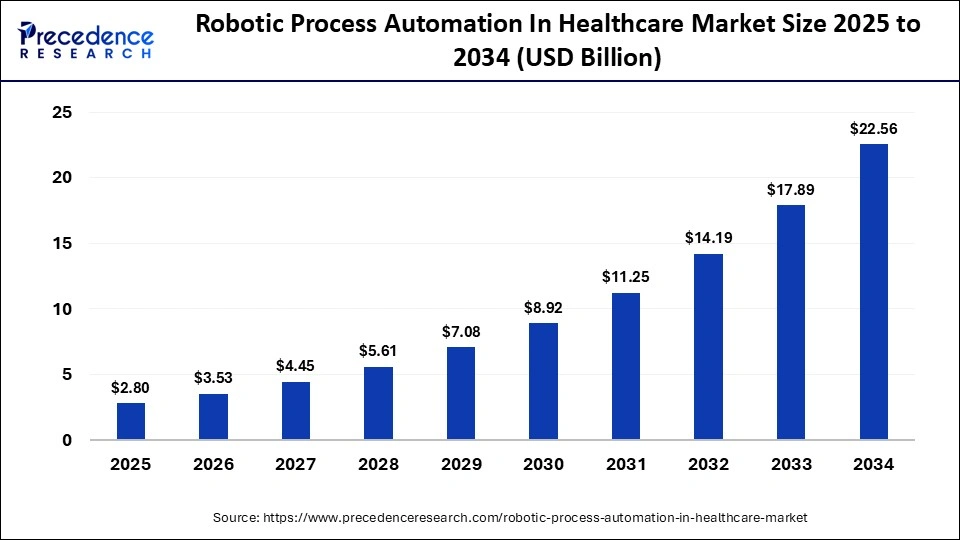
That pressure is showing up in spending. The global healthcare RPA market sat at roughly $2.80 billion in 2025 and is projected to reach $27.23 billion by 2035, a 26.10% CAGR. Notably, the US segment alone accounted for $840 million of that 2025 figure. Healthcare is therefore the fastest-growing vertical in RPA, not a late adopter.
1. Healthcare Staff Still Move Data Between Disconnected Systems
Most healthcare data does not flow. Instead, people carry it, one screen at a time, because the systems holding it were never designed to talk to each other.
Consequently, a single patient encounter can touch all of these:
- EHRs holding demographics, encounters, and clinical documentation
- Payer portals where coverage and authorization status actually live
- Clearinghouses processing EDI 837 submissions and 835 remittances
- Billing systems that need charge and payment data from both sides
- Scheduling software that rarely shares eligibility status automatically
- Spreadsheets tracking denials, appeals, and follow-up queues
- Internal applications built years ago with no integration layer
Because each handoff is manual, each handoff is also a place where data gets retyped, mistyped, or dropped entirely.
2. High-Volume Administrative Tasks Take Up Staff Time
Not every task is worth automating. However, tasks that repeat hundreds of times a week with unchanging rules are exactly where bots outperform people.
Strong automation candidates share these traits:
- High volume, meaning the task runs daily or hourly rather than occasionally
- Clear rules, so the correct action can be written down in advance
- Structured inputs, such as claim numbers, member IDs, or dollar amounts
- Low exception rates, ideally under 20 percent of total transactions
- No clinical judgment, since interpretation stays with licensed staff
Eligibility verification, claim status checks, and payment posting meet all five. In contrast, reviewing a complex medical necessity denial meets none of them.
3. RPA Can Fill Gaps Where APIs Are Not Available
Ideally, systems would connect through APIs. In reality, many healthcare platforms either have no public API or expose only part of what a workflow needs.
RPA therefore becomes the practical option when:
- A payer portal offers a login screen but no developer access
- A legacy billing or scheduling system predates modern integration standards
- An EHR API covers reads but not the write-back your workflow requires
- Vendor API access exists but carries licensing costs or approval timelines you cannot absorb
Since a bot uses the same screens your staff already use, it reaches systems an integration project simply cannot. That said, screen-based automation is the fallback, not the first choice, because interfaces change more often than APIs do.
4. RPA Helps Organizations Scale Without Adding Staff at the Same Rate
Automation rarely eliminates roles. Rather, it changes the slope of the line between transaction growth and hiring.
The practical effect looks like this:
- Volume grows faster than headcount when bots absorb the repetitive share of the work
- Staff shift toward exceptions, handling the cases that genuinely need judgment
- Overtime and temp spend drop during predictable peaks, such as month-end billing cycles
- Operating cost per transaction falls even when total operating cost keeps rising
Notably, the honest framing matters here. If a workflow carries a high exception rate, bots create review work instead of removing it, and the savings never arrive.
5. Automation Also Creates More Consistent Workflow Tracking
Beyond cost, automation produces something manual work never does: a complete record of what happened. Every bot action is logged, timed, and attributable.
That record delivers:
- Standard steps, since the bot performs the same sequence every single time
- Timestamps on every action, making cycle times measurable rather than estimated
- Exception reporting that shows exactly where and why work stalls
- Auditability, with an immutable trail of each automated action against a patient or financial record
For healthcare specifically, that last point is not a nice extra. Under HIPAA, any system touching PHI needs to prove who did what and when, and bots generate that evidence by default.
In short, healthcare organizations build RPA platforms to close the gaps between systems that were never designed to connect, and to keep administrative capacity growing without matching it hire for hire. The tracking and audit benefits usually arrive as a bonus rather than the reason
Healthcare RPA Platform Development Costs in $70,000 to $300,000 in 2026
A custom healthcare RPA platform generally costs $70,000 to $300,000 in 2026, depending on the number of workflows, integrations, bots, compliance requirements, and platform features.
Two variables move the number more than any others:
- The first is how many systems your bots must reach, since every EHR, payer portal, and clearinghouse connection is separate engineering work.
- The second is compliance depth, because SOC 2 readiness and PHI-grade audit infrastructure add cost before a single bot gets written.
Below, each tier reflects what healthcare teams actually receive at that investment level.
1. $70,000 to $120,000 for a Focused RPA Platform
At this level, you automate a narrow slice of work properly rather than covering several departments poorly. Most teams start here to prove recovery on one workflow before funding expansion.
This tier typically covers:
- 1 to 3 workflows, such as eligibility verification or claim status checks
- Limited integrations, usually one or two systems and a single payer surface
- A smaller bot fleet, generally 2 to 6 unattended bots
- Basic orchestration, meaning scheduling and queueing without multi-tenant controls
- Standard dashboards reporting volume processed and failure counts
- Straightforward exception handling, often a review queue rather than a full workflow UI
Realistically, expect 4 to 6 months and a platform that works well inside its defined scope. However, adding a fourth workflow later costs more than including it now, because the orchestration layer usually needs rework.
2. $120,000 to $200,000 for a Multi-Workflow RPA Platform
Once automation spans departments, the management layer becomes the product. Consequently, this tier spends proportionally more on orchestration and less on individual bots.
This tier typically covers:
- Multiple departments, such as patient access, billing, and denials working from one platform
- EHR integration, either read access or limited write-back depending on method
- Payer portals, generally 3 to 6 surfaces with credential and MFA handling
- Attended and unattended bots, so staff can trigger automations directly
- Central orchestration with versioning, deployment control, and work distribution
- Stronger reporting, including cycle times and dollars recovered per workflow
- Security controls, covering role-based access, secrets management, and PHI minimization in logs
- Structured exception management with routing rules and a review interface staff will use
Expect 6 to 9 months here. Notably, most teams that budget for tier one end up in tier two once integration scope gets mapped honestly.
3. $200,000 to $300,000 for an Enterprise Healthcare RPA Platform
This tier builds infrastructure other teams depend on. Therefore, the cost sits in reliability, governance, and scale rather than in bot count alone.
This tier typically covers:
- Multiple healthcare workflows running concurrently across the revenue cycle
- Large bot fleets, generally 15 or more, requiring load distribution
- Several payer integrations, spanning Medicaid, Medicare MACs, and commercial plans
- Epic or Oracle Health connectivity, including HL7 v2 or FHIR R4 write-back
- Clearinghouse integration for EDI 837 submissions and 835 remittance ingestion
- Advanced monitoring with synthetic checks that catch silent bot failures
- Enterprise security, including SOC 2 Type II readiness and tenant isolation
- Detailed auditability, with immutable trails on every automated action against a record
- High transaction volumes, meaning architecture designed for peak billing cycles
Expect 9 to 14 months. Additionally, teams selling automation as a product feature almost always land here, since multi-tenancy is an architectural decision rather than a later addition.
4. What the $70,000 to $300,000 Estimate Includes
This range covers custom engineering work. It does not automatically include every third-party subscription your platform will run on.
Included in the development range:
- Discovery, process mining, and workflow scoping
- Architecture and platform design
- Orchestrator, work queue, and exception-handling build
- Bot development and testing
- Integration engineering across EHRs, portals, and clearinghouses
- Compliance and security implementation
- QA, UAT, and security audit
- CI/CD pipeline setup and deployment
Budgeted separately:
- Cloud infrastructure, typically $500 to $4,000 per month depending on bot count and volume
- Third-party RPA licenses, if you run bots on a commercial stack rather than an owned runtime
- OCR or document AI services, when workflows involve scanned or unstructured input
- Formal SOC 2 audit fees, which are separate from readiness engineering
- Annual maintenance, which runs a meaningful percentage of build cost every year
In short, $70,000 buys a working automation for a specific problem, while $300,000 buys infrastructure the organization runs on. Where you land depends far more on integration count and compliance depth than on how many bots you think you need.
Healthcare Workflows That Can Be Automated With RPA
RPA works best on administrative workflows that repeat constantly and follow fixed rules. Below are the eight most commonly automated in US healthcare, ranked by how hard each one is to build.
| Workflow | What the RPA Bot Does | Typical Complexity |
| Eligibility verification | Checks coverage and benefits | Low to medium |
| Appointment scheduling | Moves and verifies scheduling data | Medium |
| Prior authorization | Collects information and checks status | Medium to high |
| Claims processing | Enters and checks claim information | Medium |
| Claim status checks | Retrieves payer responses | Low to medium |
| Denial management | Collects and routes denial information | Medium to high |
| Payment posting | Matches payments with accounts | Medium |
| Patient data entry | Moves structured information between systems | Low to medium |
1. Patient Access Automation
Front-end work is usually automated first, because the rules rarely change. Bots verify coverage against tomorrow’s appointment list, copy registration data between the EHR and scheduling system, and flag inactive policies before the visit rather than after billing.
2. Prior Authorization Automation
Here, RPA handles the mechanical parts. Bots gather documentation, submit through payer portals, and poll for status daily. However, medical necessity arguments and peer-to-peer reviews stay with clinical staff.
Additionally, CMS-0057-F requires impacted payers to run FHIR-based prior authorization APIs by January 1, 2027, so some portal automation has a shelf life.
3. Claims and Claim Status Automation
Status checking is the strongest candidate in the revenue cycle. Bots log into each payer, retrieve responses on aging claims, and update the billing system. Consequently, stalled claims surface in hours instead of weeks.
4. Denial Management Automation
Bots collect denial reasons, attach the original claim, and route each case to the right queue. They do not resolve denials. Instead, they remove the gathering work so staff start with a complete file.
5. Payment Posting Automation
EDI 835 remittance files arrive daily in a predictable format. Therefore, matching payments to claims is highly repeatable, which makes posting one of the most reliable automations to build.
Now that the workload is clear, the cost numbers have something concrete to attach to.
Healthcare RPA Cost Breakdown by Development Phase
A healthcare RPA platform costs $70,000 to $300,000 to build, and the table below shows exactly where that money goes. Notably, bots themselves account for less than a quarter of the total on most projects. Instead, the platform layer and the integration work carry the budget.
Healthcare RPA Cost Table
| Development Phase | Estimated Cost |
| Discovery and workflow planning | $5,000 to $15,000 |
| Architecture and UX design | $7,000 to $20,000 |
| Platform and backend development | $18,000 to $70,000 |
| Bot development | $15,000 to $60,000 |
| Healthcare integrations | $10,000 to $60,000 |
| Security, QA, and compliance | $10,000 to $45,000 |
| Deployment and DevOps | $5,000 to $30,000 |
| Typical total investment | $70,000 to $300,000 |
Because phases overlap, the timeline is shorter than the sum of the parts. However, the costs do not overlap, so the totals hold.
1. Discovery and Workflow Planning
$5,000 to $15,000
This is the cheapest phase and the most expensive one to skip. Specifically, discovery decides which workflows are worth automating before anyone writes code.
The work covers:
- Workflow mapping, documenting every click, screen, and decision point staff currently perform
- Automation suitability, scoring each workflow against volume, rule clarity, and input structure
- Exception identification, since a workflow above roughly 20 percent exceptions costs more to automate than to staff
- System access, confirming which logins, roles, and credentials bots will actually need
- Requirements, translating “automate eligibility” into testable acceptance criteria
- Transaction volumes, which determine bot count and infrastructure sizing
- API availability, checking whether screen automation is necessary or merely convenient
2. Healthcare RPA Architecture and UX Design
$7,000 to $20,000
Next, architecture decides what the platform can grow into. Consequently, decisions made here determine whether adding a fourth workflow later costs $8,000 or $40,000.
The work covers:
- Platform architecture, defining how orchestration, queues, and bots communicate
- Bot architecture, including shared selector libraries and reusable components
- Staff dashboards, showing run status, failures, and recovered value
- Work queues, controlling how tasks distribute across available bots
- Admin screens, where automations get deployed, paused, and versioned
- User permissions, separating who can run a bot from who can edit one
3. Core Platform Development
$18,000 to $70,000
This is the largest single line item on most builds. Essentially, you are building the software that manages bots rather than the bots themselves.
The work covers:
- Backend services handling orchestration, state, and task distribution
- Database design for queues, run history, and exception records
- Bot management, covering deployment, versioning, and rollback
- Workflow engine, executing multi-step processes with branching logic
- Scheduling, determining what runs overnight, hourly, or on demand
- APIs exposing platform functions to internal tools and dashboards
- Authentication, including secrets management and credential rotation
4. Bot Development
$15,000 to $60,000
Afterward, individual bots get built against the platform. Since the framework already exists, each additional bot costs less than the first.
The work covers:
- Attended bots that staff trigger directly from their desktop
- Unattended bots running on schedules without human initiation
- Business rules, written explicitly so behavior stays predictable
- Retries, handling timeouts and transient portal errors gracefully
- Workflow logic, defining what constitutes success, failure, and escalation
5. Healthcare System Integration
$10,000 to $60,000
Meanwhile, integration is the variable that separates a $90,000 project from a $280,000 one. Each connected system is discrete engineering work, not a configuration setting.
The work covers:
- EHRs, using HL7 v2 messaging, FHIR R4, or UI automation depending on access
- Payer systems, including credential rotation and MFA handling per portal
- Clearinghouses, covering EDI 837 submission and 835 remittance ingestion
- Internal software, such as legacy billing or scheduling platforms without APIs
- APIs, wherever a real one exists, because APIs break far less often than screens
6. Security and Testing
$10,000 to $45,000
Given that bots touch PHI, this phase runs parallel to development rather than after it. Therefore, treating it as a final step is the most common way projects slip.
The work covers:
- HIPAA controls, including AES-256 at rest and TLS 1.3 in transit
- PHI protection, particularly redaction in bot logs and screenshots
- QA, validating every business rule against real workflow data
- Security testing, covering credential handling and access boundaries
- Audit logs, producing an immutable record of each automated action
- Regression testing, confirming existing bots survive every new release
7. Deployment and Production Setup
$5,000 to $30,000
Finally, the platform moves into production. Because silent bot failures are the primary operational risk in healthcare RPA, monitoring belongs here rather than in a later phase.
The work covers:
- Cloud infrastructure, provisioned on HIPAA-eligible AWS or Azure services
- CI/CD, enabling bot updates without manual redeployment
- Monitoring, including synthetic checks that detect bots failing quietly
- Logging, centralized and searchable for incident review
- Production rollout, typically one workflow at a time with a rollback path
Get a phase-level estimate for your build. Intellivon maps your actual workflows, integration surfaces, and compliance obligations to a cost per phase, so you know what you are approving before development starts. Request a scoped estimate.
What Makes a Healthcare RPA Platform More Expensive
Two healthcare organizations can receive estimates $180,000 apart for what sounds like the same project. The reason is that “healthcare RPA platform” describes a category, not a scope.
Specifically, eight variables move the number, and integration count plus compliance depth move it the most. Below, each variable is priced so you can build your own estimate before a vendor gives you theirs.
Cost Impact of Each Scope Variable
| Variable | Low-Cost Scenario | High-Cost Scenario | Added Cost |
| Number of workflows | 1 to 3 workflows | 8 or more workflows | +$25,000 to $70,000 |
| Number and type of bots | 2 to 6 unattended | 15+ mixed attended and unattended | +$18,000 to $45,000 |
| Healthcare systems connected | 1 to 2 systems | 5 or more systems | +$20,000 to $55,000 |
| Workflow complexity | Fixed 10-step process | 40+ rules with branching paths | +$12,000 to $35,000 |
| Payers and payer portals | 1 to 2 portals | 8 or more portals | +$16,000 to $48,000 |
| Human review and exception handling | Simple review queue | Routed queues with SLAs and audit | +$10,000 to $30,000 |
| Reporting and management features | Basic run dashboard | Full analytics and ROI reporting | +$8,000 to $25,000 |
| Security and compliance | HIPAA baseline | SOC 2 Type II readiness | +$15,000 to $40,000 |
In short, the spread between $70,000 and $300,000 is explained almost entirely by how many systems you touch and how much compliance your buyers demand. Neither variable is negotiable once your scope is set, which is exactly why scope should be decided before the estimate.
EHR and Payer Integrations Can Change the RPA Budget Significantly
Integration is the line item that separates a $90,000 build from a $280,000 one. Healthcare systems connect at $10,000 to $60,000 in total, but the spread depends on method and count rather than vendor names.
1. Epic and Oracle Health Integration
Cost follows access, not brand. Where certified interfaces exist, HL7 v2 messaging or FHIR R4 runs $15,000 to $40,000.
However, when write-back is required, or vendor approval is slow, teams fall back to screen automation at lower upfront cost and higher ongoing risk.
2. Payer Portal Integration
Each portal is separate work, typically $3,000 to $8,000. Specifically, bots must handle:
- Login flows unique to every payer
- MFA challenges and credential rotation
- Page navigation across inconsistent layouts
- Document upload for authorization packets
- Status checks with unpredictable response formats
- Portal changes, which some payers push monthly
3. Clearinghouse Integration
Clearinghouses like Availity consolidate many payers behind one connection. Consequently, routing eligibility and claims through EDI 837 and 835 files often replaces four or five portal bots with a single integration, reducing both build and maintenance costs.
4. API Integration Versus Screen Automation
The rule is simple. If a usable API exists, use it. If none exists, RPA fills the gap.
5. Why Screen Automation Costs More to Maintain
Screen bots break when interfaces change, even though the business process has not. Therefore, a renamed field or moved button stops production work while nothing is actually wrong.
In short, the method decides your maintenance bill. API-first builds cost more in month one and far less in year two. Which brings up what that year-two number actually looks like.
The Main Components You Are Paying to Build
When you approve a healthcare RPA budget, you are funding nine distinct components, not a pile of bots. Notably, six of the nine have nothing to do with automation logic at all. Instead, they exist to keep bots running, governed, and auditable.
That is precisely why platform work absorbs more budget than bot work, and why two quotes with identical bot counts can differ by $100,000.
| Component | What You Are Paying For | Cost Range |
| Bot development engine | The framework every bot is built on, including shared components, selector libraries, and retry logic. Built once, so each later bot costs less. | $8,000 to $25,000 |
| Bot orchestrator | The system that schedules and controls bots, deciding what runs, when, on which machine, and in what order. | $12,000 to $35,000 |
| Workflow and rules engine | Business rules held in configuration rather than bot code, so changing a routing rule is an admin task, not a dev ticket. | $8,000 to $22,000 |
| Staff work queues | Holds and distributes tasks across available bots and people, preserving order during peak billing cycles. | $6,000 to $18,000 |
| Exception management | Catches every stop and routes it to the right person with the reason attached. | $8,000 to $25,000 |
| Healthcare system integrations | Each connection to an EHR, payer portal, or clearinghouse as discrete engineering work. | $10,000 to $60,000 |
| Admin dashboard | The interface for deploying, pausing, versioning, and rolling back automations without engineering help. | $6,000 to $20,000 |
| Monitoring and alerts | Synthetic checks confirming each bot is genuinely working, not merely running. | $4,000 to $15,000 |
| Security and audit logs | An immutable, attributable trail for every automated action against a patient or financial record. | $10,000 to $40,000 |
Three components drive nearly all the variance between estimates. Specifically, integrations swing $50,000 on their own, the orchestrator determines whether the platform scales past its first workflow, and the audit layer is non-negotiable the moment bots touch PHI.
Meanwhile, the components teams cut first are usually monitoring and exception management. That decision saves roughly $12,000 during the build. However, it buys bots that fail quietly against financial records, which costs far more to discover later.
In short, bots are the visible part and the cheap part. The nine components above are what you are actually buying, and the orchestrator, integrations, and audit layer explain most of the gap between a $90,000 quote and a $250,000 one.
RPA Software Licensing Can Sit Outside the Development Cost
The $70,000 to $300,000 range covers engineering work, not software licenses. Consequently, if your bots run on a commercial RPA engine rather than an owned runtime, licensing is a separate annual line on top of the build.
Notably, industry analyses put licensing at roughly 25 to 30 % of total RPA program spend, with services, development, and upkeep taking the rest. In other words, the license is real money but rarely the largest number.
RPA Licensing Cost Comparison
| Platform | Published Entry Price | Enterprise Pricing | Pricing Transparency |
| Microsoft Power Automate | $15 per user/month (Premium) | $150 per bot/month (Process), $215 per bot/month (Hosted Process) | Fully published |
| UiPath | $25 per month (Basic) | Quote-based; partner estimates near $8,000 to $15,000 per unattended bot annually | Partially published |
| Automation Anywhere | Not published | Quote-based, cloud-first | Quote only |
| SS&C Blue Prism | Not published | Quote-based, enterprise orchestration | Quote only |
Prices reflect publicly reported figures at the time of writing. Since enterprise deals are negotiated, treat the upper rows as anchors rather than invoices.
In short, treat licensing as a separate budget line and decide it on bot count rather than preference. Most healthcare teams end up with a hybrid: a licensed engine running the bots, plus custom orchestration, exception handling, and audit infrastructure built around it. Which leaves one cost nobody quotes upfront: what you pay every year after launch.
Custom RPA vs Off-the-Shelf RPA Costs
The choice is not really custom versus packaged. Rather, it is which layers you buy and which you build. Off-the-shelf engines cost less to start and more to run, while custom builds invert that.
Consequently, the right answer depends on how healthcare-specific your workflows actually are.
Custom RPA vs Off-the-Shelf RPA Costs
| Factor | Custom Healthcare RPA | Off-the-Shelf RPA |
| Initial development | Higher | Lower |
| Workflow flexibility | High | Moderate |
| Healthcare-specific UX | Custom | Limited |
| Integrations | Fully customizable | Connector-dependent |
| Licensing | Depends on architecture | Usually recurring |
| Maintenance | Owner responsibility | Vendor plus custom work |
| Best fit | Complex proprietary workflows | Standard automation |
1. Custom RPA Works Better for Healthcare-Specific Workflows
Packaged connectors rarely cover payer-specific logic, denial routing rules, or EHR write-back requirements.
Therefore, teams automating prior authorization across eight payers, or building automation they resell, usually need custom work regardless of which engine runs the bots.
2. Packaged RPA Works Better for Standard Automation
Meanwhile, generic administrative tasks are already solved.
Document routing, form filling, report generation, and internal data transfers run well on existing connectors. Building those from scratch is wasted budget.
3. A Hybrid Approach Often Makes More Financial Sense
Most healthcare teams land here, and it is usually the correct answer. Specifically, you license a proven engine for bot execution while custom-building everything above it.
A typical hybrid split looks like:
- Licensed: bot runtime, screen automation, basic scheduling
- Custom: healthcare workflow logic, EHR and payer integrations, exception queues, staff dashboards, ROI analytics, audit trails
Because the commoditized layer already exists, you avoid rebuilding it. Additionally, because the healthcare layer is yours, you keep control over payer rules and workflow changes without waiting on a vendor roadmap.
In short, buy what is commoditized and build what is specific to your revenue cycle. That split typically cuts initial development by $20,000 to $50,000 while preserving the flexibility healthcare workflows actually require.
Healthcare RPA Maintenance Costs After Launch
Plan for approximately 15% to 25% of the initial development cost per year for maintenance and ongoing engineering. On a $120,000 build, that means $18,000 to $30,000 annually. Notably, healthcare sits at the higher end of that band because payer portals change more often than the enterprise software bots usually target.
Additionally, industry benchmarks suggest 30 to 40 % of total RPA program budgets go to maintenance and break-fix once new development is included.
Annual Maintenance Cost by Category
| Category | What It Covers | Annual Cost (on a $120K build) |
| Bot maintenance | Selector repair, retry tuning, and fixes when logic drifts from the actual process | $5,000 to $9,000 |
| Payer portal changes | Rebuilding navigation when a payer moves a button, renames a field, or changes MFA | $4,000 to $8,000 |
| EHR and API updates | Adjusting to Epic or Oracle Health upgrades, FHIR version changes, and deprecated endpoints | $2,500 to $5,000 |
| Cloud infrastructure | HIPAA-eligible compute, storage, and network on AWS or Azure | $6,000 to $48,000 |
| Monitoring and support | Alert triage, incident response, and exception queue oversight | $3,000 to $7,000 |
| Security updates | Dependency patching, credential rotation, access reviews, and annual penetration testing | $2,500 to $6,000 |
| Typical annual total | Excludes new workflow development | $23,000 to $83,000 |
In short, budget 15% to 25% annually for upkeep and treat expansion as a separate decision with its own business case. Teams that conflate the two usually discover in year two that they funded very little actual maintenance.
This sets up the number that matters most to a CFO: what this platform costs across three years, not one.
The Three-Year Cost of Owning a Healthcare RPA Platform
Launch price answers one year. However, most healthcare RPA decisions are approved against a three-year horizon, because that is when licensing and maintenance either justify the build or quietly overtake it.
Below are the seven cost lines that belong in that calculation.
- Initial development: $70,000 to $300,000, depending on workflows, integrations, and compliance depth
- Annual maintenance: 15% to 25% of the initial build as a planning range
- RPA software licenses: separate and highly variable, since bot count drives vendor pricing
- Cloud infrastructure: $500 to $4,000 monthly, scaling with bot count and transaction volume
- Third-party integration fees: clearinghouse transaction charges, OCR or document AI services, EHR vendor access programs
- Internal operations and support: staff time spent triaging exceptions and reviewing bot output
- New bots and workflow expansion: $4,000 to $12,000 per additional automation once the platform exists
Three-Year TCO Example
| Cost Line | Focused Build | Enterprise Build |
| Initial development | $110,000 | $260,000 |
| Maintenance (3 years @ 20%) | $66,000 | $156,000 |
| RPA licenses (3 years) | $10,800 | $135,000 |
| Cloud infrastructure (3 years) | $21,600 | $108,000 |
| Third-party integration fees | $9,000 | $36,000 |
| Internal operations | $45,000 | $135,000 |
| Expansion (4 new bots) | $28,000 | $40,000 |
| Three-year total | $290,400 | $870,000 |
The focused build assumes six bots on Power Automate Process licensing. Meanwhile, the enterprise build assumes 25 unattended bots on enterprise licensing at roughly $1,800 per bot annually after negotiation.
Notably, licensing is negligible at six bots and becomes the second-largest line at 25. That crossover is exactly why bot count, not preference, should decide build versus buy.
In short, expect the three-year number to land near 2.5 to 3.3 times the initial build
How Intellivon Builds Healthcare RPA Platforms
We build healthcare RPA as infrastructure, not as a bot pilot. Consequently, the work starts with your transaction volumes and exception rates rather than a bot demo. Across 11 years of building custom software in healthcare, fintech, and AI, we have found that bots are rarely the hard part. Instead, orchestration design, integration method, and exception routing decide whether a platform survives its second year.
Here is how our healthcare automation engagements actually run:
- Discovery comes before architecture: our team maps how each administrative workflow runs today, including the undocumented rules and workarounds staff apply from memory.
- Your data sets the automation order: transaction volume per workflow, exception rate by process, denial rate by cause code, and days in A/R decide which bot gets built first, not which one demos well.
- Suitability gets tested honestly: workflows running above roughly 20 percent exceptions get flagged as poor automation candidates rather than scoped anyway.
- Integration targets the systems already running: Epic and Oracle Health via HL7 v2 or FHIR R4, payer portals across Medicaid, Medicare MACs, and commercial plans, plus clearinghouse EDI 837 and 835 feeds.
- This integration work is not theoretical for us: past delivery includes a SMART on FHIR build with Epic covering real-time retrieval and write-back of demographics, vitals, medications, and care plans.
- Build versus license gets decided on bot count: we run bots on an existing engine wherever one meets the requirement, and build custom orchestration, queues, and audit infrastructure around it. Rebuilding commoditized runtime is wasted budget.
- API-first wherever an API exists: screen automation is the fallback, because UI-based bots carry the maintenance load that quietly doubles three-year cost.
- Launches run in phases: one workflow first, validated against a locked baseline, then expansion only once recovered dollars are measurable.
- Exception handling is built, not deferred: routed queues with reasons attached, so bots stop and escalate rather than guessing against financial records.
- Compliance is treated as architecture: BAA chain coverage, PHI redaction in bot logs and screen captures, immutable audit trails on every automated action, role-based access, and SOC 2 readiness where procurement requires it. The approach is detailed in our HIPAA security architecture guide.
Book a healthcare RPA scoping session, and you will leave with a phase-level cost range and integration scope, not a proposal deck.
Conclusion
Healthcare RPA platform development cost lands between $70,000 and $300,000 in 2026, but the launch price is only part of the decision. Because integration count and compliance depth drive most of the variance, scope those two before requesting any estimate.
Additionally, budget 15% to 25% annually for maintenance and expect a three-year figure near three times the build. Ultimately, teams that price the platform layer honestly upfront avoid the year-two surprise that derails most automation programs.
FAQs
Q1. How much does healthcare RPA software development cost in 2026?
A1. Healthcare RPA software development costs $70,000 to $300,000 in 2026. Specifically, a focused platform covering one to three workflows runs $70,000 to $120,000, multi-workflow builds run $120,000 to $200,000, and enterprise platforms run $200,000 to $300,000. Integration count and compliance depth drive most of that variance, not bot count.
Q2. How much does one healthcare RPA bot cost to build?
A2. A single healthcare RPA bot costs $4,000 to $12,000 once the platform layer already exists. However, the first bot on a new build costs far more, because it carries the orchestrator, work queues, and exception handling underneath it. Consequently, per-bot cost drops sharply after automation three or four.
Q3. Does Epic integration increase healthcare RPA development cost?
A3. Yes, though access method matters more than the EHR name. Certified HL7 v2 or FHIR R4 integration with Epic typically adds $15,000 to $40,000. Meanwhile, screen-based automation costs less upfront but carries higher maintenance, since interface changes break bots even when the underlying process has not changed.
Q4. How much does healthcare RPA maintenance cost each year?
A4. Budget 15% to 25% of your initial build annually. On a $120,000 platform, that means $18,000 to $30,000 covering bot repair, payer portal changes, EHR updates, cloud infrastructure, monitoring, and security patching. Notably, new bot development is separate and should never be bundled into a maintenance retainer.
Q5. Is custom healthcare RPA cheaper than UiPath or Power Automate?
A5. It depends on bot count. Below roughly ten bots, licensing wins, since Power Automate runs $150 per bot monthly against a higher custom build. Above fifteen bots, however, per-bot licensing compounds, and custom orchestration usually costs less across three years. Most healthcare teams ultimately run a hybrid.
Q6. Which healthcare workflow should we automate first?
A6. Start with eligibility verification or claim status checks. Both carry high volume, clear rules, structured inputs, and exception rates typically under 20 percent. Therefore, payback arrives fastest there. In contrast, denial resolution and prior authorization involve judgment and payer variation, which makes them expensive first automations.
Q7. How long does it take to build a healthcare RPA platform?
A7. A focused platform takes four to six months, multi-workflow builds take six to nine months, and enterprise platforms take nine to fourteen months. Because phases overlap, the timeline runs shorter than the sum of the parts. However, security audit and clinical UAT cannot be compressed meaningfully.