Key Takeaways:
- Hospital appointments can now be booked quickly because Artificial Intelligence takes care of all the paperwork in the background.
- Getting reminders and sorting insurance details has become easier as AI quietly manages those tasks now.
- Canceled appointments tend to get filled faster, since AI finds someone new and sends out reminders.
- Building a custom hospital AI platform usually runs between $70,000 and $300,000, depending on what’s needed.
- Intellivon builds an AI automation platform that fits right in with existing EHR and scheduling systems, so nothing needs replacing.
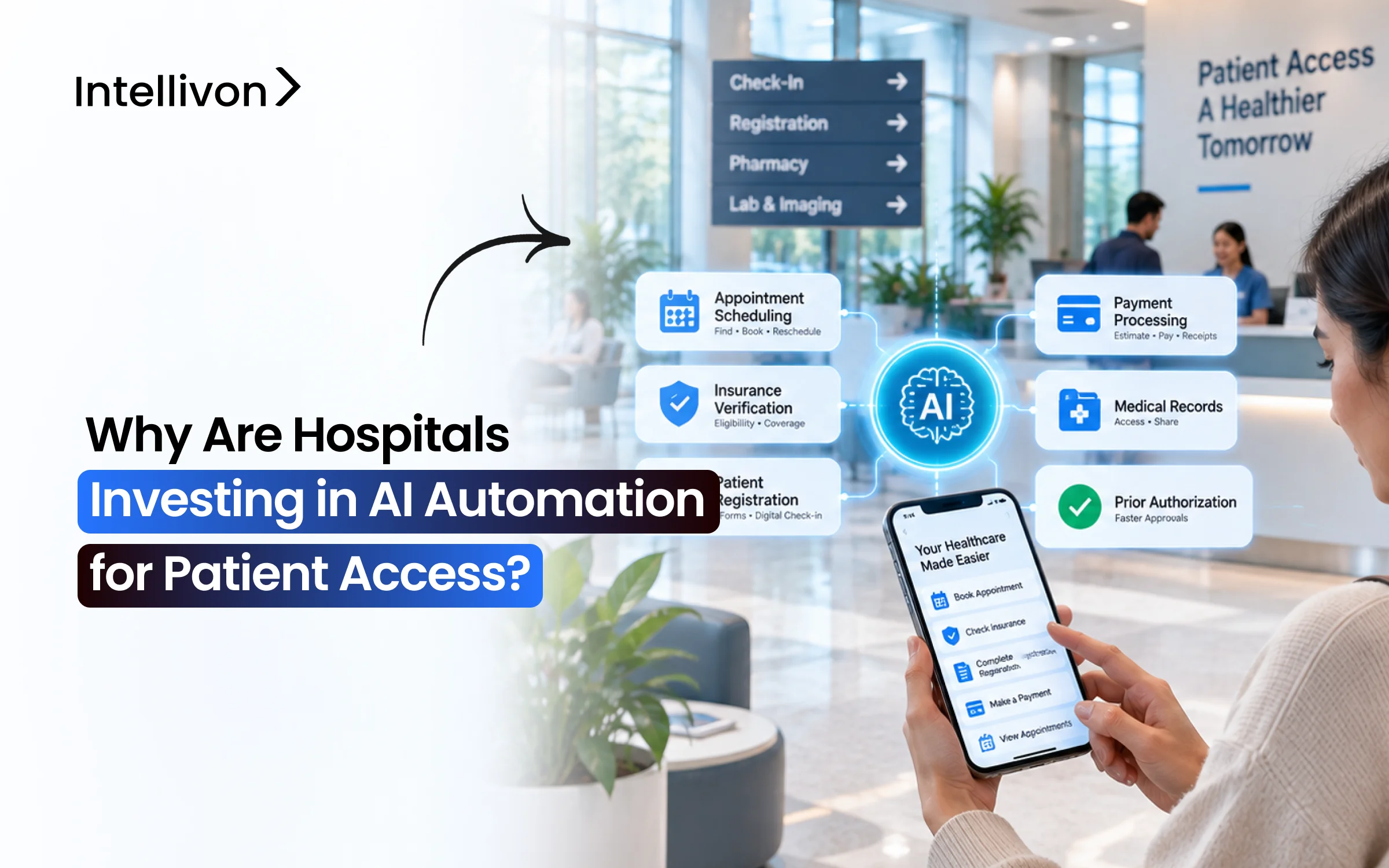
Hospitals are putting money into AI systems to automate patient access because nowadays the front end of the revenue cycle determines whether or not a claim will be paid. However, scheduling, eligibility checking, prior authorization, and registration still depend on phone calls and manual data entry, so any error in these areas results in a denial, an empty appointment slot, or a patient choosing to book with another provider.
Even so, the change is not really about replacing the call center; rather, health systems are purchasing capacity that they are unable to hire, since demand for access continues to rise while front-office staffing remains the same. As a result, AI agents now take on the routine tasks of booking, carrying out coverage checks, chasing authorizations, and making outbound recalls, before passing on the more complex cases to staff, having attached to them the full context.
Despite that, the harder question is which projects to support and whether it is better to create the system or to purchase one. This blog gives answers to that question: it shows the order in which the return on investment happens, the cost to build at each stage, the limits on writing back data from Epic, the rules that must be followed before going live, and the reason why most test projects don’t work. That is why Intellivon designs these systems with EHR integration and HIPAA controls in mind, ensuring that they prove reliable in production, not just in a demonstration.
What Is AI Patient Access Automation?
AI patient access automation is software that completes or supports the administrative work a patient moves through before care begins. That work includes finding a provider, booking, registration, insurance checks, referrals, and financial clearance.
Rather than requiring a staff member to touch every step, the system handles routine actions on its own and escalates the rest.
1. What Patient Access Includes in a Hospital
Patient access covers every step between a patient deciding they need care and that care actually starting. Most hospitals split this across a call center, a referral team, and front-desk registration staff. Consequently, a single patient can touch four departments before a clinician ever sees them.
Here is what sits inside patient access at a typical health system:
- Provider search: matching the patient to the right specialty, location, and network status.
- Appointment scheduling: selecting a visit type, then booking into an open slot on the provider’s template.
- Referral management: receiving inbound referrals, then converting them into scheduled appointments before the patient leaks elsewhere.
- Patient registration: capturing demographics, contact details, and subscriber information accurately enough to survive payer validation.
- Insurance eligibility: confirming active coverage, plan details, and benefits ahead of the visit.
- Prior authorization: determining whether the service needs approval, then submitting and tracking it.
- Reminders and communication: confirmations, prep instructions, reschedule offers, and recall outreach.
- Check-in: identity verification, form completion, and arrival status updates.
- Price estimates: giving the patient a good-faith cost figure before service.
- Financial clearance: resolving balances, payment plans, and assistance screening upfront.
Each of these steps generates its own failure mode. A wrong subscriber ID at registration and a missing authorization both end the same way, which is a denied claim.
2. Where AI Fits Into Patient Access
AI does not replace the EHR, the practice management system, or the clearinghouse. Instead, it sits around those systems as an orchestration layer and drives them through their existing APIs. In practice, the EHR stays the system of record while the AI layer does the reaching, reading, and writing.
Within that layer, the system typically performs these functions:
- Understands patient requests: interprets free-text and spoken intent rather than forcing menu selection.
- Collects information: gathers demographics, insurance details, and reason for visit through voice, SMS, or web.
- Checks rules: validates coverage, referral requirements, and visit-type eligibility against payer and provider logic.
- Triggers workflows: initiates eligibility calls, authorization submissions, and task creation without human prompting.
- Predicts cancellations: scores appointments for no-show risk, then drives targeted outreach or overbooking.
- Communicates with patients: handles confirmations, reschedules, and recall conversations end to end.
- Completes routine actions: books, cancels, updates records, and writes results back into the EHR.
- Sends exceptions to staff: routes anything ambiguous, clinical, or high-risk to a human with full context attached.
That last function matters more than the other seven. A system that automates well but escalates badly simply moves the work instead of removing it.
3. How AI Patient Access Differs From Basic Automation
Most hospitals already run automation in patient access, usually as appointment reminders or an IVR phone tree. However, those tools follow fixed instructions and break the moment a patient says something unexpected.
AI automation differs because it interprets input, weighs context, and selects a path rather than following one. The distinction becomes clearest side by side:
| Capability | Traditional automation | AI automation |
| Input handling | Menu presses and form fields | Natural speech and free text |
| Logic | Fixed if-then rules written in advance | Decision policy that weighs context per case |
| Unstructured data | Cannot read faxes, notes, or referral PDFs | Extracts structured fields from documents and calls |
| Prediction | None, reacts only to events | Scores no-show risk, denial risk, and coverage gaps |
| Workflow path | One predefined sequence | Chooses among multiple paths based on what it finds |
| Exceptions | Drops the caller or fails silently | Escalates to staff with context preserved |
| Improvement | Requires a developer to rewrite rules | Improves as interaction volume grows |
The practical difference shows up in resolution, not in volume. A reminder system tells a patient about an appointment, whereas an AI agent rebooks it, verifies the new coverage, and flags the authorization gap before the visit.
That gap between notifying and resolving is exactly what hospitals are now paying to close.
Why Hospitals Are Investing in AI Patient Access Automation
Hospitals are investing in AI patient access automation because it lets them absorb rising patient demand without growing administrative work at the same rate. Instead of hiring more schedulers for every volume increase, health systems add a layer that handles routine requests around the clock.
Beyond capacity, the investment targets four financial outcomes: fuller provider schedules, fewer access delays, fewer insurance surprises on the day of care, and less revenue lost to referrals that never convert into booked appointments.
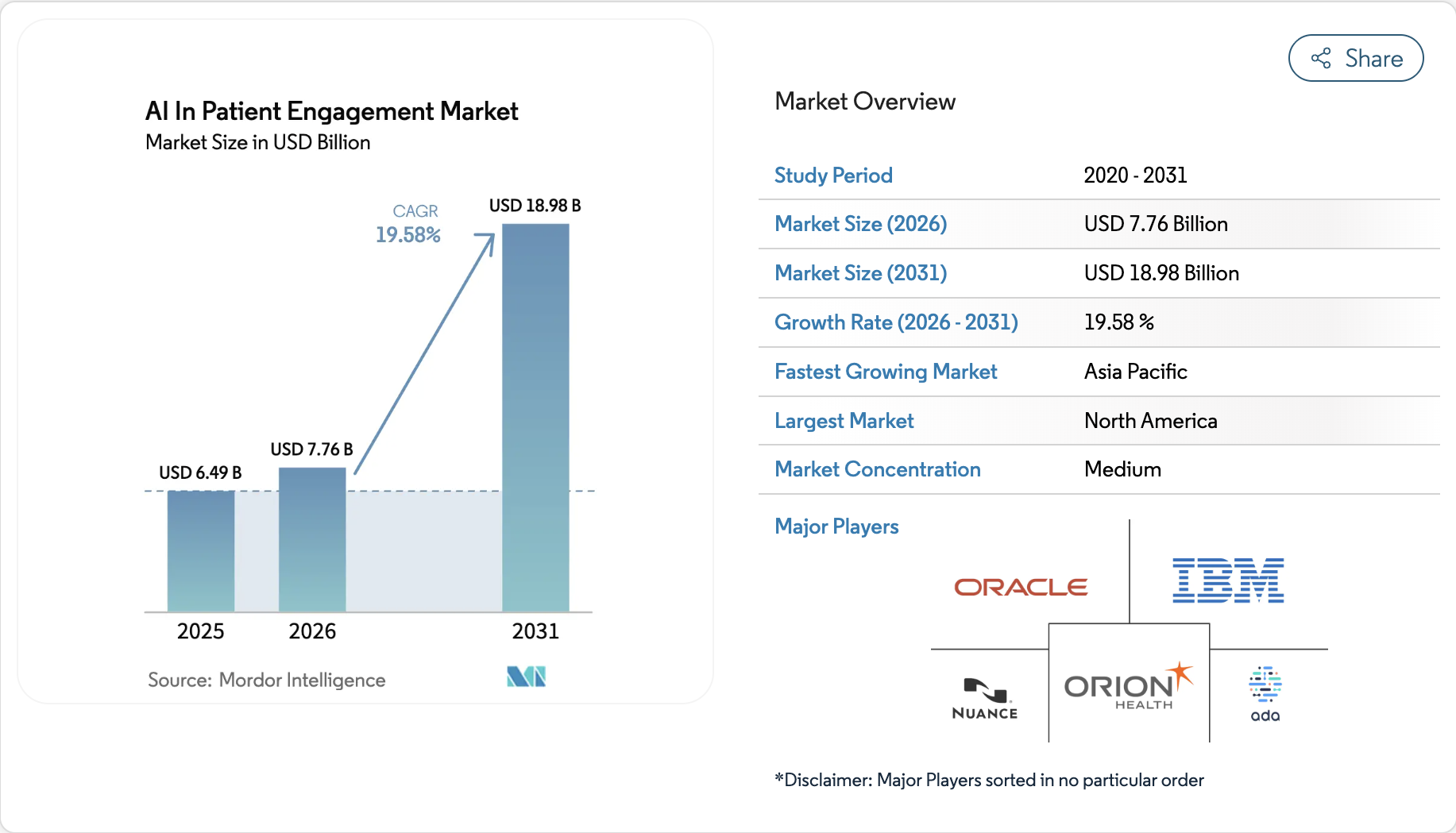
The spending is measurable. The AI in patient engagement market sits at $7.76 billion in 2026 and is forecast to reach $18.98 billion by 2031, a 19.58% CAGR, with hospitals and health systems holding the largest end-user share.
Investors are following the same curve, as shown by Assort Health’s $120 million Series C at a $1.2 billion valuation in June 2026.
1. Hospitals Need More Capacity Without Constantly Adding Staff
Patient demand keeps rising while front-office hiring does not keep pace. Meanwhile, most of the call volume hitting access teams is routine and repetitive. Therefore, hospitals use AI to absorb that predictable work so trained staff stay available for calls that need judgment.
These are the routine tasks AI typically takes over first:
- Routine inbound calls: directions, hours, appointment status, and department routing.
- Appointment changes: cancellations, reschedules, and provider swaps without a hold queue.
- Common questions: prep instructions, documents to bring, parking, and visit expectations.
- Registration: collecting and confirming demographics before arrival.
- Insurance questions: coverage status, plan details, and what the visit requires.
- Reminders: confirmations, prep notices, and follow-up prompts.
This is not a headcount replacement strategy, and hospitals that pitch it that way usually stall at the pilot. Rather, it moves experienced staff onto complex scheduling, financial counseling, and exception work. BCG notes that most health systems review under 5% of access interactions manually, so automation also creates quality visibility that never existed before.
2. Hospitals Want to Fill More of the Appointments They Already Have
Most health systems do not need more appointment slots, because they already fail to fill the ones on the schedule. A visit canceled two days out rarely gets backfilled by a manual team. Consequently, provider capacity that was already paid for simply disappears.
AI improves utilization through five connected actions:
- Cancellation prediction: scores each appointment for no-show and late-cancel risk before the date arrives.
- Automated waitlists: matches an opening to the right waiting patient within minutes, not hours.
- Appointment reminders: confirms attendance early enough that a cancellation still leaves time to refill.
- Rescheduling: offers a new slot immediately instead of sending the patient back to the phone queue.
- Patient recall: contacts patients overdue for follow-up, screening, or chronic care visits.
Provider utilization is the metric these actions move. MGMA found no-shows were the top patient access priority for practice leaders heading into 2026, ahead of online scheduling, phone access, and wait times.
3. Hospitals Want Insurance Problems Identified Earlier
Insurance problems discovered on the day of care are already expensive. At that point, the visit either proceeds toward a denial or gets canceled in front of the patient. Moving verification upstream turns both outcomes into a fixable task days ahead.
The financial case is direct. Experian Health’s 2026 survey of healthcare leaders found inaccurate or missing insurance information is a top denial trigger that starts at registration. Authorization compounds it.
The AMA reports physicians complete an average of 40 prior authorizations weekly, consuming 13 hours of physician and staff time, with 40% employing staff dedicated exclusively to that work.
AI moves this work earlier by:
- Running eligibility on booking: verifying coverage the moment the appointment is created, not the morning of.
- Rechecking before the visit: catching plan changes that occurred between booking and service.
- Discovering hidden coverage: finding active plans on accounts marked self-pay.
- Flagging authorization requirements: identifying which services need approval by payer and plan.
- Chasing status: monitoring payer portals and escalating stalled requests.
4. Hospitals Want Patient Access Available Beyond Call Center Hours
Patient demand does not stop when the access center closes. Calls arriving after hours are either abandoned or pushed into the next morning’s queue, which compounds hold times. Continuous availability fixes a structural gap rather than a staffing surge.
Hospitals extend hours through these channels:
- Voice AI: answering and resolving calls overnight and on weekends.
- SMS: two-way rescheduling and confirmation on the patient’s own schedule.
- Chat: web and portal conversations that complete tasks, not just answer questions.
- Patient portals: account-authenticated scheduling and form completion.
- Online scheduling: public booking for new patients who never call at all.
The American Hospital Association points to GenAI-augmented contact centers reducing wait times and improving first-call resolution, which is the operational shift most health systems are budgeting for in 2026.
Hospitals invest in AI patient access automation for six reasons that all resolve to the same equation: more completed patient tasks per dollar of administrative cost. Taken together, they explain why patient access became the first operational workflow most health systems chose to automate.
Where Hospitals Are Using AI Across the Patient Access Journey
Hospitals apply AI at six points in the patient access journey: scheduling, registration, eligibility verification, prior authorization, referrals, and financial clearance. Each runs on repetitive lookups and follow-up calls that need no clinical judgment.
Moreover, the return compounds when data captured in one stage feeds the next.
1. AI Appointment Scheduling
Scheduling is the hardest access workflow to automate and the most valuable to get right. Because systems like Epic enforce pre-designated slots, the agent must book into an existing opening rather than invent a time.
- Online self-scheduling: patient-led booking for shallow-rule visit types like follow-ups and screenings.
- AI-assisted scheduling: matches specialty, provider, location, visit type, insurance, and availability in one pass.
- Cancellation and no-show prediction: scores risk using lead time and prior no-show history.
- Automated waitlist filling: offers the opening to ranked patients within minutes, then writes the booking back.
2. AI Registration and Digital Intake
Registration errors create denials before a claim exists. Therefore, hospitals shift capture from the front desk to the days before arrival.
- Digital pre-registration: demographics, contact details, insurance, and consent collected by text link.
- Automated verification: duplicate matching, address standardization, insurance discovery, and subscriber validation.
- Digital check-in: identity confirmation, form completion, copay collection, and arrival status from phone or kiosk.
3. AI Eligibility and Prior Authorization
Manual coverage checks happen once at booking, which is too late. AI reruns them continuously and handles authorization on the same timeline.
- Real-time coverage checks: active coverage, plan, deductible, copay, and coinsurance.
- Requirement identification: flags which services need approval by payer and plan.
- Submission and tracking: assembles clinical evidence, files, then monitors payer portals.
- Exception handling: routes mismatches and medical necessity cases to staff with full context.
4. AI Referral Management
Referrals leak because they arrive as faxes and sit unworked. Consequently, speed of first contact determines conversion.
- Referral intake: extracts structured fields from scanned documents.
- Patient outreach: same-day contact that books during the first call.
- Specialty matching: routes to the right service line and in-network provider.
- Status tracking: chases missing records, then closes the loop back to the referring provider.
5. AI Communication and Financial Clearance
Routine outreach and cost conversations both automate cleanly, though outbound contact requires TCPA consent gating.
- Reminders and recall: two-way confirmation, plus campaigns for overdue screenings and chronic follow-ups.
- Rescheduling: offers replacement slots in the same interaction as the cancellation.
- Patient responsibility estimates: applies remaining deductible, copay, and coinsurance to the contracted rate.
- Upfront collection and assistance routing: prepayment, plans, and card on file, with hardship cases sent to a counselor.
AI now covers every access stage from first scheduling request to final payment conversation. Each workflow automates independently, yet the financial return compounds when eligibility, authorization, and scheduling data move together. Most health systems therefore prove one high-volume workflow first, then expand.
How AI Changes the Work of Patient Access Teams
AI does not remove patient access teams, and health systems that pitch it that way usually stall before production. Instead, it redistributes the work. Routine, high-volume requests move to automation, while staff shifts onto cases that need judgment, negotiation, or empathy.
Meanwhile, the system’s most important job is deciding which bucket each interaction belongs in. Get that routing right and staff trust the tool. Get it wrong, and the work simply moves sideways, which is the single most common reason patient access pilots never scale.
1. Routine Requests Can Be Completed Automatically
Good automation candidates share three traits: high volume, predictable structure, and no clinical judgment. Because these requests follow the same path every time, an agent can close them end-to-end rather than just collecting information.
These are the strongest candidates:
- Appointment status and directions: answerable from existing records with no lookup ambiguity.
- Cancellations and reschedules: a defined action with a defined confirmation.
- Prep and visit instructions: identical answers across every patient with that visit type.
- Eligibility checks: a structured query with a structured response.
- Reminders and confirmations: time-triggered, not request-triggered.
- Pre-registration collection: the patient supplies their own data, so staff verifies instead of keying it in.
2. Staff Can Spend More Time on Complex Patient Problems
Once routine volume drops, access teams get time back for the cases that actually carry financial and clinical weight. Notably, these are the same cases that used to sit in a queue while staff worked through simpler requests ahead of them.
Staff move on to work like:
- Unusual insurance cases: multiple active plans, coordination of benefits, and out-of-network exceptions.
- Difficult referrals: incomplete clinical records or a specialty with no obvious match.
- Accessibility needs: interpreters, transport barriers, and mobility accommodations.
- Financial hardship: assistance screening and payment plan conversations that require a human.
- Urgent scheduling issues: clinically time-sensitive bookings that cannot wait for the next open slot.
Consequently, the roles that grow after automation are exception specialists, financial navigators, and AI quality reviewers.
3. AI Can Route Exceptions Instead of Trying to Solve Everything
A system that automates well but escalates badly is worse than no system at all. Therefore, the escalation policy matters more than the automation rate. Three-way routing is the standard pattern:
- Routine case → automation: structured, low-risk requests the agent closes on its own.
- Complex administrative case → access employee: anything involving coverage ambiguity, hardship, or a judgment call.
- Clinical concern → clinical team: symptoms, triage questions, and medication issues never touch the automation layer.
However, routing alone is not enough. The handoff must carry the full conversation, the verification already completed, and the specific reason for escalation. Otherwise, the patient repeats themselves and the agent’s work is wasted, which practitioners consistently report as the failure point that erodes staff confidence fastest.
AI changes patient access work by absorbing repetitive requests and pushing staff toward complex, high-value cases. The dividing line is judgment, not difficulty. Hospitals that define routing rules and context handoff before go-live keep their teams on board, while those that chase automation percentage alone tend to lose both staff trust and the projected savings.
How AI Patient Access Automation Improves the Patient Experience
AI patient access automation improves patient experience by removing waiting and repetition, not by being friendlier than staff. Patients get answers at the hour they ask, complete tasks from their phone, and stop re-explaining themselves at every handoff.
However, the gains are conditional. A system that answers instantly but cannot finish the task, or that hands off without context, makes the experience worse. The improvement comes from resolution speed, and it only holds when the automation actually closes the request.
1. Patients Spend Less Time Waiting on the Phone
Hold time is the first thing patients experience and the first thing that pushes them elsewhere. Average hold times in healthcare call centers run around 4.4 minutes against an HFMA target of 50 seconds, and abandonment averages roughly 7%. Because AI agents answer every call at once, queue depth stops mattering during peak windows.
The practical effect shows up in three places:
- Peak-hour calls: Monday mornings and post-lunch surges no longer create a backlog.
- Repeat calls: patients stop calling three times for the same scheduling need.
- Abandoned calls: after-hours volume gets answered instead of disappearing.
2. Scheduling Becomes Easier Outside Business Hours
Most patients try to book when they are not at work, which is exactly when access centers are closed. Consequently, the request either waits until morning or never happens. Continuous availability closes a structural gap rather than a staffing gap.
Patients can complete these actions at any hour:
- Booking a new appointment: through voice, SMS, chat, or the portal.
- Canceling or rescheduling: without leaving a voicemail that nobody returns.
- Checking status: confirming time, location, and provider on demand.
3. Patients Receive Faster Updates About Appointments and Coverage
Waiting for a callback is where patients lose confidence. AI closes that loop by pushing updates as they happen instead of when someone reaches the task. Moreover, coverage answers arrive before the visit rather than at the front desk.
Faster updates typically cover:
- Booking confirmations: sent within seconds, not the next business day.
- Coverage changes: flagged when a plan lapses between booking and service.
- Authorization status: communicated as the payer responds.
- Schedule disruptions: provider absences surfaced with replacement slots attached.
4. Registration Can Be Completed Before Arrival
Arriving early to fill out a clipboard is the most avoidable part of a hospital visit. Digital pre-registration moves that work to the patient’s own time, usually through a text link. As a result, the front desk verifies rather than collects.
Patients complete these ahead of the visit:
- Demographics and contact details: entered once and reused across visits.
- Insurance information: captured directly from the card.
- Consent forms: signed digitally before arrival.
- Intake questionnaires: completed at home instead of in the waiting room.
5. Patients Get Clearer Information About What Happens Next
Uncertainty drives most access complaints, especially around cost and preparation. AI delivers the same answer consistently and documents what was said. Even so, clarity depends entirely on the data behind it, so an estimate built on stale contract rates still misleads the patient.
Clear next-step information includes:
- Cost estimates: what this patient owes after deductible, copay, and coinsurance.
- Visit preparation: fasting rules, documents to bring, and arrival time.
- Referral progress: whether the specialist appointment has actually been booked.
- Follow-up actions: what happens after the visit and who contacts them.
AI patient access automation improves experience by shortening waits, extending access hours, and resolving requests in one interaction. The benefit is speed and completion, not warmth.
Hospitals that measure this honestly track first-contact resolution and booking accuracy rather than assuming satisfaction scores will rise on their own.
What a Hospital AI Patient Access System Needs to Work
A patient access AI system cannot operate on its own. It holds no appointments, no patient records, and no payer contracts. Instead, it needs secure connections into the systems that already store scheduling, patient, provider, insurance, and financial data.
Without those connections, the agent can hold a convincing conversation and still complete nothing.
Therefore, integration work is not a technical footnote to the build. It is usually the largest line item in the budget and the longest item on the timeline.
1. EHR and Scheduling Integration
The EHR stays the system of record, while the AI layer reads from it and writes back into it. Consequently, every automated booking, cancellation, or registration update must pass through approved interfaces rather than a separate database.
Integration scope usually covers:
- Read access: patient demographics, appointments, providers, and coverage, which is the easier approval path.
- Write access: creating and canceling appointments or updating records, which requires additional permissions and security review.
- Identifier mapping: matching record numbers across systems, since ID types vary between environments.
- Authentication: OAuth 2.0 tokens scoped to the specific actions the agent is allowed to take.
2. Epic Cadence Integration
Seeing open time on a calendar is not the same as knowing whether a patient can book it. Epic Cadence holds the rules that decide which patient fits which slot, and an agent without those rules will book appointments that staff then have to undo.
The agent needs visibility into:
- Appointment types: duration, resources, and which visit type matches the request.
- Provider templates: blocks, new-patient limits, and session-level rules.
- Department rules: location-specific booking policies and lead-time requirements.
- Patient data: history, prior visits, and whether the patient is new or established.
- Scheduling restrictions: double-booking rules, overbooking limits, and protected slots.
Moreover, Epic enforces pre-designated slots, so a request outside an existing opening gets rejected rather than booked.
3. FHIR and Healthcare APIs
FHIR is the shared format healthcare systems use to exchange data, so one system can request information from another and understand the answer. Instead of custom point-to-point interfaces, FHIR gives both sides a common structure for patients, appointments, and coverage.
In a patient access build, these resources do most of the work:
- Patient: demographics and identifiers.
- Schedule and Slot: available time blocks a provider has opened.
- Appointment: the booking itself, including status and participants.
- Coverage: the patient’s insurance details.
- ServiceRequest: the order or referral behind the visit.
However, not every hospital runs a pure FHIR estate. Older HL7 v2 interfaces often sit alongside it, so the integration layer has to speak both.
4. Insurance and Payer Connections
Eligibility and authorization data comes from outside the hospital, which means a separate set of connections. Clearinghouses and payer portals supply most of it, though coverage varies by payer.
These connections deliver:
- Eligibility responses: active coverage, plan, deductible, copay, and coinsurance.
- Coverage discovery: finding active plans on accounts marked self-pay.
- Authorization requirements: which services need approval under which plan.
- Authorization status: approval, denial, or pending, tracked over time.
Additionally, CMS rules phasing in through 2027 require standardized FHIR-based prior authorization APIs, so this layer is changing shape as payers comply.
5. Patient Communication Channels
The agent needs a way to actually reach patients, and channel preference varies widely by population. Because each channel carries different consent and compliance rules, the messaging layer must track them separately.
Standard channels include:
- Phone: inbound and outbound voice, where latency and interruption handling determine whether it feels natural.
- SMS: two-way messaging for confirmations, reschedules, and recall.
- Email: longer instructions and document delivery.
- Patient portal: authenticated actions tied to the existing account.
- Mobile app: scheduling, check-in, and payment inside the hospital’s own product.
Notably, outbound voice and SMS fall under TCPA rules, so consent capture and revocation handling are mandatory rather than optional.
6. Payment and Revenue Cycle Systems
Financial clearance only works when access data reaches the systems that price and collect. Otherwise, the estimate a patient sees will not match the bill they eventually receive.
This connection supports:
- Contracted rate lookup: pulling the allowed amount for the scheduled service.
- Responsibility calculation: applying the patient’s remaining deductible and cost share.
- Payment processing: collecting prepayments, deposits, and plan enrollments.
- Account posting: writing collected amounts back to the correct account.
7. Patient Access Analytics Dashboard
Leaders cannot manage what they cannot see across all these workflows at once. A single dashboard is what turns an automation deployment into something a CFO will fund again. Therefore, analytics belongs in the initial build, not a later phase.
The dashboard should track:
- Containment rate: requests the agent closed without human involvement.
- First-contact resolution: whether the patient’s need was actually met.
- Booking accuracy: appointments that did not require staff correction.
- Abandonment and hold time: before-and-after comparison against baseline.
- Denial rate by cause code: isolating registration and eligibility-driven denials.
- No-show rate by specialty: measuring where prediction is working.
- Escalation quality: how often staff had to ask the patient to repeat themselves.
An AI patient access system is only as capable as the connections behind it, spanning the EHR and Cadence scheduling rules, FHIR APIs, payer feeds, communication channels, payment systems, and an analytics layer.
Each connection determines what the agent can actually finish rather than just discuss. Hospitals that scope integration honestly at the start avoid the pilots that work in a demo and fail in production.
The Compliance Stack That Has to Exist Before Go-Live
An AI patient access system touches PHI at the first patient contact, so compliance is not a post-launch hardening task.
Six controls are mandatory before live traffic: a complete BAA chain, SOC 2 evidence, TCPA consent gating, PHI-bounded session memory, immutable audit trails, and CMS-0057-F FHIR alignment for prior authorization.
Moreover, none of these are vendor promises. Each has to exist as architecture, which is why Intellivon builds them into the guardrail layer of agentic AI systems rather than bolting them on later.
1. The BAA Chain Extends to Every Model and Telephony Provider You Touch
The compliance surface ends where PHI stops moving, which is further out than most buyers assume. Therefore, a signed BAA is required from every party in the path:
- Foundation model providers: any LLM processing patient conversation content.
- Speech vendors: transcription and voice synthesis services.
- Telephony carriers: the layer carrying recorded calls.
- Cloud infrastructure: hosting, storage, and logging.
Additionally, PHI-bounded session memory should erase temporary patient data the moment a task closes.
2. TCPA Consent Gating on Outbound Automation
Outbound reminders and recall campaigns carry real legal exposure, since automated voice and SMS fall under TCPA rules. Consequently, three controls are non-negotiable:
- Consent capture: recorded at registration with channel and purpose specified.
- Revocation handling: an opt-out that takes effect immediately across every campaign.
- Logging: timestamped proof of consent state at the moment each message was sent.
3. Audit Trails That Survive a Payer or Regulator Review
Defensible logging means an outside reviewer can reconstruct why the system did what it did. Specifically:
- Write-once action logs: stored so financial and scheduling history cannot be edited.
- Override reason codes: required whenever staff reverse an automated decision.
- Model version history: the exact build behind every automated output.
- Kill-switch circuit breakers: freezing the agent on repeated actions or unauthorized adjustments.
4. Human-in-the-Loop Boundaries That Are Not Negotiable
Some decisions never belong to automation, regardless of accuracy. Hence, these stay human:
- Clinical triage: symptom assessment and urgency judgment.
- Medical necessity: authorization appeals and clinical justification.
- Financial hardship: assistance eligibility determinations.
Compliance for AI patient access rests on six controls: the full BAA chain, SOC 2 evidence, TCPA consent gating, bounded PHI memory, immutable audit trails, and CMS-0057-F alignment.
Each is architecture, not paperwork. Hospitals that scope them into the build budget avoid the go-live delays that stall projects already working in pilot.
Why 43% of Health Systems Are Piloting and Only 3% Have Shipped
Microsoft and The Health Management Academy found 43% of health system leaders piloting or testing agentic AI, while only 3% have agents running in live workflows. Meanwhile, one-third report no plans to explore agents at all in the next one to two years.
Belief is clearly not the blocker, since 77% expect backend productivity gains. Instead, the gap comes down to readiness, and the underlying NEJM AI report traces it to three areas: governance, data infrastructure, and workforce capability.
1. Governance Debt, Data Debt, and Workforce Debt
Governance debt means nobody holds authority to approve an agent taking action on its own. Consequently, without a named owner, an accuracy threshold, and a monitoring plan, the pilot has no path to sign-off no matter how well it performs.
Data debt shows up differently. Scheduling rules, provider templates, and visit types often sit undocumented or inconsistent across departments. As a result, the agent learns the wrong logic, and staff ends up correcting its bookings manually.
Workforce debt, however, is usually the binding constraint. Notably, 60% of leaders name reskilling as a top challenge. Therefore, staff who do not trust escalation quality simply route around the system.
Before funding a build, run this checklist:
- Named owner: one executive accountable for agent performance in production.
- Documented scheduling logic: templates and visit types written down, not tribal knowledge.
- Defined accuracy threshold: the number that triggers rollback.
- Exception ownership: a named team receiving escalated cases.
- Retraining plan: staff prepared for exception work before go-live.
2. The Translation Debt Nobody Budgets For
Automated work does not actually disappear. Rather, it reappears as coordination, exception handling, and reconciliation. Consequently, leaders often read this as savings that failed to materialize, when the work has simply moved.
Therefore, exception queue design belongs in Phase 3 alongside the agent build, not in Phase 5 with the pilot. Otherwise, a technically working agent becomes redistributed labor instead of recovered capacity.
3. Demo Traffic Versus Live Traffic
Rehearsed demos prove very little about production behavior. Hence the testing protocol that separates shipping pilots from stalled ones:
- Shadow mode: the agent runs alongside staff without acting.
- Live-traffic evaluation: real calls, rather than scripted scenarios.
- Concurrency testing: peak-hour volume, instead of sequential test calls.
- QA sampling: automated review across far more interactions than the under 5% most access centers manage manually.
Pilots stall because of governance, data, and workforce readiness, not model quality. Accordingly, the fix is naming an owner, documenting scheduling logic, budgeting exception handling early, and testing against live traffic. Hospitals that clear those four gates reach production, while those that skip them stay inside the 97% still testing.
How Much Does AI Patient Access Automation Cost?
Custom AI patient access automation typically costs $70,000 to $300,000 for an initial production build. However, that range is wide for a reason. Specifically, four variables move the number: how many EHRs you run, whether the agent writes back or only reads, voice versus digital-only channels, and how many specialties carry their own scheduling logic.
Accordingly, the table below breaks the total into fundable phases.
AI Patient Access Automation Cost by Development Phase
| Phase | Cost Range | What It Covers |
| Workflow Planning and Discovery | $8,000 – $20,000 | Call volume analysis, denial root-cause pull, current-state workflow mapping, KPI baselining |
| System Architecture and UX | $12,000 – $35,000 | Orchestration design, escalation paths, patient-facing flows across voice, SMS, and web |
| EHR and Healthcare Integrations | $18,000 – $60,000 | FHIR resource mapping, Cadence scheduling rules, identifier reconciliation, clearinghouse connectivity |
| Patient Access Workflow Development | $20,000 – $55,000 | Scheduling logic, registration capture, eligibility rechecks, referral intake, exception queues |
| AI Features and Automation | $18,000 – $55,000 | Intent handling, document extraction, no-show prediction models, decision policy tuning |
| Security and Compliance | $10,000 – $35,000 | BAA chain, PHI-bounded session memory, immutable audit logs, TCPA consent gating, SOC 2 evidence |
| Testing and Hospital Rollout | $10,000 – $30,000 | Shadow mode, live-traffic evaluation, concurrency testing, staff enablement |
Importantly, read these as scope bands rather than a shopping list. Most hospitals activate three or four phases in the first build, then expand once the KPI movement is proven. Otherwise, adding every high end together produces a number no health system actually spends on phase one.
What Moves a Build From $70,000 to $300,000
Since the range is driven by scope rather than vendor pricing, the drivers below determine where your build lands.
| Cost Driver | Low End | High End |
| EHR estate | Single Epic instance | Multiple EHRs plus legacy HL7 v2 interfaces |
| Write scope | Read-only with staff confirmation | Full write-back for booking and registration |
| Channels | SMS and web only | Voice, SMS, web, portal, and mobile app |
| Specialties | One service line | Multi-specialty with distinct booking rules |
| Deployment | Standard cloud | Private VPC or on-premises requirement |
| Languages | English only | Multilingual voice and messaging |
Ongoing Maintenance Costs
Beyond the build, budget 15% to 25% of initial development cost per year. That covers model retraining, payer rule changes, EHR upgrade regression testing, and telephony usage.
Notably, write-back-heavy builds sit at the upper end, because every EHR version upgrade forces regression testing against live scheduling.
Get the Patient Access AI Cost and Workflow Checklist: a phase-by-phase scoping worksheet that maps your call volume, EHR estate, and denial mix to a realistic build range before you talk to a single vendor.
How Hospitals Can Start AI Patient Access Automation Without Rebuilding Everything
Hospitals do not need to replace their EHR, scheduling system, or call center to start automating patient access. At Intellivon, we run these builds narrow and sequential: identify the access failure costing the most, document how it runs today, automate that single path, then connect it to the systems already in place.
Consequently, the first deployment stays small enough to prove or disprove inside one quarter. That sequencing matters, because health systems attempting the full patient journey at once are the ones that stall at pilot.
1. Start With the Patient Access Problem That Costs the Most
We do not open with a technology recommendation. Instead, the first engagement question is which access failure is draining the most revenue right now, answered from your denial and call data rather than a use-case list.
These are the candidates we rank by actual dollar impact:
- Call-center overload: high abandonment and hold times pushing patients to competitors.
- No-shows: empty slots on schedules the hospital already paid for.
- Referral leakage: inbound referrals that never convert into booked appointments.
- Scheduling delays: long lead times between request and first available appointment.
- Eligibility errors: coverage problems surfacing on the day of service.
- Prior authorization: procedures delayed or canceled waiting on payer approval.
Specifically, we pull denial rate by cause code, abandonment by hour, referral conversion rate, and no-show rate by specialty. Usually one line is visibly worse than the rest, and that becomes the starting point.
2. Document the Current Patient Journey
Automation fails when it encodes a process nobody wrote down. Therefore, we treat current-state mapping as a build prerequisite. Most hospitals discover during this step that the same request gets handled three different ways depending on who answers the phone.
For the selected workflow, we capture:
- Entry points: how the request arrives, by phone, fax, portal, or referral.
- Decision rules: what staff checks, and in what order, before acting.
- Systems touched: every screen a staff member opens to complete the task.
- Handoffs: where the request moves between teams and what gets lost there.
- Exception paths: what happens when the standard rule does not apply.
- Time and volume: how long each step takes and how often it runs.
This map becomes the specification the agent is built against. Otherwise, the system books appointments your staff then have to undo.
3. Choose One Workflow for the First Pilot
We deliberately scope the first pilot to a single workflow, and often to a single service line inside it. Because scope discipline is what separates a shipped deployment from an indefinite pilot, we resist the pressure to bundle.
A good first workflow has four traits:
- High volume: enough interactions to produce a readable result within weeks.
- Clear rules: logic that can be documented without clinical judgment.
- Measurable baseline: an existing KPI the pilot can move.
- Contained blast radius: failure inconveniences rather than harms.
After-hours call handling and referral intake usually fit all four, which is why we start there most often.
4. Connect the AI to Existing Hospital Systems
We build the AI as an orchestration layer around your systems, never as a replacement for them. The EHR stays the system of record, while the agent reads and writes through approved interfaces.
Our integration scope typically covers:
- FHIR resources: Patient, Schedule, Slot, Appointment, and Coverage.
- Cadence scheduling rules: appointment types, provider templates, and department restrictions.
- Clearinghouse and payer feeds: eligibility responses and authorization status.
- Communication channels: voice, SMS, portal, and email with consent state attached.
- Identifier reconciliation: matching record numbers across environments before go-live.
Importantly, we confirm write-scope approval early, since write-back review is the usual critical path on the timeline.
5. Set Rules for Human Escalation
We design the escalation policy during the agent build, not after the pilot. Otherwise, the automated work simply reappears as coordination and reconciliation work for your staff.
Our standard three-way routing:
- Routine case: the agent completes it end-to-end.
- Complex administrative case: routed to an access employee with full context attached.
- Clinical concern: routed to the clinical team immediately, never handled by automation.
Additionally, every handoff carries the conversation history and the verification already completed. Without that, the patient repeats themselves, and staff loses confidence in the system fast.
6. Measure the Pilot Against Existing Performance
Baselines are captured before a line of code is written, because a pilot without a pre-measurement cannot prove anything. Accordingly, we lock these numbers during discovery:
- Containment rate: requests closed without human involvement.
- First-contact resolution: whether the need was actually met.
- Booking accuracy: appointments requiring no staff correction.
- Abandonment and hold time: measured against the same hours pre-launch.
- Denial rate by cause code: isolating registration and eligibility-driven denials.
- Escalation quality: how often staff had to ask the patient to repeat information.
7. Expand Into Additional Patient Access Workflows
We only scale after the first workflow holds under live traffic, not demo traffic. Subsequently, expansion follows the data flow rather than the org chart, since eligibility data feeds registration, and registration feeds financial clearance.
A typical expansion sequence runs: after-hours voice, then inbound scheduling, then eligibility rechecks, then referral intake, then authorization tracking, then financial clearance.
Starting AI patient access automation means picking one costly workflow, documenting it honestly, integrating rather than replacing, and defining escalation before launch.
Measurement against a locked baseline decides whether the build earns expansion. Hospitals that follow this sequence reach production; those that automate the whole journey at once rarely do.
How Intellivon Builds AI Patient Access Automation for Hospitals
We build patient access automation as an operations project, not a model deployment. Consequently, the work starts with your call data and denial codes rather than a feature demo.
Across 11 years of building custom software in healthcare, fintech, and AI, we have found the agent is rarely the hard part. Instead, integration depth, scheduling logic, and escalation design decide whether a build survives live traffic.
Here is how our healthcare AI agent engagements actually run:
- Discovery comes before architecture: our team maps how access requests move today, including the undocumented rules and exception paths staff applies from memory.
- Your data sets the specification: denial rate by cause code, abandonment by hour, referral conversion, and no-show rate by specialty decide which workflow gets automated first.
- Integration targets the systems already running: Epic and Cadence scheduling rules, FHIR R4 resources, legacy HL7 v2 interfaces, clearinghouse and payer feeds, plus voice, SMS, portal, and email channels.
- This integration work is not theoretical for us: past delivery includes a SMART on FHIR build with Epic covering real-time retrieval and write-back of demographics, vitals, medications, and care plans.
- Automation gets built around hospital-specific rules: specialty booking logic, payer contract requirements, and visit-type branching that vendor platforms will not model for a single client.
- Launches run in phases: shadow mode first, then live-traffic validation against a locked baseline, then expansion only once the KPI actually moves.
- Escalation is designed inside the agent build: three-way routing across routine, complex administrative, and clinical cases, with full conversation context on every handoff.
- Compliance is treated as architecture: BAA chain coverage, PHI-bounded session memory, immutable audit logs, TCPA consent gating, and kill-switch circuit breakers, detailed in our agentic AI RCM guide.
Book a patient access workflow assessment, and you will leave with a phase-level cost range and integration scope, not a proposal deck.
Conclusion
Hospitals are investing in AI patient access automation because the front desk now decides whether a claim gets paid. However, the real question is not whether to automate, but which workflow to fund first and whether to build or buy.
Therefore, start with your denial mix and abandonment data, scope one workflow, and validate against a locked baseline
FAQs
Q1. What Is AI Patient Access Automation?
A1. AI patient access automation is software that completes the administrative work patients move through before care. Specifically, it handles scheduling, registration, eligibility checks, prior authorization, referrals, and financial clearance. Rather than replacing your EHR, it sits around existing systems, closes routine requests independently, and routes exceptions to staff with context attached.
Q2. Which Patient Access Tasks Can Hospitals Automate With AI?
A2. Hospitals typically automate six areas: appointment scheduling and rescheduling, digital registration and intake, real-time eligibility verification, prior authorization submission and tracking, referral intake and outreach, and patient communication, including reminders and recall. However, clinical triage, medical necessity judgment, and financial hardship decisions must stay with humans.
Q3. Can AI Patient Access Software Integrate With Epic?
A3. Yes, through Epic’s FHIR R4 APIs using Patient, Schedule, Slot, Appointment, and Coverage resources. However, read access is the easier approval path, while write-back for booking requires additional permissions and security review. Moreover, Epic enforces pre-designated slots, so the agent must book into existing openings.
Q4. Does AI Patient Access Automation Need to Be HIPAA Compliant?
A4. Yes, and compliance is architecture rather than paperwork. Specifically, you need signed BAAs across every model, speech, telephony, and cloud provider touching PHI, plus PHI-bounded session memory, immutable audit trails, and SOC 2 evidence. Additionally, outbound SMS and voice require TCPA consent gating and revocation handling.
Q5. Should Hospitals Build or Buy Patient Access AI Software?
A5. Buy when the workflow is standard, relief is needed quickly, and internal AI capacity is thin. Conversely, build when payer contract logic, specialty scheduling rules, or a multi-EHR estate exceed what vendors will model. Most health systems ultimately run a hybrid: bought agents, custom orchestration, and analytics.