Key Takeaways:
- The urgent care RCM includes all aspects such as patient check-in and insurance verification, coding, claim submission, payments, denial handling, accounts receivable, and collections.
-
Billing for urgent care is more complicated than that for standard outpatient services because of walk-ins, workers’ compensation, OccMed, self-pay, and different rules for each payer.
-
Revenue is frequently lost as a result of errors concerning eligibility, failed charges, coding mistakes, rejected claims, underpayments, and inadequate follow-up.
-
AI may be used to carry out claim checks, coding reviews, denial sorting, payment reconciliation, and AR prioritization, while employees continue to deal with the riskier decisions.
-
How Intellivon can help: We create automation and integration systems for RCM around the existing EHR, clearinghouse, payer, and payment tools, with custom projects generally ranging from $70,000 to $300,000.
A patient goes into an urgent care center, receives treatment, and leaves within thirty minutes without having the opportunity to check their insurance beforehand. This speed is the basis of the business model, and it is also what sets urgent care revenue cycle management apart from billing for a scheduled appointment. Each charge, whether it is at the E&M level or for a rapid strep test, must be accurately captured in real time because there is no subsequent visit to pick up any items that may have been overlooked.
Yet the introduction of a billing system almost never manages to deal with the timing problem by itself. If there is no dedicated charge capture procedure designed for walk-in patients, ancillary services such as rapid strep and flu tests are left unbilled, because no one follows up to ensure they are billed. Consequently, this shortfall accumulates quickly, where urgent care centers lose 15 to 25% of their ancillary revenue in the absence of a dedicated charge capture process, and at a center with a $3 million revenue figure, this can amount to more than $200,000 in unbilled charges.
This blog looks at urgent care RCM throughout the entire process, covering registration, eligibility, coding, charge capture, denial management, payer contracting, and the areas in which AI automation is of actual help.

What Is Urgent Care Revenue Cycle Management?
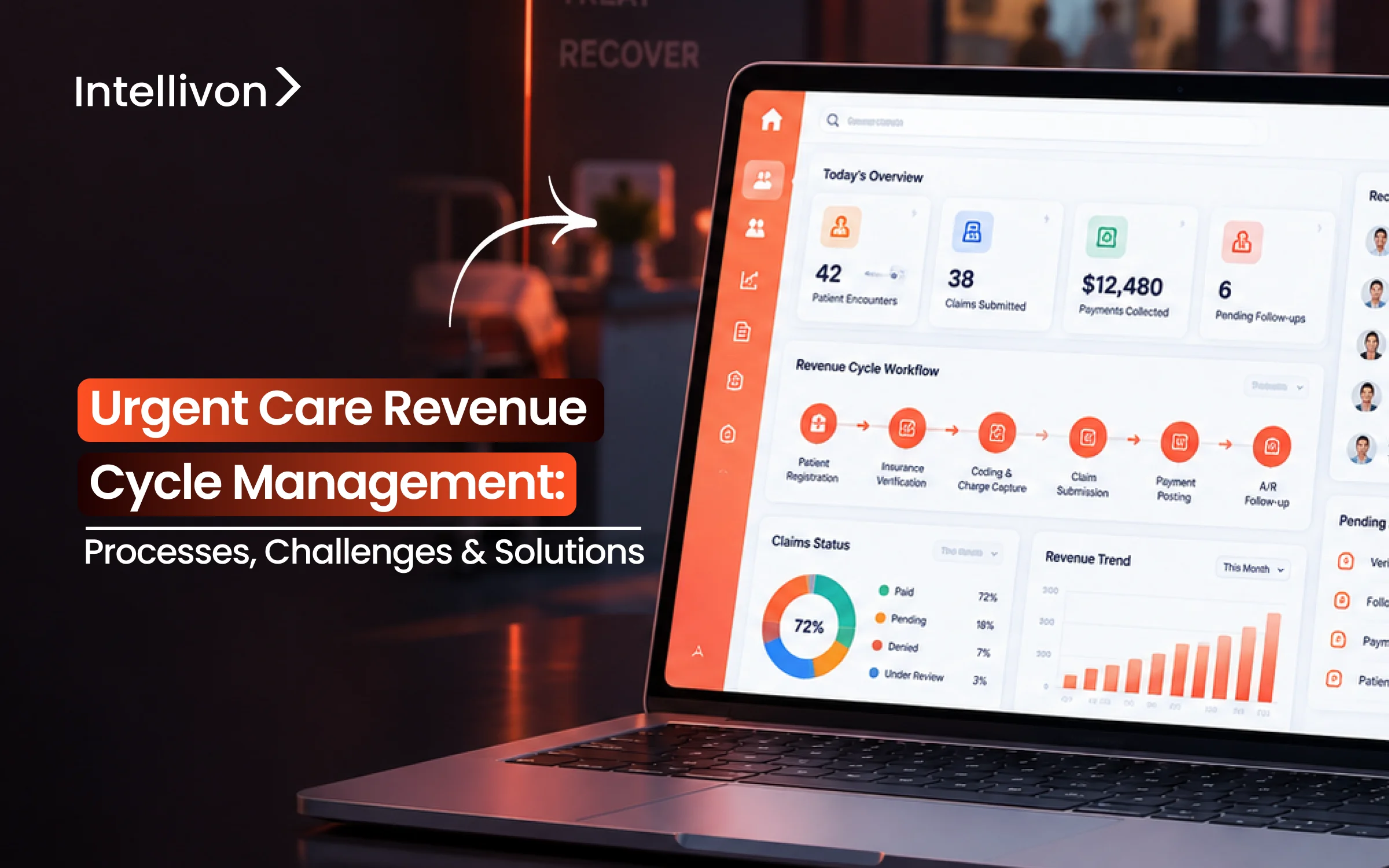
Urgent care revenue cycle management is the process of managing the financial side of an urgent care visit. It runs from patient registration and insurance verification through documentation, coding, claim submission, payer payment, denials, accounts receivable, and patient collections.
In short, it connects clinical activity with billing, so every completed service gets documented, billed correctly, tracked, and collected.
1. What Urgent Care RCM Covers
The cycle is made up of several connected steps. Each one feeds into the next, so a mistake early on shows up as a problem later.
- Patient registration
- Eligibility verification
- Cost estimates
- Copay collection
- Clinical documentation
- Charge capture
- Medical coding
- Claims submission
- Denial management
- Payment posting
- Accounts receivable (AR)
- Patient collections
2. Who Uses Urgent Care RCM
This process applies across different types of care settings, and the complexity often depends on how the organization is structured.
- Freestanding urgent care centers
- Multi-site urgent care chains
- Hospital-owned urgent care networks
- Health systems
- Occupational health providers
- Urgent care and primary care hybrids
- Urgent care and OccMed facilities
3. What Systems Support the Revenue Cycle
None of this runs on paper anymore. This is because only a handful of connected systems carry the work from patient check-in to final payment.
- EHR
- Practice management system
- Clearinghouse
- Payer connections
- Payment systems
- Billing teams
- Analytics
- Automation
Urgent care RCM covers twelve connected steps, spans several types of care settings, and depends on a handful of linked systems to function. Together, these three pieces explain what the term actually means in practice, not just in theory.
Why Hospitals and Urgent Care Networks Need Strong RCM
Urgent care creates a financial management problem that most billing systems weren’t built for. Because patients walk in without appointments, there is no time buffer to verify coverage, confirm demographics, or catch errors before the visit happens. That single fact is what forces hospitals and networks to build RCM around speed and accuracy at the same time, not one or the other.
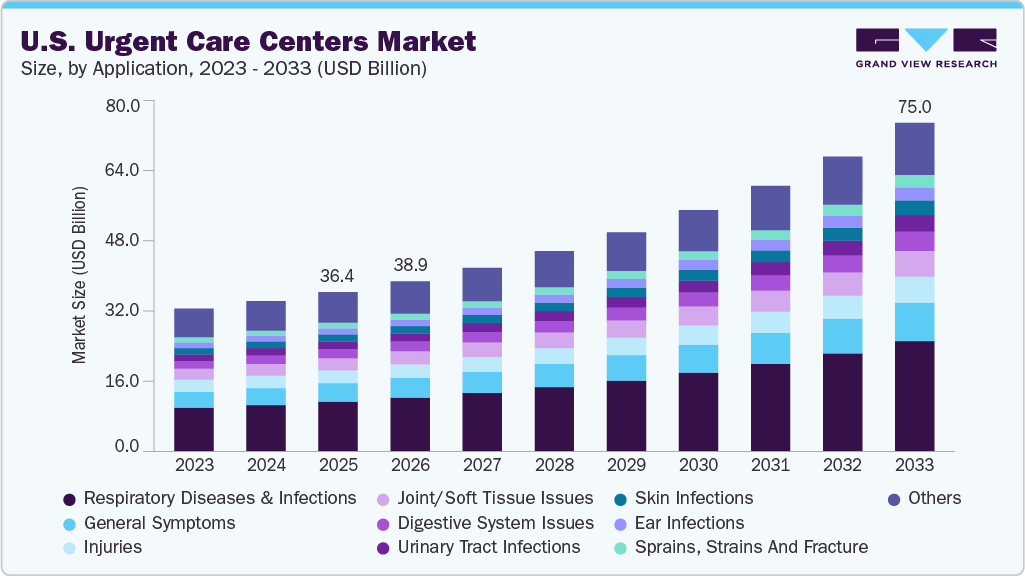
The U.S. urgent care market is expanding fast, and RCM has to keep pace with it. Valued at $36.4 billion in 2025, the market is projected to reach $75.0 billion by 2033, growing at a 9.8% CAGR through the period. That growth puts direct pressure on billing systems built for far lower volume.
1. Get Paid Faster
Cleaner claims move through the payer system faster, so the gap between visit and payment shrinks. When submission is quick, corrections are rare, and follow-up happens on schedule, cash starts moving instead of sitting.
- Experity’s RCM services target reducing AR over 120 days to below 6%, with DSO under 30 days
- Faster follow-up also means fewer claims aging past the point where payers stop responding
2. Reduce Denials and Rework
Accurate eligibility, demographics, coding, and provider information stop denials before they start. This matters because rework costs more than getting it right the first time, and it pulls staff away from new claims.
- A 2023 Urgent Care Association benchmarking survey of nearly 700 organizations found that over 55% ranked registration errors as their top RCM challenge, ahead of denials themselves
- Fewer errors upfront means billers spend less time fixing the same problem twice
3. Protect Cash Flow
RCM gives CFOs control over the variables that make revenue unpredictable. Without that control, payer receivables age, patient balances go uncollected, and seasonal volume swings hit harder than they should.
- Patient balances made up roughly 30% of urgent care receivables in 2021, yet accounted for nearly all bad debt (Source: Experity, 2026)
- Underpayments and aging AR compound quietly if nobody is tracking them by payer
4. Improve Patient Payments
Patient collections now start at the front desk, not after insurance pays. Clear estimates and upfront copay collection reduce the balance a center has to chase later.
- Clearer statements and flexible payment options raise the odds of full collection
- Waiting until after the visit to discuss cost makes collection harder, not easier
5. Give Leaders Better Financial Visibility
Hospital networks need to see performance by site, not just in aggregate. Good RCM analytics show which location has high denials, which payer pays slowly, and where AR is aging before it becomes a bigger problem.
- Visibility by site, payer, and service line turns a lagging P&L into an early warning system
6. Support Multi-Site Growth
Every new center a network opens or acquires needs the same billing rules, payer mappings, and reporting from day one. Without that standardization, growth just multiplies whatever problems already exist.
Strong RCM protects cash flow, cuts denials, and gives leadership the visibility to manage across sites, rather than just within one. That’s the business case. What makes urgent care RCM harder to execute than it looks is a different question, and it’s the one we cover next.
Urgent Care RCM Process: From Patient Check-In to Payment
Urgent care RCM follows the patient encounter from registration all the way through to final payment. To make sense of it, the process breaks into three connected stages: front-end, mid-cycle, and back-end RCM.
Each stage passes information to the next, so a mistake made early doesn’t stay contained. Instead, it travels forward and shows up two or three steps later as a denial or a delay. With that in mind, here’s how each stage actually works.
1. Patient Registration
This is where the record starts. First, the front desk captures demographics. Then it confirms patient identity, records insurance details, logs contact information, and collects consent, all within the first few minutes of the visit.
2. Insurance Verification
Once registration is done, the system checks what’s actually covered. That means confirming eligibility, coverage, deductible status, copay amount, coinsurance, and network status, usually through a real-time 270/271 transaction with the payer. Because urgent care patients walk in without warning, this step has to happen fast. There’s no window to verify coverage days in advance, the way a scheduled visit allows.
3. Patient Payment
With coverage confirmed, the center can give the patient a real cost estimate. From there, this stage covers copay collection, upfront payment, self-pay pricing, and financial assistance for patients who qualify. Collecting here, rather than waiting until after the visit, is what keeps patient balances from turning into bad debt later.
4. Clinical Documentation
Now care actually happens, and the provider documents diagnosis, treatment, medical decision-making, and every procedure performed. This documentation becomes the foundation for everything that follows. So if the notes are incomplete here, coding problems show up downstream.
5. Charge Capture
Next, every billable item from the visit gets logged. That includes the E/M visit itself, plus lab work, imaging, medications, injections, supplies, and any procedures performed. Missed charge capture is one of the quieter revenue leaks in urgent care, mainly because these services rarely trigger a denial. Instead, they just go unbilled and disappear.
6. Medical Coding
At this point, coders translate the documentation into billing language using ICD-10-CM, CPT, and E/M codes, along with the correct modifiers and place of service (POS). Since accuracy here directly determines whether the claim gets paid on the first pass, this step carries more weight than it might seem.
7. Claim Scrubbing
Before anything goes out, the claim gets checked for patient details, provider information, code accuracy, modifiers, payer-specific rules, duplicates, and missing data. In short, this step exists to catch what would otherwise come back as a denial weeks later.
8. Claim Submission
Once scrubbed, the claim is packaged into an 837 file and sent through the clearinghouse to the payer. After that, the clearinghouse returns acknowledgments confirming the claim was received and accepted for processing.
9. Payer Adjudication
From here, the payer reviews the claim against coverage rules, medical necessity, and contract terms. Based on that review, it decides to pay, deny, or partially pay the claim.
10. Payment Posting
When payment arrives, it gets recorded through an 835 ERA or EFT, and any adjustments are reconciled against what was billed. Essentially, this step confirms whether the payment matches what the contract actually allows.
11. Denial Management
If a claim comes back denied, the team identifies why, traces the root cause, corrects the issue, and files an appeal where appropriate. Over time, this same process should feed back into prevention, so the same denial doesn’t keep repeating.
12. Accounts Receivable
Meanwhile, unpaid claims get tracked by age, with staff following up on payer status until each one resolves. The longer a claim sits unresolved, the less likely it is to ever get collected.
13. Patient Collections
Finally, whatever balance remains after insurance pays gets billed to the patient through statements, payment plans, and, if needed, collections or write-offs.
So from check-in to final collection, urgent care RCM runs through eleven connected steps, and a breakdown at any point delays payment further down the line. Now that the full process is mapped out, the next question is what makes it harder to run in urgent care than in almost any other care setting.
Biggest Urgent Care Revenue Cycle Management Challenges
Before any of this gets fixed, it has to be named clearly first. So here’s a plain diagnosis of the seven challenges that do the most financial damage in urgent care RCM, without jumping ahead to solutions just yet.
1. Walk-In Patient Volume
Because urgent care runs on walk-ins, there’s almost no pre-registration and no advance financial clearance window. As a result, the front desk has to capture demographics, insurance, and consent within the same few minutes as check-in. Naturally, that rush is where most downstream problems actually begin.
2. Insurance Verification Errors
Even when verification happens fast, it doesn’t always happen correctly. Common errors include inactive coverage, an incorrect payer on file, subscriber mismatches, and wrong benefit information. Since none of these get caught in the moment, they usually surface later as a denial instead.
3. Multiple Payer Rules
On top of that, urgent care deals with more payer types than most specialties in a single day: commercial, Medicare, Medicaid, self-pay, workers’ comp, and employer billing. Because each one follows different financial rules, the same visit can require entirely different handling depending on who’s paying.
4. Claim Denials
Once a claim reaches the payer, it can still be denied over eligibility, coding, medical necessity, missing authorization, coordination of benefits, timely filing, or insufficient documentation.
In fact, according to MGMA data, the average initial denial rate across U.S. medical practices reached 11.8% in 2024, up from 10.2% just a few years earlier.
5. Payer Underpayments
Here’s the part that’s easy to miss: a claim doesn’t have to be denied to lose money. It can be paid and still be paid wrong, since expected payment and actual payment don’t always match what the payer contract and fee schedule call for.
6. High Accounts Receivable
Meanwhile, slow payer responses, weak follow-up, and poor prioritization all let claims age past the point where they’re realistically collectible. And the longer a claim sits, the more it starts behaving like a loss instead of a delay.
7. Disconnected RCM Systems
Underneath all of this sits a structural issue. Specifically, when the EHR, practice management system, clearinghouse, payer, payment system, and analytics don’t exchange information cleanly, every challenge above becomes harder to catch and slower to fix.
Urgent RCM Platform Challenges At A Glance
| Challenge | Financial Result |
| Walk-in volume | Incomplete data at intake |
| Verification error | Denial |
| Multiple payer rules | Inconsistent handling |
| Claim denial | Delayed or lost payment |
| Underpayment | Revenue loss |
| High AR | Slower cash |
| Disconnected systems | Errors compound across steps |
So together, these seven challenges explain most of the revenue urgent care organizations lose before it ever reaches the bank. Now that they’re clearly laid out, it’s finally time to move into fixing them.
Urgent Care RCM Solutions That Improve Collections and Cash Flow
Every challenge listed above has a direct fix, and each solution here maps straight back to one of the seven problems already covered.
In other words, fixing walk-in volume, verification errors, payer complexity, denials, underpayments, aging AR, and disconnected systems is what actually improves collections and cash flow.
So instead of general advice, here’s how each specific problem gets solved in practice.
1. Fix Walk-In Volume With Faster, Cleaner Registration
Since walk-in volume causes most downstream errors, the fix has to start right at check-in. Therefore, digital intake, demographic validation, insurance-card capture, and required-field checks all work together to catch mistakes before they ever reach a claim.
- Digital intake forms reduce manual entry errors
- Required-field checks stop incomplete records from moving forward
- Insurance-card capture confirms the payer on file actually matches the card
2. Solve Verification Errors With Real-Time Eligibility Checks
To fix verification errors, coverage has to be confirmed in real time, not simply assumed. As a result, connecting 270 and 271 transactions directly into the workflow pulls eligibility and benefit information back within seconds, so most checks never need a person at all.
- Real-time 270/271 checks confirm active coverage before the visit ends
- Exceptions route automatically to staff, so only the unusual cases need review
3. Handle Multiple Payer Rules With Payer-Specific Workflows
Because commercial, Medicare, Medicaid, self-pay, workers’ comp, and employer billing all follow different rules, one generic workflow simply can’t handle all of them well. Instead, each payer type needs its own built-in logic, especially workers’ comp and OccMed, which involve employer billing, carrier billing, authorization, and separate pricing altogether.
- Dedicated workflows for injury cases prevent claims from being misrouted
- Payer-specific rule sets remove the guesswork billing staff would otherwise handle manually
4. Prevent Denials Instead of Just Appealing Them
The strongest fix for denials isn’t a stronger appeal process. Rather, it’s catching the problem before the claim ever leaves the building, which means running coding checks (ICD-10, CPT, E/M, modifiers, POS) and a full claim scrub against patient, provider, payer, and documentation data first.
- Denial → root cause → workflow fix → monitoring stops the same denial from repeating
- Claim scrubbing catches duplicates, missing data, and payer-rule mismatches before submission
5. Catch Underpayments by Comparing Expected to Actual Payment
Since underpayments hide inside claims that already got paid, the only way to catch them is to compare the numbers directly. So that means checking expected reimbursement against the actual allowed amount and the actual payment received, using the payer contract, fee schedule, CPT, modifier, and POS as reference points.
- Contract-based variance checks flag underpayments that would otherwise go unnoticed
- Fee schedule comparisons work the same way across every payer type
6. Bring Down AR With Smarter Prioritization and Status Tracking
High AR usually isn’t a follow-up problem so much as a prioritization problem. Because of this, working the oldest claim first often wastes time on accounts that were never going to pay well anyway, while ranking by dollar value, payer, age, deadline, denial reason, and recovery probability gets more claims collected, faster.
- Automated claim status tracking through 276/277 transactions replaces manual phone calls
- Work queues built around recovery probability keep billers focused on claims worth chasing
7. Connect Disconnected Systems and Standardize Across Sites
Finally, none of the fixes above hold up if the EHR, practice management system, clearinghouse, payer, and analytics don’t talk to each other properly. For hospital networks and multi-site chains, this also means standardizing payer rules, fee schedules, provider data, and reporting across every location, not just one.
- Analytics tracking clean claim rate, denial rate, days in AR, and net collection rate surfaces leakage before it compounds
- Standardized work queues and coding controls make it possible to scale without multiplying the same problems
So each of these seven fixes answers one specific challenge rather than a generic one, and that specificity is exactly what improves collections and cash flow in practice.
How the Urgent Care RCM Technology Stack Should Connect
The urgent care RCM stack should connect so that clinical data, billing data, payer transactions, payments, and analytics all flow in one direction without manual re-entry at any step.
In short, eight components have to talk to each other cleanly, since a gap between any two of them is exactly where revenue starts leaking.
Core Components of the RCM Technology Stack
| Component | What It Provides |
| EHR | Patient, encounter, documentation, diagnosis, procedure, and clinical data |
| Practice Management System | Scheduling, registration, billing, claims, and provider information |
| Clearinghouse | Claims routing, acknowledgments, eligibility checks, and status updates |
| Payer Connections | 270/271, 837, 276/277, 835, and 278 transactions where required |
| FHIR and APIs | Clinical and application integration, though not a replacement for X12 financial transactions |
| Payment Systems | Patient payments, payment gateways, ERA, EFT, and banking reconciliation |
| Contract Data | Payer terms, fee schedules, reimbursement rules, and effective dates |
| Analytics Layer | Claims, denials, payments, contracts, AR, and patient balances brought together |
Underneath all of this sits security, and none of it works without it. So HIPAA compliance, PHI protection, encryption, role-based access control (RBAC), multi-factor authentication (MFA), audit trails, and signed BAAs all have to run across every layer, not just one.
For a deeper breakdown of how these systems connect in production, see our guide on Intellivon’s enterprise RCM platform architecture.
So once the stack is actually connected end to end, the real question becomes whether these changes are improving financial performance at all. And that’s exactly what we look at next.
How to Modernize Urgent Care RCM Without Replacing the EHR
Urgent care organizations rarely need to replace the EHR simply because revenue-cycle workflows are inefficient.
Instead, a lower-risk approach is to keep the systems handling clinical care in place, and then add integration, rules, automation, AI, and analytics around the parts of RCM actually creating financial friction. Here’s how that process works in practice, step by step.
1. Audit the Existing Revenue Cycle First
Before changing anything, the current state needs a real baseline. That means measuring eligibility errors, charge lag, clean claim rate, denials, AR, underpayments, patient collections, and staff effort as they stand today.
2. Map Every System and Data Exchange
Next, every system touching revenue needs to be inventoried, including the EHR, PM, scheduling, clearinghouse, payer interfaces, contract data, payments, banking, analytics, and any separate OccMed systems. Since gaps between systems are usually where revenue leaks, this step matters more than it looks.
3. Fix Data and Rules Before Adding AI
Once the map is done, the next step is cleaning up what’s underneath it. That means finding duplicate patients, incorrect provider data, old payer mappings, inaccurate fee schedules, broken interfaces, missing charge mappings, and outdated payer rules before any AI gets layered on top.
4. Automate One High-Value Workflow First
From there, it’s better to automate one workflow well than five workflows poorly. Good starting points include eligibility, claim scrubbing, denial classification, payment reconciliation, or AR prioritization, chosen based on where the audit showed the most friction.
5. Add AI Only Where Variability Justifies It
At this stage, AI should only step in where deterministic rules genuinely struggle, such as text interpretation, prediction, anomaly detection, prioritization, or drafting. Everywhere else, rules alone still do the job better and more predictably.
6. Pilot the Workflow
Before wider rollout, the workflow gets tested on one location, one payer, one service line, or one specific workflow, so results stay measurable and contained.
7. Expand After the Financial Result Is Proven
Finally, expansion only happens once the pilot’s results are measured directly against the original baseline, not assumed.
Intellivon follows this same incremental sequence with urgent care and hospital-owned networks, building around the existing EHR rather than proposing a full replacement from day one.
So with the modernization approach established, the next question becomes whether the organization should build this technology at all, or use an existing RCM product or service instead.
What Does a Custom Urgent Care RCM Build Cost?
A custom urgent care RCM implementation typically costs $70,000 to $300,000 for workflow automation, integrations, analytics, and AI built around existing systems. That said, this range does not include EHR licensing, clearinghouse fees, or outsourced billing fees, since those are separate, ongoing costs tied to the systems already in place.
Cost Breakdown by Project Phase
So instead of one flat number, the total build breaks down across five phases, each covering a different part of the work.
| Phase | Cost Range | Covers |
| Discovery and Workflow Design | $8K–$15K | Workflow audit, data mapping, requirements, revenue leakage review |
| Integrations | $20K–$55K | EHR, PM, clearinghouse, payer, and payment connections |
| Workflow Automation | $20K–$60K | Eligibility, claims, payments, and AR automation |
| AI Features | $20K–$80K | Coding assistance, denial prediction, denial classification, underpayment detection |
| Analytics and Security | $15K–$45K | Dashboards, audit, security, testing, and rollout |
Importantly, these individual maximums aren’t simply added together. Instead, the total project stays within the $70K to $300K planning range, since scope and phase overlap usually keep costs from stacking at their highest point simultaneously.
Project Levels
Because the right level depends on scope, not every organization needs the same build.
- Focused automation: $70K–$120K
- Multi-module RCM: $120K–$200K
- Enterprise multi-site: $200K–$300K
Ongoing Maintenance
Once live, maintenance typically runs 15% to 25% of the original build cost annually, covering payer-rule updates, integrations, security, AI monitoring, and infrastructure.
So a $150K build, for example, generally needs $22K to $37K a year to stay current.
Timeline
Timelines scale with project level, too.
- Focused automation: 10–14 weeks
- Multi-module: 4–6 months
- Enterprise rollout: 6–9 months
Get a Cost and Scope Estimate
For organizations still weighing the numbers, Intellivon offers an Urgent Care RCM Workflow & Cost Assessment, mapping revenue leakage, integration needs, automation opportunities, and expected project scope before any commitment is made.
Section close: With cost and timeline clarified, the final question is what Intellivon actually builds around the existing RCM environment, which is what we cover next.
How Intellivon Builds Around Existing Urgent Care Systems
Intellivon helps urgent care organizations fix revenue leakage without ripping out the EHR they already run on. Here’s exactly what that looks like in practice.
The process starts by finding where the money is actually being lost, then builds around your existing systems to fix it, in stages, with results measured at every step.
- The engagement starts by finding the real revenue problem, whether that’s denials, eligibility errors, coding rework, aging AR, underpayments, or slow patient collections
- Your existing stack gets mapped next, including the EHR, PM, clearinghouse, payer connections, payment systems, and analytics, so any fix works with what’s already running
- Underlying rules get fixed before any automation goes in, correcting validations, payer logic, routing, fee schedules, and contract terms
- Repetitive work gets automated after that, like eligibility checks, claim checks, reconciliation, and AR work queues, since that’s usually where the fastest gains show up
- AI comes in only where rules alone fall short, for prediction, classification, anomaly detection, and text review
- Coding decisions, appeals, write-offs, and contract disputes stay with a person, because those calls still need human accountability
- Every rollout happens in stages, by site, payer, workflow, or service line, rather than all at once
- Results get measured against your original baseline before anything expands further, so the financial impact is proven before the next phase
Ready to see where your revenue is leaking? Talk to Intellivon about a workflow and cost assessment built around your current systems, no full replacement required.
Conclusion
Urgent care revenue cycle management works best when it’s built around the systems already running the practice rather than replacing them. So the real fix isn’t a bigger platform. It’s cleaner registration, real-time eligibility, tighter coding, and AI applied only where variability actually justifies it.
Consequently, organizations that fix rules before adding automation see denials drop, and cash flow stabilize faster than those chasing a full rebuild. In short, modernization works better as a series of proven steps than one large bet.
FAQs
Q1. What Integrations Does an Urgent Care RCM System Need?
A1. A working RCM system needs the EHR, PM, clearinghouse, payer connections, payment systems, and analytics all connected together. On top of that, it also needs 270/271 for eligibility, 837 for claims, 276/277 for status checks, and 835 for payment posting, so data actually moves without manual re-entry.
Q2. Which AI Models Help With Urgent Care Billing?
A2. Different AI models handle different jobs here, so no single model covers everything. NLP reviews documentation and coding, classification models sort denials, predictive models flag likely denials early, anomaly detection catches underpayments, and LLMs assist with drafting appeals and summarizing claims.
Q3. Should Urgent Care RCM Be Built or Bought?
A3. The decision comes down to a simple rule: buy for standard workflows, since off-the-shelf tools already handle them well, and build for unique ones. A hybrid approach works best when the existing clinical and billing stack is already functioning and just needs targeted fixes around it.
Q4. Does Every Urgent Care Claim Use POS 20?
A4. Not always, even though CMS defines POS 20 specifically for urgent care facilities. In practice, actual billing depends on facility type, payer-specific rules, the contract in place, and how the entity is structured, so the code can vary by claim.
Q5. Does Every Urgent Care E/M Claim Need Modifier 25?
A5. No, and using it automatically is a mistake. Modifier 25 only applies when documentation clearly supports a significant, separately identifiable E/M service beyond the procedure performed, so it depends entirely on what the record actually shows.
Q6. How Is Workers’ Comp Billing Different From Regular Urgent Care Billing?
A6. Workers’ comp billing involves an employer, a carrier, an adjuster, a date of injury, and a case number, none of which apply to standard visits. Because of this, it also follows separate authorization rules, state-specific requirements, distinct fee schedules, and stricter documentation standards throughout.