Key Takeaways:
-
Epic Rover serves nursing and bedside workflows while Haiku supports physician mobile review, ordering, and clinical decision-making.
-
ICU deployment requires role-specific configuration covering BCMA, specimen collection, flowsheets, orders, results, notes, and secure messaging.
-
MDM, MFA, SSO, Wi-Fi management, FHIR integration, and PHI controls are non-negotiable mobile deployment requirements.
-
Ambient AI can extend both nursing and physician documentation workflows, reducing manual charting burden across ICU teams.
-
How Intellivon serves as an integration and workflow-engineering partner for Epic Rover and Haiku projects costing $70,000 to $300,000.
Epic Rover and Haiku exist because charting from a stationary workstation pulls nurses and physicians away from the bedside. Nurses spend 25% to 35% of every shift on documentation, according to a 2026 nursing documentation report built on Black Book Research’s Nurses Week survey. That time comes directly out of patient care.
However, moving documentation onto a phone doesn’t automatically fix that. Rover’s medication scanning workflow can save nurses up to 30 minutes per shift, but only when barcode scan rates actually stay high. For instance, one burn unit saw compliance climb from 52% to 83%, simply by fixing workflow friction rather than the technology itself. As a result, the real driver of time savings is workflow design, and mobile access alone rarely delivers it.
Haiku follows a similar pattern for physicians. An app that adds extra steps gets abandoned quickly, regardless of how polished the interface looks. In this blog, we’ll cover Rover’s nursing workflows and Haiku’s physician workflows. Additionally, we’ll walk through ambient AI documentation, MDM and network planning, and what proper configuration actually costs to implement well.

What Are Epic Rover and Haiku Mobile Applications?
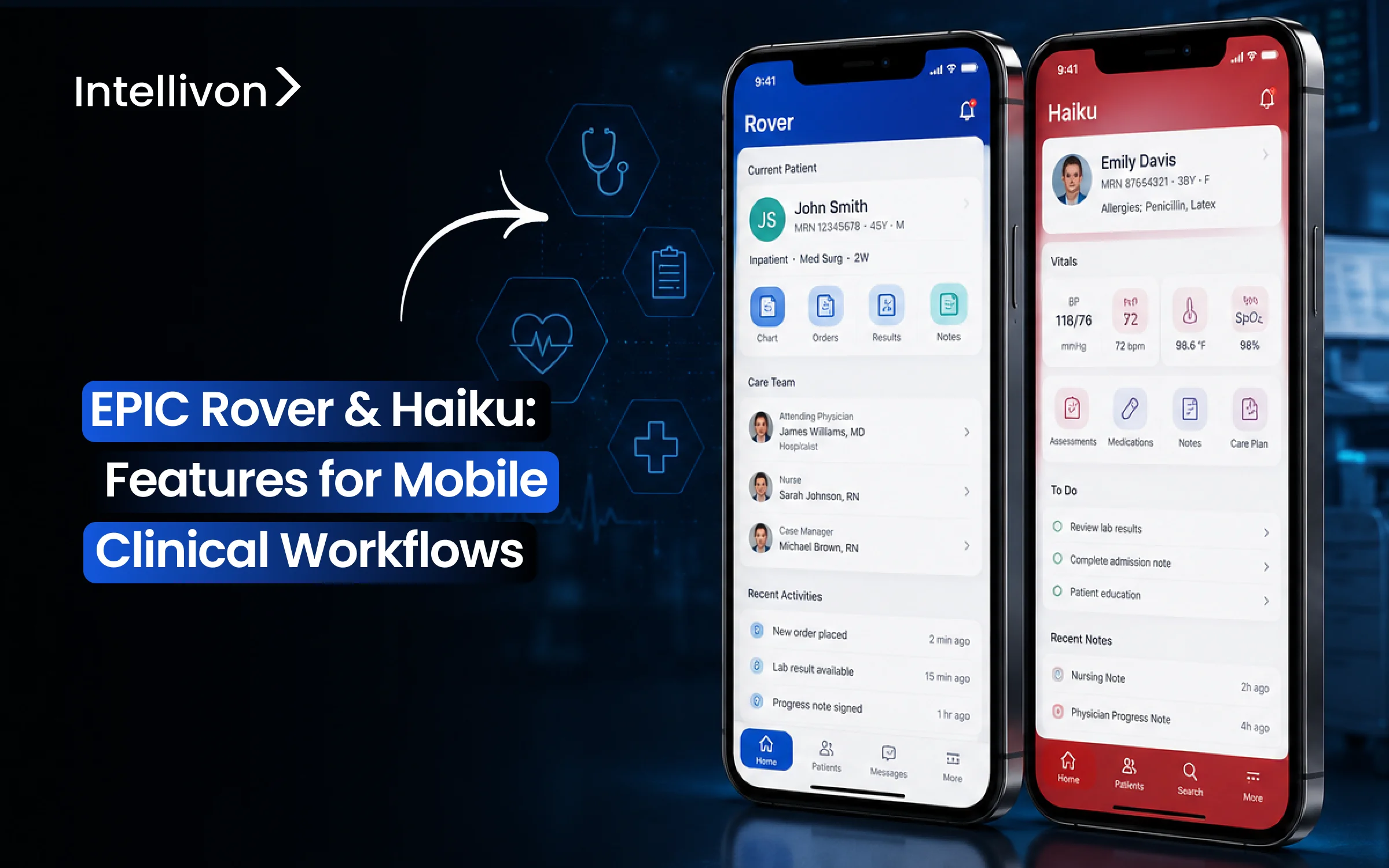
Epic Rover and Epic Haiku are specialized mobile EHR applications designed to extend core Hyperspace workflows onto handheld devices. Specifically, Rover serves bedside nurses and clinical staff by mobilizing real-time documentation, barcode medication administration, and specimen collection.
Meanwhile, Haiku serves physicians and advanced practice providers by streamlining chart review, secure messaging, In Basket management, and clinical ordering directly on smartphones.
- Epic Rover (Handheld Clinical Execution): In practice, Rover operates on iOS and Android handhelds to manage high-frequency bedside tasks, including five-rights medication verification and flowsheet documentation.
- Epic Haiku (Physician Mobility): Similarly, Haiku runs on iOS and Android smartphones, allowing rounding providers to review diagnostic results, dictate clinical notes, and manage schedule queues remotely.
- Epic Canto (Tablet-Optimized Review): Furthermore, Canto delivers a provider-focused interface optimized for iPad displays, offering richer visual data density than compact smartphone screens.
- Epic Hyperspace (Full Desktop EHR): However, Hyperspace remains the central desktop client, providing complete administrative configuration, deep clinical documentation, and unrestricted charting capabilities.
- Epic Monitor & Adjacent Surfaces: In addition, Epic Monitor supplies centralized inpatient tracking on wall-mounted displays, while micro-interfaces like Epic Limerick deliver critical push notifications directly to Apple Watch devices.
Haiku and Rover Users and Devices
| Surface | Primary User | Best-Fit Workflow | Typical Device |
| Rover | Nurses & clinical staff | Bedside data capture, scanning, & execution | iOS / Android smartphone or scanner |
| Haiku | Physicians & providers | Mobile chart review, messaging, & orders | iOS / Android smartphone |
| Canto | Physicians & providers | Expanded mobile review & rounding | Apple iPad |
| Hyperspace | Broad clinical staff | Full-scope enterprise EHR documentation | Desktop workstation / COW |
| Epic Monitor | Inpatient care teams | Centralized patient status & telemetry tracking | Dedicated wall display |
Ultimately, available functionality strictly depends on an organization’s specific Epic core release, server licensing tiers, and active profile configurations. Consequently, as health systems scale these mobile clinical touchpoints, configuring interoperable backend data pipelines becomes essential for stable deployment.
For a deeper breakdown of enterprise data architecture, see our guide on EHR-Agnostic Clinical Data Interoperability Pipelines.
Why Hospitals Are Expanding Epic Mobile Workflows
Healthcare systems are expanding mobile EHR adoption to eliminate workstation latency and capture critical clinical actions at the bedside.
By shifting targeted documentation, verification, and communication workflows to handheld devices, health systems lower cognitive load, accelerate clinical interventions, and reduce reliance on stationary Workstations on Wheels (WOWs).
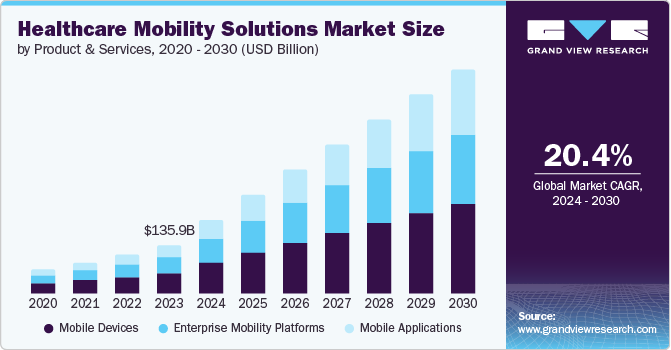
Specifically, surging demand for bedside efficiency is accelerating capital allocation across health systems. According to Grand View Research, the global healthcare mobility solutions market is projected to reach $628.1 billion by 2030, growing at a 20.4% CAGR. Consequently, scalable handheld workflows have shifted from optional conveniences to core clinical infrastructure.
- Point-of-Care Bedside Execution: Clinicians capture vitals, intake assessments, and flowsheet inputs immediately during patient encounters rather than charting in batches at nursing stations.
- Closed-Loop Safety Scanning: Integrated barcode scanning enforces five-rights medication administration, validates positive patient identification, and tracks specimen collection to prevent downstream diagnostic errors.
- Accelerated Triage and Response: Emergency and ICU providers receive critical diagnostic alerts, review high-resolution imaging, and sign urgent orders immediately away from workstations.
- Streamlined Rounding and Handoffs: Inpatient care teams conduct mobile rounds with real-time access to active problem lists, lab trends, and structured handoff summaries.
- Unified Device Consolidation: Standardizing on secure enterprise mobile hardware aligns with Apple’s healthcare mobility framework by replacing pagers, VoIP badges, and tethered scanners with a single platform.
However, mobile access does not automatically deliver operational efficiency. Realized clinical value occurs only when informatics teams tailor role-specific actions rather than forcing an entire desktop EHR onto a compact screen.
Consequently, optimizing these deployments requires a clear operational separation between nursing execution in Rover and physician decision-making in Haiku.
Epic Rover vs Haiku for Mobile Clinical Workflows
Epic Rover and Epic Haiku do not compete against each other. Instead, they serve complementary operational roles within a unified mobile clinical environment.
While Rover standardizes point-of-care nursing tasks like medication administration and specimen collection, Haiku prioritizes provider decision-making, rapid chart review, and diagnostic ordering.
Epic Rover vs Haiku for Mobile Clinical Workflows
| Workflow Area | Epic Rover | Epic Haiku |
| Patient Lists & Schedules | Yes (Unit / Assignment based) | Yes (Clinic / Rounding based) |
| Chart & Results Review | Yes (Bedside focus) | Core (Comprehensive review) |
| Barcode Medication Admin (eMAR) | Core workflow | Not primary purpose |
| Wristband & Patient Matching | Core Rover use | Limited / Specialty only |
| Specimen Collection & Lab Orders | Core workflow | Not primary purpose |
| Nursing Flowsheets & Vitals | Core bedside entry | View-oriented |
| Physician Documentation & SOAP | Limited / Role-dependent | Core mobile workflow |
| In Basket & Secure Chat | Configurable team chat | Core communication hub |
| Voice Dictation & Ambient AI | Emerging documentation | Established physician workflow |
| ICU Operations | Bedside validation & telemetry | Alert response & orders |
- Distinct User Archetypes: In practice, Rover equips bedside teams with barcode-driven execution tools, whereas Haiku mobilizes high-level clinical decision support for physicians.
- Operational Interdependence: Consequently, synchronized communication between both surfaces accelerates critical care responses across inpatient units.
However, exact mobile capabilities depend strictly on an organization’s specific Epic core release, security classes, and mobile device management policies. Therefore, clinical informatics teams must configure profile-specific role security to ensure data integrity across both applications.
Epic Rover Features for Nursing Bedside Workflows
Epic Rover streamlines point-of-care nursing by shifting high-frequency bedside tasks directly onto handheld devices. Specifically, it combines barcode validation, clinical documentation, and secure messaging into mobile workflows.
This structural shift allows nurses to execute daily patient care without returning to stationary workstations.
1. Medication Administration and Safety Scanning
Rover provides a mobile electronic medication administration record (eMAR) that enforces five-rights validation directly at the bedside.
- Closed-Loop Scanning: Nurses scan the patient wristband barcode followed by the unit-dose medication barcode to confirm patient identity and dosage accuracy.
- Dual-Sign & Controlled Substances: The interface prompts for required co-signatures on high-risk medications and provides structured pathways for clinical overrides.
- Smart Pump Interoperability: As documented in UI Health Care clinical protocols, Rover integrates with BD Alaris infusion pumps to associate orders, pre-program rates, and auto-populate intake flowsheets.
2. Specimen Collection and Lab Tracking
The mobile specimen collection workflow connects bedside nursing directly to Epic Beaker.
- Order Execution Sequence: Nurses review collection task lists, scan the patient wristband, collect the sample, and print barcoded tube labels via mobile Bluetooth printers.
- Positive Specimen Identification: Scanning the newly labeled tube immediately confirms collection in the EHR, preventing mislabeling and manual logging delays.
3. Bedside Nursing Documentation and Flowsheets
Rover enables rapid entry of continuous patient parameters directly into clinical flowsheets.
- Flowsheet Data Entry: Staff record vitals, intake and output, pain scores, and point-of-care testing (POCT) results on the go.
- Complex Care Tracking: Nurses manage lines, drains, and airways (LDAs), document wound progress with integrated photo capture, and record real-time cardiac arrest interventions during Code Blue events.
4. Shift Task Management and Team Communication
Handheld interfaces centralize communication and task prioritization across dynamic hospital units.
- Dynamic Worklists: Nurses manage patient shift assignments, view automated task lists, and track time-sensitive orders.
- Care-Team Collaboration: Integrated Secure Chat enables direct text and VoIP communication with rounding physicians, eliminating overhead paging delays.
Ultimately, Rover functions best when it eliminates trips to stationary workstations for tasks that naturally occur at the bedside.
For an operational analysis of clinical system design, see our breakdown on Custom Healthcare Workflow Integration Architecture.
Epic Haiku Features for Physician Mobile Workflows
Epic Haiku gives rounding and on-call physicians secure smartphone access to chart review, clinical messaging, diagnostic results, and mobile order entry.
Specifically, by centralizing high-yield review and decision pathways on mobile screens, Haiku enables providers to act rapidly on critical patient changes without logging into stationary desktop computers.
1. Patient List Management and Longitudinal Chart Review
Initially, Haiku organizes physician schedules and rounding lists with direct links to longitudinal patient records.
- Comprehensive Chart Summary: Consequently, providers review active problem lists, current home medications, verified allergies, past encounter notes, and vital sign trends within a single view.
- External Record Federation: In addition, when configured with Care Everywhere, clinicians query external health systems directly from their smartphone to retrieve historical records before specialty consults.
2. Diagnostic Results and Critical Value Review
Furthermore, the application aggregates laboratory panels and imaging reports into chronological, trendable views.
- Critical Lab Notifications: For example, physicians receive real-time push alerts for abnormal and panic lab values, allowing for immediate therapeutic interventions.
- Imaging and Trend Tracking: Meanwhile, providers review diagnostic radiology reports, track multi-day hematology trends, and view high-resolution clinical media directly within the mobile chart.
3. Mobile Documentation and Voice Dictation Integration
Moreover, Haiku accelerates clinical note entry using integrated voice recognition and mobile capture. As detailed in UI Health Care documentation, clinicians can review, author, and sign notes remotely.
- Speech Recognition: In practice, native integration with medical dictation tools like Nuance Dragon Medical allows physicians to dictate SOAP notes, progress updates, and brief consults directly into mobile templates.
- Clinical Media Capture: Similarly, providers capture secure clinical photos for dermatological tracking or surgical wound checks that upload directly to the EHR without saving to local device storage.
4. Mobile Ordering and Electronic Prescribing
Additionally, Haiku supports targeted inpatient order entry and ambulatory electronic prescribing based on organizational policy.
- Order Signing and Refills: Therefore, physicians authorize routine inpatient lab orders, approve outpatient prescription refills, and cosign resident orders remotely.
- Controlled Substance Authentication: Along with standard signing, the app enforces biometric or secondary re-authentication for schedule II–V medications in compliance with DEA EPCS regulations.
5. In Basket Processing and Team Communication
Finally, Haiku serves as an essential mobile communication bridge between attending physicians, residents, and nursing teams.
- In Basket Triage: As a result, providers clear patient advice requests, sign off on outstanding orders, and review staff messages while away from their desks.
- Secure Collaboration: Furthermore, integrated Epic Secure Chat supports one-on-one messaging, automated alert routing, and direct VoIP calling without exposing personal phone numbers.
However, mobile access is designed for rapid clinical decisions rather than complex, multi-system orders. Consequently, understanding these architectural boundaries is critical when deploying mobile workflows in high-acuity environments like the ICU.
For insights into high-yield provider systems, read our technical breakdown on Enterprise Clinical Decision Support Architecture.
How Rover and Haiku Support ICU Clinical Workflows
Health systems do not deploy a standalone, out-of-the-box ICU dashboard. Instead, engineering and informatics teams assemble the mobile critical care environment by orchestrating Rover’s bedside execution tools, Haiku’s physician decision pathways, push alerts, and dedicated inpatient display surfaces.
This multi-surface design ensures that high-acuity data flows without latency between frontline nursing staff and rounding intensivists.
1. High-Acuity ICU Nursing Execution in Rover
In intensive care units, Rover functions as the primary point-of-care tool for executing and documenting continuous interventions.
- Positive Patient Verification: Nurses scan wristbands to confirm identity before initiating high-risk titrated infusions or complex ventilator changes.
- Rapid Critical Charting: Staff document lines, drains, airways (LDAs), intake/output volumes, and pain scores directly into flowsheets while remaining at the bedside.
- Emergency Code Response: During Code Blue resuscitation events, nurses log synchronized medication pushes, defibrillation shocks, and cardiac rhythms directly in real time.
2. Time-Critical ICU Physician Workflows in Haiku
Meanwhile, Haiku provides intensivists and on-call specialists with a mobile command center for diagnostic review and immediate triage.
- Continuous Chart Surveillance: Providers track real-time arterial blood gases (ABGs), review portable chest radiographs, and evaluate telemetry trends while rounding.
- Urgent Order Placement: Intensivists authorize critical medication adjustments and sign stat diagnostic orders directly on mobile devices without returning to central workstations.
- Alert Acknowledgment: Structured push notifications immediately alert physicians to panic lab thresholds and telemetry triggers, enabling immediate therapeutic changes.
3. Integrating Epic Monitor and Display Surfaces
To avoid fragmented communication, hospitals separate mobile smartphone access from centralized unit tracking. As noted in Inova clinical systems guidance, Epic Monitor serves as a dedicated inpatient review tool that condenses critical chart sections for fast evaluation.
- Haiku vs. Epic Monitor: While Haiku manages individualized mobile chart review and order entry, Epic Monitor aggregates multi-patient unit status, care gaps, and telemetry streams onto dedicated station displays.
- Canto Expansion: Intensivists use Canto on iPad devices for visual rounds requiring side-by-side diagnostic comparisons.
4. Technical Criteria for ICU Dashboard Design
Consequently, effective critical care integration depends on clear information architecture rather than simply mirroring desktop screens.
- Clinical Delta Identification: The interface must immediately highlight what physiological parameters changed over the last two hours.
- Action Ownership: Dashboards must explicitly define who owns the next clinical task and whether pending STAT orders were acknowledged.
- Overdue and Abnormal Alerts: Unacknowledged panic values must escalate through automated notification trees to prevent adverse patient outcomes.
How Mobile Workflows Change Across Clinical Specialties
Clinical mobility cannot rely on a generic, one-size-fits-all build. Instead, healthcare organizations configure Rover and Haiku around the specific operational pressures, documentation rhythms, and diagnostic requirements of distinct medical specialties.
Mobile Workflows Changing Across Clinical Specialties
| Setting & Specialty | Primary Epic Rover Priority | Primary Epic Haiku Priority |
| Intensive Care Unit (ICU) | Flowsheet capture, titrated IV meds, LDAs, and stat blood specimens | Multi-parameter trends, urgent lab results, stat orders, and panic alerts |
| Emergency Department (ED) | Triage vitals, rapid intake scanning, and fast-track medication pushes | Rapid chart review, STAT imaging reviews, and emergency admission orders |
| Medical-Surgical Units | Shift task execution, routine eMAR verification, and intake/output logging | Multi-patient rounding lists, consultant sign-offs, and result follow-up |
| Perioperative Services | Pre-op patient ID scanning, blood verification, and PACU handoff tracking | Surgical status tracking, operative log review, and post-op sign-outs |
| Inpatient Oncology | Dual-nurse chemo verification, central line tracking, and lab draws | Protocol safety review, lab monitoring, and regimen adjustments |
| Ambulatory & Primary Care | Immunization scanning, in-clinic lab collection, and vitals capture | Daily schedule management, rapid SOAP notes, and In Basket triage |
| Home Health & Dorothy | Remote offline flowsheet entry and point-of-care wound photography | Remote physician review, home care order signing, and tele-consults |
| Cardiology & Inpatient Med | Bedside telemetry association and urgent anti-arrhythmic scanning | Mobile ECG tracing review, echo reports, and cardiology consult notes |
| Pediatrics & Neonatal ICU | Weight-based dose scanning and pediatric wristband verification | Growth chart analysis, specialty dosing orders, and care-team chat |
| Psychiatry & Behavioral | Behavioral observation checks and safety assessment logging | Longitudinal psychiatric note review and mobile psychotropic e-prescribing |
| Obstetrics & Gynecology | Labor flowsheet recording, fetal monitor tagging, and newborn bands | Delivery note creation, ultrasound report review, and on-call triage |
| Hospitalist Services | Bedside discharge vital checks and pending collection tracking | Cross-cover rounding lists, discharge summaries, and verbal order cosigns |
Consequently, a high-yield implementation requires configuring precise combinations of role, department, and clinical context rather than simply granting identical mobile access to every staff member.
FHIR, Third-Party Apps, and AI Extensions for Epic Mobile
Epic Rover and Haiku do not need to host every specialized clinical capability natively. Instead, healthcare engineering teams use standards-based integration layers to launch external clinical tools, sync peripheral telemetry, and embed ambient intelligence directly into handheld screens.
1. SMART on FHIR Mobile App Extensions
Initially, modern mobile architectures allow clinicians to launch third-party applications without losing patient context.
- Standards-Based Handshakes: By implementing SMART on FHIR over OAuth 2.0 with PKCE authorization, mobile tools securely inherit active user credentials and patient tokens.
- Contextual In-App Launching: Consequently, clinicians access specialized external risk calculators, genomic panels, or wound-imaging engines within Rover and Haiku via standard FHIR R4 resource calls.
- Intellivon Engineering Approach: Specifically, we build lightweight, secure micro-frontends with embedded PKCE handshakes to keep external app launches under two seconds.
- Transition to Systems: Therefore, these standard application bridges allow health systems to integrate deeper diagnostic feeds seamlessly.
2. Connected Clinical Systems and Ancillary Integration
Furthermore, handheld tools must continuously synchronize with peripheral hospital infrastructure to maintain operational integrity across high-acuity units.
- Diagnostic and Device Feeds: In practice, mobile workflows consume laboratory data from Epic Beaker, stream continuous vital telemetry from bedside monitors, and query PACS image archives.
- Smart Pump Interoperability: Similarly, Rover links with smart infusion hardware like BD Alaris to pre-populate dosage verifications and hard safety limits directly at the bedside.
- Intellivon Engineering Approach: In response, our teams configure resilient HL7 and FHIR translation brokers that prevent data packet drops during peak network load.
- Transition to Ambient AI: Meanwhile, connecting peripheral telemetry lays the technical foundation for integrating ambient machine learning models.
3. Ambient AI Voice Scribing in Epic Haiku
Moreover, ambient clinical intelligence captures natural doctor-patient dialogues during rounds and converts them into structured notes.
- Speech and Note Structuring: Integrated tools capture ambient conversations, filter background acoustic noise, and generate draft SOAP notes.
- Clinician Review and Sign-Off: Therefore, providers review, edit, and sign AI-generated documentation before committing structured data into the chart.
- Intellivon Engineering Approach: To ensure clinical safety, we deploy custom, HIPAA-compliant NLP pipelines that validate medical terminology against SNOMED-CT before pushing draft notes to provider queues.
- Transition to Bedside Scribing: In addition to physician scribing, ambient technology is expanding rapidly into frontline nursing workflows.
4. Ambient AI Nursing Documentation in Epic Rover
Finally, ambient intelligence is actively transforming bedside nursing documentation. As documented by Microsoft Dragon Copilot support, ambient tools capture spoken nursing interactions and generate draft flowsheet entries covering vitals, pain scores, intake/output, and lines, drains, and airways (LDAs).
- Human-in-the-Loop Validation: Because patient safety is critical, spoken observations generate draft flowsheet values that nurses must explicitly verify and accept before final submission.
- Compliance and Governance: In practice, deployments enforce patient verbal consent, comply with two-party state recording laws, and maintain clear audit trails for all AI-assisted entries.
- Intellivon Engineering Approach: Consequently, our engineers design strict validation layers that flag unverified numeric entries, ensuring automated documentation remains safe and compliant.
Ultimately, enterprise AI functions as an assistive clinical pipeline rather than autonomous charting.
For a complete breakdown of secure microservice integrations, see our guide on Custom FHIR API Integration and Secure Microservices Architecture.
How to Implement Rover and Haiku Across a Health System
Healthcare systems deploy Epic Rover and Haiku by aligning clinical roles with targeted device capabilities and secure backend infrastructure. Instead of attempting an uncoordinated hospital-wide release, engineering and informatics leaders execute a structured, seven-stage implementation model.
Consequently, this phased strategy safeguards patient safety, validates wireless connectivity, and drives lasting clinical adoption.
1. Map Roles, Devices, and Clinical Workflows
Initially, implementation teams must map exact clinical responsibilities to specific mobile applications and hardware requirements across every inpatient department.
- Clinical Observation: Informatics specialists shadow bedside nurses and rounding physicians to identify high-frequency documentation bottlenecks in ICU, emergency, and med-surg units.
- Workflow Inventory: Teams document core task dependencies, scanner hardware needs, and user security permissions across clinical departments.
| Role | Core Mobile Workflow | Primary Surface | Critical EHR Dependency |
| Staff Nurse (RN) | eMAR barcode scanning & vitals | Epic Rover | Willow Inpatient & integrated scanner |
| Phlebotomist | Specimen collection & tube printing | Epic Rover | Epic Beaker & mobile label printer |
| Hospitalist | Diagnostic review & rounding notes | Epic Haiku | EpicCare Inpatient & speech engine |
| Intensivist | STAT order entry & panic alert triage | Epic Haiku / Monitor | Epic Inpatient & real-time telemetry |
| Surgeon | Post-op status checks & consult logs | Epic Haiku / Canto | OpTime Surgical System |
- Intellivon Engineering Approach: In practice, we construct an enterprise role-workflow matrix before configuring screens, ensuring role-based access aligns with operational realities.
- Forward Transition: Once role boundaries are established, teams must select and standardize the underlying physical mobile hardware.
2. Standardize Clinical Mobile Hardware and Peripherals
Next, organizations determine device distribution models, choosing between dedicated hospital-owned shared handhelds and secure bring-your-own-device (BYOD) configurations.
- Hardware Selection: Bedside nursing demands ruggedized handhelds with dedicated optical barcode scanners, whereas rounding physicians typically use personal or enterprise smartphones.
- Peripheral Pairing: Teams test Bluetooth mobile label printers and auxiliary battery packs to ensure continuous operation across 12-hour shifts.
- Intellivon Engineering Approach: Specifically, we benchmark optical scan speeds across diverse packaging types to select hardware that reads damaged barcodes under low bedside lighting.
- Forward Transition: After standardizing mobile hardware, engineering teams must validate the wireless network infrastructure across all clinical units.
3. Validate Clinical Wi-Fi Roaming and Network Performance
Following hardware selection, network engineers optimize hospital wireless infrastructure to prevent dropped sessions while clinicians move between patient rooms.
- Wireless Survey: Engineers conduct signal-mapping audits across concrete and lead-lined hospital environments to eliminate radio dead zones.
- Fast Roaming Protocols: Networks enforce fast transition standards like 802.11r to maintain active VoIP and data connections during physical handoffs.
- Intellivon Engineering Approach: Therefore, we configure synthetic telemetry probes that simulate continuous rover sessions, identifying packet drops before live clinical deployment.
- Forward Transition: With network reliability secured, informatics teams configure enterprise mobile security and identity platforms.
4. Configure Mobile Device Management, MFA, and Single Sign-On
Furthermore, identity teams configure Mobile Device Management (MDM) platforms to enforce HIPAA encryption standards and streamline mobile authentication.
- Policy Enforcement: Platforms like Microsoft Intune, VMware Workspace ONE, and Jamf push managed application packages, enforce device pin codes, and enable remote wipe.
- Streamlined Access: Fast user-switching, biometric authentication, and single sign-on (SSO) badges allow nurses to log into shared handsets in under two seconds.
- Intellivon Engineering Approach: In response, our security architects integrate certificate-based authentication profiles, removing manual password entry while preserving DEA EPCS compliance.
- Forward Transition: Once security profiles are active, teams build and test application integrations within non-production environments.
5. Build and Validate Epic Non-Production Testing Environments
Additionally, technical teams configure mobile server endpoints and validate third-party integration pipelines within dedicated test environments.
- Environment Build: As Epic guidelines emphasize, health systems must actively lead testing within their non-production environments to validate mobile interfaces against core EHR code.
- Integration Verification: Teams validate SMART on FHIR tokens, LIS Beaker pipelines, and infusion pump communication before touching production databases.
- Intellivon Engineering Approach: Consequently, our teams execute automated regression suites across non-production environments, verifying that mobile order entries sync accurately without record locking.
- Forward Transition: Following non-production validation, the organization transitions into focused clinical pilot programs.
6. Execute Phased Departmental Pilots and Superuser Training
Rather than executing a risky hospital-wide release, leadership launches targeted pilots within high-readiness clinical units.
- Superuser Enablement: Nurse and physician champions complete hands-on simulation training, mastering barcode worklists, mobile charting, and communication workflows.
- Controlled Deployment: The pilot launches in a single department with 1–2 workflows, testing barcode accuracy, charging docks, and shift handovers under real operating conditions.
- Intellivon Engineering Approach: Specifically, we provide dedicated elbow-to-elbow technical support during pilot shifts, resolving hardware configuration issues within minutes.
- Forward Transition: After validating pilot stability, organizations scale the deployment and enter continuous workflow optimization.
7. Scale Hospital Deployment, Analyze Adoption, and Optimize Workflows
Finally, informatics teams scale mobile access enterprise-wide while tracking clinical usage telemetry to refine system performance.
- Adoption Analytics: Analytics teams monitor barcode scan compliance rates, mobile note completion times, and In Basket response latencies across departments.
- Continuous Optimization: Leaders gather clinician feedback to streamline flowsheet layouts, adjust alert notification volumes, and eliminate low-value clicks.
- Intellivon Engineering Approach: As a result, we build continuous telemetry dashboards that correlate mobile adoption metrics with reduced documentation time and lower clinical burnout.
For a deeper exploration of enterprise deployment architectures, see our guide on Enterprise Healthcare Cloud Infrastructure and Migration Best Practices.
How Much Does Rover and Haiku Implementation Cost?
A custom Epic Rover and Haiku workflow implementation, integration, or optimization program typically requires a $70,000–$300,000 engineering budget, excluding Epic licensing and large-scale device procurement.
Specifically, feature availability and direct software charges depend entirely on each health system’s existing Epic core licensing tiers and server agreements.
Consequently, technical budgets focus primarily on custom workflow configuration, security engineering, and enterprise testing.
Implementation Cost Table
| Implementation Phase | Typical Engineering Budget |
| Workflow Discovery and Clinical Design | $10,000–$25,000 |
| Rover & Haiku Configuration Support | $15,000–$40,000 |
| FHIR, HL7, and Integration Engineering | $20,000–$60,000 |
| MDM, Identity, and Security Engineering | $10,000–$35,000 |
| Custom Mobile and AI Workflow Extensions | $20,000–$90,000 |
| Testing, Staff Training, and Go-Live Support | $10,000–$35,000 |
- Focused Departmental Deployment ($70K–$120K): First, single-facility rollouts target 1–2 specific clinical workflows (such as eMAR barcode scanning) within existing Epic infrastructure.
- Multi-Workflow Program ($120K–$200K): Next, multi-department expansions incorporate custom MDM configurations, peripheral hardware pairing, and additional inpatient specialties.
- Enterprise Extension ($200K–$300K): Finally, multi-facility health systems deploy custom SMART on FHIR microservices, ambient voice scribing, and advanced clinical telemetry dashboards.
Additionally, organizations should budget approximately 15–20% of the initial engineering cost annually for continuous integration maintenance, operating system patches, and workflow optimization.
How Intellivon Extends Epic Mobile Clinical Workflows
Epic remains the central clinical system of record across the enterprise. Specifically, Intellivon provides the specialized engineering layer around Epic when health systems require custom capabilities beyond out-of-the-box configuration.
- Standards-Based Interoperability: First, our engineers build secure FHIR R4 and HL7 data pipelines that feed real-time telemetry into mobile clinical screens.
- SMART on FHIR Micro-Frontends: Next, we develop contextual in-app extensions with embedded PKCE handshakes, keeping external app load times under two seconds.
- Custom Peripheral Middleware: In practice, our teams architect resilient drivers connecting Rover workflows to smart infusion pumps and bedside Bluetooth printers.
- Ambient AI Scribing Pipelines: Furthermore, we deploy HIPAA-compliant NLP engines that convert clinical dialogues into structured notes validated against SNOMED-CT standards.
- Assistive Nursing Automation: Similarly, we build human-in-the-loop ingestion systems that safely route spoken observations into draft flowsheet entries.
- Predictive Alert Routing: Additionally, our platforms process continuous vital streams to deliver prioritized push notifications directly to on-call providers.
- Enterprise MDM and SSO Architecture: Meanwhile, we design certificate-based authentication pipelines that enable sub-two-second badge logins without compromising DEA EPCS compliance.
- Production-Tested Implementations: As evidence, our team engineered an AI-powered Remote Patient Monitoring (RPM) platform utilizing SMART on FHIR alongside automated clinical orchestration pipelines for hospital networks.
Consequently, building modern mobile extensions requires an engineering partner who understands production-grade EHR architectures.
Book a free strategy call with Intellivon’s technical experts to evaluate your mobile integration roadmap and clinical architecture.
Conclusion
Ultimately, Rover and Haiku deliver measurable value when healthcare organizations stop viewing them as smaller versions of desktop Epic. Specifically, Rover anchors high-frequency execution directly at the bedside, whereas Haiku mobilizes urgent chart review and provider orders.
Moreover, configuring specialized epic rover haiku ICU dashboard features requires an integrated engineering layer across real-time alerting, mobile device security, and network performance.
Consequently, health systems that align role-specific interfaces with resilient data infrastructure effectively eliminate documentation latency and protect patient safety.
FAQs
Q1. What is the difference between Epic Rover and Haiku?
A1. Fundamentally, Rover and Haiku differ by clinical role and operational intent. Specifically, Rover mobilizes bedside execution for nurses through barcode medication scanning, specimen tracking, and flowsheet entry. Conversely, Haiku streamlines physician workflows by providing mobile chart review, diagnostic results, secure messaging, and targeted order entry on smartphones.
Q2. Can Epic Rover replace medication barcode scanners?
A2. Yes, but the decision depends on specific clinical ergonomics and hardware performance. While smartphone camera scanning works well in low-volume ambulatory clinics, high-acuity inpatient units require dedicated optical sleds. Consequently, dedicated hardware provides faster scanning, longer battery life, and superior infection control across heavy medication administration passes.
Q3. Can Epic Haiku replace Hyperspace for physicians?
A3. Generally, no, because Haiku is not designed to replace desktop Hyperspace. Instead, Haiku excels at targeted mobile actions like rapid chart review, In Basket triage, and urgent orders. However, complex multi-system ordering, detailed billing reconciliation, and full clinical documentation still require the complete desktop EHR interface.
Q4. Can third-party clinical apps integrate with Rover and Haiku?
A4. Yes, third-party applications integrate directly using modern interoperability standards. Specifically, Epic supports SMART on FHIR over OAuth 2.0 with PKCE authorization. Consequently, health systems launch external clinical calculators and diagnostic tools within mobile sessions while securely preserving active user and patient context.
Q5. Can hospitals use ambient AI inside Rover and Haiku?
A5. Yes, health systems are actively expanding ambient AI across both mobile applications. In practice, ambient solutions convert clinical dialogue into draft physician notes and bedside nursing flowsheets. However, organizations must enforce human-in-the-loop validation, secure patient recording consent, and maintain strict HIPAA governance across all AI-generated entries.
To Sum It Up
- Rover creates the most value when it removes a workstation step from medication, specimen, or bedside documentation workflows.
- Haiku should optimize rapid physician decisions, not attempt to reproduce every Hyperspace workflow on a smartphone.
- An ICU mobile strategy is a combination of Rover, Haiku, configured Epic views, alerts, integrations, and monitoring.
- Configure native Epic functionality first. Build custom FHIR or AI extensions only when a measurable clinical workflow gap remains.