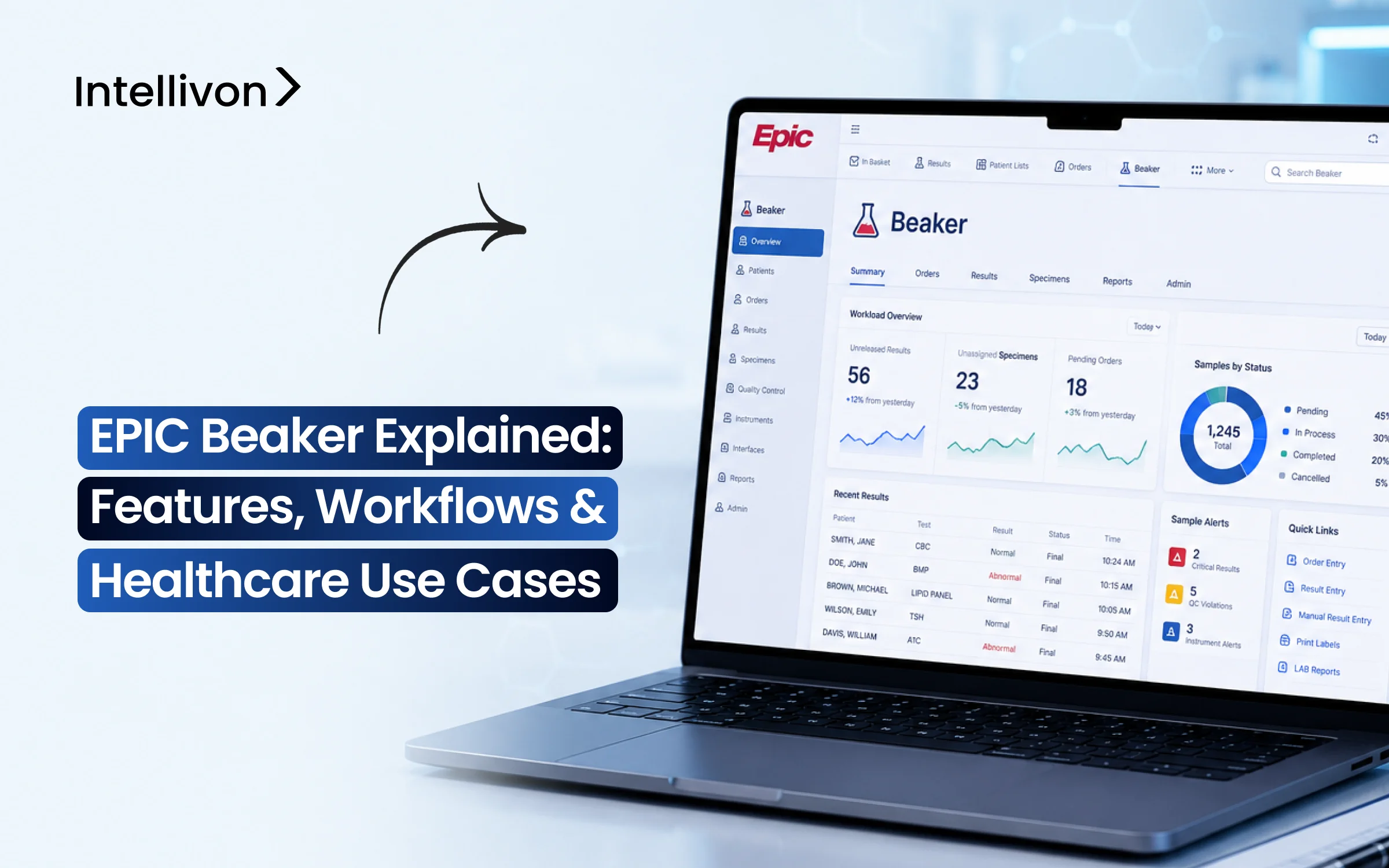
Key Takeaways:
- Epic Beaker handles the everyday flow of lab work. Within its operations, a test is ordered, after which a sample is collected. Then the lab processes it, and the result goes back to the clinical team.
- Separate departments of the lab use it in different ways. Chemistry and hematology may depend heavily on analyzer feeds, while microbiology and pathology usually have longer, more detailed workflows.
- Beaker also has to talk to the systems already sitting around the lab. That can include analyzers, middleware, reference labs, and other hospital applications.
- HL7 and FHIR help move that information between systems, but the real work is often in the details. Test codes, result formats, instrument names, and reporting rules can vary from one site to another.
- Intellivon builds custom integration or optimization work around Beaker, the cost of which generally falls in the $70,000 to $300,000 range.
Ask any lab director about the worst call they’ve gotten, and it is almost never about a broken analyzer. Consequently, it is a specimen that got labeled wrong, or a critical potassium result that sat for twenty minutes before anyone saw it. Epic Beaker runs the machinery behind all of it, which includes orders, specimens, and results moving across core lab, microbiology, blood bank, and pathology, with the QC checks built right into the process instead of tacked on at the end.
The instrument side is where things get real. This is because Beaker doesn’t talk to analyzers on its own. Instead, it needs certain middleware translating raw output into something the system can use, and that layer either works cleanly or it becomes the thing everyone blames. On the other end, the same data ends up in MyChart, in FHIR pulls for research tools, feeding sepsis and AKI alerts nobody thinks about until they fire.
This blog post covers Beaker’s workflows across every department, which is the instrument and middleware layer, CLIA and CAP compliance, and what these systems actually cost to get right. Additionally, we will also cover its features, workflows, and use cases so you are fully informed about the system before you choose an integration partner.

What Is Epic Beaker and How Does It Support Clinical Laboratories?
Epic Beaker is the built-in laboratory software inside the Epic hospital system. Several hospitals run their patient charts on one program and their lab testing on a separate, older system. However, Beaker combines both into one shared database.
This setup lets lab workers, doctors, and nurses view test orders, track samples, and see results instantly without system delays.
- Lab Software vs. Patient Chart: The main hospital system stores patient history, doctor notes, and billing records. The lab system tracks blood or tissue samples, sends instructions to testing machines, and verifies test accuracy.
- Direct Connection to EpicCare: Because Beaker shares the same system as doctor charts, nobody has to manually send data between programs. A doctor places an order, and the lab sees it right away.
- Step-by-Step Testing Process: The software manages each test from start to finish. It tracks when a nurse collects a sample, prints barcode labels, routes tubes to machines, and sends finished results back to the doctor.
- Two Main Lab Divisions: Beaker CP handles high-volume automated blood, urine, and infection tests. Beaker AP manages tissue biopsies, cancer screenings, and cell samples examined under microscopes.
- Daily Users: Phlebotomists who draw blood, lab techs who operate analyzers, pathologists who review biopsies, and floor nurses use Beaker to manage daily testing.
Documented outcomes from health systems like Stanford Health Care show that Beaker reduces pre-analytic processing to under 10 minutes and cuts overall diagnostic turnaround times.
This tight integration stops communication errors between hospital departments and ensures doctors get accurate test results when making treatment decisions.
Why Are Enterprises Integrating Epic Beaker Into Their EHR Systems
Enterprises integrate Epic Beaker into their EHR systems to eliminate fragile external software connections and operate from a single patient record. As a result, hospitals cut costly IT maintenance fees, prevent sample mislabeling errors, and instantly deliver critical test results to doctors without cross-system communication delays.
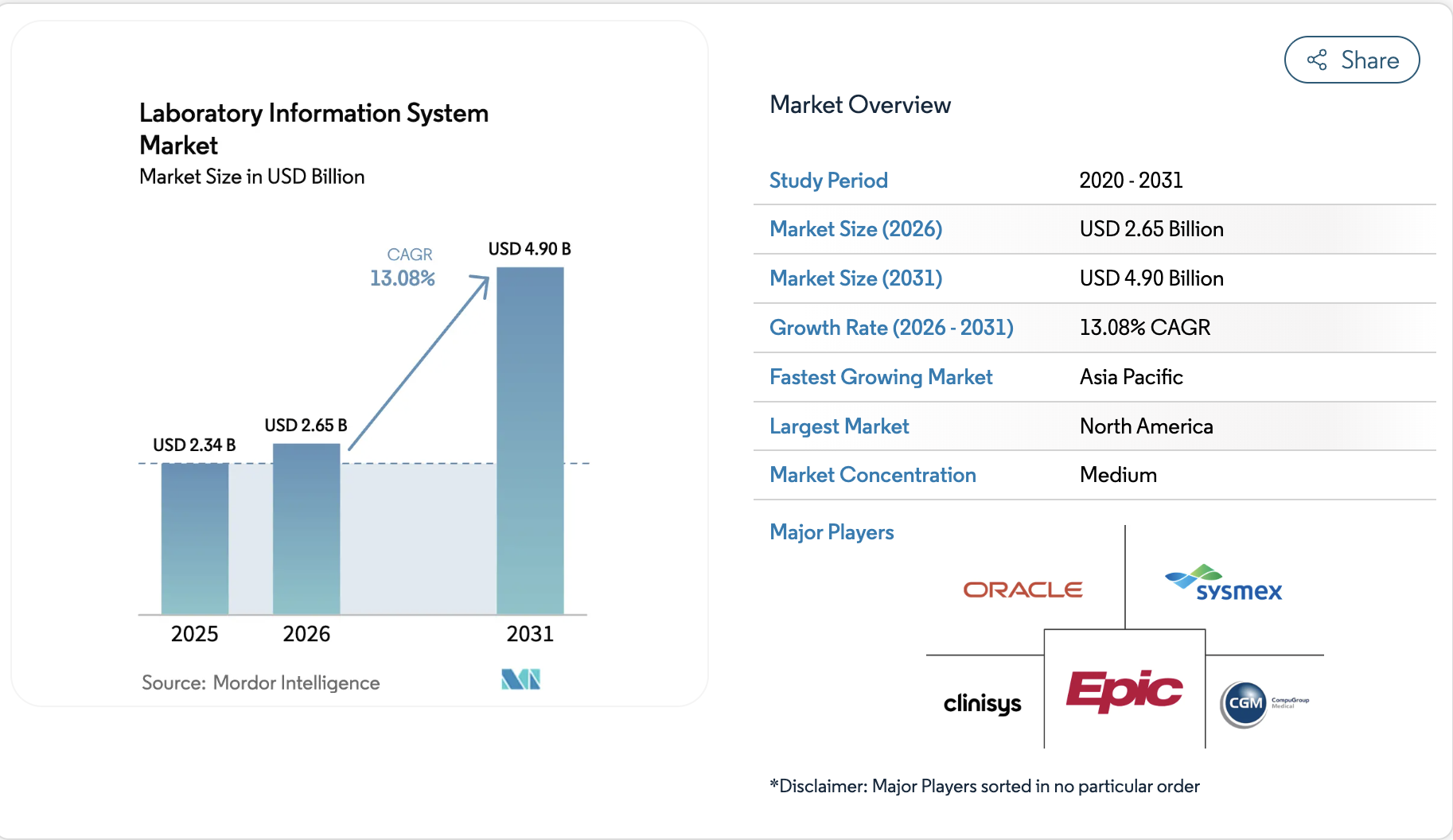
The global lab software market will hit $4.90 billion by 2031, growing at a steady compound annual growth rate (CAGR) of 13.08%. Because hospitals want simple systems, many now choose Epic Beaker to replace old programs. As a result, health systems cut IT costs and speed up test results for patients.
- Large Hospital Reach: In addition, data from Becker’s Hospital Review shows Epic manages 43.7% of all hospital beds. Therefore, choosing Beaker is the most practical move for hospitals already using Epic charts.
- Widespread Adoption: Furthermore, an industry review from Folio3 Digital Health shows over 170 hospital facilities switched to Beaker in just one year. Consequently, major hospital networks can now run all their branch labs on the same tool.
- Proven Cost and Time Savings: Most importantly, a research study in the American Journal of Clinical Pathology proved Beaker cut routine blood test turnaround times down to 56 minutes. Besides saving time, removing extra software saves hospitals between $150,000 and $400,000 every year in IT fees.
Switching to one shared system removes expensive software connections and prevents testing delays. Thus, hospitals save money while doctors get critical test answers much faster.
How Epic Beaker Supports Different Clinical Laboratory Workflows
Epic Beaker manages two distinct testing divisions: Clinical Pathology (CP) for fluid samples and Anatomic Pathology (AP) for tissue biopsies. Because both divisions share the central hospital database, the system automates specimen tracking, benchtop analyzer communication, and direct chart reporting.
As a result, care teams receive verified diagnostic results without manual communication delays.
1. Clinical Pathology Workflows
Clinical Pathology benches handle high-volume liquid tests such as blood and urine panels. Consequently, Beaker CP automates these workflows from bedside collection straight through analyzer validation.
A. Chemistry Workflow
Chemistry benches process high-volume metabolic panels, lipid profiles, and liver enzymes on automated track lines. Therefore, Beaker connects directly to high-throughput analyzers to auto-verify normal results and flag abnormal values.
- Automated delta checks: First, the system compares current numbers against previous patient results to catch sudden spikes before releasing data.
- Automatic reflex testing: Next, if an initial enzyme level falls outside the safe range, Beaker immediately orders and runs dilution tests without requiring a new doctor order.
- Rapid technologist review: Meanwhile, normal results post to patient charts in seconds, whereas abnormal values pause on a dedicated worklist for technician review.
Following chemistry testing, hematology benches process cellular blood counts using similar automated logic.
B. Hematology Workflow
Hematology testing analyzes whole blood samples to evaluate red blood cells, white blood cells, and platelets. Accordingly, the system captures cell counter outputs and applies rule-based logic to trigger automated slide reviews.
- Complete Blood Count (CBC) evaluation: Initially, Beaker checks cell distributions against preset clinical ranges to verify healthy counts instantly.
- Reflex slide routing: Furthermore, when white blood cell counts show abnormal shapes or counts, the system automatically routes the sample for digital slide imaging or manual review.
- Structured morphology flags: In addition, technicians record cell shape flags directly into structured fields so oncologists and hematologists can review them immediately.
While hematology delivers fast liquid counts, microbiology manages organism growth over several days.
C. Microbiology Workflow
Microbiology identifies bacterial, fungal, and viral pathogens grown from patient swabs and blood cultures. For this reason, Beaker tracks multi-day specimen plating, incubation times, colony growth, and antibiotic susceptibility testing (AST) panels.
- Digital culture workcards: Specifically, technicians use digital workcards to record daily plate growth and colonial morphology.
- Preliminary reporting: Meanwhile, the system lets the lab release early findings, such as preliminary gram stain results, while the full culture incubates.
- Automated susceptibility testing: Finally, once an organism is identified, Beaker matches the bacteria against antibiotic panels to highlight which medications will kill the infection.
Shifting from live cultures, immunology monitors the body’s immune response to disease.
D. Immunology and Serology Workflow
Immunology benches run antibody screens, autoimmune panels, and viral protein assays. Consequently, Beaker organizes batch runs across immunoassay analyzers while calculating serial dilution ratios across sequential visits.
- Efficient batch testing: Primarily, technicians group multiple patient samples into single analyzer runs to maximize reagent efficiency.
- Titer trend tracking: Moreover, the software tracks numerical antibody titer levels and generates visual trend graphs inside the chart.
- Early autoimmune flags: As a result, abnormal autoimmune markers trigger automated alerts to help doctors identify conditions like lupus or rheumatoid arthritis earlier.
Completing the clinical pathology division, urinalysis processes routine fluid screenings.
E. Urinalysis Workflow
Urinalysis tests urine chemistry and microscopic sediment to screen for kidney dysfunction and urinary tract infections. Thus, Beaker connects automated test strip readers with digital sediment analyzers to eliminate manual bench logging.
- Direct strip reading: First, the system pulls chemical readings directly from benchtop dipstick scanners.
- Reflex microscopic exams: Subsequently, when protein or leukocyte fields flag positive, Beaker automatically orders and tracks a microscopic sediment exam.
- Digital sediment imaging: Finally, digital images of crystals, casts, and cells attach directly to the lab report for physician review.
2. Anatomic Pathology Workflows
Anatomic Pathology manages solid tissue biopsies, surgical resections, and cellular scrapings. Unlike fluid testing, Beaker AP tracks physical tissue samples through chemical preparation, slicing, and microscopic examination.
A. Histology Workflow
Histology turns surgical tissue into microscope slides for diagnostic evaluation. Because precision is critical, Beaker AP tracks specimens through gross dissection, paraffin block embedding, microtome sectioning, and slide staining.
- Unique 2D barcode labeling: First, the platform prints unique 2D barcode labels for every tissue cassette and glass slide.
- Step-by-step station tracking: Next, technicians scan barcodes at grossing stations, embedding centers, and microtomes to log complete chain-of-custody data.
- Integrated special stain orders: In addition, pathologists can order special chemical or immunohistochemical (IHC) stains directly inside the electronic case file.
Moving from solid tissue blocks to cell washings, cytology applies a similar screening process.
B. Cytology Workflow
Cytology screens individual cells collected from Pap smears, fine needle aspirations, and fluid washings. Accordingly, Beaker coordinates primary screener reviews, automated rescreen percentages, and final pathologist sign-offs.
- Workload-limit tracking: Specifically, the system enforces daily slide evaluation limits to prevent screener fatigue and maintain accuracy.
- Random rescreen rules: Furthermore, Beaker automatically routes a set percentage of negative cases for quality control rescreening before sign-off.
- Automated pathologist escalation: Consequently, any sample showing abnormal or atypical cell changes routes automatically to a pathologist for final review.
Biopsy specimens requiring comprehensive staging then move directly to surgical pathology.
C. Surgical Pathology Workflow
Surgical pathology provides definitive diagnoses on tumor resections and biopsy specimens. Therefore, Beaker provides synoptic reporting templates aligned with College of American Pathologists (CAP) cancer protocols.
- Structured synoptic templates: First, pathologists record tumor size, margin status, and histologic grade in standardized check-box formats.
- Discrete data entry: Because of this structure, oncology software can pull cancer stage data automatically without reading free-text notes.
- Multi-part specimen support: Additionally, the system tracks multiple tissue specimens taken from a single surgical procedure under one master case number.
Beyond standard tissue exams, modern labs connect with specialized diagnostic boundaries.
3. Specialized Diagnostic Boundaries
Modern precision medicine requires Beaker to interface smoothly with specialized testing environments outside standard clinical labs.
A. Molecular Diagnostics and Genomics Boundary
Molecular laboratories process next-generation sequencing (NGS), polymerase chain reaction (PCR) tests, and pharmacogenomics panels. Because genomic variant call files (VCFs) are massive, Beaker ingests discrete, actionable interpretations while external databases store raw data files.
- Precise variant mapping: Primarily, the system matches specific gene mutations to actionable clinical findings.
- Automated drug-gene warnings: Consequently, when a doctor prescribes a drug that clashes with a patient’s genetic test, Beaker triggers a safety alert.
- Secure external archiving: Meanwhile, raw sequencing data stays in secure storage while the final summary attaches to the medical record.
Finally, transfusion medicine operates under strict standalone safety boundaries.
B. Blood Bank and Transfusion Services Boundary
Transfusion services require rigid safety checks for blood typing, antibody screening, and crossmatching. Therefore, while Beaker tracks routine blood tests, specialized blood bank engines manage unit allocation and donor matching.
- Bidirectional verification: First, Beaker exchanges data with the blood bank software to verify patient blood type history before unit release.
- Positive patient matching: Next, nurses scan patient wristbands and blood bag barcodes at the bedside to verify a match before starting transfusions.
- Antibody identification flags: As a result, the system flags any patient with rare antibodies so blood bank staff can prepare compatible units in advance.
Connecting these specialized laboratory departments creates a unified diagnostic platform across hospital networks.
Therefore, this unified data layer speeds up specimen turnaround times and eliminates diagnostic handoff errors.
Which Epic Beaker Features Matter Most for Laboratory Operations?
Epic Beaker makes daily lab operations faster and safer by replacing manual paperwork with simple computer workflows. Instead of just saving test data, the system routes tubes, checks normal results automatically, and warns doctors about dangerous values.
As a result, labs avoid mix-ups, get answers to doctors quicker, and keep patients safe.
1. Wristband and Sample Scanning
Nurses scan the patient’s wristband and blood tube right at the bed before drawing blood. Therefore, the system confirms the patient’s identity on the spot to stop sample mix-ups.
- Bedside Matching: First, handheld scanners read the wristband to ensure the blood draw matches the doctor’s active order.
- Instant Labels: Next, small bedside printers print barcode labels only after the patient’s identity is verified.
- Draw Timestamps: In addition, the system logs the exact draw time and worker name directly into the chart.
2. Sample Barcode Tracking
Every tube, tissue block, and glass slide gets its own barcode sticker. Consequently, lab staff can see the exact physical location of any test tube at any time.
- Scan at Every Desk: Workers scan tubes when they arrive at the lab, enter centrifuges, and move to testing machines.
- Freezer Location Maps: Furthermore, the software tracks the exact shelf and box number for frozen samples.
- Child Tube Labels: When pouring blood into smaller secondary tubes, Beaker prints linked barcodes so parts of the same sample never get lost.
3. Automatic Result Checks
Smart computer rules review test numbers straight from testing machines without human help. As a result, normal test results reach doctors in seconds.
- Past Test Comparisons: First, the system checks new results against older tests to catch sudden, unexpected changes.
- Flag Strange Numbers: Meanwhile, only strange or borderline test results pause for a technician to inspect by hand.
- Faster Emergency Results: Consequently, emergency room doctors get routine blood test results much faster.
4. Danger Value Alerts
When a test reveals life-threatening numbers, Beaker sends an urgent alert immediately. Therefore, doctors can act fast without waiting for slow phone calls.
- Instant Pop-Ups: The system sends real-time pop-up alerts straight to the doctor’s phone or computer screen.
- Note Phone Confirmations: Furthermore, lab staff record the doctor’s verbal read-back confirmation inside the chart.
- Alert Backup Doctors: If the primary doctor does not answer quickly, the system routes the alert to another covering provider.
5. Master Test Menu and Machine Quality Checks
Lab managers control test rules, tube types, and machine accuracy checks from one central screen. Thus, every hospital clinic follows the exact same testing standards.
- Master Test Catalog: First, the system shows the exact tube color, fasting rules, and handling steps for every test.
- Daily Calibration Tracking: Next, the software monitors machine accuracy daily to catch errors before testing patient blood.
- Automatic Machine Locks: If a machine fails its daily check, Beaker stops the tool so it cannot run patient samples.
6. Live Lab Worklists and Status Screens
Supervisors and bench staff track pending tests, turnaround times, and backlogs on live dashboards. Consequently, team leads can move extra staff to busy benches before tests pile up.
- Priority Queues: Dedicated lists keep emergency room and ICU samples at the very top of the line.
- Wait-Time Dials: Visual timers show how long samples sit waiting at each station.
- Batch Approvals: Technicians can review and approve large batches of normal results all at once.
7. Patient Result Sharing on MyChart
Finished lab results post directly to the patient’s phone app with clear reference ranges and simple explanations.
Healthcare teams design these patient portal interfaces by applying modern web development best practices so users can navigate their health records smoothly across any mobile device.
- Fast Result Posting: Normal lab results go straight to the patient app as soon as the test finishes.
- Simple Color Ranges: Patients can easily see whether their numbers fall in the green normal zone or the red alert zone.
Building clean patient portals and external digital health tools requires reliable technical foundations.
Using these simple, practical tools turns standard hospital labs into fast, automated testing centers. Next, we will examine the system architecture and data interfaces that connect Beaker to hospital analyzers and data warehouses.
How Epic Beaker Connects With Lab Instruments and Middleware
Epic Beaker connects to physical laboratory analyzers through an intermediate software layer called middleware. Testing machines speak low-level instrument protocols, while Beaker processes structured healthcare messages.
As a result, test orders route directly to machines, and completed results return to doctor charts without manual entry.
1. Data Innovations and Instrument Managers
Middleware platforms like Data Innovations Instrument Manager act as translators between physical lab hardware and the central software. Because hundreds of analyzer brands use different communication formats, middleware standardizes all signals into universal messages.
- Protocol Translation: First, the middleware converts raw machine outputs (such as ASTM standards) into standardized HL7 formats.
- Driver Libraries: Next, pre-built driver profiles connect specialized hardware from vendors like Roche, Abbott, and Beckman Coulter.
- Traffic Balancing: In addition, the software balances specimen routing across multiple identical testing lines during peak volume hours.
2. Bidirectional Interfaces and Analyzer Worklists
Two-way communication channels allow Beaker and lab machines to talk back and forth automatically. Consequently, bench staff do not have to type patient names or test menus into individual machines.
- Order Query Routing: First, the machine reads a tube’s barcode and asks middleware what tests to perform.
- Worklist Population: Next, Beaker sends the exact testing instructions back to the analyzer track within milliseconds.
- Result Transmission: Finally, the analyzer completes the test and sends numerical values straight back to Beaker without human typing.
3. Quality Control and Error Handling
Middleware catches machine errors and calibration failures before bad numbers reach the main hospital chart. Therefore, the system protects patient safety by halting broken testing channels automatically.
- Real-Time Westgard Rules: First, the software checks daily control runs to ensure machines measure accurately.
- Automated Channel Lockouts: Furthermore, if calibration drifts, the middleware blocks the machine from testing patient blood.
- Interface Error Queues: In addition, any sample with a damaged barcode or missing order routes into an exception worklist for fast technician review.
4. Multiple Middleware Layers and Reference Labs
Large health systems often run multiple middleware systems alongside connections to external reference laboratories like Quest or Labcorp. Therefore, managing these connections requires specialized mapping to prevent data bottlenecks across hospital networks.
- Send-Out Test Tracking: First, Beaker transmits electronic orders to external reference labs and tracks specimen transit status.
- Automated Result Ingestion: Next, external test results flow back through secure interfaces to populate the patient chart directly.
- Standardized Code Mapping: In addition, the system aligns local test codes with national LOINC and SNOMED medical dictionaries.
Connecting testing machines to a unified database eliminates manual transcription errors and speeds up test results.
How Epic Beaker Helps Labs Meet CLIA, CAP, and HIPAA Requirements
Epic Beaker enforces laboratory compliance by embedding regulatory rules directly into daily software workflows. Instead of collecting paper evidence right before an audit, the system automatically logs user actions, controls access to protected health information (PHI), and verifies test data.
Consequently, clinical laboratories maintain continuous inspection readiness for College of American Pathologists (CAP) and Clinical Laboratory Improvement Amendments (CLIA) standards.
1. System and Interface Validation
Labs must prove that software changes and instrument connections never alter patient test results. Therefore, Beaker provides validation tools to test data accuracy across every connected analyzer and middleware channel.
- Interface Testing: First, technical teams run test batches to confirm numbers match between the machine screen and the patient chart.
- Transmission Verification: Next, the system tests automated result transmissions to ensure decimal points and reference units never shift.
- Workflow Defect Detection: Furthermore, rigorous testing across an integrated [epic beaker api] often reveals pre-analytic order mismatches and physical routing bottlenecks before go-live.
2. Autoverification and Change Validation
Automated release rules need formal proof of accuracy before labs can turn on auto-verification. Consequently, Beaker tracks rule testing and logs every software update to meet strict accreditation rules.
- Rule Validation: First, technologists test clinical logic against hundreds of sample cases with known normal and abnormal outcomes.
- Change Tracking: Next, the platform records every rule edit, author name, and date to prove compliance during system upgrades.
- Safety Lockouts: In addition, any unvalidated rule change automatically stops auto-verification until a supervisor signs off.
3. Immutable Audit Trails and Role Permissions
Regulatory standards require complete transparency regarding who views, edits, or releases lab data. Therefore, Beaker logs every user click in an unalterable history log.
- Role-Based Access: First, permissions restrict test sign-offs and sensitive record access strictly to qualified staff.
- Timestamped Action Logs: Next, the software records the exact user ID, date, and workstation for every result modification.
- Correction Auditing: When staff change an entered result, Beaker preserves the original number and requires a written reason for the edit.
4. Protected Health Information (PHI) Controls
HIPAA mandates strict security safeguards around sensitive patient data. Accordingly, Beaker encrypts data both in transit and at rest across the hospital network.
- Screen Break-Glass Controls: First, staff must enter a formal reason before opening sensitive or VIP patient charts.
- Encrypted Data Exchanges: Next, all messages flowing between analyzers and servers use secure encryption protocols.
- Automatic Session Timeouts: Furthermore, workstations lock automatically when left unattended to prevent unauthorized record viewing.
5. CAP and CLIA Inspection Documentation
Preparing for biennial lab inspections often consumes weeks of manual staff preparation. In contrast, Beaker generates digital compliance packets on demand.
- Competency Records: First, the system links technologist training credentials directly to analyzer sign-off permissions.
- Quality Control Reports: Next, digital Levey-Jennings charts and calibration logs export instantly for inspector review.
- Specimen Turnaround Metrics: Finally, supervisors pull real-time turnaround reports to prove testing meets stated hospital quality goals.
Automating these compliance controls protects patient privacy and guarantees test accuracy across every hospital department.
How Real Epic Beaker Projects Improve Laboratory Efficiency and ROI
Real-world hospital deployments show that replacing separate lab programs with Epic Beaker delivers clear business and clinical returns. By running laboratory workflows inside the central patient chart, hospitals remove manual paperwork, speed up test turnarounds, and stop specimen mix-ups.
As a result, health networks lower IT maintenance costs while improving patient care safety.
1. Cutting Specimen Errors and Extra Work
Mislabeled blood tubes and lost samples force expensive redraws and delay urgent treatments. Consequently, using integrated barcode scanning at the bedside prevents sample mix-ups before blood ever leaves the patient room.
- Bedside Identification: First, nurses scan patient wristbands directly to make sure the blood draw matches the doctor’s active order.
- Fewer Specimen Redraws: Next, stopping labeling mistakes cuts repeat blood draws and saves nursing hours.
- Chain-of-Custody Tracking: In addition, automated timestamps trace every tube from the patient bed to the analyzer machine.
2. Accelerating Turnaround Time (TAT)
Manual paper handoffs slow down emergency test results and keep patients waiting in hospital beds. Therefore, automated instrument routing delivers fast, reliable data straight to doctors.
- High-Speed Automatic Checks: First, normal test results post directly to doctor screens in seconds without manual sign-offs.
- Priority Emergency Queues: Next, emergency department blood panels jump to the front of the testing line.
- Instant Critical Alarms: Furthermore, automated pop-up alerts notify care teams immediately when test values reach dangerous levels.
3. Stanford Health Care Deployment Metrics
Stanford University Medical Center replaced their legacy Sunquest software with Epic Beaker to standardize testing across their hospital network. Therefore, their published clinical study proved that large-scale consolidation delivers rapid efficiency gains.
- Massive Project Scope: Specifically, the deployment covered 1,766 clinical tests, 59 instrument interfaces, and seven external reference laboratories.
- Faster Test Results: Furthermore, routine metabolic panel turnaround times improved from 60–80 minutes down to 56 minutes, with intake dropping to just 9 minutes.
- Fewer Label Errors: In addition, positive patient barcode scanning at the bedside led to a major drop in mislabeled specimens.
4. University of Iowa Enterprise Migration
Implementation research tracked by Folio3 Digital Health shows the University of Iowa deployed Beaker Clinical Pathology across complex academic medical facilities. Consequently, this project proved the importance of setting up clean test menus early.
- Massive Master Catalog: First, the project team built and validated roughly 1,852 orderable tests and 5,660 resultable components.
- Deep Clinical Teamwork: Next, lab experts collaborated early to standardize order sets and collection rules.
- Fewer Manual Typing Mistakes: In addition, university research showed 3.7% of manual lab entries had errors, whereas direct Beaker connections eliminated these data typos completely.
5. Pathology Migration Accuracy Benchmarks
A detailed pathology migration report documented by Folio3 Digital Health validated 45 consecutive complex tissue cases during dry-run testing before go-live. Thus, health systems can verify software safety before turning off older systems.
- High Workflow Match: First, the dry-run testing successfully matched over 99% of established anatomic pathology workflows without data loss.
- Standard Cancer Templates: Next, structured cancer staging templates matched existing College of American Pathologists (CAP) protocols.
- Smooth System Launch: Consequently, the team confirmed diagnostic accuracy and tissue tracking before full cutover.
Standardizing laboratory operations across a single electronic health record lowers IT licensing costs and accelerates emergency care delivery. Next, we will examine the full system implementation phases, timeline schedules, and cost planning factors.
How We Plan an Epic Beaker Implementation From Start to Go-Live
Integrating Epic Beaker is a multi-phase engineering and clinical transformation project. Because a single routing error can delay patient care, hospitals rely on structured milestones to bridge IT infrastructure with active laboratory benches.
Therefore, following a rigorous sequence from initial discovery to cutover ensures testing accuracy, operational uptime, and regulatory readiness.
Step 1: Workflow Assessment and Laboratory Inventory
First, engineers and laboratory leaders map physical specimen paths across every acute care unit, outpatient draw station, and testing bench. This phase uncovers hidden manual handoffs before building any software rules.
- Audit physical testing routes: Track sample journeys from the bedside draw through accessioning, centrifugation, and bench distribution.
- Log analyzer hardware: Catalog every chemistry track, blood gas reader, slide maker, and handheld barcode scanner across all hospital facilities.
- Document legacy connections: Detail existing interface engines, driver versions, and manual phone alert protocols.
Intellivon conducts an on-site operational audit across all bench specialties to pinpoint interface bottlenecks, missing drivers, and physical routing delays. This initial discovery provides a reliable blueprint for the subsequent build.
With the physical inventory documented, the team begins structuring the master test catalog.
Step 2: Test Dictionary and Compendium Design
Next, laboratory teams merge disparate departmental test menus into a single electronic compendium. This step eliminates duplicate order entries and standardizes collection parameters across every clinic.
- Standardize order sets: Combine separate hospital test catalogs into unified orderables with clear clinical naming conventions.
- Define collection protocols: Set exact tube cap colors, draw volumes, fasting prerequisites, and specimen stability windows.
- Map standardized medical codes: Link every resultable component directly to national LOINC and SNOMED terms for clear billing and reporting.
Intellivon maps local hospital test codes to universal coding standards and structures discrete result fields within the compendium. This configuration prevents cross-system order mismatches across hospital networks.
After finalizing the compendium, technical teams begin software configuration.
Step 3: CP and AP System Configuration
During this stage, analysts configure specialized rules, worklists, and screens for both Clinical Pathology and Anatomic Pathology. Consequently, bench technicians and pathologists gain tools tailored to their specific daily testing tasks.
- Configure autoverification logic: Write rule-based algorithms to check delta changes and auto-release normal fluid results instantly.
- Build critical-value alerts: Set high-priority electronic alerts to notify attending clinicians when results exceed safe physiological ranges.
- Design synoptic templates: Format structured reporting forms compliant with College of American Pathologists (CAP) cancer protocols.
Intellivon builds custom autoverification logic, reflex rules, and CAP-compliant synoptic templates tailored to your laboratory’s specific testing protocols. This build ensures high-throughput automation for fluid testing and structured data tracking for tissue pathology.
Once software logic is configured, teams integrate physical laboratory instruments.
Step 4: Interface Architecture and Middleware Integration
Laboratory analyzers rely on low-level protocols that require translation before communicating with Epic. Therefore, engineers configure middleware platforms like Data Innovations to bridge physical hardware with the LIS.
- Deploy analyzer drivers: Install dedicated software drivers for chemistry lines, hematology counters, and immunoassay tracks.
- Enable bidirectional messaging: Establish two-way communication so analyzers can query barcodes and transmit results automatically.
- Set quality control rules: Configure real-time Westgard rules to catch calibration drift before patient samples process.
Intellivon develops resilient bidirectional middleware pipelines connecting diverse analyzer fleets directly to Beaker. This integration eliminates manual result transcription and halts testing if quality controls fail.
With instruments connected, engineers focus on migrating historical clinical records.
Step 5: Data Migration and Reference Lab Connectivity
Next, technical teams migrate historical diagnostic records and establish secure interfaces with outside reference laboratories. This phase maintains continuity of care while supporting send-out testing operations.
- Extract historical lab data: Convert past patient results, blood bank histories, and pathology narratives into structured formats.
- Build reference lab interfaces: Establish electronic order and result channels with external partners such as Quest and Labcorp.
- Validate extraction accuracy: Run iterative conversion dry runs to verify that legacy numbers, units, and dates align without data loss.
Intellivon executes automated data extraction, translation, and verification pipelines to migrate historical lab data securely. This disciplined migration preserves historical patient trends without corrupting active charts.
After data is securely converted, rigorous end-to-end testing begins.
Step 6: End-to-End Validation and User Training
Before launching the system, the project team executes hundreds of test scenarios and trains laboratory staff on daily operations. As a result, users gain practical confidence and resolve system errors before treating real patients.
- Run integrated test scripts: Track simulated patient specimens through the entire lifecycle, from bedside barcode scans to final analyzer reports.
- Deliver role-based training: Provide targeted hands-on instruction for phlebotomists, bench technologists, and pathologists.
- Execute mock cutovers: Simulate high-volume shift changes and downtime scenarios to test system stability under stress.
Intellivon builds comprehensive validation suites and leads interactive training for laboratory personnel. This hands-on preparation ensures complete operational readiness across all shifts.
With testing verified and teams trained, the organization proceeds to final cutover.
Step 7: Cutover and Post-Live Optimization
Finally, the hospital transitions from its legacy LIS to Epic Beaker during a scheduled downtime window. Technical teams provide round-the-clock support to resolve issues instantly and fine-tune operational workflows.
- Execute production cutover: Transition in-flight orders, switch active instrument feeds, and verify initial live results.
- Deploy elbow-to-elbow support: Place dedicated clinical and technical specialists at every bench to assist staff in real time.
- Monitor turnaround metrics: Track dwell-time dashboards to resolve emerging bottlenecks in accessioning and verification.
Intellivon provides 24/7 on-site cutover support and conducts post-live tuning to optimize auto-verification rates and TAT performance. This post-launch focus ensures long-term operational efficiency and clinical return on investment.
Executing a disciplined, phased rollout protects active laboratory testing and ensures data integrity from day one. Next, we will break down the expected implementation costs, licensing factors, and ongoing maintenance budgets.
How Much Does Epic Beaker Integration and Optimization Cost?
Custom integration and optimization for Epic Beaker typically cost between $70,000 and $300,000.
This pricing reflects specialized engineering work, including custom analyzer drivers, FHIR interface building, downstream analytics pipelines, and clinical workflow extensions, rather than base Epic licensing or core health system software procurement.
Workstream Cost Breakdown
The total investment varies based on the number of testing benches, legacy analyzer interfaces, and custom clinical alert paths required across your hospital network.
Consequently, health systems structure these engineering budgets across distinct technical phases:
| Workstream | Suggested Range |
| Discovery and Workflow Mapping | $5K–$12K |
| Architecture and Data Design | $8K–$18K |
| HL7 / FHIR / Interface Engineering | $18K–$70K |
| Workflow Extensions | $15K–$60K |
| Analytics or AI Integration | $8K–$50K |
| Validation and Testing | $8K–$35K |
| Go-Live and Optimization | $8K–$55K |
Annual system maintenance and interface optimization typically require 15% to 20% of the initial build budget. Therefore, health systems can budget accurately for ongoing analyzer driver updates and quarterly upgrade validations.
Defining clear interface boundaries early prevents cost overruns during analyzer connectivity and validation phases. Next, we will explore how AI diagnostic tools and advanced predictive algorithms integrate directly into these Beaker workflows.
What to Look for When Choosing an Epic Beaker Integration Partner
Selecting the right Epic Beaker integration partner determines whether your laboratory migration finishes on schedule or stalls during validation. Because lab workflows directly impact patient safety, your engineering partner must understand both low-level instrument interfaces and complex hospital data governance.
Therefore, evaluating technical vendors against strict operational criteria protects your implementation budget and timeline.
Core Partner Evaluation Checklist
When vetting specialized integration firms, technical leadership should verify capabilities across several key operational areas:
- Epic Interoperability and Modern Protocols: First, verify demonstrated experience with standard HL7 v2 messaging (ORM/ORU) alongside modern FHIR R4 resources like DiagnosticReport and Observation.
- Deep Middleware and Driver Expertise: Next, ensure the team has hands-on experience configuring Data Innovations Instrument Manager, instrument drivers, and bidirectional analyzer communication channels.
- Regulatory and Security Awareness: Furthermore, partners must design validation suites that satisfy College of American Pathologists (CAP), CLIA, and HIPAA compliance mandates without cutting corners.
- Non-Invasive Architecture Design: In addition, the vendor must build scalable workflow extensions, analytics feeds, and external tools that connect cleanly to Epic without altering its core database.
- Production MLOps and Advanced AI: Finally, evaluate their ability to deploy secure, real-time diagnostic models and clinical alert pipelines safely into production clinical environments.
Choosing a specialized technical partner with proven laboratory domain expertise like Intellivon prevents costly interface rework and keeps testing operations running smoothly.
How Intellivon Builds Integrations and AI Around Epic Beaker
Intellivon builds custom integration layers, real-time middleware pipelines, and diagnostic AI extensions that work directly alongside Epic Beaker. Instead of modifying core EHR databases or introducing fragile workarounds, our engineering approach creates secure, non-invasive data pipelines that expand laboratory capabilities while keeping patient safety and regulatory compliance intact.
- Epic as the Single Source of Truth: First, all custom tools treat Epic as the authoritative system of record. Patient charts, physician orders, and released lab results remain safely anchored within Epic’s central database.
- Resilient HL7 and FHIR Interoperability Layers: Next, we construct bidirectional pipelines using HL7 v2 (ORM/ORU) messaging and modern SMART on FHIR R4 APIs (DiagnosticReport, Observation, Specimen) to exchange discrete data with external tools in real time.
- Analyzer Driver and Middleware Optimization: Furthermore, our engineers configure and test Data Innovations Instrument Manager rules, driver profiles, and specimen routing logic to ensure zero-mismatch data exchange with testing hardware.
- Downstream Analytics and Real-Time Dashboards: In addition, we pipe structured Beaker data into Caboodle, Clarity, and custom business intelligence engines to track turnaround times, analyzer backlogs, and staffing productivity.
- Production MLOps and Diagnostic AI Tools: For advanced precision workflows, we deploy low-latency clinical machine learning models—such as automated slide screening flags and sepsis risk indicators—directly into physician review queues.
- HIPAA-Compliant Security and Audit Infrastructure: Every data pipeline incorporates end-to-end encryption, strict role-based access controls, and automated audit logging to satisfy CLIA, CAP, and federal privacy requirements.
- Continuous Monitoring and Post-Live Tuning: Finally, we deploy automated interface telemetry to detect message queue delays, analyzer communication drops, and validation drift before they impact active patient care.
Deploying high-throughput laboratory integrations requires an engineering partner who understands both clinical hardware and enterprise software architecture. Book a free 30-minute strategy call with an Intellivon healthcare systems engineer to review your analyzer connectivity, interface requirements, and AI implementation roadmap.
Conclusion
Integrating Epic Beaker transforms disconnected testing benches into a fast, unified clinical diagnostic network. By combining laboratory workflows directly with the main patient record, health systems eliminate manual data errors, accelerate turnaround times, and lower IT maintenance overhead.
Therefore, deploying the right interface pipelines and intelligent extensions ensures your laboratory operates with unmatched speed, compliance, and clinical accuracy from day one.
FAQs
Q1. Does Epic Beaker connect directly with analyzers?
A1. Generally, Beaker connects to physical analyzers through an intermediate middleware platform like Data Innovations. Testing machines use low-level instrument protocols, whereas Beaker processes standard HL7 healthcare messages. Therefore, the middleware translates data bidirectionally, routing orders directly to instruments and returning verified results to patient charts automatically.
Q2. Does Epic Beaker support blood-bank workflows?
A2. Beaker manages standard blood typing and antibody screening directly within its clinical pathology module. However, high-risk transfusion unit releases and donor tracking often rely on specialized blood bank software. Consequently, engineering teams build bidirectional interfaces between Beaker and external transfusion engines to verify patient compatibility before unit release.
Q3. Which FHIR resources work with Beaker laboratory data?
A3. Beaker exchanges discrete diagnostic data using standard FHIR R4 resources. Specifically, systems use ServiceRequest for placing lab orders, Specimen for tracking collection details, and Observation for individual test values. In addition, DiagnosticReport packages complete multi-component panels and narrative pathology interpretations for external clinical applications.
Q4. Does Epic Beaker support molecular and genomic testing?
Yes, Beaker processes discrete molecular and genomic test findings alongside standard pathology data. Because raw genomic sequence files are massive, external biobanks archive the heavy data. Meanwhile, Beaker ingests discrete, actionable variant interpretations directly into the patient chart to trigger automated drug-gene safety alerts for prescribing physicians.
Q5. How should Beaker autoverification rules be validated?
A5. Laboratories validate autoverification algorithms by running hundreds of historical patient cases through dry-run testing environments. Therefore, technical teams verify that normal results release instantly while abnormal, critical, or mismatched values reliably pause for technologist review. Furthermore, every rule test is logged to satisfy strict CAP and CLIA inspection requirements.
Q6. What causes Epic Beaker projects to struggle after go-live?
A6. Projects primarily struggle when teams neglect upfront middleware mapping, compendium cleanup, or role-based staff training. Consequently, unmapped test codes cause interface message drops, while unvalidated rules create false alarm backlogs. Establishing continuous interface monitoring and post-live elbow support prevents these early operational bottlenecks from disrupting patient care.