Key Takeaways
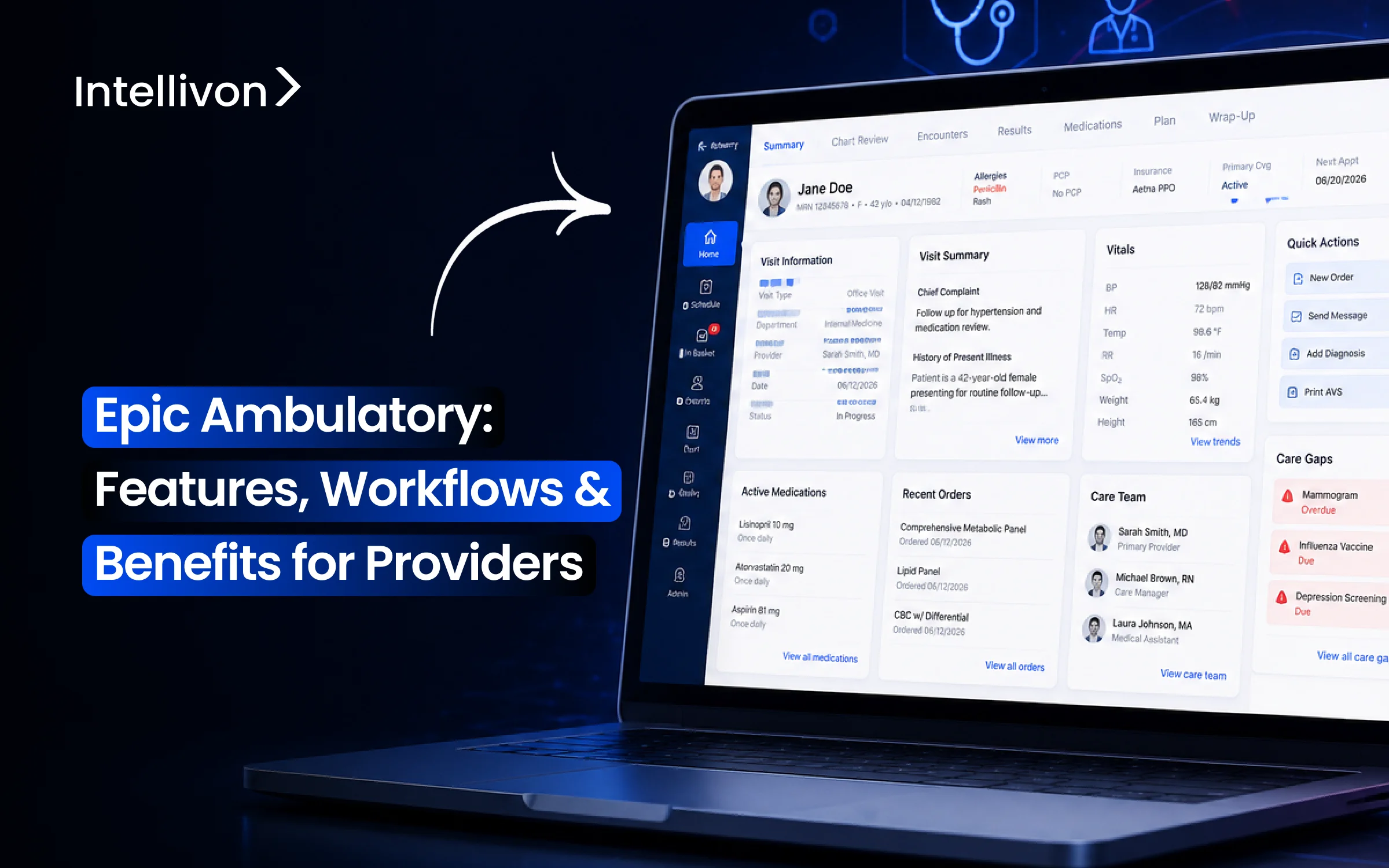
- The Epic Ambulatory solution encompasses several functionalities used by physicians, nurses, pharmacists, and all other departments working together in taking care of patients visiting outpatient facilities.
- The entire process covers the patient from their first appointment through to any related care. Within the same arrangement, providers are able to carry out pre-visit tasks, rooming, documentation, placing orders, viewing results, handling messages from MyChart, and closing the visit.
- For providers, the main benefit is time; smart tools, specialist templates, alerts, In Basket routing, care-gap tracking, and ambient documentation all serve to cut down on repetitive tasks and make it easier to manage daily clinical duties.
- Epic Ambulatory optimization and integration projects have costs ranging from $70,000 to $300,000. However, the price generally varies according to the number of specialties, workflows, and AI features.
- Intellivon incorporates and extends Epic Ambulatory by providing the FHIR, HL7, automation, and AI layers around Epic, whilst Epic remains the primary clinical system.
A physician sees twenty patients before lunch and still spends more time typing than talking to any of them. That’s the gap Epic Ambulatory is built to close. As Epic’s outpatient module, Ambulatory consolidates scheduling, documentation, and messaging into one place so it is easier to navigate for providers.
However, merely installing it does not fix the issue. This is because without ambient documentation tools like Nuance DAX or Abridge running alongside it, physicians still end up finishing notes at home anyway. Once the two are paired, though, a study across five academic medical centers found documentation time dropped by 16 minutes per eight-hour shift, enough to hand providers back a real chunk of their evening.
That gap between what Epic Ambulatory can do and what most rollouts actually achieve is largely a configuration problem, not a software one. So this blog covers Epic Ambulatory’s core features, specialty workflows, and what providers actually gain from it, and by the end, you’ll know what to build and why.

What Is Epic Ambulatory and Who Uses It?
Epic Ambulatory is the electronic health record system built specifically for outpatient doctor appointments and medical clinics.
Doctors, medical assistants, and clinic nurses use this software every day to review patient charts, order medications, write visit notes, and handle follow-up communications.
1. What Epic Ambulatory Actually Manages
First, the platform manages the entire patient visit from start to finish.
- Before the Visit: Staff check the daily schedule, verify insurance details, and review the patient’s medical history.
- During the Visit: Medical assistants record vitals and allergies during rooming. Next, doctors document symptoms in progress notes, update problem lists, and order lab tests, imaging, or specialty referrals.
- After the Visit: Clinicians send prescriptions to retail pharmacies, submit billing codes, and clear their In Basket inbox messages.
2. Epic Ambulatory vs. EpicCare Inpatient
However, outpatient clinic software works very differently from hospital software:
| Feature | Epic Ambulatory | EpicCare Inpatient |
| Care Setting | Outpatient doctor offices and specialty clinics | Hospital rooms and acute care units |
| Visit Duration | Short, scheduled visits (15–30 minutes) | Overnight or multi-day hospital stays |
| Main Clinical Focus | Preventative care, annual exams, and long-term health | 24-hour bedside nursing care and continuous vital monitoring |
| Medication Handling | Direct e-prescriptions sent to retail pharmacies | Timed medication administration records (MAR) for nurses |
| Billing Model | Routine office visit charges and professional fees | Hospital room rates, facility fees, and bundled inpatient care |
3. Which Epic Modules Sit Around Ambulatory
Additionally, Epic Ambulatory connects directly to several companion tools to keep the clinic running:
- Cadence & Prelude: Schedule appointments and register patient demographics.
- MyChart & Haiku: Connect patients to their test results and allow doctors to check charts on mobile phones.
- Beaker & Radiant: Deliver laboratory results and radiology scans directly to the clinic chart.
- Resolute: Handles final patient billing and insurance claims.
Therefore, understanding this ecosystem helps clinic leaders see how data moves smoothly across the entire health network.
Why Epic Ambulatory Matters More for Providers in 2026
Today, health systems are actively shifting their focus from buying new software to fixing everyday clinic bottlenecks. Because outpatient clinics generate steady revenue, improving daily doctor workflows directly boosts both financial margins and patient care.
1. The U.S. Ambulatory EHR Market Is Still Expanding
First, patient care is rapidly moving outside traditional hospital walls into neighborhood clinics. Because of this shift, Grand View Research estimates the U.S. ambulatory EHR market will jump from $5.79 billion in 2025 to $7.60 billion by 2030 at a 5.57% compound annual growth rate (CAGR).
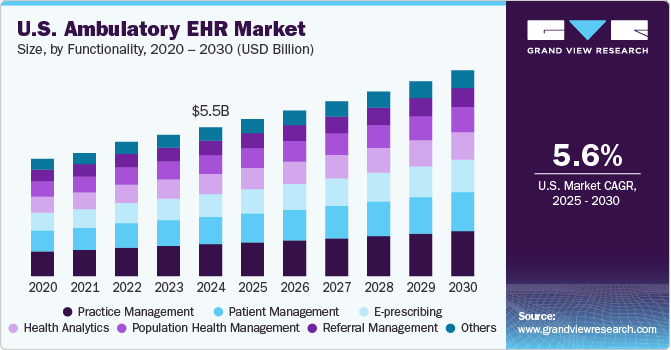
As a direct result, healthcare groups are spending more money to keep their outpatient technology running smoothly.
2. Large Physician Groups Are Becoming a Faster-Growing Segment
Meanwhile, independent doctor practices are quickly merging into large regional networks. In fact, research shows that medical groups with 50 or more doctors will grow faster than any other segment through 2030.
Consequently, healthcare leaders urgently need standardized software tools that work reliably across dozens of different clinic locations.
3. Epic Holds Strong Ambulatory Market Position
Furthermore, Epic remains the leading technology choice for outpatient medical centers nationwide. According to a Definitive Healthcare ambulatory market report, Epic ranks first among all vendors with 16,295 installations, capturing nearly 20% of the market.
Additionally, Epic earned a top score of 91.6 in the 2025 Best in KLAS health-system-owned ambulatory EHR rankings.
4. Buyers Are Shifting From EHR Replacement to Optimization
Because most health systems already own Epic, few organizations want to switch to a completely new system. For example, recent KLAS acute care data shows Epic already covers 43.7% of U.S. hospitals and 56.9% of hospital beds.
Therefore, clinic executives are now investing in workflow upgrades and smart automation instead of costly software replacements.
5. AI Is Becoming Part of the Epic Ambulatory Investment Case
At the same time, AI is quickly becoming standard clinic equipment rather than an experimental tool. For instance, a 2026 peer-reviewed study on hospital AI adoption found that 62.6% of hospitals running Epic had already implemented ambient AI scribes by mid-2025.
6. Outpatient AI Is Moving From Pilots to Measurable Economics
Ultimately, these automated tools are delivering real, measurable financial returns to clinic bottom lines. Specifically, a 2026 ambulatory study showed that ambient AI cut note-writing time by 28.3% and reduced after-hours “pajama time” by 35.4%.
Furthermore, doctors saw 8.5% more patients, generating an extra $2,629 in monthly revenue per provider.
Thus, fine-tuning the clinic software environment directly protects doctor time and increases overall clinic earnings.
Epic Ambulatory Features That Simplify Daily Provider Work
Many clinics struggle with documentation delays, but the real issue is usually poor setup rather than missing software tools.
When healthcare organizations configure these features correctly, doctors spend significantly less time clicking screens and more time focusing directly on patient care.
1. Fast Note-Writing Tools
Writing repetitive clinic notes takes hours and quickly drains doctors’ energy. To solve this, Epic provides four basic SmartTools:
- SmartPhrases (dot-phrases that insert common text blocks)
- SmartTexts (longer standardized note templates)
- SmartLists (pick-lists of clinical options)
- SmartLinks (smart tags that automatically pull live vitals and lab numbers into notes).
As a result, properly combining these four tools cuts routine typing time in half while keeping medical records accurate.
2. Custom Specialty Forms
Standard clinic templates rarely fit the unique needs of specialized doctors like cardiologists or pediatricians. However, clinics can build custom SmartForms, which are interactive intake forms tailored to specific medical specialties.
For teams creating connected patient forms or clinician-facing tools around Epic, these web development best practices can also help keep the experience simple and easy to use.
Because these forms capture structured clinical data directly, doctors avoid typing long narrative paragraphs, and medical assistants gather the right visit details before the exam even starts.
3. One-Click Order Bundles
Manually searching for common blood tests, X-rays, and standard prescriptions wastes valuable minutes during every appointment. Instead, clinics build SmartSets and personal preference lists that bundle routine diagnoses, lab orders, and medications into one single screen.
Therefore, a physician can order complete care plans for common conditions like diabetes with just one click.
4. Helpful Safety Alerts
Doctors often experience alert fatigue when clinical warning pop-ups appear too frequently for minor issues. By tuning Best Practice Advisories (BPAs), clinic teams can filter out unnecessary alerts and display only critical warnings for severe drug allergies or dangerous drug-drug interactions.
Consequently, clinicians trust the alerts they see and catch high-risk safety hazards quickly.
5. Automated Preventative Care Reminders
Tracking overdue mammograms, colonoscopies, and routine vaccines across thousands of patients creates huge administrative overhead.
Epic’s Health Maintenance feature tracks these requirements automatically and flags open care gaps directly inside the chart.
Thus, medical assistants can schedule necessary cancer screenings and order overdue routine blood tests before the doctor enters the exam room.
6. Smart Message Routing and Refill Delegation
Unmanaged inbox messages, test results, and refill requests frequently overwhelm clinic doctors after hours. To fix this, health systems configure In Basket delegation protocols with strict pass/fail rules for medication renewals.
Consequently, clinic triage nurses safely approve routine chronic medication refills based on visit recency and normal lab values, while forwarding only complex clinical questions to the physician.
Ultimately, fixing these core configuration bottlenecks directly protects doctor time and prevents workplace burnout.
How Epic Ambulatory Workflows Run From Scheduling to Follow-Up
The standard outpatient workflow moves sequentially from patient scheduling through post-visit billing. When clinics configure these steps properly, data flows smoothly between front-desk staff, triage nurses, and physicians without duplicate work.
1. Scheduling and Pre-Visit Planning
First, front-desk staff set up the upcoming appointment and verify necessary coverage.
- Scheduling: Epic Cadence manages daily provider calendars and specific appointment slots.
- Intake Prep: Staff check insurance eligibility and review digital pre-visit questionnaires in advance.
2. Patient Check-In and Clinical Intake
Next, patients arrive at the clinic or check in remotely from home.
- Registration: Front-desk teams verify patient identity, collect co-pays, and secure signed consent forms.
- Digital Kiosks: Patients update their demographic details and confirm contact information directly.
3. Rooming and Provider Visit Preparation
Then, medical assistants take the patient to the exam room to collect initial clinical data.
- Vitals & History: Staff record vital signs, check allergy lists, and verify current medications.
- Care Gaps: Assistants review chief complaints and flag overdue preventative health maintenance.
4. Clinical Documentation During the Visit
Afterward, the doctor enters the room to assess symptoms and document the encounter.
- Fast Notes: Clinicians use SmartPhrases, SmartTexts, and SmartLinks to generate clear SOAP notes quickly.
- Ambient Tools: Integrated voice dictation systems convert live patient conversations into structured notes automatically.
5. Clinical Decision Support During the Encounter
Meanwhile, the software actively monitors the patient record to protect safety.
- Smart Alerts: BestPractice Advisories instantly flag severe drug-drug interactions and medication allergies.
- Preventative Prompts: The system prompts providers about open screening gaps and elevated clinical risks.
6. Orders, Prescriptions, and Referral Workflows
Subsequently, the physician orders diagnostic tests and coordinates outside specialty care.
- Prescriptions: Doctors send e-prescriptions directly to retail pharmacies through Surescripts networks.
- Referrals & Diagnostics: Clinicians order necessary lab panels, radiology imaging, and track required prior authorizations.
7. Results Review and Clinical Follow-Up
Later, diagnostic teams process ordered tests and return finalized reports.
- Result Routing: The system routes completed blood tests and radiology reports directly to the ordering provider.
- Critical Values: Urgent, abnormal test flags alert doctors immediately for fast clinical follow-up.
8. In Basket and Between-Visit Workflows
Additionally, clinical teams manage ongoing communication between scheduled office visits.
- Inbox Triage: Staff routes patient questions, incoming records, and refill approvals efficiently.
- Delegation: Clinic nurses safely manage routine prescription renewals based on approved health protocols.
9. Visit Wrap-Up and Patient Communication
Before leaving, the patient receives clear written instructions for home recovery.
- Care Plans: Staff print customized After Visit Summaries with clear medication schedules.
- Portal Sync: Future appointment dates and educational materials sync directly to the patient’s MyChart app.
10. Charge Capture and Encounter Closure
Finally, the provider signs the clinical note and submits final visit billing.
- Billing Codes: Clinicians select accurate ICD-10 diagnosis codes and CPT procedure levels.
- Sign-Off: Providers lock the note, release professional charges, and close the encounter file.
Thus, connecting these ten steps creates a smooth operational loop across the entire clinic.
How Specialty Clinics Configure Epic Ambulatory Differently
Specialty clinics configure Epic Ambulatory differently by keeping one shared medical record for every patient while giving each department custom screens, order buttons, and intake checklists.
Instead of forcing all doctors to use the same generic forms, each clinic customizes its screens to match the exact conditions it treats daily.
Consequently, specialists can finish their notes and place orders much faster while keeping patient records clear across the entire health system.
1. Primary Care
Primary care offices handle high daily patient traffic with a heavy focus on preventative wellness and long-term health monitoring.
- Preventative Checkups: First, clinical reminders track annual wellness visits, routine immunizations, and cancer screenings automatically.
- Chronic Illness Care: In addition, custom navigators organize multi-year treatment plans for ongoing conditions like diabetes, high cholesterol, and hypertension.
2. Cardiology, Neurology, and Orthopedics
These diagnostic and surgical clinics require structured anatomical data alongside specialized testing tools to evaluate complex organ systems.
- Specialty Order Bundles: Specifically, customized order sets combine echocardiograms, brain MRIs, and physical therapy referrals in a single screen.
- Structured Physical Exams: Furthermore, doctors use clickable body diagrams and joint range-of-motion checklists to document nerve and bone findings without typing long paragraphs.
3. Oncology and Complex Longitudinal Care
Cancer treatment requires close tracking across multi-month chemotherapy regimens, radiation schedules, and delicate laboratory thresholds.
- Chemotherapy Protocols: First, specialized oncology navigators track multi-cycle drug dosing alongside strict kidney and liver toxicity lab checks.
- Care Coordination: Consequently, oncology teams share updated longitudinal summaries with primary care doctors to avoid missed medication interactions or delayed side effects.
4. Behavioral Health and Psychiatry
Mental health visits rely heavily on structured behavioral questionnaires alongside extra medical privacy safeguards.
- Standardized Screenings: To begin with, embedded PHQ-9 and GAD-7 questionnaires track depression and anxiety scores over time.
- Protected Records: As a result, strict role-based access rules shield sensitive psychotherapy notes so general clinic staff cannot see private therapy details.
5. Pediatrics and OB-GYN
Maternal and child care clinics depend heavily on timeline-based tracking tools and age-specific developmental milestones.
- Child Development: For example, built-in growth charts and pediatric vaccine schedules update automatically as children age.
- Prenatal Care: Similarly, pregnancy navigators track gestational age, ultrasound images, and trimester blood tests across every prenatal checkup.
6. Ophthalmology, Dermatology, and Minor Procedure Clinics
Visual and surgical specialties prioritize quick photo reviews and fast documentation for minor office procedures.
- Direct Image Capture: First, high-resolution cameras and eye-exam equipment upload skin lesion photos and retina scans straight into the chart.
- Fast Procedural Notes: Afterward, quick-entry SmartForms let doctors document skin biopsies and eye injections with just a few quick taps.
Thus, tailoring these specialty navigators allows every clinic to work quickly while maintaining network-wide data standards.
Next, we will explore how ambient AI documentation tools integrate into these clinic workflows to remove manual typing altogether.
How Ambient AI Reduces Epic Documentation Work
Ambient AI tools reduce outpatient documentation work by listening to natural conversations between doctors and patients during clinic appointments.
Instead of forcing physicians to type into the computer during the visit, these systems automatically generate structured medical notes and queue up suggested orders for the doctor to approve.
Consequently, clinicians spend less time looking at computer screens and more time engaging directly with their patients.
1. Epic’s Built-In AI Assistant
In early 2026, Epic released its native AI Charting capability as part of the Art clinician platform.
- Native Integration: First, the tool operates directly inside Epic’s interface without requiring external software tabs.
- Order Suggestions: In addition, the AI identifies mentioned medications or diagnostic tests and places them into an order review cart automatically.
2. Connected Third-Party AI Scribes
Alternatively, many healthcare networks deploy specialized third-party ambient solutions like Nuance DAX Copilot and Abridge.
- Specialty Models: To begin with, these vendors use custom speech models trained on complex specialty conversations.
- API Sync: Furthermore, they push organized clinical summaries straight into Epic through secure FHIR web services.
3. How Ambient Notes Move Into the Chart
The ambient documentation process follows a clear step-by-step pipeline from the initial exam room conversation to the final legal note.
- Step 1 (Audio Capture): First, a smartphone or clinic microphone securely records the patient-doctor conversation.
- Step 2 (Medical Processing): Next, the speech engine transcribes the audio and extracts key clinical symptoms and treatment plans.
- Step 3 (Draft Creation): Then, the system populates a structured SOAP progress note draft directly inside the patient chart.
- Step 4 (Final Sign-Off): Finally, the physician reviews the text, makes any necessary adjustments, and electronically signs the file.
4. Why Doctors Must Review Every Note
Although generative AI works quickly, automated systems must never finalize medical records without direct human oversight.
- Error Prevention: First, doctors must catch AI hallucinations, incorrect dosage terms, or missed patient details before signing.
- Legal Accountability: Ultimately, the licensed physician remains legally responsible for all documented diagnoses and care decisions.
5. Patient Consent, Audio Privacy, and Security
Because clinic visits involve private health discussions, health systems must apply strict privacy safeguards and audit controls.
- Explicit Consent: To start, clinic staff or digital check-in screens must obtain clear verbal or written consent from patients before recording starts.
- Data Protection: Furthermore, audio files must be encrypted and automatically deleted after note generation to maintain strict HIPAA compliance.
6. What Real Clinic Studies Show About Doctor Time
Recent medical studies prove that ambient AI provides significant, measurable operational relief for practicing physicians.
- Faster Note Writing: For example, a Sutter Health evaluation of 100 ambulatory clinicians found average documentation time dropped from 6.2 down to 5.3 minutes per appointment.
- Reduced Burnout: In addition, providers reported marked reductions in mental strain, feeling rushed, and after-hours charting.
Thus, adding ambient speech tools to outpatient clinics significantly speeds up clinical documentation and protects physician well-being.
How FHIR, HL7, and SMART Apps Extend Epic Without Replacing It
Healthcare organizations extend Epic Ambulatory by using open application programming interfaces (APIs) and standard data feeds to connect third-party digital tools directly into existing clinician workflows.
Instead of replacing their multi-million-dollar EHR core, health systems plug in specialized AI tools, patient calculators, and analytics engines that read and write patient data securely.
This modular strategy lets clinics adopt new technology quickly while keeping their core medical records unified and compliant.
1. Embedded Apps for Active Doctor Workflows
Doctors often waste time logging into separate external websites during patient visits. To solve this, SMART on FHIR technology allows external clinical applications to open directly inside the Epic interface.
- Single Sign-On: First, clinicians log in once, and the embedded tool opens instantly using secure OAuth 2.0 authorization.
- Patient Context: In addition, the app immediately knows which patient chart is open, eliminating manual patient searches.
2. Modern APIs for Clinical Data Exchange
Health systems use standard FHIR R4 APIs to request specific medical data points on demand without querying entire database tables.
- Demographics & Visits: First, developers pull core identity and encounter records using Patient and Encounter resources.
- Clinical Findings: Next, applications read live vitals and lab numbers using Observation, while tracking chronic illnesses through Condition resources.
- Orders & Plans: Finally, systems manage active pharmacy orders via MedicationRequest, retrieve scan reports through DiagnosticReport, and organize team goals using CarePlan.
3. Traditional Feeds for High-Speed Clinic Events
Although REST APIs work well for point-of-care queries, high-volume operational events still rely on proven HL7 v2 messaging.
- Patient Registration: First, ADT messages broadcast real-time patient check-ins, room transfers, and demographic updates.
- Scheduling: Next, SIU feeds instantly sync booked, modified, or canceled clinic appointments.
- Orders & Results: Finally, ORM messages send outbound diagnostic orders to laboratories, while ORU feeds return finalized blood test results and imaging reports into the chart.
4. Bulk Data Pipelines for Population Health
Clinical analytics teams need to process data across tens of thousands of patients simultaneously rather than querying individual records one by one.
- Asynchronous Exports: Specifically, Backend Services FHIR runs automated, system-level exports of entire patient cohorts overnight using JSON files.
- Risk Tracking: Consequently, population health platforms analyze historical trends to identify rising disease risks and overdue preventative screenings across large patient populations.
5. Choosing Between Embedded Tools and Background Pipelines
Clinical leaders must evaluate specific operational criteria to decide whether an application should live inside Epic or run in the background.
- In-Workflow Interactive (SMART on FHIR): Choose this pattern when a doctor must see real-time guidance, such as drug dosing calculators or risk scores, during an active 15-minute appointment.
- Background Data Ingestion (HL7 / Bulk FHIR): Choose this architecture when systems process billing claims, population health dashboards, or night-time lab result routing without requiring physician interaction.
Thus, using the right integration pattern ensures new clinical tools run smoothly without slowing down the core EHR.
What Architecture Epic Ambulatory Needs for AI and Automation
To run AI and automation reliably, healthcare enterprises must build a layered technical architecture around their EHR rather than relying on point-to-point connections.
While Epic Ambulatory remains the core system of record, external automation engines require secure middle layers to route events, run machine learning models, and enforce strict federal data protections.
Architecture Comparison Table
| Architecture Layer | Core Role & Technology | Operational Impact on Clinic Workflows |
| 1. Native EHR Core | Epic Chronicles & EpicCare Ambulatory | Serves as the primary system of record for patient visits, clinical orders, and legal chart history. |
| 2. API Gateway | SMART on FHIR, REST APIs, & HL7 v2 | Manages secure, real-time data exchange and external app access without overloading the EHR database. |
| 3. Workflow Orchestration | Event queues, clinical business rules, & retry logic | Triggers automated tasks, retries failed data transfers, and routes messages to staff queues smoothly. |
| 4. AI Services | Ambient voice, clinical NLP, & predictive models | Transcribes clinic visits into draft notes and flags rising health risks before doctor appointments. |
| 5. Data & Analytics | Clarity, Caboodle, & external cloud lakes | Aggregates longitudinal patient data for population health tracking and large-scale quality reporting. |
| 6. Security & Identity | OAuth 2.0, RBAC, & automated audit trails | Enforces minimum necessary access and verifies Business Associate Agreements (BAAs) under HHS HIPAA Security rules. |
| 7. Governance | Model drift tracking & interface monitoring | Continuously monitors clinical AI accuracy and ensures third-party tools run safely without system downtime. |
Structuring these technical layers properly protects system performance and maintains complete regulatory compliance across all clinic locations.
Consequently, health systems gain the agility to deploy new clinical automation tools safely without risking clinical data integrity.
How We Implement Epic Ambulatory Across a Multispecialty Network
Implementing or optimizing Epic Ambulatory across large, multispecialty provider networks requires a rigorous, phased engineering approach. Rather than relying on rigid out-of-the-box templates, health systems must balance enterprise-wide standardization with department-specific custom builds.
Intellivon partners with health system leadership to plan, build, and deploy production-grade clinical workflows, custom FHIR integrations, and ambient AI tooling. Our eight-step methodology ensures measurable time savings for clinicians while protecting system-wide data integrity.
Step 1 — Map Current Provider Workflows
Successful clinical design begins in the exam room, not in administrative conference rooms. Clinical teams often work around EHR friction using informal paper notes or off-system workarounds that never appear on executive workflow diagrams.
- On-the-Ground Observation: First, our clinical analysts shadow medical assistants, front-desk staff, and physicians through real patient encounters to record actual documentation habits.
- Friction Identification: Next, we measure baseline click counts, note-completion delays, and after-hours In Basket bottlenecks to pinpoint exact points of operational failure.
Intellivon captures quantitative baseline metrics across every clinic site before writing a single configuration rule or integration script. This real-world operational map guides every subsequent build decision.
Step 2 — Separate Native Epic Gaps From Configuration Gaps
Health systems frequently assume missing functionality requires buying third-party software when the capability already exists natively inside their Epic license.
- Native Feature Audit: First, we evaluate whether existing system tools like SmartForms, Express Lanes, or native BPAs are simply turned off or misconfigured.
- Custom Build Scoping: Next, we identify genuine architectural gaps—such as specialized AI models or custom third-party dashboards—that require external FHIR integrations.
Intellivon reviews your existing Epic system build to ensure you extract maximum value from native features before funding custom software builds. Distinguishing configuration gaps from technical gaps prevents unnecessary licensing spend.
Step 3 — Design the Standard Enterprise Workflow
Every multispecialty network needs a shared clinical foundation to ensure clean enterprise reporting and uninterrupted patient data flow.
- Core Standardization: First, we establish uniform data models for patient registration, master problem lists, allergy tracking, and routine vital sign capture.
- Care Coordination: In addition, we standardize inter-department referral workflows and cross-facility communication to eliminate disconnected patient charts.
Intellivon establishes standard data schemas and intake protocols across your entire network so patient records remain consistent across primary care and surgical sites. Once the enterprise core is stable, we focus on department-specific needs.
Step 4 — Add Specialty-Specific Configuration
Forcing distinct medical disciplines into one generic clinical template slows down providers and inflates documentation error rates.
- Custom Navigators: First, we design dedicated intake navigators for specialties like oncology, cardiology, neurology, and pediatrics.
- Targeted Flowsheets: Next, we configure specialized clinical flowsheets, anatomical drawing tools, and standard behavioral health assessments such as PHQ-9 and GAD-7 screeners.
Intellivon designs targeted user interfaces tailored to each clinical discipline, ensuring specialists interact only with the data fields relevant to their practice. This specialty-first approach keeps notes concise and clinically meaningful.
Step 5 — Configure SmartTools, CDS, Orders, and In Basket
Fine-tuning day-to-day documentation accelerators and inbox delegation protocols delivers immediate relief to practicing doctors.
- SmartTool Optimization: First, we build specialty-specific SmartPhrases, SmartTexts, and SmartSets to streamline standard office visit note creation and ordering.
- In Basket Delegation: Furthermore, we build structured pass/fail triage protocols that empower clinic nurses to process routine prescription refills and normal lab results safely.
Intellivon configures clinical decision support rules and In Basket routing matrices that cut provider cognitive burden and reduce unmanaged inbox backlogs. With clinical tooling configured, we connect external data systems.
Step 6 — Build Required FHIR, HL7, AI, and Data Integrations
Modern ambulatory networks require robust integration pipelines to connect ambient AI tools, analytics lakes, and specialty third-party applications.
- API & Interface Builds: First, we build secure SMART on FHIR launch apps, bidirectional HL7 v2 diagnostic feeds, and Backend Services FHIR pipelines.
- AI Orchestration: In addition, we deploy ambient documentation platforms like DAX Copilot and Abridge, ensuring clinical transcripts map directly into the correct progress note sections.
Intellivon engineers secure, compliance-ready middleware layers that link third-party digital tools and ambient AI models into your Epic instance without performance latency. Next, the entire environment undergoes safety verification.
Step 7 — Validate Security and Clinical Safety
Deploying automated clinical tools requires rigorous verification of patient privacy, access controls, and clinical safety thresholds.
- HIPAA Compliance: First, we verify OAuth 2.0 authorization flows, role-based access rules, and automated audit logging to ensure strict ePHI protection.
- Clinical Risk Review: Next, we test all clinical decision support rules and AI extraction outputs against real-world test charts to prevent dangerous hallucinations or missed allergy alerts.
Intellivon conducts rigorous end-to-end security audits and clinical logic validations, protecting your health system from both regulatory non-compliance and clinical safety hazards.
Step 8 — Run Specialty-Based UAT
Final user acceptance testing (UAT) must be conducted by the actual clinicians who will use the system during patient care.
- Simulated Clinics: First, we run realistic mock clinic sessions with practicing doctors and medical assistants to validate speed, accuracy, and ease of use.
- Rapid Refinement: Next, we address clinician feedback immediately, adjusting SmartSet order groups and screen layouts prior to network-wide launch.
Intellivon coordinates hands-on user testing and superuser training programs, ensuring smooth clinical adoption and high provider satisfaction on day one.
How Much Epic Ambulatory Optimization and Integration Costs
Epic Ambulatory optimization, integration, and AI-extension projects typically require $70,000–$300,000, excluding Epic’s own licensing or contractual fees.
While baseline EHR software costs are fixed, custom engineering budgets depend directly on workflow complexity, data interfaces, and clinical scope.
Estimated Project Costs by Development Phase
| Project Phase | Typical Intellivon Project Range |
| Workflow discovery and requirements | $8,000–$20,000 |
| Ambulatory workflow and UX design | $15,000–$50,000 |
| FHIR/HL7/API integrations | $15,000–$75,000 |
| AI or workflow automation layer | $20,000–$80,000 |
| Security, compliance, and validation | $7,000–$25,000 |
| Training and deployment support | $5,000–$20,000 |
Planning an Epic Ambulatory project? Download the Epic Ambulatory Integration and Workflow Readiness Checklist to map native Epic capabilities, integration gaps, AI opportunities, and budget before vendor discussions.
What Keeps a Project Near $70,000
First, smaller builds focus strictly on one or two high-friction clinic workflows. Consequently, projects stay near the $70,000 floor when teams configure standard SmartTools, optimize In Basket triage, and deploy basic integrations across a single medical specialty.
What Pushes the Build Toward $150,000–$200,000
Next, medium-scale programs add custom FHIR R4 APIs and bidirectional HL7 feeds. In addition, these projects connect patient-facing MyChart workflows, automate clinical quality reporting, and deploy standardized navigators across several distinct clinic locations.
What Pushes Enterprise Programs Toward $300,000
Furthermore, large enterprise deployments introduce ambient AI transcription, complex third-party tools, and real-time clinical decision support. As a result, coordinating multi-site hospital rollouts and custom machine learning pipelines pushes investments toward the $300,000 ceiling.
Ongoing Maintenance and Optimization Costs
Finally, health systems must plan for ongoing technical care after initial deployment. Therefore, budget approximately 15–20% of the initial custom build annually for interface monitoring, security updates, clinical rule refinements, model governance, and regression testing.
What Intellivon’s Healthcare Builds Prove About Ambulatory Extensions
Building digital health extensions requires proven technical blueprints rather than theoretical plans.
Intellivon engineers compliance-ready clinical platforms, API pipelines, and predictive AI tools that work alongside enterprise EHR systems.
1. Remote Patient Monitoring via SMART on FHIR
First, connecting home medical devices to clinics requires real-time data handling. Intellivon built a SMART on FHIR remote monitoring platform that feeds live biometric trends into provider charts.
Consequently, doctors track patient vitals, trigger automated alerts, and enforce strict role-based access without leaving standard workflows.
2. Pediatric and Maternal Care Workflows
Next, distributed clinics require strong interoperability to coordinate complex patient care. Intellivon developed specialized tracking pipelines for pediatric networks and high-risk maternity care.
As a result, care teams sync developmental milestones, automate prenatal triage questionnaires, and schedule timely telehealth visits.
3. AI Risk Analytics Inside Provider Charts
Furthermore, physicians need instant diagnostic insights during appointments. Intellivon integrates predictive AI models directly into clinical views using FHIR APIs. Therefore, doctors receive point-of-care risk flags that improve treatment planning.
Planning an Epic Ambulatory Optimization or AI Extension?
Intellivon assesses your outpatient workflows, identifies native system capabilities, and maps where FHIR, HL7, or governed AI add measurable value. Consequently, you receive a scoped architecture, integration timeline, and clear $70,000–$300,000 budget range.
Book an Epic Ambulatory Strategy Call
Conclusion
Optimizing Epic Ambulatory is no longer about replacing your core EHR, but rather about eliminating daily clinical friction. Consequently, fine-tuning native SmartTools, streamlining In Basket triage, and connecting governed ambient AI directly reduces physician burnout.
Furthermore, deploying secure FHIR integrations ensures your outpatient clinics scale efficiently while protecting documentation accuracy. Ultimately, modernizing these ambulatory workflows recovers valuable clinical time, increases patient volume, and drives sustainable health system revenue.
FAQs
Q1. Why does Epic Ambulatory work differently at every health system?
A1. First, every health system customizes its own security roles, department templates, and preference lists. Consequently, specific software features might exist in Epic, but hospital governance teams intentionally restrict access for certain staff roles. Therefore, local clinical policies directly shape how the software looks and functions for individual providers.
Q2. Does Epic Ambulatory support ambient AI documentation?
A2. Yes, Epic fully supports ambient artificial intelligence tools during outpatient encounters. For example, clinicians can use native AI Charting inside the Art platform to draft progress notes. Alternatively, health systems can connect external ambient scribes like Abridge and Nuance DAX Copilot through secure application programming interfaces.
Q3. Does an Epic Ambulatory integration require FHIR or HL7?
A3. The choice depends entirely on your specific workflow needs. First, choose SMART on FHIR when doctors require interactive, real-time tools directly inside the patient chart. In contrast, deploy traditional HL7 v2 messaging when systems must process high-volume background data, such as incoming laboratory results and appointment updates.
Q4. What HIPAA controls do custom Epic integrations require?
A4. To begin with, developers must implement strict role-based access controls and automatic data encryption. Furthermore, federal rules require detailed system audit logs, user identity checks, and signed Business Associate Agreements. As a result, healthcare organizations successfully enforce the minimum necessary data standard while protecting sensitive electronic health records.
Q5. Can medical assistants handle orders or refill workflows in Epic?
A5. Yes, medical assistants can manage routine refills, but strict clinical governance rules apply. Specifically, state scope-of-practice laws and health system policies determine what assistants can sign. Therefore, clinics configure In Basket delegation protocols so assistants safely queue standard medication renewals for final physician review and approval.
Q6. How should multispecialty organizations standardize Epic workflows?
A6. Health systems should first standardize a single enterprise core for basic registration, vitals, and billing. Afterward, leadership should add tailored clinical extensions, custom flowsheets, and specialized order sets for individual departments. Consequently, this structured approach keeps network data clean while giving medical specialists the exact tools they need.