

Key Takeaways:
- Healthcare cloud applications are software systems that are designed to operate on AWS, Azure, or Google Cloud rather than on on-premises servers.
-
The key benefits include easier scaling, faster software updates, better access to healthcare data in various locations, simpler integration with other systems, and greater computing power available for use in analytics and AI.
-
The cloud platforms mainly used for these applications are AWS, Microsoft Azure, and Google Cloud. The technologies commonly employed are FHIR, HL7, APIs, cloud databases, containers, and AI services.
-
The typical cost of a bespoke healthcare cloud application lies between $70,000 and $300,000, with the ultimate price mostly determined by the need for EHR integrations, medical devices, imaging, AI features, security requirements, and the quantity of data.
-
The way that Intellivon develops healthcare cloud applications is to build the cloud platform together with custom workflows, integrations, data pipelines, and AI features around the healthcare systems that are already in place, rather than replacing proven infrastructure unless there is a clear reason for doing so.
Healthcare cloud applications are software systems, such as electronic health records, remote patient monitoring, medical imaging, and revenue cycle platforms, that are designed to operate on AWS, Azure, or Google Cloud rather than on on-premises servers. For a founder, what is more important is the way in which these applications are used, the reasons why organizations are adopting them, and which cloud technologies are in fact being used to power them.
In addition to simple storage, the range of applications has expanded a great deal. Nowadays, cloud platforms are able to stream live vital signs from connected devices for remote monitoring, use AI to assist with triage of medical images, and automatically handle revenue cycle workflows that previously had to rely on manual claims processing. Consequently, the benefits are immediate, which include greater interoperability among providers, reduced infrastructure costs as patient data increases, and a more straightforward route to compliance because the major cloud providers have agreed to HIPAA business associate agreements for eligible services.
Even so, the technology used varies from provider to provider, and it becomes costly to rectify a wrong choice early on. This is why this blog looks at the various use cases, benefits, and the main technologies that founders should take into account before starting their development, drawing on Intellivon’s real-world experience in the healthcare cloud.
What Are Healthcare Cloud Applications?
Healthcare cloud applications are clinical or administrative systems that store, process, and deliver patient data using cloud infrastructure rather than on-premises hospital servers. They cover electronic health records, remote monitoring, medical imaging, and revenue cycle tools.
AWS, for instance, positions cloud healthcare around nine use cases:
- EHRs
- Medical imaging
- Genomics
- Remote patient care
- Connected devices
- Patient engagement
- Revenue management
- Interoperability
- Disaster recovery.
For founders, that list doubles as a scoping checklist. In fact, Redox and Athenahealth already run production workloads across most of it, so the pattern is proven, not theoretical.
How Healthcare Cloud Applications Work
A healthcare cloud application follows the same basic pattern regardless of which provider hosts it. First, data enters from a connected system, then the cloud layer processes or stores it, and finally the interface delivers it back to a user or another system.
That loop repeats constantly, often in real time, for use cases like remote monitoring.
- Application logic runs partly or fully on cloud infrastructure instead of local hospital servers.
- From there, users reach it through a web or mobile interface.
- Meanwhile, clinical or business data flows in from connected systems, including EHRs, wearable devices, labs, or claims platforms.
- Behind that interface, cloud services handle storage, computing, integrations, analytics, or AI processing.
- Finally, the application writes information back to other healthcare systems when the workflow requires it, such as updating a vital sign in Epic.
The Healthcare Cloud Market Founders Are Building Into
The healthcare cloud computing market is projected to reach $169.34 billion by 2031, up from $74.02 billion in 2026, at an 18.0% CAGR.
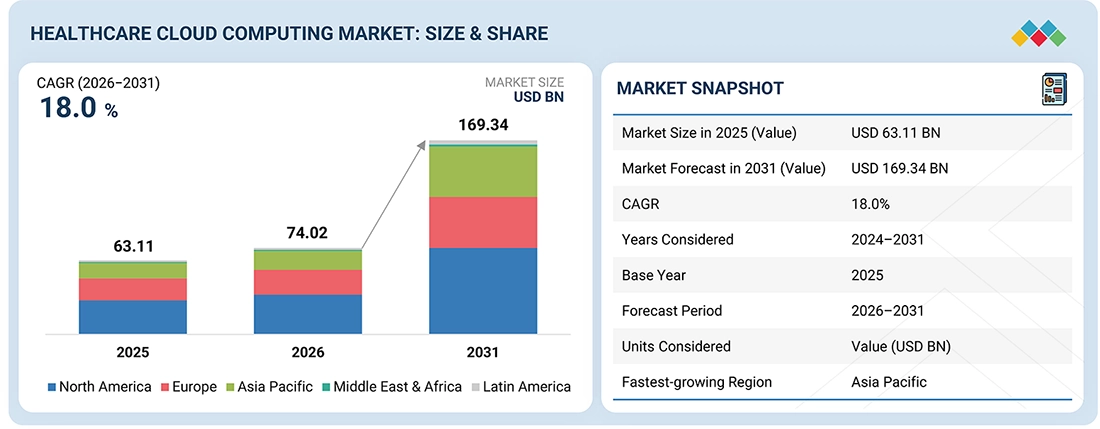
Consequently, hospitals are moving EHR workloads to the cloud, providers are adopting AI-ready infrastructure, and payers are automating claims to meet new interoperability mandates.
1. Market Size and Growth Numbers That Actually Matter
Market estimates vary by research firm, but the direction is consistent across all of them. Mordor Intelligence puts the 2026 figure at $60.76 billion, expanding to $102.77 billion by 2031 at an 11.09% CAGR. MarketsandMarkets estimates it higher, and both firms agree on one thing: North America dominates.
- MarketsandMarkets: $74.02B in 2026, growing to $169.34B by 2031 at 18.0% CAGR
- Mordor Intelligence: $60.76B in 2026, growing to $102.77B by 2031 at 11.09% CAGR
- North America holds roughly 45 to 48% of the global market, per both firms
- Clinical information systems, meaning EHR, PACS, and RIS platforms, make up the largest application segment
The exact number depends on which firm you trust, but the range still points in the same direction. From here, the more useful question for a founder isn’t the market size. It’s what’s actually driving hospitals to migrate right now.
2. Why Providers Are Migrating Now
Three forces are pushing this shift forward at once. First, EHR vendors themselves are rebuilding on cloud-native architecture, which pulls hospital data along with them whether providers plan for it or not.
Second, hyperscalers have started cutting data egress fees, which directly lowers the cost of moving large imaging and genomic datasets off-premises.
- EHR-native cloud shift: Epic, Cerner, and other major EHR vendors are building cloud-first architecture, which pushes their hospital customers toward cloud infrastructure by default.
- Egress-fee changes: major cloud providers have reduced or removed data egress charges, lowering the total cost of ownership for moving imaging and genomic workloads.
- AI-ready infrastructure demand: hospitals increasingly need GPU and ML infrastructure for radiology triage, ambient documentation, and predictive analytics, none of which legacy on-premises servers handle well.
None of these forces are unique to any single provider. Instead, they’re converging at the same time, which is why the migration is accelerating rather than staying flat.
The organizations already acting on this convergence make the case better than any market report can.
3. Named Players Already Doing This
These aren’t hypothetical trends. Philips partnered with AWS to shift patients from inpatient settings toward home-based care, connecting remote devices and running analytics that reduced hospitalizations and care costs.
GE Healthcare’s Genesis portfolio, released in 2025, builds cloud-native imaging and diagnostics directly into its AI-enabled workflows.
- Philips + AWS: home-based care model connecting devices and analytics, reducing hospitalizations and costs
- GE Healthcare Genesis: cloud-native imaging and diagnostics portfolio, released 2025, built for AI-enabled workflows
- Athenahealth: cloud-based EHR and revenue cycle management with integrated care coordination
- eClinicalWorks: cloud-hosted EHR serving thousands of practices as SaaS
Together, these examples confirm the market numbers aren’t just projections sitting in a report. They’re already running in production, at scale, across some of the largest names in healthcare.
Why Healthcare Companies Build Applications in the Cloud
The benefits of healthcare cloud applications come down to seven practical gains: elastic scaling, multi-location access, easier system integration, faster release cycles, AI-ready infrastructure, better disaster recovery, and lower physical infrastructure overhead.
None of these guarantee lower total cost automatically, though. Still, together, they explain why providers keep migrating.
1. Scale Without Buying More Hospital Infrastructure
A hospital running its own servers has to buy for peak demand months or years in advance. Cloud infrastructure changes that math.
Instead, resources scale up or down as usage actually changes, so a spike in patient traffic doesn’t require new hardware sitting idle the rest of the year.
- Patient traffic: compute scales automatically during enrollment periods, flu season surges, or telehealth spikes.
- Images: petabyte-scale storage handles growing PACS and DICOM archives without new physical drives.
- Devices: connected device data from remote monitoring scales with patient count, not server capacity.
- Analytics: large-scale queries run on demand rather than waiting on fixed on-premises compute.
- AI workloads: GPU capacity for model training or inference scales up only when a job actually needs it.
This elasticity, for example, is exactly what Philips used to shift care from inpatient settings to home-based monitoring on AWS, connecting devices and running analytics without provisioning new hospital hardware. From scaling, the next practical gain is where that data can actually be reached.
2. Make Healthcare Data Available Across Locations
Multi-site hospital systems, remote clinicians, home care teams, and telehealth platforms all need the same patient record. That’s true regardless of which building or device someone is using.
On-premises systems, by contrast, tie data to a physical location, which cloud infrastructure removes by default.
- A multi-site hospital system can give every location the same real-time patient view instead of syncing separate local databases.
- Meanwhile, remote clinicians can pull records securely from outside the hospital network.
- Home care and remote monitoring teams can access live vitals without a VPN into a single data center.
- As a result, distributed care teams can coordinate on the same record simultaneously, rather than waiting on batch syncs.
Because of this shift, 63% of healthcare organizations have adopted or plan to adopt cloud-based EHR systems, since distributed access has become a baseline expectation rather than a bonus feature.
Once data is reachable everywhere, the next question is how many other systems it can actually talk to.
3. Connect More Healthcare Systems Through APIs
Cloud infrastructure makes it easier to connect a healthcare application to the systems around it, since most managed cloud platforms ship with API tooling built in.
That matters because a healthcare application rarely works in isolation. Instead, it depends on a chain of outside systems to function at all.
- EHRs, through FHIR or HL7 interfaces
- Labs, for result delivery and order status
- Pharmacies, for prescription routing and fulfillment updates
- Payers, for claims, eligibility checks, and prior authorization
- Medical devices, for real-time data ingestion
- Imaging systems, for PACS and DICOM retrieval
This is only becoming more necessary, too, since CMS now requires FHIR-based prior authorization APIs from payers by January 2027. Once systems can talk to each other reliably, the next gain shows up in how fast teams can actually ship changes.
4. Reduce Some Infrastructure Costs
Cloud computing is not always cheaper than running hospital-owned servers. That claim doesn’t hold up once compliance, staffing, and workload patterns are factored in. Still, it does reduce specific categories of spend that on-premises infrastructure carries by default.
- Less physical infrastructure means no upfront capital spend on servers sized for peak demand.
- Usage-based resources mean paying only for compute and storage actually consumed, not idle capacity.
- Managed services shift patching, backups, and scaling work away from an internal team.
- Reduced hardware management frees IT staff from physical maintenance, though it doesn’t eliminate cloud-side operational work.
Even so, none of these savings are automatic. Without active cost management, cloud spend can climb past what on-premises infrastructure would have cost, which is exactly the discipline the next section covers.
Public, Hybrid or Multi-Cloud: Which Setup Should You Choose?
The right cloud setup depends on how tightly the application needs to connect to existing hospital infrastructure. Public cloud, for instance, fits new, standalone products.
Hybrid cloud, on the other hand, fits products that have to talk directly to on-premises systems like PACS or legacy EHRs. Multi-cloud fits neither by default, and founders often reach for it for the wrong reasons.
Table Comparison: Public vs. Hybrid vs. Multi-Cloud
| Factor | Public Cloud | Hybrid Cloud | Multi-Cloud |
| Best for | New products, startups, SaaS, AI platforms | Products connecting to existing hospital systems | Contractual or provider-specific requirements across partners |
| Cost | Lowest to start, usage-based | Higher, due to on-premises maintenance plus cloud spend | Highest, due to duplicated tooling and cross-cloud data transfer |
| Complexity | Lowest | Moderate to high, depending on legacy systems involved | Highest, requires synchronization across providers |
| Hospital integration | Minimal to none required | Deep integration with EHRs, PACS, and local networks | Varies by which system connects to which cloud |
| Scalability | Highest, fully elastic | Limited by the on-premises component | High per-cloud, but coordination overhead offsets some of it |
| Maintenance | Lowest, mostly managed by the provider | Split between internal IT and the cloud provider | Highest, since two provider relationships must be maintained |
So the decision usually comes down to what already exists on the hospital’s side, not which setup sounds most advanced.
Public cloud covers most new products, hybrid covers anything tied to legacy infrastructure, and multi-cloud stays the exception rather than the default.
AWS vs Azure vs Google Cloud for Healthcare Applications
Which cloud a healthcare founder should choose comes down to three things: the specific healthcare services each provider offers, the EHR ecosystem the organization already runs on, and how AI-heavy the product actually is.
From there, the fit splits cleanly: AWS leads on breadth of purpose-built healthcare services, whereas Azure leads for organizations already tied to Microsoft and Epic, and Google Cloud, in turn, leads for analytics-heavy and AI-native products.
1. When AWS Makes Sense
AWS fits founders building on infrastructure they’ll likely already know, since it offers the widest set of purpose-built healthcare services of the three providers.
Specifically, AWS supports healthcare workloads across EHRs, imaging, genomics, remote patient care, connected devices, patient engagement, and revenue management.
- AWS HealthLake: managed FHIR R4 data store with built-in clinical NLP through Comprehend Medical
- AWS HealthImaging: petabyte-scale medical imaging storage, reducing imaging storage costs by up to 40%
- EKS: managed Kubernetes for containerized healthcare workloads
- AWS HealthOmics: purpose-built for genomic and omics data at scale
- Amazon Bedrock: foundation model access for generative AI, HIPAA-eligible since 2024
- Lambda: serverless compute for event-driven pipelines like claims processing
- S3: the underlying storage layer most other AWS healthcare services build on
Because AWS already covers this much ground natively, it tends to suit founders who want one provider handling imaging, genomics, and clinical data without stitching together separate vendors. From there, the calculation changes for organizations already standardized on Microsoft.
2. When Microsoft Azure Makes Sense
Azure makes the most sense for healthcare organizations that are already Microsoft-heavy, since its healthcare services integrate directly into infrastructure many hospitals already run.
Entra ID, for instance, extends the same identity and access management most enterprise IT teams already use elsewhere in the organization.
- Microsoft-heavy healthcare organizations already running Active Directory, Office 365, or Azure infrastructure
- Entra ID for identity and access management across clinical and administrative systems
- Azure Health Data Services, covering FHIR, DICOM, and MedTech services under one platform
- FHIR and DICOM support, natively unified rather than split across separate services
- Azure AI, including AI health capabilities like Text Analytics for health
- Existing Microsoft enterprise infrastructure, which reduces onboarding friction for IT teams already trained on it
Because of Azure’s Epic partnership specifically, this becomes the stronger default for Epic-heavy provider organizations, where DAX Copilot and Microsoft Fabric plug directly into workflows clinicians already use.
From identity and Epic integration, the decision shifts again once analytics and AI become the primary driver.
3. When Google Cloud Makes Sense
Google Cloud fits founders whose product is fundamentally a data or AI platform rather than a clinical workflow tool first.
In line with that, Google currently positions its healthcare cloud offering around healthcare data, AI, patient workflows, clinician productivity, operational workflows, and claims-related applications, which reflects where its actual technical strengths sit.
- Healthcare data platforms, built on the Cloud Healthcare API
- FHIR, natively supported alongside HL7 v2 and DICOM under one API
- HL7 v2, useful for organizations still bridging legacy messaging formats
- DICOM, for imaging data stored and queried in the same platform as structured records
- BigQuery, integrating directly with healthcare data for large-scale analytics
- Analytics, since BigQuery, Pub/Sub, and Dataflow connect natively to the Healthcare API
- AI-heavy healthcare products, supported through MedLM and Gemini-based clinical tooling
Because BigQuery sits at the center of this stack, Google Cloud tends to win for academic medical centers and payers running claims analytics at scale, like Highmark Health’s use of Google’s AI to streamline claims operations.
Once the priority shifts from infrastructure fit to genuine analytics and AI depth, Google Cloud usually becomes the stronger case.
4. AWS vs. Azure vs. Google Cloud Comparison
| Factor | AWS | Azure | Google Cloud |
| Healthcare data service | HealthLake (FHIR R4, built-in NLP) | Azure Health Data Services (FHIR, DICOM, MedTech unified) | Cloud Healthcare API (FHIR, HL7 v2, DICOM unified) |
| FHIR | R4, native | R4, DSTU2, STU3, R4B preview, broadest version coverage | R4, native, strong profile validation |
| HL7 | Supported via integration engines | Supported via Azure integration services | HL7 v2 natively supported in the same API |
| DICOM | Supported via HealthImaging | Native DICOM service | Native DICOM store |
| AI | Bedrock, Comprehend Medical, SageMaker | Azure AI, Text Analytics for Health, DAX Copilot | Vertex AI, MedLM, Gemini |
| Analytics | Athena, QuickSight, Glue | Synapse, Microsoft Fabric | BigQuery, Pub/Sub, Dataflow |
| Container services | EKS | Azure Kubernetes Service | Google Kubernetes Engine |
| Serverless | Lambda | Azure Functions | Cloud Functions |
| Hospital ecosystem fit | Broadest native healthcare service set | Strongest for Epic-heavy, Microsoft-standardized organizations | Strongest for analytics- and AI-first products |
| Best use case | Founders wanting one provider across imaging, genomics, and clinical data | Organizations already on Microsoft infrastructure or tied to Epic | Data platforms, claims analytics, and AI-native products |
In the end, no provider is universally better, since each one wins on a different axis: AWS on breadth, Azure on Epic and Microsoft fit, Google Cloud on analytics and AI depth.
From this comparison, the next section moves into what actually keeps any of these three compliant once real patient data starts flowing through them.
Making HIPAA-Eligible Cloud Services Actually HIPAA-Compliant
“HIPAA-eligible” and “HIPAA-compliant” are not the same thing, and that gap is where most healthcare cloud builds run into trouble. A service being HIPAA-eligible only means the cloud provider will sign a Business Associate Agreement covering it.
Compliance, however, still depends entirely on how the organization configures and uses that service.
1. What a Business Associate Agreement Actually Covers
A BAA is a contract in which the cloud provider agrees to safeguard protected health information under HIPAA rules. It covers the provider’s side of the shared responsibility model: physical security, infrastructure availability, and the provider’s own handling of data.
It does not, though, cover how the customer configures access, encryption, or logging on top of that infrastructure.
- A signed BAA does not make an application compliant by itself.
- The organization is still responsible for encryption settings, access controls, and audit logging.
- Using a non-BAA-covered service with PHI is a compliance violation, even if the rest of the environment is compliant.
- The shared responsibility model places that configuration burden squarely on the customer, not the cloud provider.
Because of that split, signing a BAA is the starting point of compliance work, not the finish line. From here, the next question is which specific services the BAA even covers in the first place.
2. The AWS/Azure/GCP HIPAA-Eligible Services List
Each cloud provider maintains its own list of services covered under its BAA, and that list changes over time as new services launch. As of mid-2026, AWS’s HIPAA-eligible services list passed 200 services, including EC2, S3, RDS, Lambda, HealthLake, and Bedrock.
Not every AWS service made that list, though, which is exactly where teams get tripped up.
- EC2, S3, RDS, Aurora, DynamoDB, Lambda, and HealthLake are all covered under the AWS BAA.
- Purpose-built healthcare services like HealthLake and HealthImaging launched as HIPAA-eligible from day one.
- General-purpose services typically take 6 to 18 months after launch to become HIPAA-eligible.
- A service not on the list cannot legally hold PHI, regardless of how secure it otherwise seems.
As a result, checking the eligible services list before architecting a new component isn’t optional. It’s the single most common audit finding when teams skip it, since it’s easy to assume a popular AWS or Azure service is automatically covered when it isn’t. Once the service list is confirmed, the remaining work shifts to how those services are actually configured.
3. Encryption, Access Control, and Audit Logging Requirements for PHI Workloads
Configuration is where most of the real compliance work happens, since the BAA only confirms which services are allowed to hold PHI, not how securely they’re set up.
Encryption has to be enforced both in transit and at rest, typically through the provider’s key management service.
Access control, meanwhile, needs to follow least-privilege principles rather than broad default permissions.
- Encryption in transit: enforced by default on services like AWS HealthLake through HTTPS over TLS.
- Encryption at rest: required for all storage holding PHI, using customer-managed keys where possible.
- Access control: scoped to least privilege, with role-based permissions rather than shared credentials.
- Audit logging: every access to PHI logged with enough detail to reconstruct who accessed what and when.
Together, these three controls form the actual compliance layer sitting on top of the BAA. Without them, a technically HIPAA-eligible environment can still fail an audit or, worse, a real breach.
The Compliance Certification Stack: SOC 2, HITRUST, and When You Need Both
Enterprise healthcare buyers typically expect SOC 2 as a baseline and HITRUST once PHI volume or contract size grows. FedRAMP, by contrast, only matters if the buyer is a federal agency.
Each certification signals something different, and buyers usually know exactly which one they’re asking for.
1. SOC 2 Type II
SOC 2 Type II is usually the first certification a healthcare startup pursues, since it’s the fastest to earn and the most widely recognized by enterprise buyers.
It typically costs $50,000 to $150,000 for initial certification, with $20,000 to $50,000 annually after that, and takes 6 to 12 months.
- Signals baseline security maturity to enterprise buyers evaluating a vendor.
- Covers access control, encryption, and incident response as core criteria.
- Most of the investment carries forward toward HITRUST or FedRAMP later.
2. HITRUST e1/i1/r2
HITRUST becomes necessary once a buyer specifically requires it, which happens often in healthcare procurement.
Costs range from $20,000 for e1 up to $300,000 for r2, depending on assessment depth, with timelines from 3 to 24 months.
- e1 fits early-stage startups needing a lighter assessment.
- I1 or R2 fits organizations selling directly into hospital systems or payers.
- HITRUST-certified environments posted a 99.41% breach-free rate in 2024.
3. FedRAMP
FedRAMP only applies once a federal agency is the actual buyer, so most healthcare startups can skip it initially. Traditional FedRAMP historically cost over a million dollars and a year or more. On the other hand, FedRAMP 20x has cut that closer to six figures and months, rather than years.
Given that gap, founders should pursue SOC 2 first, add HITRUST when a buyer requires it, and treat FedRAMP as a later-stage decision tied to a specific federal contract, not a default target.
Real Use Cases Healthcare Cloud Applications Are Built For
Healthcare cloud applications get built for five recurring use cases: remote monitoring, medical imaging, clinical decision support, population health analytics, and revenue cycle automation.
Each one, in turn, pulls on a different combination of the cloud services covered earlier. Together, they cover most of what founders in this space are actually shipping in 2026.
1. Telehealth and Remote Patient Monitoring
Among these, remote patient monitoring applications ingest live data from connected devices, like blood pressure cuffs or glucose monitors, and stream it back to care teams in near real time.
This is, in fact, the exact pattern Philips built with AWS, connecting devices and running analytics to shift care from inpatient settings to the home, reducing hospitalizations in the process.
Along similar lines, Intellivon built a comparable system for HealthCore Connect, integrating SMART on FHIR with Epic to enable real-time vitals retrieval, risk stratification, and provider dashboards.
- IoT devices push readings to a cloud ingestion layer, often through MQTT or a managed IoT service.
- From there, the application normalizes that data into FHIR resources for interoperability with the EHR.
- On top of that, AI models flag anomalies, like an irregular heart rate, for care team review.
- Providers, meanwhile, access the same data through dashboards, regardless of location.
Because this use case depends on constant, low-latency data flow, it’s one of the clearest cases where cloud elasticity pays off directly. From monitoring, the next use case shifts from streaming data to storing and analyzing large files.
2. Medical Imaging and PACS/DICOM Cloud Storage
Similarly, medical imaging applications store and process large DICOM files, often at petabyte scale, while giving radiologists fast access for diagnosis.
AWS HealthImaging, for instance, reduces the total cost of medical imaging storage by up to 40% by keeping a single authoritative copy of imaging data in the cloud instead of duplicating it across systems.
- Cloud-native PACS replaces on-premises imaging archives with elastic, petabyte-scale storage.
- As a result, sub-second image retrieval supports radiologists working across multiple locations.
- Beyond storage, AI-assisted triage flags high-priority scans before a radiologist opens them manually.
- Vendors like GE Healthcare’s Genesis portfolio, for example, build this AI layer directly into their cloud-native imaging tools.
As imaging volume grows, this is usually the first workload where on-premises storage becomes financially impractical. From imaging, the same AI infrastructure extends naturally into clinical decision support.
3. Clinical Decision Support and Ambient AI Documentation
Building on that same AI layer, clinical decision support applications use models to surface relevant information at the point of care, while ambient documentation tools reduce the manual burden of note-taking.
Microsoft’s DAX Copilot is a leading example here, passively capturing patient encounters and generating clinical notes automatically. Google Cloud follows a similar pattern, where an AI scribe listens to patient encounters and generates clinical notes in real time.
- Ambient AI scribes reduce the administrative documentation burden physicians carry after each visit.
- Alongside that, clinical decision support models surface relevant history, allergies, or drug interactions during a visit.
- These tools, notably, sit close to the EHR, since they need real-time access to the patient record.
- As a result, physician time freed from documentation shifts back toward direct patient interaction.
Because this use case depends heavily on real-time inference, it’s one of the strongest arguments for choosing a cloud provider with mature AI infrastructure already in place. From individual encounters, the next use case scales the same data up to entire populations.
4. Population Health Analytics and Value-Based Care Reporting
At a larger scale, population health applications aggregate data across patient groups to identify care gaps, track outcomes, and support value-based care contracts.
This depends, in particular, on a data warehouse layer, like BigQuery or Snowflake, sitting alongside the FHIR store. Google Cloud’s BigQuery integration, for instance, is built specifically for this kind of scale.
- Aggregated patient data reveals trends a single-patient view can’t, like rising readmission rates across a region.
- On top of that, value-based care contracts require reporting tied to specific quality metrics, which these platforms automate.
- Care coordination tools, meanwhile, route flagged patients to case managers before a condition worsens.
- Analytics pipelines connect the FHIR layer to the warehouse without a manual export step.
Since value-based care reimbursement depends directly on this reporting, the application isn’t optional infrastructure. Instead, it’s tied to actual revenue. From population-level analytics, the final use case moves into the financial side of the same data.
5. Revenue Cycle and Prior Authorization Automation
Finally, revenue cycle applications automate claims processing, denial management, and prior authorization, all of which are shifting toward FHIR-based APIs under regulatory pressure.
In fact, CMS now requires FHIR-based prior authorization APIs from Medicare Advantage, Medicaid managed care, and QHP issuers by January 1, 2027, which is pulling payer infrastructure toward the cloud on a fixed deadline.
- SMART App Launch and CARIN IG APIs give patients and providers standardized access to claims and coverage data.
- Ahead of submission, AI models predict denial risk before a claim is even submitted.
- Highmark Health, for example, uses AI specifically to streamline claims operations and reduce fraud.
- Automated reconciliation, similarly, matches payments to claims without manual review for most transactions.
Because the CMS-0057-F deadline is fixed, payers and their technology vendors don’t have the option of waiting.
How Cloud Applications Connect With Healthcare Systems
A healthcare cloud application only creates value once it can actually exchange data with the systems around it. That exchange happens through a handful of standard interfaces, each suited to a different kind of system.
Here’s what each one covers.
1. FHIR APIs
FHIR R4 is the modern standard most cloud platforms build around. Core resources include Patient, Encounter, Observation, DiagnosticReport, MedicationRequest, and Condition, each representing a distinct piece of clinical data.
2. HL7 Interfaces
Older hospital systems, however, still run on HL7 v2 messaging rather than FHIR. Common message types include ADT for admissions, ORM for orders, ORU for results, and SIU for scheduling. Most cloud builds still need to bridge these existing interfaces, not replace them outright.
3. EHR Integration
Beyond the messaging standard itself, integration also depends on which EHR vendor sits on the other end. Epic, Oracle Health, MEDITECH, and athenahealth each expose their own vendor-specific APIs on top of FHIR and HL7. As a result, integration work still varies by vendor even when the underlying standard is the same.
4. Medical Imaging Integration
For imaging specifically, PACS systems connect through DICOM and DICOMweb, feeding into cloud imaging storage like AWS HealthImaging.
5. Medical Device and IoT Integration
Wearables and RPM devices, meanwhile, stream data through gateways into the cloud in near real time, feeding the monitoring use cases covered earlier.
6. Lab and Pharmacy Integration
Similarly, LIS platforms and pharmacy systems route lab results and medication data into the application, usually through HL7 or FHIR interfaces.
7. Direct Integration vs. Integration Platforms
Given all these interfaces, teams generally choose between direct APIs and a dedicated interface engine. Direct APIs work for a small number of connections. Once that number grows, though, platforms like Redox, Mirth, or Rhapsody, or custom middleware, become the more maintainable choice.
Interoperability alone is a deep enough topic to deserve its own guide rather than a subsection here. For a closer look at EHR integration specifically, see Intellivon’s guide on connecting healthcare systems and applications.
How AI Fits Into Healthcare Cloud Applications
AI belongs at the application layer, sitting on top of the compliant cloud infrastructure covered earlier, never as a separate, unmonitored system operating outside it.
AWS has published detailed guidance specifically on this point, describing a HIPAA-ready generative AI architecture using layered compliance controls, where every component touching PHI stays independently auditable.
From that foundation, AI shows up in five recurring places across a healthcare cloud application.
1. Ambient Clinical Documentation
Here, audio from a patient encounter feeds into transcription, then into automated note generation, before a clinician reviews and signs off. Only after human review does the note write back to the EHR.
2. Clinical Decision Support
Similarly, models generate predictions, recommendations, or risk scores, then surface them directly inside the clinician’s existing workflow rather than a separate tool.
3. Healthcare Analytics
Beyond individual encounters, AI also drives operational analytics, patient risk scoring, population health trends, and quality metric reporting at scale.
4. AI for Billing and Administrative Work
On the financial side, AI increasingly handles coding, claims drafting, prior authorization, denial prediction, and document processing, reducing manual review time.
5. Protect PHI When Using AI Models
Because PHI is involved at every step above, protecting it comes down to a specific checklist:
- Use only permitted, HIPAA-eligible model services, like Amazon Bedrock, which became eligible under AWS’s BAA in 2026.
- Set explicit data retention policies so PHI isn’t stored longer than necessary.
- De-identify data wherever the use case allows it.
- Restrict model access to authorized roles only, not broad team-wide permissions.
- Confirm training data never includes PHI unless a specific BAA and consent framework covers it.
- Get a signed BAA from any third-party AI vendor before PHI reaches their systems.
Monitor AI After Deployment
Even after deployment, the work isn’t finished. Teams still need to track accuracy, latency, and drift over time, since a model’s performance can degrade as real-world data shifts. Failures and human review overrides should be logged, too, so patterns of when clinicians reject the AI’s output become visible.
Ultimately, ongoing monitoring should tie back to clinical impact, not just technical uptime, since a model that’s fast and available but frequently wrong still carries real patient risk.
How to Build a Healthcare Cloud Application Step by Step
This is the same eight-step process Intellivon runs on every healthcare cloud build, whether the client is a founder shipping a first product or an enterprise adding a new capability to an existing system.
Each step exists to catch a specific failure mode before it becomes expensive. Here’s how it works in practice.
Step 1: Define the Healthcare Problem
Before any architecture decision gets made, Intellivon starts by pinning down who actually uses the application, what workflow changes for them, and which existing system stays the source of truth for patient data.
Skipping this step is the most common reason healthcare builds run over budget later.
Step 2: Identify Every System the Application Must Connect To
From there, the team maps every external system the application has to talk to: the EHR, payer systems, connected devices, labs, pharmacy platforms, imaging systems, and any third-party APIs.
Since integration work usually drives the bulk of a healthcare project’s cost, this list shapes the architecture far more than the application’s own features do.
Step 3: Choose the Cloud Setup
Once that integration map exists, the cloud decision follows naturally rather than coming first.
Intellivon chooses between public, hybrid, or multi-cloud based on what Step 2 revealed, then picks AWS, Azure, or Google Cloud based on the EHR ecosystem, AI needs, and compliance requirements already covered earlier in this guide.
Step 4: Design Security and Compliance
With the cloud setup fixed, compliance gets designed in, not bolted on afterward.
That means scoping exactly which data counts as PHI, securing a BAA for every service that touches it, setting up IAM with least-privilege access, enforcing encryption in transit and at rest, building audit logging from day one, and confirming backup and disaster recovery before a single line of application code ships.
Step 5: Build a Proof of Concept
Next, Intellivon builds a proof of concept aimed squarely at the riskiest technical problem, not the most attractive screen. In practice, that’s usually one of a few things: an Epic integration, device data ingestion, DICOM handling, AI inference latency, or high-volume data throughput. Proving out the hard part early avoids discovering it’s unsolvable after months of unrelated feature work.
Step 6: Build the Application and Integrations
Once the POC de-risks the hardest problem, full development moves forward across the frontend, backend, cloud services, APIs, databases, and every healthcare integration identified in Step 2.
This is also where the architecture decisions from Steps 3 and 4 get implemented at scale, not just prototyped.
Step 7: Test the Complete Healthcare Workflow
After the build, testing has to cover more than whether features work in isolation. Intellivon tests functionality, every integration point, security controls, failure cases like a dropped device connection or a delayed lab result, performance under real patient volume, and data accuracy across every system the application touches.
In healthcare, a passing functional test still isn’t enough on its own.
Step 8: Launch and Monitor the Application
Finally, launch isn’t the end of the process. CI/CD pipelines keep releases moving safely after go-live, observability tracks the application in production, and the team monitors cost, incidents, security posture, usage patterns, and scaling needs as real users come online.
Because healthcare applications carry ongoing compliance obligations, this monitoring phase never really closes out the way a typical software launch might.
Together, these eight steps are what separate a healthcare cloud application that survives an audit and scales cleanly from one that works in a demo and breaks under real patient load. From here, the next section turns to what this entire process actually costs, broken down by phase.
How Much Does a Healthcare Cloud Application Cost?
A custom healthcare cloud application generally costs $70,000 to $300,000 to build, depending on workflows, integrations, data volume, compliance, AI, and infrastructure requirements. That range breaks down across six phases, each with its own cost driver.
- Discovery and Architecture: $8,000 to $20,000
- UX and Product Design: $10,000 to $30,000
- Application Development: $30,000 to $100,000
- Healthcare Integrations: $12,000 to $70,000
- Security and Testing: $7,000 to $40,000
- Cloud Setup and Launch: $3,000 to $40,000
- Ongoing Maintenance: Around 15% to 25% annually
What Makes Healthcare Cloud Apps More Expensive?
Several factors push a build toward the higher end of that range. Multiple EHR integrations add cost fastest, since each vendor’s API behaves differently. Beyond that, medical devices, large imaging files, AI features, and real-time processing all add engineering complexity that most non-healthcare software never touches.
On top of that, hybrid architecture, multi-cloud setups, complex compliance requirements like HITRUST, and high-availability infrastructure each add their own layer of cost.
Healthcare Cloud Application Cost Table
| Project Type | Typical Scope | Estimated Cost |
| Basic cloud healthcare app | Single workflow, minimal integrations | $70,000 to $100,000 |
| EHR-connected application | FHIR or HL7 integration with one EHR | $100,000 to $150,000 |
| RPM or IoT platform | Device ingestion, real-time streaming | $130,000 to $200,000 |
| AI healthcare platform | Clinical AI, ambient documentation, or predictive models | $150,000 to $250,000 |
| Enterprise multi-system platform | Multiple EHRs, payers, imaging, AI | $250,000 to $300,000+ |
Most first builds land in the $100,000 to $200,000 range once integrations and compliance are factored in, rather than the bare $70,000 floor. Getting an accurate number, though, depends entirely on the specific systems a founder needs to connect to and how much AI the product actually requires.
Why Founders Choose Intellivon for Healthcare Cloud Application Development
Building a compliant healthcare cloud application takes more than cloud expertise. It takes direct experience with FHIR, HL7, EHR vendors, and the compliance stack that keeps a hospital or payer willing to sign a contract. Here’s why founders bring that work to Intellivon specifically.
- 11+ years building regulated software across healthcare, fintech, and AI-driven products, not just generic cloud migrations.
- Direct SMART on FHIR and Epic integration experience, built for HealthCore Connect’s remote patient monitoring platform, including real-time vitals, risk stratification, and HIPAA-compliant deployment.
- Compliance built in from day one, covering HIPAA, GDPR, SOC 2, and HITRUST, rather than retrofitted after launch.
- Multi-cloud expertise across AWS, Azure, and Google Cloud, so the recommendation fits the founder’s EHR ecosystem instead of a single default stack.
- Phased delivery, starting with a proof of concept on the riskiest technical problem before committing to full build costs.
- 200+ AI engineers and data scientists, covering everything from ambient documentation to clinical decision support to claims automation.
- Enterprise-scale track record, having delivered 500+ projects across 50+ countries, including regulated healthcare and financial platforms.
Ready to scope your healthcare cloud application? Book a free strategy call with Intellivon’s team and get a real architecture and cost estimate, not a generic quote.
Conclusion
Building a healthcare cloud application in 2026 comes down to a few real decisions: choosing the right cloud provider, treating compliance as architecture rather than paperwork, and connecting cleanly to the EHRs, devices, and payers already in place. None of that has to stay theoretical.
With the market growing fast and CMS deadlines already fixed for 2027, founders who scope these decisions early, rather than after launch, avoid the costliest rebuilds. The next step is turning this framework into an actual architecture and budget.
FAQs
Q1. How much does a healthcare cloud application cost to build in 2026?
A1. A custom build generally costs $70,000 to $300,000, depending on integrations, compliance, and AI needs. Most first builds, however, land between $100,000 and $200,000 once EHR integrations and security testing are factored in. On top of that, ongoing maintenance typically runs 15% to 25% of the build cost annually.
Q2. Is AWS, Azure, or GCP better for a healthcare startup?
A2. No single provider wins outright. AWS offers the broadest set of purpose-built healthcare services, so it suits founders wanting one platform for imaging, genomics, and clinical data. Azure, meanwhile, fits organizations already tied to Microsoft or Epic, while Google Cloud fits analytics- and AI-heavy products.
Q3. Do we need HITRUST if we already have SOC 2?
A3. Not always. SOC 2 covers most early buyer requirements and costs less to obtain. HITRUST, though, becomes necessary once a specific buyer, often a hospital system or payer, requires it directly. Many organizations pursue SOC 2 first, since the investment carries forward toward HITRUST later.
Q4. What does “HIPAA-eligible” actually mean on AWS or Azure?
A4. It means the cloud provider will sign a Business Associate Agreement covering that specific service. It does not mean the service is automatically compliant. Instead, compliance still depends on how the organization configures encryption, access control, and audit logging on top of that eligible service.
Q5. How long does it take to build a HIPAA-compliant cloud application?
A5. Timelines typically run 3 to 12 months, depending on integration complexity and compliance depth. A focused MVP can launch closer to 3 to 4 months, whereas enterprise builds with multiple EHR integrations and HITRUST certification often stretch toward the 12-month mark or beyond.
Q6. Can we integrate directly with Epic or Cerner from a custom cloud app?
A6. Yes, generally through SMART on FHIR for Epic or Oracle Health’s equivalent APIs for Cerner. That said, each vendor exposes its own specific endpoints and authentication requirements on top of the shared FHIR standard, so integration work still varies meaningfully by vendor.
Q7. Should we build our own FHIR server or use a managed one?
A7. For most startups and mid-size organizations, a managed FHIR store, like AWS HealthLake, Azure Health Data Services, or Google’s Cloud Healthcare API, is the faster and lower-risk choice. Self-hosted options like HAPI FHIR only make sense with specific customization needs a managed service can’t meet.

