Key Takeaways
-
AI imaging tools only deliver value when results appear inside the PACS viewer, not in a separate portal requiring extra logins.
-
Successful integration requires DICOM routing, PHI protection, AI inference, result formatting, and RIS/EHR connectivity working as one pipeline.
-
Integration patterns differ: direct PACS for single sites, VNA-based for hospital networks, modality-first for emergency triage, and cloud-native for multi-location scale.
-
Common failures include legacy PACS incompatibility, late AI results, DICOM metadata errors, and missing radiologist feedback loops.
-
How Intellivon builds PACS-connected AI imaging systems your enterprise fully owns, with standards-based integration and clinical workflow design from day one.
Hospitals are quickly adopting AI imaging tools, and the clinical benefits are clear. AI identifies abnormalities faster, reduces differences in reporting between facilities, and helps radiologists handle increasing scan volumes. However, these tools are only truly valuable when radiologists can access them in their usual workspace instead of a separate system they need to remember to open.
PACS serves as the everyday workspace for every radiologist, and this context is important. It is where scans are opened, reviewed, annotated, and reported. Thus, when AI results are available directly within that environment, adoption happens more easily. If those results are stuck in a separate portal, teams waste time switching systems, important findings may be overlooked, and the technology might be quietly set aside.
On the other hand, Inadequate integration creates clinical and operational risks that build up over time. Intellivon creates PACS-connected AI imaging systems for hospitals, diagnostic chains, teleradiology platforms, and health technology companies operating at a large scale. In this blog, we discuss how to link AI imaging tools with PACS systems in a way that is technically sound and usable in clinical settings.
What Is Driving The Boom Behind AI Medical Imaging Tools Now
AI medical imaging is growing fast, and the numbers reflect genuine clinical urgency. Radiologist shortages, rising scan volumes, and proven gains in early disease detection are all driving adoption forward simultaneously.
The market was valued at USD 2.2 billion in 2026 and is projected to reach between USD 18 and 23 billion by 2033 to 2034, growing at a CAGR of 27 to 35% over that period. That trajectory places AI imaging among the fastest-scaling segments in enterprise healthcare technology today.
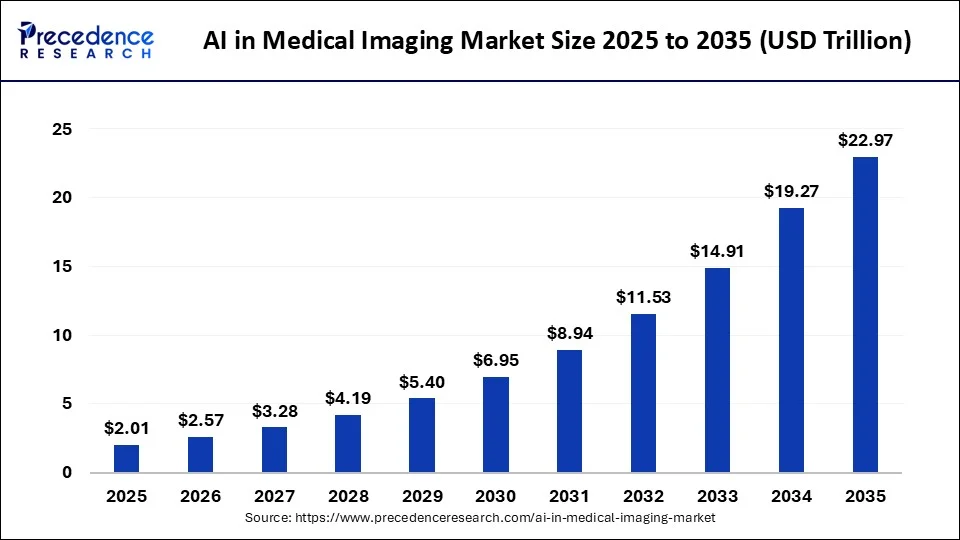
Radiologist shortages are pushing healthcare systems to rely on AI for routine imaging tasks, while rising rates of cancer, stroke, and other chronic conditions are increasing demand for faster, more precise diagnostics.
Over 5 billion imaging exams are conducted globally each year, generating the training data that makes AI models progressively more accurate and reliable.
- Chronic disease burden is expanding the volume and complexity of imaging workloads
- Deep learning advances are making it possible to detect findings that were previously easy to overlook
- Cloud platforms are giving smaller facilities access to AI infrastructure that was once out of reach
Technological Advances
- Deep learning algorithms now detect subtle abnormalities with accuracy gains of 5 to 17% over unaided review, particularly in cancer screening.
- Cloud-based deployments hold 44.7% of the market share in 2026, reducing infrastructure costs for diagnostic centers and regional hospitals.
- Over 1,000 FDA-cleared AI imaging tools are available today, covering everything from noise reduction to workflow prioritization.
Regulatory and Investment Support
Regulatory pathways for AI imaging have become more defined, with over 700 algorithms cleared through FDA and CE processes. Reimbursement trends are also shifting in favor of AI-assisted diagnostics, making adoption financially viable for more health systems.
What Does PACS Integration Mean For AI Imaging Tools?
The integration of AI into medical imaging represents a shift from passive storage to active diagnostic assistance. For an enterprise to realize a return on investment, these tools must operate within the existing digital infrastructure rather than alongside it.
1. PACS As The Core Imaging Workspace
The Picture Archiving and Communication System serves as the primary engine for radiology departments. It is the digital environment where clinicians spend their entire workday viewing, manipulating, and interpreting complex medical images.
- Centralized Utility: Practitioners rely on PACS to retrieve historical studies and compare them with current scans. It acts as the definitive source of truth for visual diagnostics.
- Workflow Friction: When AI tools require a separate login or a different browser tab, adoption rates plummet. Surgeons and radiologists cannot afford to toggle between windows during high-volume shifts.
- Native Adoption: Placing AI insights directly into the viewer allows for immediate validation. If the software flags a potential fracture or a lung nodule natively, the physician can confirm the finding without breaking their concentration.
2. Where AI Fits Into The PACS Workflow
A successful deployment maps the AI logic to the specific lifecycle of a medical image. This journey begins the moment a patient clears the scanner and ends when a verified report reaches the billing department.
- Image Acquisition and Routing: As the scanner generates raw data, a DICOM router automatically sends a copy to the AI server. This happens in the background before the radiologist even opens the study.
- Processing and Inference: The AI engine analyzes the pixels to identify patterns or measurements. This step must be rapid to ensure results are ready by the time the clinical review starts.
- The Feedback Loop: The system pushes the annotated images or structured data back into the PACS. The radiologist reviews these “pre-read” insights, accepts or rejects them, and finalizes the report for the permanent archive.
3. PACS, RIS, EHR, And VNA: How They Work Together
Enterprise imaging is a multi-layered ecosystem where data must flow seamlessly between different specialized platforms. Understanding these connections is vital for any stakeholder looking to build a scalable platform.
- PACS and RIS: While the PACS handles the pixels, the Radiology Information System manages the schedules and tracking. AI needs to know the urgency of a case from the RIS to prioritize its processing queue.
- The EHR Connection: The Electronic Health Record provides the broader clinical context. AI tools often perform better when they can pull patient history or lab results from the EHR to refine their diagnostic confidence.
- VNA Centralization: The Vendor Neutral Archive stores data from across the entire hospital system. Connecting AI to the VNA ensures that the algorithms can access longitudinal data from various departments beyond just radiology.
4. PACS Integration vs Simple API Integration
A basic API connection might move data from point A to point B, but true clinical integration requires deep compatibility with medical standards. Enterprise leaders must distinguish between mere connectivity and functional harmony.
| Feature | Simple API Integration | Deep PACS Integration |
| Data Format | Often requires conversion to JPEG/PNG | Native DICOM support with full metadata |
| Workflow | Toggles between windows or tabs | Unified workspace within the primary viewer |
| Metadata | Frequently lost during transmission | Preserved for longitudinal patient tracking |
| Reporting | Manual entry of results into EHR | Automatic population of findings into RIS/EHR |
| Compliance | Harder to track across different logs | Centralized audit trail for all AI interactions |
| Performance | Potential latency from cloud uploads | Real-time processing via edge or local routing |
This structural alignment ensures that technology serves the clinician rather than adding to their administrative burden. When AI fits perfectly into the established workspace, it transitions from a novelty to an essential clinical asset.

Why AI Imaging Tools Need PACS Integration
Hospital decision makers often prioritize the accuracy of an algorithm, but the clinical success of that tool depends almost entirely on its integration. Even the most sophisticated model will fail to deliver value if it exists as an isolated island outside the daily reporting environment.
1. Keeps Radiologists Inside Existing Workflow
Forcing a medical professional to leave their primary workspace is the fastest way to kill adoption. Deep integration ensures that every necessary tool is available in a single unified interface.
- Elimination of Friction: Clinicians do not have to manage a separate login or navigate an extra dashboard. The images and AI insights appear together, removing the need for manual uploads or downloads.
- Reduced Cognitive Load: Context switching between different applications drains mental energy and increases the risk of error. Keeping the workspace consistent allows the radiologist to maintain their focus on the patient study.
- Operational Velocity: By removing administrative hurdles, the department can process higher volumes of cases. A seamless workflow translates directly into faster review cycles and improved throughput for the entire facility.
2. Makes AI Findings Available at the Right Time
Timing is a critical variable in diagnostic pathways. If an AI result arrives after the human has already signed off on a report, its value drops to nearly zero.
The Royal College of Radiologists notes that AI analysis should be complete and available on PACS before the human reporter begins image interpretation. That makes workflow timing a core part of AI-PACS integration.
- Critical Prioritization: Sophisticated systems use AI to scan the entire incoming queue. If a suspected brain bleed is detected, the study is automatically moved to the top of the worklist with an urgent alert.
- Pre-Read Advantages: When a clinician opens a case, the measurements and preliminary annotations should already be rendered. This “pre-read” allows the human expert to validate findings rather than starting from a blank slate.
- Reduced Reporting Latency: Automating the detection of routine findings reduces the time spent on every study. This efficiency ensures that critical results reach the referring physician while the patient is still in the clinical vicinity.
3. Improves Clinical Adoption
The best technology in the world is useless if the staff refuses to use it. Usability is a fundamental requirement for long-term project viability.
- Natural Trust Building: Radiologists tend to trust tools that supplement their natural habits. When AI markers appear in the same viewer they have used for years, it feels like an upgrade rather than an intrusion.
- Decision-Point Presence: Strategic value is highest when AI outputs appear at the exact moment a decision happens. If an insight is buried in a separate portal, it remains invisible during the most critical part of the process.
- Usability Over Model Quality: Experience shows that a slightly less accurate model with perfect integration will be used more frequently than a superior model with a poor interface. Practical utility drives enterprise ROI.
4. Reduces Missed AI Findings
A primary goal of medical AI is to serve as a safety net. However, a safety net only works if the person in charge can actually see it.
- Integrated Visualization: Placing results inside the PACS viewer ensures that subtle findings are not overlooked. Clear visual markers guide the eye toward areas of concern that might have been missed in a high-pressure environment.
- Unified Reporting: Disconnected portals lead to fragmented data. When findings are linked directly to the report, the information remains cohesive and becomes part of the permanent medical record.
- Visible Triage: Visual cues on the worklist notify the entire team of an AI-detected abnormality. This visibility ensures that even if one staff member is occupied, the department remains aware of high-priority cases.
5. Supports Multi-Site Imaging Operations
Modern healthcare enterprises often span multiple locations, from large hospital networks to specialized diagnostic chains. Integration allows these disparate sites to operate as a single, efficient unit.
- Consistent Standards: A centralized AI processing hub ensures that every location follows the same diagnostic benchmarks. This consistency is vital for maintaining a strong brand reputation across a hospital network.
- Teleradiology Synergy: For organizations using remote readers, integrated PACS allows the AI insights to travel with the image. The remote radiologist sees the same annotations as the local technician, ensuring a unified standard of care.
- Scalable Infrastructure: Enterprises can deploy AI across dozens of sites simultaneously if the integration is handled at the network level. This approach lowers the cost per scan and simplifies the management of the entire technological stack.
This architectural alignment turns a standalone software product into a functional enterprise asset. When technology fits the workflow, it moves beyond a simple tool and becomes an integral part of the clinical mission.
How AI Imaging Tools Integrate With PACS Systems
Successful deployment requires a rigorous, multi-stage technical handshake between the AI engine and the hospital infrastructure.
At Intellivon, we treat this integration as a high-stakes engineering project where every millisecond of latency and every byte of metadata matters. We follow a proven, seven-step blueprint to ensure your investment becomes a seamless part of the clinical ecosystem.
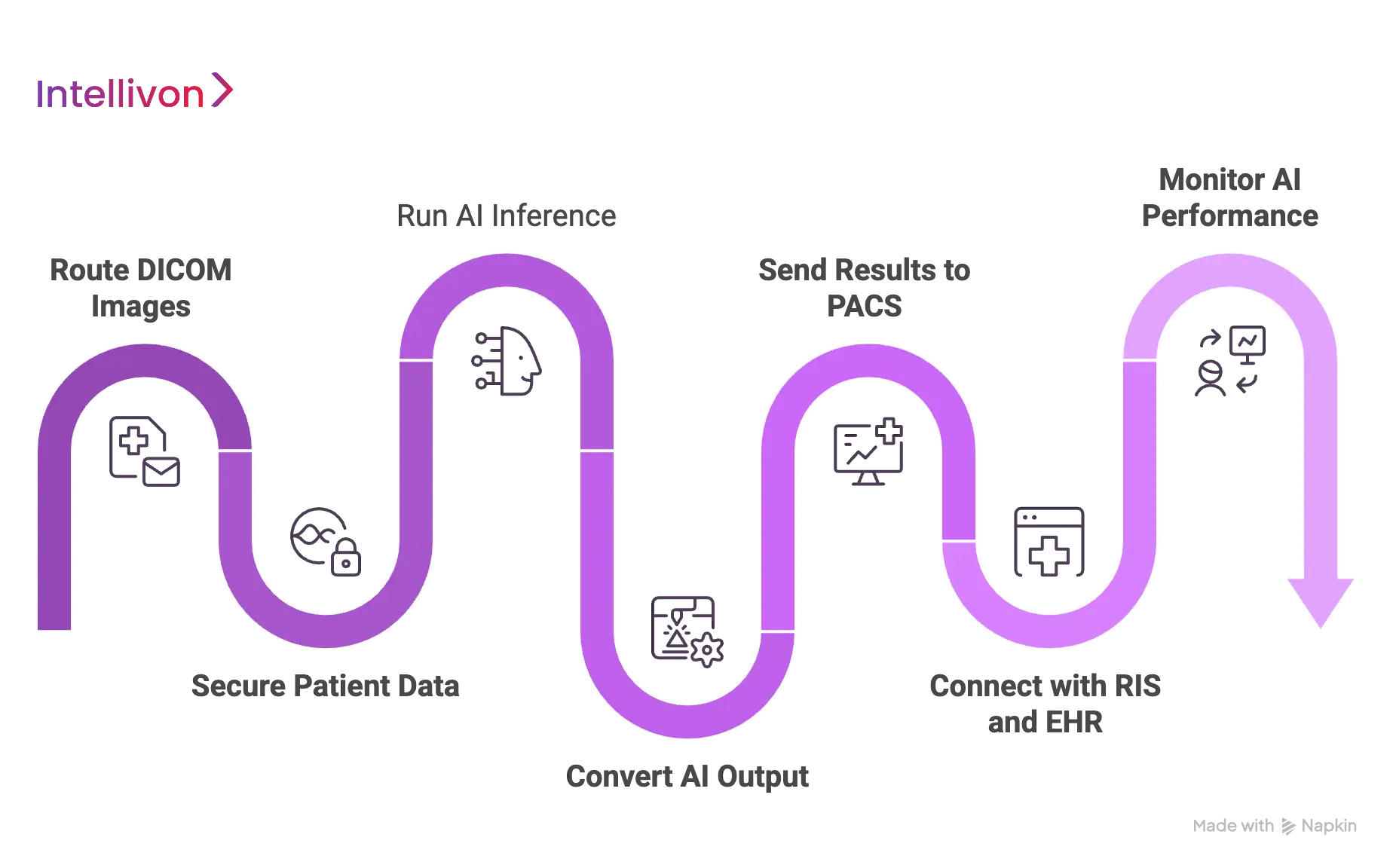
Step 1 — Route DICOM Images To The AI System
The process begins with the secure and intelligent movement of pixel data. We use sophisticated routing logic to ensure only the relevant studies reach the AI processing engine.
- DICOM C-STORE and Query/Retrieve: Our systems utilize standard DICOM protocols to receive images directly from modalities or pull them from the archive based on specific triggers.
- Intelligent Routing Rules: We configure granular filters based on body part, modality (CT, MRI, X-ray), or clinical indication. This prevents the AI from wasting resources on irrelevant scans.
| Protocol Component | Function in Integration |
| Modality Routing | Sends scans directly from the device to the AI for immediate triage. |
| Study Selection | Uses metadata tags to identify cases that match the AI model’s intent. |
| C-MOVE/C-GET | Allows the AI to “ask” for historical images to perform comparative analysis. |
Step 2 — Secure Patient Data Before AI Processing
In an enterprise environment, security is not a feature but a foundation. We ensure that Protected Health Information (PHI) remains shielded through every transition.
- De-identification and Pseudonymization: Before data leaves the local network for cloud processing, we scrub or encrypt patient identifiers. This maintains HIPAA and GDPR compliance without losing the link to the clinical study.
- Robust Access Controls: We implement strict identity management to ensure only authorized systems and personnel can interact with the imaging data.
- Audit Logging: Every step of the data journey is logged. This provides a transparent trail for hospital compliance officers to verify data integrity and privacy.
Step 3 — Run AI Inference On The Imaging Data
Once the data is staged and secured, the AI models perform the heavy lifting. This phase requires high-performance computing power to deliver results before the radiologist opens the case.
- Preprocessing: The system normalizes the image, adjusting for variations in scanner hardware and slice thickness to ensure the model receives a consistent input.
- Orchestrated Inference: Depending on the enterprise strategy, we run these models on-premise for ultra-low latency or in the cloud for massive scalability.
- Model Selection: Our orchestration layer automatically picks the best model for the specific clinical question, whether it is detecting a stroke or measuring a tumor.
Step 4 — Convert AI Output Into PACS-Readable Results
AI findings are useless if the PACS cannot “read” them. We translate complex algorithmic outputs into standardized DICOM objects that any modern viewer can display.
AI findings should be communicated back to PACS using widely used DICOM standards, especially when results need to appear inside the radiologist’s existing interpretation workflow.
- DICOM Structured Reports (SR)
We turn AI measurements into structured data that can automatically populate a draft report. - Secondary Captures and Overlays
The system creates new image instances with heatmaps or bounding boxes baked in, ensuring the clinician sees exactly what the AI detected. - Segmentation Objects
For complex cases like oncology, we generate 3D masks that allow for precise volume measurements directly within the PACS viewer.
Step 5 — Send AI Results Back Into PACS Or The Viewer
The final diagnostic insight must return to the physician’s eye. We prioritize “native” display to ensure the information is consumed at the point of decision.
- Result Routing: The processed “AI study” is pushed back to the PACS and linked to the original scan. This ensures they appear side-by-side in the patient’s history.
- Critical Finding Alerts: If the AI detects a life-threatening condition, it triggers a visual flag on the radiologist’s worklist, effectively re-ordering their day based on clinical urgency.
| Result Type | Visual Representation | Clinical Impact |
| Heatmaps | Color-coded probability maps | Highlights subtle lesions in high-density scans. |
| Bounding Boxes | Square markers around findings | Directs the eye to specific areas of concern. |
| Confidence Scores | Percentage-based reliability | Helps the clinician weigh the AI’s suggestion. |
Step 6 — Connect Results With RIS and EHR Systems
A complete integration goes beyond the imaging department. We bridge the gap between the pixels and the patient’s broader medical record using modern interoperability standards.
FHIR is increasingly used to close the loop between imaging AI outputs and clinical systems by turning AI findings into structured clinical information that can support reporting and downstream care.
- HL7 and FHIR Integration: We use these protocols to push AI findings into the Electronic Health Record (EHR). This allows a cardiologist or neurologist to see AI insights without ever opening the PACS.
- Automated Report Templates: By feeding data directly into the Radiology Information System (RIS), we can pre-fill report templates, saving the clinician minutes of manual typing on every case.
Step 7 — Monitor AI Performance After Deployment
The job is not done once the system is live. Intellivon provides ongoing oversight to ensure the AI remains accurate and the technical pipeline remains healthy.
- Performance Analytics
We track inference failures and latency. If a result takes too long to generate, we optimize the routing or compute resources. - Radiologist Feedback Loops
We provide a mechanism for clinicians to “agree” or “disagree” with AI findings. This data is vital for identifying model drift or false positives over time. - Continuous Auditing
Our team monitors the entire stack to ensure uptime. We treat the AI pipeline with the same level of criticality as the PACS itself.
At Intellivon, we specialize in navigating these technical complexities for global enterprises. We build the entire infrastructure that makes AI a reliable, scalable, and indispensable part of your hospital’s future.
Core Standards Used In AI-PACS Integration
Interoperability is the bedrock of any enterprise-grade healthcare deployment. Without strict adherence to global standards, AI tools remain isolated scripts rather than integrated clinical solutions.
Utilizing these frameworks ensures that data remains portable, secure, and understandable across different vendor systems.
1. DICOM For Medical Image Exchange
The Digital Imaging and Communications in Medicine (DICOM) standard is the universal language of medical imaging. It governs how images are produced, stored, and transmitted between scanners, archives, and AI engines.
- Standardized Formatting
DICOM ensures that an MRI from one manufacturer is readable by an AI tool from another. It packages the raw pixel data with essential metadata such as patient demographics and equipment settings. - Bidirectional Communication
We use DICOM not only to send images to the AI but also to receive the results back. This allows AI annotations to be stored as permanent “objects” within the patient study. - Study Routing Integrity
By leveraging DICOM tags, the system can automatically route specific studies to the correct AI model, ensuring that a chest X-ray never accidentally triggers a brain-specific algorithm.
2. DICOMweb For Modern Web-Based Imaging Workflows
As hospital systems move toward cloud-native architectures, DICOMweb provides the necessary protocols for high-speed, web-based image access. It allows AI services to interact with PACS using standard internet technologies.
- WADO-RS and QIDO-RS
These services allow the AI to “Web Access” and “Query” DICOM objects via RESTful APIs. This is significantly more efficient than traditional network protocols for cloud-based AI processing. - STOW-RS
This protocol enables the AI to “Store” its findings back into the hospital archive over a secure web connection, facilitating seamless integration for remote or distributed hospital networks. - Lightweight Integration
DICOMweb reduces the heavy infrastructure requirements of traditional PACS connections, making it easier to deploy AI services across mobile platforms and thin-client viewers.
3. HL7 For Hospital System Messaging
While DICOM handles the images, Health Level Seven (HL7) handles the administrative and clinical messages that trigger imaging events.
- Triggering Events
An HL7 message notifies the system when a doctor orders a scan or when a patient is admitted. The AI uses these messages to prepare its processing queue before the images even arrive. - Workflow Synchronization
HL7 messages ensure that the Radiology Information System (RIS) and the PACS are always in sync regarding a patient’s status, preventing data silos during the diagnostic process.
4. FHIR For Structured Clinical Data Exchange
Fast Healthcare Interoperability Resources (FHIR) represents the next generation of data exchange. It allows AI findings to be broken down into discrete, searchable data points within the Electronic Health Record (EHR).
| FHIR Resource | Purpose in AI Integration |
| DiagnosticReport | Contains the final narrative and summary of the AI and radiologist findings. |
| Observation | Stores specific AI measurements, such as tumor volume or bone density scores. |
| ImagingStudy | Links the AI results directly to the specific scan stored in the PACS. |
| Patient | Provides the essential clinical context and history to refine AI accuracy. |
5. IHE Profiles For Workflow Interoperability
Integrating the Healthcare Enterprise (IHE) provides the “cookbooks” that show how to use DICOM and HL7 together to solve specific clinical problems.
A recent RSNA review highlights the importance of standards-based interoperability for scaling AI adoption in radiology workflows.
- Scheduled Workflow (SWF)
This profile ensures that the AI processing happens in the correct sequence, from the initial order to the final archived report. - AI Result Integration (AIR)
IHE AIR profiles define exactly how AI outputs should be displayed and managed within the clinician’s workspace, ensuring a consistent experience regardless of the software vendor. - Cross-Vendor Harmony
By following IHE profiles, enterprises avoid “vendor lock-in,” allowing them to swap or upgrade AI models without rebuilding the entire integration pipeline.
By mastering these standards, Intellivon ensures that your AI infrastructure is not just functional today but ready for the interoperability demands of tomorrow’s healthcare landscape.
AI-PACS Integration Architecture
A robust integration architecture transforms a collection of individual software components into a unified diagnostic powerhouse.
For an enterprise to scale AI across multiple departments, the underlying structure must be modular, resilient, and highly secure.
The Anatomy of an Integrated Ecosystem
The following architecture represents the gold standard for deploying AI within a hospital network. It ensures that data flows smoothly from the moment of capture to the final clinical decision.
- Imaging Modality and Capture: The journey begins at the scanner (CT, MRI, X-ray). Modern modalities are configured to push data directly to a DICOM Router, which serves as the traffic controller for the entire network.
- The Intelligence Hub: AI Inference Engine: The router sends the relevant studies to the AI Inference Engine. This engine can reside on-premise for high-speed local processing or in the cloud for elastic scalability. It analyzes the pixels and identifies critical patterns.
- The Translation Layer: Result Formatter: Once the AI finishes its analysis, the Result Formatter converts those findings into standardized DICOM objects. This step is vital because it ensures the PACS can natively display the AI’s heatmaps, measurements, and annotations.
- The Clinical Workspace: PACS Viewer and RIS: The formatted results are pushed back into the PACS Viewer, where they appear on the radiologist’s monitor. Simultaneously, structured data is sent to the Radiology Information System (RIS) to pre-fill reports and update worklist priorities.
| Architectural Component | Strategic Function | Business Value |
| DICOM Router | Automates data flow based on metadata. | Reduces manual administrative tasks. |
| Inference Engine | Executes complex AI algorithms. | Increases diagnostic accuracy and speed. |
| EHR Connection | Links imaging data to patient history. | Provides a 360-degree patient view. |
| Monitoring Layer | Tracks system uptime and model drift. | Ensures long-term reliability and safety. |
Security and Governance Layers
In a healthcare setting, the technical architecture must be wrapped in a rigorous security framework to protect patient privacy and ensure regulatory compliance.
- Security Layer: This includes end-to-end encryption for data in transit and at rest. Multi-factor authentication and role-based access control ensure that only authorized personnel can view sensitive imaging data.
- Monitoring and Audit Layer: A dedicated monitoring service tracks every transaction within the pipeline. If a result is delayed or a model fails to process a study, the system alerts the IT team immediately. This layer also maintains the audit logs required for HIPAA and GDPR compliance.
- EHR and Clinical Integration: The final architecture connects to the Electronic Health Record (EHR). This allows the AI-generated findings to follow the patient throughout their care journey, informing surgeons, oncologists, and primary care physicians.
This structured approach minimizes technical debt and maximizes the lifespan of your technology investments. By building a modular architecture, your organization can easily swap or add new AI models as clinical needs evolve.
Best Practices For Integrating AI Imaging Tools With Hospital PACS
Moving from a pilot project to a full-scale enterprise deployment requires a disciplined approach to integration.
By following these best practices, healthcare leaders can ensure that their AI investment delivers clinical value without introducing new operational risks.
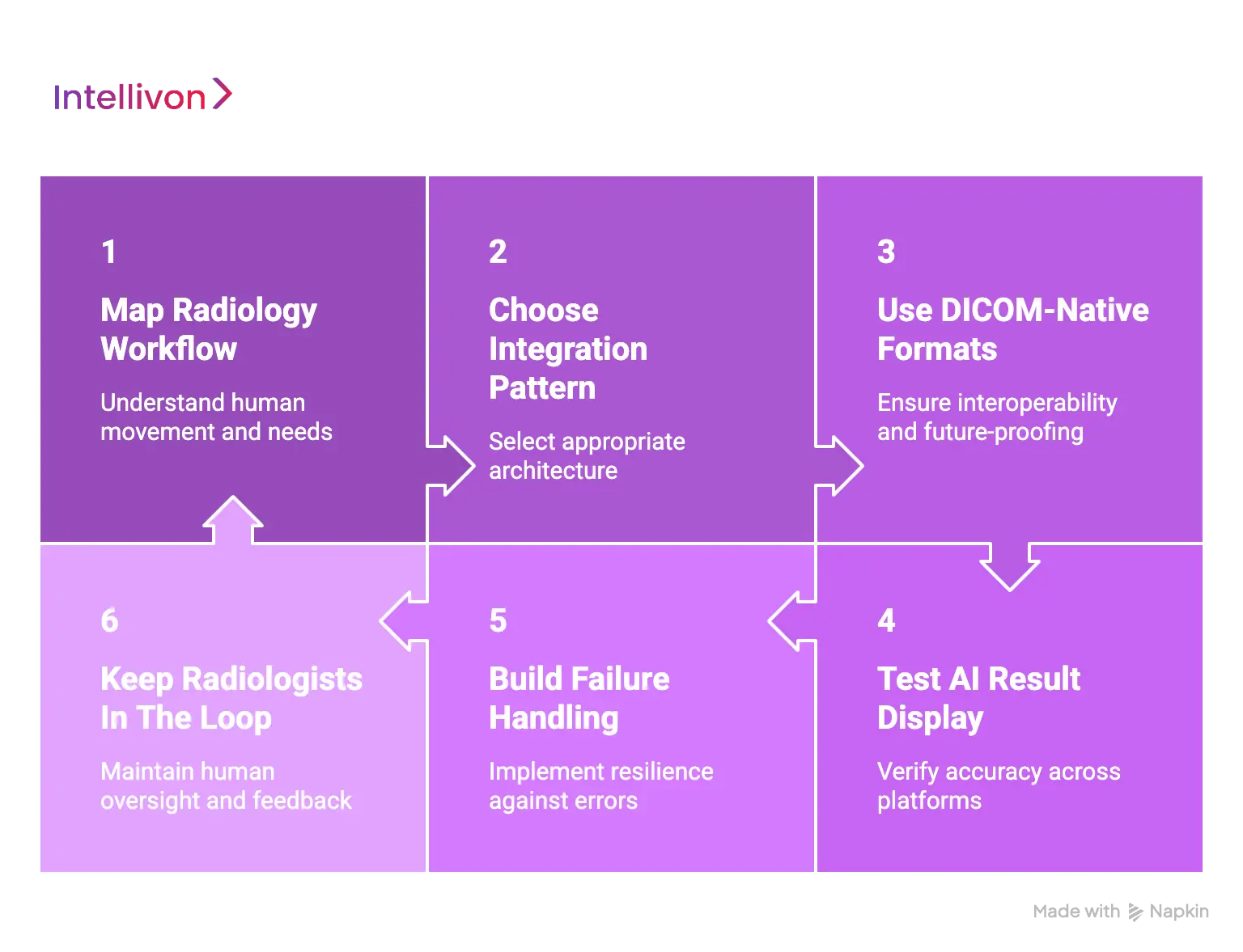
1. Start With Radiology Workflow Mapping
Before a single line of code is integrated, you must understand the human movement within the department. Technology should adapt to the clinician, not the other way around.
- Identifying the Users: Determine exactly who will interact with the AI findings. Is it the general radiologist, a sub-specialist, or an ER physician? Each group has different informational needs and time constraints.
- Defining the Trigger: Decide which scans need AI processing. Processing every single image can waste compute resources; instead, set rules based on modality, body part, or clinical urgency.
- Escalation Pathways: Establish a clear protocol for how the system handles urgent findings. If the AI detects an intracranial hemorrhage, the integration must have a path to move that study to the top of the worklist immediately.
2. Choose The Right Integration Pattern
There is no one-size-fits-all architecture for medical AI. The choice between cloud, on-premise, or hybrid models depends on your facility’s volume and security requirements.
- Strategic Alignment: VNA-based routing is often best for large hospital networks, while direct PACS integration may suit smaller, single-site facilities.
- Hybrid Flexibility: Many enterprises now opt for hybrid architectures where data is pre-processed locally for speed, while the heavier inference or long-term analytics occur in the cloud.
3. Use DICOM-Native Result Formats
To ensure your AI results are future-proof and interoperable, always stick to established medical imaging standards.
- Structured Data: Use DICOM Structured Reports (SR) for measurements. This allows the data to be easily extracted for research or used to auto-populate report templates in the RIS.
- Visual Precision: Leverage DICOM Segmentation Objects and Presentation States for overlays. These formats allow the radiologist to toggle the AI findings on and off without permanently altering the original pixels.
4. Test AI Result Display Across PACS Viewers
What the AI generates in its internal engine must match what the radiologist sees on their diagnostic monitor. Never assume a result will render perfectly across different platforms.
- Cross-Vendor Testing: If your hospital uses multiple PACS vendors or has different versions of a viewer in different departments, test the AI output on every single one.
- Annotation Integrity: Verify that measurements are accurate and that bounding boxes or heatmaps do not obscure critical anatomy. Consistent rendering is key to building clinical trust.
5. Build Strong Failure Handling
In a clinical environment, a “silent failure” is the most dangerous kind. Your integration must be resilient enough to handle network outages or processing errors.
| Failure Point | Best Practice | Operational Result |
| Inference Timeout | Implement automated retry logic. | Minimizes missed AI insights due to transient glitches. |
| Network Outage | Enable fallback to manual review. | Ensures patient care is never stopped by tech issues. |
| System Crash | Set up real-time IT alerts. | Allows for immediate troubleshooting and minimized downtime. |
6. Keep Radiologists In The Loop
AI should be a co-pilot, not an autopilot. The human expert must always have the final word on any diagnostic finding.
- Override and Correction: Provide simple tools within the viewer that allow the radiologist to accept, reject, or modify an AI suggestion. This maintains the “human-in-the-loop” standard required for medical safety.
- Feedback Capture: Create a mechanism where clinicians can easily report “bad” findings. This data is invaluable for long-term model improvement and local validation.
By adhering to these standards, you transform a complex technical challenge into a repeatable, scalable business success. These steps ensure that when you integrate AI, you are upgrading the entire clinical intelligence of your organization.
Security And Compliance Requirements For AI-PACS Integration
Protecting patient data is the most critical responsibility for any enterprise deploying healthcare technology.
In an era of increasing cybersecurity threats, integrating AI with a hospital PACS requires a multi-layered security strategy that ensures data integrity while maintaining strict regulatory compliance.
1. Protect DICOM Data During Transfer
Medical images contain a wealth of sensitive information within their metadata. Securing this data as it moves between the scanner, the AI engine, and the archive is the first line of defense.
- Encryption Protocols: All data in transit must utilize Transport Layer Security (TLS) or operate within a Virtual Private Network (VPN) tunnel. This prevents “man-in-the-middle” attacks from intercepting clinical images.
- Network Segmentation: Isolating the imaging traffic from the general hospital Wi-Fi or administrative network limits the attack surface. Secure DICOM routing ensures that data only moves between verified and trusted endpoints.
2. Control Access To AI Results And Imaging Data
Not every user in a hospital system needs access to every piece of diagnostic data. Implementing the principle of least privilege ensures that sensitive information is only available to those who require it for patient care.
- Role-Based Access Control (RBAC): Permissions should be granular. A radiologist requires full access to images and AI findings, whereas an administrative staff member may only need to see the scheduling status of a study.
- Identity Management: Integrating the AI platform with the hospital’s existing Active Directory or Single Sign-On (SSO) provider allows for centralized management of user credentials and immediate revocation of access when a staff member leaves the organization.
3. De-Identify Data When Required
When using imaging data for research, model training, or third-party cloud processing, Protected Health Information (PHI) must be handled according to strict legal standards.
- Anonymization and Pseudonymization: Systems should automatically scrub direct identifiers like names and social security numbers from the DICOM header. Pseudonymization allows the hospital to re-link results to the patient record internally without exposing their identity to the AI vendor.
- Clinical vs. Research Workflows: The integration should distinguish between live clinical diagnostics, where the patient identity is necessary, and secondary uses where de-identification is a mandatory compliance step.
4. Maintain Audit Trails Across The Workflow
A comprehensive audit log is essential for both regulatory compliance and clinical accountability. You must be able to reconstruct the entire lifecycle of an AI-assisted diagnosis.
| Audit Event | Data Points Captured |
| Data Retrieval | Who accessed the study and from which workstation? |
| AI Inference | The specific model version used and the timestamp of processing. |
| Result Return | The exact findings were pushed back to the PACS viewer. |
| Clinical Review | Which physician viewed the AI result, and whether they accepted it. |
5. Align With HIPAA, GDPR, And Hospital IT Policies
Enterprise leaders must ensure that every technical component satisfies the legal requirements of their specific region and the internal security standards of the healthcare organization.
- Data Residency and Retention: Clear policies must define where data is stored and for how long. For GDPR compliance, knowing the physical location of the servers processing patient data is a non-negotiable requirement.
- Vendor Risk Assessments: Before integration, the AI provider must undergo a rigorous security review. This includes evaluating their encryption standards, incident response plans, and third-party security certifications like SOC2 Type II.
6. Secure Cloud Or Hybrid AI Processing
While the cloud offers immense compute power, it requires specialized security configurations to meet healthcare standards.
- Private Networking: Use private cloud instances that are not reachable via the public internet. Secure key management systems ensure that the hospital maintains control over the encryption keys used to lock its data.
- Continuous Monitoring: Automated security tools should monitor the cloud environment for unauthorized access attempts or configuration changes. Real-time alerts ensure that potential vulnerabilities are addressed before they can be exploited.
By embedding security into the architectural design, Intellivon helps enterprises build trust with patients and regulators alike. A secure integration is not just a defensive measure; it is a prerequisite for sustainable digital transformation in healthcare.
Conclusion
Integrating AI into hospital PACS transforms medical imaging from a static archive into a dynamic diagnostic engine. By prioritizing deep interoperability and standardized workflows, healthcare leaders can reduce physician burnout and improve patient outcomes.
Success requires a strategic focus on technical standards, data security, and clinical adoption. This evolution is no longer an optional upgrade but a fundamental requirement for any enterprise committed to modernizing its diagnostic infrastructure.
How Intellivon Integrates AI Imaging Tools With Hospital PACS Systems
At Intellivon, we build PACS-connected AI imaging systems for hospitals, diagnostic imaging chains, teleradiology platforms, radiology SaaS companies, and healthtech startups.
Our approach focuses on DICOM-native workflows, secure image routing, AI inference orchestration, PACS viewer compatibility, healthcare interoperability, compliance controls, and scalable enterprise deployment.
A. Mapping The Radiology Workflow Before Integration
We first study how imaging studies move across modalities, PACS, RIS, reporting systems, and radiologist worklists. This helps us define where AI should run, when results should appear, and how findings should enter the clinical review process.
Our radiology workflow mapping includes:
- Workflow discovery across modality, PACS, RIS, and reporting systems
- Modality mapping for CT, MRI, X-ray, ultrasound, or mammography workflows
- Radiologist review process analysis for interpretation and reporting steps
- Critical case routing logic for urgent findings and priority worklists
- Integration scope planning based on PACS capabilities and hospital needs
- AI result placement strategy for viewer, report, or worklist-level access
This ensures the AI tool fits into the hospital’s existing radiology workflow instead of creating a separate system that slows teams down.
B. Building Secure DICOM Routing Pipelines
We build DICOM-native routing pipelines that move imaging studies from PACS, modalities, or VNA systems to the AI engine without disrupting existing hospital operations.
Our DICOM routing pipeline development includes:
- DICOM C-STORE workflows for secure study transfer
- Query/retrieve setup for controlled image access from PACS systems
- Metadata checks to validate patient, study, series, and modality details
- Study matching logic to prevent duplicate, missing, or mismatched results
- Secure image routing with encryption, access controls, and transfer logs
- Error handling for failed transfers, unsupported files, or incomplete studies
This gives hospitals a reliable image movement layer where AI tools can process the right studies at the right time.
C. Connecting AI Inference To Imaging Workflows
We design the AI processing layer where medical images are prepared, analyzed, and converted into clinically usable outputs. These outputs may include findings, measurements, annotations, confidence scores, risk levels, or segmentation maps.
Our AI inference workflow development includes:
- Image preprocessing for AI-ready scan normalization and quality checks
- AI inference pipelines for real-time or batch imaging analysis
- Model orchestration for detection, segmentation, classification, or triage
- GPU, cloud, on-premise, or hybrid processing based on hospital needs
- Inference monitoring to track processing time, failures, and output status
- Result validation workflows before AI findings return to clinical systems
This allows AI analysis to run as part of the imaging workflow, not as a disconnected backend process.
Build Your AI-PACS Integration With Intellivon
If you want to integrate AI imaging tools with your hospital PACS system, Intellivon can help you design, build, and deploy the complete AI-PACS workflow.
From DICOM routing and AI inference pipelines to PACS result formatting, RIS/EHR connectivity, viewer integration, monitoring dashboards, and compliance controls, we build AI imaging integrations that fit real radiology operations.
Contact Intellivon to build a secure AI-PACS integration that brings AI findings directly into radiologists’ existing workflows and scales with your healthcare organization.
FAQs
Q1. Can AI imaging tools work with any PACS system?
A1. Most AI imaging tools can integrate with PACS systems that support standard DICOM workflows. However, older PACS versions, limited viewer support, custom vendor restrictions, or weak API access can make integration more complex. A technical assessment is usually needed before development begins.
Q2. How do AI results appear inside PACS?
A2. AI results can appear as DICOM Structured Reports, overlays, segmentations, secondary captures, measurements, heatmaps, or presentation states. The exact format depends on the PACS viewer, AI use case, and how radiologists need to review the findings.
Q3. Does PACS integration require replacing the hospital’s existing system?
A3. No. In most cases, AI imaging tools can be integrated with the existing PACS through DICOM routing, VNA routing, or secure middleware. Replacement is only needed when the current PACS cannot support the required workflow, security, or result display.
Q4. Is cloud-based AI-PACS integration safe for hospitals?
A4. Cloud-based AI-PACS integration can be safe when it uses encryption, secure networking, access control, audit logs, data residency rules, and clear PHI handling policies. Some hospitals may still prefer on-premise or hybrid deployment for stricter control.
Q5. How long does AI-PACS integration take?
A5. A basic single-modality integration may take a few months, while a multi-site, multi-modality enterprise system takes longer. Timeline depends on PACS vendor complexity, DICOM routing access, security approvals, AI model scope, and validation needs.