Key Takeaways:
- Complicated scheduling is possible, but only if the AI is able to take into account the actual rules of healthcare.
-
Before any appointment can be scheduled, a patient may need the involvement of a provider, a room, a referral, and approval.
-
The AI also requires actual access to the EHR, and not just a chatbot running on top.
-
Certain requests can be carried out automatically, while others still require a scheduler to intervene.
-
Intellivon designs these systems based on the real scheduling process, and not on the basis of a generic AI workflow.
Yes, conversational AI can be used for appointment scheduling when dealing with complex, multi-step workflows, but not just for arranging a single visit. However, it doesn’t work the way demonstrations usually show. Single-visit booking is already a solved problem and is generally not the issue that founders are concerned about.
What happens when scheduling becomes complicated? Referrals, prior authorization, booking involving more than one resource, and true integration with the EHR all come into play.
The blog looks at each of the problems in turn. In the case where conversational AI is already functioning without any need for discussion, there’s no reason for you to pay to rebuild a solution that has already been achieved. However, in the areas where it fails, like referral routing, prior authorization holds, multi-resource coordination, and true integration with EHR systems via the Epic and Cerner FHIR APIs.
For any founder who is trying to decide whether such a product is buildable or who has already started discussing it with Intellivon, this is the information that no one ever gives you at the outset.

How Conversational AI Appointment Scheduling Works
Conversational AI appointment scheduling works by pairing a natural language interface with your existing scheduling system. Patients talk or type the way they normally would. The AI figures out what they need, then checks it against real availability.
So no new booking system gets bolted on. Instead, the AI becomes a smarter front door to the system you already run.
1. Patients Schedule Through Normal Conversation
Patients don’t learn a new interface. They call, text, open a chat window, or use a portal. The AI meets them wherever they already are. The channel changes. The logic underneath doesn’t.
- Voice scheduling: Patients call in and just talk. No phone tree, no pressing 1 for English.
- SMS scheduling: Because it’s all text, patients book, confirm, or reschedule without downloading anything.
- Web and portal scheduling: The same conversational layer sits inside the portal you already have, instead of replacing it.
2. AI Turns Patient Requests Into Scheduling Actions
Once the AI hears the request, it still has to turn plain language into something a scheduling system can act on. That happens in three steps.
- Intent recognition: First, figure out whether the patient wants to book, cancel, reschedule, join a waitlist, or just ask what’s open.
- Patient preference capture: Next, pull out the date, location, provider, specialty, and time from what they actually said.
- Appointment type identification: Finally, nail down the specific visit or service, not just “an appointment.”
3. Existing Scheduling Systems Still Control the Booking
Here’s the thing worth saying plainly: conversational AI doesn’t replace your EHR or scheduling system. It shouldn’t try to. The AI handles the conversation.
Your scheduling system still owns availability, conflicts, and the actual booking record. For a deeper look at how these pieces fit together, see How to Build an AI Chatbot Platform for Healthcare.
So conversational AI appointment scheduling starts with a better front end. It listens, understands, and translates. But once a request gets complicated, the interface layer alone isn’t enough. That’s where the real engineering work begins.
Where Healthcare Teams Use AI Scheduling Today
Healthcare teams already use conversational AI appointment scheduling in eight distinct ways, not one. Most of that use sits in the routine, high-volume tasks: booking, rescheduling, canceling, and confirming. So while more advanced use cases exist, they’re still catching up.
Here’s where the technology is actually deployed today, not where vendors promise it will be tomorrow.
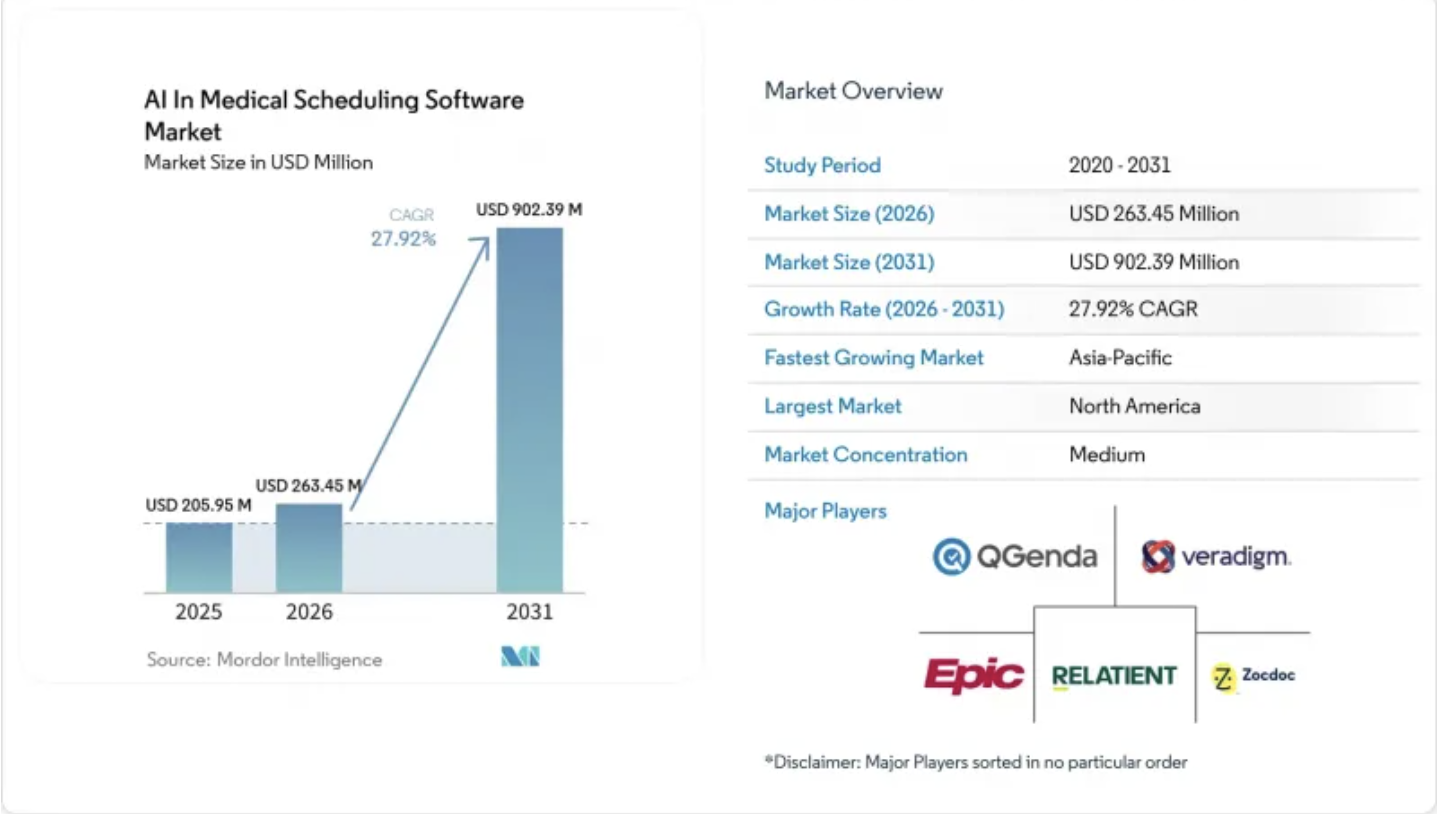
According to Mordor Intelligence, that advanced-workflow segment is exactly where growth is concentrated, with capacity optimization and waitlist automation growing at a 29.52% CAGR through 2031, faster than the market overall.
1. New Appointment Booking
New booking is the most common entry point. The AI identifies the visit type needed, then searches real-time availability across matching providers.
2. Appointment Rescheduling
Patients move an existing appointment without calling staff. The AI checks new availability and updates the record in the same conversation.
3. Appointment Cancellations
Cancellations release the slot immediately instead of sitting open until staff processes it manually. That capacity becomes bookable again within seconds.
4. Appointment Verification
Patients confirm the time, location, provider, and prep instructions before the visit. This single use case drives a large share of scheduling call volume.
5. Provider and Location Search
Before booking, patients ask which provider or facility fits their needs. The AI filters by specialty, location, and insurance instead of a directory search.
6. Waitlist Management
When a slot opens early, the AI matches it to a waiting patient automatically. Per Mordor Intelligence, this is the fastest-growing AI scheduling capability, at a 29.52% CAGR through 2031.
7. Recall and Follow-Up Scheduling
Recurring care plans trigger the next visit automatically, so a six-month follow-up doesn’t depend on the patient remembering to call back.
8. Call Routing Around Scheduling Requests
Not every request should be booked by AI. When a case is unclear or sensitive, the system routes it to staff instead of guessing.
Across these eight areas, most healthcare teams have automated the routine work already. Fewer have moved into waitlist matching, recall scheduling, or smart routing, and the market data confirms that’s exactly where growth and opportunity is concentrated. That gap is where the next competitive edge sits.
Healthcare Enterprises Already Using AI Scheduling
Healthcare enterprises are already running conversational AI appointment scheduling at scale, rather than testing it in pilots.
In fact, five named health systems show what real deployments deliver in production: fewer abandoned calls, more appointments booked, and measurable savings.
So before getting into the technical architecture behind this, it helps to see proof that it already works, not just in vendor demos, but in live health systems handling real patient volume.
1. Tampa General Hospital
a. Scheduling and Call Management
Tampa General deployed Hyro’s agentic AI voice assistants directly into its experience center. As a result, the assistants now handle appointment management, scheduling, and prescription requests that previously required a staff member on every call.
b. More Appointment Capacity
Within just two weeks of launch, TGH saw a 21% increase in appointments scheduled through its experience center. That’s a fast payoff for a rollout that had barely settled in.
c. Shorter Patient Wait Times
Meanwhile, average call wait time fell 58%, dropping from 6.2 minutes down to 2.4 minutes. Call abandonment fell right alongside it, down 56% over the same period.
2. Baptist Health
a. Appointment Management Automation
At Baptist Health, Hyro automated 64% of appointment tasks, including verification, cancellations, and rescheduling. So instead of routing every request to a live agent, most of that volume now resolves without one.
b. Call Deflection
On top of that, the same deployment deflected 79% of IT help desk calls, things like password resets, away from staff entirely. That freed up real hours for higher-value work.
c. Cost Savings
Hyro reports, and this is vendor-sourced, nearly $1 million in savings within the first three months. Even accounting for vendor framing, that’s a fast return.
3. Inova Health
a. Smart Call Routing
Inova deployed Hyro’s voice AI agents across its patient support centers. Within six months, the health system reached 100% coverage of patient access calls, meaning every call had an AI agent available to answer or route it.
b. Staff Capacity
Because of that coverage, Inova reports saving around 4,000 staff hours per month through automated call handling. That’s capacity redirected toward more complex patient needs instead of routine ones.
c. Return on Investment
All told, Inova’s deployment delivered an 8.8x, or 880%, return on AI investment, according to Hyro’s published case study. That’s one of the stronger ROI figures among the five systems here.
4. Weill Cornell Medicine
a. Higher Appointment Conversion
Weill Cornell reports a 47% increase in booked appointments after adding conversational AI to its scheduling flow. So the tool actually converted more visits into confirmed appointments.
b. Better Digital Engagement
Alongside that, the same deployment saw a 31% decline in website bounce rate, since patients could complete scheduling instead of abandoning the page partway through.
5. Prisma Health
a. Self-Service Rescheduling
Prisma Health’s AI chat agents reached a 66% self-service reschedule rate within the first year. In other words, two out of three reschedules now happen without a staff member involved at all.
b. Conversation Resolution
Beyond that, the deployment achieved an 80% chat resolution rate, per Hyro’s published case study, meaning most conversations resolved without needing escalation.
c. Capacity Gains
As a result, Prisma attributes more than $300,000 in first-year capacity gains directly to the rollout.
Across all five, the same pattern shows up: fewer calls handled by staff, faster resolution, and real dollar savings, all vendor-reported but independently published by the health systems themselves.
Complex Scheduling Goes Far Beyond Finding a Slot
Complex appointment scheduling is hard because a free slot on a calendar doesn’t automatically mean the appointment can happen. So while basic scheduling only checks time and availability, complex scheduling also has to check eligibility, resources, dependencies, and preferences, all at the same time.
As a result, basic booking success doesn’t actually predict whether AI can handle the harder version of this problem.
This isn’t theoretical, either. According to a JAMIA Open study on UCSF’s referral automation tool, manual referral entry took nearly 12 minutes per patient, and as a result, more than 40% of referrals were never scheduled at all.
That’s exactly the kind of administrative complexity basic booking tools were never built to handle.
1. A Free Slot Is Not Always a Bookable Appointment
A calendar might show an opening at 2 pm, but that alone doesn’t mean anyone should book it yet. Instead, four separate checks have to pass first, and unfortunately, most basic scheduling tools only run one of them.
- Provider eligibility: First, confirm the provider is actually credentialed for this specific visit type, not just free on the calendar.
- Patient eligibility: Next, confirm the patient meets the rules for this appointment, such as new-patient status or age restrictions.
- Resource availability: Then, confirm the room, equipment, and any required staff are all free at the same time, not just the provider.
- Administrative clearance: Finally, confirm referrals, payer requirements, and prior authorization are already in place before the slot gets held.
2. Several Rules Can Apply to One Appointment
A single booking can trigger multiple rules at once, not just one. For example, a same-day cardiology visit might require an active referral, insurance pre-authorization, and a room with specific equipment, all simultaneously.
However, basic scheduling tools tend to check these one at a time, if they check them at all, and that’s exactly where complex workflows tend to break down.
3. One Visit Can Depend on Another Visit
Sometimes, appointments only make sense in sequence, not in isolation. For instance, a follow-up visit might depend on lab results coming back first, or a procedure might require imaging completed within a set window beforehand.
So booking one visit without checking the other risks scheduling an appointment nobody can actually use.
4. Patient Preferences Sit on Top of Hard Rules
Of course, patients have real preferences, like a specific time of day or a provider they’ve seen before. But those preferences only matter once the hard rules are already satisfied.
Ultimately, none of this is about whether the AI is smart enough. Instead, it’s about whether the underlying system tracks eligibility, resources, sequence, and preference as separate layers, rather than one flat calendar.
That distinction, in the end, is what actually separates basic booking tools from systems built to handle complex scheduling.
How AI Handles Complex Scheduling Workflows
AI handles complex scheduling workflows through eight sequential steps, not by letting a language model freely pick a calendar slot. So instead of guessing, the system identifies the patient, checks eligibility, applies rules, and only then searches for valid options.
As a result, every complex booking follows the same disciplined path, whether it’s a routine visit or a multi-resource procedure.
1. Identify the Patient and Request
Every complex workflow starts the same way: confirming who’s asking and what they actually need. So before anything else happens, the AI verifies identity and extracts the real request from natural language.
- Confirms patient identity against the record already on file in the EHR
- Extracts the specific request type: new visit, referral follow-up, or reschedule
- Flags mismatches instead of guessing, since Baptist Health’s deployment only hit 70.5% identification accuracy at this exact stage
2. Determine the Correct Appointment Type
Once the patient is identified, the system still has to map the request to a specific visit type. That’s harder than it sounds, because one phrase can mean a dozen different appointment types.
- Matches the request against a structured appointment-type taxonomy, not just keywords
- Accounts for specialty, symptoms, and urgency together
- Confirms the visit type before checking whether it’s even allowed yet
3. Check Referral and Eligibility Requirements
Next, before any slot search happens, the system checks whether a referral or eligibility rule stands in the way. This is exactly where basic scheduling tools tend to skip a step.
- Confirms an active, unexpired referral for specialty visits
- Checks age restrictions, insurance status, and program eligibility for new patients
- Blocks the booking attempt entirely if eligibility fails, rather than letting it proceed anyway
4. Apply Scheduling Rules and Dependencies
After eligibility clears, the AI applies every rule that governs this specific appointment. Because several rules often apply at once, this step runs multiple checks in parallel instead of one at a time.
- Verifies provider credentialing for the exact visit type requested
- Confirms resource dependencies, like required equipment or a care team
- Checks sequencing rules, such as a lab result needing to land before a follow-up gets booked
5. Search Valid Providers and Resources
Only now does the AI actually search for a slot, and not on a single calendar. Instead, it searches across every provider, room, and resource that could satisfy the appointment at once.
- Searches overlapping availability across provider, room, and equipment simultaneously
- Excludes any option that already failed a rule in step 4
- Returns only options that are actually bookable, not just technically open
6. Rank Options Around Patient Preferences
Once valid options exist, patient preferences finally enter the picture, but only as a ranking layer, rather than a hard rule.
- Ranks the valid slots by stated preference: time of day, provider, or location
- Never surfaces a preferred slot that breaks a hard rule from earlier steps
- Presents only real, bookable choices, so nothing shown can later fall through
7. Confirm the Selected Appointment
Once the patient picks from the ranked options, the system confirms it back in plain language, in the same conversation.
- Restates the time, provider, and location clearly
- Includes any prep instructions the patient needs beforehand
- Closes the loop immediately, which prevents a separate confirmation call later
8. Write the Booking Back to the EHR
Finally, the booking gets written back to the EHR itself, not just logged somewhere in the AI’s own memory.
- Uses FHIR Schedule, Slot, and Appointment resources to complete the write-back
- Makes the appointment visible to staff working directly inside the EHR
- Fails visibly and escalates to staff if the write-back doesn’t go through
Put together, these eight steps show that conversational AI handles complex scheduling through orchestration, not by letting a language model freely pick a slot off a calendar.
Multi-Provider and Multi-Resource Scheduling
Multi-provider and multi-resource scheduling means checking several moving parts at once, not just one provider’s calendar. So instead of confirming a single availability window, the AI has to confirm providers, rooms, equipment, and staff are all free at the same time.
That’s the exact point where simple booking tools stop working.
1. Coordinating Several Providers
Some visits genuinely need more than one provider involved, and the system has to check all of them together rather than one at a time.
- Primary and specialist availability: Matches overlapping open slots across two separate provider calendars.
- Multidisciplinary appointments: Coordinates three or more specialists for a single combined visit.
- Shared care-team schedules: Confirms every assigned team member is available, not just the lead provider.
2. Matching Rooms to Appointment Types
Not every room works for every visit, so the system checks room type against appointment requirements before confirming anything.
- Procedure rooms: Confirms the room supports the specific procedure being booked.
- Imaging rooms: Matches the visit to a room with the correct imaging setup.
- Specialty clinical spaces: Reserves space built for that specialty, not a generic exam room.
3. Adding Equipment to the Availability Check
Equipment gets booked alongside the room, since a free room with unavailable equipment still isn’t bookable.
- Imaging equipment: Confirms the specific machine needed is free at that time.
- Procedure equipment: Checks that required instruments or devices aren’t already reserved elsewhere.
- Monitoring equipment: Reserves monitoring tools tied to that visit type in advance.
4. Scheduling Staff Around the Same Visit
Beyond the provider, several support roles often need to be free at the exact same time for the visit to actually happen.
- Nurses: Confirms nursing support is scheduled alongside the provider.
- Technicians: Reserves the technician tied to the equipment being used.
- Anesthesia teams: Coordinates anesthesia availability for procedures that require it.
- Supporting clinicians: Adds any additional clinical staff the visit specifically requires.
Multi-provider and multi-resource scheduling only works when providers, rooms, equipment, and staff are checked together rather than separately. Miss one, and the appointment isn’t actually bookable, even if everything else lines up. That’s the coordination layer basic scheduling tools were never built to handle.
Referrals and Prior Auth Change the Booking Path
Referrals and prior authorization change the booking path because they decide whether a visit can be scheduled at all, not just when. So instead of a single availability check, the AI has to branch down different paths depending on what the referral and insurance actually allow.
As a result, the same requested appointment can lead to three very different outcomes.
1. Referral Details Determine Where Patients Go
A referral isn’t just a formality, so the system checks its status before searching for any slot at all.
- Valid referral: If the referral is active and matches the visit, the AI proceeds straight to scheduling.
- Missing referral information: But if key details are missing, the system pauses and requests them before continuing.
- Incorrect specialty referral: Similarly, if the referral doesn’t match the specialty requested, the AI flags the mismatch instead of booking anyway.
- Expired referral: And if the referral has lapsed, the system blocks the booking until it’s renewed.
2. Insurance Rules Narrow the Appointment Options
Once the referral clears, insurance rules further narrow which appointments are actually valid, not just which providers are available.
- Network eligibility: First, the AI confirms the provider is in-network for the patient’s plan.
- Service eligibility: Then, it checks whether this specific service is covered under that plan at all.
- Location restrictions: Finally, it confirms the visit location itself falls within plan coverage.
3. Prior Authorization Creates Conditional Scheduling
Prior authorization adds one more branch, since the appointment’s status depends entirely on where the authorization request stands.
- Authorization approved: If approval is already on file, the booking proceeds immediately.
- Authorization pending: If it’s still pending, the system holds the slot instead of releasing it.
- Authorization denied: If it’s denied, the AI stops the booking and explains why, rather than scheduling a visit that can’t happen.
- Staff review required: And if the case is unclear, the system routes it to staff instead of guessing.
So referrals and prior authorization actually change which booking path the AI takes. Get any one of these wrong, and the appointment either can’t happen or shouldn’t have been booked.
AI Must Keep Context Through the Whole Conversation
AI must keep context through the whole conversation because scheduling rarely happens in one clean request. So instead of treating each message as isolated, the system has to track what’s already confirmed, what’s still open, and what changed along the way.
As a result, losing that thread even once can turn a simple reschedule into a broken booking.
1. Scheduling State Goes Beyond Conversation Memory
Remembering what the patient said isn’t the same as tracking what’s actually been confirmed in the scheduling system itself.
So the AI has to hold both: the conversation history and the real-time booking state, and keep them in sync as the conversation moves forward.
2. Patients Can Change Their Preferences Midway
Patients often shift their request halfway through, so the system has to update the search without losing everything decided so far.
- Different date: If the patient asks for a new date, the AI re-searches availability without discarding earlier confirmed details.
- Different provider: Similarly, a provider change re-runs eligibility and resource checks for the new provider specifically.
- Different location: A location change re-checks network and resource availability at the new site.
- Different channel: And if the patient switches from voice to text mid-request, the system carries the same context forward instead of starting over.
3. One Conversation Can Contain Several Tasks
A single conversation often bundles more than one request, like booking a new visit while also confirming an existing one.
So the AI has to track each task separately, resolving one without accidentally overwriting or dropping the other.
4. Interrupted Conversations Need Recovery Logic
Conversations get interrupted constantly, whether the call drops or the patient simply steps away. So the system needs clear recovery logic instead of forcing the patient to start over from scratch.
- Completed actions: First, the AI keeps a record of what’s already been confirmed and booked.
- Pending actions: Next, it tracks what’s still awaiting confirmation or a response from the patient.
- Failed actions: Then, it flags anything that didn’t go through, rather than silently dropping it.
- Safe conversation resume: Finally, it picks the conversation back up from where it left off, instead of restarting the entire request.
So keeping context through the whole conversation is what keeps complex scheduling from falling apart mid-request. Miss a preference change or an interrupted session, and the booking either breaks or duplicates.
EHR Integration Makes Real-Time Scheduling Possible
EHR integration makes real-time scheduling possible because conversational AI can’t book anything the EHR doesn’t actually see. So instead of treating the EHR as an afterthought, real-time scheduling depends on FHIR resources and vendor-specific APIs working together from the start.
As a result, this layer is exactly what separates a chatbot that talks about appointments from one that actually books them, covered in more depth in our EHR Integration guide.
1. FHIR Schedule Organizes Resource Availability
FHIR Schedule defines which resource, whether that’s a provider, room, or piece of equipment, is even eligible to be booked in the first place.
So before any time slot gets checked, the system consults the Schedule resource to confirm that the resource is active and schedulable at all.
2. FHIR Slot Represents Potential Appointment Time
Once Schedule confirms eligibility, FHIR Slot represents each specific block of time that could become an appointment.
Then, the system marks each slot as free, busy, or tentative, so the AI knows exactly which windows are actually available to offer.
3. FHIR Appointment Represents the Actual Booking
Finally, FHIR Appointment is what actually turns a slot into a real booking, linking the patient, provider, and time together as one confirmed record.
As a result, this is the resource that shows up in the EHR itself, not just in the AI’s own memory.
4. Epic Scheduling Needs Workflow-Level Integration
Epic doesn’t expose scheduling through FHIR alone, so real-time booking also requires workflow-level integration on top of it.
- Availability search: First, the system queries Epic’s scheduling APIs directly for real-time openings, not a cached snapshot.
- Appointment reads: Next, it reads existing bookings to avoid double-booking or conflicting holds.
- Appointment creation: Then, it writes the new booking back through Epic’s own scheduling workflow, not a generic FHIR call alone.
- Appointment changes: Finally, it updates or cancels through that same workflow layer, so Epic’s internal rules stay enforced.
5. Oracle Health Has Its Own Scheduling Interfaces
Oracle Health, similarly, runs its own scheduling interfaces through the Millennium Platform, separate from a generic FHIR implementation.
So a build that works against Epic doesn’t automatically work against Oracle Health without its own integration path.
6. HL7 and Vendor APIs Still Matter
Even with FHIR in place, HL7 v2 messages like SIU still carry real-time scheduling events underneath in many hospitals.
So a real-time scheduling build, much like the broader EHR integration architecture it sits inside, usually needs FHIR and HL7 working side by side, not one instead of the other.
7. Failed Writes Need Reconciliation and Recovery
Finally, a booking that fails to write back to the EHR has to be caught immediately, not discovered later.
So the system needs automated reconciliation that compares expected bookings against confirmed ones, then retries or escalates to staff when something doesn’t match.
So real-time scheduling isn’t just about calling a FHIR API correctly. It’s about combining Schedule, Slot, and Appointment resources with vendor-specific workflow integration and reliable failure recovery.
Miss any one piece, and the booking either doesn’t happen or doesn’t actually show up where staff can actually see it.
HIPAA Controls for AI Appointment Scheduling
HIPAA controls change the architecture of AI appointment scheduling because every scheduling request touches PHI, rather than clinical conversations. So instead of bolting compliance on afterward, six specific controls have to be built into the system from day one. As a result, a scheduling AI that skips even one of these isn’t just risky, it’s not actually compliant.
1. Identity Verification Before Sensitive Actions
Before the AI reveals or changes anything tied to a patient’s record, it has to confirm who it’s actually talking to. So identity verification runs first, not as an afterthought once the conversation is already underway.
- Confirms patient identity against demographic details already on file
- Blocks any scheduling action, not just bookings, until identity is verified
- Escalates to staff automatically when verification fails, rather than guessing
2. Role-Based Access to Scheduling Data
Once identity is confirmed, the system still limits what gets shown based on who’s asking. So a patient sees only their own scheduling data, while staff access follows their specific role instead of blanket permissions.
- Grants patients visibility into their own appointments only
- Scopes staff access by role, not by default admin rights
- Logs every access attempt, whether it succeeds or gets denied
3. Encryption for PHI in Transit and Storage
PHI has to stay encrypted the entire time, whether it’s moving between systems or sitting in storage. So this isn’t optional at either point, since a gap at either end defeats the purpose of encrypting the other.
- Encrypts every message between the AI and the EHR in transit
- Encrypts stored conversation data and scheduling records at rest
- Applies the same standard across voice, chat, and SMS channels alike
4. Audit Logs for Every Scheduling Action
Every scheduling action needs a record, not just the ones that succeed. So audit logs capture bookings, cancellations, failed attempts, and staff overrides, all in one tamper-resistant trail.
- Logs the who, what, and when for every scheduling event
- Includes failed and denied actions, not just completed ones
- Stays tamper-resistant, so records can’t be quietly altered later
5. Conversation and Recording Retention Policies
Conversations and call recordings can’t just accumulate indefinitely, since that itself becomes a compliance risk. So retention policies define exactly how long data stays, and what happens to it after that window closes.
6. Business Associate Agreements With AI Vendors
Finally, any AI vendor touching PHI needs a signed BAA in place before deployment, not after. So this is the legal foundation that makes every other control in this section actually enforceable.
Together, these six controls are the architecture PHI requires to move safely through a scheduling conversation at all. Skip identity verification or a BAA, and the rest of this list doesn’t actually protect anything. That’s why compliance belongs in the build from the start, not a review at the end of it.
What Conversational AI Scheduling Platforms Cost in 2026
A custom conversational AI appointment scheduling platform typically costs $70,000 to $300,000. So the exact number depends on scope, not luck, and the table below breaks down where that money actually goes.
Conversational AI Scheduling Platform Cost Table
| Phase | Range |
| Discovery and Workflow Mapping | $7,000–$15,000 |
| Architecture and Data Foundation | $10,000–$30,000 |
| Core Scheduling Platform | $15,000–$45,000 |
| AI and Conversation Automation | $15,000–$70,000 |
| EHR and Healthcare Integrations | $15,000–$70,000 |
| Compliance, Testing, and Launch | $8,000–$70,000 |
1. Annual Maintenance Adds 15% to 25%
Beyond launch, maintenance runs 15% to 25% annually, covering integration upkeep, infrastructure, AI evaluation, monitoring, security, and workflow changes.
2. Integration Depth Drives the Budget Up
Because EHR integration is the widest range in the table, connecting to Epic or Oracle Health specifically pushes cost toward the top of that band.
3. More Scheduling Rules Increase Engineering Scope
Similarly, every additional rule, referral, prior auth, or multi-resource adds engineering time to the Core Scheduling Platform phase.
4. Voice and Omnichannel Support Add Cost
Finally, adding voice on top of chat and SMS pushes AI and Conversation Automation toward its higher end, since voice needs its own testing pass.
So the range maps directly to which phases get complex for your specific workflow. That’s exactly what a scoping call settles before any engineering starts.
Why Healthcare Founders Building Complex Scheduling Workflows Choose Intellivon
Plenty of vendors can sell you a chatbot that books a single visit with one provider. But this guide covered a harder question: whether that same system can handle referrals, prior authorization, multi-resource coordination, and real EHR write-back without falling apart.
If your organization actually needs the second version, and not the demo one, that’s a different build, and it’s the one Intellivon specializes in.
- Map your specific scheduling workflows, including referral routing, prior auth, and multi-resource booking, before any code gets written
- Design the FHIR Schedule, Slot, and Appointment architecture your EHR actually requires, not a generic template
- Build native integration with Epic Cadence, Oracle Health, or your specific EHR vendor’s own scheduling APIs
- Handle HIPAA compliance, PHI encryption, and audit logging as part of the architecture, not an afterthought
- Design escalation logic that hands off to staff cleanly when a request falls outside safe automation
- Test against real clinical workflows, including edge cases and failure scenarios, not just sandbox demos
- Set up monitoring and reconciliation so failed bookings get caught in hours, not discovered weeks later
- Deliver phased rollout with a clear cost breakdown by phase, so you know exactly what you’re paying for and why
If your scheduling problem looks like the complex version this guide walked through, not the simple one every vendor demo shows, that’s worth a real scoping conversation. Talk to Intellivon’s healthcare AI experts about what your specific workflow actually requires to build.
Conclusion
So can conversational AI appointment scheduling handle complex healthcare workflows? Yes, but only when it’s built with real orchestration, EHR integration, and compliance from day one rather than after launch. Because the eight enterprises covered here already prove it works in production, not just in demos.
Therefore, the real question is whether your build partner actually understands the difference between simple booking and the complex version your organization needs.
FAQs
Q1. Can AI schedule appointments with several providers?
A1. Yes, so long as the system checks overlapping availability across every provider involved, rather than just one calendar. So instead of booking a single slot, it matches multiple providers’ open windows simultaneously. Without that coordination, multi-provider requests either fail outright or get booked incorrectly, which is why basic scheduling tools struggle here.
Q2. Can AI handle referrals before booking?
A2. Yes, but only if the system checks referral status before searching for a slot. So an active, unexpired referral clears the path, while a missing or expired one pauses the booking instead of proceeding blindly. Because of that check, referral-aware scheduling avoids the leakage basic tools create.
Q3. Can AI schedule while prior authorization is pending?
A3. Generally, no, not as a confirmed booking. Instead, the system holds the slot while authorization is pending, then confirms once approval comes through. If authorization is denied, the AI explains why rather than scheduling a visit that can’t happen. So the booking stays conditional until that status resolves.
Q4. Can conversational AI schedule directly into Epic?
A4. Yes, but it requires workflow-level integration, not just a generic FHIR call. So the AI has to query Epic’s scheduling APIs directly, read existing bookings, and write changes back through Epic’s own workflow. Without that layer, appointments exist in the AI’s memory but never actually reach the EHR.
Q5. Can AI fill canceled appointments from a waitlist?
A5. Yes, and it’s one of the fastest-growing capabilities in this category, at a 29.52% CAGR. So the moment a cancellation happens, the system matches the open slot to a waiting patient automatically. As a result, capacity that would otherwise sit empty gets recovered without a manual call.
Q6. When should AI transfer the patient to staff?
A6. Whenever a request is unclear, sensitive, or fails a required check, like authorization or eligibility. So instead of guessing, the system escalates cleanly with context intact, rather than booking something it shouldn’t. That handoff logic, not the AI’s language skills, is what makes complex scheduling safe to trust.
Q7. How much does complex AI scheduling cost in 2026?
A7. Typically, $70,000 to $300,000, depending on integration depth and scheduling complexity. So EHR integration and AI automation usually drive the range higher, while simpler builds stay near the lower end. Beyond launch, plan for 15% to 25% annually in maintenance, covering monitoring, security, and ongoing workflow updates.