Key Takeaways:
-
Custom RPA can prevent many avoidable claim denials before submission.
-
It works best on eligibility, authorization, filing, and data mistakes.
-
Published results show automation can bring down denial rates significantly.
-
Clinical denials still need human judgment and sometimes AI support.
-
Learn how Intellivon builds RPA around existing claims systems and real workflows.
Yes, RPA (Robotic Process Automation) claims denial management cuts denials, but only the ones caused by process errors. Bots follow rules exactly, so they handle eligibility checks, missing claim fields, and filing deadlines well. However, a bot cannot read a physician’s note and argue that a procedure was medically necessary. That line decides most of your return.
So the real question is not whether bots work. Founders keep asking us something sharper: does RPA reduce healthcare claims denials enough to justify a custom build? The answer depends almost entirely on what your denials are actually made of, and most teams have never checked.
Denial automation is one of the most requested builds our team at Intellivon scopes for US healthcare founders and providers. Therefore, this blog gives you the decision framework we use internally, where you will see which denials bots fix, what a custom build costs by phase, and when skipping RPA is smarter.

What RPA Claims Denial Management Means for Healthcare Organizations
RPA claims denial management means using software bots to run the repetitive billing tasks that cause and resolve denials. These bots log into your systems the same way a biller does, then check data, submit claims, track status, and file appeals.
However, they only follow rules you define, so they handle volume rather than judgment calls.
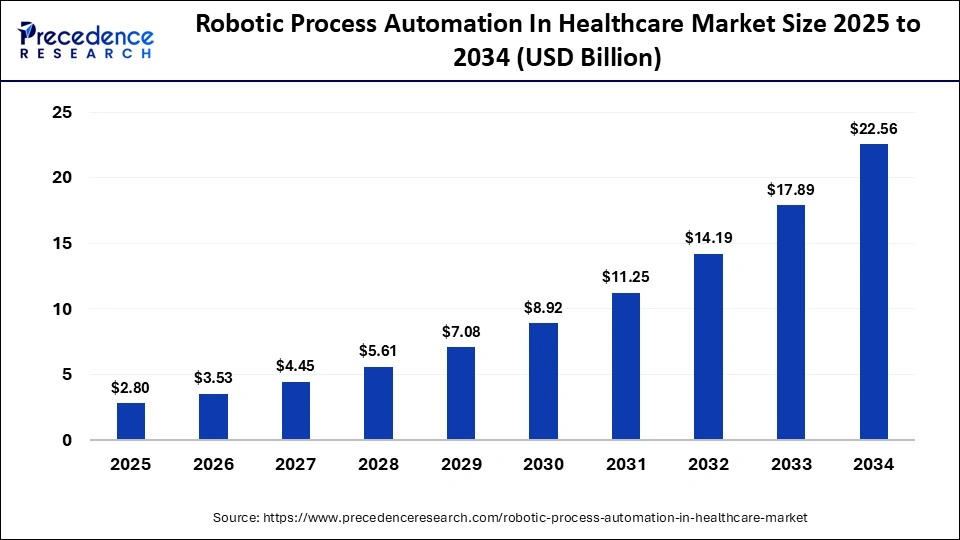
The healthcare RPA market is growing fast. Precedence Research values the global robotic process automation in healthcare market at $2.80 billion in 2025, projecting it to reach $27.23 billion by 2035 at a 26.10% CAGR. Notably, claims management holds the largest application share at an estimated 32.8% in 2026. Therefore, denial automation drives much of that growth.
1. How RPA Works in the Claims Process
A bot opens your EHR, reads the claim data, and moves it into your billing system without retyping anything. It then checks that claim against payer rules before submission. Because bots run overnight, your team starts each morning with clean queues instead of lookups.
Here is what a denial-focused bot fleet typically handles:
- Pulls demographic and insurance data from the EHR into the billing platform
- Runs eligibility checks against payer systems before the appointment
- Applies payer-specific edits and flags bad claims before they go out
- Polls payer portals for claim status and updates your system automatically
- Reads ERA files, sorts denials by reason code, and routes them to the right queue
- Resubmits corrected claims and tracks appeal deadlines by payer
2. Where RPA Fits in Denial Prevention and Recovery
Prevention happens before submission, while recovery happens after the payer says no. Both matter, but they cost very different amounts. Catching a coverage error at scheduling costs almost nothing, whereas reworking that same claim after denial costs real staff hours.
- Prevention bots: eligibility verification, data entry, claim scrubbing, authorization checks
- Recovery bots: denial classification, appeal assembly, resubmission, timely filing alerts
3. Why Healthcare Teams Use RPA for Claims Work
Several billing teams are not slow because staff lacks skill. Therefore, they are slow because the work repeats endlessly across dozens of payer portals.
- Manual claim volume grows faster than headcount budgets allow
- The same payer tasks repeat thousands of times each month
- Typing errors create denials that nobody intended
- Follow-up slips, so claims age past filing limits
RPA gives your billing team a rules-based worker that never skips a step. It prevents avoidable denials upfront and works the remaining ones faster. Consequently, the value depends on how much of your denial volume is genuinely repetitive.
What Published Results Show About RPA and Claim Denial Reduction
Published studies and vendor case data show that automation does lower denial rates, but only in the categories it targets. The strongest documented results come from eligibility verification, prior authorization, and registration accuracy.
However, results vary widely. Reductions depend on which workflow was automated and whether bots ran alone or alongside process redesign and human review.
Documented Denial Reductions From Healthcare Claims Automation
| Published result | Automation used | Before | After | Reported change |
| Northwell Health study, JAMA Network Open | EMR-integrated prior authorization | 7.6% | 2.6% | 65.4% relative reduction |
| OhioHealth | Automated eligibility and COB checks | Not published | Not published | 42% fewer registration denials |
| MetroHealth | Automated registration verification | Not published | Not published | 44% fewer denials |
| Texas health system, Access Healthcare | Analytics, redesign, and bots | 20% | 11% | 45% relative reduction |
| AGS Health, Texas system | Denial PMO plus automation | Not published | Not published | 64% fewer authorization denials |
1. Prior Authorization Automation Cut Denials From 7.6% to 2.6%
This is the strongest peer-reviewed evidence available. Northwell Health radiation oncologists studied 6,551 cases across 86 health plans. Denials fell from 314 cases to 63, a 65.4% average drop, with statistical significance at p<0.001.
- 2,403 automated cases were compared against 4,148 historic controls
- Per-payer reductions ranged from 45.7% to 88.6%
- Median authorization time fell 33.9%, from 4.2 to 2.8 business days
- Payer and prescription alignment reached 97.4% of automated cases
2. Front-End Eligibility Automation Cut Registration Denials by 42%
Front-end automation produces the largest category-specific gains. OhioHealth used Experian Health’s Patient Access Curator to check eligibility, coverage, and coordination of benefits in one automated pass. Registration and eligibility denials dropped 42% in the first year.
- Registrars stopped running manual searches across payer portals
- Staff reviewed exceptions instead of every single account
- Clean registration data stopped errors from reaching billing
- MetroHealth reported a 44% denial reduction using the same approach
3. A Texas Health System Dropped Its Denial Rate From 20% to 11%
Bots alone did not produce this result. Access Healthcare combined denial analytics, workflow changes, coding expertise, and exception-flagging automation. The denial rate halved within 90 days, and collections rose by $5.2 million.
Therefore, treat this as evidence for combined programs, not isolated bots. Automation carried the volume while people fixed the root causes feeding it.
4. What These Results Actually Tell You
Read across all five cases, and one pattern holds. Every large reduction came from automating a specific, preventable denial cause, never from automating broadly.
- Prior authorization and eligibility are the highest-yield targets
- Reductions concentrate in one category, not across total denials
- The biggest wins pair automation with process redesign
Do not expect a 65% cut in total denials. Expect meaningful reductions in whichever categories you automate well. Consequently, your business case starts by measuring what share of your denials comes from repeatable workflows.
Why Healthcare Claims Get Denied in the First Place
Several denials come from administrative mistakes rather than clinical disagreements. Payers reject claims because coverage was wrong, information was missing, authorization was absent, or a deadline passed.
Each of those failures is preventable with better data at intake. However, a smaller group of denials questions whether care was medically necessary, and those need human judgment rather than cleaner data.
1. Eligibility and Insurance Errors
Coverage changes constantly, but registration data does not. Consequently, claims go out against plans that ended weeks earlier.
- Coverage terminated before the date of service
- Patient switched plans without telling the front desk
- Secondary insurance missed entirely
2. Missing or Incorrect Patient Information
Small typing errors create denials nobody intended. A single wrong digit in a member ID stops a clean claim cold.
- Misspelled names or wrong dates of birth
- Incorrect member or subscriber ID numbers
- Wrong payer selected at registration
3. Prior Authorization Problems
Missing precertification is one of the most common denial reasons across US payers. Approvals also expire, and delivered care often drifts from what was approved.
- No authorization obtained before the service
- Approval expired before treatment started
- Service delivered differs from the approved code
4. Coding and Claim Errors
Payers apply their own edit rules on top of national standards. Therefore, a claim can be technically correct and still get rejected.
- Wrong CPT, ICD-10, or HCPCS codes
- Missing or invalid modifiers
- Failed NCCI edits or bundling conflicts
5. Timely Filing and Submission Errors
Every payer sets its own filing window. Once that clock runs out, the money is gone permanently.
- Claim never submitted after a correction
- Appeal filed past the payer deadline
- Clearinghouse rejection nobody noticed
6. Clinical and Medical Necessity Denials
These denials question the care itself, not the paperwork. Resolving them requires reading the chart and building a clinical argument.
Five of these six causes are data and process failures, which makes them predictable and preventable. Only medical necessity denials need real clinical judgment. That split decides what automation can realistically fix.
Where RPA Fits Into Claims Denial Management
RPA sits on both sides of the denial. Before submission, bots verify data and catch errors that would trigger a rejection. After submission, they sort denials, correct claims, and resubmit them on schedule.
However, RPA only executes rules you write. Therefore, it belongs wherever the work is repetitive and predictable, not wherever it is hardest.
1. What RPA Actually Does in a Healthcare Claims Workflow
A bot uses your systems the same way a biller does. It logs in, reads a screen, copies data, and clicks through the workflow. Because it follows a script, it never skips a field or forgets a follow-up.
- Reads claim data from the EHR and moves it into billing
- Checks information against payer rules before submission
- Updates records across systems without retyping
- Submits forms through portals and clearinghouses
- Monitors claim status and flags anything that stalls
2. RPA Before a Claim Is Submitted
Prevention is where RPA earns the most money. Catching a coverage error at scheduling costs almost nothing, whereas fixing that same claim after denial costs staff hours.
- Runs eligibility checks the night before appointments
- Validates demographics, member IDs, and payer selection
- Confirms authorization exists and has not expired
- Applies payer edits and holds bad claims for review
3. RPA After a Claim Is Denied
Recovery work is repetitive, which makes it strong bot territory. Denials arrive with reason codes, and those codes map cleanly to actions.
- Reads ERA files and classifies denials by reason code
- Routes each denial to the correct work queue
- Corrects and resubmits claims that failed on data errors
- Tracks appeal and filing deadlines by payer
4. What RPA Cannot Do on Its Own
A bot cannot read a physician’s note and argue that treatment was necessary. It also cannot interpret a vague denial letter or negotiate with a payer representative.
RPA handles the volume on both sides of a denial, before and after submission. It prevents avoidable rejections and works the rest faster. Consequently, everything requiring clinical judgment still needs a person.
How RPA Helps Prevent Claims Denials Before Submission
RPA lowers the denial rate by fixing claims before payers ever see them. Bots verify coverage, confirm authorizations, check required fields, and catch data mismatches while the claim is still editable. Because a prevented denial costs nothing to rework, this is where automation returns the most money.
However, prevention only works when your bots run before submission, not after.
1. Automating Insurance Eligibility Checks
Coverage errors are the single most preventable denial cause. Bots run checks the night before appointments, across every patient and every payer at once. Results write straight back into your system without staff involvement.
- Confirms active coverage on the date of service
- Verifies plan details, deductibles, and copay amounts
- Detects terminations and mid-year plan switches
- Checks coordination of benefits for secondary payers
- Flags mismatches between registration data and payer records
2. Automating Prior Authorization Tracking
Missing precertification drives a large share of US denials. Bots cannot argue clinical necessity, but they can make sure nothing slips through unapproved.
- Screens scheduled CPT codes against payer authorization rules
- Submits routine documentation through payer portals
- Polls authorization status and updates the EHR automatically
- Captures approval numbers and links them to the claim
- Monitors expiration dates and escalates approvals about to lapse
3. Checking Claims Before They Reach the Payer
Every payer defines a clean claim differently. Therefore, bots apply your rule set at the point of submission and hold anything that fails.
- Detects missing or blank required fields
- Validates patient demographics and member IDs
- Confirms provider NPI, taxonomy, and billing details
- Runs NCCI edits and checks modifier logic
- Applies payer-specific rules before transmission
4. Preventing Timely Filing Errors
Filing windows vary by payer, and a missed deadline is permanent revenue loss. Bots track those clocks continuously.
- Tracks each payer’s filing and appeal deadlines
- Confirms every claim actually transmitted
- Alerts staff on clearinghouse rejections
- Escalates aging claims before the window closes
5. Catching Data Errors Across Healthcare Systems
Denials often start when the same patient exists differently in three systems. Bots compare those records and surface conflicts early.
- Reconciles registration, EHR, and billing data
- Matches insurance records against payer responses
- Flags conflicts for human review before billing
Prevention bots work the front end, where errors are cheap to fix. Eligibility, authorization, and claim checks deliver the largest denial reductions. Consequently, build here first, then move downstream.
How RPA Makes Denial Management Faster After a Claim Is Denied
Prevention never catches everything, so some claims will still come back denied. RPA then cuts the manual work needed to resolve them. Specifically, bots read remittance files, sort denials by reason, correct the simple ones, and rebuild appeal packages. However, speed is the gain here, not prevention.
Consequently, recovery bots recover revenue faster rather than stopping the denial from happening.
1. Automatically Identifying and Sorting Denials
Denials arrive with structured reason codes, which makes sorting them ideal bot work. As a result, a bot can read every remittance the moment it lands. In practice, the worklist is built before your staff even arrive.
- Parses ERA files and extracts CARC and RARC codes
- Groups denials by payer and denial reason
- Ranks each denial by claim dollar value
- Assigns work to billing, coding, or clinical teams
- Sets priority using deadline proximity and recovery odds
2. Checking Claim Status Without Manual Follow-Up
Status checking is pure repetition, and staff hate it. Meanwhile, unchecked claims quietly age toward their filing deadline. Therefore, bots handle the polling and only alert people when something needs action.
- Pulls claim status from clearinghouse dashboards
- Logs into payer portals and reads status screens
- Confirms acknowledgments after every submission
- Runs EDI 276 and 277 status transactions
- Follows a set schedule per payer instead of ad hoc checks
3. Correcting and Resubmitting Simple Denials
Many denials fail on data rather than on judgment. Because the fix is predictable, a bot can apply it without review. Afterward, the claim goes back out the same day instead of sitting in a queue.
- Adds missing fields the payer flagged
- Corrects names, dates of birth, and member IDs
- Updates coverage details after a fresh eligibility check
- Applies routine claim edits your team has already standardized
- Resubmits through the correct channel and logs the action
4. Automating Denial Appeal Preparation
Appeals lose money mostly because nobody has time to build them. However, most of that work is assembly rather than argument. Therefore, bots build the package while staff only review and sign.
- Pulls claim, remittance, and encounter data into one file
- Retrieves supporting documents from the EHR
- Populates payer-specific appeal forms
- Tracks the appeal deadline for each payer
- Monitors responses and reopens the case when a decision lands
5. Escalating Complex Denials to the Right Team
In contrast, some denials should never touch a bot. Medical necessity disputes, coding disagreements, and contract underpayments all need human reasoning. Instead of attempting them, a well-designed bot routes them immediately.
- Sends clinical denials to a nurse or physician reviewer
- Routes coding disputes to certified coders
- Flags contractual underpayments for contract management
- Escalates high-dollar claims regardless of denial type
Recovery bots cut the hours between denial and resubmission. Specifically, they sort, chase, correct, and prepare, while people handle the arguments. Consequently, your team spends its time where judgment actually changes the outcome.
Which Types of Claims Denials Can RPA Reduce the Most?
RPA works best on denials caused by data, deadlines, and repeated payer rules. Those follow predictable logic, so a bot can resolve them without judgment. Meanwhile, coding and documentation denials need an AI layer on top of the bot.
However, medical necessity and contract disputes need people. Consequently, your denial mix decides whether automation pays back.
1. Fit by Denial Type at a Glance
| Fit level | Denial types | What resolves it |
| High fit | Eligibility, demographics, missing information, timely filing, coordination of benefits | RPA alone |
| Medium fit | Coding errors, modifiers, documentation gaps, payer exceptions | RPA plus AI or NLP |
| Low fit | Medical necessity, clinical disputes, contract underpayments, high-value claims | Human review |
2. Denials That Are Strong Candidates for RPA
These denials repeat in the same shape every time. Because the rule never changes, a bot applies it consistently. Therefore, expect your largest reductions here.
- Insurance eligibility and coverage termination errors
- Demographic mistakes such as names, dates of birth, and member IDs
- Administrative prior authorization gaps, including missing or expired approvals
- Missing claim fields the payer flags by code
- Timely filing misses caused by slow follow-up
- Coordination of benefits errors on secondary coverage
- Payer-rule errors your team keeps repeating
3. Denials That Need RPA Plus Other Technology
Here the bot handles movement while something smarter handles interpretation. In practice, RPA gathers the data, and an AI model reads it.
- Coding denials requiring code selection, not just code entry
- Modifier disputes tied to clinical context
- Documentation gaps buried in free-text notes
- Payer-specific exceptions that shift without notice
- Unusual claim patterns your rules never anticipated
4. Denials That Usually Need Human Review
These denials question the care or the contract. Consequently, automation can prepare the case but never argue it.
- Medical necessity denials
- Complex clinical documentation disputes
- Payer contract and underpayment disagreements
- High-value claims where the dollar risk justifies review
- Disputed clinical decisions between payer and physician
Run your last six months of denials through these three buckets before budgeting anything. If most of your volume sits in the high-fit group, RPA will move your denial rate. Otherwise, fix the process or add an AI layer first.
Why RPA Alone Cannot Solve Every Claims Denial
RPA fails where denials require judgment, change constantly, or start outside your billing team. Bots follow rules exactly, so they break when payers rewrite those rules or redesign their portals.
Meanwhile, automation cannot repair bad data it receives from registration. Therefore, treat RPA as one layer in a denial program rather than the whole answer.
1. RPA Follows Rules Rather Than Understanding Clinical Context
A bot executes instructions. It does not reason. Consequently, it cannot read a physician’s note and decide whether a treatment was justified.
- Cannot interpret free-text clinical documentation
- Cannot judge whether care met medical necessity criteria
- Cannot build a clinical argument for an appeal
- Fails when the same denial code means different things by payer
2. Payer Rules Change Frequently
Payers update coverage policies, edit rules, and documentation requirements throughout the year. However, your bots only know the rules you wrote last quarter.
- Coverage policies shift mid-year without clear notice
- Annual CPT and ICD-10 updates change valid code sets
- Payer-specific edits vary across every plan you bill
- Rules written once become silently wrong over time
3. Payer Portal Changes Can Break RPA Bots
Screen-based bots depend on the page looking the same tomorrow. In practice, it often does not. Forrester found that 45% of firms report weekly bot breakage, which makes maintenance a permanent budget line.
- Portal redesigns break the bot’s navigation path
- New MFA or CAPTCHA steps stop automated logins
- EHR version upgrades shift field locations
- Broken bots fail quietly unless you monitor them
4. Poor Data Cannot Be Fixed by Automation Alone
Automation processes what it receives. Therefore, bad registration data simply reaches the payer faster.
- Wrong insurance captured at intake still denies
- Duplicate patient records still confuse claim matching
- Untrained front-desk staff keep generating the same errors
- Speed without accuracy raises your rework volume
5. Some Denials Are Payer or Contract Problems
Not every denial means your workflow failed. Some reflect payer behavior or contract terms you never negotiated well.
- Payers using automated review to deny at scale
- Underpayments tied to contract rate disputes
- Policy exclusions written into the plan
- Denials overturned only through appeal, never prevention
RPA handles repetition rather than reasoning, and it needs maintenance to stay accurate. Consequently, pair it with clean upstream data, an AI layer for documentation, and people for disputes. That combination lowers denials, not bots alone.
Where AI Makes RPA Denial Automation More Effective
AI handles the judgment calls that bots cannot. Specifically, it predicts which claims will be denied, reads unstructured clinical notes, interprets messy denial patterns, and drafts appeals. Meanwhile, RPA still does the moving, clicking, and submitting.
Therefore, the two work as layers rather than alternatives. In practice, this hybrid closes the gaps that rules-only automation leaves open.
1. Predicting High-Risk Claims Before Submission
Rules catch known errors. However, prediction models catch claims that look risky for reasons nobody wrote a rule about. As a result, your team reviews the riskiest claims instead of every claim.
- Scores each claim for denial likelihood before submission
- Learns from your own historical denial outcomes
- Flags code and payer combinations that repeatedly fail
- Routes high-risk claims to human review, low-risk claims straight out
2. Finding Missing Information in Clinical Documentation
Much of the information payers want sits in free-text notes, not structured fields. Consequently, a rules engine cannot see it. NLP reads that text and surfaces what is missing.
- Extracts diagnoses and clinical details from physician notes
- Flags documentation gaps before the claim goes out
- Matches documented care against payer coverage criteria
- Supports coding accuracy without replacing the coder
3. Understanding More Complex Denial Reasons
Denial codes are often vague, and the same code means different things across payers. Therefore, pattern analysis works better than static rules.
- Groups denials by real root cause, not just reason code
- Detects payer behavior changes early
- Links denial spikes to specific service lines or teams
- Surfaces trends your rules were never built to catch
4. Drafting Denial Appeals
Appeals stall because writing them takes time. However, generative AI can produce a first draft while RPA assembles the evidence and files it.
- Drafts appeal language tied to payer policy
- Pulls supporting evidence from the chart
- Matches argument structure to the denial reason
- Hands the draft to staff for review, never straight to the payer
5. Keeping People in the Loop
Automation should stop short of final decisions. In fact, several US states now require documented human oversight of AI-driven billing decisions.
- Staff approve every appeal before submission
- Coders review AI code suggestions
- Clinical denials always reach a clinical reviewer
- Every automated action stays logged for audit
RPA executes, whereas AI interprets. Together they cover both the repetitive work and the judgment work. Consequently, the strongest denial programs run both under human review.
How Custom RPA Connects With Your Existing Healthcare Systems
Custom RPA sits on top of what you already run. Bots log into your EHR, billing platform, clearinghouse, and payer portals the same way your staff does. Therefore, no system replacement is required. Where APIs exist, the bot uses them instead of screens.
Meanwhile, everything else runs through the interface your team already knows.
1. EHR and Practice Management Systems
Your EHR holds the data every claim depends on. Consequently, this is where most denial bots start.
- Reads patient demographics and insurance details
- Pulls encounter and charge information
- Retrieves clinical documentation for appeals
- Writes eligibility and status updates back into the record
- Works with Epic, Oracle Health, athenahealth, and smaller systems
2. Clearinghouses and Claims Systems
Claims pass through a clearinghouse before reaching the payer. In practice, a lot of denial signals get lost at this step.
- Submits claims on a continuous schedule
- Confirms acknowledgments after every batch
- Reads remittance files as they arrive
- Captures denial responses and reason codes
- Flags clearinghouse rejections nobody noticed
3. Payer Portals
Many payers still offer no usable API. Therefore, portal automation remains the only option for those plans.
- Logs in and checks claim status
- Retrieves authorization decisions and reference numbers
- Downloads denial letters and remittance documents
- Submits appeals where no electronic channel exists
However, check each payer’s terms first. MassHealth, for example, has required written approval before running bots on its Provider Online Service Center since July 2022.
4. EDI Transactions
EDI is more stable than screen scraping, so use it wherever the payer supports it.
- 270 and 271 for eligibility verification
- 276 and 277 for claim status checks
- 837 for claim submission
- 835 for remittance and denial data
5. FHIR and Healthcare APIs
APIs do not break when a screen changes. As a result, they need far less maintenance than portal bots. This matters now, because CMS-0057-F requires impacted payers to run FHIR APIs from January 1, 2027.
- More reliable than screen automation
- Cheaper to maintain over three years
- Future-proof as payer APIs come online
6. Denial Analytics and Reporting Systems
Every bot action produces data. Consequently, your dashboards get better as automation runs.
- Feeds denial rate and clean claim rate tracking
- Supports root-cause analysis by payer and service line
- Creates the audit trail compliance reviews require
RPA connects to your stack instead of replacing it. Use APIs and EDI where available, then bots for everything else. That mix keeps maintenance low, and integration cost predictable.
How to Build an RPA Claims Denial Reduction Strategy
Start with your denial data rather than with bot selection. At Intellivon, we audit six months of denials first, separate the preventable ones from the clinical ones, then rank the rest by volume and dollar value.
Only after that do we automate one or two workflows. Consequently, the pilot proves value before anyone budgets a full fleet.
1. Start With Your Existing Denial Data
Every automation decision comes from this step. We pull your remittance history and break it into categories that show where the money actually leaks. Without this baseline, you cannot prove the bots worked later.
- Total denial volume and monthly trend
- Initial denial rate against the 11.8% to 12.6% industry range
- Dollar value tied up in each denial category
- Denials grouped by payer, since payer behavior varies widely
- CARC and RARC reason codes across your full book
- Denials by service line and by registration location
- Root cause behind each cluster, not just the code
2. Find the Denials That Are Actually Preventable
Next, we split the data into three groups. Only one of them belongs to automation, and founders are often surprised by how the split falls.
- Workflow failures: eligibility, demographics, missing fields, timely filing
- Clinical denials: medical necessity, documentation disputes
- Payer-driven denials: contract underpayments, policy exclusions
If most of your volume sits outside the first group, we say so early. Automating around a clinical documentation problem wastes money.
3. Rank Workflows by Volume and Financial Impact
Repeatability alone does not justify a bot. Therefore, we score each workflow on both axes and automate only where they overlap.
- High volume plus high dollar value goes first
- High volume plus low value goes second
- Low volume plus high value stays manual, because judgment matters more
- Anything requiring clinical reasoning is excluded entirely
4. Map Where Each Denial Starts
A denial rarely starts in billing. In practice, it starts weeks earlier at a desk nobody associates with revenue. We trace each denial cluster back to its origin point.
- Registration and patient intake
- Insurance verification and eligibility checks
- Prior authorization requests and approvals
- Coding and charge capture
- Clinical documentation
- Claim creation and scrubbing
- Claim submission and transmission
This map decides where the bot goes. Fixing a registration problem with a resubmission bot treats the symptom instead of the cause.
5. Start With One or Two High-Volume Workflows
We never automate a full revenue cycle in phase one. Instead, we pick one or two workflows and run them to production.
- A narrow pilot exposes integration problems cheaply
- Your team learns the exception patterns before scale
- Results arrive in weeks, not quarters
- A failed pilot costs a fraction of a failed program
This matters because EY reports that 30% to 50% of RPA projects fail. Most of that failure comes from scope, not technology.
6. Build Exception Handling Into the Workflow
Exception design separates a working bot from a liability. Consequently, we define the stop conditions before writing any automation.
- The bot stops when data is ambiguous
- Clinical denials route to a clinical reviewer
- High-dollar claims escalate regardless of denial type
- Every handoff is logged for audit
7. Measure Results Before Expanding
Finally, we hold the pilot against your baseline. Bot run counts prove nothing, so we track outcomes instead.
- Denial rate in the automated category
- Clean claim rate and first-pass resolution rate
- Days in accounts receivable
- Staff hours returned to higher-value work
Data first, then triage, then one controlled pilot. Expand only when the numbers move against your original baseline. That sequence is why our denial builds land inside budget rather than stalling at proof of concept.
Custom RPA vs Denial Management Software
Buy software when your workflows are standard, and your systems are already supported. Build custom RPA when payers, legacy systems, or internal rules fall outside what a product covers.
However, most organizations end up somewhere between the two. Therefore, the practical question is not build or buy, but which workflows each approach should own.
1. When Off-the-Shelf Software Is Enough
Products work well when your operation looks like the operation they were built for. Consequently, they deliver value fastest with the least engineering effort.
- You run a mainstream EHR with existing connectors
- Your payer mix is common and already supported
- Denial reasons follow predictable industry patterns
- You need results in weeks, not months
- You have no internal team to maintain bots
2. When Custom RPA Makes More Sense
Custom builds earn their cost where products stop. In practice, that gap shows up as manual work nobody can automate away.
- Unusual payer workflows no vendor supports
- Legacy systems without APIs or modern integrations
- Several disconnected applications staff switch between daily
- Custom billing processes built around your specialty
- Heavy manual payer portal work across many plans
- Denial rules specific to your organization
- Automation you intend to own as product IP
3. When a Hybrid Approach Makes More Sense
Most healthcare organizations land here. Therefore, keep the platform and build bots only around its gaps.
- Platform handles eligibility, scrubbing, and standard denials
- Custom bots cover unsupported payers and legacy systems
- Bots move data between tools the platform never reaches
- You avoid rebuilding what already works
4. Existing Denial Automation Platforms to Benchmark
Before building anything, benchmark against what these platforms already automate.
| Platform | What it automates | Where gaps usually appear |
| Waystar | Claim submission, denial prediction, appeals workflow | Niche payers and custom internal rules |
| Experian Health | Eligibility, coverage discovery, registration accuracy | Post-denial workflow depth |
| Infinx | Prior authorization and eligibility verification | Broader RCM automation |
| CareCloud | Integrated billing and denial workflow | Works best inside its own stack |
| Automation Anywhere | General-purpose bots across any system | No healthcare denial logic out of the box |
Buy for standard workflows, build for the ones nobody supports, and expect to do both. Benchmark the platforms first, then automate only what remains manual. That sequence keeps your build scope small and your cost predictable.
How Much Does Custom RPA Claims Denial Automation Cost?
Custom RPA claims denial automation costs $70,000 to $300,000 to build. Where you land depends on how many payer workflows, bots, and system integrations the project covers. Meanwhile, AI features and legacy systems push the number upward. Therefore, most organizations start narrow and expand once the first workflows prove out.
Below is the full breakdown by phase.
1. Cost Breakdown by Delivery Phase
| Phase | Cost range | What it covers |
| Workflow discovery and denial analysis | $8,000 to $18,000 | Six-month denial audit and automation map |
| Architecture and integration design | $12,000 to $40,000 | EHR, clearinghouse, and payer connection design |
| RPA workflow development | $25,000 to $95,000 | The bots themselves, plus exception routing |
| Rules, AI, and denial intelligence | $5,000 to $80,000 | Rules engine, prediction models, NLP review |
| Security, testing, and user acceptance | $10,000 to $35,000 | HIPAA controls, audit logs, parallel testing |
| Deployment, reporting, and training | $10,000 to $32,000 | Go-live, denial dashboards, staff training |
| Total | $70,000 to $300,000 | Full custom build |
2. What Each Phase Actually Delivers
Discovery comes first because it decides everything after it. Consequently, you get an automation map and a denial baseline before anyone writes code.
- Discovery: identifies which denial categories are genuinely automatable
- Architecture: defines how bots reach each system, via API or screen
- Development: builds eligibility, scrubbing, status, and resubmission bots
- Intelligence: adds prediction and documentation review where rules fall short
- Security: applies HIPAA controls and builds the audit trail
- Deployment: moves bots into production with dashboards and training
3. Ongoing Maintenance Costs
Maintenance is not optional, so budget it from day one. Plan for 15% to 25% of initial development cost every year.
- Payer portal redesigns break existing bot navigation
- EHR version upgrades shift field locations
- Annual CPT and ICD-10 updates change valid code sets
- Payer rule changes require logic updates
- Monitoring catches bots that fail silently
4. What Increases the Cost of the Project
Nine variables drive your position inside the range. Therefore, scope these before requesting any quote.
| Cost driver | Why it raises cost |
| Number of payer workflows | Each payer needs its own rules and testing |
| Number of bots | More bots mean more build and more maintenance |
| EHR integrations | Each additional EHR adds $30,000 to $80,000 |
| Payer portal integrations | Screen automation carries recurring upkeep |
| AI features | Prediction and NLP require models and training data |
| Legacy systems | No APIs means slower, more fragile builds |
| Claim volume | High volume demands stronger infrastructure |
| Reporting requirements | Custom dashboards extend the analytics phase |
| Compliance requirements | SOC 2, BAA, and audit depth add engineering |
Expect $70,000 to $300,000 for the build and 15% to 25% annually to keep it running. Payer count, EHR count, and AI scope move the number the most. Consequently, a narrow first phase keeps your total predictable.
Security and Compliance Requirements for Claims Automation
Any bot touching claims data touches PHI, so it inherits every HIPAA obligation your staff carries. Specifically, that means encryption, unique credentials, role-based access, and complete audit logs on every action.
Additionally, vendors handling that data need signed business associate agreements. Therefore, compliance is a design requirement from day one, not something added before launch.
1. HIPAA and PHI Protection
Claims data contains names, diagnoses, and coverage details, all of which qualify as PHI. Consequently, the Privacy and Security Rules apply to bots exactly as they apply to people.
- Bots access only the minimum data each task requires
- PHI never leaves approved systems or regions
- Data retention follows your existing HIPAA policy
- Breach notification procedures cover bot failures too
2. Role-Based Access for RPA Bots
Treat every bot as a named worker with a defined job. In practice, this stops one broken bot from reaching data it never needed.
- Each bot gets its own permission set
- Access is scoped to specific systems and functions
- Permissions are reviewed when workflows change
- Retired bots have access revoked immediately
3. Secure Credential Management
Never let bots share a human login. However, this is one of the most common shortcuts we see in existing deployments.
- Bots use unique service accounts, never staff credentials
- Passwords sit in a managed vault, not in bot scripts
- Credentials rotate on a fixed schedule
- MFA handling is documented per payer portal
4. Encryption and Data Protection
Encryption is required at rest and in transit. Therefore, verify it across every hop the data takes.
- TLS on all system and payer connections
- Encrypted storage for claim files and remittances
- Encrypted logs, since logs often contain PHI
- US data residency confirmed with every vendor
5. Complete Audit Logs
Auditors need to reconstruct why a claim was resubmitted. Consequently, logs must capture intent rather than just outcomes.
- Every PHI access recorded with timestamp and bot identity
- Every claim action logged, including automated resubmissions
- Logs made immutable and retained per policy
6. BAA and Third-Party Vendor Requirements
Any vendor processing PHI signs a BAA. Additionally, verify their controls before signing.
- Signed BAA with your development partner
- SOC 2 Type II certification confirmed
- Cloud hosting and subcontractors covered in writing
7. Human Approval for High-Risk Actions
Some actions should never be completed unattended. Instead, route them for sign-off.
- Appeals reviewed before submission
- High-dollar claims approved by a person
- Clinical denials sent to clinical reviewers
Bots inherit your HIPAA obligations the moment they touch claims data. Build unique credentials, scoped access, encryption, and audit logs into the design. Consequently, compliance becomes cheaper than retrofitting it later.
How Intellivon Will Help You Build RPA for Claims Denial Reduction
We start with your denial data, not with a bot demo. Our team audits six months of remittance history, separates the preventable denials from the clinical ones, and tells you which categories are actually worth automating. Sometimes that answer is fewer workflows than you expected.
Consequently, you get a scoped build with a defensible ROI case instead of a bot fleet nobody can maintain.
Here is what working with us looks like:
- Denial audit before development. We map your CARC and RARC volume by payer, service line, and dollar value, so automation targets where the money actually sits.
- Healthcare-first engineering, not generic RPA. Healthcare is roughly 30% of our delivery mix, and enterprise clients make up 80% of our book.
- Proven EHR integration experience. We built a SMART on FHIR integration with Epic for a US healthcare client, covering real-time data retrieval and write-back under HL7 FHIR standards.
- API-first architecture where it matters. We use EDI and FHIR wherever payers support them, then screen automation only for the gaps, which keeps your maintenance bill down.
- Compliance engineered from day one. HIPAA controls, unique bot credentials, encrypted logging, OAuth 2.0 authentication, and signed BAAs are built in, not bolted on.
- Exception handling defined before the first bot. We decide upfront where automation stops and a clinical reviewer, coder, or contract team takes over.
- Phased delivery: you can stop after phase two. Each phase produces a standalone deliverable, so you are never locked into a full program to get value.
Book a denial strategy call. Bring six months of denial data, and we will walk you through which workflows are automatable, what each is worth annually, and where the payback lands.
Conclusion
RPA claims denial management works, but only where denials are repetitive. Specifically, bots cut eligibility, demographic, authorization, and filing denials while people handle clinical disputes. Therefore, your denial mix decides the return, not the technology.
Start by auditing six months of remittance data, then automate one workflow and measure it. Meanwhile, plan for maintenance from day one. Consequently, organizations seeing real reductions built narrow, measured, and expanded only after the numbers moved.
FAQs
Q1. Can RPA Prevent Claims From Being Denied?
A1. Yes, but only administrative denials. Bots verify eligibility, confirm authorizations, and check required fields before submission, which stops rejections caused by bad data. However, they cannot prevent medical necessity denials. Therefore, expect prevention in specific categories rather than an across-the-board reduction in your total denial rate.
Q2. Which Claims Denials Are Best Suited for RPA?
A2. Eligibility errors, demographic mistakes, missing claim information, timely filing misses, and coordination of benefits issues suit RPA best. Each follows predictable rules, so a bot resolves them consistently. Meanwhile, coding denials need an AI layer. Consequently, audit your CARC codes first to see where your volume actually sits.
Q3. Does RPA Need AI for Denial Management?
A3. Not always, but usually. RPA alone handles roughly half of denial categories well. However, coding errors, documentation gaps, and complex denial patterns need AI or NLP to interpret unstructured text. Therefore, most production programs run both layers together, with staff reviewing anything the models flag.
Q4. Can RPA Work With Epic and Other EHR Systems?
A4. Yes. Bots use Epic, Oracle Health, and athenahealth the same way staff does, so no system replacement is needed. Additionally, API-based integration through SMART on FHIR is more reliable than screen automation. Consequently, we use APIs wherever available and reserve bots for systems without them.
Q5. What Happens When a Payer Changes Its Portal?
A5. The bot breaks, often silently. Forrester found that 45% of firms report weekly bot breakage, so this is routine rather than exceptional. Therefore, budget 15% to 25% of build cost annually for maintenance. Additionally, monitoring matters, because an unmonitored broken bot quietly stops working claims.