Key Takeaways:
-
Enterprise imaging platforms consolidate PACS, DICOM ingestion, VNA logic, and EHR image access across specialties.
-
Focused MVPs cover one or two PACS connections, basic VNA, and a universal viewer with HIPAA controls.
-
Production builds add multi-specialty workflows, DICOMweb, FHIR ImagingStudy support, and AI imaging triage integration.
-
MVPs cost $70,000 to $120,000 while production-grade builds reach $180,000 to $350,000.
-
How Intellivon builds enterprise imaging platforms as governed imaging infrastructure, and not isolated image repositories.
The enterprise imaging platform cost for consolidating across hospital specialties typically falls between $70,000 and $350,000. That range exists because radiology, cardiology, and pathology often run on different PACS systems from different vendors. Each one stores images in its own format. Before any AI tool or analytics layer gets built, those systems need to speak the same language.
Here is what most cost guides miss entirely. Without a DICOM tag normalization layer built in from day one, every new specialty needs custom mapping work from scratch. That alone can push migration costs up by 30 to 50%. Get that layer right early, though, and the payoff is real. Hospitals consolidating into a vendor-neutral archive have cut duplicate imaging studies by up to 30% within the first year. That means lower storage costs and fewer repeat scans for patients.
Intellivon has built enterprise imaging architecture for over ten years, and the normalization layer always comes before migration starts. This post breaks down every phase: VNA implementation, PACS migration, DICOM and non-DICOM integration, EHR connectivity, AI diagnostic tools, and HIPAA compliance. By the end, you will have a phase-by-phase cost framework ready for your next capital approval meeting.

What Is an Enterprise Imaging Consolidation Platform?
An enterprise imaging platform is a hospital-wide system that unifies medical images, videos, reports, and metadata into one governed environment. It connects PACS, VNA, RIS, CVIS, LIS, EHR, DICOM devices, non-DICOM media, and AI tools.
This architecture replaces siloed legacy systems with a single, standards-based foundation that optimizes clinical workflows and reduces overall enterprise imaging platform cost.
1. The platform is not just a bigger PACS
Traditional PACS handle departmental workflows, while an enterprise platform connects multiple specialties across the hospital network. Moving beyond isolated systems requires understanding how specialized software components interact at scale:
- PACS Layer: Manages localized, high-speed operational workflows and reading preferences for specific clinical departments.
- VNA Layer: Serves as the vendor-neutral archive and image lifecycle management layer to standardize long-term storage rules.
- Universal Viewer Layer: Provides an enterprise-wide zero-footprint or diagnostic viewer for fast clinical access.
- EHR Integration Layer: Drives the clinical workflow by calling patient pixels directly into charts.
- AI Tools Layer: Executes automated image analysis pipelines, triage routing, and worklist prioritization algorithms.
To accurately calculate how much imaging consolidation costs, hospitals and leadership must evaluate specific multi-specialty imaging platform development cost variables. This includes budgeting for a standard radiology PACS consolidation cost alongside a distinct cardiology PACS integration cost.
Furthermore, networks must factor in a pathology imaging integration cost for whole-slide scanners, plus an oncology-focused endoscopy imaging integration cost.
2. The platform creates one longitudinal imaging record
This unified platform ensures clinicians can access a complete longitudinal imaging view of a patient across multiple specialties and facilities. Building this single record requires resolving complex identity discrepancies between disparate departmental systems that utilize completely different patient numbering conventions.
- Identity Normalization: Reconciles conflicting accession numbers and study details across legacy networks.
- EMPI Integration: Resolves local medical record numbers to a single enterprise patient identifier.
- Duplicate Detection: Identifies and merges overlapping or identical studies automatically.
- Tag Cleaning: Executes consistent DICOM tag normalization cost routines before archiving media.
Deploying this identity layer requires balancing a dedicated patient matching imaging cost with an enterprise master patient index imaging cost.
This structural strategy prevents data mismatching and guarantees deterministic data matching at scale.
3. The platform must support DICOM and non-DICOM content
While radiology relies on traditional DICOM protocols, massive volumes of critical clinical media live in non-standardized enterprise formats. A modern platform must natively ingest visible light files, point-of-care ultrasound clips, wound photos, and clinical PDFs.
- DICOMweb Implementation: Provides modern, web-based RESTful APIs for low-latency image streaming to remote viewers.
- FHIR ImagingStudy Resource: Connects imaging metadata directly to modern EHRs for real-time lookups.
- Cross-Enterprise Sharing: Uses document-based sharing standards for non-DICOM files like endoscopy videos.
- Metadata Indexing: Packages encounter-based images with accurate clinical tags for searchable governance.
Managing these diverse data types directly impacts your final enterprise imaging platform build cost. Organizations must budget for a modern DICOMweb implementation cost alongside a visible light imaging integration cost for clinical cameras.
Additionally, engineers must account for a non-DICOM imaging integration cost to handle point-of-care documentation safely.
An enterprise platform unifies imaging media to make data usable across the entire care journey, not just inside individual departments. This foundational approach ensures every dollar invested maps directly to clinical integration, regulatory governance, data migration, and long-term AI-readiness.
Why Hospitals Need Enterprise Imaging Now More Than Ever
Hospitals need enterprise imaging now because imaging volume, specialty image creation, AI adoption, cloud migration, and cross-site care coordination are growing faster than legacy systems can handle. A unified architecture cuts down on duplicate software, helps doctors find files faster, and gives IT teams complete control over storage security.
Highlighting this urgency, the global vendor-neutral archive market is expanding at a CAGR of 13.3% from 2025 to 2033 to manage these exploding multi-department datasets.

1. Imaging is no longer only a radiology problem
Modern hospital networks create huge amounts of visual data outside the main scanning lab. Doctors across every department use cameras, scopes, and specialized sensors to check on patients every day.
- Multi-Ology Spread: Care teams in cardiology, ophthalmology, pathology, dermatology, and orthopedics make heavy use of daily visual media.
- Emergency & Acute Care: Fast point-of-care ultrasound clips are captured in emergency rooms, surgery suites, and wound care clinics.
- Silo Fragmentation: Specialized tools in endoscopy and oncology create loose files that sit outside the hospital’s official record.
- Growth Projections: The global vendor-neutral archive market was estimated at $2.94B in 2024 and is projected to reach $8.89B by 2033.
Because of this data spread, evaluating your multi-specialty imaging platform development cost is a vital planning step.
Every clinic needs a clear way to save and share its unique media. Without a combined platform, these loose files remain completely invisible to the rest of the care team.
2. Departmental silos increase operating cost
Running separate imaging systems across different floors drains hospital budgets quickly. IT teams find themselves trapped in a cycle of paying for duplicate software licenses and separate support teams.
- Contract Clutter: Networks frequently pay for multiple separate PACS contracts, standalone archives, and isolated viewing tools.
- Support Overload: Specialized engineering teams are forced to maintain individual, custom connections for every distinct system.
- Storage Inefficiency: Independent storage arrays prevent the hospital from getting bulk hardware discounts or saving space.
- Strategic Consolidation: Merging these contracts under a single footprint directly optimizes your overall imaging consolidation total cost of ownership.
When hospitals calculate their true radiology PACS consolidation cost alongside a broader PACS consolidation cost framework, the waste becomes obvious. Maintaining a tangled multi-PACS integration cost model creates massive financial friction over time.
3. AI needs clean imaging infrastructure before it needs models
Deploying helpful clinical AI assistants requires much more than just buying a smart algorithm. Advanced models need a clean, steady pipe of standardized data before they can safely assist doctors with diagnoses.
- Data Preparation: Images must be cleaned, stripped of private details, and routed correctly before an AI can read them.
- Pipeline Setup: Engineering teams must budget for an end-to-end image analysis pipeline cost to keep files moving smoothly.
- Smart Routing: Systems use an imaging prioritization algorithm cost model to send critical cases straight to the top of the stack.
- Doctor Alerting: Automated critical results notification cost structures must connect right into the physician’s daily text feed.
This means your AI triage integration cost and AI diagnostic imaging integration cost are mostly infrastructure expenses. You are building the automated routing highway, not just buying the car.
4. Cloud and hybrid storage are changing budget models
Traditional on-premise data centers are becoming too expensive and difficult to scale for modern hospitals. Shifting to flexible storage setups changes how health systems plan their yearly IT spending.
- Capacity Flexibility: Cloud architecture lets hospitals pay for exactly what they use instead of buying expensive backup servers upfront.
- Hybrid Models: Keeping active files in a hybrid cloud imaging setup gives fast local speed while using the cloud for old archives.
- Safety Planning: Moving backups offsite ensures your long-term disaster recovery imaging cost stays highly predictable.
- System Protection: Built-in high availability imaging architecture cost models stop system downtime during unexpected power outages.
According to research into modern infrastructure trends, cloud-based storage solutions held over 45% of the VNA market share due to their elasticity and lower total cost of ownership. Managing your long-term image lifecycle management cost requires balancing an on-premise imaging storage cost against a flexible cloud imaging storage cost. These cloud tools keep your systems safe and compliant without a giant upfront hardware bill.
The shift to a unified platform isn’t just about following a new tech trend. It comes from the combined pressure of image data growth, specialty fragmentation, and AI-readiness. Therefore, your build should always start with a clear architectural plan rather than rushing into vendor sales pitches.
How Much Does an Enterprise Imaging Platform Cost?
The overarching enterprise imaging platform cost usually ranges from $70,000 to $350,000 for a custom, modular infrastructure build. An initial minimum viable product (MVP) costing $70,000 to $120,000 can successfully consolidate one or two high-priority departmental workflows.
However, a comprehensive production-grade build scaling up to $350,000 is necessary to safely link multiple hospital specialties, advanced vendor-neutral archives, EHR interfaces, and automated AI triage tools.
1. Cost by build maturity
The overall financial scope of an imaging consolidation initiative depends heavily on the initial implementation footprint you choose to deploy. Therefore, selecting the right starting point allows your health network to balance immediate capital availability with long-term technological goals.
- Modular MVP: Focuses strictly on proving core ingestion stability across one or two primary operational departments.
- Multi-Specialty Release: Expands standard workflows across radiology and cardiology while actively introducing critical non-DICOM asset management.
- Enterprise Production Build: Delivers full cross-enterprise scale with highly advanced data routing, hybrid storage pools, and centralized governance dashboards.
- Maturity Milestones: The following table breaks down exactly how these development tiers map to specific hospital sizing and technical inclusions:
Cost By Model Type
| Build Type | Cost Range | Best For | What It Includes |
| Imaging Consolidation MVP | $70,000–$120,000 | One hospital or two departments | DICOM ingestion, one PACS connector, basic viewer, EHR launch link, HIPAA controls |
| Multi-Specialty First Release | $120,000–$220,000 | Radiology + cardiology + one specialty | VNA logic, DICOMweb, non-DICOM capture, patient matching, audit logs |
| Enterprise Production Build | $220,000–$350,000 | Multi-site or academic center | Multi-PACS migration, hybrid storage, AI routing, FHIR, analytics, DR, compliance dashboards |
2. Cost by development phase
A professional engineering build breaks your entire capital budget down into highly predictable, milestone-based development phases. This structured financial transparency ensures that your engineering partner remains completely aligned with your clinical roadmap from day one.
- Strategic Planning: Establishes the foundational enterprise imaging strategy cost parameters alongside your deep discovery phase imaging cost allocations.
- Core Extraction Layer: Sets aside clear funding for both your vendor-neutral archive development cost and complex legacy PACS migration cost workloads.
- Workflow Optimization: Pinpoints necessary investments for diagnostic universal viewer cost items and standard EHR imaging integration cost connections.
- Engineering Breakdown: The following financial outline summarizes every individual line-item expense required during a comprehensive custom development cycle:
Cost Table By Development Phase
| Development Phase | Cost Range |
| Discovery phase imaging cost | $8,000–$18,000 |
| Enterprise imaging strategy cost | $10,000–$25,000 |
| Architecture design cost imaging | $12,000–$35,000 |
| DICOM and PACS integration | $18,000–$55,000 |
| Vendor-neutral archive development cost | $25,000–$80,000 |
| Imaging data migration cost | $20,000–$75,000 |
| EHR imaging integration cost | $18,000–$60,000 |
| Universal viewer cost | $15,000–$45,000 |
| Non-DICOM imaging integration | $12,000–$50,000 |
| AI imaging integration | $20,000–$70,000 |
| HIPAA imaging compliance cost | $15,000–$45,000 |
| Testing phase cost imaging | $10,000–$30,000 |
| Deployment cost imaging consolidation | $8,000–$25,000 |
3. Ongoing maintenance cost
Deploying the platform is an initial capital event, but keeping it secure and optimized requires consistent operational support. Ongoing platform engineering and maintenance typically costs between 18% and 28% of the initial software build price every single year.
- Infrastructure Tuning: Covers active database indexing, cloud storage cost optimizations, and routine API maintenance updates.
- Security & Verification: Funds ongoing security patch deployment, detailed audit log reviews, and regular HIPAA validation tests.
- Clinical Calibration: Supports real-time worklist management cost imaging modifications and critical diagnostic model validation checks.
- Operational Budgeting: For example, a custom $150,000 base platform will require a highly predictable $27,000 to $42,000 annually for ongoing support.
The overall cost range stays highly practical when your first implementation focuses on creating a governed integration layer instead of replacing every PACS simultaneously. This phased capital strategy lets you demonstrate clear financial and clinical milestones before investing in wider hospital expansions.
The next natural decision is mapping out how your core architectural layers consume this budget during development.
What Architecture Drives Enterprise Imaging Platform Cost?
The overarching enterprise imaging architecture cost is driven by seven core structural layers. These include acquisition, normalization, archive, access, workflow, intelligence, and governance.
Each layer adds to the total build budget because a safe platform must preserve clinical context, manage heavy files, protect patient privacy, and keep images instantly accessible inside everyday hospital software.
1. Architecture Layer Comparison
Before diving into the technical details of each layer, it is helpful to look at how these components compare in terms of their focus and their baseline engineering cost ranges:
| Architecture Layer | Core Functional Focus | Estimated Cost Range |
| 1. Acquisition & Connectivity | Linking physical scanning devices and departmental software | $15,000–$45,000 |
| 2. Normalization & Identity | Cleaning metadata tags and matching records to the right patient | $12,000–$40,000 |
| 3. VNA & Archiving | Managing long-term file storage rules and disaster recovery | $25,000–$80,000 |
| 4. Viewer & EHR Access | Displaying images inside clinical charts without slow downloads | $25,000–$75,000 |
| 5. Workflow & Reporting | Automating doctor worklists and voice-to-text report pipelines | $20,000–$65,000 |
| 6. AI & Analytics | Routing scans through triage models and tracking platform volumes | $20,000–$70,000 |
| 7. Security & Governance | Encrypting private data and generating strict compliance audit trails | $15,000–$50,000 |
2. Layer 1 — Image acquisition and source connectivity
This foundational layer acts as the digital doorway for all the medical images coming into your network. Consequently, it requires setting up secure listeners that can constantly pull data from every scanning machine in your facilities.
- System Connections: Connects your baseline DICOM integration cost factors with incoming scheduling feeds and live image availability updates.
- Department Integration: Links your core RIS integration cost requirements directly to a specialized cardiology CVIS integration layout.
- Specialty Expansion: Plugs in your pathology information system integration cost needs alongside a unified LIS integration imaging cost budget.
As a result, building this layer involves an estimated cost range of $15,000–$45,000.
3. Layer 2 — Metadata normalization and patient identity
Once the platform receives an image, this layer steps in to clean up the attached text information and data tags. This is necessary because different clinics often type in patient names, dates, and order numbers using entirely different formats.
- Tag Fixing: Uses a dedicated DICOM tag normalization cost budget to automatically rewrite messy or mismatched image headers.
- Patient Matching: Links localized hospital chart numbers together using a centralized electronic master patient index (eMPI) routine.
- Clean Archiving: Deploys a smart duplicate study detection cost framework to find and merge identical patient files automatically.
Because this identity matching requires highly precise logic, it carries an estimated cost range of $12,000–$40,000.
4. Layer 3 — VNA and image archiving
This layer serves as the central, independent storage vault for every piece of visual media across your entire healthcare network. It helps hospitals break free from expensive vendor lock-in by storing files in a clean, neutral format.
- Neutral Archiving: Combines your baseline vendor-neutral archive cost items with the general VNA implementation cost hospitals face today.
- Lifecycle Rules: Automates your long-term image archiving cost routines to move old files onto cheaper storage tiers automatically.
- Safety Backups: Manages your overall image storage cost hospitals footprint while setting up secure offsite disaster recovery spaces.
Establishing this independent storage layer requires a dedicated cost range of $25,000–$80,000.
5. Layer 4 — Viewer and EHR access
This layer gives doctors a fast, simple window to look at patient images directly from their daily computers or mobile tablets. It removes the old frustration of having to log into five separate software tools just to see a single scan.
- Universal Viewing: Integrates your diagnostic viewer cost parameters with an agile, zero-footprint viewer cost setup.
- EHR Integration: Connects your primary Epic imaging integration cost footprints directly to a standard Cerner imaging integration cost pathway.
- Fast Launching: Uses modern SMART on FHIR protocols to handle secure, launch-in-context image viewing inside the active chart.
Building this highly visible clinical access layer carries an estimated cost range of $25,000–$75,000.
6. Layer 5 — Workflow automation and reporting
This layer coordinates the daily tasks of your specialists by organizing their reading lists and managing how they dictate final results. It is designed to save time by removing manual steps from the doctor’s daily routine.
- Smart Worklists: Balances your general worklist management cost imaging needs with a localized radiologist worklist optimization cost layout.
- Report Routing: Connects your imaging report integration cost systems with structured reporting cost imaging fields inside the patient chart.
- Voice Ingestion: Minimizes manual typing by factoring in your baseline voice recognition radiology cost and speech recognition reporting cost items.
Optimizing these daily clinical reading lines involves a projected cost range of $20,000–$65,000.
7. Layer 6 — AI and analytics
This intelligence layer uses smart automation to pre-screen incoming medical images and track how efficiently your platform runs. It helps busy hospital teams spot critical emergencies much faster than manual sorting allowed.
- AI Triage: Automatically analyzes incoming pixels to spot urgent issues like brain bleeds or collapsed lungs before a human looks at them.
- System Dashboards: Deploys a clear imaging analytics dashboard cost setup to track your daily clinical study volumes over time.
- Waste Reduction: Uses dedicated duplicate imaging reduction cost logic to find and stop unnecessary repeat scans.
Integrating these advanced analytical and machine learning pipelines carries an estimated cost range of $20,000–$70,000.
8. Layer 7 — Security, compliance, and governance
This final, protective layer wraps around the entire platform to keep patient details safe and ensure your network passes federal privacy audits. It acts as an invisible shield against data breaches and unauthorized lookups.
- Data Protection: Establishes a highly secure PHI security imaging platform using strong data encryption imaging cost mechanisms.
- Access Control: Deploys a rigid role-based access imaging platform alongside an unalterable, automated audit trail imaging cost log.
- Certifications: Builds out the technical foundations needed to satisfy your SOC 2 compliance imaging cost and HITRUST certification imaging cost milestones.
Securing your infrastructure to meet these strict BAA requirements imaging vendors face involves an estimated cost range of $15,000–$50,000.
Your underlying technical architecture decides your true budget before you ever start picking out specific software features. If your platform needs to support multi-site viewing, advanced AI pipelines, and strict compliance dashboards, the build will naturally lean toward the higher end of the $70,000–$350,000 spectrum. The next step is looking at the actual development phases required to bring this platform to life safely.
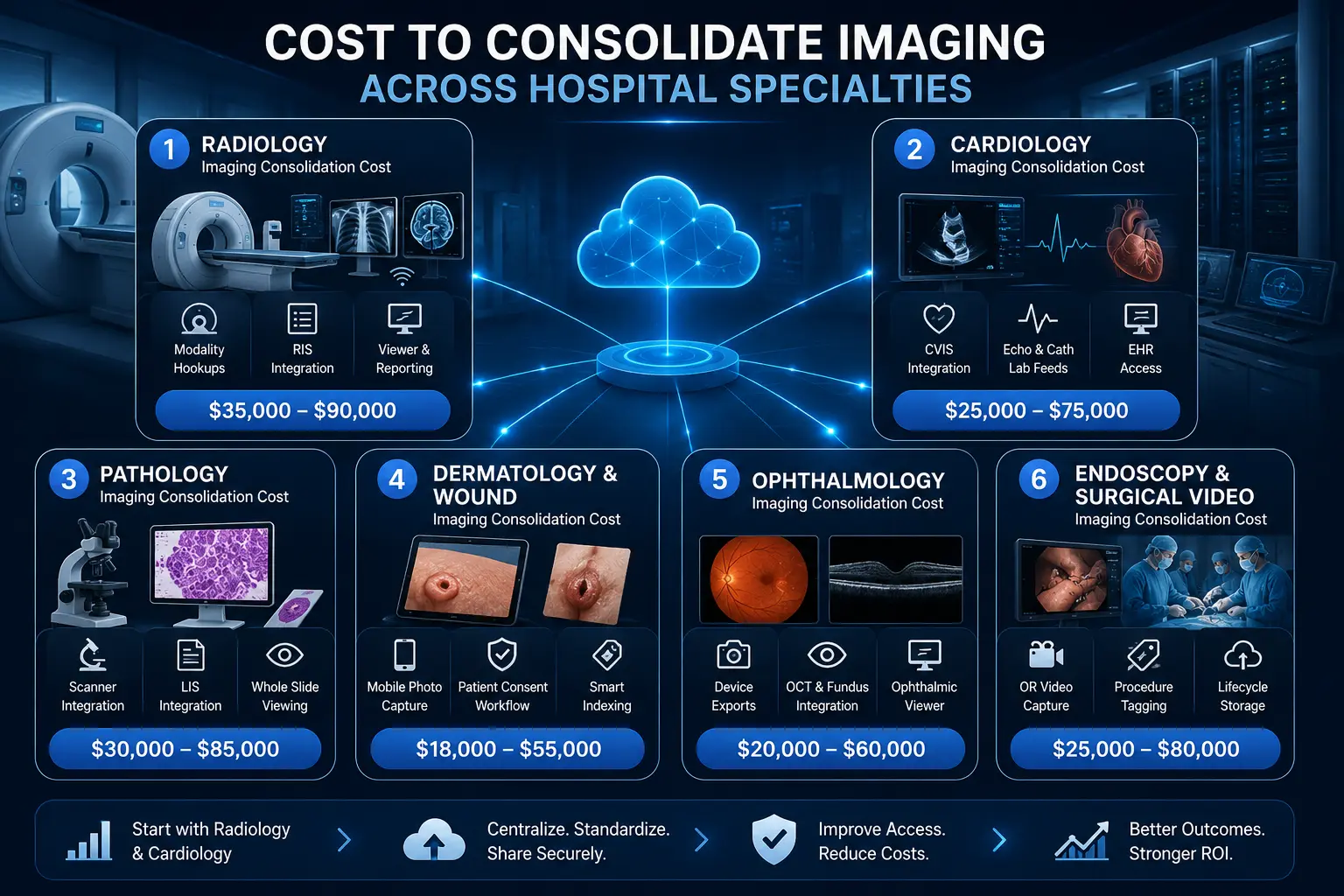
Cost To Consolidate Imaging Across Hospital Specialties
The cost to consolidate imaging across hospital specialties depends on which specific departments enter the platform first. Radiology and cardiology setups usually cost less because they already utilize mature, structured DICOM workflows.
Conversely, departments like pathology, dermatology, ophthalmology, endoscopy, surgery, and wound care often cost more because they introduce heavy non-DICOM files, custom specialty viewers, and encounter-based workflows.
1. Radiology imaging consolidation cost
Radiology is almost always the first department to be integrated because its data structures are already highly standardized. Connecting this department involves linking all high-volume scanning equipment directly to your new central archive foundation.
- Core Infrastructure: Reconciles your active radiology PACS cost structures with a unified radiology PACS consolidation cost framework.
- Modality Hookups: Connects high-volume clinical machines like CT, MRI, traditional X-ray, ultrasound, and mammography devices.
- Result Delivery: Links your primary RIS integration pathways directly to diagnostic viewers, active reading worklists, and final report delivery lines.
Therefore, bringing these traditional scanning pipelines into your shared platform carries an estimated cost range of $35,000–$90,000. This baseline step allows networks to replace aging, expensive department servers with clean, centralized cloud links. As a transition to the next step, once your main radiology scans are connected, integrating your heart center is the next logical baseline target.
2. Cardiology imaging consolidation cost
Cardiology departments create massive, fast-moving video streams and electrical waveforms that require continuous clinical monitoring. Consolidating this area ensures that busy heart specialists can review historical cardiovascular scans without changing programs.
- System Alignment: Connects your baseline cardiology PACS integration cost items directly with a centralized hospital CVIS integration layout.
- Media Support: Bridges high-bandwidth echocardiography clips, active cardiac cath lab video feeds, and precise ECG-linked data studies.
- Chart Delivery: Delivers automated cardiac reporting tools alongside fast, on-demand image access directly from the active EHR screen.
As a result of these high-bandwidth video needs, this specific clinical expansion involves an estimated cost range of $25,000–$75,000. Because heart data relies heavily on standard DICOM protocols, connecting these lines is relatively fast and highly predictable.
Consequently, this step eliminates the old operational friction of hunting down loose cardiac CDs across different clinic sites.
3. Pathology imaging consolidation cost
Digital pathology introduces a unique data challenge because a single tissue biopsy scan can easily create a massive multi-gigabyte file.
Consolidating this department requires robust data highways that can handle heavy background file transfers without choking your main network.
- Scanner Hookups: Bridges specialized whole-slide imaging equipment into your primary vendor-neutral archive framework.
- Data Linking: Manages your baseline pathology imaging integration cost parameters while streamlining your overarching LIS integration imaging cost footprint.
- Case Mapping: Sets up high-performance specialty viewing tools designed specifically to map ultra-high-resolution images to active patient cases.
Managing these incredibly heavy laboratory file types involves a projected development cost range of $30,000–$85,000. Because pathology files are so large, engineers must build intelligent background streaming rules to keep clinical load times low.
For that reason, this layer is vital for helping laboratory teams share slides safely with remote specialists.
4. Dermatology and wound imaging consolidation cost
Unlike radiology labs, skin clinics and wound teams generate unstructured visual data using everyday handheld cameras or clinical tablets. Capturing this media requires flexible, encounter-based workflows that happen right at the patient’s bedside.
- Photo Capture: Deploys a dedicated dermatology imaging integration cost layout to handle secure visible light capture on mobile devices.
- Workflow Safety: Replaces unsafe, unencrypted phone photos with structured clinical workflows that include explicit patient consent checks.
- Smart Indexing: Builds automated metadata indexing rules to replace messy, unsearchable EHR attachments with organized file lines.
Setting up these flexible, encounter-based photo capture pathways involves an estimated cost range of $18,000–$55,000. This software layer allows your care teams to execute long-term, longitudinal wound comparison views across different hospital visits.
For that reason, it transforms simple mobile photos into powerful, fully traceable clinical documentation tools.
5. Ophthalmology imaging consolidation cost
Eye care clinics utilize highly specialized, proprietary diagnostic cameras that must export detailed visual cross-sections of the patient’s retina. Consolidating this area means converting these unique device readouts into formats that any doctor can view.
- Device Exports: Connects complex, multi-vendor device export formats straight into your central enterprise imaging network.
- Scan Ingestion: Integrates high-resolution retinal images, structured fundus photography files, and advanced optical coherence tomography (OCT) scans.
- Fast Access: Automatically deploys a specialized eye-viewer tool directly from basic patient charts using a structured ophthalmology imaging integration cost budget.
Standardizing these unique ocular diagnostic endpoints involves an estimated development cost range of $20,000–$60,000. This custom integration allows doctors to see subtle changes in a patient’s vision health without needing the original clinic machine.
Therefore, it provides an essential safety bridge for multi-site health systems.
6. Endoscopy and surgical video consolidation cost
Operating rooms and gastrointestinal suites generate long, continuous high-definition video feeds during surgical procedures. Consolidating this media requires setting up smart storage rules so these heavy video files do not rapidly overwhelm your primary hard drives.
- OR Capture: Hooks up specialized endoscopy imaging integration cost lines straight into active operating room video recording boxes.
- Tagging Feeds: Automatically stamps incoming procedural metadata, surgery dates, and performing physician names onto every video asset.
- Storage Rules: Deploys strict image lifecycle rules to automatically move heavy, older video files onto cheaper cloud storage tiers.
Protecting and archiving these massive intraoperative video recordings carries a projected cost range of $25,000–$80,000. Furthermore, this layer builds rigid, restricted access controls to ensure only authorized surgical teams can review sensitive operative videos.
This step ensures complete procedural transparency while keeping your long-term storage bills highly predictable.
Your chosen specialty scope changes your final development budget much more than overall hospital building size alone. Therefore, a smart first release usually starts by connecting radiology and cardiology before expanding out to your high-value, non-DICOM departments.
Build vs Buy: Which Enterprise Imaging Strategy Costs Less?
Buying a full enterprise imaging suite can reduce your immediate vendor management risk, but it can also trap your hospital in rigid contracts and expensive, multi-year data migration commitments.
Alternatively, building a custom platform costs less when you need targeted department consolidation, EHR image access, and rapid AI-readiness.
This custom route is especially useful if your healthcare network does not actually want or need to replace every legacy departmental PACS simultaneously.
1. Strategy Comparison Matrix
To help your leadership team make an informed choice, the following table compares the explicit trade-offs, financial models, and operational impacts of both paths:
| Deciding Factor | Buying a Commercial Suite | Building a Custom Integration Layer | Hybrid Build-Plus-Vendor |
| Primary Financial Model | Heavy upfront capital expense + multi-year software licensing fees. | Highly predictable, milestone-based initial engineering cost. | Balanced mix of existing vendor support fees + target build costs. |
| Workflow Interruption | High. Requires retuning entire departments and retraining clinical users. | Low. Departmental software stays intact while data is routed in the background. | Extremely low. Clinicians keep their tools while IT teams gain a unified data view. |
| AI Ingestion Flex | Locked into the vendor’s approved marketplace and update schedules. | Total flexibility. Pipelines can ingest, route, and swap any AI model instantly. | Independent model orchestration layer sits outside vendor constraints. |
| Vendor Lock-In Risk | High risk of multi-year contract dependencies for upgrades. | Zero lock-in. Your health system owns the core integration code repository. | Controlled risk. Vendor dependencies are strictly limited to edge workflows. |
2. Buying is better when you need a full PACS replacement
Purchasing a ready-made commercial system from an established vendor ecosystem is a smart choice if your physical hardware and departmental software are completely outdated.
When your core radiology or cardiology workstations are crashing, buying a packaged commercial suite solves your software and infrastructure problems at the same time.
- Commercial Landscape: Hospital networks typically choose from large commercial platforms like Philips, Sectra, AGFA, Visage, GE HealthCare, Fujifilm, Hyland, Mach7, Intelerad, Change Healthcare, or the broader Oracle Merative ecosystem.
- Total Packages: These commercial vendors package their core software licenses alongside built-in data archiving tools and dedicated customer support lines.
- Massive Commitments: However, these large commercial enterprise deals frequently scale up into major eight-figure or nine-figure capital investments.
- Enterprise Scaling: These heavy financial deals cover massive multi-year enterprise contracts, complex cloud migrations, and extensive training for thousands of active hospital users across a national footprint.
Therefore, the buy strategy makes perfect financial sense if you are already planning to completely throw out your old departmental setups.
However, if your current radiology and cardiology departments are already happy with their existing software tools, forcing them to switch to a massive commercial suite creates unnecessary operational friction.
3. Building is better when you need an integration and intelligence layer
Building a custom consolidation platform is the ideal financial move when your existing departmental PACS setups are still working perfectly.
Instead of paying to replace functional software, a custom build creates a smart connection layer that sits quietly on top of your current investments.
- System Linking: Connects your independent, scattered PACS setups together without forcing any clinic to abandon their preferred daily software.
- Clean Ingestion: Automatically normalizes messy file headers and exposes a fast, web-based universal viewing tool for all clinicians.
- AI Routing: Constructs automated image routing pathways to pass clinical studies smoothly into diagnostic AI classification engines.
- Broad Governance: Brings unmanaged non-DICOM departments under a single, highly secure regulatory governance and auditing framework.
- Strategic Evidence: Provides immediate, clear proof of workflow consolidation value before your board commits to any massive long-term procurement deals.
Because you are only building the smart connecting highway, your upfront engineering expenses stay highly controlled. This targeted strategy means your enterprise imaging platform cost maps directly to fixing broken workflows rather than buying redundant software licenses.
Consequently, you get a modern, AI-ready archive footprint without the painful disruptions of a total system replacement.
4. Hybrid build-plus-vendor is often the most realistic path
A hybrid implementation strategy allows modern health systems to keep their trusted departmental software vendors while creating a custom layer for advanced interoperability.
This practical approach combines the stability of established medical software with the complete flexibility of custom-built data pipelines.
- Vendor Retention: Keeps your high-speed radiology and cardiology scanners running on their native, deeply trusted department software.
- Custom Independence: Builds an independent software layer to handle cross-site image exchange, centralized data analytics, and deep EHR chart integrations.
- Model Orchestration: Creates an open, flexible architecture to plug in and swap out various diagnostic AI models without waiting for vendor updates.
- Control Points: Gives your internal hospital IT team total ownership over long-term data storage rules and compliance log auditing.
Choosing this hybrid path ensures that your clinicians keep the specialized tools they know best, while your leadership gains a unified data asset. This strategy helps hospitals avoid expensive vendor lock-in because your central data repository remains completely neutral and adaptable over time.
Therefore, it effectively bridges the gap between old legacy infrastructure and modern, cloud-native healthcare tools.
The cheaper financial path for your hospital is not always a simple choice between a total build or a total buy. Instead, the most cost-effective strategy is the one that avoids unnecessary system replacement while still completely solving your clinical access, data governance, and AI-readiness needs.
The next natural step is reviewing the operational returns on investment that leadership can expect after launching a unified imaging platform.
Successful Enterprise Imaging Platforms and Their Costs
Successful enterprise imaging platforms demonstrate that final costs depend heavily on overall network scale, contract models, data migration depth, and specialty scope. Because public vendor pricing is naturally limited, available real-world examples reveal an incredibly wide financial spread.
While targeted custom builds can sit comfortably under $350,000, massive commercial health-system vendor contracts frequently scale into tens or hundreds of millions of dollars over several years.
1. Visage 7 Enterprise Imaging Platform
In late 2024, Australia-based health imaging firm Pro Medicus signed a massive, 10-year contract valued at a minimum of $213 million to deploy its cloud-engineered Visage 7 platform across Trinity Health’s vast national network.
This extensive infrastructure project was designed to completely replace legacy PACS software from nine different independent vendors across 93 active hospitals spanning 26 states.
- National Scale: Consolidates core diagnostic operations for over 650 active radiologists and thousands of localized clinical staff members.
- Full-Stack Scope: Bundles the central Visage 7 Viewer, Visage 7 Open Archive, and modern workflow management modules together.
- Cloud Delivery: Replaces fragmented on-premise hardware setups with a fully centralized, cloud-based image exchange network.
- EHR Integration: Drives seamless, launch-in-context image viewing directly linked to Trinity’s primary electronic health record.
This massive national deal highlights why an enterprise-wide commercial replacement model carries such a significant premium. These nine-figure budgets bundle baseline software licensing with massive data migration workloads, 24/7 support structures, and extensive multi-site system training.
Therefore, this scale is not comparable to an agile $70,000 to $350,000 custom project focused on building an initial, modular integration layer.
2. Visage and Duly Health and Care
Demonstrating commercial costs for regional networks, Pro Medicus signed a separate seven-year agreement with Duly Health and Care in December 2024 valued at $30 million (AUD).
Duly Health stands as a major independent multi-specialty physician group, supporting over 40 active radiologists and 1,000 doctors across 150 outpatient clinics.
- Outpatient Focus: Deploys a unified, cloud-based diagnostic platform across a massive network of local clinical sites.
- Archive Migration: Involves moving millions of historical records from Duly’s legacy PACS archive and older vendor-neutral archive.
- Transactional Model: Utilizes a flexible, transaction-based licensing framework where operational costs scale naturally with active study volume.
- Unified Stack: Delivers the full software suite comprising advanced clinical viewing, automated task workflows, and open archiving.
This regional deal proves that outpatient and multi-specialty image consolidation still commands an eight-figure budget when executing a total system replacement. Migrating massive legacy archives over to a new commercial vendor introduces significant technical complexity and service fees.
Consequently, health networks must prepare for substantial multi-year capital commitments when choosing to swap out their baseline core technology stack.
3. Philips Enterprise Imaging
Large international health systems regularly turn to comprehensive managed services to unify their scattered diagnostic capabilities across wide geographic zones.
For instance, the Malaffi Health Information Exchange in the Emirate of Abu Dhabi deployed Philips’ vendor-neutral image exchange platform to provide secure clinical access to radiology images across more than 60 connected sites.
- High Interoperability: Grants primary medical providers instant, remote access to view critical diagnostic scans from multiple independent facilities.
- Migration Depth: Relies on high-efficiency data integration pipelines that historically showcase an impressive 99.7% data migration success rate.
- Workflow Enhancements: Embeds intuitive visualization tools within the diagnostic viewer, saving oncology teams up to 8.9 minutes when assessing complex tumor burdens.
- Flexible Budgeting: Offers hospital leadership teams a choice between traditional capital procurement or predictable managed service operating models.
This wide deployment model highlights that enterprise software vendors typically price their products around overall network scale and active data migration volumes. Instead of a simple, flat software fee, costs reflect the continuous engineering support needed to maintain diverse multi-site installations.
For that reason, managed service models help large systems preserve immediate capital while locking in long-term technical support.
4. Sectra Enterprise PACS / VNA Strategy
Health networks frequently deploy a converged software approach to systematically eliminate duplicate clinical software tools across their networks.
For example, ProMedica health system utilizes a unified Sectra enterprise imaging platform to combine its core radiology capabilities with a broad range of clinical sub-specialties.
- Specialty Coverage: Expands a single technical footprint to serve radiology, cardiology, mammography, pathology, ophthalmology, and wound care.
- Viewer Consolidation: Deploys the unified Sectra UniView tool to let doctors review diverse diagnostic images through one software application.
- Maternal Fetal Medicine: Integrates highly specialized maternal fetal care workflows and ultrasound imaging directly into the core network.
- TCO Optimization: Drastically reduces total cost of ownership by eliminating separate, siloed departmental maintenance agreements.
This converged layout proves that a single platform can successfully manage diverse clinical datasets when configured with a unified technical infrastructure. However, a total vendor-led consolidation requires extensive workflow alignment and matching routines across every participating clinic.
This thorough preparation ensures that specialized doctors can read distinct studies without losing their unique, department-specific measurement tools.
5. AGFA Enterprise Imaging VNA
Taking a data-first approach, many hospital systems prioritize building an independent storage foundation before making any changes to their front-end diagnostic software.
Utilizing an AGFA Enterprise Imaging VNA layout allows networks to decouple their long-term data archiving needs from specific vendor viewing tools.
- Neutral Ingestion: Standardizes and stores multi-departmental files securely using an open, vendor-neutral archive architecture.
- Universal Access: Deploys the zero-footprint XERO viewer to stream images securely to remote physicians without local data downloads.
- Non-DICOM Capture: Includes dedicated mobile capture tools to safely tag and upload loose clinic photos, wound clips, and surgical media.
- Lifecycle Control: Automates long-term storage rules, PHI security data encryption, and strict regulatory compliance audit logs.
This data-centric strategy is highly effective when a hospital network needs to solve immediate storage growth and EHR access problems first.
By focusing on the archive layer, leadership can establish complete data governance without interrupting the daily routines of their busy radiologists. Therefore, it offers a highly practical blueprint for systems looking to regain control over their data footprint.
These large public examples prove that enterprise imaging becomes incredibly expensive when you attempt a total, system-wide software replacement all at once. Consequently, a custom $70,000 to $350,000 build is best framed as a focused integration layer or a first-phase interoperability foundation.
This targeted strategy lets your hospital capture the exact clinical benefits of a unified platform without taking on massive, multi-million-dollar vendor contracts.
How To Build an Enterprise Imaging Platform in Phases
Hospitals should build enterprise imaging platforms in phases because imaging consolidation touches clinical workflow, storage, security, EHR access, and specialty operations.
A phased roadmap starts with discovery and architecture, then connects priority systems, migrates image data, validates access, adds AI, and expands specialty coverage after clinical users trust the platform.
Furthermore, taking a step-by-step approach keeps your upfront software engineering and enterprise imaging strategy cost milestones completely manageable.
1. Implementation Phase Roadmap
Before diving into the detailed technical execution of each step, the following table summarizes the primary goals, technical focus, and sequencing of a phased deployment roadmap:
| Implementation Step | Primary Goal | Core Technical Focus | Sequence Dependency |
| 1. Source Discovery | Map all active imaging endpoints | Modality inventory and workflow dependency matrix | Prerequisites for architecture |
| 2. Architecture Design | Create a modular system blueprint | VNA logic, DICOMweb APIs, and SMART on FHIR specs | Must precede integration |
| 3. Clinical Integration | Connect core software systems | HL7 interfaces, EHR launch context, and viewer routing | Required before migration |
| 4. Data Migration | Transfer and clean legacy image archives | DICOM tag normalization and duplicate study detection | Requires live destination archives |
| 5. Security Governance | Lock down compliance parameters | Data encryption, role-based access, and audit trails | Required before production use |
| 6. AI & Analytics | Deploy intelligent routing tools | Automated triage pipelines and utilization dashboards | Final optimization layer |
Step 1 — Map imaging sources, owners, and workflows
Start by identifying every department, device, archive, viewer, and workflow that creates or stores imaging data. This includes radiology PACS, cardiology PACS, pathology systems, ophthalmology devices, dermatology photos, endoscopy videos, surgical media, EHR attachments, and external image-sharing portals.
- System Tracking: Builds a complete physical modality inventory alongside a detailed PACS and VNA software archive list.
- Data Pathways: Traces every active DICOM and non-DICOM source pathway across your entire hospital layout.
- Policy Audits: Identifies local image lifecycle rules, current clinician viewer access models, and long-term legal data retention obligations.
Step 2 — Design the VNA, viewer, and integration architecture
Design the architecture around image movement, metadata trust, and clinical access. The platform should define how images enter the archive, how patient identity is resolved, how studies appear inside the EHR, how viewers launch, and how AI tools receive eligible studies without exposing unnecessary PHI.
- Storage Blueprint: Establishes a highly resilient vendor-neutral archive architecture using cost-effective hybrid cloud storage pools.
- Modern APIs: Configures fast DICOMweb communication links alongside standardized HL7 and FHIR data interfaces.
- Access Protocols: Integrates a secure SMART on FHIR viewer launch method backed by strict role-based access rules and audit trail design.
Step 3 — Connect PACS, specialty systems, and the EHR
Integration turns the architecture into a working clinical system. This phase connects PACS, RIS, CVIS, LIS, EHR, identity services, viewers, and storage layers so the platform can retrieve, display, and govern imaging data across departments without breaking existing clinical workflows.
- Interface Links: Builds active DICOM interfaces alongside traditional HL7 ORM scheduling and ORU result text feeds.
- Chart Embedding: deploys FHIR ImagingStudy resources to pass visual asset lists directly into Epic or Cerner launch context frames.
- User Routing: Configures secure single sign-on (SSO) tools to manage diagnostic viewer routing and real-time image availability notifications.
Step 4 — Migrate and normalize legacy imaging data
Migration should move clinically useful imaging data first, not every old file at once. Hospitals need to assess historical image volume, study metadata quality, accession number consistency, patient matching risk, storage tiering, and downtime tolerance before deciding between full migration, phased migration, or just-in-time retrieval.
- Budget Mapping: Outlines a realistic legacy PACS migration cost plan that accounts for complex multi-vendor PACS migration workloads.
- Data Cleaning: Executes continuous DICOM tag normalization cost routines to automatically fix mismatched accession numbers or broken patient fields.
- Integrity Checks: Deploys automated data hashing and validation tools alongside a dedicated error queue handling workflow.
Step 5 — Add HIPAA, access control, and audit governance
Compliance must sit inside the imaging platform, not around it. The build should enforce encryption, role-based access, audit logs, retention policies, BAA requirements, PHI controls, downtime procedures, disaster recovery, and secure AI routing before clinicians use the platform at scale.
- Data Shielding: Deploys strong data encryption and imaging cost mechanisms for patient files both at rest and moving across networks.
- Access Tracking: Implements strict role-based access controls (RBAC) along with unalterable, automated audit trail imaging cost logs.
- Framework Readiness: Builds the underlying technical architecture needed to support future SOC 2 compliance imaging cost and HITRUST certification imaging cost reviews.
Step 6 — Add AI imaging tools and analytics dashboards
AI should enter after imaging data is accessible, clean, and governed. The first AI layer can route urgent cases, flag duplicate studies, detect missing priors, support worklist prioritization, and generate imaging utilization dashboards before hospitals attempt diagnostic model deployment.
- Smart Triage: Connects your baseline AI imaging triage integration cost footprint directly into active image analysis pipelines.
- System Tracking: Deploys a clear imaging analytics dashboard cost layout to track daily clinical volumes and system storage growth.
- Waste Control: Uses automated duplicate imaging reduction cost logic to find and flag unnecessary repeat scans before they get read.
A phased rollout keeps your overall development practical and stable because it addresses critical infrastructure layers before adding advanced features. By focusing on data connectivity, identity matching, and strict security rules first, your hospital creates a highly reliable foundation that clinical users can actually trust.
The next natural step is reviewing the frequently asked technical and financial questions that leadership teams encounter when finalizing an enterprise imaging consolidation strategy.
What ROI Can Hospitals Expect From Imaging Consolidation?
Imaging consolidation ROI usually comes from lower storage duplication, fewer PACS contracts, faster access to prior studies, and reduced repeat imaging. Furthermore, networks see substantial returns through improved radiologist productivity, better turnaround times, and stronger AI-readiness.
Consequently, leadership should measure financial returns across cost avoidance, clinical workflow speed, compliance risk reduction, and future software reuse.
1. Storage cost reduction imaging ROI
Maintaining separate storage networks for every medical department is an incredibly expensive way to run a hospital. Unifying your files into a single, shared vendor-neutral archive allows your IT team to optimize data expenses systematically.
- File Clean Up: Automatically deletes duplicate file copies across your systems to free up massive amounts of server space.
- Smart Tiering: Deploys strict lifecycle rules to shift older clinical studies onto cheaper cloud storage tiers automatically.
- Contract Cuts: Eliminates the need to pay for multiple separate archive maintenance agreements with independent tech vendors.
- Bulk Savings: Allows the hospital network to buy hardware and cloud space in bulk to get the lowest possible rates.
As a result, your overall imaging consolidation ROI begins with immediate infrastructure savings. Transitioning away from expensive on-premise hardware directly lowers your ongoing imaging consolidation total cost of ownership. For that reason, consolidating your archive layer provides a highly predictable financial win within the very first year.
2. Duplicate imaging reduction ROI
When a doctor cannot find a patient’s past scans from another clinic, they are often forced to order a brand-new test. This lack of data visibility results in unnecessary procedures that drive up hospital operational waste.
- Instant Access: Gives clinicians a complete longitudinal view of a patient’s history across all participating network sites.
- Smart Alerts: Deploys automated duplicate study detection logic to warn doctors if a similar scan was recently completed.
- Patient Safety: Lowers unnecessary radiation exposure and eliminates the frustration of duplicate testing for the patient.
- Insurance Approvals: Reduces insurance claim denials by ensuring every ordered scan is clinically justified and fully documented.
Therefore, creating a shared data layer delivers an immediate duplicate imaging reduction ROI. It stops your clinics from wasting valuable machine time on tests that have already been performed elsewhere.
Consequently, this step frees up open appointment slots for new, revenue-generating patients.
3. Radiologist productivity ROI
Specialized reading doctors waste a massive amount of time every day simply logging into different software tools and waiting for heavy image files to load.
Streamlining their workspace directly increases how many cases they can comfortably review each shift.
- Single Workspace: Combines multiple departmental feeds into one optimized, high-speed universal viewer interface.
- Automated Prioritizing: Uses a radiologist worklist optimization cost model to automatically push urgent cases to the top of the reading stack.
- Faster History: Gathers past relevant clinical studies from other departments automatically without requiring manual searches.
- Voice Reporting: Integrates structured reporting tools and speech recognition software to cut down on manual typing time.
Optimizing these daily reading lines directly unlocks a substantial radiologist productivity ROI. It removes the technical friction that slows down your highest-paid clinical specialists.
For that reason, this workflow layer helps busy reading teams manage rising study volumes without burning out.
4. Imaging turnaround time ROI
A slow imaging pipeline delays critical care decisions throughout your entire hospital network. For instance, when an emergency room doctor has to wait hours for a scan report, patient discharge times stall completely.
- Emergency Speed: Delivers urgent scans straight to specialized reading doctors using automated critical results notification paths.
- Faster Discharges: Speeds up routine inpatient scanning turnarounds to help floor nurses open up empty beds much faster.
- Oncology Tracking: Allows cancer teams to rapidly compare current scans against historical priors to assess treatment response.
- Immediate Alerts: Automatically texts critical or unexpected diagnostic findings directly to the ordering physician’s mobile device.
As a result, accelerating your data pipelines yields a massive imaging turnaround time ROI. Moving patients through the imaging process faster reduces overall length of stay in the emergency department. Therefore, it optimizes your entire facility’s daily patient throughput and capacity.
5. AI-readiness ROI
Trying to deploy modern machine learning tools on top of messy, fragmented legacy databases is an expensive engineering nightmare. Building a consolidated foundation ensures your hospital is ready to use advanced automation without massive future upgrade fees.
- Clean Datasets: Automatically standardizes, strips private details, and curates clean imaging files for model training.
- Easy Connections: Uses modern DICOMweb and FHIR interfaces to let you plug in new AI applications within days instead of months.
- Validation Pipelines: Creates a secure environment to test and monitor algorithm performance against your real-world patient mix.
- Future Proofing: Prevents your network from getting locked into a single vendor’s closed, proprietary AI marketplace.
Establishing this flexible, open foundation ensures your long-term imaging AI model integration cost stays highly controlled. It transforms your passive data archive into a highly structured, valuable enterprise asset.
Consequently, your health system remains completely prepared to adopt the next generation of intelligent clinical tools.
Build Enterprise Imaging Infrastructure With Intellivon
Intellivon helps healthcare organizations build enterprise imaging infrastructure that connects PACS, VNA, EHR systems, specialty imaging workflows, AI models, and compliance controls into one production-ready platform.
The goal is not to replace every imaging system at once. It is to help hospitals create a governed imaging layer that makes clinical images easier to access, manage, analyze, and use across specialties.
What Intellivon Helps Build
- PACS and VNA integration architecture
- Radiology, cardiology, pathology, ophthalmology, dermatology, and endoscopy imaging workflows
- DICOM, DICOMweb, HL7, and FHIR ImagingStudy integrations
- EHR imaging access for Epic, Cerner, and other clinical systems
- Universal viewer and zero-footprint viewer integration
- Non-DICOM image capture for photos, videos, and specialty media
- Legacy PACS migration and imaging data normalization
- AI imaging triage and diagnostic model integration
- Imaging analytics dashboards for volume, utilization, and turnaround time
- HIPAA security, audit trails, RBAC, encryption, and governance controls
Why Teams Work With Intellivon
- 500K+ engineering hours
- Ex-MAANG engineering experience
- Complex healthcare integration expertise
- HIPAA-ready architecture
- AI, MLOps, computer vision, and workflow automation experience
- Production-first healthcare AI delivery
If your team is planning an enterprise imaging platform build, Intellivon can help you define specialty scope, PACS/VNA integration requirements, EHR connectivity, AI model architecture, compliance controls, cost range, and rollout roadmap before development begins.
Conclusion
Enterprise imaging platform cost usually falls between $70,000 and $350,000 when hospitals build a focused consolidation layer instead of replacing every imaging system. This budget covers PACS and VNA connectivity, DICOM and non-DICOM ingestion, EHR access, viewer integration, migration, AI-readiness, storage governance, and HIPAA controls.
Therefore, the strongest roadmap starts with a high-value scope, proves clinical access, and expands across specialties while carefully controlling change management risk.
Things To Know About Enterprise Imaging Platform Cost
Q1. How much does imaging consolidation cost hospitals?
A1. Imaging consolidation usually costs $70,000–$350,000 for a custom first-phase platform. A narrow build with one PACS, one viewer, EHR access, and HIPAA controls starts near $70,000–$120,000. However, multi-specialty builds with VNA logic, DICOMweb, non-DICOM capture, AI routing, and hybrid storage usually reach $180,000–$350,000 before broader migration begins.
Q2. How long does multi-specialty imaging platform development take?
A2. A focused MVP usually takes 10–16 weeks when scope stays limited to priority departments. However, production multi-specialty imaging platform development usually takes 5–9 months because teams must connect PACS, EHR, identity, viewers, storage, audit trails, and specialty workflows. Large historical migrations or PACS replacement can extend beyond 12 months.
Q3. What makes PACS consolidation cost hospitals more than expected?
A3. PACS consolidation costs rise when hospitals discover inconsistent DICOM tags, duplicate patient identifiers, old accession number rules, separate viewer workflows, and hidden specialty archives. As a result, migration, validation, and workflow testing often cost more than interface development because clinical image access must remain reliable during the transition.
Q4. How much does an imaging interoperability platform cost?
A4. An imaging interoperability platform usually costs $90,000–$250,000 when it connects PACS, VNA, EHR, DICOMweb, HL7, FHIR, viewers, and basic governance controls. However, costs move toward $350,000 when the platform adds multi-specialty workflows, non-DICOM capture, AI routing, historical migration, and analytics dashboards.
Q5. What do PACS administrators ask about VNA implementation in forums?
PACS administrators usually ask about cost, timeline, image source discovery, storage sizing, DICOM support, prefetching, viewer integration, EHR launch, business continuity, and specialty workflow impact. Therefore, the strongest decision rule is simple: scope image sources first, then price migration, access workflows, governance controls, and support.
Key Takeaways
- Hospitals rarely have an imaging shortage. They have an imaging access problem caused by fragmented PACS, specialty systems, viewers, and archives.
- A $70,000–$350,000 custom build should be positioned as a first-phase consolidation layer, not a full enterprise PACS replacement.
- Non-DICOM imaging from dermatology, wound care, endoscopy, pathology, and surgery often creates more integration complexity than radiology DICOM workflows.
- AI imaging tools do not create value until the platform can route clean studies, preserve metadata, protect PHI, and keep clinicians in review.
- The smartest enterprise imaging strategy often keeps existing PACS systems in place while building a neutral access, governance, analytics, and AI-readiness layer above them.