Key Takeaways:
-
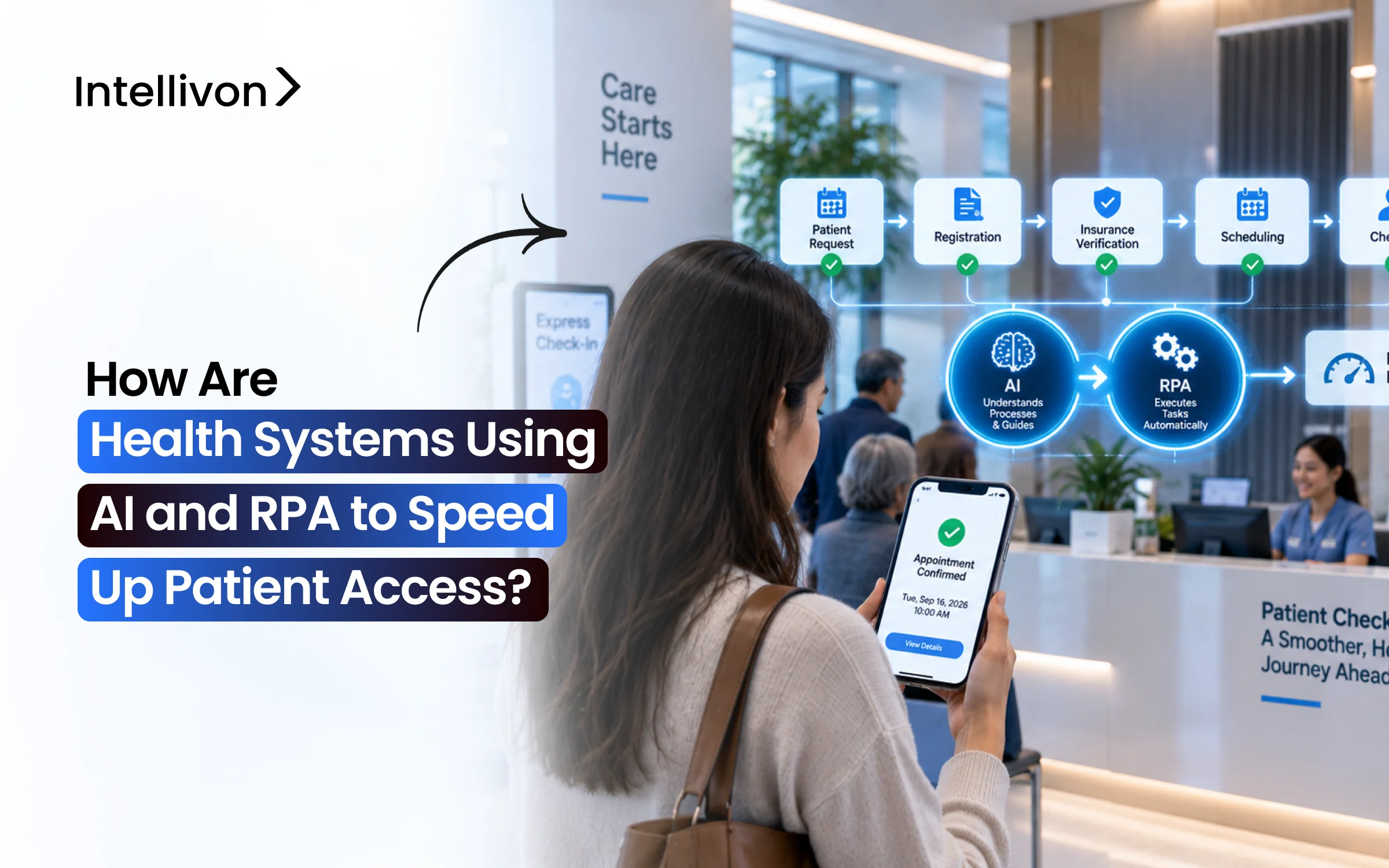
Healthcare systems use intelligence and robotic process automation to provide patient care much faster.
-
AI handles the tasks while RPA takes care of the repetitive daily work.
-
Scheduling, insurance checks, approvals, patient registration, and referrals all benefit a lot from automation today.
-
Health systems are cutting wait times, giving staff more useful time.
-
See how Intellivon designs these systems with tools that hospitals use every day.
In 2026, the main uses of AI and RPA (robotic process automation) in the healthcare revenue cycle will be eligibility verification, tracking of prior authorizations, pre‑registration, and scheduling automation. Health systems also automate reminders, digital check‑in, referral routing, and patient recall. Together, these steps remove the queues that exist from a patient’s first call to the confirmation of a cleared appointment.
The key factor that decides whether these automations cut wait times is how deep the EHR write‑back goes. For example, if the bots only read EHR data, the delay moves to a queue for staff work. Because the average wait for a patient appointment has now reached 31 days in major US cities, every stalled queue delays care.
For more than 11 years, Intellivon has built healthcare automation that connects with Epic, payer portals, and clearinghouses. Using this experience, the blog shows how each application works, which automation layer fits best, and the CMS‑0057‑F deadlines. It also gives a breakdown of the integration architecture, HIPAA controls, and real cost ranges so you can make an informed decision before you start building.
Patient Access in Healthcare Explained
Patient access in healthcare is every step a patient completes before care begins. It covers scheduling, insurance verification, prior authorization, registration, and check-in. In other words, patient access is the front end of the revenue cycle.
When these steps run smoothly, patients get seen sooner. Conversely, when they stall, visits get delayed, and claims get denied later.
Much of this work still happens by hand. For instance, staff log into payer portals, call insurers, and re-enter the same patient details across systems. As a result, electronic medical prior authorization adoption reached only 40% in the 2025 CAQH Index, so most requests still involve manual work.
The core patient access steps include:
- Scheduling: Patients book, reschedule, or cancel appointments by phone, portal, or chat.
- Eligibility verification: Staff confirms active coverage and benefits before the visit.
- Prior authorization: Payers approve certain procedures, tests, or medications in advance.
- Pre-registration and intake: Patients share demographics, insurance cards, and consent forms ahead of time.
- Check-in: Patients confirm arrival and pay copays at a desk, kiosk, or mobile device.
- Referral management: Incoming referrals get routed to the right department and provider.
In short, patient access decides how fast a patient moves from first contact to a cleared visit. Because each step depends on the one before it, one delay slows everything after it. That chain of handoffs is exactly where AI and RPA now step in.
Why Enterprises Are Automating Patient Access With AI and RPA
Enterprises are automating patient access because wait times keep rising while front-end work stays manual. At the same time, staffing shortages leave access centers unable to keep pace with call and authorization volume. As a result, health systems now treat AI and RPA as a way to add capacity without adding headcount.
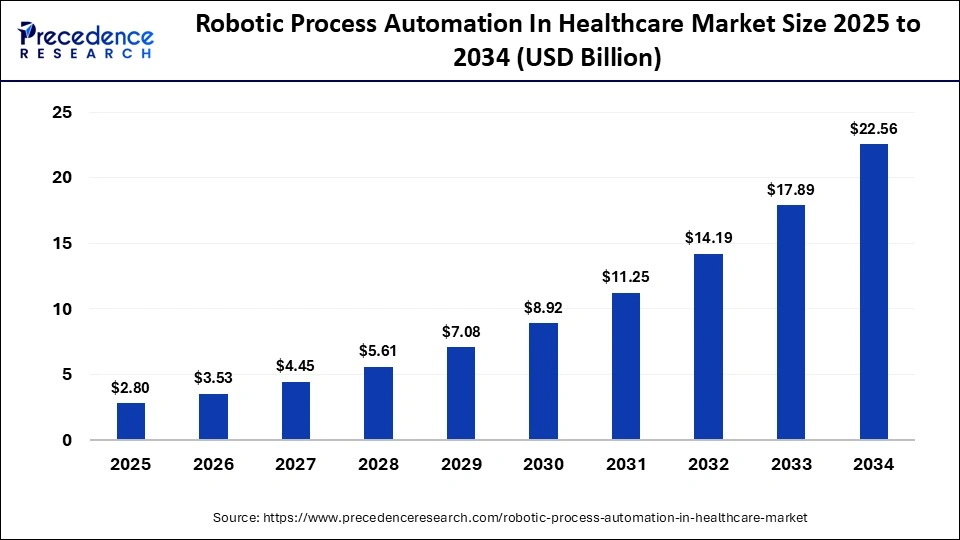
The market reflects this shift. Precedence Research values the US healthcare RPA market at $840 million in 2025, rising to about $8.17 billion by 2035. That is a 25.55% CAGR. Globally, the same firm expects a 26.10% CAGR between 2026 and 2035.
1. The Wait-Time Data Health System Leaders Are Reacting To
Patients now wait longer than at any point since AMN began tracking. According to AMN Healthcare’s 2025 survey, booking a physician appointment takes 31 days on average across 15 large metros. Moreover, the gap between cities is wide.
- 2022 average: 26 days
- 2025 average: 31 days, a 19% increase
- Longest metro wait: Boston, at 65 days
- Shortest metro wait: Atlanta, at 12 days
2. What Manual Front-End Transactions Still Cost US Healthcare
Manual eligibility and authorization work still carries a large price tag. For example, the 2025 CAQH Index points to a remaining $21 billion savings opportunity from full automation. However, prior authorization remains one of the least automated transactions.
- Remaining savings opportunity: $21 billion
- Electronic prior auth adoption in 2023: 31%
- Electronic prior auth adoption in 2025: 40%
3. Why Healthcare RPA Market Forecasts Disagree by Billions
Market estimates vary because research firms use different growth assumptions and forecast windows. For instance, The Business Research Company projects much slower growth than Precedence Research. Therefore, compare the methods before quoting any single number.
- The Business Research Company: $2.61 billion in 2026, reaching $4.52 billion by 2030, at a 14.7% CAGR
- Precedence Research: $2.80 billion in 2025, reaching $27.23 billion by 2035, at a 26.10% CAGR
4. The Patient Access Vendors Health Systems Already Evaluate
Health systems rarely start from zero, since several vendors already specialize in access workflows. In fact, one 2026 analysis groups the leading startups by their strongest use case. Meanwhile, established firms are launching their own prior authorization tools.
- Tennr: Referral orchestration
- Infinitus: Repetitive payer calls
- Hyro: Health-system access channels
- Notable: Broad administrative automation
- R1 RCM: Launched R1 Prior Authorization in January 2026
- UiPath: Released agentic AI prior authorization solutions at ViVE 2026
In short, longer waits, costly manual work, and a growing vendor market are pushing enterprises to automate access now. Still, market numbers vary by source, so smart buyers compare scope before committing.
AI and RPA Do Different Jobs in Patient Access
AI and RPA do different jobs in patient access. Specifically, RPA repeats fixed, rules-based steps across systems, such as checking eligibility or updating work queues. AI, on the other hand, interprets information and makes predictions, like reading a referral or flagging no-show risk.
Because most access workflows need both, health systems get the best results when each tool handles the part it suits.
1. RPA Handles Repetitive System Work
RPA uses software bots that click, type, and copy data the way a staff member would. In other words, it follows the same set of steps every time. As a result, it works best on high-volume tasks with predictable rules.
a. Moving Data Between Systems
Bots pull patient details from one system and enter them into another. Consequently, staff stop retyping the same demographic and insurance information.
b. Checking Payer Portals
Many payers still share coverage details only through web portals. For this reason, vendor-reported data shows portal bots can cut eligibility cycle time by 35% to 50%.
c. Updating Work Queues
After each check, bots record the result in the EHR. Then they move the case to its next step or flag it for review.
2. AI Handles Work That Needs Interpretation
Some access tasks involve messy documents, everyday language, or judgment calls. Fixed RPA rules cannot handle these well. Instead, AI models read, understand, and predict.
a. Reading Documents
AI pulls diagnoses, orders, and provider details from faxed referrals and authorization forms. It then turns that information into structured data.
b. Understanding Patient Requests
Conversational AI understands requests like “I need to move my Tuesday appointment.” It can then reschedule without a staff member stepping in.
c. Predicting Access Problems
Models score no-show risk, spot incomplete workflows, and rank urgent cases. As a result, staff focus first on the patients who need attention most.
3. AI and RPA Work Better Together
An intelligent patient access workflow assigns each task to the right layer. For example, AI reads a referral, RPA checks coverage, and a person reviews any mismatch.
- AI: Interprets or predicts.
- RPA: Performs repeatable actions.
- APIs: Connect systems directly.
- People: Handle exceptions.
4. APIs Should Come Before Screen Bots
Enterprises should not use RPA for every integration. Supported APIs, such as FHIR, are usually more stable because they don’t depend on screen layouts. By contrast, bots often need updates when payer portals change their interface.
- Use APIs first: Choose them when the EHR or payer offers a supported connection.
- Use RPA to fill gaps: Apply bots to portals and legacy systems without APIs.
- Plan for maintenance: Expect bots to break when screens or login rules change.
In short, RPA does the clicking, AI does the thinking, and APIs create the most stable connections. Therefore, the strongest patient access programs combine all three and keep people in charge of exceptions.
RPA, AI, or Agentic Automation: Matching Each Patient Access Task to the Right Layer
The right automation layer depends on how much judgment a task needs. Rules-based RPA suits fixed, repeatable steps like eligibility checks. AI, by contrast, fits tasks that need reading or prediction, such as no-show scoring. Agentic AI suits workflows that span several systems.
In every case, however, people should review high-risk decisions before they reach a patient record.
1. Which Automation Layer Fits Each Patient Access Task
The table below maps common access tasks to the layer that should run them. It also shows where a person still needs to step in.
| Patient Access Task | Rules-Based RPA | Needs AI | Needs Agent | Human Review |
| Eligibility verification | Yes | Only for unclear benefits | No | Exceptions only |
| Prior auth status tracking | Yes | No | No | Pended or denied cases |
| Insurance card extraction | No | Yes | No | Low-confidence reads |
| No-show risk scoring | No | Yes | No | Overbooking decisions |
| Referral to scheduled visit | Partly | Yes | Yes | Urgent and clinical routing |
2. Where Rules-Based RPA Still Delivers the Fastest Payback
RPA pays back fastest when a task follows the same steps every time. For example, eligibility and status checks rarely change between patients. In addition, vendor-reported data shows portal bots can cut eligibility cycle time by 35% to 50% while running around the clock.
- Eligibility checks: Bots verify coverage overnight for the next day’s visits.
- Auth status tracking: Bots check pending requests and update the EHR.
- Data transfers: Bots move registration details between systems.
3. Where AI Models Are Required, Not Optional
Some tasks cannot run on fixed rules because the input changes every time. Insurance cards vary in layout, and patient behavior is unpredictable. Therefore, these tasks need models that read, score, or predict.
- No-show risk scoring: Models flag patients likely to miss visits.
- Insurance card extraction: AI reads member IDs and plan names from photos.
- Auth likelihood: Models estimate approval odds before submission.
4. Where Agentic AI Earns Its Risk in Multi-Step Access Workflows
Agentic AI makes sense when one request triggers several connected steps. For instance, a referral may need a coverage check, an authorization, and a booked slot. To support this, Microsoft’s Healthcare Agent Orchestrator lets agents from different platforms work together on systems like Epic.
- Referral to booking: One agent reads the referral while another checks payer rules.
- Governed handoffs: Each agent works within set permissions.
- Design guidance: Our guide to building agentic AI for revenue cycle management covers autonomy levels.
5. Human-in-the-Loop Checkpoints That Keep Agents Safe
Agents should never act alone on decisions that affect care or coverage. Instead, they should pause and send the case to staff. As a result, speed improves without losing accountability.
- Before auth submission: Staff confirm the clinical evidence.
- Before record changes: Staff approve demographic or insurance edits.
- When confidence drops: Low-scoring cases go to a review queue.
In short, RPA runs fixed steps, AI handles reading and prediction, and agents connect multi-step workflows. Still, human checkpoints decide how far each layer can act on its own.

8 RPA Use Cases in Healthcare Revenue Cycle That Shorten Time to Care
The RPA use cases in healthcare revenue cycle that shorten time to care cover eligibility, prior authorization, scheduling, no-shows, intake, check-in, referrals, and recall. Each one removes a manual step between a patient’s first contact and a cleared visit.
In practice, most health systems combine RPA with AI, since several of these tasks need reading or prediction.
8 Patient Access Use Cases at a Glance
The table below shows what each use case automates, which KPI it moves, and a named example.
| Use Case | Technology | KPI Moved | Named Proof Point |
| Eligibility verification | RPA + voice AI | Pre-visit clearance rate | Weave RPA eligibility |
| Prior authorization | RPA + AI | Auth turnaround time | Montage Health |
| Self-scheduling | Conversational AI | Call abandonment | Intermountain Health |
| No-show prevention | AI + automation | No-show rate | TeleVox reminders |
| Pre-registration and intake | RPA + AI | Registration error rate | Epion digital intake |
| Digital check-in | AI + RPA | Check-in time | Epion check-in |
| Referral management | RPA + AI | Referral-to-visit time | Tenner |
| Patient recall | RPA + AI | Recall completion rate | TeleVox recalls |
1. Real-Time Insurance Eligibility Verification Before the Slot Is Booked
Checking coverage at booking prevents surprises on the day of the visit. Instead of finding an inactive plan at the desk, staff fix the problem days earlier. As a result, fewer visits get delayed or rescheduled.
a. RPA Payer Eligibility Automation for Portals Without Clean 270/271 Data
Standard EDI eligibility responses often leave out plan details. To fill those gaps, bots log into payer portals and pull the missing information.
For example, Weave uses RPA to retrieve real-time data from insurance portals that clearinghouse data misses. Our guide to connecting 100+ payer networks covers the full setup.
b. Voice AI Agents for Payers That Only Answer by Phone
Some payers still share benefits only by phone. In these cases, voice AI agents call, navigate the phone menu, and confirm coverage.
According to one vendor, its agents capture up to 60 data points at 99% accuracy in under two hours. This figure is vendor-reported.
2. Prior Authorization Triage, Submission, and Status Tracking
Prior authorization is one of the slowest access steps. However, automation splits it into smaller tasks that run in parallel. Consequently, requests move from days of manual follow-up to faster, tracked workflows.
a. AI Prior Auth Clinical Documentation Assembly
AI reads the patient chart and pulls the evidence a payer needs. Next, it matches that evidence to payer criteria before anyone submits. This way, fewer requests come back for missing documents.
b. RPA Prior Auth Status Tracking Against Epic Work Queues
Bots check payer portals for status updates and record the results in Epic. In one example, Montage Health reduced Epic authorization work queue volume by 22% after automating status checks.
c. Approval Acceleration Claims and How to Read Them
Vendor turnaround numbers need context. For instance, R1 reports clearing 68% of orders within one hour and nearly 97% within one day.
These figures are vendor-reported. Therefore, buyers should ask which payers, services, and case types the numbers include.
3. AI Online Self-Scheduling and Conversational Scheduling
Patients increasingly expect to book without waiting on hold. For this reason, health systems add online booking and AI agents that answer calls and chats. Routine requests then get resolved without staff involvement.
a. Conversational AI Patient Scheduling Inside the Call Center
Virtual agents handle booking, rescheduling, and call routing from start to finish. After deploying Hyro’s voice assistant, Intermountain Health reported an 85% drop in call abandonment and a 79% drop in wait times. This result is vendor-reported.
b. Why Cadence Write-Back Depth Decides Scheduling ROI
Read-only connections are rarely enough on their own. In fact, Hyro’s 2026 benchmark found 82% of systems with advanced EHR integrations exceed $500,000 in annual ROI. By comparison, only 18% of systems on standard FHIR connections reach that level.
4. AI No-Show Prediction, Reminders, and Waitlist Backfill
Every missed appointment is a slot another patient could have used. To recover that capacity, health systems predict no-shows early and refill open slots automatically. Over time, schedules stay fuller without longer clinic hours.
a. AI No-Show Prediction Design
Models score risk using past attendance, lead time, visit type, and travel distance. Based on the score, the system sends extra reminders or flags the slot for overbooking.
b. AI Cancellation Management and Automatic Slot Backfill
When a patient cancels, the system texts waitlisted patients right away. The first patient to confirm gets the slot, and the booking writes back to the EHR.
5. RPA Pre-Registration, AI Digital Intake, and Demographic Verification
Intake used to happen at the front desk on paper. Now, patients finish it on their phones before they arrive. Meanwhile, bots check the data in the background.
a. AI Digital Intake With Insurance Card and ID Capture
Patients photograph their insurance card and ID. AI then reads member IDs and plan names, which cuts manual typing errors.
b. RPA Demographic Verification and Duplicate Record Checks
Bots compare new details against existing records and flag mismatches or duplicates before the visit. Our guide to building an AI RCM platform explains how registration error alerts work.
6. AI Digital Check-In and RPA Kiosk Integration
Digital check-in lets patients confirm arrival, sign forms, and pay copays by phone or kiosk. Importantly, each update must sync back to the EHR so clinical staff sees arrival status right away. Without that sync, check-in only moves the delay to the next desk.
- Mobile check-in: Patients confirm arrival from the parking lot.
- Kiosk integration: Bots push kiosk data into registration fields.
- Copay collection: Payments post to the patient account at check-in.
7. AI Referral Management, Fax-to-EHR Intake, and Care Navigation
Referrals often stall because they arrive by fax and wait in a queue. With automation, faxes get read, sorted, and routed within the same workflow. As a result, fewer referrals get lost before a visit is booked.
a. RPA Referral Routing Automation
AI reads each faxed referral, and bots enter it into the EHR. Then they route it to the right department. In automated setups like the one shown in a NAHAM webinar, staff only handle incomplete or missing information.
b. AI Care Navigation Inside the Digital Front Door
AI assistants ask a few questions and guide patients to the right specialist on the first try. Our guide to HIPAA-compliant AI chatbots covers the compliance requirements.
8. AI Patient Recall and RPA SMS Outreach Automation
Overdue patients often slip through because recall lists are built by hand. Instead, bots pull overdue patients from the EHR, and AI sends personalized texts with booking links. Staff then call only those who don’t respond.
- Recall lists: Bots find patients overdue for screenings or follow-ups.
- SMS outreach: Patients book directly from the message.
- CRM tracking: Our guide to building a healthcare CRM platform covers outreach workflows.
In short, these eight use cases remove the manual steps that slow patients down, from eligibility checks to recall outreach. Moreover, the strongest results come from combining RPA with AI and writing every update back to the EHR.
How Epic, Cadence, and FHIR Integration Decide Whether Automation Speeds Access
Epic, Cadence, and FHIR integration decide whether automation speeds access because every result has to land back in the EHR. For example, if a bot verifies coverage but can’t update the schedule, staff still re-enter the data.
Therefore, durable access automation uses supported APIs first, adds RPA only where APIs are missing, and sends failures to people.
1. AI RPA Patient Access Architecture, Layer by Layer
A patient access automation stack has five layers. Each layer passes work to the next, so one weak link slows the whole flow.
| Layer | What It Does | Example |
| Intake channels | Captures patient requests | Phone, portal, SMS, fax |
| Orchestration engine | Decides the next step and owner | Workflow rules and routing |
| Bots and agents | Complete the task | Eligibility bot, scheduling agent |
| EHR connectors | Read and write patient data | FHIR APIs, HL7 feeds |
| Analytics layer | Tracks speed and exceptions | KPI dashboards |
2. FHIR Patient Access APIs vs Screen-Level RPA
The right integration path depends on what the target system supports. Supported APIs are more stable because they don’t rely on screen layouts. However, many payer portals and legacy tools still offer no API.
a. SMART on FHIR and Epic APIs for Scheduling Write-Back
SMART on FHIR and Epic APIs let automation book slots and update appointment status directly. Write-back, however, must confirm every update without corrupting records.
As a result, it needs longer testing and governance sign-off, as our EHR integration cost guide explains.
b. RPA as a Transitional Bridge for Systems Without APIs
RPA fills the gap when a portal or legacy system has no API. Still, it should stay tactical, because heavy reliance on screen automation adds maintenance and governance risk.
3. Why Patient Access Bots Break and How to Design Against It
Bots break when the screens or security around them change. In fact, practitioners say portal interface changes are the main maintenance burden. Meanwhile, portals keep tightening login security.
- UI changes: A moved button or renamed field stops the bot.
- MFA prompts: New login challenges block unattended sessions.
- Bot detection: Security tools flag automated logins and lock accounts.
a. Exception Queues, Selector Monitoring, and Owned Service Accounts
A few design choices keep bots running when portals change.
- Exception queues: Failed tasks go to staff instead of stalling silently.
- Selector monitoring: Alerts fire as soon as a screen element changes.
- Owned service accounts: Login codes go to an inbox and phone the automation team controls.
In short, access automation only speeds care when results write back to Epic reliably. So use APIs where they exist, keep RPA as a bridge, and design every bot to fail safely.
Real Health Systems Using AI and RPA
Yes, major health systems are already using AI and RPA in patient access. For example, they now automate registration, imaging scheduling, appointment calls, eligibility checks, and prior authorization. Moreover, several have reported clear gains in speed, staff capacity, and denial rates. As a result, the real question for most enterprises is no longer whether these tools work, but where to start.
Disclosure: The results below are publicly reported enterprise deployment results, mostly published by the technology vendors. They are not independent controlled studies.
1. Regional One Health Automated Registration
Registration at Regional One Health used to be slow and paper-heavy. In fact, staff needed more than seven minutes and several applications to register one patient.
After moving to one AI workflow, Regional One reportedly cut registration to under 30 seconds.
One Workflow Replaced Six Applications
- Before: Staff switched across six applications for each registration.
- After: A single Notable workflow handled check-in and digital copay collection.
- Staff impact: Leaders said the goal was a better experience, not fewer employees.
2. Beacon Health Expanded AI Scheduling
Beacon Health System started with diagnostic imaging because patient callbacks could take days or weeks. After early success with mammography and select CT orders, it widened the rollout. Today, about 45% of patients schedule through AI, and about 30% book within 24 hours.
Imaging Became a Starting Point
Imaging works well as a first target because orders are frequent and follow repeatable rules. Once it worked there, Beacon had proof to scale.
- Scope expansion: Coverage grew to more than 40 diagnostic imaging orders.
- Added services: Beacon then launched online scheduling, digital registration, and reminders.
- Rollout speed: The platform went live in about nine months.
3. Inova Automated Appointment Calls
Inova’s contact center was handling 2.4 million calls a year, mostly about appointments. However, hiring could not keep up with demand. After deploying Hyro’s voice AI agents, Inova reported that AI fully handled 50% of appointment-management calls.
AI Connected With Existing Systems
Inova did not replace its EHR or contact center. Instead, it centralized its call center first and then added AI on top of the existing tools.
- Integrations: Epic, Cheers CRM, and NICE CXone telephony.
- Volume: About 338,000 automated calls per month.
- Capacity gained: 4,272 staff hours each month.
4. MetroHealth Automated Registration Checks
MetroHealth’s registration errors kept turning into denials weeks later. To fix this, it adopted Experian Health’s Patient Access Curator. The tool runs eligibility, coordination of benefits, and demographic checks in one transaction. As a result, MetroHealth reported sharp drops across three denial types.
Errors Were Fixed Before Claims Were Created
Because the checks run at registration, errors get corrected before a claim even exists. Consequently, back-end teams spend far less time on rework.
- Coordination of benefits denials: Down 44.1%.
- Registration denials: Down 20.3%.
- Eligibility denials: Down 37.3%.
5. Texas Health Automated Prior Authorization
Texas Health Resources deployed Humata Health in July 2025 across diagnostic imaging, cardiovascular services, and interventional radiology. Within months, Humata reports that automation covered 100% of in-scope volume. In addition, the vendor says first-pass approvals rose, and revenue cycle overtime ended.
- Clinical packets: Built with minimal staff input.
- Denial risk: High-risk cases flagged before submission.
- Staff workload: Routine overtime removed for the revenue cycle team.
In short, these five health systems show that AI and RPA already run daily patient access work. Moreover, each one started with a focused workflow, connected it to existing systems, and then scaled.
Automation Around Epic and Existing Systems
No, health systems do not have to replace existing software to automate patient access. Instead, automation works around Epic, Oracle Health, and current scheduling tools. APIs and FHIR connect systems directly, while RPA fills the gaps.
AI then sits above that layer to read, predict, and route work. As a result, the EHR stays in charge, and automation simply removes manual steps around it.
1. Keep the EHR as the System of Record
The EHR should remain the single source of truth after automation goes live. In other words, bots and AI agents read from it and write results back to it. They should never keep a separate copy of patient records.
- Patient data: Demographics, coverage, and orders stay in Epic or Oracle Health.
- Automation results: Eligibility responses and auth statuses write back to the patient record.
- Real example: At MetroHealth, automated registration checks returned results directly to the EHR, so staff stopped jumping between portals.
2. Connect the Existing Scheduling System
Patient access automation should book directly into the scheduling system staff already use, such as Epic Cadence. Otherwise, it creates a second calendar that nobody trusts. Therefore, every booked, moved, or canceled slot must sync in real time.
- Scheduling write-back: AI agents book and update appointments inside Cadence.
- Existing tools: Inova connected its voice AI agents with Epic, its CRM, and its telephony system rather than replacing them.
- Testing needs: Write-back takes longer to validate, as our EHR integration cost guide explains.
3. Use FHIR and APIs Where Available
APIs should be the first choice because they connect systems directly and don’t break when screens change. Moreover, payers are moving toward them. In fact, CMS gave impacted payers until January 1, 2027, to meet its Prior Authorization API requirements.
- EHR APIs: Use FHIR for patient, coverage, and appointment data.
- Payer APIs: Use them for eligibility and prior authorization where offered.
- Planning: Our interoperability platform guide covers CMS readiness.
Use RPA for the Remaining Gaps
Some portals and legacy tools still offer no API. In these cases, RPA handles the missing steps, such as logging into a payer portal to check status.
4. Add AI Above the Integration Layer
AI should sit above APIs and bots, not replace them. That way, AI decides what to do, while the integration layer carries it out.
- Prediction: Scores no-show risk and auth approval odds.
- NLP and document AI: Reads faxed referrals and insurance cards.
- Conversational AI: Understands patient scheduling requests by phone or chat.
5. Orchestrate AI, RPA, APIs, and Staff
An orchestration layer runs one workflow across every tool. For instance, AI reads a referral, an API checks coverage, a bot confirms auth status, and staff approve the booking.
a. Human Review Queues
Uncertain cases go to a staff queue instead of being guessed. For example, a low-confidence insurance card read gets reviewed before it updates the record.
b. Retry and Failure Handling
- Automatic retries: Failed API calls and bot runs retry on a schedule.
- Alerts: Repeated failures notify the automation team right away.
- Fallback routing: Stalled tasks move to staff so access work never stops silently.
6. Build HIPAA Controls Into Every Workflow
PHI moves across many systems once automation starts. Therefore, security controls must be part of each workflow from day one, not added later.
a. Bot and Service Accounts
- Dedicated identities: Each bot gets its own account, not a staff login.
- Least privilege: Accounts can only access the data their task needs.
- Credential rotation: Access keys expire on a schedule, as covered in our agentic AI RCM guide.
b. Audit Trails
Every automated read, update, decision, and override should be logged. As a result, compliance teams can trace exactly what happened to each patient record.
In short, patient access automation works best when it builds around existing systems. Keep the EHR in charge, use APIs first, add RPA for gaps, and protect every step with HIPAA controls.
Rolling Out Patient Access Automation in Phases
Intellivon rolls out patient access automation in six phases once a workflow is selected. First, we document the current process and design the integrations. Next, we build one workflow and test it in shadow mode against real staff work.
Then, we release it to live traffic gradually. Finally, we expand into adjacent workflows, so each phase proves value before adding risk.
1. Phase 1: Workflow Discovery
We start by mapping how access work actually happens, not how the policy manual describes it. To do this, our team works directly with schedulers, registrars, and authorization staff. As a result, hidden workarounds and exceptions surface before any code is written.
- Process mapping: We document every click, call, and handoff in order.
- System inventory: We list each EHR module, payer portal, and phone system involved.
- Rules and exceptions: We capture payer rules, specialty rules, and how often exceptions occur.
- Intellivon Approach: We record baseline KPIs, such as call abandonment and auth turnaround, so results can be proven later.
2. Phase 2: Integration Design
Once the workflow is clear, we decide which technology handles each step. In general, we choose APIs first because they are the most stable. RPA, AI, and staff then cover what APIs cannot.
- FHIR and HL7: We connect patient, coverage, and scheduling data directly with the EHR.
- RPA: We use bots only for portals and legacy systems without APIs.
- AI and staff handoffs: We define where AI reads or predicts and where people must approve.
- Intellivon Approach: We build an integration map for every step, so IT, compliance, and operations sign off before development begins.
3. Phase 3: Build the First Workflow
Next, we build one workflow that solves one measurable access problem, such as imaging scheduling or next-day eligibility checks. This way, the health system sees results sooner. It also avoids waiting on a full platform.
- Narrow scope: We target one service line and one clear KPI.
- EHR write-back: Every result updates the patient record, not a side spreadsheet.
- Intellivon Approach: We route uncertain cases to staff queues from day one, so nothing gets guessed.
4. Phase 4: Run in Shadow Mode
Before automation touches live patients, we run it alongside existing staff. In shadow mode, it processes real cases while people still do the actual work. Therefore, we can compare results without any risk to patients.
- Side-by-side results: We compare automation decisions with staff decisions.
- Mismatch reviews: We study every case where the two disagree.
- Intellivon Approach: We grant execution rights only after automation matches or beats the human baseline.
5. Phase 5: Release to Live Traffic
After shadow mode passes, we move the workflow into production gradually. For instance, we may start with one clinic or a small share of calls. Then, we widen the release as KPIs hold steady.
- Staged release: Volume grows in controlled steps.
- Live monitoring: Dashboards track errors, retries, and exceptions daily.
- Intellivon Approach: We keep a rollback plan ready, so staff can take over instantly if problems appear.
6. Phase 6: Expand Into Adjacent Workflows
Once the first workflow is stable, we expand into the steps around it. For example, scheduling automation often extends into eligibility, registration, referrals, and prior authorization. Because these steps share data, each expansion reuses integrations we have already built.
- Eligibility: We add it when booked visits still arrive without cleared coverage.
- Registration: We add it when intake errors cause rework or denials.
- Intellivon Approach: We expand only where KPIs point to the next bottleneck.
In short, our phased rollout proves patient access automation one workflow at a time. Moreover, each phase builds on the last, so scaling gets faster and safer as the program grows.
Patient Access Automation Costs in 2026
A custom AI and RPA patient-access platform typically costs $70,000 to $300,000 in 2026. The final number depends on how many workflows you automate, how many payers you connect, and how deeply the system writes back to the EHR.
For a deeper breakdown, see our guide on what it costs to build a healthcare RPA platform.
1. Patient Access Automation Cost by Phase
| Phase | Estimated Cost | What It Covers |
| Discovery | $5,000 to $15,000 | Workflow mapping, baseline KPIs, automation scoring |
| Architecture and UX | $7,000 to $20,000 | System design, staff queues, patient-facing screens |
| Platform development | $18,000 to $70,000 | Orchestration, backend, dashboards, AI layer |
| RPA development | $15,000 to $60,000 | Individual bots and automation logic |
| Healthcare integrations | $10,000 to $60,000 | EHR, FHIR, payer, scheduling, and legacy connections |
| Security and QA | $10,000 to $45,000 | HIPAA controls, audit trails, testing |
| Deployment | $5,000 to $30,000 | Production setup, monitoring, DevOps, rollout |
Few projects hit the top of every phase at once. Instead, your scope decides where the total lands within the range.
2. Annual Maintenance: 15 to 25 Percent
After launch, budget 15% to 25% of the initial build each year. This keeps automation running as the systems around it change.
- Bot repair: Fixes bots after payer portal changes.
- EHR updates: Adjusts integrations after Epic or Oracle Health upgrades.
- Security and models: Covers patches, monitoring, and AI model tuning.
Intellivon will show which of your workflows need AI, RPA, an API, EHR integration, or human review, with an estimated cost for each phase. Book a call with our team.
In short, most patient access builds land between $70,000 and $300,000. Scoping the first workflow carefully keeps both build and maintenance costs predictable.
How Intellivon Builds Patient Access Automation
Intellivon builds patient access automation around the workflows, EHRs, and payer mix a health system already has. Instead of selling a fixed product, we start with one measurable bottleneck, such as imaging scheduling or next-day eligibility.
Then we connect AI, RPA, and APIs to Epic and existing tools. As a result, automation proves its value before it scales across service lines.
- 11+ years of healthcare engineering: Our teams build custom software across healthcare, fintech, and AI-driven products.
- Epic SMART on FHIR experience: We have delivered SMART on FHIR integrations with Epic that read and write patient data in real time.
- API-first integration design: We use FHIR, HL7, and payer APIs first, then add RPA only where APIs fall short.
- AI where judgment is needed: We apply document AI, prediction, and conversational AI to referrals, no-show risk, and scheduling requests.
- Human review built in: Uncertain cases route to staff queues instead of being guessed.
- HIPAA controls from day one: Every bot gets its own scoped account, and every action is logged in an audit trail.
- Phased delivery with shadow mode: We test each workflow against real staff work before it touches live patients.
If patient wait times, auth queues, or registration errors are slowing access in your health system, start with one workflow. Book a strategy call with Intellivon to map where AI, RPA, and APIs fit, and what your first build would cost.
Conclusion
The RPA use cases in healthcare revenue cycle that shorten time to care are working at health systems like Inova and MetroHealth. Moreover, these tools run around existing systems, so no EHR replacement is needed. However, results depend on choosing the right first workflow and connecting it to Epic.
Therefore, start with one measurable bottleneck, prove it in shadow mode, and expand into eligibility, authorization, and referrals. Over time, patients reach care faster and staff spend less time on rework.
FAQs
Q1. Can AI and RPA Work With Epic?
A1. Yes, AI and RPA can work with Epic without replacing it. Specifically, FHIR APIs and HL7 feeds exchange patient, coverage, and scheduling data directly. Meanwhile, RPA handles payer portal steps where no API exists. Either way, every result writes back to the Epic patient record, so staff see updates immediately.
Q2. Which Patient Access Process Should Come First?
A2. Start with the patient access process that has high volume, long delays, and clear rules. In addition, choose a workflow with few exceptions and reliable system access for integration. For example, next-day eligibility checks often qualify first, since they repeat daily, follow payer rules, and connect through APIs or portals.
Q3. Can AI Fully Automate Patient Scheduling?
A3. No, AI can automate routine scheduling, but not every request. For instance, it handles booking, rescheduling, and cancellations for standard visit types. However, complex cases need people, such as urgent symptoms, multi-provider visits, or specialty rules that require clinical judgment. Therefore, AI should route these requests to staff with context.
Q4. Does RPA Replace Patient Access Staff?
A4. No, RPA usually shifts work rather than removing jobs. Instead, bots take over repetitive tasks like portal checks and data entry. As a result, staff spend more time on exceptions, complex cases, and patient support. For example, Regional One Health leaders said their goal was never to reduce employees.
Q5. Can AI Reduce Appointment No-Shows?
A5. Yes, but prediction alone does not reduce no-shows. AI identifies patients with a higher risk of missing appointments. However, the result depends on what happens next, such as extra reminders, easier rescheduling, transportation help, or backfilling slots from a waitlist. Therefore, prediction must connect directly to outreach and scheduling workflows.
Q6. How Does CMS Affect Prior Auth Automation?
A6. CMS-0057-F requires affected payers to decide expedited prior authorization requests within 72 hours and standard requests within seven calendar days. In addition, most Prior Authorization API requirements begin January 1, 2027. As a result, providers should design API-ready workflows now, while keeping RPA for many commercial payers outside the rule.
Q7. How Much Does Patient Access Automation Cost?
A7. A custom AI and RPA patient access platform typically costs $70,000 to $300,000 in 2026. Specifically, the total depends on workflow scope, payer connections, and EHR write-back depth. In addition, after launch, budget 15% to 25% of the build cost each year for bot repair, integration updates, monitoring, and security.